
UniFi Cloud Gateway • 5G connectivity • Wi-Fi 7
Ubiquiti Dream Router 5G Max (UDR-5G-Max) for modern connected sites
The Ubiquiti Dream Router 5G Max is a compact UniFi Cloud Gateway for organisations and homes that need professionally managed internet, built-in cellular connectivity, secure network segmentation and modern wireless access without assembling a stack of separate appliances. It is especially worth considering where a usable 5G data connection can provide primary internet service or an alternative path when a fixed broadband connection fails.
The UDR-5G-Max brings together a Sub-6 5G modem, tri-band Wi-Fi 7, a 10G SFP+ interface, four 2.5 GbE RJ45 interfaces including one PoE-capable port, and the UniFi application environment. It is not a guarantee of mobile coverage, internet speed or uninterrupted service. For a deployment in Tanzania, first confirm the exact regional hardware, radio authorisation, mobile operator support, suitable SIM or eSIM plan, indoor signal quality and installation needs.
Next step: request a product and deployment suitability quotation for your Tanzania site.
At a glance: verified hardware capabilities
5G cellular WAN
Sub-6 5G NR and 4G LTE; peak 5G NSA downlink rated up to 3.4 Gbps
Integrated Wi-Fi
Tri-band Wi-Fi 7 across 2.4, 5 and 6 GHz, subject to permitted regional configuration
Wired interfaces
Four 2.5 GbE RJ45 ports including one PoE-capable port, plus one 10G SFP+ port
Security performance
Manufacturer-rated 2.3 Gbps IDS/IPS throughput
Managed environment
UniFi Network plus listed Protect, Access, Talk and Connect application support
Physical power and storage
15.4 W PoE budget on one port; preinstalled 64 GB microSD for NVR use
These are maker-stated capabilities. Throughput, coverage, user capacity, carrier operation and application suitability vary with configuration and real conditions; they should be validated for the intended installation.
Who should consider this gateway?
Choose this gateway when several everyday requirements coincide: a centrally managed firewall, wireless access, several high-speed wired connections and a cellular internet option. A small office with a dependable fixed line might use 5G for contingency. A temporary field office with no available fixed service might use 5G as its primary WAN. A technically managed household might value network-wide monitoring and separate connections for work, guests and connected devices.
It is less compelling if cellular connectivity has no present or anticipated role, if a large property needs numerous access points, or if the network demands a bigger switch and extensive PoE capacity from day one. The included switch provides a starting point, not a replacement for a distribution switch in a larger installation. Selection should follow a simple inventory of internet circuits, users, wireless rooms, cameras, powered devices and future growth rather than the highest advertised speed.
Understanding the all-in-one UniFi design
A Cloud Gateway is the control point between local networks and internet services. It routes traffic, enforces security policy, manages configured WAN paths and gives administrators one place to understand network conditions. The Dream Router 5G Max also hosts wireless clients directly and can manage supported UniFi equipment. That consolidation may reduce the number of separate devices, power connections and interfaces needed in a modest deployment.
The benefit of consolidation is operational simplicity, not unlimited expansion. If many separate network zones, high camera counts or broad wireless coverage are required, a larger gateway, external access points, switching and dedicated recording storage may be more appropriate. Consider the integrated components as a balanced package. The hardware makes initial deployment approachable while the UniFi environment provides room to add compatible networking devices later if the design calls for them.
Built-in 5G: primary internet or resilient backup
The integrated cellular interface is a defining reason to choose this model over a conventional wired-only router. It supports Sub-6 5G NR and 4G LTE according to Ubiquiti’s published technical specifications. When a fixed internet line is unavailable, a suitable mobile data service can form the WAN connection. When fixed internet is the preferred path, a cellular subscription can help maintain access during an outage, subject to the configured WAN rules.
These two situations have very different commercial implications. A primary mobile connection needs a plan with enough monthly data for normal operations, acceptable latency, adequate upload performance and dependable coverage at the site. A backup connection needs a clear definition of which essential services should remain available during outages and how to limit expensive nonessential traffic. In either case, the gateway cannot create a mobile signal or overcome a carrier outage; verify service at the exact installation location.
What the 3.4 Gbps mobile figure means
Ubiquiti publishes a peak 5G non-standalone downlink figure of up to 3.4 Gbps for the device, along with other theoretical peak figures for standalone 5G and LTE. These are modem capability ratings under specified conditions, not promises of a subscriber’s actual throughput. A live connection is influenced by network loading, supported radio bands, backhaul, interference, signal strength, carrier policies and the speed limits or traffic management of the mobile plan.
Use measured performance at the intended premises to judge suitability. Test download and upload at different business hours, check latency during video calls, and repeat after relocating the device within a practical indoor area. The fastest result beside a window may not represent the best overall position for indoor Wi-Fi. A well-designed installation balances cellular reception, wireless coverage, power availability, physical security and cable placement rather than relying on a headline throughput figure.
SIM, eSIM and local mobile-plan planning
Ubiquiti lists two nano-SIM positions and a nano-SIM-or-eSIM option in its model specifications. This offers provisioning flexibility, but the supported arrangement, activation procedure and available carrier features should be checked for the precise regional unit and current software before purchase. Physical slot count does not mean that several independent mobile subscriptions can necessarily transmit at full speed simultaneously.
For Tanzania, ask a prospective mobile operator whether the required data-only or business plan is permitted in a router, which APN or activation steps apply, and whether the device’s modem bands and carrier provisioning are compatible. Request clarity on fair-use conditions, roaming restrictions, service-level commitments and public-IP options where remote access matters. Do not assume that a SIM which works in a phone is automatically supported in this gateway. Test the intended SIM and failover behaviour before relying on the connection for production work.
Multi-WAN configuration and failover expectations
The router supports multi-WAN features, including load balancing and internet-quality reporting. In a fixed-plus-mobile deployment, administrators can select their primary connection and arrange a secondary path according to the current UniFi Network options. A failover policy is useful only when the gateway can determine a primary path is unusable and an alternate usable connection exists. Monitor both links rather than merely checking that the SIM appears active.
Some applications may disconnect briefly when a WAN change occurs because the public address or underlying session changes. Video calls, VPN sessions, payment workflows and uploads may need to reconnect. Failover does not duplicate an internet service or guarantee uninterrupted transactions. Design a periodic test in which the main line is deliberately disconnected during an agreed maintenance window, critical services are exercised and the return to the preferred WAN is confirmed. Document what users should expect before an actual outage.
Designing the wired connection layout
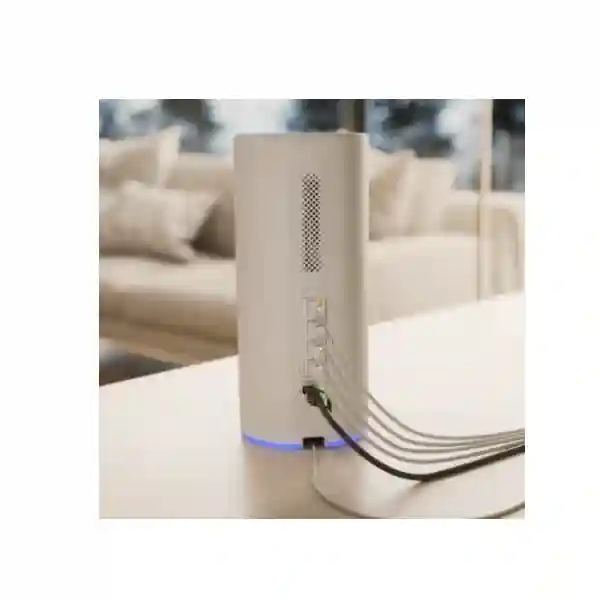
The listed physical ports comprise four 2.5 GbE RJ45 interfaces, one of which can provide PoE, and one 10G SFP+ interface. Ubiquiti identifies an RJ45 interface and the SFP+ interface as default WAN ports. This means buyers should not interpret the port list as four permanently available LAN sockets plus separate wired WAN sockets. The effective LAN count depends on the selected internet connection and how interfaces are assigned.
Draw a small topology before procurement. A typical arrangement might bring fibre or an upstream modem into the WAN side and connect a workstation, a switch and a wireless or surveillance device to the remaining appropriate ports. If more endpoints are needed, an external UniFi or compatible Ethernet switch may be sensible. A 2.5 GbE connection delivers its benefit only when the connected device, cabling and upstream path can operate at that rate; slower devices continue to work at their negotiated speed.
When the 10G SFP+ port is valuable
The 10G SFP+ interface gives the gateway a high-speed connection option for suitable fibre, DAC or other compatible SFP+ equipment. It can be useful when an internet handoff or upstream network connection uses that form factor. The port is not a promise that one client will achieve 10 Gbps of internet throughput, nor does it create a second 10G RJ45 port. Overall throughput must account for the other connected interfaces, enabled security features and actual traffic paths.
Confirm the exact transceiver or cable requirements with the upstream equipment vendor. Check optical specifications, connector type, distance, module compatibility and whether the physical link will negotiate at a common supported rate. Consider whether the application truly benefits from a 10G interface or whether the available 2.5 GbE links are more appropriate. A connectivity plan grounded in the real upstream handoff avoids paying for adapters or optics that cannot be used.
PoE capability and what it does not cover
One RJ45 interface supports a 15.4 W PoE budget according to Ubiquiti’s specification. This is useful for a compatible low-power peripheral, but it is not a multiport high-power PoE switch. Before connecting an access point, phone or camera, check that the endpoint’s power standard and maximum demand match the output capability of the selected port. A physically fitting Ethernet plug does not guarantee that a connected device can be powered safely or sufficiently.
If the installation includes several cameras, multiple wireless access points or power-hungry peripherals, plan an appropriately specified PoE switch or approved power injectors. Account for startup demand, cable loss and future devices, not simply the sum of nominal operating wattages. Keep the gateway’s own power supply on a stable circuit and consider a properly sized UPS when continuity during power interruptions matters. Cellular redundancy cannot preserve operations if the gateway, switch or client devices lose electrical power.
Tri-band Wi-Fi 7 in practical use
The integrated wireless system operates on the 2.4, 5 and 6 GHz bands where permitted by the regional configuration and local regulations. Ubiquiti specifies Wi-Fi 7 with two spatial streams per radio and published maximum radio rates of 688 Mbps on 2.4 GHz, 4.3 Gbps on 5 GHz and 5.7 Gbps on 6 GHz. These figures describe radio-link capability under favourable conditions; they should not be added together and presented as one user’s internet speed.
Clients need compatible hardware and configuration to obtain Wi-Fi 7-specific benefits. Older devices can still connect using supported earlier Wi-Fi standards, but their capabilities remain limited by their own radios. The 2.4 GHz band often assists with longer-reach and legacy devices while higher-frequency bands can provide greater local capacity under suitable conditions. A good wireless plan chooses appropriate channels, security settings and placement based on the building and actual client mix.
Realistic coverage for a Tanzania home or office
Ubiquiti lists a nominal coverage area of 160 square metres for the integrated wireless access point. Treat that figure as a planning reference rather than a guarantee that every room, floor or outside work area will have the same service. Reinforced concrete, masonry, metal cabinets, mirrors, neighbouring networks and the shape of a building can all change the result. A multistorey site may need additional UniFi access points even when the floor area appears modest.
Test coverage at desks, counters, meeting spaces and other critical locations, not only near the router. Check both signal quality and usable throughput. Position the unit upright with appropriate ventilation and avoid enclosing it behind equipment or inside a metal cabinet. If the best cellular signal occurs in a location that produces poor indoor Wi-Fi coverage, design for separate access points rather than compromising the entire network around a single placement decision.
6 GHz Wi-Fi, device compatibility and country settings
Wi-Fi 7 can use the 6 GHz band on compatible equipment, but legal channel availability and permitted power levels vary by country. The router’s hardware specifications alone do not prove that a specific 6 GHz configuration is authorised in Tanzania. Use the correct regional hardware and country settings, and confirm applicable radio rules before enabling particular features. Never change regulatory settings to imitate another country merely to expose additional channels.
Compatibility also depends on client support. Some laptops and phones support Wi-Fi 6E or Wi-Fi 7, while many printers, sensors and older devices use only 2.4 or 5 GHz. A sensible deployment offers appropriately configured networks for these groups rather than requiring every user to upgrade hardware immediately. Test authentication and roaming with representative devices, including any business-critical scanners or payment terminals, before replacing the old wireless service.
Security functions and responsible configuration
The UniFi environment provides a stateful firewall, traffic identification, application-aware controls, intrusion detection and prevention, content filtering and related policy features. These tools help an administrator understand and control traffic between internet and internal networks. They should be configured to reflect the organisation’s risk, not simply switched on without considering performance or operational impact. Ubiquiti rates IDS/IPS throughput at 2.3 Gbps under its test conditions.
Update the console and supported devices, enable strong administrator authentication, restrict management access and review configuration backups. Establish rules that block unnecessary inbound access and minimise connections between unrelated internal groups. Advanced optional security subscriptions may have separate commercial terms; do not assume every marketed intelligence feed or service tier is included without checking the exact package. A gateway is one layer of protection, not a substitute for patching devices, securing endpoints or training users.
Guest, staff and connected-device networks
Segmentation is one of the most useful practical reasons to deploy managed networking. A business can separate trusted staff devices from visitor Wi-Fi, payment equipment, cameras and other connected systems. Different SSIDs, VLANs and firewall policies can define which resources each group can reach. For example, visitor internet access may be allowed while access to office file shares or management interfaces is blocked. Policies should be designed and tested rather than assumed.
Too many networks can create unnecessary administrative work, particularly when printers, wireless casting or discovery protocols must function across boundaries. Start with a small, clear policy model: trusted devices, guests and higher-risk connected equipment. Document the exceptions that genuine business workflows require. Ensure the connected switches and any additional access points carry the correct VLAN configuration; a gateway cannot enforce an intended design if downstream equipment is connected or tagged incorrectly.
VPN access and connections between sites
Ubiquiti lists WireGuard and OpenVPN capabilities as well as supported site-to-site options, including IPsec and Site Magic. These can help authorised staff reach resources across locations or allow managed networks to communicate securely. The right design depends on whether the requirement is remote employee access, a branch-to-head-office connection or administrative reachability for maintenance. Authentication, permissions and the location of the services being accessed are just as important as the tunnel protocol.
Mobile operators may place customer devices behind carrier-grade NAT or assign changing addresses, which can complicate services that expect direct inbound connectivity. Before depending on a particular VPN topology, confirm whether it works over the intended mobile plan and whether the required endpoints can initiate connections successfully. Test the connection during cellular failover, not only on the fixed line. Include sensible access controls and a process for removing credentials when users or contractors leave.
Monitoring traffic, congestion and application priorities
The UniFi management interface can provide visibility into connected clients, WAN status and traffic categories. These insights can help distinguish a weak internet link from a busy wireless channel or a device consuming disproportionate bandwidth. Internet quality and outage reporting are especially useful where a cellular connection acts as a reserve path. Establish a normal performance baseline before altering traffic policies so that changes can be evaluated against actual conditions.
Quality-of-service and routing rules can help prioritise business workflows, but they cannot make a poor mobile signal equivalent to a stable dedicated connection. Decide which traffic is essential during an outage: business communication, point-of-sale connectivity, stock systems or remote administration may need preference over software updates and entertainment streams. Where cellular data is metered, review automatic backups, device updates and large file synchronisation so that an emergency connection is not exhausted by nonessential background activity.
Capacity, managed devices and future expansion
Ubiquiti describes support for more than 30 managed UniFi devices and more than 300 simultaneously connected users in its published overview. These numbers express the maker’s positioning and should not be interpreted as a performance guarantee for every combination of traffic, security settings, wireless environment and application workload. A site with intensive video, large transfers or many network segments may reach a practical limit earlier than a simple low-bandwidth installation.
Estimate growth by considering concurrent active users, not only the total number of devices that might connect during a day. Include employee laptops, phones, printers, sensors, guest clients and infrastructure management overhead. Check how many ports, PoE outputs and wireless radios the present plan needs, and whether additional switching or access points will be required. For large multi-site estates or high-volume surveillance, compare appropriately sized UniFi gateway and recording platforms rather than automatically scaling this desktop unit beyond its intended role.
UniFi Protect and the included microSD storage
The router supports UniFi Protect and ships with a preinstalled 64 GB microSD card for its NVR function, according to the official technical specification. Ubiquiti’s overview provides representative camera-management limits by resolution, including five HD, two 2K or one 4K camera. These are product capacity indicators, not an assurance that every camera combination or continuous recording policy will perform identically. Camera equipment is separate unless the final commercial offer explicitly includes it.
Recording duration depends on camera count, bitrate, resolution, frame rate, motion settings and retention policy. The included microSD capacity should therefore be treated as an entry point for modest recording needs, not as a substitute for a purpose-built surveillance storage plan. Check the precise compatible storage media, required endurance and supported expansion before changing cards. Where footage is critical for compliance, incident review or long-term retention, consider a dedicated UniFi recording appliance and a documented backup or export procedure.
Full UniFi application environment
Beyond routing and wireless management, the specification lists support for UniFi Protect, Access, Talk and Connect alongside Network. These applications open possibilities for sites that already use compatible UniFi security or operational equipment. Application availability does not mean the necessary cameras, readers, phones, displays, access hardware, telephone services or storage are included in the gateway purchase. The practical solution must be designed around the associated devices, service requirements and software capabilities.
For a first installation, it is often best to implement routing, Wi-Fi, segmentation and monitoring before introducing further functions. This reduces the number of moving parts during commissioning. Where the project includes building access or surveillance, assess power needs, endpoint compatibility, data protection, physical installation and retention requirements separately. In a business environment, responsibility for ongoing system updates and user administration should be clear from the beginning.
Setup, local administration and the touchscreen
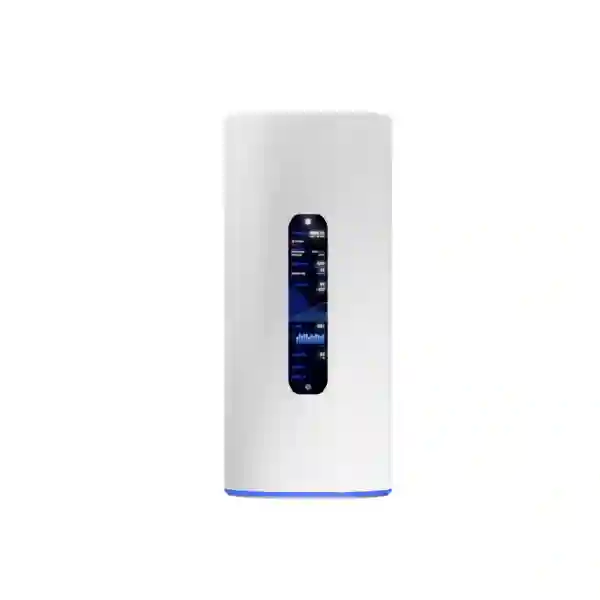
The desktop unit includes a 4.7-inch touchscreen and supports management through the UniFi environment. The screen offers local device information, while the main configuration experience enables detailed network and security policies. The compact housing measures 110 by 110 by 250 millimetres and weighs approximately 1.4 kilograms. Allow a stable surface, a safe route for cables and enough access for service work; it is not a ceiling-mounted or outdoor-rated access point.
During initial setup, record the installed firmware version, the administrator access method, the selected country settings and the physical connections to each port. Document the management address, configured networks, WAN priorities, SIM activation information held securely and the approved recovery procedure. Do not leave factory defaults or unnecessary exposure in place. Assign an owner to review alerts, configuration changes and software updates after installation, especially if the device is supporting critical daily operations.
Deployment scenario: small office with wired broadband
In a small office, a fibre or other fixed connection may remain the primary internet service while an approved cellular data plan provides an alternative path. Employees use segmented Wi-Fi, desks attach to the available wired ports or an external switch, and an administrator reviews the dashboard for outages and unexpected client behaviour. The appeal is not that one router eliminates every possible failure, but that routing, mobile backup and network visibility can be managed together.
Plan the complete dependency chain. If the fibre handoff, router and switch share one electrical circuit, a power failure can still interrupt everyone. Add suitable backup power where justified, and test critical applications over the mobile path. Some cloud services may notice a public-IP change. Define data-use controls for backup operation and an escalation contact for carrier faults. This approach is useful for offices whose tolerance for disruption is measured in business tasks rather than theoretical benchmark figures.
Deployment scenario: temporary or changing premises
A training venue, pop-up workspace or temporary project site may have little time to arrange fixed internet. A cellular-capable gateway can simplify the network stack when a compatible plan and strong indoor signal are available. Staff can connect over managed Wi-Fi, selected wired equipment can use the Ethernet ports and known network policies can be applied consistently. The ability to move the unit is helpful, but service quality can change substantially between locations.
Before each move, verify that the destination has usable mobile reception, permitted equipment operation, safe electrical supply and enough coverage for the proposed floor layout. Consider data caps, network congestion during events and the consequences of losing connectivity at peak attendance. Maintain a commissioning checklist so that the correct administrator credentials, SIM profile, guest settings and firewall policies are checked every time. For extensive outdoor or dispersed use, a different architecture with separately positioned radios may be preferable.
Deployment scenario: retail, guest and service areas
Retail or customer-facing spaces often need different levels of trust on the same premises. Payment equipment, staff administration, guest Wi-Fi, inventory systems and surveillance devices should not automatically share unrestricted access. A managed gateway can help implement clear network separation and monitor the status of the primary and secondary internet links. For businesses with mobile checkout systems, wireless coverage at the counter and stockroom is often more important than peak throughput measured beside the router.
Map the transaction journey before deployment. Test that terminals and associated services work over the chosen fixed connection and, when required, the cellular backup path. Confirm the payment provider’s network requirements and whether changing WAN addresses causes any disruption. Guest access should have a suitable security policy and traffic limits where necessary. If surveillance or many powered endpoints are part of the requirement, include separate PoE switching and storage rather than assuming the gateway alone provides every function.
Deployment scenario: managed home and hybrid work
A household that hosts remote meetings, connected appliances and several personal devices can benefit from the same disciplined network design used by an office. Separate work devices from guest access and less-trusted equipment, enable sensible security features and monitor whether an internet problem is wireless, wired or cellular. A 5G subscription can provide a second path for essential work when a reliable carrier signal is available.
Do not buy solely because a Wi-Fi 7 label sounds newer. Confirm the benefit to existing phones, laptops and local applications, then compare the total cost of the router, mobile data and any extra access points with a simpler alternative. If the home has thick walls or several floors, a distributed wireless design may deliver a better everyday experience than one high-specification radio placed beside the incoming internet connection. Practical coverage and usable reliability should drive the decision.
Comparing this model with a conventional router
The strongest distinction is the integration of 5G connectivity with UniFi management, modern Wi-Fi and relatively fast physical interfaces. A basic consumer router may cover casual browsing for less initial investment, but it may not provide the same managed multi-network workflow. Conversely, a dedicated gateway plus a separately placed cellular modem and external access points can offer greater placement flexibility, wider coverage or easier component-level replacement at the expense of a more involved system.
Ask which design better matches the building and operational responsibility. Integrated hardware is appealing where space, installation complexity and management simplicity matter. Modular hardware is appealing where the cellular signal is strongest far from the preferred Wi-Fi location, where large PoE switches are already required or where high-capacity recording has its own infrastructure. Neither design is universally superior; the right recommendation is the one that satisfies tested connectivity, coverage, security and growth requirements.
Installation and commissioning checklist
Begin by identifying the service entry point, the required mobile plan and the locations of all essential clients. Verify the exact model, regional radio configuration, applicable Tanzanian equipment authorisation and the mobile carrier’s compatibility requirements before procurement. Check cabling and transceiver choices for any fibre or SFP+ handoff, along with the PoE draw of a proposed endpoint. Choose a ventilated indoor location that balances mobile reception and wireless reach, and plan any external access points in advance.
At commissioning, update the console through the supported process, secure administrator accounts, create the necessary trusted and guest networks, apply explicit firewall rules and confirm each wired port’s purpose. Measure connection performance in the actual rooms where people work. Test both normal and failed-WAN conditions, including business-critical applications, and review whether the cellular plan’s usage controls operate as intended. Save a configuration record, note the restore procedure and agree who will maintain the device.
Before signing off, ask users to complete their most important workflows: a representative call, a cloud upload, inventory access or a payment test as relevant to the site. Record the observed results and any limits of the chosen network. The acceptance test should document measurable service outcomes, not simply a successful green status indicator on the device.
Local buying considerations for Tanzania
A model supporting a radio band on its datasheet does not establish that it is authorised for operation in Tanzania or that a particular operator will provision it. The Tanzania Communications Regulatory Authority publishes requirements for type approval of electronic communications equipment. Confirm the status of the exact imported variant and the applicable wireless operating rules through an appropriate authorised channel. The manufacturer certifications listed for other markets should not be presented as Tanzanian approval.
Also verify whether the proposed mobile carrier permits the intended usage, what contract or top-up arrangement applies and whether a business plan offers any relevant support commitment. Ask the seller to confirm the precise regional hardware, power adapter, included items and commercial terms. Do not infer stock, delivery timing, installation service, warranty or a Tanzanian-shilling price from international listings. A reliable quotation should make these local terms explicit alongside the network design.
Power, environment and physical placement
Ubiquiti specifies a 54 V DC adapter, a 100–240 V AC input range for the power supply and maximum device consumption of 34.5 W excluding PoE output. The published ambient operating range is 0–40 degrees Celsius, with noncondensing humidity requirements. These figures are useful for planning, but they are not a reason to install the appliance outdoors, in direct sun or inside an unventilated cabinet. Heat, dust, unstable electricity and physical access should all be considered.
Allow access to power and network cables without putting the device where it can easily be knocked over. Protect the power supply from inappropriate replacement and check any UPS sizing against the full network equipment load, including upstream modem, switches and powered endpoints. A cellular backup may keep traffic moving during a fixed-line outage, but it cannot protect against simultaneous loss of power or a failure of all available carriers. Document the environmental and electrical assumptions in the installation plan.
What to include in the request for a quotation
A useful enquiry states the number of users and devices, approximate floor layout, current internet connection, whether 5G is primary or standby, the mobile operator or plan under consideration and any special application requirements. Include the number of fixed endpoints, expected PoE devices, cameras, remote users and separate guest or staff networks. This gives the reviewer enough information to identify whether the desktop gateway alone is adequate or whether switching, access points and storage are also required.
Request confirmation of the exact model and regional version, relevant approval and carrier suitability, product contents, pricing in the appropriate local currency, availability and after-sales terms. Ask for an explanation of any limitations that affect the site, such as radio placement, metered data, WAN failover behaviour or recording storage. A transparent proposal should distinguish what comes in the hardware box from separately required subscriptions and equipment, and should make no performance guarantee without a suitable test or service commitment.
Operations and long-term ownership
Once installed, the gateway becomes part of the organisation’s operational infrastructure. Assign responsibility for firmware changes, password management, access reviews, alerts and periodic restoration tests. Keep a secure record of the network design, device serial information, service provider details, configuration backup location and who is authorised to approve changes. For business operations, document a straightforward fallback procedure when the primary circuit is down or a mobile plan has reached a limit.
Review performance after major changes such as adding cameras, increasing guest capacity or introducing new wireless clients. Track recurring WAN outages and whether they originate in the upstream service, local power, equipment or wireless environment. Adjust traffic priorities according to actual business needs. If requirements outgrow the compact gateway, plan a controlled migration to larger UniFi infrastructure rather than accumulating undocumented switches and ad hoc rules.
Frequently asked questions
Does the Dream Router 5G Max work in Tanzania?
It may be suitable for a Tanzania deployment, but support must be verified for the exact regional hardware and operator. Check the mobile plan, 5G or LTE bands, permitted Wi-Fi settings and relevant TCRA type-approval status. The presence of supported bands on a datasheet is not itself a local approval or carrier guarantee.
Can I use 5G as my main internet connection?
The integrated modem is designed to provide cellular WAN connectivity. For primary use, evaluate signal quality at the intended location, the service plan’s data and speed policies, upload performance, latency and peak-hour consistency. Prepare for carrier interruptions and changing radio conditions as part of normal planning.
Can it switch to 5G if fibre internet fails?
UniFi supports multi-WAN features and failover configuration. Actual continuity depends on successful configuration, the health of the backup connection and the application involved. Existing video calls or secure sessions may need to reconnect when the route or public IP address changes. Test before relying on failover.
Is 3.4 Gbps the speed I will receive from a mobile operator?
No. That is a published peak modem downlink rating for a specified 5G mode. Real service may be much slower or vary during the day due to signal conditions, plan restrictions and network demand. Use on-site measurements and a representative workload to set expectations.
How many Ethernet ports are there?
The hardware has four 2.5 GbE RJ45 interfaces and one 10G SFP+ interface. One RJ45 can provide PoE, and an RJ45 interface can serve as a default WAN. Consequently, the number of available LAN sockets depends on the chosen WAN configuration; plan the exact physical layout.
Does the router supply power to multiple access points?
Only one integrated RJ45 port is specified with a 15.4 W PoE budget. For several access points, cameras or higher-power endpoints, an appropriately rated external PoE switch or supported injectors will usually be needed. Check every endpoint’s power specification.
Does Wi-Fi 7 work with older laptops and phones?
The radio supports older Wi-Fi standards as well as Wi-Fi 7, so compatible legacy clients can generally connect. Their achievable speeds and features follow the capabilities of their own hardware. For 6 GHz operation, both client support and the applicable local regulatory settings must be checked.
Will one device cover a large office or several floors?
Ubiquiti lists a planning coverage figure of 160 square metres, but actual results depend on construction materials, interference and client locations. A large or multistorey space may need additional UniFi access points. Perform a basic site survey instead of relying on a coverage figure alone.
Can I connect UniFi cameras and record video?
The router supports UniFi Protect and includes a 64 GB microSD card. Published camera capacity depends on video resolution, and practical storage duration depends on recording settings and bitrate. For extensive or important surveillance, review dedicated recording storage and retention requirements.
Can remote staff connect securely through VPN?
The platform supports several VPN technologies, including WireGuard and OpenVPN, plus site-to-site options. The successful design depends on identity controls, endpoint reachability and the internet service. Some mobile plans use carrier-grade NAT, so test the intended remote-access workflow over cellular as well as fixed WAN.
Is the quoted international price the Tanzania selling price?
No. International price listings do not verify a local offer, taxes, availability, warranty or delivery terms. Obtain a current quotation for the exact model and regional variant. No local price or stock status is asserted in this product description.
What information should I provide before ordering?
Share the intended location and building layout, internet services, number of users, required wired devices, Wi-Fi coverage areas, any cameras or PoE equipment, expected data usage and whether cellular is a primary or backup connection. These details support a responsible compatibility and sizing review.
Do I need separate subscriptions for security or mobile service?
A mobile operator data subscription is normally required to use cellular internet. Some optional enhanced-security offerings may have separate terms or fees. Confirm the current software features, optional services and all charges for the exact quotation rather than assuming every advertised enhancement is included.
Does the gateway guarantee uninterrupted business operation?
No single gateway can guarantee continuity. Cellular service, fixed lines, power, software and connected devices can all fail. Multi-WAN options and sensible backup power can reduce specific risks, but a tested recovery plan and realistic service expectations remain necessary.
Request a suitability review and quotation
Tell FourTeck Tanzania how many people and devices your network must serve, whether 5G will be your primary or backup connection, and which wired, PoE, security or recording functions are required. Ask for confirmation of the exact UDR-5G-Max regional model, local operating suitability, price, availability and applicable commercial terms. A clear brief helps identify the right configuration without making assumptions about radio coverage, approvals or equipment included.
Request product details and a tailored quotation.




Reviews
There are no reviews yet.