
Unified networking for considered spaces
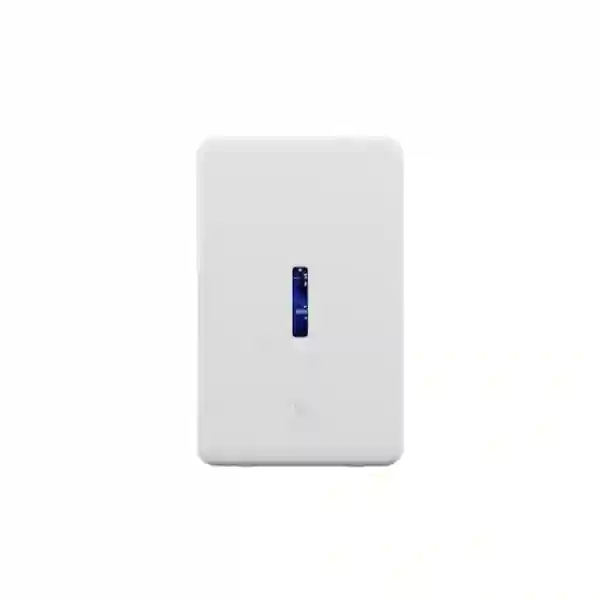
Ubiquiti UniFi Dream Wall (UDW)
A wall-mounted UniFi gateway with integrated Wi-Fi 6, Gigabit PoE switching, high-speed SFP+ interfaces and support for UniFi network and security applications. Designed for buyers who want capable, centrally managed connectivity without automatically dedicating a rack to every network function.
Is the Dream Wall right for your network?
The primary buying question is whether the Dream Wall can consolidate the functions you actually need while leaving enough space for extra access points, cameras and future connections. It is most compelling for a well-planned office, shop or larger residential deployment where wall mounting matters, devices can connect through the available ports, and a single UniFi management environment is desirable.
The Ubiquiti Dream Wall UDW is not a one-box answer to every networking problem. It needs an appropriate internet service, sensible physical security, correct PoE port assignments and additional hardware wherever the design calls for it. Review the capacity and trade-offs below, then request a quotation for the exact proposed configuration in Tanzania.
Verified specification summary
These are manufacturer-published reference specifications for model UDW. They do not represent a promise about local inventory, deployment throughput or guaranteed wireless coverage.
| Product and model | Ubiquiti UniFi Dream Wall — UDW |
|---|---|
| Form factor | Wall-mounted UniFi cloud gateway |
| LAN copper ports | 17 × 1 GbE RJ45; 12 supply PoE |
| Powered port distribution | 4 × PoE, 4 × PoE+, 4 × PoE++ |
| Shared PoE output budget | 420 W |
| Additional network interfaces | 1 × 2.5 GbE RJ45; 2 × 10G SFP+ |
| Default WAN interfaces | 2.5 GbE RJ45 and 10G SFP+ |
| Integrated Wi-Fi | Dual-band; Wi-Fi 6 on 5 GHz |
| Manufacturer Wi-Fi coverage reference | 140 m²; actual coverage varies |
| IDS/IPS throughput reference | 3.5 Gbps |
| UniFi applications | Network, Protect, Access, Talk, Connect |
| NVR-related internal media | Pre-installed 512 GB microSD; integrated 128 GB SSD |
| Power architecture | Two hot-swappable PSU positions; one PSU pre-installed |
| Physical size and weight | 549 × 342 × 62 mm; approximately 8.6 kg |
| Manufacturer operating temperature | −10 to 40 °C |
| Manufacturer device capacity reference | 100+ managed UniFi devices; 300+ connected users |
A compact UniFi foundation for connected premises
The Ubiquiti UniFi Dream Wall UDW is intended for buyers who need a practical network foundation without dedicating a conventional equipment rack to the gateway, main switch, wireless access point and video-management console. Its wall-mounted format brings those roles together in one identifiable installation point. That is particularly useful when an office or customer-facing premise has modest equipment space but still needs structured networks for staff, guests, cameras and other connected endpoints. The benefit is not that every accessory disappears. Cabling, internet termination, battery backup and additional access points may still need their own locations.
Plan the Dream Wall around the actual building, not the appearance of a tidy installation. List the expected users, wired outlets, cameras, door devices, wireless coverage areas, internet services and critical business applications first. Then decide whether the combination of integrated ports, PoE power and UniFi software addresses those requirements with room for growth. A system may be physically compact while remaining operationally complex, so the network design, permissions, updates and backup procedures still deserve deliberate attention.
What the integrated hardware actually replaces
Instead of requiring a separate gateway appliance, a basic PoE distribution switch and an initial wireless access point, the Dream Wall incorporates all three functions. It also hosts UniFi applications, including the management tools needed for supported networking, camera and access-control products. This changes the installation architecture: the first group of wired devices can terminate at the Dream Wall, and the integrated Wi-Fi radio can serve the surrounding space. The design can reduce the number of standalone enclosures and power cords in a suitably sized deployment.
Integration should not be confused with limitless expansion. The available port mix, the shared PoE power budget and the performance of the built-in radio are finite. One well-chosen downstream switch may be preferable to using every available port and then improvising extensions. Likewise, a second access point may deliver a better user experience than trying to position the whole gateway for maximum radio coverage. Buyers should treat the unit as a central foundation that can connect additional UniFi equipment when the floor plan requires it.
Who should consider the Dream Wall
A small or medium-size office with several workstations, phones, cameras and visitor devices is a natural evaluation case. The same applies to a retail environment where customer Wi-Fi needs to remain distinct from point-of-sale and back-office systems. A professional practice may value the discreet installation and unified view of devices, provided access permissions and operational procedures meet its needs. Larger homes or mixed-use buildings can also benefit when cable routes and physical access to the unit are well planned.
The more important selection factor is architecture rather than industry. Buyers seeking a wall-mounted network core, a mix of Ethernet and PoE, and one management environment have a strong reason to evaluate UDW. Buyers who need rack-based components, extensive independent expansion, specialized recorder storage, or unusually demanding radio placement should compare a modular UniFi design before choosing. Neither approach is automatically superior; the right one depends on the building, support model, future upgrades and acceptable service risks.
Understand the Ethernet port layout before ordering
The published hardware layout provides seventeen 1 GbE RJ45 LAN ports, one 2.5 GbE RJ45 port normally used for WAN, and two 10G SFP+ ports, with one 10G SFP+ interface normally used as WAN and the other available for LAN. Of the seventeen Gigabit LAN interfaces, twelve provide PoE output and five are non-PoE ports. This distinction matters because the port count alone does not say how many devices can receive power. Draw a port schedule with each endpoint, location, link speed, required power class and intended VLAN.
The 10G SFP+ interfaces are useful for suitable upstream connections or a faster downstream link to compatible equipment, but the individual Gigabit copper ports remain Gigabit ports. A 10G uplink does not convert a connected 1 GbE desktop port into a multigigabit connection. Confirm optical transceivers, direct-attach cables, link negotiation and provider handoff requirements separately. Where many wired endpoints share heavy traffic, evaluate contention and switching architecture instead of assuming headline uplink speed removes every bottleneck.
Plan PoE as a power budget, not a simple port count
UDW has four PoE ports, four PoE+ ports and four PoE++ ports, with a published aggregate PoE budget of 420 watts. Manufacturer-listed port maximums are 15.4 W for PoE, 30 W for PoE+ and 60 W for PoE++. These ratings define the relevant standards and ceilings; they are not a promise that every connected device will draw its maximum continuously. A design should total expected and worst-case power requirements while respecting the category assigned to each physical port.
For example, a high-demand access point or powered peripheral may need a PoE++ interface even when a lower-powered camera can use standard PoE. Reserve appropriate ports before cabling and allow a margin for cold start, changes in device configuration and future replacements. Do not treat the 420 W shared capacity as extra power available on top of each port rating. If the connected equipment exceeds the port or total budget, choose an additional compatible PoE switch or adapt the design rather than relying on optimistic assumptions.
Built-in Wi-Fi 6: useful, but placement still matters
The integrated wireless component supports dual-band connectivity using Wi-Fi 6 on the 5 GHz radio and legacy-compatible operation on 2.4 GHz. Manufacturer technical figures list up to 2.4 Gbps radio data rate on 5 GHz with 4 by 4 MIMO and up to 300 Mbps on 2.4 GHz with 2 by 2 MIMO. These are radio-level rates under defined conditions, not guaranteed individual internet speeds. Client capabilities, channel width, interference, walls, distance and the uplink all affect what users experience.
Ubiquiti lists a nominal coverage area of 140 square metres for the integrated radio. Treat that number as a planning reference rather than a promise for a Tanzanian office with reinforced walls, partitions, reflective surfaces or multiple floors. The best location for cable termination may not be the best place for Wi-Fi propagation. If coverage or capacity is important, carry out a site survey, measure signal quality in occupied spaces and add properly located UniFi access points where needed.
Separate staff, guest and operational traffic
One of the more valuable reasons to use a managed gateway is the ability to organize traffic deliberately. The Dream Wall supports VLAN and subnet segmentation, which can keep employee devices, visitor Wi-Fi, cameras and building systems on distinct logical networks. A shop might assign guest devices an internet-only segment while keeping sales terminals on a controlled business segment. An office might use separate networks for meeting-room devices, employee workstations and security equipment.
Segmentation works only when switch port profiles, wireless network assignments, firewall policies and administrative access are configured consistently. A separate VLAN name does not automatically create an appropriate security boundary. Decide which systems must communicate, which services require internet access and which paths should be blocked. Test printing, casting, remote management and other legitimate workflows rather than simply isolating everything. Document these decisions so future equipment replacements do not accidentally connect sensitive devices to the wrong network.
Gateway firewall and intrusion controls
The Dream Wall includes stateful firewall capabilities, application-aware policies, traffic inspection and UniFi intrusion detection and prevention features. Ubiquiti specifies an IDS/IPS throughput figure of 3.5 Gbps. That number is useful when assessing the gateway alongside a suitable internet handoff, but it is a manufacturer performance specification rather than a guarantee for every ruleset, packet size or live traffic pattern. Actual results can vary with enabled features and the broader network design.
Security depends on configuration as much as available features. Start with a documented policy for management access, outbound services, cross-VLAN communication and externally exposed applications. Restrict administrative accounts, enable supported multifactor authentication, maintain current firmware and review alerts. Threat detection does not replace endpoint protection, safe user practices or reliable backups. Buyers should also review which optional security intelligence features carry separate requirements or subscriptions, rather than assuming every advanced service is permanently included without conditions.
Dual internet connections and continuity planning
The default WAN arrangement includes a 2.5 GbE RJ45 interface and a 10G SFP+ interface. UniFi software supports multi-WAN features such as failover and load balancing where the chosen configuration and connected services allow them. This can be relevant when internet availability is important to payment processing, cloud applications, communications or remote administration. Multiple uplinks should be evaluated for genuine diversity, not just counted as two cables entering the same building.
Confirm the service handoff from each provider, compatible physical connection, IP addressing, authentication and any required upstream equipment before ordering. Test what happens when one connection loses upstream internet while its local Ethernet link remains active. Consider how application sessions behave during a failover and which systems truly need resilience. A backup internet connection is not a substitute for backup power. If the gateway, optical terminal or upstream provider equipment loses electricity, network continuity may be interrupted regardless of WAN configuration.
Understand 10G capability realistically
Ubiquiti describes the Dream Wall as a 10G Cloud Gateway because the platform includes 10G SFP+ connectivity. This is useful for designs with compatible fibre, DAC links or high-speed switching, and it allows an uplink to carry aggregated traffic from multiple Gigabit clients. Nevertheless, WAN service, security inspection, individual port capacity and endpoint performance remain separate design constraints. The headline interface speed cannot be interpreted as a guaranteed 10 Gbps secure internet experience for each connected device.
Before using an SFP+ connection, record whether the interface serves the internet handoff or the internal network, then confirm the appropriate module type and cable route. If the ISP supplies copper Ethernet rather than optical service, a matching RJ45 connection or properly supported conversion method is needed. Avoid purchasing transceivers solely on connector appearance. Check vendor compatibility, required distance, heat, power and whether an interconnecting switch supports the chosen negotiated speed.
A practical approach to camera recording
The Dream Wall hosts UniFi Protect and includes manufacturer-described local storage: a pre-installed 512 GB microSD card for NVR use and a built-in 128 GB SSD for detection recordings. Manufacturer guidance lists camera-management reference capacities of up to twelve HD cameras, seven 2K cameras or four 4K cameras. Those figures are planning references for different image classes; they are not additive and should not be treated as a universal retention guarantee.
Before selecting camera quantities, define the image resolution, frame rate, recording mode, retention objective and expected activity. Storage needs can rise significantly with continuous recording, busy scenes or higher quality settings. Assess the practical endurance and replacement strategy for the media in an environment with sustained recording, and decide whether a separate recorder is preferable for large deployments or longer retention. The built-in camera service does not eliminate the need to protect footage according to the organization’s privacy, access and incident-response policies.
Door access, communications and additional UniFi applications
Beyond network management and Protect, the manufacturer’s application list includes UniFi Access, Talk and Connect. This broad software support makes the platform interesting when a business plans to manage networking together with compatible door access, communications or connected display devices. The console’s ability to host an application does not mean every external reader, telephone, lock or display is included, licensed or automatically compatible. Each endpoint must be evaluated on its own terms.
For a door-control project, identify the required access hubs, readers, lock power, emergency egress design, installation standards and local operating procedures. For telephony, establish the intended calling service, numbering and any applicable service availability before assuming a particular feature works in Tanzania. For digital displays or other connected devices, account for their separate hardware and network requirements. Start with a manageable scope, confirm current application support, and expand only after the complete workflow has been tested.
Unified administration and visibility
A single UniFi console can simplify routine visibility across compatible gateways, switches, access points and supported applications. Administrators can see device status, connected clients, network settings and relevant events without maintaining several unrelated local controllers. For organizations with a small internal IT team, reducing the number of systems to inspect can be useful, particularly when network, Wi-Fi and camera requirements overlap.
However, one interface does not remove the need for operating discipline. Assign individual administrator accounts according to responsibility, record changes and establish a process for software upgrades and incident investigation. Train at least one alternate administrator to handle ordinary access and recovery tasks. Keep an accurate record of the site’s internet settings, VLANs, devices and power connections. The quality of this documentation becomes especially important if the person who originally configured the console is unavailable when a fault occurs.
Choosing wall position and protecting physical access
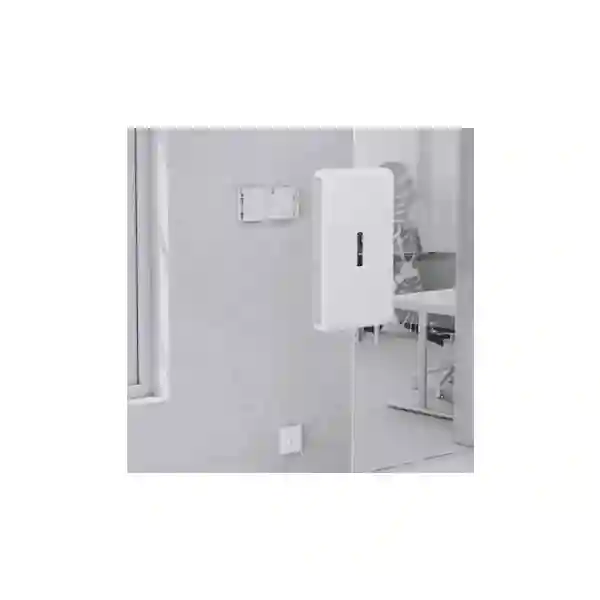
The enclosure measures approximately 549 by 342 by 62 millimetres and weighs about 8.6 kilograms according to Ubiquiti. These details are important when choosing a mounting surface, leaving clearance for cables and planning safe installation. The device is intended for wall mounting, not casual placement on a desk or in an exposed public area. Select a suitable structurally sound surface and follow the current installation guide for fixing hardware, ventilation and cable routing.
A location that looks discreet may still be unsuitable if visitors can touch the unit, cables are vulnerable, or the heat and power environment is poor. Consider restricted access, cable labels, protected internet termination and maintenance clearance. The wall position should also be reachable by technicians without unsafe ladders or disruption to customers. In a humid or dusty workplace, check the actual environment against the manufacturer’s operating limits rather than assuming indoor-rated equipment can tolerate any room conditions.
Electricity, cooling and resilience
Manufacturer specifications state universal 100 to 240 V AC input at 50/60 Hz and a maximum consumption of 112 W excluding PoE output. The specified total depends on the load powered by the PoE interfaces. The design supports two hot-swappable power-supply positions, but Ubiquiti lists only one power-supply unit as pre-installed. Buyers should confirm the exact package and separately supplied accessories before budgeting for power redundancy.
Two power modules can help address an internal PSU failure when the required hardware is fitted, but they do not inherently protect against a building-wide outage. Consider a properly sized UPS and the runtime requirements of the gateway, upstream internet termination and any downstream devices that must remain available. Account for PoE loads in this calculation. Plan for heat, airflow and periodic inspection. Critical systems such as door access need their own end-to-end power and safety evaluation rather than relying on a gateway feature label.
Performance specifications versus everyday experience
Ubiquiti lists support for more than one hundred managed UniFi devices and more than three hundred connected users as platform reference figures. These are helpful indicators of the class of deployment the Dream Wall targets, but real performance varies with client behavior, enabled services, radio conditions, switching needs and application mix. A building with many idle smartphones places different demands on the network than an office transferring large files, recording several cameras and holding video meetings throughout the day.
For procurement, write a workload profile instead of using device count alone. Estimate simultaneous active users, expected internet peaks, camera streams, local file traffic, guest-session turnover and important latency-sensitive applications. Review the effect of security inspection and routing features on the chosen links. Test representative client traffic after installation and save a baseline for future comparisons. If traffic expectations are uncertain, favor a design with straightforward expansion options rather than one that uses all available capacity on day one.
Design for safe guest connectivity
Visitor access is an everyday requirement for offices, hospitality spaces and retail premises, but it should not share unrestricted access with business resources. A separate guest wireless network can provide internet access while preventing ordinary visitors from reaching cameras, management interfaces or employee workstations. Decide what authentication experience is appropriate and ensure any captive portal or guest procedure is understandable to the intended audience.
Guest networks still consume internet bandwidth and radio airtime, so set reasonable limits where necessary and observe client experience during busy periods. If the gateway is in a back office, an additional access point in the actual guest area may be needed. Check the communication between the guest SSID, its VLAN and firewall restrictions with real devices. Do not assume that enabling a single guest toggle resolves privacy, service reliability or every operational requirement.
Supporting business applications and voice
Common workloads include cloud accounting, video conferencing, browser-based enterprise systems, inventory terminals and IP phones. These activities depend on more than raw internet speed. Consistent latency, manageable contention, correct segmentation and dependable power often make a bigger difference to business continuity. UniFi’s networking features can help organize traffic and provide visibility, but they must be configured around measured needs rather than marketing labels.
Where voice or real-time meetings are essential, inspect upstream connection quality and confirm suitable Quality of Service settings within the overall network. If PoE phones are planned, check each model’s power class and assign ports accordingly. Recording devices and office computers may also create local traffic that shares uplinks. Test busy-hour operation after deployment, including video meetings during file transfers, to ensure that real workflows remain usable rather than relying entirely on theoretical data rates.
A sensible network layout for a small office
A practical starting design could place the provider termination and Dream Wall in a protected utility location, connect fixed desks or printers through the Gigabit LAN interfaces, supply suitable cameras and access points through appropriately rated PoE ports, and use separate staff and guest wireless networks. The exact number and location of devices should come from the floor plan. Additional UniFi switching can extend ports to another room or floor where cable runs are more manageable.
Plan cable routes and switch placement around maintenance as well as first installation. Label each outlet at both ends, maintain a port map and leave a small reserve for new employees or equipment. A structured cabling system may cost more initially than ad hoc leads but makes faults easier to isolate. Before activation, confirm internet settings, address allocation and device adoption. Afterward, verify endpoint power, link negotiation, wireless roaming and security restrictions with real users.
A sensible network layout for retail
Retail environments often combine point-of-sale terminals, scanners, inventory systems, staff devices, customer Wi-Fi and cameras. These functions should not automatically share the same network trust level. A Dream Wall-centered design can provide the gateway, local ports and management plane while separate VLANs and firewall rules help define which systems may exchange traffic. Position additional access points according to customer density and building materials rather than assuming a rear-office device covers the sales floor.
Power continuity deserves particular attention because an internet or switching outage can affect checkout, inventory and surveillance simultaneously. Identify which services must remain functional during short power interruptions and where an upstream carrier dependency still exists. Configure monitoring for the relevant network segments and keep a written recovery procedure. If a branch has a centrally managed business network, confirm addressing, VPN and administrative standards before adopting a local configuration that may not fit the wider organization.
A sensible network layout for professional premises
Clinics, consultancies, agencies and professional offices may need stable wireless connectivity, secure departmental separation and a manageable record of connected equipment. UDW can be evaluated as the central network appliance where desk count and PoE needs fit its published resources. Separate client-facing guest access from internal workstations, and assess whether network-connected cameras or entrance systems belong in their own protected segments.
Where organizations handle sensitive information, security design should begin with business policy and applicable obligations, not merely with the availability of a firewall. Decide who can administer the gateway, how software changes are approved and how logs or alerts are reviewed. Put tested backup arrangements in place for important files and services. The Dream Wall manages network paths; it is not a substitute for the safeguards required inside applications, on employee devices or within organizational processes.
How to assess expansion over the next several years
Network requirements change when new staff arrive, office layouts evolve or additional cameras are introduced. The integrated port count is useful at installation, but capacity planning should include a realistic growth reserve. A new Wi-Fi generation may also become attractive before the gateway or switch needs replacement. In a modular deployment, those elements can be refreshed independently; in an integrated appliance, part of the original functionality stays physically attached to the core unit.
That distinction is one of the most important Dream Wall buying decisions. If the primary benefit is a tidy wall-mounted installation and current capacity comfortably exceeds the expected load, integration can be compelling. If the organization expects frequent changes in uplink speeds, specialist security features, storage scale or wireless standards, compare the lifecycle cost of a separate UniFi gateway, switch and access points. Include spare parts, management effort and planned downtime in that comparison.
Understand the single-enclosure trade-off
Combining several networking roles can streamline cabling and simplify a modest installation, but it also concentrates multiple functions in one physical device. A fault affecting the console may have a wider operational impact than a fault affecting one replaceable access point or switch in a modular system. The presence of an optional second power module mitigates one category of failure but cannot make the complete appliance fully redundant.
Buyers should identify which services would be lost if the gateway required repair, reset or replacement. Consider whether temporary standalone switching, a spare gateway plan or documented configuration backups are appropriate. For a site where business operations cannot tolerate a prolonged network interruption, discuss the complete continuity architecture before committing. A compact network can still be professionally resilient, but resilience must be designed at the service level rather than inferred from enclosure size.
Installation preparation checklist
Before installing the unit, collect the site survey, intended device list, provider handoff details, mounting plan, cabling schedule and projected PoE load. Confirm the wall can carry the device safely and that a suitable AC supply is available. Record each cable’s destination and leave enough room to reach ports without severe bends or strain. Review local workplace safety requirements and select a technician capable of following the current manufacturer instructions.
Preconfigure the planned networks, administrative roles and adoption process where appropriate. At installation, label interfaces, verify input power, connect WAN services and adopt downstream UniFi equipment carefully. Confirm firmware and application versions through supported management channels. Test LAN segmentation, Wi-Fi authentication, client roaming and failover under controlled conditions. Document the final state and make sure the site owner knows who is responsible for maintaining the installation once the commissioning technician leaves.
Commissioning tests that matter
A commissioning checklist should be based on outcomes users can recognize. Verify wired link speed, internet access, guest isolation, access to necessary internal services and the expected number of active wireless clients. Check that each PoE endpoint starts successfully and that the aggregate load remains within budget. Confirm camera recording and playback using the intended retention settings rather than relying only on an application status indicator.
Next, test network changes and failure behavior. Disconnect one internet service in a controlled test, observe recovery and restore the normal setup. If UPS power is installed, validate its behavior with the complete required load. Confirm that ordinary administrators can access the correct management functions without receiving unnecessary privileges. Capture baseline performance and export or otherwise safeguard essential configuration information according to current supported procedures.
Operating the Dream Wall after deployment
Routine administration includes updating firmware, checking device health, reviewing security and capacity alerts, and maintaining accurate records. Set a reasonable schedule for configuration reviews and verify that unused accounts and unnecessary network permissions are removed. After a significant business or building change, repeat coverage and capacity checks. A network that passed acceptance testing at installation may need adjustments when more wireless devices or new applications are introduced.
Do not assume that automated updates, alerts or cloud-access features are substitutes for responsibility. Decide who receives critical notifications and who can respond if the internet is down. Review camera storage health and verify the ability to retrieve recordings when they are needed. Keep a record of replacements and power consumption changes. Consistent small maintenance tasks usually reduce the likelihood that a simple problem becomes a disruptive outage.
Security baseline for administrators
A strong starting point includes unique administrator identities, supported multifactor authentication, the principle of least privilege and deliberate management-network restrictions. Disable accounts that are no longer required, apply updates according to an approved maintenance process and check device inventories regularly. Avoid exposing management interfaces to the internet without an explicit, justified design. Remote access should use a supported secure method and a clear access policy.
Also decide which events are important enough to investigate. Repeated authentication failures, unexpected new clients, changed firewall rules and unstable WAN service may each warrant attention in different environments. Document who reviews alerts and how incidents are escalated. Security is an operational process involving people, software and endpoints; even a feature-rich UniFi gateway cannot guarantee protection from every attack or configuration mistake.
Practical considerations for deployment in Tanzania
For a Tanzania-based buyer, the useful questions are the same core engineering questions with particular attention to the actual building and service arrangement. Confirm whether the available internet handoff is copper Ethernet, fibre through provider equipment or another supported format. Establish the power conditions at the premises, desired UPS runtime and the safety of the proposed wall location. Discuss network management responsibilities and the ability to obtain compatible replacement accessories when needed.
A local project may also require decisions about cabling routes, building access, occupied operating hours and the timing of a cutover from an existing router. These are deployment questions, not claims about a particular provider or installation service. FourTeck Tanzania pricing, stock, delivery options, commissioning services and warranty terms should be confirmed through a current quotation for the exact product and scope. Do not infer local product certification or service coverage from international product specifications alone.
How to compare Dream Wall with a modular UniFi system
The closest architectural alternative is not necessarily another wall-mounted product. A separate UniFi cloud gateway, PoE switch and one or more access points can deliver a similar set of network roles while allowing each component to be selected for a specific workload. A modular design may be preferable when switch port density is high, radio locations are difficult, camera retention needs are extensive, or a rack is already available.
Compare total installed cost rather than only the price of one box. Count mounting hardware, power systems, extra access points, cables, switches, storage, installation effort and ongoing administration. Evaluate how fast a failed component could be replaced and which upgrades are likely during the equipment’s life. The Dream Wall should win when its integrated capabilities solve the actual constraints; modular equipment should win when flexibility or separation is more valuable than consolidation.
When the Dream Wall is probably not the best fit
An environment with many floors, numerous high-power PoE devices or a very large camera-recording requirement may quickly outgrow the integrated switching and storage concept. The same caution applies to buyers who need many individual multigigabit copper ports or a wireless network designed around several precisely placed radios. UDW can connect external devices, but it should not be selected on the assumption that built-in components eliminate those larger system requirements.
Sites with demanding continuity requirements may also prefer separated gateway and access infrastructure, dedicated recording hardware or other high-availability arrangements. This does not make the Dream Wall unsuitable for business. It means the system boundary matters: where a compact central core is enough, it can be efficient; where requirements are specialized, the right answer may involve more independent devices. Ask for a topology review rather than relying only on an attractive specification summary.
Questions to ask before requesting a quotation
Begin with the exact model UDW, the intended installation environment, number of wired endpoints, expected PoE classes and projected internet services. Include how many cameras will record, their resolutions and the required retention duration. Describe the building layout and the rooms where wireless performance matters most. If the existing network has configuration requirements, provide a non-sensitive summary of VLANs, address ranges, authentication systems and critical applications.
Then confirm what the quotation includes: the console, manufacturer-specified accessories, any optional redundant PSU, compatible optics, cabling, UPS, extra switches, access points and commissioning work. Ask separately about locally applicable commercial terms rather than assuming they follow another market’s offer. A complete equipment schedule makes it easier to compare purchase paths fairly and prevents a low initial figure from hiding infrastructure that will still be necessary.
Making the purchase decision
The clearest reason to select the Ubiquiti Dream Wall UDW is that its integrated architecture aligns with a real deployment: one managed gateway, a moderate number of wired and PoE clients, useful local Wi-Fi and UniFi application hosting, all in a wall-mounted form factor. Its 420 W shared PoE budget, 17 Gigabit LAN ports and 10G SFP+ interfaces make the specification substantial, but those figures only become benefits when the planned endpoints and workloads fit them.
Choose the system after checking the network diagram, PoE schedule, Wi-Fi survey, camera storage plan, access requirements and power continuity strategy. If the site needs more independent capacity, include the necessary external equipment or consider a modular build. For a purchase in Tanzania, request a current product-specific quotation and confirm all local commercial arrangements before ordering. A well-scoped deployment is more useful than a collection of impressive headline figures.
Frequently asked questions about UDW
These answers address the questions that most directly affect equipment selection, integration and deployment planning.
Does the Dream Wall replace a separate router, switch and access point?
It combines gateway, managed Gigabit switching and a built-in wireless radio, so it can replace those functions in a suitable small deployment. However, additional access points, switches, provider termination equipment, UPS power or dedicated storage may still be required. A floor plan and device schedule determine whether the integrated hardware covers the whole site.
How many PoE ports does UDW have?
There are twelve powered Gigabit LAN ports: four PoE, four PoE+ and four PoE++. The complete unit has seventeen Gigabit RJ45 LAN ports, including five without PoE output. Each powered port has its own standard and maximum; the total available PoE power is shared across the device. Check both limits before assigning cameras and access points.
Is the 420 W PoE budget available on every port?
No. The 420 W figure is a shared total, not a per-port rating. Manufacturer-listed port ceilings are 15.4 W on PoE, 30 W on PoE+ and 60 W on PoE++. The connected devices must comply with their assigned port’s capability as well as the combined budget. Leave capacity for normal operating variations.
Does it provide Wi-Fi 6 coverage for an entire building?
The built-in radio supports Wi-Fi 6 on 5 GHz, and Ubiquiti provides a nominal 140 square metre coverage reference. Actual coverage depends on radio placement, wall materials, interference and client devices. Larger buildings, several floors or difficult room layouts commonly require additional access points. Surveying the real site is more dependable than relying on the coverage number alone.
Can the Dream Wall manage security cameras?
Yes. It hosts UniFi Protect and has built-in storage described by Ubiquiti. The manufacturer provides example capacity references for HD, 2K and 4K camera counts. Actual recording retention depends on camera configuration, activity and available storage, so camera quantity and footage retention should be planned together. Large surveillance projects may be better served by a dedicated recording system.
Are there two power supplies included?
Ubiquiti describes two hot-swappable PSU positions but lists one PSU as pre-installed. Do not assume a second power module is included with every shipment. Verify the exact box contents and the optional module requirement before budgeting. Even with two modules, a separate strategy is needed for outages affecting the building or upstream internet equipment.
Does a 10G SFP+ connection mean every wired client gets 10 Gbps?
No. The Dream Wall has 10G SFP+ interfaces for suitable uplink or WAN roles, while its seventeen copper LAN ports operate at Gigabit rates. The speed delivered to any client depends on the client’s interface, connected switch, workload and upstream service. Security processing and internet-plan capacity are separate considerations.
Can I use two internet connections?
The default WAN interfaces include 2.5 GbE RJ45 and 10G SFP+, and current UniFi functionality supports multi-WAN features. Actual setup depends on the provider handoffs, compatible modules, service addressing and desired failover policy. Test recovery behavior and make sure the gateway and upstream equipment have power during an interruption.
Is this better than a Dream Machine and separate switch?
Neither design is universally better. Dream Wall suits a buyer who values consolidation and has requirements within its integrated capacities. A modular gateway, PoE switch and access points can be easier to scale or refresh individually. Compare physical space, installed cost, port requirements, camera recording, upgrade plans and failure recovery rather than product names alone.
Can I buy the Dream Wall in Tanzania at a known price?
A current FourTeck Tanzania price, availability and delivery commitment have not been verified for this listing. Request a quotation for model UDW and specify any accessories or installation services you need. That also gives you an opportunity to confirm the applicable warranty terms, power module configuration and final scope before placing an order.
Does the model number UDW mean it is the store SKU?
UDW is the manufacturer model identifier used for this hardware. An individual retailer may use a different stock-keeping identifier for its own catalog. Unless the target listing explicitly labels a SKU, the model number should not be copied into an unverified SKU field. Confirm the exact product configuration on the quote.
What information makes a useful deployment quote?
Provide a floor plan or room list, approximate endpoint counts, required wired connections, PoE device models, internet handoff details, expected cameras and retention goals, plus any UPS or cabling work. Include whether installation and ongoing management are needed. This helps distinguish the Dream Wall hardware cost from the supporting equipment and labor needed for a working solution.
Request a Dream Wall deployment quotation
Tell FourTeck Tanzania how many endpoints, cameras, PoE-powered devices and wireless areas the network needs to support. Ask for a product-specific quotation covering model UDW and any necessary extra access points, switches, compatible accessories, UPS or installation work. Confirm current price, availability, delivery and commercial terms before placing an order.
Ask FourTeck Tanzania for a tailored UDW quotation




Reviews
There are no reviews yet.