
Outdoor point-to-point backhaul · Tanzania buying guide
Ubiquiti airFiber 5U AF-5U High-Band Wireless Bridge
Connect two fixed network sites using an engineered outdoor radio link. Assess path clearance, real capacity, mounting and Tanzania frequency authorization before ordering. Request a project-specific quotation rather than relying on headline specifications.
At a glance
- Model: AF-5U high-band point-to-point bridge
- Manufacturer maximum throughput: 1.2+ Gbps, not guaranteed site speed
- Advertised maximum range: 100+ km, dependent on conditions and regulatory region
- Ethernet: one Gigabit data port and one 10/100 management port
- Power: 50 V, 1.2 A passive Gigabit PoE adapter; up to 40 W device consumption
- Deployment: paired fixed endpoints, professional alignment and local regulatory review
Choosing the AF-5U for a point-to-point connection
The Ubiquiti airFiber 5U AF-5U is a purpose-built outdoor wireless bridge for carrying network traffic between two fixed locations. It is designed for sites that need a dedicated backhaul connection rather than ordinary indoor Wi-Fi coverage. A typical link places one professionally aligned radio at each end, connected by Ethernet to the local network. The airFiber platform is attractive where trenching fibre is difficult, expensive or slow, but a suitable radio path and correctly authorized spectrum are available. The AF-5U is the high-band version of the airFiber 5 family. That distinction matters: buyers must confirm the exact model and the frequencies allowed at the planned installation site before treating it as interchangeable with an AF-5. The published headline throughput is a radio capability, not a promise of application speed at every distance. For a Tanzania project, start with endpoints, coordinates, path elevation, required capacity, uptime objective and the intended use. Those details determine whether this equipment is appropriate and whether a formal survey is needed.
Quick feature summary
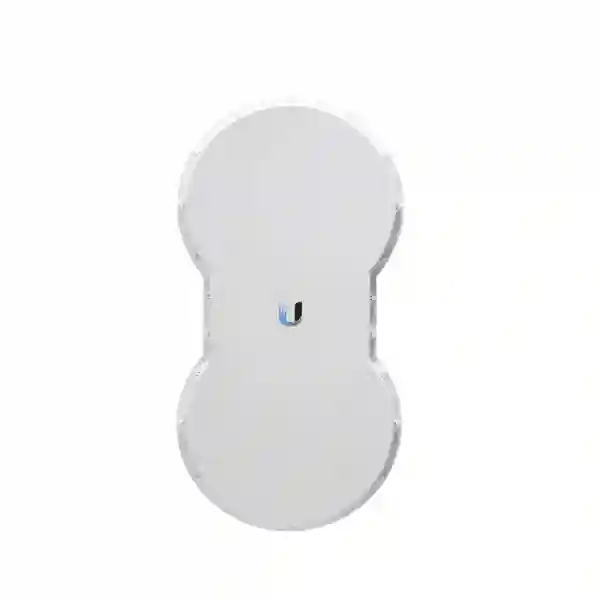
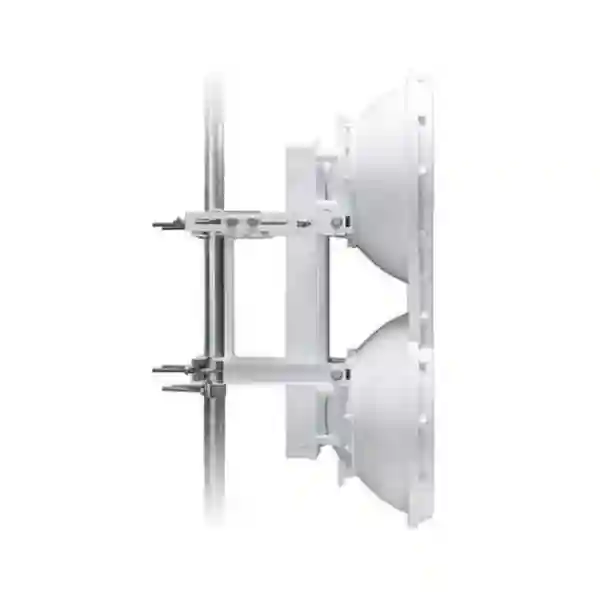
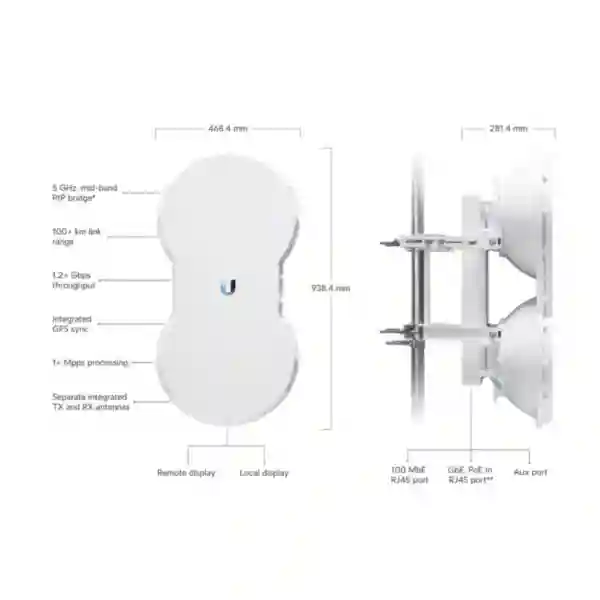
The AF-5U provides a dedicated point-to-point radio architecture, an integrated high-gain directional antenna, a Gigabit Ethernet traffic port and a separate 10/100 Mbps management port. Manufacturer specifications list maximum throughput of 1.2+ Gbps, a maximum range described as 100+ km depending on regulatory region, AES 128-bit encryption and GPS radio-frame synchronization. These are specification ceilings or features, not guaranteed results for any particular route. The unit is supplied with a pole-mount kit and a specified 50 V, 1.2 A Gigabit passive-PoE adapter. Power consumption is rated up to 40 W. Unlike a compact indoor access point, the device is a substantial outdoor installation component, around 16 kg including its mount. Its physical size and wind loading therefore belong in tower and pole engineering decisions. Buyers should plan for two compatible endpoints for a new link, appropriate mounting structures, grounded Ethernet cabling, surge protection, reliable power and professional alignment. Quote comparisons should explicitly distinguish the per-unit radio from a complete installed two-end link.
What the high-band designation means
The AF-5U is identified by Ubiquiti as the airFiber 5 High-Band bridge. Published frequency ranges vary by regulatory region: the manufacturer lists 5725–5850 MHz under its cited FCC or Canadian classifications, 5725–5875 MHz for the cited ETSI classification, and a broader 5725–6200 MHz figure for other regions. None of those listings is a Tanzania frequency authorization. The practical frequency, permissible radiated power, channel widths and any licensing conditions must be confirmed against the current TCRA framework and the exact equipment configuration. A device capable of tuning to a channel is not proof that the channel may legally be used. Nor should a planner assume that a purportedly clear frequency remains clear throughout a busy day. Test local interference at both ends and leave a realistic margin. The high-band design can be useful for engineers with a suitable assignment and path, but a lower-band or differently licensed solution may be a better fit where the required spectrum cannot be lawfully used.
Throughput: interpreting 1.2+ Gbps responsibly
Ubiquiti publishes a maximum throughput figure of 1.2+ Gbps for the model. In procurement terms, that is a performance envelope established by the manufacturer, not a fixed committed service rate. Real throughput depends on supported modulation, chosen channel bandwidth, duplex arrangement, link signal quality, noise and interference, regulatory power limits, Ethernet and switching constraints, and how traffic is measured. Network engineers should distinguish radio headline throughput, aggregate capacity, usable IP throughput and guaranteed busy-hour traffic. They should also account for overhead, the traffic split in each direction and the cost of retransmissions or reduced modulation under poor conditions. Before buying, express the business requirement as traffic in Mbps in each direction, latency sensitivity, acceptable degradation and peak utilization. For video aggregation, test both sustained and burst traffic. For an ISP backhaul, consider growth, not just today’s subscriber traffic. A path analysis and site acceptance test are far more reliable than purchasing against the maximum figure alone.
Range and line of sight
The manufacturer cites a maximum range above 100 km with a regulatory-region qualifier. This does not mean every 100 km path is workable or lawful. The intended endpoints need clear radio line of sight and adequate Fresnel-zone clearance, not merely a view of the opposite tower from a rooftop. Earth curvature becomes important on long routes, while trees, new construction, hill profiles and roof parapets can obstruct shorter routes. The combined path must also support acceptable received signal and fade margin under prevailing conditions. To plan a route, collect coordinates and elevations for both ends, tower or building heights, obstacle information and suitable mounting locations. Compute clearance with the intended frequency and use a proper link-budget methodology. Inspect both ends physically and consider seasonal vegetation growth or construction changes. If there is no achievable clear path, a relay site, different technology or fibre may be the more dependable solution. A realistic engineering assessment protects the buyer from an impressive range claim that the site cannot reproduce.
Good deployment scenarios in Tanzania
Potential applications include connecting two company premises on separate sites, linking a remote operations facility to a main office, feeding network traffic from a tower to a nearby point of presence, and bridging connectivity to a campus or industrial compound. These are examples of network architecture rather than claims about a specific location or FourTeck installation coverage. In each case, the network designer should identify what traffic needs to cross the link, how a fault will affect operations, and what alternate path exists. A warehouse may prioritize predictable access to centrally hosted applications; an ISP may prioritize peak-time subscriber transport; a security operations site may require steady video throughput and carefully planned power backup. The AF-5U can be evaluated for these tasks when fixed endpoints, licensed or otherwise authorized operating parameters, and suitable mount locations are available. It is not designed to replace a mobile broadband service, serve phones as a conventional indoor hotspot, or avoid the work of surveying and engineering an outdoor radio path.
Point-to-point, not point-to-multipoint Wi-Fi
An airFiber AF-5U deployment is fundamentally a dedicated point-to-point connection between paired radio endpoints. Buyers accustomed to a conventional wireless access point should not assume that one AF-5U will directly service a group of Wi-Fi clients or act as a general point-to-multipoint sector base station. A network spanning several buildings may require separate individual links, aggregation switches or an entirely different wireless architecture. Before choosing equipment, draw a simple topology showing every source, destination, VLAN, routed segment and service handoff. Determine whether the requirement is a single long-haul bridge or many independently served remote sites. Also identify the traffic failure domain: a failed central aggregation point can affect multiple remote buildings even when each radio link is healthy. This topology-first method often makes the procurement decision clearer than comparing antenna gain or advertised capacity in isolation. For a single high-capacity fixed-to-fixed path, the airFiber family is a relevant candidate; for client access, compare purpose-designed access products instead.
Hardware and interface planning
The manufacturer lists a 10/100/1000 Ethernet data interface, a separate 10/100 Ethernet management interface and an RJ-12 auxiliary alignment-tone port. The separation of management and user traffic can help installers maintain deliberate control of access, but the management interface still needs secure network design and protected credentials. The data port should connect to correctly configured switching or routing equipment with enough capacity for the proposed link. Check that downstream interfaces, uplinks and firewalls do not become the bottleneck. Review Ethernet cable quality, shield termination, grounding practice and maximum cable run appropriate to the environment. Since the radio is powered with passive PoE, do not substitute an arbitrary active-PoE switch port or generic injector on the assumption that all PoE is interchangeable. Use power equipment compatible with the manufacturer requirements. Document which port carries management and which port carries user traffic so maintenance staff do not accidentally strand remote access while changing a network configuration.
Power supply and resilience
Ubiquiti specifies a 50 V, 1.2 A Gigabit PoE adapter and an accepted device input range of 42–58 V DC, with maximum device consumption of 40 W. A practical bill of materials therefore includes the intended power injector, indoor electrical supply, suitable Ethernet cable, protective earth and protection against electrical surges. For a remote or business-critical site, calculate backup power duration using the complete installed load, including switches and any local networking equipment. Do not size a battery only against the radio’s 40 W maximum without considering inverter losses, aging batteries, ambient temperature and maintenance intervals. Ask whether both endpoints have equally reliable power: a perfectly powered central tower cannot prevent an outage at the remote site. Surge exposure and earthing deserve special care on elevated outdoor structures. Follow the manufacturer’s installation instructions and applicable electrical safety requirements. Where lightning exposure or building-to-tower cabling creates complex grounding questions, use a qualified installer rather than improvising connections.
Physical installation and mounting
The published dimensions are 938.4 × 468.4 × 281.4 mm. Ubiquiti lists radio weight of 11.5 kg without the mount and approximately 16 kg with the included mounting kit. These measurements are relevant when selecting a pole, rooftop frame or tower attachment. The manufacturer also publishes substantial wind loading and a wind-survivability figure of 200 km/h under its specified conditions. These figures are component specifications, not approval of a particular tower design or roof structure. A structural specialist should evaluate local exposure, fasteners, corrosion, vibration, anchoring and any additional mechanical loads. The chosen mount must allow fine azimuth and elevation adjustment while holding alignment after tightening. Keep safe access for maintenance and cable servicing. Avoid assuming that an existing small Wi-Fi mast is adequate for a larger airFiber assembly. Include the installer’s access method, height-work precautions, weatherproofing and safe routing of cables in project costs. A good mounting plan is essential to preserving signal levels over time.
Alignment and initial commissioning
The official quick-start instructions describe setting one airFiber as Master and the other as Slave, configuring compatible transmit and receive frequencies, then aligning the link. In the official procedure, the Master is initially aimed toward the Slave, and installers make controlled adjustments rather than turning both units simultaneously. Local and remote signal indicators help guide alignment. The guide recommends obtaining a balanced link and maintaining readings while hardware is finally tightened. A successful link light is only the beginning of commissioning: record the configured channels, duplex mode, modulation, received signal level, link capacity, management addresses and firmware. Test each traffic direction with representative loads. Inspect cable entries, grounding, power quality and mount stability before handover. Retain photographs of the installations and a diagram of the topology. If signal fluctuates during tightening, correct alignment rather than accepting the initial result. Final acceptance should use the customer’s agreed service objectives, not merely evidence that two radios can see one another.
Duplex and channel design
The AF-5U platform supports half-duplex and full-duplex operating arrangements. The manufacturer documentation explains that full-duplex operation can favor throughput and latency while leaving fewer frequency-planning choices; half duplex offers additional flexibility and entails throughput or latency tradeoffs. Consequently, an engineer should not promise the same performance in every mode or copy configuration values from a different airFiber deployment. Frequency pairing between Master and Slave needs to be logically correct, and channel selection must respect authorized bands and practical interference conditions. Confirm the required directional capacity before the configuration is frozen. A site serving large downloads but limited uploads may have different requirements from one carrying symmetrical enterprise applications. Channel widths also affect the choice between peak data rate and available clean spectrum. Produce a channel plan that records alternatives, explains the selected mode, and leaves a controlled change process in place for subsequent tuning. This avoids reactive changes that inadvertently create interference or violate assigned parameters.
Interference and link reliability
Outdoor fixed wireless links share the realities of a radio environment that can change. Other transmitters, industrial equipment, unexpected reflections, physical obstructions and noise can reduce signal quality even when antennas remain pointed correctly. Survey at the planned height and consider measurements over more than one brief observation window when congestion is likely. Evaluate both endpoints, as interference seen at one end may differ significantly from the other. Analyze fade margin and planned modulation, not only the best signal reading collected during alignment. Document alarms and thresholds for received signal, capacity and errors so operations teams can distinguish developing problems from a complete failure. Good link reliability also depends on stable power, good cable termination, secure mounts and protected management access. If operations cannot tolerate an interruption, design redundancy at the network level. A single wireless link, even a well-engineered one, is a single path unless the overall topology provides a backup.
Security and network separation
Ubiquiti lists 128-bit AES encryption for the AF-5U platform. That is a useful radio security feature but not a replacement for a comprehensive network security design. Protect management credentials, limit management reachability, review supported firmware and apply the organization’s change controls. Separate administrative access from ordinary user traffic where practical, and document firewall policies at each end. Sensitive applications may still require their own application-layer or network-layer encryption and identity controls. Consider how a remote technician will reach the radio if the primary link is down and how configuration backups will be stored securely. Restrict physical access to power injectors, switches and mount locations where possible. For business and ISP networks, use the bridge as a defined transport segment within an overall routing and access policy rather than treating the existence of wireless encryption as a complete security solution. Security improves when responsibilities, monitoring and recovery procedures are established before the site goes live.
Performance acceptance testing
A good handover test starts with an agreed definition of success. Record the path, equipment models, firmware, channels, bandwidth, duplex mode and target operating conditions. Measure signal quality and usable traffic throughput in both directions using a controlled test arrangement that does not overload unrelated production links. If the application is latency-sensitive, measure latency and packet loss as well as throughput. Test at more than one traffic level and watch for uneven performance, interface errors or unexpected channel interference. Review the stability of the management connection and the ability to recover after planned power cycling. Link tests performed at installation are a baseline, not a lifetime warranty that propagation will remain unchanged. Include a process for later comparisons and escalation. Procurement teams should ensure that acceptance criteria distinguish manufacturer theoretical figures from the guaranteed outcomes of any contracted installation or service. No fixed throughput, uptime or service-level agreement should be inferred from a product datasheet alone.
Operations and maintenance
A radio bridge should have a maintenance owner and documented access procedure. Keep secure records of configuration, firmware version, addressing, licensed operating parameters, mounting details and installation photographs. Monitor key signals and Ethernet interface behavior so deteriorating performance is noticed before users report a major outage. When planning firmware updates, examine the model’s current official software information and release notes, confirm compatibility with both ends and define a rollback plan. Avoid unscheduled changes to frequencies, channel width or duplex settings because the remote link may be lost. After severe weather or nearby construction, investigate changes in receive levels and inspect mounting hardware when it is safe to do so. Maintain power systems and surge protection as part of site service. If the link supports essential operations, specify spares, replacement access procedures and fallback connectivity in the network design. These basic disciplines often matter more to uptime than a headline specification.
Tanzania regulatory checks
The Tanzania Communications Regulatory Authority manages radio spectrum and administers relevant authorizations. TCRA materials distinguish equipment type approval from spectrum licensing or rights to use assigned frequencies. The AF-5U manufacturer’s regional tuning table is therefore not evidence of a local authorization, and the listing does not assert Tanzania type approval for this model. Before ordering or transmitting, confirm the exact device approval status, applicable frequency allocation, potential licensing requirements, permitted channel width and power limits, and professional installation obligations with the responsible authority or appropriately qualified local specialist. The required documents may depend on the project and service arrangements. Do not assume that a 5 GHz label means all possible AF-5U channels are freely usable. If the intended band is unavailable under the applicable conditions, reassess the solution before committing to a radio path. This checks the legal as well as the technical feasibility of the deployment and helps avoid expensive changes after hardware procurement.
Comparing the AF-5U with alternatives
The AF-5U is an integrated high-band airFiber bridge. It should be evaluated against the project rather than assumed to be the best device because of its quoted maximum speed or distance. Compare the authorized frequency options, available spectrum, interference risk, needed link capacity, expected path availability, tower loading, total power requirement and installed cost. The AF-5 mid-band model covers a different published regional tuning profile, but choosing between them requires checking local authorizations and the actual radio path. Other airFiber products, purpose-built microwave links and fibre may offer different tradeoffs in spectrum, capacity, installation and maintenance. A shorter low-cost campus connection may not need the same equipment as a major backhaul route. A link requiring multi-gigabit committed capacity or extremely high availability may merit another architecture. The correct comparison is between complete engineered solutions that meet the same acceptance criteria, not between headline throughput figures on unrelated product pages.
Procurement checklist
Define whether the quote covers one radio or the two endpoint units needed for a fresh point-to-point connection. Confirm the exact model AF-5U, the included manufacturer-specified passive-PoE adapter, mounting kit and any other actual box contents stated on the quotation. Specify the mounting structure, Ethernet cable, surge protection, grounding, power backup and switching equipment as separate bill-of-materials items where necessary. Check the site-survey and installation scope, including work at height and final acceptance tests. Request confirmation of warranty terms, regional supply configuration, available firmware support and replacement arrangements directly from the supplier; none is presumed here. Ask the project engineer to document Tanzania regulatory verification before deployment. For long routes, confirm tower access, elevation data and Fresnel clearance before hardware is ordered. Keep commercial decisions separate from technical validation: price and availability can change, while the site’s engineering requirements must still be satisfied. This disciplined process reduces surprise costs and makes competing quotations easier to compare fairly.
Common quotation mistakes to avoid
A frequently missed cost is the second endpoint: a radio product listing is not automatically a ready-to-operate full link. Another is assuming that a maximum range number proves path feasibility without a terrain and Fresnel clearance check. Buyers may also overlook the difference between a manufacturer-supported tuning range and the legal frequency permissions at the location. Additional pitfalls include powering the radio with an incompatible PoE source, mounting it on a structure not designed for its weight and wind load, and commissioning without a repeatable benchmark. The separate management port should be reflected in access planning rather than left as an afterthought. Where backup service matters, a single radio path should not be described as redundant. Finally, request model-specific identification on quotations; AF-5U and AF-5 are related products but are not synonymous. Resolve these points in the purchase specification before price becomes the dominant decision factor.
How to request an informed AF-5U quote
To evaluate the Ubiquiti airFiber 5U AF-5U for a Tanzania project, provide the two endpoint locations, proposed mounting heights, approximate distance, expected traffic in both directions, uptime needs and any existing tower, cabling or power arrangements. Add available path photographs and a concise topology diagram if possible. Explain whether this is a new link, a replacement unit or an expansion of an existing network. An existing-link replacement also requires confirmation of the remote device model, firmware and configured parameters; it should not be assumed that every other Ubiquiti radio will pair with the AF-5U. Request confirmation of equipment scope, regional frequency suitability, professional installation needs and site survey requirements before purchasing. A useful response should identify unresolved assumptions and the tests needed to close them. Contact FourTeck Tanzania for a product and project discussion; availability, quotation, warranty and any installation service must be confirmed for the specific request.
Frequently asked questions
Is AF-5U a Wi-Fi access point?
No. It is a fixed point-to-point wireless bridge, not a general-purpose access point for phones or laptops. The planned network must provide client access separately.
Does one radio make a complete link?
A new point-to-point link normally requires a compatible radio endpoint at each location. Confirm whether a quote is per unit, per pair or a complete installation.
What frequency does the AF-5U use?
It is the high-band version. Ubiquiti publishes region-dependent configurations beginning at 5725 MHz and extending to different upper limits, potentially 6200 MHz in its other-regions specification. This is not a local permission statement.
Can it operate at any advertised frequency in Tanzania?
No such assumption is safe. Confirm applicable TCRA type approval, spectrum rights, allowed channels, bandwidths and power limits for the exact deployment before operation.
What throughput should I expect?
The manufacturer advertises maximum throughput of 1.2+ Gbps. The achievable service rate depends on link design, interference, duplex, channel width, modulation and network overhead.
Can it cover 100 km?
The manufacturer gives 100+ km as a maximum specification subject to regulatory region. A specific route needs a complete path analysis, line-of-sight clearance, sufficient margin and relevant authorization.
Is full duplex supported?
Yes, the official guide describes half- and full-duplex operation. They have different capacity, latency and channel-planning tradeoffs, so the engineer should select the appropriate mode.
Is there a Gigabit data port?
Yes. The radio has a 10/100/1000 Ethernet data port, plus a separate 10/100 Ethernet management port.
Can I power it from any PoE switch?
No. It uses manufacturer-specified passive PoE and has a specified voltage range. Verify the injector and wiring rather than assuming normal active PoE compatibility.
What power supply is specified?
Ubiquiti lists a 50 V, 1.2 A Gigabit PoE adapter with maximum device consumption of 40 W.
Does the product include mounting hardware?
The manufacturer lists a pole-mount kit as included, but complete mounting structures, cable, grounding and installation services should be checked separately on the quotation.
How heavy is the assembly?
The manufacturer lists approximately 11.5 kg for the radio without the mount and 16 kg with the mount. The structure must also accommodate the specified wind load.
Does it need line of sight?
For a reliable point-to-point route, plan for clear line of sight and appropriate Fresnel-zone clearance. Trees, terrain and buildings must be assessed.
What is GPS used for?
The published features include GPS radio-frame synchronization. It is part of the airFiber radio architecture, not a substitute for site alignment or geographic surveying.
Is encryption provided?
Ubiquiti lists 128-bit AES encryption. Continue to protect administrative access and sensitive application traffic with an overall security policy.
Can it support IP cameras?
It can be evaluated as a transport link carrying network traffic, including video, when the complete capacity, latency and network design satisfy the application. It is not itself a camera or recorder.
How do I plan for bad weather?
Use sufficient link margin, stable mounting, proper grounding, protected cabling and resilient power. Evaluate the full route and do not rely on a nominal maximum range as an availability guarantee.
Is the AF-5U interchangeable with AF-5?
They are different high-band and mid-band variants with different manufacturer frequency specifications. Do not assume interchangeability or replacement suitability without confirming the full link design.
Does the listing include a Tanzania price?
No verified local price is stated here. Request an exact quotation and clarify whether it includes one unit, two units, taxes, installation and accessories.
What information should I send for a quote?
Provide endpoint coordinates or locations, distance, desired capacity, mounting heights, power availability, existing equipment and the intended service. That makes a site-specific discussion possible.
Discuss your AF-5U link requirements
Share your two endpoints, estimated distance, required capacity and installation conditions with FourTeck Tanzania. Ask for a model-specific quotation and confirmation of the regulatory, supply and site-engineering checks needed before deployment.




Reviews
There are no reviews yet.