
UBIQUITI • ACB-ISP • TANZANIA
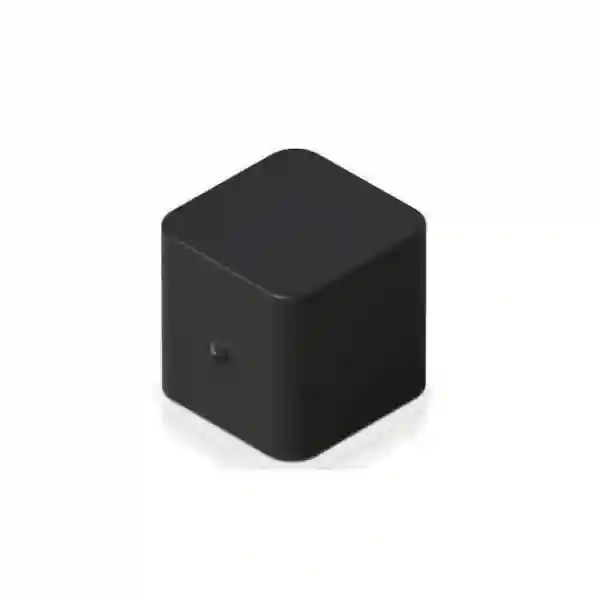
Ubiquiti airCube ISP ACB-ISP: 2.4 GHz Wi-Fi Access Point with 24V PoE
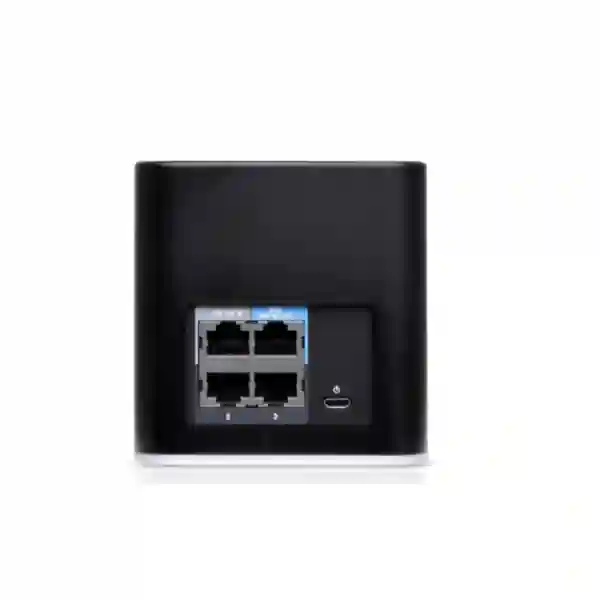
The Ubiquiti airCube ISP ACB-ISP is a compact indoor Wi-Fi access point intended for straightforward home and small-premises networking, especially alongside compatible airMAX customer-premises equipment. It provides 2.4 GHz Wi-Fi 4 connectivity, four 10/100 Mbps Ethernet ports and configurable 24V passive PoE passthrough. It is a sensible candidate where compatibility and an uncomplicated fixed-wireless layout matter more than maximum speed. However, it does not offer 5 GHz Wi-Fi or gigabit wired ports, and the published 300 Mbps Wi-Fi link rate is not an internet-speed guarantee. For a Tanzania installation, match the model to the service plan, upstream CPE, power arrangement and number of users before ordering. Request confirmation of the exact unit and accessories rather than assuming local stock or bundled power equipment.
Key specifications at a glance
| Model | ACB-ISP |
|---|---|
| Wireless | 2.4 GHz, Wi-Fi 4 / 802.11n, 2×2 MIMO |
| Maximum wireless link rate | 300 Mbps (theoretical) |
| Ethernet | Four 10/100 Fast Ethernet ports |
| Antenna gain | 4 dBi |
| Power input | 5V Micro-USB adapter (not included), or 24V PoE on LAN port 1 |
| PoE output | Controllable 24V passive PoE on WAN port |
| PoE passthrough supply planning | Manufacturer specifies 24V, 1A PoE input for adequate CPE passthrough |
| Device maximum consumption | 5W, excluding any downstream load |
| Dimensions | 87.8 × 89.5 × 89.25 mm |
| Manufacturer listed mass | 280 g |
| Operating temperature | -10°C to 50°C |
These are technical attributes of the manufacturer’s ACB-ISP model, not a promise of user throughput, Tanzania stock, a particular warranty, or any local certification. The power plan and the actual wired bottleneck are especially important when reviewing the quote.
Quick fit decision
Consider this model when
You need modest 2.4 GHz indoor Wi-Fi, a few Fast Ethernet connections and a compatible airMAX CPE installation where verified 24V passive PoE integration is helpful.
Choose another model when
You need 5 GHz Wi-Fi, gigabit Ethernet, high user density, sophisticated segmentation or a gateway appropriate for internet plans above the Fast Ethernet ceiling.
A practical starting point for a fixed-wireless connection
A home or small office receiving internet from an outdoor wireless CPE needs an indoor device that presents a usable local network. The airCube ISP was built with that arrangement in mind. It combines a 2.4 GHz Wi-Fi access point, wired Ethernet connections, and an option to pass suitable 24V power to a compatible upstream device. For a small premises where the connection comes through an airMAX radio, this can simplify the equipment layout. It does not replace the outdoor radio, establish a wireless backhaul by itself, or increase the speed of the service subscribed to from an internet provider. Begin with a diagram of the incoming link, the number of wired devices and the areas that need Wi-Fi. Check whether the upstream equipment is already routing traffic and whether the airCube should operate as a router or an access point. Matching those functions to the existing network prevents double routing and confusing IP addressing.
What ACB-ISP actually provides
The airCube ISP ACB-ISP belongs to the UISP-oriented airCube family. Its built-in radio supports 802.11n Wi-Fi on 2.4 GHz, with 2×2 MIMO and a maximum listed wireless link rate of 300 Mbps. The unit provides four 10/100 Fast Ethernet interfaces rather than gigabit Ethernet. This combination suits modest internet plans, ordinary web browsing, messaging, point-of-sale terminals with appropriate security controls, and routine office access where the required throughput is within the equipment limits. It is not a dual-band device and cannot provide a 5 GHz network. An advertised wireless rate is a radio-link figure under favorable conditions, not the speed any individual user should expect while transferring files or browsing the internet. The slower of the internet service, Ethernet interfaces, radio conditions and client capabilities can determine the actual user experience. Buyers should weigh these limits before choosing a device for a modern high-throughput connection.
Why 2.4 GHz matters
The 2.4 GHz band remains useful because many phones, budget laptops, printers and connected devices can communicate on it. It can be a reasonable choice when compatibility matters more than high wireless throughput. The same band is also shared with neighboring Wi-Fi networks, Bluetooth devices and other sources of interference. Busy buildings may experience contention, retransmissions and inconsistent speeds. The airCube ISP cannot move a client to 5 GHz because it has no 5 GHz radio. An installer should inspect nearby networks, choose an appropriate channel and set a sensible channel width for the local environment rather than assuming that a higher numerical link rate is always better. Place the unit away from metal cabinets, large appliances and dense concrete barriers where possible. A small change in placement may yield more practical improvement than changing a setting without measuring the result. Test performance where people actually use their devices.
Fast Ethernet ports and speed planning
The four Ethernet ports on this model use 10/100 Mbps technology. This is an important buying consideration if a property already has a fiber, fixed-wireless or other internet connection that can exceed 100 Mbps. Wired devices connected through the unit cannot obtain a gigabit Ethernet link from these ports. Likewise, routing traffic through a Fast Ethernet WAN interface creates a practical bottleneck before considering application overhead. For basic premises, four ports can be convenient for a desktop computer, a printer or another small wired device without immediately installing a separate switch. For large file transfers, network video recording, multi-user downloads, or faster internet subscriptions, a router and switch with gigabit interfaces are more appropriate. Count physical connections in advance and reserve room for future additions. Do not treat the quoted 300 Mbps wireless rate as an end-to-end throughput promise when the wired side is limited to 100 Mbps nominal link speed.
AirMAX CPE integration without confusion
Ubiquiti positions the airCube ISP for interoperation with airMAX customer-premises equipment. In a typical fixed-wireless installation, the outdoor radio communicates with a provider or site link, while the airCube distributes connectivity inside the building. The two devices play different roles. The external CPE must still be selected for the actual service, distance, mounting position and radio conditions. Simply purchasing an indoor airCube will not create a provider link or turn it into a long-range outdoor radio. Confirm the exact CPE model and its electrical requirements. Some compatible installations can use the airCube’s controlled 24V PoE output, while other equipment requires a different powering method. Verify port assignment, cabling and network configuration before connecting power. If the operator manages the CPE, coordinate changes with that operator rather than resetting or reconfiguring equipment without authorization.
Understanding passive PoE
Power over Ethernet can reduce the number of power cables in an installation, but different PoE systems are not automatically interchangeable. The ACB-ISP supports 24V passive PoE input on LAN port 1 and controllable 24V passive PoE output on its WAN port. Passive PoE is not the same as a universally negotiated IEEE 802.3af or 802.3at connection. Applying an unsuitable voltage or wiring arrangement can damage hardware. Before using this feature, compare the markings and documentation of the power injector, the airCube and the downstream CPE. Confirm polarity, pin assignment and current requirements. Never assume that a random PoE switch is compatible because its socket looks identical. Where a power source or cable run is uncertain, ask a qualified network installer to validate the arrangement. The ability to pass power is convenient only when the complete electrical path is verified and correctly rated.
Powering one device versus powering a CPE
There are two distinct questions when planning power: how the airCube itself will operate and whether it must also supply another device. The manufacturer identifies Micro-USB power and 24V PoE input as options for powering the access point, with the Micro-USB adapter not included. For an installation requiring 24V PoE passthrough to an airMAX CPE, the manufacturer specifies 24V, 1A PoE input to provide sufficient power. Do not assume that a 5V Micro-USB supply can also support the intended 24V passthrough arrangement. Select the injector and cables for the combined equipment load and the manufacturer’s instructions, not merely the airCube’s listed 5W maximum device consumption. Plan where the power injector will sit, how the cable is protected and how the arrangement will be serviced. Confirm which accessories are actually supplied with the exact quoted package before placing an order.
Planning the installation room by room
Good Wi-Fi design begins with the physical layout. List the rooms that need service, the materials between them, and the number of users likely to be active at the same time. A compact indoor access point may work well in a small open area, but a single device cannot guarantee coverage through reinforced walls or several floors. Keep the unit in a ventilated indoor location with sensible cable access and enough clearance to inspect its status indicator. Avoid hiding it inside metal racks or near equipment that radiates interference. Test at desks, counters and living areas rather than only next to the device. If signal is weak in distant rooms, reconsider the placement or the number and type of access points required. A high-power setting cannot compensate reliably for a phone with a weak return signal. Coverage must be evaluated in both directions.
Choosing router mode or access-point mode
The right operating mode depends on the upstream device. If the incoming connection supplies a bridged link and the airCube is intended to manage the local network, router functionality may be appropriate subject to the provider’s configuration requirements. If another router already performs NAT, DHCP and firewall functions, access-point or bridge operation may be the cleaner design. Running overlapping DHCP servers can cause unpredictable address assignment. Placing a second router behind an existing router may create double NAT, which can complicate VPNs, remote access and some applications. Document the intended gateway IP address, LAN subnet and management credentials before starting. The service provider may require specific WAN addressing or authentication details; obtain them from the provider. Do not copy settings from a different customer’s installation. After setup, test local addressing and internet connectivity from a wired and a wireless client.
Setup and management approach
Ubiquiti’s airCube materials describe local configuration and management within its service-provider ecosystem, historically referred to as UNMS and now associated with UISP branding. A site operator should check the currently supported management and firmware workflow for the installed revision before relying on a particular app interface. Begin with manufacturer instructions for the exact model, connect power through a compatible input, and access the device through the supported setup path. Set a unique administrator password, configure the desired wireless network name and security settings, and document who is responsible for the installation. Test the WAN connection, the LAN addressing plan and the wireless clients. If remote management will be used, enroll the device through an authorized operator account and secure that account appropriately. Never expose the administrative interface to the public internet merely for convenience. Keep configuration records in a secure location so a future technician can troubleshoot the network without guesswork.
Security basics for shared premises
A wireless router should be treated as part of the security boundary of the property, not simply as a source of radio signal. Use the strongest wireless security mode supported by the installed firmware and every necessary client, and choose a long unique passphrase. Change factory or previously shared administrator credentials. Turn off management access that is not needed, update firmware through trusted processes and restrict who can make configuration changes. Where business and visitor traffic must be kept separate, verify whether the actual firmware and network design can provide the isolation policy required. Do not assume that naming two wireless networks alone creates robust separation. Sensitive transactions, customer data and business applications may require dedicated firewall, switch or access-point features beyond this model. Retain backup configurations securely and record a recovery process. A small device can be adequate in a modest deployment, provided its features genuinely match the organization’s security requirements.
Small-office use cases
In a small office, the airCube ISP can provide an indoor wireless endpoint for everyday laptops and phones while offering wired connections for a few devices. This is useful when the office receives connectivity from a compatible upstream wireless radio and the intended traffic is modest. Before choosing it, inventory video calls, cloud applications, accounting tools, point-of-sale requirements and simultaneous staff usage. Cloud applications can be sensitive to delay even when their bandwidth consumption seems low. A quiet office with a few users has different requirements from a busy training room or a shop streaming several video feeds. Where high-speed backup, centralized guest control, business-grade roaming or advanced security segmentation is important, compare a fuller network architecture. A dependable network is defined by the work it must support, not by the lowest-cost device that can create a Wi-Fi signal. Plan capacity with expected growth in mind.
Home deployment use cases
For a home receiving an internet connection through an external CPE, this model can offer a tidy indoor endpoint for phones, tablets and ordinary web browsing. The compact form factor makes it easier to place on a shelf than a large rack-mounted unit. Its 2.4 GHz-only design may be sufficient for basic usage, but households with many simultaneous streams, gaming consoles, high-bandwidth local file transfers or a fast subscription should examine alternatives. If one room already has a strong signal while another remains unreliable, do not assume a replacement router alone will solve the problem. Diagnose wall losses, interference and distance. Keep firmware and wireless passwords under the homeowner’s control or under an agreed support arrangement with the provider. Ask whether the internet connection is supplied via an outdoor Ubiquiti radio, an optical terminal or a mobile gateway; that distinction changes the ideal network diagram.
Deployment for wireless internet providers
For wireless internet service providers, consistency across customer premises matters. The airCube ISP’s relationship with airMAX CPE equipment and its UISP-oriented positioning may support a standardized small customer installation when the technical limits are acceptable. A rollout plan should specify the approved CPE models, injector rating, wiring layout, firmware version, operating mode, management ownership and installation checklist. Operators should also define what happens when a customer resets the router, changes a password or moves the unit. A simple diagram at handover can save future site visits. Confirm which remote management features are available in the current platform and software, and avoid assuming that every historical app workflow remains unchanged. When customers subscribe to tiers above the capacity of Fast Ethernet or require dual-band Wi-Fi, supply a more capable customer router rather than creating an avoidable service bottleneck. Standardization should not override package suitability.
Reliability during power interruptions
Any indoor access point depends on a stable source of electricity. In a location where supply interruptions are possible, discuss a correctly sized backup solution for the entire internet path: outdoor CPE, indoor router, injectors, optical equipment where present and any upstream devices under local control. Backing up only the airCube will not preserve a connection if the outdoor radio has lost power. The manufacturer lists a 5W maximum device consumption for the airCube itself, but total load planning must account separately for devices supplied through PoE and conversion losses. Confirm input specifications and electrical protection before connecting backup equipment. Keep power adapters away from water and excessive heat and route cables to reduce accidental disconnection. Test a restart after power restoration to ensure addresses and services return correctly. A modest investment in a well-designed power arrangement can matter more to reliability than theoretical radio speed.
Cable layout and maintenance
Ethernet cabling has both a data role and, in passive PoE arrangements, an electrical role. Use appropriately rated cable, sound connectors and a layout that allows the installer to identify each end. Label the cable from the upstream radio and the cable supplying power. Outdoor segments require their own weather protection, routing and grounding considerations determined by the installation and local electrical practice. Do not route unprotected outdoor cabling beside mains wiring or across unsafe structures. Keep bends gentle and avoid crushed cable under doors. The airCube’s small size does not eliminate the need for strain relief and tidy cable management. Before handover, verify link negotiation, inspect for intermittent disconnections and record the injector and CPE models. A clear installation photo or written connection schedule can help diagnose faults months later, especially when more than one technician supports the premises.
Troubleshooting a slow connection
When a customer reports that the Wi-Fi is slow, identify the layer responsible before changing equipment. First compare the subscribed internet plan with a wired test under suitable conditions, remembering that the airCube’s Fast Ethernet links are nominally 100 Mbps. Next test near the access point with a compatible client, then test in the affected room. If speed falls sharply with distance, investigate interference and building obstacles. If wired and wireless tests are both poor, inspect the upstream CPE signal, service congestion and cable errors with the provider. A displayed 300 Mbps wireless association rate does not prove that the internet service or Ethernet path will deliver 300 Mbps. Monitor whether the symptom occurs only at busy times, only on one device, or after power interruptions. Document measured results before and after each change so the chosen remedy addresses the real fault.
Troubleshooting no internet access
A connected Wi-Fi icon is not proof of internet access. The client may be associated with the airCube while the upstream device, WAN link, DNS configuration or internet service is unavailable. Start by checking which equipment has power and whether its physical connection indicators are normal. Confirm that the client receives a valid IP address, gateway and DNS information. Test communication with the local router before testing an external service. For fixed-wireless installations, have the provider verify the CPE and its registered link rather than randomly resetting it. If the airCube was recently changed between router and bridge functions, check for address conflicts or missing DHCP service. Revisit passive PoE configuration only after verifying the complete electrical arrangement. Record the exact symptoms and any configuration changes made; troubleshooting is safer and faster when each test isolates one possible cause.
When to choose an upgraded router
The ACB-ISP should not be selected for every site simply because it supports 24V PoE passthrough. Choose a more capable router or access point when 5 GHz is important for reducing 2.4 GHz congestion, when gigabit wired connectivity is required, or when the premises need modern high-capacity Wi-Fi. High user density, extensive guest policies, advanced VPN routing and centralized security can also justify different hardware. Compare actual workloads with published interface and radio limits rather than relying on headline Wi-Fi numbers alone. Ubiquiti also offers other product families, but management ecosystems and power requirements differ; a device branded UniFi should not automatically be assumed to use the same provisioning process as a UISP airCube. If the existing airMAX CPE needs passive 24V power, include a compatible power solution in any upgrade plan. A replacement design should preserve the working upstream link without sacrificing safety.
Comparing airCube ISP and airCube AC
The names are similar, but the two airCube models should not be confused. The airCube ISP ACB-ISP is the 2.4 GHz 802.11n model with four Fast Ethernet ports. The airCube AC is a different model with dual-band capability and gigabit interfaces according to Ubiquiti’s family datasheet. This difference affects the throughput ceiling, client options and suitability for faster internet plans. A buyer who needs 5 GHz, improved local transfer capacity or room for higher-speed service should not assume the ISP model offers those features. Conversely, where a provider supplies a modest plan and wants a straightforward 2.4 GHz indoor device alongside a compatible CPE, the ISP model may be enough. Compare exact model identifiers in quotations and packaging, and ensure accessory choices correspond to the purchased version. Do not substitute product photographs for a specification check because the enclosures share a related design.
What 300 Mbps means in practice
The number 300 Mbps describes an upper wireless physical-layer link rate for the supported radio configuration, not a guaranteed sustained application result. Real traffic carries protocol overhead and is affected by signal strength, interference, client radio capability and how many devices compete for airtime. A client may connect at a lower negotiated rate, and that rate may change as it moves. The four 10/100 Mbps Ethernet ports impose an additional limitation on traffic that passes through those physical interfaces. Users should therefore evaluate the device against the throughput they need, not against an assumption that a 300 Mbps label equals a 300 Mbps internet connection. If an internet provider sells a plan close to or higher than the Fast Ethernet limit, an upgraded gateway is worth considering. For a modest plan, consistent coverage and correct configuration may be more valuable than chasing the highest number printed on a specification sheet.
Understanding the antenna specification
Ubiquiti publishes a 4 dBi antenna gain for the airCube ISP. That is a radio component specification; it is not a promise of a particular room count, floor area or outdoor range. Actual coverage depends on antenna orientation, client transmit capability, obstacles, competing signals and local regulatory settings. Wireless communication is bidirectional, so a router that reaches a phone does not guarantee the phone can return a reliable signal across the same path. Avoid interpreting antenna gain as a direct measure of internet speed. During an installation, make representative measurements in the intended working areas and check stability during normal occupancy. A useful plan prioritizes adequate signal throughout important rooms instead of a peak reading in one corner. For large, multi-floor or heavily partitioned spaces, multiple carefully positioned access points may be more practical than expecting a single compact unit to cover everything.
Capacity for several devices
The airCube can serve multiple wireless clients, but a stated Wi-Fi link rate does not establish a guaranteed client count or simultaneous application capacity. Every connected device shares airtime on the same 2.4 GHz radio. A handful of devices checking email is a very different workload from several users streaming video while transferring large files. Latency-sensitive services can deteriorate before throughput appears fully exhausted. Build an approximate usage profile: people present at peak time, wireless client mix, expected applications and the underlying internet speed. Consider which stationary devices could use Ethernet to reduce wireless demand, while remembering the 100 Mbps port limit. If capacity is uncertain, test with a representative workload and identify a reasonable upgrade path. An installer should not advertise an unsupported maximum number of users from the data rate alone. Reliable sizing is based on observed demand and practical constraints.
Tanzania buying considerations
A Tanzania buyer should first establish the type of internet service being delivered at the property. The same router recommendation may not fit a fixed-wireless subscription, a fiber termination, a mobile gateway and a complex office LAN. For a provider-managed outdoor airMAX CPE, confirm who owns and configures the radio and who is allowed to replace customer-side equipment. Ask the seller for the exact ACB-ISP model, power accessories included in the quote and appropriate technical support arrangements. Local pricing, taxes, delivery and stock status should be confirmed in an actual quotation rather than inferred from overseas retailer listings. If the device is intended for a regulated deployment, seek documentation applicable to the specific unit and current Tanzanian requirements rather than treating foreign certification labels as proof of local approval. A careful purchase decision joins model identification, power compatibility and expected network performance.
Before installation: buyer checklist
Prepare the basic information before the installer arrives. Record the incoming service type, upstream radio model if one is present, the subscription speed, the number of wired and wireless devices, and the location of an accessible power source. Ask which device will distribute IP addresses and which will provide the security boundary. Confirm whether the upstream CPE needs power through the airCube and, if so, verify an appropriate 24V passive PoE injector with enough capacity. Check that Ethernet cable runs are reachable and in good condition. Identify any applications that require inbound connections or special network configuration so they are not unexpectedly disrupted by NAT changes. Keep administrator credentials and provider settings available through an authorized person. A short preparation exercise reduces unnecessary installation visits and helps determine whether the ACB-ISP is the correct model before money is spent.
After installation: acceptance tests
A working status LED is only the first sign that an installation has power. Confirm that a wired client and a wireless client can each obtain an appropriate network address, reach their intended local resources and access the internet. Measure performance with an understanding of the service tier and Fast Ethernet limitations. Walk through the rooms where signal is needed and test a voice call, normal browsing or another real task. If the airCube supplies 24V passive PoE to an outdoor CPE, verify the upstream device operates reliably and that the injector and cable remain within the prescribed installation requirements. Confirm the management password has been changed, unnecessary remote administration is disabled and the support contact is documented. Record model identifiers and configuration backups in a protected place. A proper handover includes what the device can do, its limitations and what customers should check before reporting a fault.
Long-term care and firmware
Network devices benefit from periodic review even when they appear stable. Keep a record of installed firmware and consult current vendor guidance before making updates. Review security advisories, assess compatibility with the existing management system and schedule changes at a suitable time. Back up the configuration using the supported method and preserve access credentials securely. Inspect cable connectors, check for heat or moisture exposure and confirm that power sources remain suitable if other equipment has been added. Reassess capacity when the provider upgrades the internet package or a business adds more users. A router that worked with a modest subscription can become the bottleneck after service improvements. If troubleshooting requires replacement hardware, specify the ACB-ISP and the desired features rather than purchasing a visually similar model without checking frequency, port speed and power requirements. Maintenance is simpler when someone owns the network documentation.
What to ask when requesting a quote
A useful quote request should identify the device by manufacturer and full model: Ubiquiti airCube ISP ACB-ISP. State whether the intended role is a home access point, a small-business router or an indoor endpoint paired with an airMAX CPE. Include the upstream equipment model, desired power arrangement and approximate internet plan speed. Ask the supplier to confirm package contents, accessory requirements, commercial availability and applicable terms in writing. If you need 5 GHz or gigabit connectivity, say so at the start; those features are not provided by this model. If the installation uses an operator-managed CPE, involve the operator in the compatibility check. This makes it easier to compare like-for-like offers and avoids purchasing the wrong injector or assuming a quoted unit includes a power adapter. FourTeck Tanzania can review the stated requirements through its usual enquiry process without an unsupported claim of current local inventory.
Frequently asked questions
Is the airCube ISP a router or only an access point?
It is presented as an indoor Wi-Fi access point for customer deployments and can be configured for different network roles supported by its firmware. The right role depends on the upstream service. If another router already handles addressing and firewall functions, access-point operation may be preferable. If the indoor device must route a provider connection, verify the WAN settings and current capabilities with the provider before configuration.
Does ACB-ISP support 5 GHz Wi-Fi?
No. The ACB-ISP uses the 2.4 GHz band and 802.11n technology. Anyone specifically requiring a 5 GHz radio should select a different model, after checking the full specification and management environment. A visually similar airCube AC should not be mistaken for the airCube ISP.
Can I get 300 Mbps internet through it?
The published 300 Mbps figure is the maximum wireless link rate, not a guaranteed real-world internet throughput. Its wired ports are 10/100 Mbps, so a connection traversing those interfaces is constrained by their nominal speed and overhead. For subscriptions requiring more than 100 Mbps, consider equipment with gigabit network interfaces.
Does it power an outdoor airMAX radio?
It supports a controllable 24V passive PoE output on the WAN port for appropriate devices. This does not mean every outdoor radio is electrically compatible. Verify the CPE voltage, current requirement, pinout and total power budget. The manufacturer’s family datasheet specifies 24V, 1A PoE input when PoE passthrough power is required for the airCube ISP.
Is the power adapter included?
Ubiquiti identifies the Micro-USB adapter as not included in its official technical specifications. Package contents can vary by the exact listing or bundle, so ask for written confirmation of the injector or adapter supplied. Do not assume that a power accessory is included merely because an installation illustration shows one.
Will it work with fiber internet?
A fiber service normally terminates in a suitable optical network device or gateway. The airCube may be placed downstream as part of an Ethernet network if the design, connection settings and speed limits are suitable. It has no built-in optical fiber port, and its Fast Ethernet interfaces may constrain a faster subscription. Verify the provider’s permitted connection method.
Is it suitable for a large office?
It is better evaluated for modest customer-premises networks than for dense, high-throughput deployments. A large office may need multiple dual-band access points, gigabit switching, stronger segmentation and more capable routing. Plan from user count, floor plan and application requirements instead of relying on a theoretical maximum wireless rate.
Does it use standard PoE from any switch?
Do not assume so. Its documented 24V passive PoE arrangement differs from negotiated IEEE PoE systems. Check the exact power source and pinout against the device documentation. Never test an unknown injector or switch by trial and error because incompatible power can damage equipment.
Can it improve a weak signal in every room?
It may improve indoor service when properly placed, but no guaranteed area or room count follows from the published antenna specification. Concrete walls, interference and client hardware all affect coverage. Test actual locations, consider moving the device and plan additional access points when the property is too large for one radio.
How is the airCube managed?
Ubiquiti positions the airCube within its service-provider management ecosystem, and older documentation may use the UNMS name. Confirm current firmware and UISP platform compatibility before planning automated provisioning or remote support. Lock down administration and use authorized accounts rather than exposing the device openly to the internet.
What information should I send for a Tanzania quotation?
Send the full model ACB-ISP, intended quantity, internet service type, CPE model if relevant, planned speed and preferred power arrangement. Ask for confirmation of package contents, accessories and locally applicable sales terms. No Tanzanian price, stock level, delivery promise or approval status should be inferred without an actual verified offer.
What is the difference between airCube ISP and airCube AC?
The ISP model provides 2.4 GHz 802.11n and 10/100 Ethernet. The AC model has dual-band wireless and gigabit ports according to the manufacturer family datasheet. That distinction is crucial for buyers who need 5 GHz or higher throughput. Always compare the model number in the quote rather than relying on the airCube family name.
Request an ACB-ISP compatibility and quotation review
Tell FourTeck Tanzania the quantity you need, your internet type, the upstream CPE model if relevant, expected service speed and the intended power arrangement. Ask for the exact product and accessories to be confirmed. A checked configuration and written quote are more useful than assumptions about stock, package contents or suitability.
Enquire about Ubiquiti airCube ISP ACB-ISP and the correct power accessories.




Reviews
There are no reviews yet.