
WiFi 6 mesh | Router + MeshPoint | Model AFi-ALN
Ubiquiti AmpliFi Alien Router and MeshPoint AFi-ALN
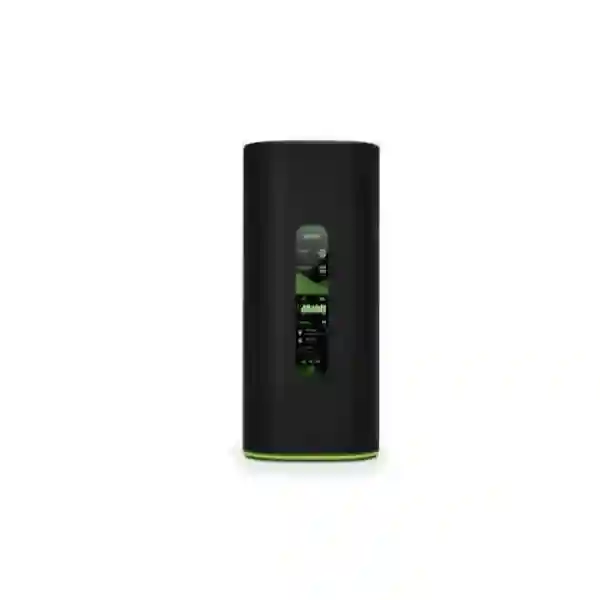
Bring WiFi into more of the rooms where it matters. The AFi-ALN combines a touchscreen-equipped Alien router and matching WiFi 6 MeshPoint for extended indoor coverage, with app-based management and Gigabit Ethernet connectivity. Review the site layout, client devices and regional hardware variant before requesting a quote in Tanzania.
Key specifications at a glance
WiFi 6 (802.11ax), 2.4 GHz and 5 GHz
Router: 1 × GbE WAN + 4 × GbE LAN; MeshPoint: 1 × GbE
4.7-inch colour touchscreen
AmpliFi application, WiFi/Ethernet access
100–240 V AC, 50/60 Hz, separate power for both units
Alien-family mesh equipment; verify standalone versus paired kit
Published data rates are theoretical radio figures, not guaranteed internet speeds. Regional operating limits vary.
What the AFi-ALN kit is designed to solve
The Ubiquiti AmpliFi Alien Router and MeshPoint AFi-ALN is a two-device WiFi 6 mesh system for customers who want a strong primary wireless network and better service in rooms beyond the convenient reach of a single router. The package combines a full AmpliFi Alien router with a matching Alien MeshPoint. The router connects to an existing internet service through its Gigabit Ethernet WAN port; the MeshPoint extends the Alien network toward another part of the property. This is useful when a study, bedroom, lounge or second work area has weaker coverage than the room containing the internet connection. Rather than treating every room as an identical radio environment, consider the path between the two units, the number of walls, and the placement of client devices. A two-unit kit can be a good starting point for a larger home or a small office with a straightforward layout, but it is not a guarantee that every floor or outbuilding will achieve the same speeds. Ask for a deployment assessment based on the actual rooms and internet connection before committing to a coverage expectation.
What is included in the box
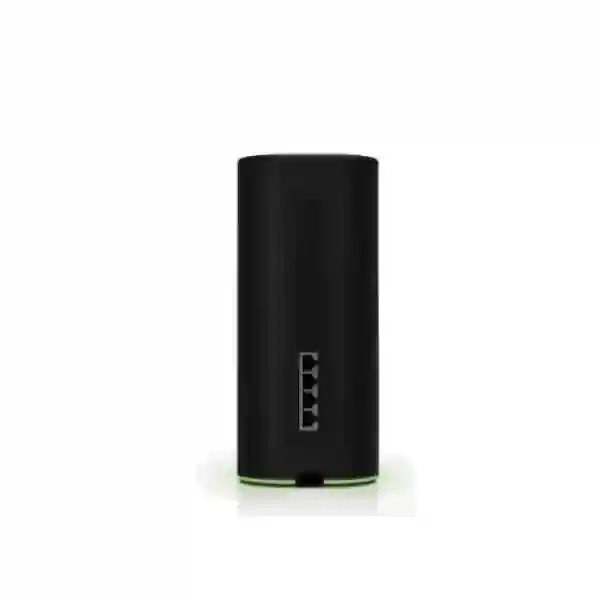
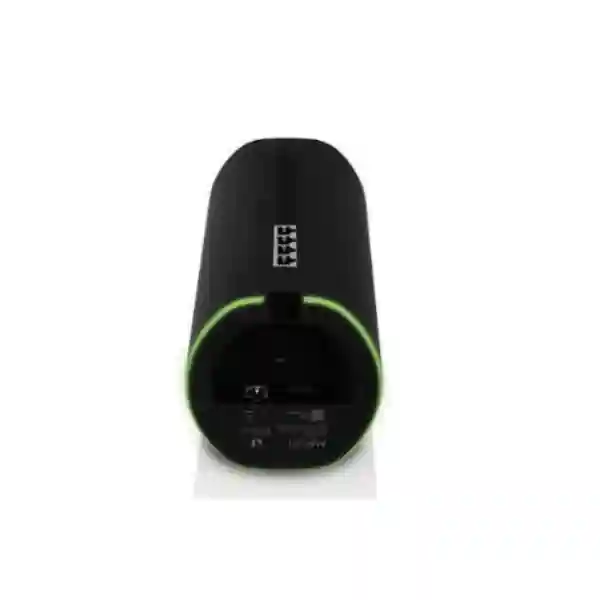
The manufacturer’s quick-start guide identifies one AmpliFi Alien router, one Alien MeshPoint, two power cables and an Ethernet cable as the kit contents. The main router and the MeshPoint are visually related, but they serve different roles and have different physical interfaces. The router has the colour touchscreen, one Gigabit Ethernet WAN port and four Gigabit Ethernet LAN ports. The MeshPoint has a signal indication system and one Gigabit Ethernet port, but no touchscreen. Both require their own mains power. Confirm the regional plug variant and exact supplied accessories on the offer before ordering; an international model designation does not, by itself, confirm the plug in a particular box. Place the two devices where they can be kept ventilated and serviced, not hidden in tightly enclosed cabinets. If the intended installation requires extra cabling, cable routing, a network switch, a surge-protected outlet or an additional battery backup, plan those items separately instead of assuming they are included.
WiFi 6 technology in practical terms
WiFi 6, also called IEEE 802.11ax, is designed to improve how a wireless network handles capable clients, particularly where several devices need airtime. Ubiquiti lists OFDMA, MU-MIMO and transmit beamforming among this system’s wireless functions. OFDMA can help distribute wireless resources more efficiently, while MU-MIMO can support communication with multiple suitable devices under the appropriate conditions. Beamforming can help direct transmission toward clients. These are radio capabilities, not promises that every connected phone or laptop will achieve a particular transfer rate. A WiFi 5 laptop may still work, but it cannot gain WiFi 6-specific capabilities it does not support. Similarly, a mobile device with a modest radio configuration may connect at a far lower rate than the published radio maximum. When evaluating a purchase, examine the age and WiFi capability of the devices that matter most, the internet package being used, the number of simultaneous users and the surrounding radio congestion.
Understanding the radio-speed figures
The published international technical specifications list a theoretical maximum data rate of 1148 Mbps on 2.4 GHz and 4800 Mbps on 5 GHz, with regional operation affecting available channels and transmission settings. These figures describe wireless link capabilities under specified technical conditions; they are not measured internet download speeds, and they must not be added together to claim one user’s guaranteed throughput. Real data transfer includes protocol overhead and is influenced by channel width, interference, network load, client antenna count, distance, walls and upstream internet capacity. A wired client on a Gigabit Ethernet port also faces that port’s link limit even if the surrounding radio has a larger aggregate capacity. Buyers comparing WiFi systems should therefore look beyond a large headline Mbps figure. Identify where video calls, cloud backups, video streaming and downloads happen, then evaluate the actual throughput and stability in those locations with the devices that will be used there. The objective is consistent experience, not a laboratory maximum printed on the carton.
Router and MeshPoint: different responsibilities
The router is the primary connection point for the internet service and the central unit for the Alien mesh network. It provides the WAN connection, local wired Ethernet connections, the main user-facing touchscreen and application-based management. The MeshPoint is the extension unit, placed farther into the building while maintaining a suitable link to the primary router. This arrangement is useful when adding another full router solely to cover a distant room would be unnecessary. It is important not to confuse the MeshPoint’s one Ethernet port with four additional LAN ports on the primary router. The expansion unit has a different port layout and does not include a touchscreen. When a desk has several wired devices, consider whether that desk should be connected directly to the router, supported by appropriately planned networking equipment, or supplied by a separate network cable. The right choice depends on topology, cable routes and the importance of stable wired performance.
Mesh links and the placement tradeoff
An extension point works best when it receives a good upstream connection while sitting close enough to the area that needs improved wireless coverage. Placing the MeshPoint at the exact corner where WiFi is already extremely weak may leave it with a poor connection to repeat. A more productive starting point is an intermediate position with a strong link to the router and a useful path toward the distant devices. Ubiquiti describes a dedicated 5 GHz mesh connection in the Alien system, while regional radio configurations and installation conditions affect observed behaviour. High-density concrete, reinforced walls, metal cladding, mirrors, water tanks and multiple floor slabs can all change how far a signal travels. Where the devices can be linked over suitable Ethernet cabling, ask about the supported wired-backhaul configuration and the wiring needed for the particular deployment. Do not assume that a mesh label means any two devices can communicate reliably across a long building or separate outdoor structure.
Who should consider this two-unit system
This product is worth evaluating for households with several rooms using smart TVs, laptops, phones and tablets; remote-working families whose router is far from the main workspace; and small professional environments that need straightforward wireless coverage without a complex controller-based network. It can also suit a home with an upstairs workspace and a downstairs broadband connection if placement testing confirms a good mesh link. A customer who wants convenient mobile-app setup and a visible router status display may value this system more than someone whose main goal is elaborate switch configuration. Larger offices, hotels, buildings with many independently managed networks, and sites requiring centrally managed enterprise access points may need a different architecture. A mesh kit should not be presented as a substitute for a full wireless site survey, carefully designed wired backbone, security segmentation or high-availability internet connection when those requirements are essential. Match the solution to the number of areas, usage patterns and business impact of an outage.
A sensible Tanzania deployment discussion
For a buyer in Tanzania, start with the actual location where internet service arrives and the construction of the building. A compact apartment with open rooms is different from a two-storey masonry home, a long corridor office or a building with several reinforced walls. Identify whether the internet access arrives through a provider-supplied modem, fibre termination device or another router, and whether the service uses settings that need to be coordinated during installation. The Alien router connects through Gigabit Ethernet WAN, so the upstream equipment and credentials must support the planned arrangement. Check the power outlet and power continuity at both device locations; each unit needs electricity to maintain the intended network. If outages are a concern, budget for appropriate backup power with sufficient capacity and correct electrical integration. No local stock, installation coverage, approval, delivery time or Tanzanian price is implied here. Those commercial details should be confirmed against a current written offer for the exact model and regional variant.
Getting more from the router’s touchscreen
One distinctive feature of the Alien router is its built-in 4.7-inch colour touchscreen. Ubiquiti specifies a 274 by 1268 display, making the router visibly different from compact wireless units that rely entirely on a mobile phone for feedback. The screen offers convenient access to device and network status at the equipment location. It is helpful where the router sits on a shelf or desk and the person checking basic operation does not want to find another device first. The screen is on the router, not the included MeshPoint, so do not plan a second touchscreen at the extension location. The product also has a green light ring and configurable brightness through the AmpliFi application. For spaces such as bedrooms, reception desks or shared offices, consider the visual effect of the device’s light and whether the planned position makes the screen accessible. Do not position equipment solely for appearance at the expense of airflow, mains safety or good wireless performance.
Management through the AmpliFi app
The manufacturer’s setup guide describes configuration through the AmpliFi mobile app for compatible phones, while also documenting a setup route for users connecting to the default wireless network from a computer or tablet. Once configured, the app provides a network overview, connected client information and access to several operational functions. It is intended to make basic home-network tasks understandable without requiring users to administer a separate enterprise network controller. A network dashboard can be useful when a member of the household asks whether the internet is working or a newly connected device is visible. The app can also help diagnose certain network and MeshPoint status issues. Before purchasing for an organisation, check whether the available administration methods and permissions are suitable for its support process. Do not assume the platform provides the full monitoring, identity management, reporting, logging or configuration features of an enterprise wireless controller. App options and mobile operating-system support can also change with software releases.
Wired ports and real network topology
The primary Alien router has one Gigabit Ethernet WAN port for its upstream internet connection and four Gigabit Ethernet LAN ports for local wired devices. That configuration is convenient for a television, desktop computer, network storage device or another piece of equipment located near the router. The MeshPoint has a single Gigabit Ethernet port. These port counts matter because customers may otherwise overestimate the wired expansion available from a two-unit package. Sketch the equipment you want wired: perhaps an office desktop, a printer, a television and a media player. If more connections are necessary, determine where a compatible Ethernet switch and cables would fit into the design. Also confirm how the internet provider’s device will connect and whether the Alien will route traffic or operate in a suitable alternative mode. Gigabit ports are not multi-gigabit ports; even a faster internet contract will not turn a 1 GbE port into a higher-speed physical interface.
Security and guest-network expectations
The official technical specifications identify WPA2 wireless security and guest traffic isolation. That makes it important to describe the advertised capability accurately rather than claim a security feature absent from the source. For example, do not assume WPA3 support for this exact kit merely because WPA3 is associated with some newer WiFi products. Use a strong, unique network password, protect the router’s administration credentials, keep firmware current through supported procedures, and review which people should have guest access. The AmpliFi guide describes an app-based guest function and the ability to limit access for guests. Where sensitive financial, client or internal company data is involved, review the full security requirements rather than relying on a guest SSID as a complete policy. Consider device updates, endpoint security, service-provider equipment, physical access and the implications of sharing a network. Businesses with advanced authentication or highly granular policy requirements should verify support before treating this kit as their primary security platform.
Family profiles, control and everyday convenience
The manufacturer’s app guidance describes family profiles that let an administrator group devices and apply internet-access pauses or schedules. This can be useful when a household wants an uncomplicated way to manage when selected devices have internet access. It is a network control feature, not a guarantee that every app, offline activity or mobile-data connection can be restricted. Children and other users may still reach services through cellular data or a different connection. A sensible deployment includes household agreements and suitable device-level security controls alongside any network scheduling. For a shared workspace, the same convenience of grouping devices can reduce small administrative tasks, but it should not be confused with enterprise identity-management or staff access-control systems. Before depending on a particular control for critical operations, verify how it behaves with the actual devices and the current firmware version. Some configuration details may differ by client type or software release.
What Teleport adds and what it does not
Ubiquiti presents Teleport as a way for users to establish a VPN connection back to their AmpliFi home network. It can be useful when a person wants secure access to appropriate home-network resources while away, subject to supported applications and network conditions. However, a VPN connection is not a replacement for reviewing the security of files, devices and services at the remote end. Performance depends on both internet connections, particularly the upload capacity available at the home location, as well as the remote connection’s stability. Customers planning remote access should check the current Teleport feature set, software requirements and account-management procedures. They should also distinguish access to a home network from an employer-managed corporate VPN, which may need different authentication and compliance measures. No particular VPN speed, geographic availability, uninterrupted connection or compatibility with every application is guaranteed by the presence of the feature name.
Simple installation sequence
Begin by confirming that the internet provider’s connection and the equipment to be attached are ready. Place the Alien router on a stable, open surface near the broadband handoff, provide suitable mains power and connect the upstream modem or provider equipment to the router’s WAN port. Follow the manufacturer’s guided setup method to create the wireless network and appropriate credentials. After verifying that the primary router can reach the internet, place and power the supplied MeshPoint at an intermediate location. Allow the unit to establish its mesh connection, then examine its signal indicators and the network information available through the application. Test with the actual phones, laptops and televisions in the intended coverage areas. If a location remains weak, adjust the MeshPoint position and test again rather than assuming the initial position is ideal. Record the final configuration, device location, administration ownership and any support information for future maintenance. Always follow the exact regional hardware guide shipped with the device and applicable electrical practices.
How to test coverage after setup
A useful acceptance test should measure whether real applications work well in the rooms that matter, not simply whether a WiFi icon shows several bars. Start near the router to establish a baseline, then test at the MeshPoint and at the furthest intended work or entertainment area. Use the same device where possible so the measurements are more comparable. Record download and upload results, responsiveness, and the quality of a video call or other important application. Repeat tests during a period when many household devices are active, because load can reveal issues absent from an isolated test. If wired equipment is involved, compare its connection with a wireless device to help separate WiFi problems from upstream service problems. Pay attention to internet-plan limitations, device capability and signal interference. An individual speed test does not prove long-term reliability, but a small structured set of tests is far more informative than choosing a router based on one maximum-rate specification.
Understanding walls, floors and coverage claims
Manufacturers may present illustrative coverage figures to explain the potential scale of a WiFi product. Such figures are not a building-specific guarantee. A room with thin interior partitions can behave very differently from a room behind reinforced concrete, tile, metal doors or several storage cabinets. Equipment at one end of a property may struggle to serve the other end even if the straight-line distance seems short. Signal performance also changes with the position of the phone or laptop, competing networks and interference from other devices. If the objective is better wireless coverage across multiple floors, the most useful question is where the second unit can communicate reliably with the first while still serving the target floor. For remote outbuildings, long corridors or very dense construction, discuss cable-based networking and additional access points rather than promising the included MeshPoint will solve every obstruction. Plan around actual usable coverage, not a single square-foot number.
Backhaul: why the link between units matters
The communication path between the router and the MeshPoint is called backhaul. This link carries traffic from devices near the extension unit toward the main router and then to the wider network. Even when a laptop has a strong link to the MeshPoint, a weak or congested backhaul can limit its experience. That is why placement and building materials are central to mesh planning. The Alien platform is designed with dedicated mesh-link capability, and Ubiquiti also documents Ethernet-backhaul scenarios within the AmpliFi family. The exact supported wired arrangement should be checked for the hardware and software configuration under consideration. A network cable can be useful where a property has suitable cable routes and wireless obstructions, but it adds installation work and must be properly terminated and protected. The best arrangement balances expected throughput, ease of maintenance, aesthetics and cost. Ask specifically how the MeshPoint will connect to the main router in the finished installation.
Compatibility: stay within the Alien product family
Alien equipment should not be purchased on the assumption that it will join every previous AmpliFi installation. Ubiquiti’s support guidance states that the Alien family meshes with Alien products and is not mesh-compatible with AmpliFi HD, Instant or Gamer’s Edition devices. This is an important checkpoint when upgrading a household that already owns older AmpliFi routers or extension points. The same guidance states that devices bundled together as a kit are paired to each other and cannot simply be repurposed to extend a different existing mesh. Standalone expansion devices can have different adoption options. Therefore, if you are buying this AFi-ALN kit for a future expansion plan, discuss the planned second phase before ordering and confirm whether any extra devices are standalone and compatible. Do not base a purchase on the expectation that the included kit MeshPoint can be separated and added to a neighbour’s or another office’s network. Compatibility questions should be resolved against current manufacturer guidance and exact model identifiers.
When this is not the right network product
A two-unit consumer-oriented mesh system will not be the most suitable answer for every environment. A site demanding multiple separately administered networks, detailed role-based administrative control, large numbers of ceiling-mounted access points or central coordination across many buildings may be better served by a purpose-designed business network. Similarly, a user who needs 2.5 GbE or 10 GbE wired interfaces should note the Alien kit’s published Gigabit Ethernet connections. Customers seeking the latest available WiFi standard should also recognise that this is a WiFi 6 product, not automatically a WiFi 6E or WiFi 7 system. Some buyers might prefer a less expensive single-router solution if their building is compact and has no meaningful dead zones. Others may achieve better results through permanent structured cabling. A fair comparison starts with the outcomes that matter: consistent connectivity, management requirements, budget, physical layout, device support and upgrade plans. A premium mesh experience is valuable only when it matches those needs.
Processor, memory and physical design
The official technical sheet lists a quad-core ARM Cortex-A53 processor running at 2.2 GHz and 1 GB of DDR3L memory for the router and MeshPoint. These hardware details describe the platform, but they do not justify inventing a particular real-world routing benchmark or number of concurrent connections under every workload. Both units are approximately 110 by 110 by 250 mm, with the router weighing around 1.2 kg and the MeshPoint around 1.1 kg. Their tall enclosure format is intended for open placement; it may be more visible than a discreet wall-mounted access point. Check furniture depth, outlet location and cable clearance before specifying a shelf. The enclosure is polycarbonate, and the antenna system is internal. Users should avoid covering the equipment or surrounding it with metal accessories that could obstruct radio signals. Physical design affects the installation experience as much as published processor specifications: space, heat, cable routing and accessibility all matter.
Power supply and environmental conditions
Ubiquiti specifies universal AC input of 100–240 V at 50/60 Hz, with maximum consumption of 35 W for the router and 34 W for the MeshPoint. These are maximum specified consumption figures, not a prediction of the actual energy consumed every hour. Both devices need suitable power at their installed positions, and the included mains cables should match the regional offer. The technical sheet lists an ambient operating-temperature range from minus 10 to 45 degrees Celsius and humidity from 5 to 95 percent non-condensing. Those figures do not mean the product is weatherproof. Avoid outdoor exposure, direct rain, wet areas and poorly ventilated enclosures unless a separate, correctly engineered protected installation is specified. In settings with unreliable electricity, discuss surge protection and backup power for the broadband terminal, router and MeshPoint together. Powering only one element may not preserve internet access. Review the proposed backup device’s safe electrical rating and maintenance requirements.
Wireless channels and regional variants
Wireless equipment is subject to the permitted radio frequencies and operating conditions of the market in which it is used. Ubiquiti’s published specifications note that operating frequencies and transmit-power limits depend on the regulatory region. A device’s country selection, regional variant and software behaviour can therefore affect which channels are available. Buyers should confirm the exact offered regional model and its suitability for lawful use in Tanzania rather than assuming that an imported unit behaves identically to a unit sold for another market. This page does not claim Tanzanian type approval or any specific local certification for the offered listing. The manufacturer lists international and regional radio parameters, but these alone should not be treated as evidence of approval by a Tanzanian authority. Where approval status is important to procurement, ask for the applicable paperwork for the exact hardware variant and consult the appropriate current regulatory requirements before installation.
Supporting older client devices
WiFi 6 routers are designed to communicate with a variety of earlier WiFi client standards, but the result is still limited by each device’s own radio capabilities. A phone with a single modest antenna cannot be expected to behave like a multi-antenna laptop close to the router. Some older smart-home devices are limited to 2.4 GHz, while higher-performance computers may prefer 5 GHz under the right conditions. When migrating from a different network, document existing network names, passwords and any device settings that must be updated. A change of router may require reconnecting printers, cameras, televisions or home automation devices. For devices that are especially sensitive to network changes, test their connection before retiring the old equipment. The goal is an orderly transition without introducing downtime for essential activities. If compatibility with a specific legacy device is business-critical, verify it with a practical test rather than relying solely on a broad statement that older WiFi generations are supported.
Planning for video calls and hybrid work
Remote workers often judge network quality by how consistently a meeting stays connected, not by the maximum headline wireless speed. A laptop situated behind several walls can suffer from retransmissions and a less stable signal even when the internet contract offers ample bandwidth. The MeshPoint can help improve the local wireless path when placed strategically, but the ISP connection, upstream congestion, power continuity and the laptop’s own radio remain important. Position the work area within reliable coverage and consider a wired connection where a stable path is available. If multiple people simultaneously upload large files or attend video calls, test the network under that realistic load. Check latency and packet loss as well as download throughput when diagnosing interruptions. For an office whose work depends heavily on connectivity, think beyond WiFi: plan suitable power backup, provider reliability and support processes. A mesh product is one component in an end-to-end communications setup.
Planning for streaming, gaming and shared entertainment
The kit may be attractive when televisions, consoles, tablets and media players are distributed across rooms. A strong connection near the main router does not automatically mean that a TV on another floor has a reliable stream, which is where a sensibly placed MeshPoint can help. For fixed devices situated near the primary router, the four Gigabit LAN ports offer an alternative to wireless connectivity. A fixed connection can remove some radio variables, although app performance will still depend on the internet service and remote content provider. Online gaming places particular importance on responsiveness and consistency; a stronger WiFi signal is useful, but it does not guarantee lower internet latency. Download-heavy activities can also compete with voice calls or other traffic. Set expectations through application testing during ordinary usage. Identify the busiest hours and the most important devices, then evaluate the mesh against those requirements rather than treating all entertainment workloads as identical.
Small-office deployment considerations
In a small office, assess how many workers use wireless at once, whether visitors require a separate guest experience, and which systems must remain accessible during service interruptions. The Alien’s app-based control and mesh coverage may be sufficient for a simple office where a few rooms share one internet connection. However, a professional deployment may have additional obligations involving sensitive records, employee separation, guest access, audit logging and central support. The official feature set should be checked against those requirements before procurement. Use the available LAN ports deliberately, especially for stationary business equipment. Create a straightforward layout diagram showing the provider equipment, router, MeshPoint, key wired devices and wireless coverage zones. Designate who owns the administration account and how credentials are stored securely. Document how to perform a safe restart and how to contact the person responsible for maintenance. If those requirements sound extensive, a more configurable business networking platform may be the better fit.
Maintenance and troubleshooting
A reliable wireless installation benefits from simple ongoing checks. Keep a record of the router’s placement, the MeshPoint’s location, the device model and the administration method. When a complaint arises, determine whether the problem affects all devices or only one, whether a wired connection works, whether the upstream ISP link is healthy and whether the MeshPoint remains connected. Ubiquiti’s guide describes diagnostic information relating to WAN link, IP settings, internet connectivity and MeshPoint status. These indicators can help narrow the problem, but they do not replace systematic testing. Avoid repeated factory resets without first checking configuration records, because resetting can require reconnecting devices and recreating settings. Review updates through the supported AmpliFi administration route, and keep passwords secure. The supplied hardware documentation describes reset procedures for recovery when required. For prolonged outages, coordinate investigation across electricity, provider equipment, router, mesh link and client devices in that order.
Upgrade and expansion decisions
Think about both the current floor plan and likely changes over the next several years. A new room, a home office relocation or additional devices may alter where wireless coverage is needed. The included MeshPoint provides one additional coverage location, but it does not mean that an unlimited number of bundled MeshPoints can be taken from separate kits and freely mixed. Ubiquiti’s compatibility guidance makes a distinction between paired kit hardware and suitable standalone expansion products. Discuss expansion with the exact model numbers and proposed topology. Also weigh whether future internet or wired-network requirements might exceed Gigabit Ethernet, because the published interfaces on this model are Gigabit. A WiFi 6 kit can still be a reasonable fit for many users, but it is not a substitute for checking upgrade paths. If permanent Ethernet infrastructure is already available, consider whether alternative wired access points provide more predictable long-term coverage. Choose the architecture that remains practical to administer as the property changes.
Comparison checklist before requesting a quote
A fair evaluation should compare solutions using the same criteria. First identify the internet package and its required handoff; then count the important rooms, floors and fixed devices. Note which devices support WiFi 6 and which are older. Compare the number and speed of Ethernet ports, the availability of suitable mesh expansion, management convenience and the type of security controls required. Next, check whether both units can be powered safely where they need to sit. Ask for the exact regional variant, package contents and any additional installation materials. Clarify whether the quote covers equipment only or includes cabling, configuration and site testing. Evaluate any requested warranty or after-sales terms from the written offer, not from assumptions based on a brand name. Finally, ask for an estimate of the practical installation approach rather than a blanket coverage promise. A purchase decision becomes easier when every option is assessed against the same physical and operational needs.
Frequently asked questions
Is the AFi-ALN a single router? No. The identified kit includes one Alien router and one matching MeshPoint. Does the MeshPoint have a touchscreen? No. The 4.7-inch colour touchscreen is on the main router. What is the wired WAN port speed? The router has one Gigabit Ethernet WAN connection. Can this extend an older AmpliFi HD network? Ubiquiti says Alien mesh products are not compatible with HD, Instant or Gamer’s Edition mesh families. Can I use the bundled MeshPoint to extend a different Alien kit? Bundled units are paired within their original kit; do not assume they can be separated to extend another network. Does WiFi 6 guarantee 4800 Mbps internet speed? No. That is a theoretical radio-link figure under supported conditions, not a guarantee of application throughput. Can both devices run without mains power? No. Each requires power. Is the kit suitable outdoors? The stated operating specifications do not establish outdoor weatherproofing. Can it provide internet without an ISP? No; the router still needs a working upstream internet service for internet access.
Questions about order readiness in Tanzania
What should I confirm before purchasing in Tanzania? Ask for the exact AFi-ALN regional variant, contents, power cable type and current commercial terms. Can I receive a price in Tanzanian shillings? Request a current written TZS quotation for the exact offered configuration; this description intentionally does not invent a price. Is local stock guaranteed? No availability claim is made here. Is installation included? Confirm whether installation, configuration, testing and any cabling are part of the offer. Does the kit have local regulatory approval? Do not infer it from international technical specifications; request evidence applicable to the exact variant when required. Which internet providers can it use? Its WAN interface is Gigabit Ethernet, but compatibility depends on the ISP’s handoff and network configuration. Will it cover my entire house? Coverage depends on layout, construction and placement, so a site-specific assessment is better than a blanket guarantee. Can I add devices later? Expansion must follow the manufacturer’s Alien-family and paired-kit compatibility rules.
A clear next step
If the Ubiquiti AmpliFi Alien Router and MeshPoint AFi-ALN looks suitable for your building, prepare a short brief before requesting a quote: describe the number of floors, where the current internet connection enters, the rooms with weak WiFi, the main devices in those rooms and any preference for wired connections. Include whether you require equipment only or an installation proposal. Ask for confirmation of the exact model, regional variant, availability, commercial terms and any applicable approval documentation. Where the layout is challenging, request a placement plan and realistic acceptance tests rather than a promise of identical speed in every room. This creates a stronger basis for deciding whether the Alien kit, a different mesh layout or a wired access-point design is right for your home or office in Tanzania. Request an AFi-ALN quotation and compatibility review before ordering.
Request an AFi-ALN quote
Share your building layout, current internet equipment and coverage goals. Request confirmation of the regional variant, product availability, quotation and any installation requirements before buying.




Reviews
There are no reviews yet.