
HP Poly Edge V400 IP Desk Phone
A practical Open SIP desk phone for teams that need clear calls, configurable line visibility and a dependable Ethernet-based workstation. Compare its real capabilities with your calling platform and network before purchasing.
Before you buy
The HP Poly Edge V400 IP Desk Phone is best evaluated as one part of a complete business calling system. A compatible SIP platform, sound network design, appropriate power and the right headset or accessory selection all matter. Use the guidance below to establish fit before asking for a current Tanzania quotation.
V400 at a glance
| Product type | Open SIP wired IP desk phone |
|---|---|
| Display | 3.5-inch colour screen |
| Line controls | 8 line keys, supporting up to 32 line appearances, features and contacts |
| Audio | HP Poly HD Voice, full-duplex audio, Acoustic Fence, NoiseBlockAI v3 |
| Networking | 2 × Gigabit RJ-45 Ethernet ports |
| USB | 2 × USB-C ports with distinct connection roles |
| Wireless | No built-in Wi-Fi or Bluetooth on V400; passive NFC listed |
| Expansion | Supports one optional HP Poly Edge V expansion module |
| Security capabilities | Trusted Security Module, 802.1X, HTTPS provisioning, TLS and SRTP support |
| Power planning | PoE, USB-C and optional external adapter approaches; verify exact bundle |
| Recommended check | Confirm SIP provider, provisioning, headset and accessory compatibility |
Specifications describe the model family and the verified V400 distinction. Platform configuration, accessories and commercial bundles require confirmation.
What the Edge V400 is designed to solve
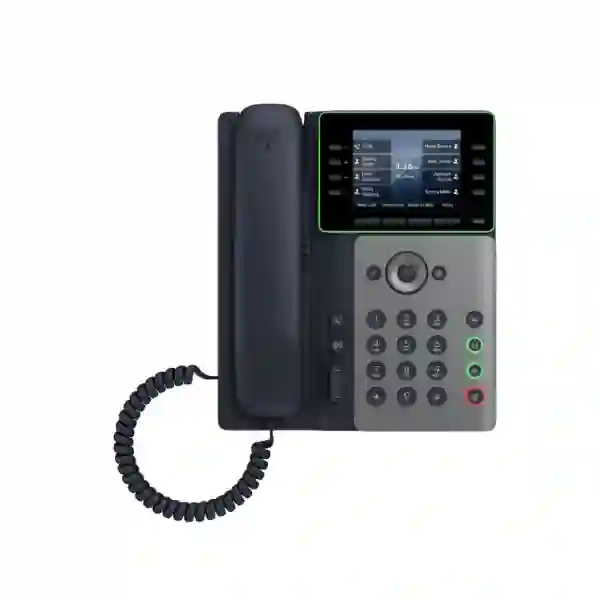
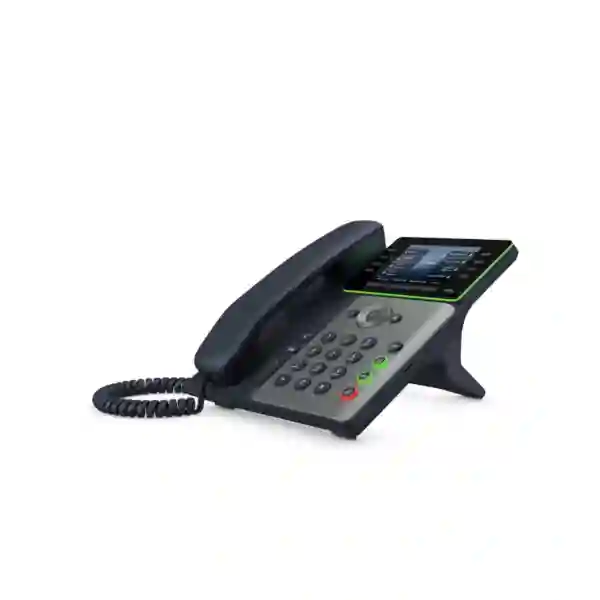
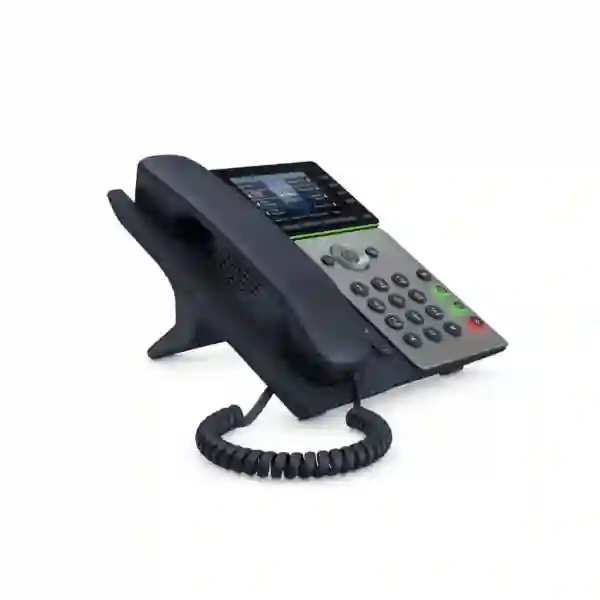
The HP Poly Edge V400 IP Desk Phone is a wired Open SIP business telephone for people who handle several calls and need to see useful call information without moving to a complex touchscreen workstation. It brings an easy-to-read 3.5-inch colour display, eight line keys supporting up to 32 line appearances, professional audio processing and straightforward Ethernet connectivity into one desktop device. It is particularly relevant when a team wants a dedicated voice endpoint rather than relying entirely on a computer or mobile application.
The important buying question is not simply how many features the phone has. It is whether the planned telephone service can provision this model, whether desk locations have the right Ethernet and power infrastructure, and whether staff need wireless connectivity. The V400 is a wired model without built-in Wi-Fi or Bluetooth. For organisations that prefer a predictable cable-based desk setup, that can be a suitable design choice; for wireless desks, the related V450 deserves evaluation.
FourTeck Tanzania can use a buyer’s telephone-platform details, intended extension count, desk layout and preferred accessories to prepare a more useful configuration enquiry. Buyers should request confirmation of the exact regional product variant, supported service configuration, included power accessories and any commercial terms before ordering. Those decisions are much more consequential than a feature list considered in isolation.
A practical fit for desks that manage several conversations
Many office roles involve answering a customer, placing a colleague on hold, checking whether another person is free and returning to the original call. A dedicated desk phone allows this sequence to remain separate from browser windows and software alerts. The Edge V400 is oriented toward knowledge workers and can also make sense for team leaders, administrative staff and service desks where a clear, repeatable calling routine matters.
Eight physical line keys provide immediate access to configured functions, while the phone supports a larger collection of line appearances and contacts through its interface. The advertised support for up to 32 lines, features and contacts should not be interpreted as 32 simultaneous conversations or 32 automatically activated SIP accounts. Actual appearances and assignments depend on how the telephone platform, firmware and administrator settings use the available resources.
Before purchasing for a whole department, map the activities of two or three representative users. Record how often they transfer calls, monitor colleagues, handle multiple ringing lines, use a headset or work away from their desk. A small pilot can show whether the key layout is appropriate, whether one expansion module would help, and whether a simpler or more advanced phone is a better match.
Display, line keys and status information
The V400 includes a 3.5-inch colour display intended to make caller information, menus and programmed functions easier to locate during the working day. It also includes a multicolour status light around the screen. This combination can be useful on a shared office floor, where staff need to recognise a phone’s condition quickly without constantly navigating menus or relying only on a ring tone.
Physical keys are valuable when a process needs consistent actions. A receptionist may need to locate a commonly used extension, while a manager may want a frequently contacted colleague within quick reach. The phone’s eight line keys support a broader set of configurable appearances and functions, but the exact arrangement must be designed in the telephone system. Do not assume that every label, presence indicator or feature key will work in the same way on every hosted provider.
During configuration, prioritise the functions users actually use rather than filling every available key. Give common actions clear labels, keep related contacts together and test how names display at normal desk distance. Teams with many monitored extensions should consider whether the optional Edge V expansion module is preferable to forcing too much information into the base display.
Open SIP: flexible architecture, but verify your platform
Open SIP means this phone is intended for SIP-based business calling rather than one single proprietary telephone ecosystem. In a typical deployment, an administrator gives the device its network settings, compatible provisioning details and the credentials or configuration supplied by the chosen voice platform. The device then participates in the organisation’s calling environment according to that platform’s supported features and policies.
Open SIP does not guarantee that every internet telephony provider will register the phone, permit auto-provisioning or support advanced functions. Some managed providers restrict supported devices, firmware releases or provisioning methods. Others may require a tested template for call transfer, presence indicators, directories, emergency calling or remote management. A claim that a system is SIP-based should therefore start a compatibility discussion, not end one.
Ask the voice-service provider for the current device support matrix, required software version, security settings, SIP registration limits, provisioning URL method and supported feature-key behaviour. Confirm whether the planned deployment uses an onsite IP PBX, a hosted SIP service or a provider-managed platform. Trial registration and several real call scenarios should be completed before a large rollout is approved.
Audio quality in a busy office
The Edge V400 combines HP Poly HD Voice, full-duplex audio and echo-cancellation features with NoiseBlockAI v3 and Acoustic Fence technology. These features are designed to make a caller’s voice easier to understand when office activity is happening nearby. They are relevant to reception counters, shared departments and open-plan workplaces where keyboards, nearby discussion and other background sounds can interfere with telephone conversations.
Noise reduction is a tool, not an unconditional promise of silence. The result depends on whether the person is using the handset, speakerphone or an appropriate headset, on the level and position of surrounding noise and on the behaviour of the remote party’s device. Network problems such as packet loss and jitter can also damage speech quality even when local microphone processing is working properly.
The sensible purchasing test is a realistic call. Make calls from a quiet desk and a typical busy desk, switch between the preferred audio paths and ask someone at the far end how clearly speech is heard. Also check the caller’s experience when two people talk at once. This separates the phone’s acoustic capabilities from network or service problems that require a different fix.
Choosing between handset, speakerphone and headset
Different tasks call for different audio methods. A handset remains familiar for private conversations and short calls. The speakerphone can be convenient when hands are needed for notes or a brief office discussion, subject to the organisation’s privacy rules. Headsets are often more appropriate for users who spend long periods on calls, need both hands free or work near other people.
HP’s V400 product information identifies USB Type-C, RJ-9 and an electronic hook switch connection for compatible headset arrangements, with an optional adapter referenced for EHS use. That does not mean every headset is automatically compatible. Connector shape alone is insufficient: verify USB headset support, control-button functions, microphone behaviour and any required adapter with the actual headset model and current phone software.
For procurement, collect the make and model of existing headsets and state whether answer/end control, call volume, mute feedback and movement away from the desk matter. If users will connect a headset to a computer as well as to the phone, test the desired routing. The V400 does not provide integrated Bluetooth for wireless headset or mobile-phone pairing; buyers needing that built-in radio capability should examine the V450.
Gigabit Ethernet and desk cabling
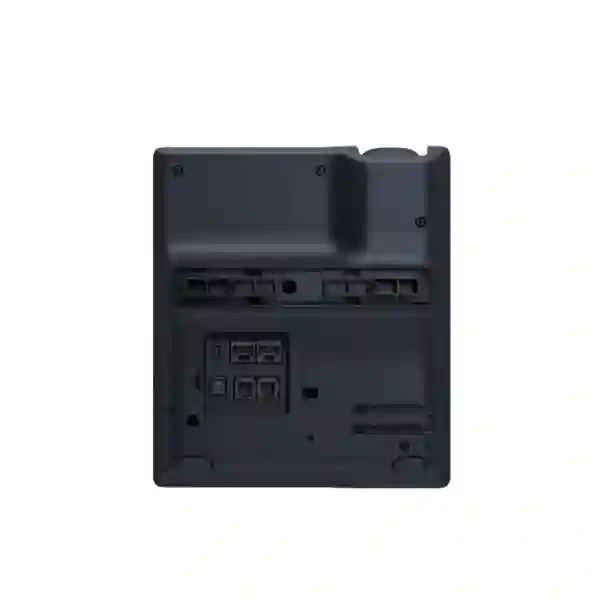
The Edge V400 has two RJ-45 Ethernet interfaces supporting 10/100/1000 Mbps network connections. In a common desk arrangement, one interface connects toward the office network and the other can connect a computer through the phone. This can help maintain a tidy workstation where a suitable single network outlet feeds the phone and the computer, subject to the organisation’s switching and security design.
Two Gigabit interfaces should not be mistaken for two separate internet services or a promise that any cabling arrangement will work without planning. An IT team still needs to confirm switch port configuration, VLANs, address allocation, network access controls and whether a downstream computer is permitted. The phone’s own calling quality will depend on the available network path and the priority given to voice traffic.
In new office or refurbishment projects, check the desk cabling before choosing the phone quantity. Verify cable condition, switch port availability, patching records and whether the organisation wants phones and PCs on separate logical networks. If staff regularly move between rooms, record how extension identity, phone settings and physical network access will be handled, rather than assuming the handset can simply be unplugged and used anywhere.
Planning Power over Ethernet and backup power
The V400 supports Power over Ethernet, allowing suitable network switching equipment to provide the phone with network connectivity and power through the Ethernet connection. HP also describes USB-C and an optional external power-supply approach for the V400 family. The exact power supply included with a sale depends on the product variant or bundle and must be confirmed on the quotation; it should never be inferred from a photograph.
For a multi-phone installation, the network switch’s total PoE power budget is as important as its number of ports. Count all powered endpoints, check the requirements of the exact devices and allow a sensible operating margin. Some offices will want switch-level backup power so that phones can continue operating during short mains interruptions, but a backup strategy must include the PBX, router, network equipment and voice service path as well.
A powered phone is not the same as a working telephone service. If the internet connection, SIP provider, upstream network or local call server is unavailable, some calls can still fail even while the display is illuminated. Businesses in Tanzania planning voice-critical workflows should evaluate power continuity and network resilience as part of the system, not as an afterthought when the phones arrive.
USB-C and working with computer audio
HP lists two USB-C connections for the Edge V400 and describes PC Connect audio support via USB-C. This gives the product additional possibilities beyond a conventional handset and Ethernet lead, such as supported USB headset arrangements or use with a computer audio workflow. The exact ports serve different technical roles, so administrators should consult the current hardware guide before specifying which cable or accessory belongs in which connector.
A USB-C connector is not a guarantee that any laptop, charging adapter, storage device or headset will function as expected. Host and On-The-Go roles, supported software functions and power requirements matter. A business should not budget on the assumption that arbitrary USB accessories will work, that the device will replace every computer audio peripheral or that the phone will become a generic conferencing device without validation.
If a team uses browser-based business applications alongside voice calls, pilot the intended computer connection with the actual operating system and application. Verify audio selection, microphone levels, mute operation, call control and the ability to switch between desk-phone and PC tasks. The best configuration is the one that removes confusion for everyday users rather than introducing another complicated sound-routing option.
Security designed into the endpoint
HP specifies a Trusted Security Module for the Edge V400 family, together with security capabilities such as 802.1X authentication, encrypted configuration handling, HTTPS provisioning, TLS, SRTP and signed software support. These are valuable building blocks for protecting a business voice endpoint. They help an administrator design stronger device identity, software integrity, signalling protection and media security within a properly managed telephone environment.
Security features do not configure themselves. TLS and SRTP must be supported and appropriately enabled across the phone, provisioning service and call platform; certificates, credentials and key handling also require administration. An isolated product claim should never be understood as evidence that calls are encrypted end to end in a particular deployment. Similarly, a trusted module does not remove the need for switch security, software updates and sensible access controls.
Before approving a rollout, determine who owns provisioning access, how administrator passwords are managed, how devices receive updates and what happens when an employee changes role. Avoid sharing live SIP passwords in open emails or ticket comments. IT teams should assess remote management and network segmentation alongside physical access to phones in public-facing areas.
Provisioning and fleet management
An organisation with one desk phone may configure it individually, but this approach becomes costly when dozens of users need consistent settings. HP identifies Poly Zero Touch Provisioning, Poly Lens and other management options for the V400 family. These can support a more systematic deployment approach, with the exact workflow depending on current software, enrolment requirements, licensing where applicable and the organisation’s phone-service provider.
A deployment plan should distinguish device setup from phone-service activation. Even when a handset can obtain a configuration automatically, administrators must still have the right extension assignments, policy settings, network access and service credentials. A central inventory should associate each physical handset with a location, intended user or shared area, firmware level and any required accessory. Such records make later changes far more manageable.
For phased implementation, create a tested baseline configuration, document the approval process for changes and decide how failures will be escalated. Verify whether your service provider permits the management platform you want to use. A clear process for restoring a phone after replacement or reset is often more valuable operationally than a lengthy list of management features that has never been exercised.
Accessibility and day-to-day ease of use
The wider Edge V Series includes accessibility-related options such as text-to-speech, adjustable fonts and display accommodations for colour-vision differences. These can matter for employees who need clearer information or an alternative way to interact with on-screen content. A phone that provides useful accessibility controls may reduce the need for informal workarounds, especially when the same device type is used throughout a department.
Accessibility requirements should be tested with the actual user’s needs rather than chosen from a specification sheet alone. Confirm the desired feature is available and usable on the exact firmware, check whether preferred contrast and text settings persist after provisioning, and assess the physical key layout. Also consider whether an appropriate headset, handset or hearing-support arrangement is needed for the user’s daily tasks.
Train staff on a small set of repeatable procedures: answering a call, placing it on hold, transferring it, finding a programmed contact and reporting a problem. Accessible setup includes documentation, sensible labels and support contacts as well as device features. If the organisation has multiple languages or staff who share a desk, confirm which interface and directory settings the chosen provider can actually maintain.
Expansion module for reception and busy service desks
HP specifies support for one optional Edge V expansion module with the V400 series. The accessory is designed to add more visible programmable keys for staff who monitor many lines, extensions or busy-lamp fields. The related expansion module offers 22 dedicated keys per page over three pages, creating up to 66 additional programmable positions when the deployment supports the intended function.
The extra screen space can help receptionists, supervisors and office administrators, but it should only be purchased when the actual workflow requires it. An assistant who monitors a small team may work comfortably with the standard eight keys. A larger front desk may need to see colleagues across several departments, making the additional module useful. Underlying call-platform capabilities still determine what each key can do.
Before including the accessory in a quotation, confirm the exact expansion-module model, supported V400 firmware, physical installation arrangement and the provider’s feature-key support. Review desk space and the number of keys users can work with comfortably. An expansion module improves access to information; it does not independently add SIP-trunk capacity, telephone numbers or PBX licences.
Discreet alert capability requires a defined policy
HP describes a programmable, one-touch discreet emergency-alert capability in the Edge V Series. The feature is intended to make it easier for a user to contact a preselected destination in a sensitive situation, with certain alert information concealed from the local interface. This is potentially relevant to controlled reception desks and selected frontline roles, but it should never be presented as a replacement for an organisation’s emergency response process.
The telephone administrator must determine whether the function is available and permitted in the specific deployment, which number it calls, how the action is initiated and who receives the alert. Teams should check what happens when the local network, PBX, provider service or power fails. They should also consider staff training, accidental activation, privacy and the distinction between an internal security desk and public emergency services.
Do not assume that a VoIP system will automatically transmit a caller’s physical location to emergency responders. Call routing and location handling depend on the service and country-specific arrangements. A company wanting to use this feature in Tanzania should confirm its telecommunications and workplace response design with the relevant service provider and internal safety team before relying on it.
V400 versus V450: understand the wireless difference
The V400 and V450 share a closely related display, general line-key proposition and expansion capability, but their wireless connectivity differs. HP identifies the V400 as the model without integrated Wi-Fi or Bluetooth and the V450 as the version offering those functions. For a permanently wired desk with managed Ethernet, the V400 may meet all practical needs without the additional radios.
The V450 becomes worth examining when a buyer requires supported Wi-Fi networking, integrated Bluetooth headset pairing or Bluetooth-related mobility features. A wirelessly connected handset still needs stable power, network design, security configuration and provider compatibility. Wireless capability can reduce a cabling problem, but it can also introduce coverage and interference considerations that need testing.
Do not buy a V400 expecting a later setting to turn on native Bluetooth or Wi-Fi. Passive NFC listed for the V400 is not a substitute for either function. Conversely, do not assume the V450 is automatically the better financial choice: if Ethernet and a wired headset are already standard, choosing features that staff will not use may add complexity without solving a problem.
V400 versus older Edge E400 naming
The Edge V400 and Edge E400 are not the same model. They come from different HP Poly product generations, and accessories, software identifiers, visual layouts and particular specifications should not be copied between them. Search results for the E400 can easily appear when someone looks for V400 information because both names include the number 400 and refer to IP desk phones.
The distinction matters when ordering a replacement, planning provisioning or checking an existing headset. An old configuration guide or spare part labelled E400 should not automatically be accepted as suitable for V400 hardware. Similarly, claims about a secondary display or a particular wireless-enabled E-series variant should not be transferred to this product. Always compare the exact name and model documentation.
During procurement, put ‘HP Poly Edge V400’ prominently on the request, and ask the supplier to state the exact variant offered in the quotation. For replacements, record the model of the installed phone, the provider’s approved firmware and any accessory dependencies. Correct identification at this stage prevents far more confusion than attempting to correct a mismatched order after deployment.
Tanzania deployment: practical network considerations
For a Tanzanian organisation planning a new IP telephony deployment, the most useful local question is whether the intended office network and voice service can support clear, consistent calls. The phone itself does not create a telephone service. It needs appropriate network access and a compatible platform, with outbound and inbound call arrangements established separately by the business and its chosen provider.
Ask the provider about the connection between office locations, the location of any hosted call platform, voice quality targets, call routing and outage handling. If the office has limited network resilience, consider a second network path or a documented fallback procedure where suitable. Test actual business calling at the times when the office’s internet usage is heaviest, rather than evaluating performance only in a quiet installation window.
Do not assume support for a particular Tanzanian mobile operator, SIP-trunk product, calling plan, telephone number range or local certification without confirmation for the actual service. Likewise, do not interpret this page as a statement of stock, in-country delivery, installation coverage or a locally applicable warranty. These commercial and regulatory questions should be answered explicitly in the purchasing process.
Common business scenarios
A professional-services team may want reliable handsets at dedicated workstations, with extension keys for internal colleagues and regular client calls. Here, the value is a familiar user interface, clear conversation handling and the ability to keep calling separate from laptop activity. The right pilot should check audio quality, transfer shortcuts and how a missed-call or voicemail workflow behaves on the selected platform.
A customer-facing office may use the V400 for an administrator who receives calls, checks staff availability and passes callers to the right person. If the team is small, the standard programmable keys may be sufficient. If many extensions must be visible at once, one optional expansion module could improve the workflow. The call platform must supply the presence or monitored-extension information for those keys to be useful.
A distributed organisation may prefer consistent wired devices across several managed offices. This can simplify training and help the IT team standardise on a known phone profile. Success still depends on having suitable local switches, secure remote management, resilient connectivity and a service provider that permits the model. It is sensible to prove the configuration at one site before repeating it at many.
When the V400 is not the best match
The V400 is not a wireless desk phone. If the installation cannot provide a suitable Ethernet connection, or the user requires a native Bluetooth headset connection, another model should be considered. The V450 is a natural related comparison, but even then the specific wireless network and headset requirements must be verified. A wireless feature is useful only when it solves a real operational constraint.
It may also be the wrong choice for users who need a larger display, a more extensive built-in attendant interface, touch-based applications or a device designed around a particular collaboration platform’s native calling experience. For those cases, compare the appropriate phone categories and obtain a support statement for the exact calling application. A SIP capability claim does not equal a certified experience on every platform.
Conversely, for an occasional user needing only a very basic extension, the V400 may offer more interface capacity than necessary. Before buying one phone for every employee, group users by their actual needs and estimate how many lines, monitored contacts and audio accessories each group requires. A mixed estate can be easier to justify than purchasing advanced hardware for tasks that do not need it.
Pre-installation checklist for IT and procurement
Start with the call platform. Record whether the service is hosted or local, identify the current supported device list, establish the required network and provisioning methods, and confirm any limits on extensions, registrations or advanced call controls. Obtain a current configuration example from the provider where possible. The team should agree who will own credentials, updates and first-line troubleshooting after installation.
Then check each physical workplace. Note where Ethernet outlets and PoE-capable switch ports are available, whether a connected computer uses the phone’s network pass-through, and whether a desk will need an external power accessory. Review backup power, cabling, safe cable routing, desk space and preferred headset type. Identify any security or accessibility requirements that need to be demonstrated during the pilot.
Finally, define clear acceptance tests. These should include placing and receiving calls, transferring them, testing hold and voicemail where supplied, checking real speech quality, confirming key labels and verifying that a replacement phone can be commissioned without guesswork. Record the outcome and sign off the chosen firmware and provisioning profile before buying the remaining handsets.
Unboxing and first commissioning
HP’s Edge V400 product brief describes a phone, handset, handset cable, desk stand, network cable and quick-start guide in the standard package. The actual commercial bundle may vary, so an order should separately identify whether an external power adapter, wall mount, expansion module, headset or other accessory is included. A buyer should not treat optional items shown in illustrations as part of the base phone.
At installation, assemble the desk stand, connect the handset, attach the phone to a suitable network and power source, and apply the approved configuration method. A technician should verify the correct firmware, network parameters, extension assignment and time settings, then place a live call. A display that boots successfully does not prove that the telephone account is registered or that a real caller can reach the extension.
Label the handset or update the asset inventory after a successful test, and give the user a short guide for everyday actions. If an expansion module or headset has been selected, test it at this point rather than leaving it for a later support ticket. Consistent commissioning records are particularly useful when an organisation operates multiple offices or has staff turnover.
Troubleshooting without guessing at the cause
If audio sounds broken, first determine whether the fault affects one handset, one office or every endpoint on the calling service. Check whether the problem occurs on handset and headset calls alike, and whether it appears only when calling outside the organisation. This can help separate an accessory problem from an endpoint configuration issue or a wider network or service problem.
Where a network issue is suspected, inspect cabling, PoE state, switch counters, address allocation and the path to the SIP platform. Packet loss, congestion and inconsistent latency can make voices cut out even when a phone advertises sophisticated noise processing. The IT team should review voice prioritisation policies and use the provider’s diagnostics rather than immediately resetting every affected device.
If calls do not register or fail after a change, check the approved provisioning profile, service credentials, clock synchronisation where relevant, certificates and the software level required by the provider. Avoid copying passwords between devices or disabling security checks merely to make registration succeed. Keep a record of the test, symptoms and corrective action so the next similar incident can be resolved faster.
Maintaining a secure, supportable phone estate
After installation, an IP phone becomes part of the managed technology estate. Assign responsibility for software updates, configuration backups or templates, asset records and retirement. Keep a current list of device locations and the extensions associated with them, while limiting access to sensitive SIP credentials. A simple ownership model prevents an otherwise capable device from becoming difficult to maintain.
Organisations should establish a method for checking vendor software notices and service-provider change announcements. A new software release may improve behaviour, but it may also require compatibility testing with the installed telephone service and accessories. Pilot changes on representative devices and maintain a way to recover a phone if the new configuration behaves unexpectedly.
Before moving or disposing of a handset, follow the approved process for removing user associations, credentials and configuration data. Confirm whether an administrator reset is enough for your security policy and review vendor guidance for the actual firmware. Long-term operational value comes not just from features available on day one, but from keeping the phone environment predictable as employees, providers and network conditions change.
How to request the right quotation
A useful quotation begins with a concise description of how the phones will be used. Tell FourTeck Tanzania the desired quantity of HP Poly Edge V400 units, whether each desk has suitable Ethernet and PoE, the name of the intended SIP or PBX service and the number of sites involved. Include the number of staff who will use wired headsets and the number who need an optional expansion module.
Also state any special conditions: a wall installation, a requirement to route computer audio through USB-C, an internal discreet-alert workflow, monitored extension keys or integration with an existing handset fleet. Ask for the exact model and regional variant, included accessories, any necessary power supply, relevant compatibility confirmations and the commercial terms. Avoid assuming these details from a generic online product image.
The goal is a quote that can be reviewed by the people who will install and support the system, not only by the purchasing department. A well-scoped request makes it easier to compare alternatives fairly and avoids spending money on hardware that cannot use the organisation’s chosen telephone service. Request a configuration and availability check before placing an order.
Frequently asked questions
These answers focus on the exact V400 model rather than borrowing features from the V450 or older E400 generation.
Does the HP Poly Edge V400 include Wi-Fi or Bluetooth?
No. HP identifies the V400 as a wired model without integrated Wi-Fi or Bluetooth. It does have passive NFC listed in the product brief, but passive NFC is not a replacement for wireless networking or Bluetooth headset pairing. If those functions are essential, evaluate the related V450 and verify the supported deployment and accessory details.
How many lines does the V400 support?
HP specifies eight line keys supporting up to 32 line appearances, features and contacts. That figure refers to configurable phone interface capacity, not a promise of 32 simultaneous active calls, registered accounts or licensed external telephone channels. Confirm the provider’s supported key assignments and SIP limits for your planned service.
Does this phone work with every SIP provider?
It is an Open SIP desk phone, but interoperability should be confirmed for the specific provider, service plan, phone firmware and features. Ask for current device support information, registration requirements and the provider’s tested configuration. Test transfer, hold, voicemail, directory and any busy-lamp functions that matter to the business before rollout.
Can it be powered by the network switch?
The Edge V400 supports Power over Ethernet with appropriate network equipment. Its broader power options include USB-C or an optional power adapter, depending on the configuration. Check switch PoE capacity, the exact hardware variant and the contents of the seller’s bundle before budgeting for installation or backup power.
Can I use a wireless headset with the V400?
The V400 does not have integrated Bluetooth. HP lists wired headset connection options, including USB-C, RJ-9 and an EHS interface for a compatible optional arrangement. A separately designed wireless headset system may use a supported base or interface, but that exact model and all call-control features need compatibility testing; do not assume native wireless pairing.
Is the V400 suitable for a receptionist?
It may be suitable for a smaller or moderately busy reception desk when the phone platform supports the required line keys and call controls. HP also describes one optional expansion module with additional programmable positions. A receptionist with extensive monitoring requirements should assess the real key layout and perhaps compare larger attendant-oriented phones.
What is the difference between Edge V400 and Edge E400?
They are different HP Poly models from different product generations. Do not transfer hardware, accessory or configuration specifications from an E400 page to a V400 order. Verify the complete model name on purchasing documents and in the provider’s device list, especially when replacing older equipment.
Does the Edge V400 automatically encrypt all calls?
HP specifies security capabilities including TLS and SRTP, but their actual use depends on configuration and the telephone platform. A trusted security module and secure provisioning features help build a safer deployment; they do not by themselves prove that every call is encrypted end to end. Ask the administrator or provider to confirm the active security policy.
Can the V400 connect to a computer through USB-C?
HP lists USB-C connectivity and PC Connect audio functionality. The practical behaviour depends on the supported operating system, application, connection mode and the phone’s configuration. Test with the actual computer and headset workflow, and check the current hardware guide before specifying cables or accessories for an entire team.
Are an expansion module, wall mount and power adapter included?
These accessories must not be assumed to be part of the standard offer. HP describes the expansion module and wall mount as optional; power-adapter inclusion can depend on the quoted variant. Ask the supplier to identify everything supplied with the exact regional product bundle and to quote additional accessories separately where needed.
Will this handset work during an electricity or internet outage?
A phone powered by a PoE switch may stay on while that switch is powered, but calling also depends on the PBX or hosted service and a working network path. Businesses that need continuity should assess backup power, upstream connectivity and an alternative calling procedure. No desk phone alone can guarantee service during a wider network outage.
What should a Tanzania buyer send with a quote request?
Provide the requested quantity, office network and PoE details, preferred calling provider, extension requirements, headset and expansion-module needs, and whether the devices are for a new installation or a replacement project. Request written confirmation of exact variant, compatibility, current availability, pricing, delivery arrangements and applicable commercial warranty terms before proceeding.
Request a V400 configuration and quotation check
Tell FourTeck Tanzania how many phones you need, which SIP or PBX service will be used, whether PoE is available and which accessories are required. Request confirmation of the exact V400 variant, service compatibility, current commercial availability and terms before purchasing.
No price, stock level, delivery commitment or local warranty term is implied by this guide.




Reviews
There are no reviews yet.