
Business SIP desk phone · Tanzania buyer guide
HP Poly Edge E350 IP Desk Phone
Handle frequent calls with eight line keys, a clear 3.5-inch colour display and flexible Ethernet, Wi-Fi and Bluetooth connectivity.
The HP Poly Edge E350 IP Desk Phone is a strong candidate for business reception teams, supervisors and professionals who need familiar physical controls alongside a managed SIP phone system. Explore the real capabilities, the power and network requirements, and the compatibility questions to resolve before requesting a quote.
Quick technical overview
These are the key manufacturer-documented capabilities of the E350 family. Exact regional bundles, software behaviour, accessories and platform support must still be confirmed for the unit being supplied.
| Display | 3.5-inch colour IPS LCD, 320 × 240 pixels |
|---|---|
| Keys | 8 physical line keys; pagination for up to 32 line or contact positions |
| Wired network | 2 × RJ-45 10/100/1000 Mbps Ethernet ports |
| Wireless | Integrated 2.4 GHz and 5 GHz Wi-Fi; Bluetooth 5.0; NFC listed in HP specifications |
| Power | IEEE 802.3af PoE, Class 3; 13 W maximum listed by HP |
| USB | 1 × USB 2.0 Type-C for supported media and storage uses |
| Headset options | Bluetooth, RJ9, USB and electronic hook switch options; check accessory compatibility |
| Calling | SIP-based business voice; PBX/provider determines feature availability |
| Audio | Poly HD Voice, Acoustic Clarity, Acoustic Fence, NoiseBlockAI |
| Operating temperature | 0–40°C listed by HP |
Know before you order
The E350 needs a compatible SIP/VoIP system; it is not a standalone telephone service. Ethernet with PoE can provide both connectivity and power. Wi-Fi can provide network connectivity, but a suitable local power source is still necessary when PoE is unavailable. Confirm PBX compatibility, headset choices and the exact regional box contents before approving a purchase.
Who should choose the Poly Edge E350?
A work phone designed around people who manage several conversations, need dependable audio, and may move between wired and wireless desks.
The Edge E350 makes sense for a reception team handling frequent inbound calls, a supervisor who monitors several colleagues, an office administrator who transfers calls throughout the day, or a professional who wants the familiar ergonomics of a dedicated handset without giving up modern network options. Its physical buttons, colour screen and headset choices reduce the need to navigate an on-screen softphone for every routine action. For an organisation evaluating desk telephones in Tanzania, the important starting point is not simply how many features appear on a spec sheet, but how those features match actual call flows and the existing telephone platform.
Eight line keys provide immediate access to commonly used functions, while pagination extends the addressable line or contact positions to 32. That is valuable where a user needs assigned appearances, speed dials or monitored contacts, but the number should not be confused with a promise of 32 simultaneous conversations or 32 independent subscriptions. Your call server and provisioning profile determine how line appearances and key functions behave. A short workflow review before ordering will reveal whether the E350 is appropriately equipped for daily use or whether a simpler model would cover the same work.
This is a SIP-oriented business desk phone, not a standalone mobile telephone and not a substitute for a PBX, hosted calling service or appropriate network connection. Organisations should confirm their provider’s supported software, registration process, feature map and deployment policy before buying multiple units. If users primarily work through browser meetings rather than managed voice calls, a headset or another endpoint may be more appropriate. The strongest purchasing decision matches the phone to an operational need, not just a preference for newer hardware.
Clear controls and efficient line handling
Make routine actions visible so staff can focus on the caller rather than the interface.
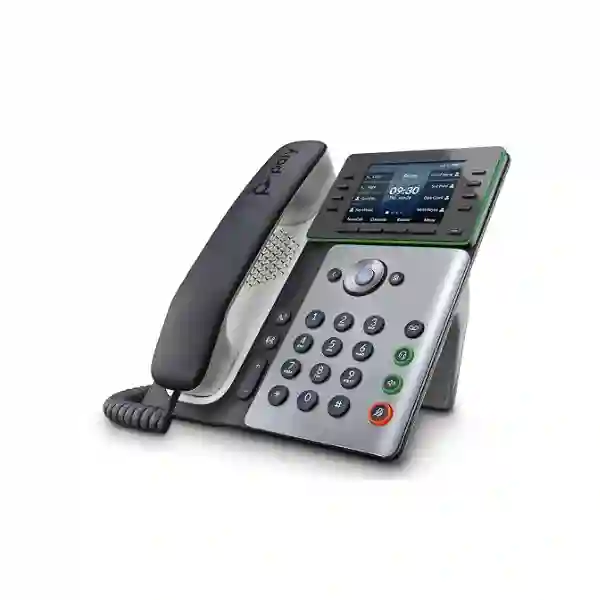
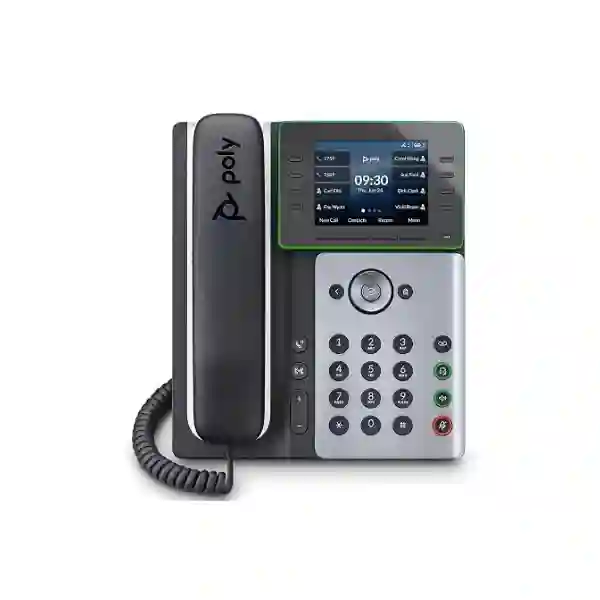
The 3.5-inch colour IPS display presents line information, contacts, soft keys and call context at a glance. Its 320 × 240 pixel resolution is suited to a compact telephone interface rather than document viewing. An illuminated surround status indicator helps users notice activity, and physical navigation, audio and line controls offer tactile feedback. At a busy front desk, it is worth deciding which calls and colleagues deserve direct key access rather than spreading every available position across several pages. A carefully planned first screen is often more useful than a long, unstructured list of labels.
The eight physical line keys can represent different functions according to the platform configuration. They might be used for a user’s line appearances, commonly dialled extensions, shared call handling or features such as monitored contacts when supported by the phone system. The pagination control exposes further positions, taking the total supported line or contact capacity to 32. Key behaviour is not identical on every SIP server. Ask the administrator to demonstrate transfer, hold, consultative transfer, presence monitoring and any shared-line workflow on the actual service before standardising labels for a department.
Managers may want selected speed dials on the first page, receptionists may prioritise the transfer destinations they use repeatedly, and a shared desk may need a much leaner layout. These differences can be documented as profiles and rolled out consistently during provisioning. Consistency matters because employees change shifts or desks, and a phone that looks familiar cuts down on avoidable mistakes. Where a hot-desk policy is required, verify that the server supports the intended sign-in and user-assignment method; the hardware alone does not automatically deliver every hot-desking capability.
Voice quality in a busy workplace
Understand what the audio technologies do—and what the surrounding network must still deliver.
HP identifies Poly HD Voice, Poly Acoustic Clarity, Acoustic Fence and NoiseBlockAI among the E350 family’s audio capabilities. These features have distinct jobs. Poly HD Voice supports natural-sounding speech when the call path permits compatible wideband audio. Acoustic Clarity addresses full-duplex conversation, echo and background noise management. Acoustic Fence is intended to reduce distracting sound during handset or supported wired-headset use. NoiseBlockAI addresses background noise when using the speakerphone. Together they help make the caller easier to hear and the user easier to understand in practical office environments.
Noise reduction should not be treated as a replacement for good acoustics or network engineering. A desk placed beside a loud machine, an overcrowded switch, packet loss, or heavy uplink contention can still undermine intelligibility. Room layout, microphone placement and a supported headset can have as much day-to-day impact as the endpoint specification. For sensitive conversations, an appropriate headset and quieter workspace may be preferable to hands-free operation. Test the intended audio mode—handset, speakerphone or headset—in the actual working area rather than relying only on a quiet-room demonstration.
Wideband codecs and real-time media depend on both ends of a connection and the service configuration. A call can fall back to a narrower codec, traverse a constrained external network or suffer jitter even though the desk phone itself supports advanced audio processing. During a pilot, listen for clipped syllables, unexpected echo, delays and dropped speech at both low and peak traffic periods. Include external calls, internal extensions and transfers in the test. A repeatable voice test tells buyers far more than an isolated promise of exceptionally clear calling.
Wired Ethernet, wireless networking and desk flexibility
The E350 supports both traditional LAN desks and selected locations without a convenient Ethernet drop.
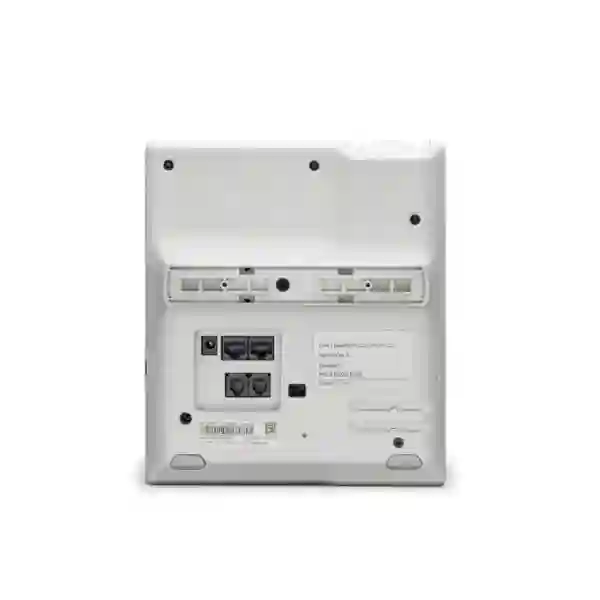
Two RJ-45 Gigabit Ethernet interfaces are documented for the E350. One connects the telephone to the network and the other can offer a pass-through connection for a nearby computer. This can simplify desk cabling when a single existing network outlet serves both devices, provided the network architecture and switching policy allow that arrangement. Check voice VLANs, data separation, endpoint authentication and the expected network speed with the IT team. A pass-through port is convenient, but it should not be assumed to bypass organisational security rules or deliver performance beyond the available uplink.
Built-in Wi-Fi operates in the 2.4 GHz and 5 GHz bands, with standards and channel support detailed in HP’s technical specifications. That gives organisations more placement flexibility, particularly for temporary desks or locations where running a new cable would be inconvenient. However, coverage, interference, access-point capacity, authentication configuration and roaming conditions must be assessed on site. Wireless convenience is not a guarantee of consistent call quality. Where reliable wired Ethernet is readily available, it is often the simpler path for a stationary call-intensive endpoint.
The critical difference between the two deployment modes is power. Over a suitable Ethernet connection, the phone supports IEEE 802.3af Power over Ethernet, Class 3. If it connects by Wi-Fi without a PoE cable, it still needs a compatible local power solution. HP’s standard box list does not identify a mains power adapter as included. Therefore, confirm the exact regional bundle and order a compatible supply separately if the desk will not use PoE. This small detail matters during procurement: a working wireless network by itself cannot switch on an unpowered desk phone.
Plan PoE and resilient operation before installation
Power choices affect convenience, budget and how voice services behave during interruptions.
HP lists a maximum power figure of 13 W and built-in auto-sensing IEEE 802.3af Class 3 PoE support for the documented model. A network designer should check the total switch power budget, not merely whether a port has a PoE label. A floor with many telephones, wireless access points and other powered devices can exhaust a switch budget even when each connection works separately. Calculate the intended count of endpoints and preserve appropriate headroom for upgrades. Confirm the selected switch’s port capabilities and the site wiring before deployment rather than solving avoidable power problems at the last minute.
If business calling is critical during a short mains interruption, consider the entire path: phone, PoE switch or compatible adapter, router, firewall, access equipment, PBX or hosted service connectivity. A UPS serving one device does not preserve calls when another component loses power. Where the WAN connection is interrupted, an internally powered desk phone may remain on but external calling can still be unavailable. Document business continuity expectations and any local fallback or mobile escalation arrangements separately from hardware selection. Never promise outage resilience based on PoE support alone.
A structured handover should record power method, switch port, cable identification, device location, network segment and the support contact for that endpoint. That record helps an engineer distinguish a defective unit from a disabled PoE port, changed VLAN or cabling issue. In an office with frequent desk moves, clear port records also reduce accidental disruption when staff relocate. Treat the power source as an explicit item on the quotation and installation checklist, especially for Wi-Fi deployments and locations where a suitable Ethernet connection is not already available.
Headsets, Bluetooth pairing and mobile-call workflows
Choose how people listen and speak based on their working pattern.
The phone provides integrated Bluetooth 5.0, and HP describes pairing with compatible Poly Bluetooth headsets as well as mobile-phone call handling from the desk device. This offers flexibility for users who want to stand up or turn away from a screen while continuing a conversation. Availability of fast pairing and individual headset features can depend on the selected headset and software. Confirm the exact accessory model and pairing procedure before purchasing a large number of headsets. A Bluetooth label on two products is not, by itself, a guarantee that every control or call-management function will work together.
HP also documents USB, RJ9 and electronic hook switch headset options for different workstyles, although adapters or other accessories may be necessary. A user who mostly handles confidential calls might choose a wired headset, while a supervisor moving around an office may value a wireless option. For high-volume reception work, verify answer/end controls, headset lifting behaviour, mute feedback and comfort over a full shift. The phone’s available interfaces expand the choice, but headset suitability depends on both physical connectivity and the implemented feature set.
Pairing a mobile phone does not mean a mobile subscription becomes an independent SIP trunk or that the organisation’s PBX policies automatically govern personal mobile calls. Separate the two call routes in training and explain where call records, caller identity and business retention policies apply. If a corporate policy restricts personal-device pairing or wireless accessories, obtain approval before enabling those functions. Practical trial questions include whether the headset reconnects reliably after charging, how staff switch audio paths and whether a user can quickly return to the handset during a difficult call.
SIP, PBX and hosted VoIP compatibility
The right phone is the one your chosen telephony platform can actually provision and support.
The E350 is designed for SIP-based voice environments; HP technical documentation references IETF SIP and common media/network protocols. That is a strong starting point for many business telephone systems, but standards support is not identical to a provider’s product certification. A hosted platform may support basic registration while offering only part of the device’s button, directory, security or presence functionality. For a purchase decision, request the PBX version, endpoint software version, SIP profile, supported feature list and configuration instructions from the service owner. Avoid assuming plug-and-play integration across all platforms.
Before rollout, verify how the system handles extension credentials, outbound caller identity, number routing, hunt groups, voicemail notifications, transfer types and after-hours schedules. Those functions originate primarily from the calling platform and service design. The phone is the user’s control point, not the entire communications system. If a deployment uses a cloud-hosted PBX, establish where its voice traffic is routed and whether office firewalls and internet service policies permit the required signalling and media. A successful internal call test alone is not sufficient to validate external calling.
Businesses considering a 3CX, another SIP PBX or a hosted telephone service should obtain an exact-model compatibility confirmation from the platform or provider for the intended version. There may be differences between general SIP interoperability and approved provisioning templates, especially after software updates. Check that auto-provisioning, secure transport, directories and phonebook synchronisation work as expected. Include post-upgrade testing in the support plan. If the platform mandates a different handset model, it is better to discover that requirement during a pilot than after outfitting an entire office.
Security, provisioning and fleet administration
A phone connected to the network is an IT endpoint and needs controlled configuration.
HP lists capabilities such as 802.1X authentication, TLS, SRTP, HTTPS provisioning, encrypted configuration files and related security controls in the E350 specifications. Their presence is useful, but the security outcome depends on which features are enabled, how the server is configured and whether the organisation manages credentials correctly. A phone shipped with default settings is not automatically aligned to local security policy. Ask the IT team to document certificate handling, administrator access, approved firmware, endpoint authentication and the expected signalling and media encryption settings before deploying production credentials.
Large installations benefit from repeatable provisioning. HP references management and provisioning technologies including Poly Zero Touch Provisioning and Poly Lens in product documentation, but availability, licensing, cloud access and compatibility must be verified for the intended environment. Decide whether devices will be configured from the telephony provider, an organisation-controlled service or another approved management workflow. Keep administrator credentials secure, restrict who can alter device profiles and ensure retired units are sanitised according to the organisation’s policy. A central template should still leave room for authorised user-specific key layouts.
Operational security includes lifecycle habits. Maintain an inventory showing hardware model, firmware level, assigned user or desk, support owner and change history. Review vendor advisories and platform-supported firmware releases instead of treating every available update as automatically safe to install. Test significant changes on a small set of phones first, paying particular attention to call registration, key behaviour, headsets and encryption. Use an appropriate maintenance window and a documented recovery path. These steps reduce surprises and make it easier to respond if an account, credential or handset is compromised.
Accessibility and everyday usability
Good endpoint selection considers the people who will use it for several hours a day.
HP highlights accessibility functions for the Edge E300 family, including text-to-speech, screen colour adjustments for colour-vision needs and larger-font options. These settings can improve how users read status information and navigate common actions. They should be evaluated with the actual users and software build rather than treated as a universal promise for every individual requirement. A practical trial can identify whether display labels, indicator lights, key spacing and audio level are comfortable. Give staff time to explore the interface and provide feedback before locking the configuration for a department.
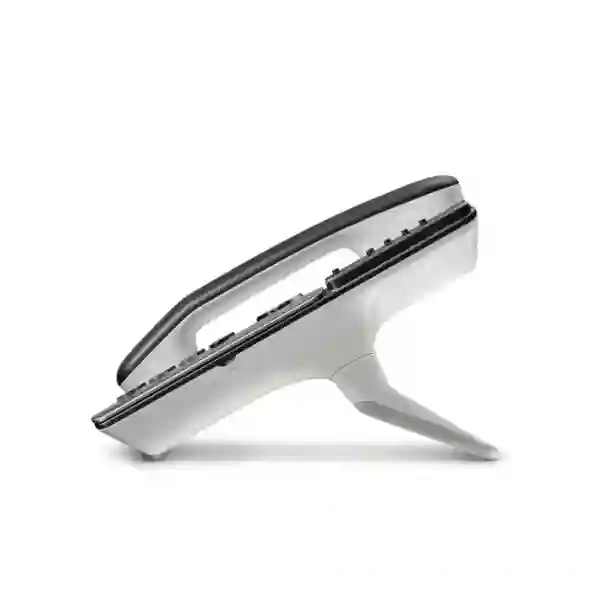
The desk stand offers placement choices, and the E350 can be installed with an appropriate wall-mount arrangement according to the applicable hardware instructions. Consider desk depth, reach, screen angle, cable strain and the location of headset charging equipment. A phone near a window can be harder to read because of glare; a unit placed too far from the user may make quick answers uncomfortable. Physical layout decisions are inexpensive to correct before installation and frustrating after the desks have been fully cabled. Make the workspace part of the acceptance test.
Shared telephones should have clearly named line keys and simple written instructions for common actions, including answer, hold, transfer, conference and voicemail access where supported. Training should use the installed PBX workflow instead of generic promotional examples. A short reference sheet can be especially valuable for temporary staff and rotating reception teams. If individual accessibility needs exist, consult the user and the employer’s relevant accommodation process to determine an appropriate endpoint and accessory combination. A feature list cannot replace individual testing.
Practical considerations for businesses in Tanzania
Evaluate local infrastructure and support arrangements without assuming availability, certification or service coverage.
An organisation deploying the Poly Edge E350 in Tanzania should begin with the condition of its existing voice and data environment. Check whether each desk has a reliable Ethernet outlet, whether managed switches provide enough PoE capacity, and whether internet connectivity is suitable for a hosted voice service. Test network latency, packet loss and jitter during normal business traffic rather than only on an empty network. If the office relies on wireless connections, perform coverage checks at every intended handset position. VoIP quality depends on local network design as much as the endpoint’s hardware.
For external calling, speak with the chosen licensed telecom provider or PBX operator about available services, telephone numbers, SIP arrangements, security requirements and support boundaries. Do not assume that a particular mobile or fixed-line operator offers an interoperable SIP trunk for every business. Confirm any necessary telecommunications approvals and the regulatory status of the exact regional unit through appropriate official channels before commercial deployment. This page does not claim Tanzanian type approval, provider certification, a local warranty or a specific supplier stock position without verification.
Electricity continuity, network cabinets and environmental conditions also deserve attention. HP documents an operating range of 0–40°C for the phone, so plan installation away from direct heat, excessive dust or moisture and other conditions outside the published limits. Ensure any additional power accessories are approved for the particular hardware and local electrical setup. If a business has several branches, document the network and calling design separately for each site; differences in internet service, firewall policy and local support can change the best implementation even when the handset model remains the same.
Real-world desk and team scenarios
A few examples show where the combination of line keys, audio options and network flexibility can be useful.
At a reception desk, the main challenge is speed and accuracy rather than the greatest possible number of configuration options. Place frequent transfer destinations on the first key page and keep caller handling instructions nearby. Confirm that the PBX supports the desired ring group, shared line, hold and transfer behaviour. Test the handoff of an external caller while another call is waiting, and make sure the indicator and label choices are easy to interpret. Reception teams often benefit from a comfortable headset and a stable wired PoE connection when those facilities are available.
For a manager or team lead, a few monitored extensions and speed dials may remove repeated searches through a contact directory. This use case depends on how the PBX exposes presence or busy-lamp information to the device. Agree on a small, well-structured key map instead of filling all 32 supported positions. If the manager regularly switches between desk calls and mobile activity, evaluate Bluetooth pairing with the exact mobile handset and accessories under company policy. A successful demonstration should include call answer, transfer and audio switching, not just initial pairing.
For flexible seating or a training room, built-in Wi-Fi may simplify occasional placement, but it creates an immediate question about where local electrical power will come from. A wired PoE desk usually offers a straightforward power and data path; a Wi-Fi desk needs adequate wireless coverage and a separately planned power supply. In a shared-desk setting, confirm whether the phone system supports secure user assignment and what happens to personal contacts or credentials between users. Avoid describing ordinary physical relocation as automated hot-desking unless the PBX workflow provides it.
In a professional services office, privacy may matter more than line density. A wired or Bluetooth headset can help users keep conversations less audible to neighbours, while call records and retention settings remain a function of the calling system. In a branch office with limited technical staff, consistent provisioning and clear support procedures may be the decisive criteria. The same hardware can serve different tasks, but the setup should reflect each team’s call volume, operating environment and training needs instead of deploying one generic profile everywhere.
Compare the E350 with nearby choices
Avoid paying for features the team will not use, and avoid underspecifying phones for demanding desks.
Within the Edge E300 family, the E350 combines the larger eight-key layout with integrated Bluetooth and Wi-Fi. HP’s E300-series positioning distinguishes less-connected variants in the same general design family. In practical terms, organisations with dependable wired PoE everywhere may decide they do not need Wi-Fi on every desk, whereas a mixed wired-and-wireless office may value the E350’s flexibility. Compare exact regional configurations and current manufacturer documentation when finalising a model mix; family names alone are not a substitute for confirming which radio features are integrated.
A user with only one extension and occasional calls may be better served by a simpler endpoint or a managed software phone. Conversely, a high-volume attendant may need specialised attendant-console functions, a larger display or additional physical key capacity beyond what this compact desk phone offers. The E350’s eight key positions and paginated access to 32 lines or contacts are a useful middle ground, not a promise that it replaces a purpose-built console in every reception operation. Map responsibilities to required keys and call flows before comparing prices.
Evaluate the total cost of a working seat. Include a compatible PBX or service subscription, any required power supply, PoE switching, network upgrades, headset, security configuration, provisioning effort and staff training. Some purchases look inexpensive until missing accessories or incompatible provisioning have to be corrected. Request the exact regional part description and contents of the quoted box. HP’s published 82M89AA is a documented product-number variant, not evidence of FourTeck Tanzania’s SKU or of which bundle will be supplied under a future quotation.
Before buying: an implementation checklist
Answer these practical questions to turn a hardware specification into a deployable, supportable calling solution.
First, identify the intended PBX or hosted VoIP provider and its supported handset list. Record the target service version, how extensions register, whether SIP credentials are user-specific and which features are supported. Second, list the line keys and behaviours each user needs, such as quick dial, monitored extensions, shared handling or voicemail indicators. Third, identify the connection type at every desk and validate PoE budget, power adapters, network segmentation and coverage. A small pilot is advisable even when the phone appears compatible on paper, because service configuration frequently determines the end-user experience.
Fourth, select headsets only after testing audio quality, comfort and answer/end controls. Fifth, determine how firmware, device credentials and provisioning templates will be managed through the phone’s life. Sixth, confirm who supports the network, the calling service and the endpoint itself. When a call fails, staff need a clear first contact rather than three suppliers referring the fault to one another. Seventh, document how emergency calling and location information are handled by the calling service; this is an operational and regulatory matter, not something the desk phone hardware can guarantee on its own.
Finally, ask for a quotation that specifies the exact model or manufacturer part number, quantity, included accessories, separately required power components, deployment services if applicable, and the applicable commercial and support terms. Verify local price, taxes, stock, lead time and warranty directly rather than relying on overseas listings. Request a practical acceptance test before broad rollout, including external inbound and outbound calls, transfers, busy periods, network recovery and any mandatory security settings. A careful buying checklist protects both the project budget and the people who depend on the telephone daily.
Installation and acceptance testing
A repeatable pilot is the best way to discover issues while they are still small.
Begin with a single representative office location. Confirm the physical contents against the purchasing document, connect the handset and stand, and use the authorised power and network connection. For a PoE installation, check the switch status and verify the phone receives an appropriate address and network configuration. For Wi-Fi, plan compatible power first and connect the phone to an approved wireless network using the site’s security policy. Avoid copying administrative credentials into an unsecured setup note. The person installing the handset should know which team is responsible for resolving provisioning or network errors.
Register the extension using a supported platform procedure. Verify the displayed account, incoming and outgoing dial plan, caller identification, audio in both directions, voicemail indication and the approved transfer method. If the office uses directories, shared lines or busy-lamp functions, validate those features explicitly. Exercise all planned audio options and check whether Bluetooth devices reconnect after the phone restarts. Try the computer pass-through port where it is required, and ensure the endpoint is placed in the intended network segment. Record firmware version, test date and any necessary configuration exceptions.
Test failure conditions as well as normal calls. Unplug and reconnect the network cable under controlled conditions, check recovery after power restoration, and observe the phone during busy network periods. For Wi-Fi, test in the intended location rather than beside the access point used for setup. Document packet-loss or speech problems so they can be investigated by the relevant network and service team. Once the pilot is approved, turn the findings into a standard deployment procedure and support document. Repeat the essential call tests after major network, firmware or PBX changes.
What is included and what needs confirmation
A clear packing and accessory list prevents surprises at the point of installation.
HP’s published standard contents identify the console, handset, handset cord, desk stand, network cable and setup sheet. Retail and regional bundles may differ, so the quoted unit and supplied box must be checked rather than assuming all accessories are identical worldwide. A compatible mains power supply is not identified in that standard list. If a desk will not use a suitable PoE source, request confirmation of the correct accessory before ordering. Similarly, a chosen wired or wireless headset, electronic hook switch accessory or mounting component may require a separate line item.
Consider who will own the settings and associated documentation. Staff should receive a concise user guide for the actual PBX calling procedure, while administrators need approved provisioning information and the endpoint inventory. Keep passwords and registration secrets out of handouts. For offices replacing analogue telephones, explain that an IP handset uses the data network and a compatible voice service rather than a direct analogue telephone line. Any gateways, telephone numbers or migration work belong in the surrounding project plan. The E350 is a building block of that system, not the full system itself.
A useful procurement conversation covers four distinct confirmations: the exact hardware variant, compatibility with the installed phone system, the available power and network path, and the commercial terms for supply and after-sales support. It is reasonable to request evidence for each before final purchase. The product’s international feature list does not establish stock, pricing, certification, delivery areas or warranty terms in Tanzania. Those matters should be confirmed in an up-to-date quote from the selected provider. This distinction helps buyers compare proposals on the same basis.
Frequently asked questions
Does the Poly Edge E350 work over Wi-Fi?
Yes. HP documents built-in Wi-Fi across 2.4 GHz and 5 GHz bands for the E350. However, wireless network access supplies data, not electrical power to the telephone. A Wi-Fi desk therefore needs a compatible local power solution unless it also has an appropriate powered Ethernet connection. Test signal strength, channel congestion, access-point capacity and the authentication method in the intended area. For a fixed, high-volume call position, a wired PoE connection may be easier to operate and troubleshoot.
What is the difference between eight keys and 32 lines?
The device has eight physical line keys, with a paging mechanism that makes additional line, contact or feature positions accessible. HP states support for up to 32 line or contact positions through pagination. This does not promise 32 simultaneous active calls, 32 individual phone numbers or unrestricted PBX licences. The meaning of each button and which positions are available depend on the phone system and the provisioning profile. Ask for a demonstration using your actual call-handling requirements.
Can the E350 connect to a standard SIP PBX?
The E350 is designed for SIP communications and HP documents support for the SIP protocol. That makes it a candidate for compatible SIP PBX and hosted VoIP environments, but interoperability must be checked for the exact service version. Some providers allow registration but do not support every line-key, directory, encryption or shared-call feature. Obtain an endpoint support statement or test profile from the PBX administrator. Confirm provisioning, extension registration, transfer methods and firmware expectations before purchasing multiple phones.
Is it compatible with 3CX?
Do not rely solely on the word SIP when choosing a phone for a particular 3CX version. Ask the 3CX administrator or service provider to verify the E350’s status on the relevant supported device list, provisioning workflow and firmware requirements for the installed edition and release. If the chosen deployment is unsupported, features or support arrangements may differ from expectations even when basic calls register. Pilot the exact handset with the intended configuration and test everyday call flows before making a wider commitment.
Does the desk phone come with a power adapter?
HP’s published standard contents list the phone, handset, handset cord, network cable, desk stand and setup information, but do not list a mains power adapter. A compatible PoE network port can supply power for a wired deployment. If the E350 will be used over Wi-Fi without PoE, confirm and obtain the appropriate power adapter separately. Retail bundles can vary, so use the exact quotation and packaging specification rather than assuming an adapter is included with every listing.
Can I use Bluetooth headsets or pair a mobile phone?
The E350 has integrated Bluetooth 5.0 and HP promotes supported Poly headset pairing and mobile-call handling. Compatibility with a particular headset, fast-pairing feature or mobile device should be checked before ordering accessories in quantity. Test reconnection after charging or restart, microphone quality, answer/end controls and the transition between handset and headset. Businesses should also consider whether pairing personal mobile phones aligns with company privacy and calling policies. Bluetooth capability does not replace a business SIP service.
What kind of headset connection does it support?
HP lists Bluetooth, USB, RJ9 and electronic hook switch headset possibilities for this phone family. Certain headsets and electronic-hook-switch functions may need an adapter or compatible accessory. The best choice depends on whether the user needs to move away from the desk, keep conversations private, wear a headset throughout a long shift or work in a noisy environment. Verify the exact headset model and test call control, comfort and speech quality with the installed telephone system.
Can I connect my computer through the phone?
The E350 includes two Gigabit Ethernet interfaces. HP describes the arrangement as providing a network connection to the phone and a pass-through connection to a computer. This can help where the desk has a single network outlet, but the design still needs to satisfy the organisation’s switching, VLAN and access-control policy. Ask the network administrator to confirm the intended cabling, endpoint authentication and network separation. Test the computer connection during deployment rather than assuming an unmanaged arrangement is acceptable.
Is the Poly Edge E350 suitable for a reception desk?
It can be a sensible option when reception users value physical controls, frequently used transfer destinations and the ability to configure multiple key positions. Its 3.5-inch screen, eight line keys and access to additional paginated positions can support many common workflows. The decisive question is whether the PBX provides the required attendant features, shared line behaviour, monitoring and call queues. A specialist attendant console may be preferable for unusually heavy or complex call handling. Test an actual busy-period reception scenario before selecting a fleet.
What happens during an internet or electricity outage?
A PoE-powered phone depends on the switch and its supporting electricity supply. A phone connected via Wi-Fi depends on a compatible local adapter and the wireless infrastructure. External calls also depend on the router, internet or other service connection and PBX design. A UPS or backup connection can form part of a resilience plan, but no single component guarantees uninterrupted calling. The organisation should agree on a realistic fallback process with its service provider, including how urgent calls are handled if the normal voice path is unavailable.
Does the phone have noise cancellation?
HP documents several audio technologies, including Acoustic Fence, NoiseBlockAI, Acoustic Clarity and HD Voice. Acoustic Fence is associated with reducing background sound during handset or appropriate wired-headset use, while NoiseBlockAI addresses noisy speakerphone conversations. Results still depend on room conditions, user positioning, call codec and network quality. For best evaluation, compare handset, speakerphone and selected headset modes in the actual office. No voice-processing feature can eliminate every distraction or compensate for a poor connection.
Can it be used at a shared desk or hot-desk station?
The phone is suitable for physical placement at shared desks, but automated user login and profile switching depend on the chosen PBX or hosted service. Confirm how extensions are assigned, how users sign out and whether personal information is removed when another person takes the seat. Where Wi-Fi is used, provide a secure approved network and compatible power. Shared-location staff should receive a simple set of consistent instructions for transferring calls and accessing voicemail. Test the complete sign-in workflow rather than treating a moveable handset as proof of hot-desking support.
What information should be sent for a quotation in Tanzania?
Share the number of handsets, the PBX or hosted VoIP service name and version, whether desks have wired PoE or will use Wi-Fi, and which users need headsets or special line keys. If known, include the desired hardware variant and any existing network constraints. Ask the supplier to specify the exact included contents, separate power or headset accessories, compatibility validation, configuration scope, warranty and after-sales terms. Price, availability, delivery and regulatory status should be confirmed for the particular offered unit rather than inferred from another country.
Is the Poly Edge E350 the right choice for every employee?
Not necessarily. A phone with integrated Wi-Fi, Bluetooth and substantial key capacity is attractive for multi-line users and flexible deployments, but employees with simple calling needs may not use those additions. Other roles may require larger attendant controls, a different headset strategy or a software-based endpoint. Compare the expected workflow, device management, network situation and total installed cost by role. A mixed handset fleet often makes more operational sense than assigning the same model to everyone regardless of duties.
Request an HP Poly Edge E350 quotation
Tell FourTeck Tanzania how many phones you need, which SIP/PBX service you use and whether each location has PoE or needs a separate power accessory. Include your headset and configuration requirements so the quotation can specify an appropriate hardware variant and the accessories needed for a working desk.
Next step: request a model, compatibility and accessory review before purchase. Pricing, stock, delivery, warranty and any local approval requirements must be confirmed separately.




Reviews
There are no reviews yet.