
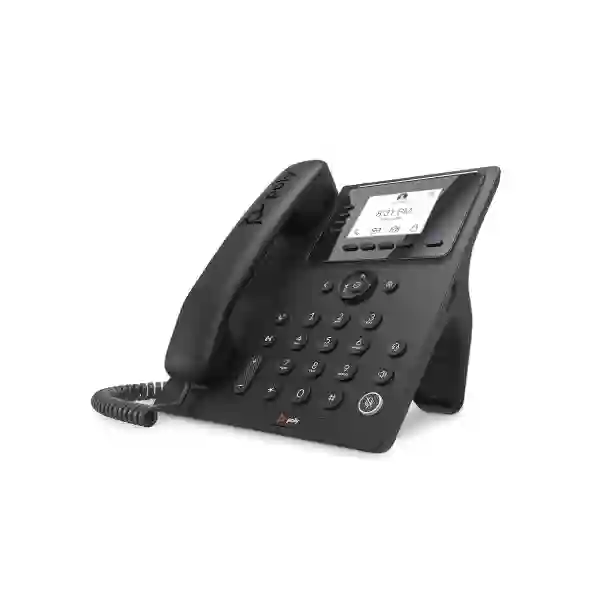
HP Poly CCX 350 Microsoft Teams IP Phone
A busy business desk needs a reliable way to answer calls without forcing every employee to depend on a computer headset. The HP Poly CCX 350 Microsoft Teams IP Phone combines the familiar feel of a physical dial pad with a native Teams phone experience, clear business audio and wired network connectivity. It is designed for people who need straightforward calling at a fixed workstation, including reception desks, service counters, shared work areas and individual offices. Its compact 2.8-inch colour screen is not a touchscreen, so users operate the phone through dedicated keys, soft keys and navigation controls. Before ordering for a Tanzania workplace, confirm the required Microsoft licensing, a suitable Ethernet connection and PoE or an optional compatible power adapter.
Key specifications at a glance
These are manufacturer-documented characteristics of the referenced Teams-oriented CCX 350 configuration. Confirm the precise ordering variant and software with your quotation.
| Purpose | Microsoft Teams business audio desk phone |
|---|---|
| Display | 2.8-inch colour LCD; 640 × 480; non-touch |
| Controls | Physical dial pad, navigation keys, dedicated Teams key |
| Audio | Poly HD Voice, Acoustic Clarity, full-duplex speakerphone |
| Network | Two RJ-45 10/100/1000BASE-T ports |
| USB | One USB 2.0 Type-C port |
| Headset | Dedicated RJ-9 port; compatible supported USB applications |
| Power | IEEE 802.3af PoE; 13 W maximum; optional approved adapter |
| Platform | Microsoft Teams-certified; Android 12 listed by HP |
| Management | Poly Lens and provisioning options, subject to configuration |
| Installation | Two-position desk stand; optional wall mounting |
| Typical package | Console, stand, handset and cord, Cat 5e LAN cable, setup sheet |
Who the CCX 350 is built for
The Poly CCX 350 is a practical choice when voice communication is the priority and staff prefer a telephone that behaves like a familiar office desk phone. A receptionist may want a handset within reach while looking after a visitor; a supervisor may need to make quick calls while moving between administrative tasks; a service counter may need a shared number without dedicating a full computer to the job. These situations favour physical controls and predictable placement. The product is also relevant to small businesses adopting Microsoft Teams calling and larger organisations standardising endpoints across departments. It is not intended to replace a meeting-room video system, smartphone or fully featured touch-display collaboration terminal. The buying decision should start with the person’s daily calling pattern, the account that will sign in, the expected call volume and the available network connection. Matching these details to the workstation helps avoid purchasing features that are unnecessary or overlooking licensing and provisioning requirements.
Microsoft Teams integration in everyday work
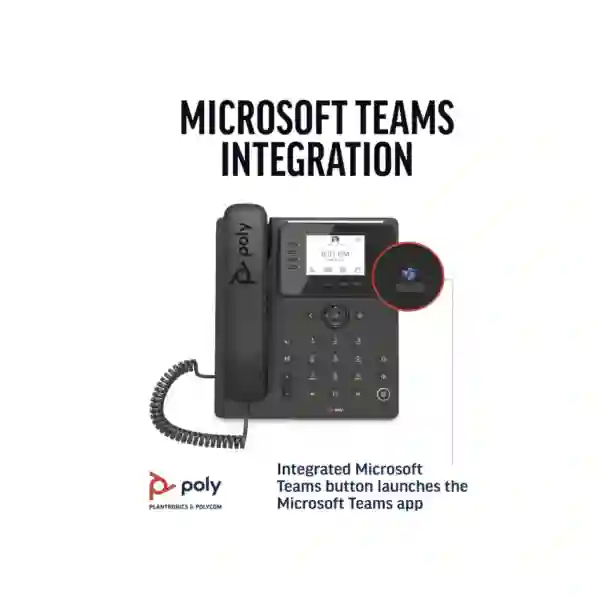
The CCX 350 version described here is a Microsoft Teams-certified desk phone with a dedicated Teams button and a native Teams phone interface. That distinction matters: staff can use the device as a Teams calling endpoint rather than treating it as an ordinary analogue handset plugged into a traditional telephone socket. When the account, tenant policy and licensing permit, users can handle Teams audio calls, access supported calling functions and work with their organisation’s Teams environment. The exact menus and calling capabilities may depend on firmware, the Teams app release and administrator settings. Some features that appear on a desktop Teams client may be different or unavailable on a desk phone, so buyers should not assume feature-for-feature parity. A useful pilot uses a real licensed account and the organisation’s intended policies to validate calls, voicemail, contacts, call handling and any special workflows before multiple units are issued to staff.
Familiar physical keypad and navigation
A traditional dial pad is a central reason to select this model. Number keys, navigation controls and dedicated calling functions provide tactile feedback that can be easier to operate during repetitive telephone tasks than an all-screen interface. Workers can make a call while keeping their primary screen on an order, spreadsheet or customer record. The handset, speakerphone, mute and volume controls also support different situations without demanding that the user navigate several on-screen menus for every adjustment. Poly designed the external surface to help with durability and debris resistance, a useful consideration for counters and active work areas. That does not make it waterproof or suitable for unprotected outdoor installation. Buyers should review the actual work environment, how often users need direct number entry and whether their accessibility needs favour physical keys. For staff who mainly navigate complex on-screen lists, a larger touch-display Teams phone may be worth evaluating instead.
Compact colour display: what to expect
The phone has a 2.8-inch colour LCD with a stated 640 by 480 resolution. This screen is useful for essential interface information and on-device prompts, but it remains a compact business-phone display. It is not a touchscreen: interaction takes place through the keypad, navigation buttons and soft keys. Adjustable font-size selections and normal or dark display modes can help tailor the visible interface to different users, subject to software version and available settings. A smaller screen can suit a desk where the user usually knows whom to call or enters numbers directly. It is less suitable if staff expect extensive directory browsing, visually rich meeting controls or a tablet-style experience. During evaluation, have an intended user complete realistic tasks such as selecting a contact, answering a waiting call and checking a voicemail notification. Those practical tests reveal more about usability than screen resolution alone.
Clear voice with Poly audio technologies
The HP Poly CCX 350 uses Poly HD Voice and Acoustic Clarity audio technologies, which are intended to improve intelligibility and natural conversation. Full-duplex speakerphone support allows both people to speak at the same time while echo-control technology helps manage feedback. The manufacturer also describes noise-reduction tools such as Acoustic Fence and NoiseBlockAI for different audio paths. These features can be valuable where an office has air-conditioning, nearby conversations or intermittent operational noise. Audio performance is nevertheless influenced by the chosen handset or headset, room acoustics, network quality and the caller’s own equipment. No desk phone can make every noisy call perfect. Before choosing a rollout quantity, test actual calls in the spaces where devices will be deployed. Compare handset, headset and hands-free operation, and ask the people who receive those calls whether speech remains easy to understand.
Noise management in a live workplace
Background noise affects the person at the other end of a call just as much as the person holding the phone. The CCX 350’s documented noise-management features are intended to reduce distracting sound in common office scenarios. An employee at a counter may need to speak while colleagues are working nearby, while an administrative user may take calls in an open-plan room. In each situation, positioning matters. Place the phone away from very loud machinery, avoid pointing the speakerphone toward hard reflective surfaces and encourage a wired headset when privacy or surrounding noise demands it. Understand that noise reduction is not acoustic isolation and does not replace good workplace layout. A practical acceptance test includes a normal-volume conversation, a noisy period and a hands-free call, using the same network and account planned for production. The aim is clear communication under typical conditions, not an unrealistic promise that every sound will disappear.
Hands-free calls and echo cancellation
A full-duplex speakerphone is useful when a user needs to refer to documents, type notes or involve a nearby colleague in an audio conversation. The CCX 350 includes speakerphone operation with acoustic echo cancellation, allowing a more natural exchange than basic half-duplex hands-free devices. However, the speakerphone should be used appropriately: voices on a shared speaker may be overheard, and the microphone can still capture environmental noise. For confidential discussions, a handset or suitable headset is usually the more appropriate choice. Where a team uses the phone at a busy reception point, establish when hands-free calls are acceptable and when they should return to private audio. Train users on the dedicated speakerphone and mute controls so that they know which mode is active. In a pilot, test both directions of speech and confirm that the far-end caller does not experience objectionable echo during real conversations.
Handset comfort and everyday call handling
The supplied handset gives users an immediately recognisable way to answer or place a call. It is useful for quick conversations and for users who do not want to wear a headset throughout the working day. The manufacturer describes a hearing-aid-compatible handset, although individual compatibility and accessibility needs should be evaluated with the actual user. Physical volume adjustment helps people set a comfortable listening level, while visible feedback can make changes easier to understand. When planning a group purchase, think about the work pattern rather than assuming every employee needs identical accessories. A user who spends only a few minutes per hour on calls may prefer the handset; someone managing continuous enquiries might benefit from a compatible wired headset. Consider where the handset rests, the available desk space, and whether its cord can move safely without pulling items off the work surface.
Wired headset options and what to check
The CCX 350 has a dedicated RJ-9 headset connection, and manufacturer guidance also discusses supported USB headset use. A headset may improve comfort for workers who make repeated calls, keep the user’s hands available and offer greater privacy than speakerphone mode. Compatibility is not determined by the presence of a connector alone. Headset wiring, supported models, firmware, use of the phone’s USB mode and any necessary adapter can affect operation. Buyers should confirm the exact headset model with the relevant compatibility guidance rather than buying an arbitrary connector and expecting it to work. For teams with existing equipment, test answer, end-call, microphone, mute and audio routing behaviour before committing to a large deployment. Wireless Bluetooth should not be assumed on this model; the CCX 350 does not offer the built-in Bluetooth headset functionality specified for certain higher CCX variants. If untethered calling is essential, compare alternatives first.
USB-C port: a useful but specific connection
A USB 2.0 Type-C port is provided for supported media and accessory applications. HP documentation also describes USB audio-related capabilities for applicable phone software profiles. This should not be confused with a guarantee that every USB-C headset, phone charger, dock or computer will work with the device. USB connectors are physically versatile, but the supported function depends on the phone’s operating mode, current firmware, peripheral and cabling. In particular, an organisation planning to use the device as a computer-attached audio accessory should verify the supported USB phone mode for its intended Poly Voice Software release, because manufacturer release notes describe changes to that mode. For normal network-based Teams calling, use the appropriate native Teams setup rather than assuming a PC connection is necessary. The safest purchasing approach is to state the desired USB use case and check that exact workflow before selecting accessories.
Two gigabit Ethernet ports
HP lists two RJ-45 network ports supporting 10/100/1000BASE-T connectivity. This gives the phone a wired connection to the local network and allows a compatible installation to use the phone’s integrated switch for a nearby computer. For desks with limited wall outlets, that arrangement may simplify cabling. Before relying on it, confirm network design rules, voice and data VLAN policy, power requirements, endpoint security and the performance expectations of the connected computer. A device with two Ethernet connectors is not automatically a replacement for a managed switch, firewall or structured network design. The phone itself needs a stable path to approved Microsoft services and any required management platforms. When documenting a workstation, label which port connects to the building network and which serves the computer, because incorrect cabling can create avoidable support calls during installation.
Power over Ethernet and optional adapter
The manufacturer’s current product specification identifies built-in IEEE 802.3af Power over Ethernet support with a stated maximum power figure of 13 watts. PoE can keep the desk uncluttered by delivering network connectivity and electrical power through the appropriate Ethernet connection. It can also support centrally planned power continuity where the business provides suitable backup to its network switches. If PoE is not available, HP describes an optional compatible external power supply; the adapter is not part of the standard box contents listed for the referenced model. Confirm the precise adapter specification, plug type and package before ordering. Do not assume an ordinary USB phone charger can power the device. For a multi-phone installation, check PoE switch budget across all ports, not just whether individual ports carry the PoE label. Reliable power is part of the calling system and should be included in rollout planning.
What your network needs before installation
A Teams desk phone depends on more than a live Ethernet socket. It needs valid network addressing, DNS resolution, time synchronisation, connectivity to the Microsoft services used by the tenant and access to any relevant Poly provisioning or update resources. The CCX 350 supports common enterprise networking mechanisms including DHCP, IPv4 and IPv6 in its published documentation. The exact configuration depends on the organisation’s switch, firewall, VLAN and authentication architecture. An IT team should establish approved port and traffic policies from current vendor guidance rather than copy an old rule set without review. Network address translation, restrictive outbound filtering and unreliable internet links may complicate initial sign-in or subsequent management. Test the actual desk location before issuing the phone, not simply a spare port in the IT office. This avoids discovering after delivery that voice endpoints are isolated from the services they need.
Voice quality depends on the whole path
An excellent speaker cannot compensate for prolonged packet loss, severe jitter or an unstable link. Poly documents adaptive jitter buffers and other voice-processing features, but these are intended to manage normal network variation rather than conceal every infrastructure problem. For an office using cloud calling, evaluate the local network, internet access, firewall capacity and the route to Microsoft services. Where appropriate, apply quality-of-service controls based on the organisation’s current network standards and test with representative traffic. A finance office on a busy data network, for example, should evaluate calling while normal uploads and downloads are running. If the business requires voice continuity during utility interruptions, its switches, upstream connectivity and other supporting equipment may need backup power as well. The CCX 350 is one component of an end-to-end communications service. Planning the entire path produces a much more realistic expectation of call quality.
Teams account and licensing checks
The phone’s Microsoft Teams certification does not include a Microsoft service subscription. Each deployment still needs an appropriate account, eligible licensing and tenant configuration for the features to be used. Internal Teams calling and calling external telephone numbers can involve different service entitlements and routing arrangements. Administrators should determine whether the endpoint is assigned to a named employee, a shared workspace or a particular organisational process. They should then confirm the current Microsoft requirements for that scenario, including any Teams Phone entitlement and public-switched telephone network connectivity where external calling is required. Do not purchase hardware on the assumption that a Teams login alone automatically supplies a public phone number. A useful pre-order checklist includes the account type, licence assignment, intended calling region, calling policy and the destination numbers that staff must reach. Having these answers first makes hardware deployment substantially simpler.
Shared reception and common-area deployment
A phone at a reception counter or communal workstation may be used by several employees rather than one named user. Microsoft provides common-area phone arrangements for Teams, with a resource account and the relevant shared-device or Shared Space licensing configuration. The precise interface and permitted features can differ from a named person’s phone, and shared devices are often configured with restrictive policies to protect information. A business should decide who owns the shared number, which team answers calls, whether private contacts should be visible and what should happen when the counter is unattended. It is equally important to plan transfer and escalation behaviour instead of buying the phone first and considering call routing later. The CCX 350’s keypad and handset can suit this setting well, but the account and Teams administration design ultimately determine what the shared endpoint can do.
Sign-in and user onboarding
A smooth first-use experience starts with the right credentials and clear instructions. Depending on Microsoft Teams administration settings, supported sign-in methods can include using the device or an administrator-assisted method from another device. Credentials should never be printed on a shared label or circulated in a general installation document. For an individual desk phone, agree how the employee will sign in and what happens when that person changes role. For common-area devices, use the intended resource account and lock down the experience according to organisational policy. After sign-in, test the features that matter to the user: an incoming call, outgoing call, microphone mute, voicemail and any transfer workflow configured for the account. Where users already know the desktop Teams application, explain that the phone is a different interface and that not every button or screen will look the same. A short hands-on orientation usually prevents more support issues than a long generic manual.
Management through Poly tools
HP lists Poly Lens, Poly Zero Touch Provisioning and other management capabilities among supported options for the CCX 350. These can be relevant when an IT team must deploy, configure and maintain more than a handful of desk phones. Central management may reduce the need to visit each desk for routine changes, but actual capabilities depend on the software, management environment and supported configuration. Administrators should confirm which platform will be authoritative for inventory, configuration and updates, and how it interacts with Microsoft Teams management. For a small site, record each device’s assigned desk, asset tag, user or shared account and operational contact. For a larger roll-out, agree a naming convention and a repeatable provisioning method before unboxing dozens of units. This makes future troubleshooting and staff moves less confusing. Management software should be treated as part of the deployment design, not an automatic service included with every purchase.
Firmware updates and Teams compatibility
Teams phones are software-dependent appliances. Their usable features, management behaviour and security posture can change with Poly Voice Software and Microsoft Teams application updates. Microsoft’s certified-phone documentation lists Poly CCX 350 releases, while HP publishes support and release information for the hardware family. Before putting a large batch into production, identify a compatible, supported software baseline and establish how the organisation will review later releases. Test updates on a small group of representative phones, especially where advanced call handling, USB accessories or custom policies matter. One historical HP support notice describes certain CCX 350 units manufactured during part of 2024 that required a recovery process for a missing Teams app; this is a reason to validate provisioning and update access rather than assume every stored device arrives at the same software level. A phone’s model name alone cannot establish the status of a particular unit’s firmware.
Security and device access
The published HP specifications include capabilities such as encrypted configuration files, HTTPS provisioning, transport security mechanisms and password-protected administration. Those functions are useful only when an organisation configures and maintains them appropriately. A desk phone can hold account-related information, expose contact details and connect to managed enterprise services, so it belongs in the same asset-control process as other connected work devices. Administrators should replace or protect default credentials as appropriate, restrict management interfaces, follow approved update procedures and establish a secure method for disposing of or reassigning a device. Shared phones deserve particular attention because several people may be able to reach the screen. Set Teams policies according to the role of the device and avoid exposing information that a passer-by should not see. Security claims should be evaluated as features of a configured system rather than promises that the physical phone alone guarantees privacy.
A practical pilot before a wider rollout
The best way to know whether the CCX 350 fits a workplace is to test the intended workflow at one or two representative desks. Start by identifying the user role, account type and essential call scenarios. Verify the Ethernet and power arrangement, complete sign-in and place calls to colleagues and the external destinations required by the organisation. Test different audio modes, any existing headset and the transfer or voicemail procedures staff need. Invite real users to comment on keypad comfort, screen readability and placement. Record the software version and network conditions so that results can be reproduced. When a problem occurs, separate account licensing from network connectivity, endpoint configuration and hardware issues. A short structured pilot can reveal hidden costs early, including incompatible headsets or insufficient PoE capacity. It also provides a training model that can be reused when additional phones are deployed.
A deployment checklist for IT teams
A reproducible installation begins before the box is opened. Confirm the exact product variant and expected box contents, choose the desk location, check the Ethernet outlet and verify that the switch can provide suitable PoE or that an approved power adapter is available. Confirm the Microsoft tenant, licence assignment and intended user or shared resource account. Check that required internet destinations and provisioning services are reachable under organisational policy. During setup, record the physical asset identifier, installed firmware, account assignment and any management enrollment. Test incoming and outgoing audio calls, mute, speakerphone, voicemail and the site’s relevant call handling. At handover, provide a brief guide explaining how users obtain support and what they should do if the phone loses power or network connection. This process applies equally to a small business and a larger enterprise; the difference is how much of it can be standardised and automated.
Front desk and customer service scenarios
Reception and customer-facing work is an especially relevant use case for a desk phone with a physical dial pad. Employees need to answer promptly, check details on another screen and keep their attention on the visitor or caller. The CCX 350 provides a familiar handset, hands-free option and direct controls for routine call work. Whether a particular call queue, transfer method or shared number behaves as required depends on the Teams configuration rather than hardware alone. Test the exact reception workflow: inbound number routing, alternate answering staff, transfers, unattended calls, voicemail and after-hours arrangements. A phone cannot substitute for a well-designed call process. Where privacy is important, position the device so that screen information cannot be seen unnecessarily and ensure confidential calls are handled with the handset or an appropriate headset rather than a loudspeaker at a public counter.
Office and administrative desks
A fixed desk phone can be useful for people who spend much of the day in document systems, email or business applications but still need immediate voice access. It gives calling a separate physical interface, potentially reducing the need to switch application windows to reach a dial pad or answer a routine call. This can be practical for finance, administration, coordination and support teams with defined desks. However, it does add another managed endpoint, network connection and item on the work surface. A buyer should therefore confirm whether the team’s calling habits justify a separate phone or whether a certified headset attached to a computer would be sufficient. The CCX 350 is most compelling when familiar telephone ergonomics, shared workstations or dedicated calling access matter. If an employee is rarely at the assigned desk, a mobile-oriented solution may fit better than a permanently installed IP phone.
Retail, warehouse and operational areas
Poly positions the CCX 350’s rugged keypad design for active environments such as retail counters, warehouses and manufacturing-related work areas. This makes sense where employees value a dial pad that is easy to recognise and where surfaces may encounter more everyday handling than a quiet office desk. It should not be mistaken for a sealed industrial telephone, hazardous-area product or weatherproof outdoor communications system. The manufacturer lists an operating temperature range of 0 to 40 degrees Celsius; local placement must remain within the published environmental specifications. Evaluate exposure to dust, moisture, accidental impacts, cable movement and cleaning procedures. Where a device sits on a busy counter, consider cable routing and whether a compatible optional wall-mount arrangement better protects available space. Operational suitability depends on the actual workplace conditions and the organisation’s maintenance practices.
Remote and hybrid working considerations
A user who works primarily from a fixed home office may appreciate a standalone Teams desk phone, particularly if they prefer a traditional handset and have a reliable wired network. The CCX 350 can also provide a consistent device experience across some office and remote desks when the organisation manages configuration centrally. It is not a wireless mobile handset and should not be chosen merely because a remote worker has Wi-Fi available. The intended installation requires suitable wired connectivity, appropriate power, licensing and internet access. IT should confirm whether its device-management, security and support arrangements extend to the remote location. Consider also whether the worker has enough desk space and whether the phone’s calling benefits outweigh a simpler headset setup. A good hybrid-work standard may offer multiple approved endpoint types rather than expecting the same hardware to suit every employee.
What is and is not in the box
For the referenced HP business media phone configuration, HP lists the phone console, desk stand, handset with cord, Cat 5e LAN cable and setup sheet. A physical Ethernet cable simplifies basic connection, but it does not mean the phone includes a PoE injector, PoE switch or independent electrical adapter. The compatible external power adapter is described as optional, and an optional wall-mount arrangement is likewise a separate consideration. Headsets are also a purchasing decision rather than something to assume is included. Because regional packages and ordering codes can differ, a quotation should state the exact variant and explicitly identify any separately ordered accessories. Buyers should also verify support and warranty terms applicable to the particular sale instead of inferring local coverage from a manufacturer’s general international document. Clear packaging expectations reduce delays when equipment reaches the installation desk.
How the two-port layout may simplify desks
At some workplaces, the CCX 350 can fit into a desk layout with one structured cable reaching the location. The network connection serves the phone, while the second Ethernet port may accommodate a connected PC within the organisation’s permitted topology. This can be convenient when only one wall outlet is provided. Before adopting it as a universal pattern, IT should inspect switch policies, PoE capacity, VLAN behaviour and any security features that distinguish voice and computer traffic. A phone pass-through arrangement can also mean that a phone outage or maintenance event affects the connected computer’s path, so critical workstations may need a different design. Label cables and provide enough length for staff to adjust the two-position stand without straining connectors. Good physical planning often has a greater impact on everyday reliability than small differences between desk phone specifications.
Accessibility and ease of use
The CCX 350 combines a tactile keypad with display and audio controls that may make routine calling easier for some users. HP documentation describes adjustable display text sizes, a hearing-aid-compatible handset and other compatibility provisions. These are useful product characteristics, but accessibility is personal and cannot be established from a specification list alone. A user may need large text, a particular hearing aid arrangement, a different headset, different button spacing or a particular call-handling method. If accessibility matters, provide an opportunity to try the device with the actual assistive equipment and representative work tasks. The small non-touch screen may suit one user while posing a limitation for another. Procurement teams should treat such testing as an ordinary part of choosing appropriate workplace equipment, not as an afterthought once all phones have been installed.
Trade-offs: compact phone versus touchscreen models
The CCX 350 deliberately prioritises a compact colour display, keypad navigation and voice calling. More visually oriented users may prefer a Teams phone with a larger touch interface, while high-volume operators may place greater value on a different set of keys or headset controls. It is sensible to compare these options according to tasks rather than assume that a higher-priced model is automatically better. Ask whether users primarily dial numbers, select a few known contacts, navigate directories or join scheduled audio meetings. Look at desk space, connection requirements, accessibility needs and the organisation’s management standard. The CCX 350 can be the right choice for a straightforward fixed calling position without being the right choice for every job. The best procurement decision is a role-based device standard that explains when this model is approved and when another class of endpoint should be evaluated.
Wireless connectivity is not the primary design
Unlike certain higher CCX models, the CCX 350 is not documented as having built-in Wi-Fi or Bluetooth in the manufacturer’s Teams user guide. Plan for wired Ethernet and a compatible wired audio arrangement instead. That matters in refurbished offices, temporary workspaces and areas without a nearby data outlet. A wireless bridge or other third-party workaround should not be assumed suitable without network and security approval, because it may introduce latency, power requirements or support complexity. If employees expect to move around a site while speaking, ask first whether a different headset-and-client combination or mobile solution would better meet their needs. Choosing the CCX 350 on the basis of its verified connectivity avoids disappointment when a user expects wireless freedom from a stationary desk telephone. It is a fixed-location communications endpoint, not a portable cordless phone.
Audio-only device, not a video conferencing screen
The CCX 350 is designed around telephone audio and the Microsoft Teams phone experience. Its compact display helps with phone functions; it is not a camera-equipped video meeting terminal. A user who needs to present slides, see remote participants or collaborate visually should use an appropriate computer, meeting-room system or other supported Teams device. Audio-only meeting participation may fit a particular task where listening and speaking are all that is required, subject to the user’s Teams licence, settings and supported software. Be clear about this distinction when buying devices for boardrooms, small meeting areas or executive offices. The presence of Microsoft Teams certification does not mean all Teams features are available on a desk phone. Writing an explicit list of required meeting activities is a useful way to decide whether the endpoint belongs on an individual desk or a shared meeting space.
Tanzania procurement questions to settle first
A Tanzania business evaluating the HP Poly CCX 350 should request a quotation that identifies the exact Teams-enabled model, configuration and accessories. Confirm the proposed unit’s provenance, the handling of manufacturer support, the available power arrangement and the scope of any offered installation or assistance. Ask how existing Microsoft licensing and call routing will be assessed, whether the site has adequate PoE capacity and how firmware will be validated. Pricing, taxes, stock, delivery and warranty handling should be stated by the actual seller rather than assumed from overseas listings. An imported product description is not evidence of local regulatory approval or service coverage. If multiple sites are involved, document each location’s network readiness separately. This prevents a straightforward phone purchase from turning into an avoidable infrastructure issue after equipment is delivered. The objective is an implementable endpoint, not merely a device with the right name on an invoice.
Budgeting for total deployment cost
The purchase price is only one part of the cost of a Teams desk phone. A realistic budget may need to account for the Teams service licences already in use or newly required, external calling arrangements, PoE switch capacity, a compatible power adapter if needed, headset accessories, cabling, network readiness, provisioning and ongoing support. Some organisations can absorb these into an existing managed communications platform; others need new preparation work. Avoid assuming that a phone becomes a complete public telephone service the moment it is connected to Ethernet. Compare the total cost with an approved alternative such as a computer headset, a shared Teams phone or a higher-end desk model. Where the CCX 350 gives users faster, more convenient call handling, its dedicated hardware may be justified. Where calling is occasional and the network is not ready, the simplest-looking hardware choice may carry unnecessary implementation overhead.
Responsible purchasing and exact model identification
The manufacturer’s published product listing for the Teams and PoE-enabled HP Poly CCX 350 identifies an HP product number, but ordering suffixes and regional variants can exist. A buyer should compare the actual quote to the complete description, including Teams compatibility, box contents and the specified power arrangement. The product number is not a substitute for a seller’s own SKU, and it should not be guessed into a local inventory field. For procurement records, capture the vendor’s offered part number, its description, quantity, accessories and accepted support terms. If the quote describes a generic CCX phone without the specific model or Teams configuration, ask for clarification. Consistent identifiers are especially important when adding more devices to an existing fleet or replacing a damaged unit. They help ensure that the hardware, provisioning plan and user instructions all refer to the same supported endpoint.
Support and fault diagnosis
When a desk phone cannot complete a call, the problem may be power, physical Ethernet connectivity, account sign-in, licensing, Microsoft service access, routing policy, firmware or a headset connection. A structured support process checks these in a sensible order rather than replacing the handset immediately. Begin with visible device power and cabling, then confirm network addressing and sign-in status using approved administrative procedures. Determine whether the fault affects one phone, one account or multiple users. Test with a known working call path where appropriate. For distorted audio, compare handset and headset paths and review the network under typical load. Record software versions and recent changes so that support teams can identify whether the problem followed an update. This approach helps an organisation maintain a useful fleet of endpoint devices instead of treating each issue as an isolated hardware failure.
Planning continuity when connectivity fails
A Teams IP phone relies on its supporting electrical and data systems. If the PoE switch loses power, the internet route is unavailable or the account cannot reach its required services, normal calling may be interrupted. Businesses that depend on customer calls should plan how staff will continue to receive enquiries during such events. Options may involve documented call routing, appropriate backup connectivity, an alternative authorised endpoint and staff procedures, all evaluated under the organisation’s communications policies. The phone’s optional separate power supply does not itself protect against a failed internet connection. Equally, a backed-up PoE switch is not enough if upstream equipment or external services are unavailable. Building a continuity process around the complete calling workflow is more effective than relying on any single device feature. Test fallback arrangements before a disruption occurs.
Training that fits the role
Users generally need to learn fewer things when training mirrors their daily activity. A receptionist may need to answer, mute, transfer and escalate a call, while an employee at an individual desk may need to place calls, use voicemail and switch between handset and speakerphone. Show staff the physical Teams, navigation, mute, volume and headset controls with a real signed-in device. Explain how the account’s calling policies affect what is visible, and provide an accessible way to request help. Avoid promising a function simply because it appears in an online screenshot from another firmware version. Training materials should use the organisation’s tested interface and approved procedures. For shared devices, include instructions for protecting private information and reporting abnormal sign-in screens. A concise reference card with the five tasks used most frequently is often more useful at the desk than a general catalogue of product features.
Evaluating another phone instead
Sometimes the correct outcome of evaluating the CCX 350 is to select a different class of device. A user who relies on wireless mobility should consider a solution designed for that requirement. Someone who frequently navigates visual content may prefer a larger touchscreen. A conference room needing video should be evaluated as a room-system project, not as a desk-phone purchase. An environment with no wired network or PoE may need infrastructure work before any network telephone is practical. Alternatively, a worker who already uses a computer all day and makes only occasional calls may be well served by a certified headset. These are not criticisms of the CCX 350; they clarify the deliberate role of an entry-level Teams desk phone. When each role is matched to an appropriate endpoint, support standards become simpler and users are less likely to be frustrated by avoidable mismatches.
Why model-specific verification matters in 2026
Business telephone hardware can remain in service through multiple software cycles. That makes current support documentation important even when the exterior of the product has not changed. The CCX 350 continues to appear in Microsoft’s Teams phone release documentation, but organisations should confirm the supported firmware and app combination at the time of installation rather than rely on a historic listing alone. Manufacturer documentation may describe several software operating profiles, and a feature available in one profile may not be identical in another. For example, USB-related functions and supported accessories can change with releases. Keep a record of the exact deployment configuration and test after material updates. This is especially important when migrating from a different calling platform or integrating with a larger fleet. Verified, current compatibility is more useful to buyers than a broad statement that any Teams-branded phone will work in every Microsoft environment.
A clear next step for business buyers
If your organisation wants a familiar desk telephone for Teams-based audio calling, the HP Poly CCX 350 Microsoft Teams IP Phone is worth assessing against the exact calling role. Confirm whether the phone is for a named employee or shared location, list the functions users need, identify the available Ethernet and power infrastructure, and check the relevant Teams licences and calling arrangements. Then request a model-specific quotation that includes any required accessories and deployment considerations. Where more than one desk is involved, arrange a small pilot before committing to a larger quantity. FourTeck Tanzania can use these requirements as the starting point for a product enquiry; the actual commercial offer, availability and any service scope must be confirmed separately. A well-specified request helps ensure that the proposed equipment fits the business rather than simply matching a product name.
Frequently asked questions
Use these answers to separate verified product characteristics from account, network and commercial choices that need checking for an individual deployment.
Is the HP Poly CCX 350 certified for Microsoft Teams?
Yes. HP identifies the Teams-oriented CCX 350 as a Microsoft Teams-certified business media phone, and Microsoft includes CCX 350 software entries in its Teams phone documentation. Certification does not replace the need for suitable tenant settings, software and account licensing.
Does the CCX 350 have a touchscreen?
No. It has a 2.8-inch colour LCD at 640 by 480 resolution, with physical keypad, navigation and soft-key controls. Buyers who require a large interactive touchscreen should evaluate a different model.
Can the phone run on Power over Ethernet?
Yes. HP specifies IEEE 802.3af PoE support and a maximum power figure of 13 W for the referenced product. Verify the PoE capabilities and available power budget of the intended switch before installation.
Is an AC power adapter included?
The standard HP box-content list for the referenced unit does not include a separate AC adapter. HP describes a compatible external power adapter as optional. Ask the seller to specify any adapter that is included in the actual quotation.
Do I need a Microsoft Teams licence?
An eligible Teams account and the necessary licence and policy configuration are required to use the applicable service features. Calling ordinary external telephone numbers may need additional Teams Phone or calling connectivity arrangements. Requirements differ for named users and shared devices.
Does it support ordinary telephone lines directly?
The CCX 350 is an IP telephone that connects to Ethernet. It is not a plug-in analogue telephone for a traditional wall telephone line. External telephone calling depends on the organisation’s supported Teams calling configuration and services.
Can I connect the phone to Wi-Fi or pair a Bluetooth headset?
The manufacturer’s Teams user guide identifies Wi-Fi and Bluetooth support on selected other CCX models, not the CCX 350. Plan this device around its wired Ethernet, RJ-9 headset and supported USB connectivity rather than assuming built-in wireless features.
Can I use my existing headset?
Possibly, but compatibility depends on the headset model, connector and software operating mode. The phone includes an RJ-9 headset port and supports defined USB use cases. Validate the exact model and essential call controls before ordering in quantity.
Can the CCX 350 be used in a reception area?
Yes, a fixed reception or shared service desk is a plausible use case. Set up an appropriate Teams account and policies, test the required call flow and check whether any shared-device licensing applies. A reception workflow is determined by the wider calling configuration as well as the phone.
Does the phone include a camera for video calls?
No. The CCX 350 is an audio-oriented desk phone with a compact status and calling display. For on-screen video meetings, presentation sharing and visual collaboration, select a suitable Teams computer or meeting-room endpoint.
How many Ethernet ports are provided?
HP specifies two RJ-45 ports with 10/100/1000BASE-T support. One connects to the network and the other may serve a nearby computer under an approved desk design. Confirm the intended VLAN, security and network topology before using pass-through connectivity.
Can I deploy several phones with central management?
HP documents management options including Poly Lens and zero-touch provisioning. The available functions depend on the relevant software, account and management configuration. Pilot the provisioning process before scaling to multiple desks or locations.
What should I verify before ordering in Tanzania?
Check the exact Teams-enabled product variant, power source, switch readiness, licences, account type, headset needs, installation environment and local quotation terms. Request written confirmation of price, stock, tax treatment, warranty handling and any services offered; none should be inferred from overseas product pages.
Is the CCX 350 a good alternative to a computer headset?
It can be when users value a physical dial pad, handset and fixed calling endpoint. A headset may be a better fit for occasional callers or employees who move frequently. Compare the full workflow, management effort, licensing and connectivity rather than hardware price alone.
What is included in the standard HP package?
HP lists the phone console, two-position desk stand, handset and cord, Cat 5e network cable and setup sheet for the referenced product. Additional accessories and regional package details should be checked against the supplier’s actual offer.
What happens if the internet is unavailable?
Because Teams calling relies on network services, loss of supporting connectivity may prevent normal calls. Businesses with important customer lines should plan approved fallback routes, alternative endpoints and communications procedures rather than relying on a single desk phone.
Request a CCX 350 product quotation
Tell FourTeck Tanzania how many desks you intend to equip, whether each is individual or shared, what Microsoft Teams calling services you use, and whether your location has wired Ethernet and PoE. Include headset and power-adapter requirements so the proposed configuration can be reviewed against your real installation needs.
Ask for confirmation of the exact device variant, quotation terms and availability. No local price, stock, service coverage or delivery promise is implied by this product guide.




Reviews
There are no reviews yet.