
HP Poly CCX 400 Business Media Phone
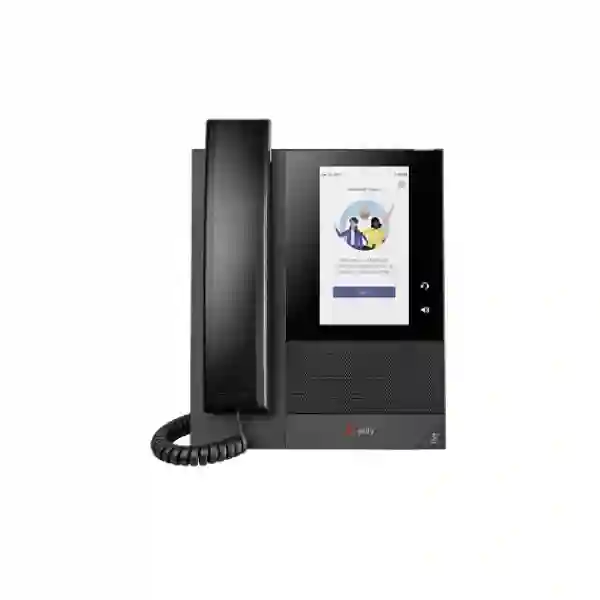
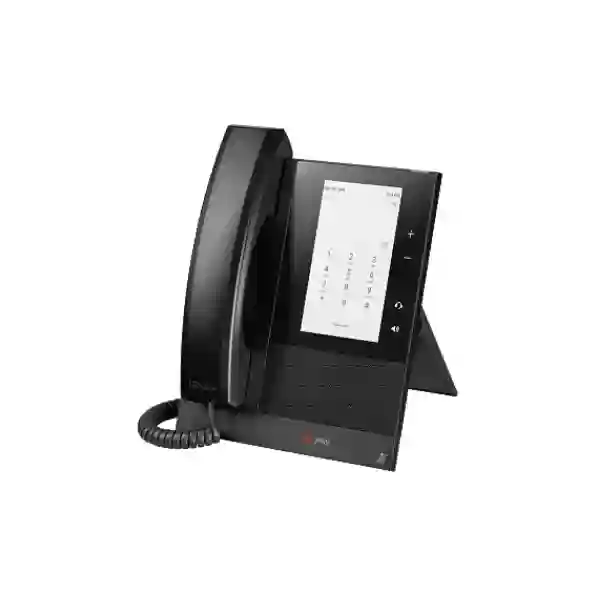
A practical wired IP desk phone with an intuitive 5-inch colour touchscreen, Poly voice technologies and Power over Ethernet support. The Poly CCX 400 Business Media Phone is designed for teams that need a familiar handset and reliable access to everyday business calling without a complicated desktop device.
The most important purchase decision is the software edition: the CCX 400 is offered in configurations for Open SIP calling and Microsoft Teams. Those configurations serve different phone environments. Confirm the exact version, your calling service, network power and headset requirements before requesting a quotation. For a business in Tanzania planning new desks or replacing older phones, this page explains both the advantages and the checks that can prevent an expensive mismatch.
At a glance: decide whether the CCX 400 fits
The CCX 400 belongs on a desk that already has, or can be given, a wired data connection and a supported IP calling service. Its 5-inch colour display helps people navigate contacts, on-screen calling functions and the interface offered by their chosen software profile. It does not automatically include a telephone number, calling subscription, hosted PBX account or Teams Phone entitlement. Those services are selected and administered separately.
Staff desks, front-office workstations and shared business calling points that need a touch-enabled wired desk phone.
Open SIP versus Teams version; provider support; a compatible PoE port; headsets and user licensing.
Built-in Wi-Fi, Bluetooth pairing, a video camera, included power adapter or universal PBX compatibility.
For procurement teams, the right question is not only whether the phone has good sound. It is whether the ordered edition can sign in or register to the company’s platform, receive the needed call features and remain supportable under the organisation’s IT policies. One well-configured test unit is often more informative than a feature list when several locations, departments or phone systems are involved.
Open SIP or Microsoft Teams: choose the correct edition
HP lists separate CCX 400 configurations for Open SIP and Microsoft Teams. An Open SIP model is intended for an IP PBX or hosted voice platform that supports compatible SIP endpoints. A Microsoft Teams model is intended for a Teams calling deployment. The hardware family and physical design are closely related, but the interface, administrative approach and applicable software can differ. Purchase documents should clearly name the intended edition rather than relying only on the words ‘CCX 400’.
| Decision point | Open SIP configuration | Microsoft Teams configuration |
|---|---|---|
| Primary environment | Compatible SIP PBX or hosted voice service | Configured Microsoft Teams Phone environment |
| Account or registration | SIP credentials and provisioning information | Teams account, policies and applicable licences |
| Administrator checks | PBX support, provisioning, feature mapping | Teams device support, sign-in and tenant policies |
| Before purchase | Confirm exact SIP platform and supported functions | Confirm exact device edition and current Teams support |
HP product references distinguish the Open SIP with PoE configuration and the Microsoft Teams with PoE configuration, but those manufacturer references are not FourTeck inventory SKUs. A product name by itself does not confirm which reference will be supplied. Ask the seller to state the full configuration and part identification on the quotation, especially where procurement, ICT and the end users are handled by different teams.
Some CCX devices and software releases support changing a base profile, but that should not be treated as a guaranteed, effortless conversion between every software image or service. Firmware, supported upgrade paths and platform rules can change. Selecting the correct edition from the beginning reduces testing and deployment risk.
The 5-inch touchscreen: why it matters at work
The CCX 400 has a 5-inch colour LCD touchscreen with a stated native resolution of 720 by 1280 pixels. The screen gives the phone a more guided interaction style than a traditional button-only desktop handset. People can work with on-screen controls and available contact or call views without interpreting a long row of physical function keys. That is useful at a desk where calling is important but not the user’s only task.
The actual screen layout depends on the installed profile, software version and calling service. A screenshot from a Teams configuration should not be used as a promise of identical menus on an Open SIP installation. Similarly, an icon shown in marketing material does not prove that the customer’s PBX exposes the associated function. User training should use a real device running the target production configuration.
For daily use, consider where the phone will sit, whether the display is comfortable to read from a seated position and whether the staff member prefers touch controls or a physical keypad. The adjustable stand offers useful placement flexibility, while the compact display may be less suitable for someone who wants a large collaboration screen. The CCX 400 is primarily a business voice endpoint, not a replacement for a desktop collaboration application.
Voice clarity for focused business conversations
HP identifies Poly HD Voice, Poly Acoustic Clarity and Poly Acoustic Fence among the audio features of the CCX 400. These are intended to make speech easier to follow and to reduce distracting noise in the appropriate listening mode. Acoustic Clarity supports full-duplex conversation with acoustic echo cancellation and background noise suppression. Full duplex matters because two people can speak naturally without the phone behaving like a one-way radio.
Poly Acoustic Fence is particularly relevant when an employee uses the handset or a compatible wired headset in an office with nearby voices. It aims to reduce unwanted sounds entering the conversation. HP also lists Poly NoiseBlockAI for reducing background noise during speakerphone use. These are useful audio technologies, but the audible result still depends on room acoustics, headset selection, microphone distance, network performance and the audio format negotiated by the calling platform.
A quiet private office, an open-plan sales floor and a reception counter create different audio challenges. For the sales floor, a suitable wired headset and a consistent microphone position may matter more than merely increasing speaker volume. For a private office, hands-free speakerphone use might be convenient. Test calls in the real workplace before making an organisation-wide decision, including calls across the network and out to the public telephone system where applicable.
It is also worth distinguishing noise reduction from complete noise elimination. No desk phone can guarantee a perfect call when the surrounding room is extremely loud or the underlying internet connection is unstable. The CCX 400 provides a strong technical foundation for ordinary voice calls; practical conditions determine the final user experience.
Handset, speakerphone and wired headset options
A business desk phone needs to accommodate different calling habits. The supplied handset gives users a familiar private listening path for individual calls. The speakerphone suits conversations where hands-free operation or participation by people near the desk is appropriate. A compatible headset can be preferable for employees who answer many calls, work beside colleagues or need their hands free while entering information into a business application.
For headset procurement, focus on the physical connection as well as the brand. The CCX 400 documentation lists wired headset connectivity and a USB Type-A port; electronic hook switch accessories may be used in supported combinations. An ordinary consumer Bluetooth headset should not be assumed to pair directly with this phone: integrated Bluetooth is not part of the standard CCX 400 connectivity described in the product information reviewed. If wireless headset operation is required, verify the exact supported base station, cable and control features before ordering.
Headset functionality involves several independent checks: audio playback, microphone input, call answer and end control, mute, volume behaviour and any electronic hook switch interface. A headset may carry sound while lacking remote call control. Organisations should test the proposed combination with the actual software edition and firmware, particularly for reception or contact-centre users who depend on predictable call handling.
For hearing comfort, provide reasonable volume guidance and allow staff to select the listening mode that works for their environment. The aim is not to standardise every employee onto speakerphone or headset, but to confirm that each person’s essential workflow has an appropriately supported audio path.
Ethernet, PoE and desk connectivity
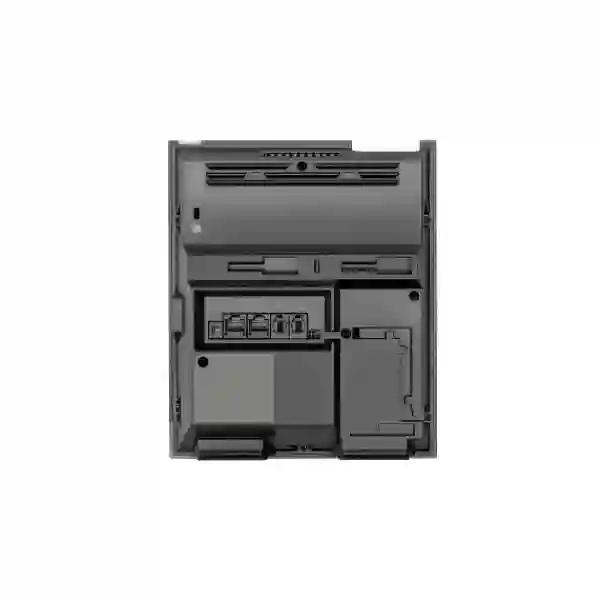
The CCX 400 includes two RJ-45 Gigabit Ethernet connections and a USB 2.0 Type-A port. One Ethernet connection links the phone to the business network, and the second may be used for a compatible desktop network pass-through arrangement. This can be helpful at existing desks where one wall data outlet serves a phone and a computer, although network and security design must still permit that topology.
For power, HP specifies autosensing IEEE 802.3af Power over Ethernet, Class 0, and a maximum consumption of 13 watts for the Open SIP with PoE configuration. A suitable PoE-capable switch or injector can provide network connectivity and power through the wired Ethernet connection. This can keep desk cabling simpler and make centrally backed-up power easier to plan when the switching infrastructure has an uninterrupted supply.
Do not confuse the presence of an Ethernet socket with a power source. An ordinary non-PoE switch or wall jack can carry data without powering the phone. Check the switch’s per-port capability and its total available PoE budget. A device can fail to start even when the data network is otherwise healthy if the port cannot provide sufficient power. Where an external power supply is needed, verify that the exact adapter is supported and included in the quote; HP’s datasheet notes an optional external adapter for the relevant configuration.
A short desk pilot should include the intended computer pass-through connection where relevant, a normal restart, a call under typical traffic load and an outage-recovery check. The goal is to confirm the whole desk works, not merely that the phone’s screen lights up.
Planning power and continuity
A phone that uses PoE is only as available as the equipment supplying that power. If the access switch, router or upstream internet equipment loses electricity, the phone may stop working even though the handset itself has no fault. Organisations that regard voice availability as important should consider backup power for the PoE switch and the other devices required by their chosen telephony architecture.
For a small deployment, count the phones on each switch, account for other PoE devices and review the switch’s usable power budget. For a larger deployment, document where the access switches are located, which devices share a circuit and how fault alerts are handled. Add spare capacity for future desk changes rather than sizing a network solely around today’s connected devices.
The CCX 400 is not a self-contained emergency communication service. Outgoing calls and emergency arrangements depend on the calling provider, its routing, local service rules and the reachability of the platform. Businesses should agree on a continuity plan that includes alternative calling methods, staff instructions and appropriate routing tests for their specific service.
As part of purchase approval, ask whether the quoted package is a PoE phone only or contains a separate adapter. A correct power plan avoids the common situation in which equipment reaches a desk before the infrastructure is ready to run it.
What the physical connections mean in practice
The first connection to plan is the network link. The phone needs a suitable wired path to the network that hosts or reaches the telephony service. The Gigabit Ethernet ports are useful where desktop network traffic is passed through, but the organisation should validate VLANs, access-control rules and the actual throughput needs of the connected computer. The presence of two ports is not a substitute for thoughtful network segmentation.
The USB Type-A port may be relevant for supported accessories and media functions. It should not be described as a universal USB dock or a guarantee that any USB headset will work. Software support, accessory firmware and the phone’s profile affect which peripherals are recognised. Similarly, a wired headset socket does not necessarily expose every remote-control function an employee expects.
A wall-mounted or tightly packed workstation needs a different cable plan from an ordinary desktop. Check connector reach, cable routing, strain relief and the space needed for an adjustable stand. Service teams should also have enough access to identify the phone’s label and the Ethernet connections without pulling apart an entire workstation.
For an office refresh, prepare a simple desk standard: Ethernet patch lead, suitable PoE port, approved headset if needed, the assigned extension or user identity, and the intended software configuration. A consistent standard makes installation, training, support and future replacement much easier.
Open SIP: questions for your PBX or voice provider
With the Open SIP configuration, the key compatibility question is whether your chosen IP PBX or hosted telephony platform supports the CCX 400 model and the intended firmware. SIP describes a signalling family, not a promise that all business call features work identically on every provider. Basic registration may be possible while shared line appearance, transfer controls, directories, presence, busy-lamp functions or provisioning still require special configuration.
Ask the platform administrator for an approved device list and a supported provisioning method. Confirm whether the phone is expected to obtain configuration through an enterprise provisioning service, manual configuration or a provider-managed process. Request details for voice VLANs, registration addresses, DNS, certificates, authentication and the policy for software upgrades. Credentials should be supplied only through an approved secure process, not added to public notes or marketing copy.
A pilot should exercise the functions people actually need: incoming and outgoing calls, blind and attended transfer, hold and resume, voicemail access, call waiting, conference operation and number presentation. If the office uses a receptionist group or hunt group, test the assigned workflow rather than assuming a feature name on the screen means the PBX supports it.
If a company is changing from a traditional PBX to hosted SIP, include the service-provider migration in the plan. Number porting, trunks, internet quality and local routing are outside the scope of the handset itself. The CCX 400 can be one endpoint in that project, but it does not supply the telephony service on its own.
Microsoft Teams: checks before assigning the phone
The Microsoft Teams version is designed for organisations using the Teams calling environment. Before purchasing, confirm the exact supported phone edition and software status against the current Microsoft and HP device guidance. A device marketed for Teams does not mean every Teams service is included in its box. The customer still needs an appropriate tenant configuration, user or shared-device assignment, calling policy and applicable licence or subscription.
Determine whether the desk is assigned to one named employee, operated by a rotating group of workers or used as a shared common-area phone. Those scenarios can have different account, device and licensing requirements. Ask the Teams administrator to document how phones will sign in, how accounts will be secured, which users can place external calls and how voicemail or transfer policies will apply.
The visible controls on a Teams phone can change as the software evolves. Administrators should verify device management and app support for the planned deployment date, test sign-in and updates, and confirm that the specific capabilities required by the user group are presently supported. Avoid basing procurement solely on screenshots from an older firmware version.
When Teams Phone is the core service, the choice between using a desk device and a computer headset also deserves consideration. A fixed phone can be useful for workers who prefer a dedicated calling device or who must answer calls away from a laptop. Other employees may be better served by a software client. The right mix depends on work patterns, not a requirement to place a handset on every desk.
Configuration, provisioning and fleet management
A single phone can be set up at a desk, but a fleet needs a reproducible process. Start by recording the ordered edition, manufacturer part reference, deployment location, assigned user or extension, network details and headset requirements. Keep device identifiers in a secure internal inventory. This makes changes and troubleshooting less dependent on the memory of the person who performed the initial installation.
HP’s CCX support resources include provisioning and management documentation, and the family is positioned for IT-managed deployment. The appropriate method still depends on the software profile and the customer’s calling platform. An Open SIP environment may use a PBX or provisioning service to supply settings; a Teams environment follows Microsoft device management and sign-in procedures. Treat these as separate deployment tracks until proven otherwise.
A practical rollout uses a known-good configuration tested on representative desks. Confirm how a factory-reset device will regain its settings, how secure certificates or credentials are installed, and what will happen after an update or power failure. Reserve an escalation path for phones that boot successfully but cannot register, sign in or place calls.
For ongoing administration, decide who owns configuration changes, feature requests and firmware approval. A managed handset is a small network computer: it should be maintained under a deliberate lifecycle policy rather than left unchanged simply because calls seem to be working.
Security and access considerations
Any device connected to a business network deserves basic security review. HP lists security capabilities for the Open SIP with PoE model including support for TLS, SRTP, HTTPS provisioning, 802.1X authentication and password controls. Support for a security mechanism is not proof that it is enabled or correctly configured in a specific installation. The PBX, network, certificates and local settings must all be aligned.
Prefer unique administrative credentials, appropriate account permissions and an approved process for installing software updates. Apply device access rules that match the organisation’s network architecture, and avoid exposing management interfaces unnecessarily. If a phone is shared, think about whether recent call information, contact details or voicemail access remain visible to the next person who uses it.
Before deployment, ask the IT team to decide where phone configuration files will be stored, how credentials will be protected and how a lost, retired or reassigned device will be reset. These questions are particularly important when external service providers assist with provisioning or when devices move between offices. The goal is to make support convenient without weakening account controls.
Security requirements can differ between a Teams service and an Open SIP provider, so insist on configuration instructions for the exact model, profile and current software version rather than applying an unrelated generic IP phone checklist without review.
Network quality: what a phone cannot fix
Even excellent audio hardware cannot repair sustained packet loss, high jitter or a congested internet connection. Voice quality depends on an end-to-end chain: the handset, LAN, switches, router, internet service where used, telephony platform and remote destination. For each site, check that the network has enough capacity and that voice traffic receives sensible treatment during busy periods.
When calls sound broken, first identify whether the issue affects every handset or only one desk. A single-desk issue may point to a damaged cable, switch port, headset or local configuration. Site-wide symptoms can involve WAN conditions, routing, SIP registration, DNS, firewall rules or a service outage. Document the time, affected users and call direction before changing settings.
For businesses using cloud calling, test from the actual site and on the actual internet link. A strong speed-test result alone does not establish low-jitter, low-loss voice performance. Plan for a sensible escalation path to the ISP and calling provider, including the measurements each organisation will need to investigate faults.
Where a business has several branches, compare their network conditions before copying one working configuration everywhere. A headset and phone may be identical while call experience differs because of local switching, internet routes or power events. The correct remedy is often an infrastructure change rather than replacing every desk phone.
Everyday business situations where it helps
Reception and visitor desks
A dedicated handset gives front-office staff a clear point for receiving calls while they greet visitors or maintain records. Test transfer, directory and headset behaviour with the installed phone service; these functions depend on platform support. Keep common numbers and escalation instructions accessible to the team.
Sales and account teams
Staff who spend much of the day on customer calls may value a dedicated device alongside a computer. A wired headset can support note-taking and CRM use, while the touchscreen offers a simple place for call controls. Choose the right PBX integration workflow instead of expecting the phone itself to synchronise with a CRM.
Administration and finance
A familiar handset and clear audio can suit employees handling supplier, client or internal calls. Review user identity, call routing and any privacy requirements before assigning the desk. If several people share one seat, set an explicit process for voicemail, contacts and sign-out.
Shared work areas
A fixed phone can provide an agreed calling point where employees rotate through the same workspace. The IT team must select the right shared-user or device model for the calling platform. Do not presume that a Teams personal-user licence is interchangeable with a common-area arrangement.
Branch offices
A standardised CCX 400 rollout can give users a similar interface across compatible sites. The network and calling service at every branch still need separate review, including PoE, power backup, internet quality and any local call-routing rules. Ship the correct edition to each site.
Managers and small offices
Some people prefer a dedicated phone for routine voice calls rather than changing windows on a laptop. The CCX 400 can serve that preference with a touchscreen and speakerphone. If built-in wireless networking, Bluetooth pairing or a larger executive display is mandatory, compare other models before ordering.
These are deployment examples, not claims that a particular calling platform, service or accessory is included. Every scenario should be checked against the enterprise’s actual voice system and operational policy before the equipment is approved.
Practical Tanzania deployment planning
For organisations evaluating a business IP phone in Tanzania, the relevant starting point is the workplace’s existing voice service and network rather than an assumed city-specific product configuration. Ask whether the site uses an on-premises IP PBX, a hosted SIP service, Microsoft Teams Phone or another calling setup. From that answer, determine whether an Open SIP or Teams edition is appropriate and what approvals the company’s ICT and procurement teams require.
Review the local access network and the resilience of the services the office depends on. Stable electricity, functioning PoE switching and dependable internet connectivity are practical considerations where voice calls rely on cloud infrastructure. The way calls reach Tanzanian mobile or fixed networks also depends on the selected service provider and its routing arrangements. The desk phone alone does not establish trunk availability, local telephone numbers or guaranteed interconnection.
Ask for a quotation that states the actual configuration, intended quantity, compatible accessories, power requirements and support responsibilities. Confirm final price, applicable taxes, delivery arrangements, service coverage, warranty terms and product availability directly before purchase; none should be assumed from a general product description. If import, compliance or local approval documentation is relevant to the procurement process, request evidence for the exact supplied model instead of relying on a generic claim about the product family.
A short acceptance test with local users is especially helpful when multiple departments have different call patterns. Validate an actual inbound call, outbound call, internal transfer and any essential receptionist or shared-desk workflow before accepting a larger rollout.
A procurement checklist worth using
- Confirm the edition: State clearly whether the requested configuration is Open SIP or Microsoft Teams. Request the manufacturer’s complete part reference for the exact unit to be supplied; do not treat a generic title as a sufficient identifier.
- Check the calling platform: Obtain the PBX, hosted-service or Teams administrator’s confirmation that the chosen profile, firmware and deployment scenario are supported.
- Review licences and accounts: Identify required user, device, calling or subscription entitlements. A telephone handset is not the same thing as a telephony service.
- Inspect network power: Verify a working wired LAN socket, supported PoE capability and sufficient switch power budget, or an approved alternative adapter if needed.
- Specify headsets accurately: List the proposed headset model, connection type and any EHS equipment. Test answer, end, mute and microphone functions.
- Define features: Separate essential calling tasks from optional convenience features. Confirm transfer, voicemail, conference and presence behaviour with the actual platform.
- Ask what arrives in the box: HP product literature lists the console, stand, handset and cord, network cable and setup information for specific packages; confirm the quoted bundle and any required extras.
- Record service expectations: Ask the quotation to identify support contact, onboarding responsibilities, commercial terms and the handling of faults without assuming a standard local service level.
For a significant order, ask for one reference device and a written pilot acceptance checklist. The additional effort at the beginning is usually smaller than the effort required to correct a batch of devices ordered for the wrong calling environment.
A sensible rollout sequence
- 1. Discover: List existing desks, phone numbers, call groups, current handsets, network locations and common user complaints. Distinguish requirements that belong to the phone from those that belong to the PBX or cloud service.
- 2. Select: Decide on the Teams or Open SIP edition using provider and administrator input. Document the precise proposed device configuration and accessory set.
- 3. Pilot: Place a unit at a representative reception desk and another at a typical staff workstation when the workflows differ. Record all expected call features before testing.
- 4. Prepare infrastructure: Confirm Ethernet, PoE, required network services, authentication, configuration access and the intended software baseline.
- 5. Provision securely: Configure the correct account or SIP registration and apply approved access controls. Avoid passing passwords in uncontrolled emails or spreadsheets.
- 6. Train briefly: Demonstrate answering, transfer, hold, headset switching, voicemail access and the agreed support procedure on a device using its real production interface.
- 7. Accept and maintain: Collect user feedback, close pilot issues, document device assignments and establish a routine for updates, spare devices and incident handling.
This sequence can be scaled for a small office or a multi-location organisation. The principle is consistent: verify the service, the edition and the network before distributing handsets. Keep the acceptance criteria short enough for real staff to execute, but specific enough that an installation can be judged objectively.
How to diagnose common setup problems
- Screen remains off: Check the Ethernet lead, PoE switch or injector and the port’s power status. If using an adapter, confirm it is the approved type and the complete power path is working.
- Phone powers on but has no network access: Inspect cabling and switch port settings, then check whether the phone is receiving the expected network configuration. A powered phone can still be on the wrong VLAN.
- SIP account fails to register: Review the configured registrar, credentials, time, DNS and network reachability with the PBX or service administrator. Do not repeatedly expose passwords while testing.
- Teams sign-in is unsuccessful: Confirm that the phone is the correct edition, meets current service requirements and has the intended account and policies. Follow the supported administrator sign-in and update guidance.
- Calls connect but sound poor: Test the handset and a supported headset independently, then investigate packet loss, congestion, microphone position and the calling route. Avoid making unrecorded firmware changes during active incidents.
- Transfer or directory feature is missing: Verify that the service supports the function on the deployed phone profile. A missing platform feature cannot always be fixed by an end-user screen setting.
- Headset works but remote answer does not: Check the exact headset, cable, accessory and EHS support rather than assuming that working audio guarantees remote call control.
If the problem persists, gather the device model, software version, network conditions, failing steps and relevant timestamps for the authorised support team. Resetting the phone without preserving configuration information can complicate diagnosis, so use a controlled procedure.
Limits and trade-offs to understand
The CCX 400 is built around a wired workplace. Built-in Wi-Fi and Bluetooth are not standard features of the CCX 400 configurations described in the reviewed manufacturer material. That distinction matters if a desk has no network cable or if staff require direct Bluetooth headset pairing. A different phone model or an approved accessory arrangement may be more suitable than forcing an unsuitable setup.
This is also not a video conferencing endpoint with an integrated camera. The touchscreen is primarily for phone interaction and related supported software functions. Employees who routinely conduct video meetings will normally use separate approved video equipment or a computer-based collaboration client. The word ‘media’ in the product name should not be interpreted as a promise of full audiovisual meeting-room capability.
Although the CCX 400 is described as an entry-level business phone, ‘entry-level’ refers to its placement in a product range, not the complexity of every deployment. A small office with an unfamiliar hosted PBX may need more configuration effort than a larger organisation with a mature provisioning process. The service and network environment drive much of the work.
Finally, a model’s inclusion in a product catalogue does not prove immediate Tanzania stock, a particular regional warranty or a certain purchase price. Those are quote-specific facts that should be confirmed for the intended order.
Compare your requirements with nearby CCX options
The CCX 400 is an attractive middle ground for someone who wants a proper touchscreen but does not need a long list of wireless or executive features. The Poly CCX family includes other phone designs, and model selection should follow the user role. A physical-keypad-first user may want to evaluate a simpler keypad-based model, while someone who needs built-in Bluetooth, wireless network connectivity or a larger display should look at a higher-feature configuration and verify its current specifications.
Do not choose a replacement simply because it has a higher model number. Determine what changes would materially improve work: a larger screen, wireless headset convenience, an extension module, network flexibility or a different software certification. Some features vary by specific model and edition, and accessory support should always be checked against current manufacturer documentation.
For an organisation standardising desktops, two approved models can sometimes be more useful than one model forced onto every role: one for mainstream wired desks and another for exceptional accessibility or connectivity needs. Keep the number of models manageable so that IT can support them without excessive firmware, accessory and training variation.
If the CCX 400 already meets the calling, audio, network and user-interface requirements, additional hardware capability may offer little benefit. Spend the remaining project attention on stable provisioning, network quality, appropriate licensing and effective user guidance.
Accessibility, user comfort and shared-device etiquette
A consistent phone user experience matters when employees have different levels of familiarity with IP telephony. The CCX 400’s colour display and touch-based controls can make routine tasks easier for some users, while others may prefer tactile physical keys. In procurement trials, include people who will actually handle calls throughout the day and consider readability, reach, hearing needs, screen reflections and desk layout.
Employees who use hearing aids, specialised headsets or assistive arrangements may have compatibility requirements beyond those listed in a headline specification. Verify the exact accessory and listening path with the user before making a purchase decision. A generic declaration of compatibility should not replace a practical demonstration of the required workflow.
Shared phones raise a separate issue: access to call history, contacts, voicemail and user identities. Agree on who may sign in, whether an account stays assigned to the device, how a shift change is handled and how personal information is protected. The answer can differ substantially between a shared SIP endpoint and a Microsoft Teams device, and must follow the organisation’s account policy.
Simple local instructions beside the desk can help: how to answer, where to transfer a call, whom to contact for faults and which actions are restricted. Keep instructions consistent with the actual deployed software rather than generic internet screenshots.
Budgeting beyond the handset price
The purchase price is only one part of the cost of a business phone. A complete budget can include a compatible PoE switch or injector, any approved external power adapter, headsets, headset control accessories, network cabling, installation labour, configuration time, user or device subscriptions, telephone service charges and ongoing maintenance. Some organisations already have most of these components; others may need an infrastructure refresh.
Assess the trade-off between using a dedicated handset and relying on a computer softphone. For employees whose role benefits from fixed desk answering, the dedicated device may simplify call access. For employees who work remotely or move frequently, a software-based option may better match their routine. A mixed environment is not inherently a problem when account policies and support processes are clear.
Ask a supplier for a line-by-line quotation that distinguishes the phone edition, quantities, accessories, installation or configuration, licence fees and continuing support. Review what is included before comparing prices between suppliers. A headline price for a phone-only PoE package cannot be compared fairly with a configured package that contains additional components.
No Tanzania price or delivery promise is stated here because those details must be validated for the actual listing and order. The strongest buying decision is an equipment and service combination that meets the stated workflows within a realistic total project budget.
Maintenance and replacement planning
IP phones benefit from ordinary IT hygiene. Keep a record of installed software versions, document the authorised update process and review vendor security or compatibility notices as they become relevant. An update can resolve problems, but it can also affect a previously tested behaviour; evaluate changes against the production service and the organisation’s change-control requirements.
For physical care, route cables neatly, avoid liquids around the phone and clean the screen and handset using methods approved for the equipment. Check the condition of frequently handled cords and headsets during routine service. A worn headset cable can produce a poor call experience even when the phone and network are healthy.
If a user leaves or moves desks, update the assignment and any associated account, extension or shared-device policy. Remove credentials when a device is retired or repurposed. Maintain a small documented spare strategy if a business depends heavily on desk calling, and confirm that spare devices can run the current supported software image.
As the telephony platform evolves, periodically reassess whether the deployed model and edition remain supported for the organisation’s required functions. Purchasing a business phone is the beginning of its managed lifecycle, not the end of the project.
Frequently asked questions about the Poly CCX 400
Is the HP Poly CCX 400 Business Media Phone a VoIP phone?
Yes. It is a business IP desk-phone family intended for network-based calling, with configurations for Open SIP services and Microsoft Teams calling. It must be connected to a compatible network and provisioned for the relevant platform. A phone purchased without an associated service or account cannot independently deliver a complete business telephone system.
Does the CCX 400 have a touchscreen?
Yes. HP specifies a 5-inch colour LCD touchscreen with 720 by 1280 native resolution. The exact controls and applications visible depend on the software edition and service configuration. The display is useful for ordinary calling tasks, but it should not be mistaken for a general-purpose tablet or integrated video conference system.
Can I connect it to Microsoft Teams?
There is a CCX 400 configuration sold for Microsoft Teams. Confirm that this is the edition you are buying and that the device, software and tenant meet current Microsoft requirements. Appropriate calling licences, user or shared-device setup and administrator policies are separate matters to verify before deployment.
Can it work with an existing SIP PBX?
The Open SIP configuration is intended for compatible SIP telephony environments. Whether it works with a specific PBX or hosted provider, and whether every desired feature works, requires confirmation from the platform vendor or service provider. Request a support statement and test the actual registration, calling and transfer workflow.
Does it need a power adapter?
HP specifies IEEE 802.3af PoE for the CCX 400 PoE configuration, so a suitable PoE switch or injector can power the phone through Ethernet. A non-PoE network connection will not provide that power. If your site needs an external adapter, confirm the exact approved model and whether it is included in the proposed package.
Does the phone include Wi-Fi or Bluetooth?
The standard CCX 400 hardware information reviewed does not list integrated Wi-Fi or Bluetooth. Plan on a wired network connection and verify supported wired or accessory-based headset options. If cable-free network operation or direct Bluetooth pairing is a non-negotiable requirement, compare a model that explicitly offers those features.
Which headsets can I use?
Headset selection depends on the phone’s available ports, the headset connection and the software version. Verify USB or wired headset compatibility and any electronic hook switch accessory with a current manufacturer support list. Test audio and remote call control separately before ordering multiple headsets.
How many phone lines does the CCX 400 support?
Open SIP materials and distributor listings describe support for up to 24 lines or SIP registrations, but an advertised capability does not override the limitations of the chosen provider, firmware or phone profile. Confirm the number of registrations and any associated service features you actually need with your administrator.
Can I use it for video meetings?
The CCX 400 is best treated as a voice-focused desk phone. It does not contain an integrated video camera for ordinary video meetings. If video collaboration is an important requirement, select a suitable computer, room system or supported device rather than assuming a touchscreen desk phone will meet it.
What comes with the phone?
HP lists a console, adjustable desk stand, handset with cord, a CAT-5E network cable and setup material for specified CCX 400 configurations. Packaging can vary by reference and region, and a separate power adapter should not be assumed. Ask for the exact box contents and included accessories on your quotation.
Is this phone suitable for a reception desk?
It can be a good candidate when reception needs a fixed wired handset and the calling platform supports the necessary transfer, directory and call-handling functions. Test the actual receptionist workflow and headset combination before approval. Reception features come from the full telephone system, not from the handset name alone.
How do I obtain pricing in Tanzania?
Request a quotation for the exact CCX 400 edition and quantity, stating your telephone platform, PoE arrangements, intended accessories and any configuration needs. Ask the supplier to confirm current price, applicable commercial terms, availability and delivery information. None of those order-specific details should be inferred from a general specification page.
If your requirement is unusual—for example, an older PBX, shared phones, specialist headsets or several branches—include that information when requesting advice. Those details can change the appropriate edition, accessories and deployment sequence.
Request an HP Poly CCX 400 quotation
Planning a phone upgrade or a new wired calling workstation? Ask FourTeck Tanzania about the HP Poly CCX 400 Business Media Phone and specify whether you need the Open SIP or Microsoft Teams configuration. Share the intended phone platform, approximate handset quantity, PoE availability and any headset or setup requirements. This will help establish which product configuration and supporting items need to be quoted.
Before purchase, request written confirmation of the exact edition and part reference, provider compatibility, commercial price, availability, warranty terms and delivery arrangements. For a larger project, consider asking for a test unit or a pilot configuration so the business can verify calling functions in its own environment. This is a quotation request, not a claim of current stock or a guaranteed service outcome.




Reviews
There are no reviews yet.