
Business cordless IP telephony • Tanzania buyer guide
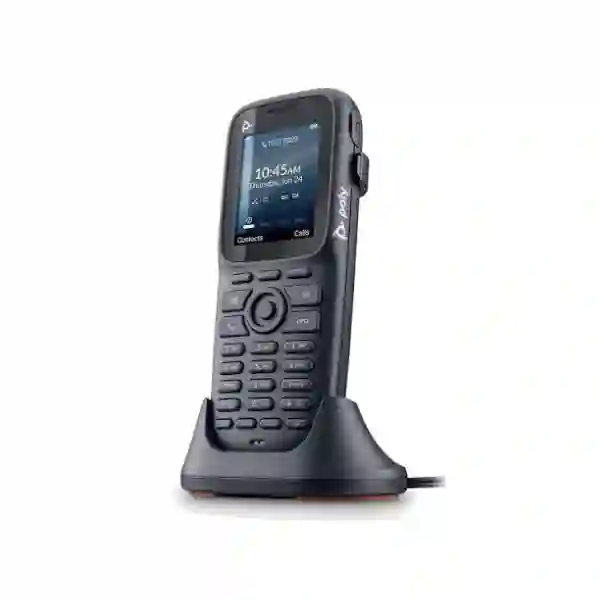
HP Poly Rove 20 DECT Wireless Handset
Stay available for business calls while moving around a properly covered workplace. The HP Poly Rove 20 DECT Wireless Handset provides DECT mobility, HD voice, a compact colour display and practical call controls when used with a compatible Poly Rove base station and a configured telephone service.
This is a handset-only product description, not a promise that a base station or calling subscription is included. For a suitable quotation, identify your existing phone system, workplace coverage area and the number of staff who need cordless calling. Confirm the exact regional supply arrangement and any required system components before ordering.
Key specifications at a glance
Battery duration and wireless range are published maximums, not guaranteed results in every deployment. The final product package, software functions and actual calling performance should be checked against the exact supplied variant and installed system.
Understand the handset before ordering
A cordless extension for a business telephone system
The HP Poly Rove 20 DECT Wireless Handset is designed for people who make and receive work calls while moving between desks, counters, offices and nearby working areas. It communicates over DECT radio with a compatible Poly Rove base station; the base connects the wireless system to an appropriate IP telephony environment. This arrangement is different from carrying a mobile phone on a public cellular network. The handset is best understood as a cordless endpoint within a planned workplace phone system, not a replacement for the business telephone service itself. For a buyer planning a new installation, identify the telephony platform, the base station and the handset quantity together. For an existing Rove installation, confirm that the intended handset can be registered on the present base and that spare capacity remains. This simple distinction prevents ordering a handset and discovering that it cannot place calls by itself.
What comes in the handset package
HP lists the handset, rechargeable battery, charging cradle, external power adapter, belt clip, quick start guide and safety information among the package contents for the referenced Rove 20 handset product. That combination allows a user to carry the telephone and recharge it at a fixed point, but it is not the same as purchasing a complete base-station telephone system. A Poly Rove base, network connectivity and telephone service must be planned separately unless an explicit bundle includes them. When requesting a quotation in Tanzania, state whether a compatible base is already installed and whether you need only an additional handset, a new single-site solution or a broader deployment. Ask the supplier to identify the exact regional package and plug supplied. Packaging and accessory configurations should be confirmed against the actual offer rather than inferred from photographs or from an unrelated starter kit.
The right everyday environment
The Rove 20 is suited to ordinary on-site business mobility: a receptionist who steps away from a desk, a retail supervisor who checks stock while speaking to a colleague or an office team member who moves between rooms. HP describes smooth, easy-to-clean surfaces, but that description should not be mistaken for proof of a particular chemical resistance, ingress-protection rating or suitability for harsh wash-down conditions. For industrial work, outdoor exposure, high-impact operations or controlled clinical cleaning procedures, compare the environmental requirements with the exact published specifications before choosing a handset. The deciding question is not simply whether the staff member needs cordless calling. It is whether the workplace conditions, mobility pattern, expected coverage and handling requirements fit this specific office-oriented model. Establishing that fit early protects the practical value of the installation.
Calling experience and useful controls
HD voice with noise-management features
HP positions HD voice as a central benefit of the Rove 20, supported by audio design intended to keep conversations understandable. Its published materials describe background-noise suppression, acoustic echo cancellation and a full-duplex hands-free speakerphone. These features are helpful when a staff member must confirm instructions, transfer information or discuss a customer request without returning to a fixed desk. Call quality nevertheless depends on more than the handset: the endpoint at the other end, system configuration, selected codecs, network conditions and surrounding noise all contribute to the experience. It is sensible to test a normal call from each intended working zone, including near walls, around shelves and in areas with competing background sound. Clear speech in a quiet demonstration area does not prove equivalent results at a busy counter during peak hours. Plan a realistic pilot using common call types.
Two-inch colour screen and navigation
The handset uses a backlit two-inch colour TFT screen, with an official datasheet resolution of 128 by 160 pixels. This is a practical status-and-navigation display, not a large touchscreen intended for document-heavy tasks. Its value is quick access to call information, menu options and handset status while remaining compact enough to carry. Buyers should consider whether staff normally wear gloves, work in dim corridors or need to read call information while walking. Ask a pilot group to use the keypad, navigation controls and screen in the real operating environment instead of judging usability from a specification table. Font settings and available interface functions can help different users, but exact behaviour should be checked on the installed software version. Readability, familiar call controls and short training sessions often matter more than the number of settings listed in a brochure.
Line keys, call parking and team workflows
HP specifies four line keys and describes customizable call functions, including convenient call parking. Such controls can make the handset useful for someone who routinely answers a call, consults another department and reconnects a caller without walking back to a desk phone. The actual options visible on a key are influenced by provisioning and the telephone service behind the base station. Before promising that a particular team workflow will work, write down how calls should be answered, parked, retrieved, transferred and escalated. Ask the system administrator to map those steps to available keys and supported PBX functions, then demonstrate the sequence with representative users. A feature name alone is not evidence that it is enabled on a specific account. Good deployment starts from the way the team handles calls, not from a long catalogue of possible telephony functions.
Mobility, range and battery planning
Understand the published indoor range
HP publishes an indoor wireless-range figure of up to 50 metres for the Rove 20. This is a maximum reference, not a guaranteed radius in every building. Concrete walls, metal shelving, equipment rooms, lift shafts, floor changes and other physical obstacles can create weak-signal areas. A base station positioned near an external wall may provide very different usable coverage from one installed centrally in an open area. Before specifying coverage, walk the likely user route and identify locations where a person must remain reachable: reception, adjacent offices, storerooms, meeting rooms and circulation spaces. Use on-site measurements and live call tests to confirm the design. If one base does not deliver the required signal, explore a suitable Rove multi-base architecture or compatible repeater arrangement rather than treating the published range as a promise.
Battery expectations in normal use
HP states up to 35 hours of talk time when Eco mode is used and up to 300 hours of standby time. Those are manufacturer maximums under stated conditions, not guaranteed results for every combination of call volume, signal conditions and configuration. The handset uses a rechargeable lithium-ion battery, with HP listing 1100 mAh capacity in its datasheet. In procurement planning, focus on actual shift patterns: how many calls a staff member handles, whether the handset spends long periods out of its cradle, and when a charging point is accessible. A team that makes short calls throughout a shift has different charging needs from a team that conducts lengthy conversations. Establish a routine for returning handsets to charging cradles between shifts, and make charging responsibility part of the handover process for shared devices.
Keeping users reachable through the shift
Good cordless telephony is as much about daily habits as radio specifications. Assign each handset to a person, desk or shift in a way that makes ownership clear. Position the charging cradle somewhere safe, dry and convenient, where it will not be obstructed by paperwork or exposed to spills. Confirm that users recognise low-battery and out-of-coverage indications, know when to transfer a call and understand what to do if their handset loses registration. Where staff work across several floors or separated buildings, document the mobility route rather than assuming coverage will follow them. If a handover or shift change is a regular occurrence, add a brief check of battery level, charging contact and network signal. Such straightforward routines reduce avoidable missed calls and prevent a nominally mobile system from becoming unreliable in practice.
Choosing the correct Rove base system
Poly Rove B1 for a straightforward small deployment
HP documentation describes the Rove B1 as a single-cell base-station option and identifies compatibility with Rove handsets including the Rove 20. Its administrative guidance gives registration capacity of up to ten wireless handsets for a B1 base. That does not imply ten simultaneous conversations or unrestricted compatibility with every external telephone platform. A B1-based approach can be worth evaluating for a small office or a compact retail environment where a single planned radio cell covers the necessary work area. Check handset count, expected call traffic, line provisioning and site layout before purchasing. If users must pass through difficult walls or cover separated zones, the simplicity of one base may not be the appropriate design. Confirm the regional hardware variant and IP telephony requirements with the implementer, and distinguish a complete B1-and-handset kit from this handset-only listing.
Poly Rove B2 for a larger or more flexible installation
HP’s current Rove administrator documentation lists up to twenty wireless handset registrations on a Rove B2 base station, with support for relevant single- or dual-cell deployment arrangements. Registration capacity and active-call capacity are different planning measures, so the total number of employees is not by itself a complete capacity calculation. A B2-based project should consider how users move between rooms, how the supporting LAN and IP telephone service are configured, and whether a dual-cell design is appropriate for the intended floor plan. Verify the precise software release and configuration limits before committing. Buyers upgrading from a simpler installation should also check that handsets already owned can be registered and that the desired call features remain available after any change of base. A structured migration plan is safer than assuming that replacing a base automatically preserves every current behaviour.
Poly Rove B4 for planned multi-cell systems
The Rove B4 family is intended for more substantial wireless arrangements, including configurations that use multiple base stations. HP’s administrator material describes up to thirty handset registrations per B4 base station, although wider system planning must follow the documented version-specific architecture and its capacity limits. A B4 discussion should therefore involve a proper site survey, base positioning, handover behaviour, network provision, administration method and the actual number of simultaneous calls required. This matters for offices with numerous rooms, departments that move across wider premises and buildings where a single base would be an inadequate design. The Rove 20 can be part of that environment, but a compatible handset does not remove the need to engineer the underlying radio and IP system correctly. Ask for a coverage drawing or test plan that matches the real premises before confirming quantities.
When a repeater is worth investigating
Poly Rove systems can use compatible R8 DECT repeaters in supported configurations to help address coverage needs. A repeater should be considered as a designed element of the system, not a universal remedy for every dead zone. Its suitability depends on the particular base, software, radio environment and deployment architecture. For instance, a reception area with good signal and an adjoining storage space with intermittent signal may require a different solution from several floors with many active handset users. Begin by identifying the weak area and testing from the planned base location; then determine whether a supported repeater, an adjusted base position or an additional base is the correct approach. Do not promise uninterrupted roaming or a specific extra distance without site evidence. A careful design avoids spending on accessories that do not solve the actual problem.
Check compatibility before spending
A handset is not an independent SIP desk phone
The handset itself communicates wirelessly over DECT. It is the compatible Rove base station and associated system configuration that provide the connection to an IP telephony environment. A buyer should not order the Rove 20 on the assumption that it has an Ethernet port, can be plugged directly into a router or can independently register to every SIP service. When expanding a business telephone system, identify the exact platform, PBX or hosted service, its supported provisioning method and the equipment already installed. Ask the administrator to confirm that a Rove base can be supported in the intended arrangement. This check is especially important when the organisation uses central call queues, reception groups, shared extensions, call recording or managed voice services. Broad labels such as VoIP compatible are not substitutes for confirming the exact deployment.
Provisioning and software-version checks
A successful installation requires more than radio pairing. Administrators need to configure network connectivity, line or service accounts, registration permissions and settings that affect how calls behave. HP publishes guides covering handset registration, base administration and release-specific features. Use documentation matching the installed base model and software version rather than applying steps from an unrelated Rove configuration. For existing installations, record the current base type, software version, registered handset inventory and any customised settings before making changes. During a pilot, verify incoming calls, outgoing calls, internal extensions, transfers, call waiting and any features that the team treats as essential. If the business telephone service is managed by a third party, coordinate provisioning with that provider in advance. Separating DECT pairing from SIP provisioning makes troubleshooting much easier for the people responsible for support.
Regional variants, electrical supply and radio rules
Internationally sold telephony equipment can have regional hardware, power-plug and radio-band variants. HP publishes a general product number for this Rove 20 family, but the exact supplied package and the matching base hardware still need confirmation for Tanzania. Do not infer Tanzanian regulatory approval from certification information shown for a different market, and do not assume that a frequency range quoted for a US model applies locally. Ask the supplier or installer to establish the appropriate regional version and any applicable requirements before installation. Also confirm the provided power adapter and the site’s electrical arrangements. Where reliable operation is important during a power interruption, assess continuity for the base station, the IP network and the telephone service, as well as the handset. Keeping only the handset charged will not maintain calls if the supporting network equipment is unavailable.
Departments that can benefit
Reception and front-of-house teams
A reception worker may need to greet visitors, find a colleague, confirm an appointment and still answer an incoming call. A cordless handset can support that pattern because the worker is not tied to a single desk position. For a smooth reception workflow, establish who owns the main incoming line, how calls are routed when someone is absent and where parked calls are retrieved. Verify that the chosen telephone platform supports the desired handoff behaviour with the Rove system. Put the charging cradle where the handset can be returned without disrupting customer contact. A small real-world trial should cover busy periods, not just quiet mornings, because call handling can become more complex when several people are requesting help at once. The goal is reliable movement and practical call control, not simply replacing a desk phone with a cordless device.
Retail shops and customer service areas
Staff in a retail setting often step between a sales counter, display area and nearby stockroom. A Rove 20 handset may allow a supervisor to check information while speaking to a customer or respond to colleagues without losing access to the business phone system. Range must be tested carefully around shelves, metallic fixtures and enclosed storerooms. Consider where the handset is carried, whether a belt clip is suitable and how staff avoid leaving it on a shelf at the end of a task. If customers rely on telephone enquiries for item availability, design a simple process for requesting a stock check and returning to the call. The device is particularly useful when an employee’s work is spread across nearby spaces but remains inside a planned office or retail wireless coverage area.
Office and administrative staff
In ordinary offices, the handset can assist staff who divide their day among workstations, printers, meeting rooms and shared service points. It can be especially helpful for employees who do not need to stay seated at a dedicated desk but still answer the same business extension. Before deployment, decide whether each person receives an individual handset or whether devices are shared by role. Those choices affect naming, charging, transfer etiquette, security settings and fault reporting. Test whether the handset remains reliable near boardrooms, partition walls and corridors. Where an organisation already has fixed IP phones or softphones, decide which tasks genuinely require a DECT handset and which are better handled by existing endpoints. A mixed system can be more practical than issuing a cordless handset to every employee without evaluating actual movement patterns.
Healthcare-adjacent and service workflows
HP describes the Rove 20’s smooth surfaces as easy to clean and notes their value in environments where routine cleaning is important. That is a design characteristic, not a guarantee of medical certification or resistance to every cleaning chemical. A clinic reception, administrative service point or similar low-exposure environment may benefit from the device, provided the facility’s handling and hygiene requirements are checked separately. Do not select the handset solely because a brochure refers to healthcare; confirm the specific cleaning protocol, environmental exposure and device-management rules. Teams should also consider whether shared handsets are acceptable under their local operating procedures. For demanding clinical, wet or highly physical work areas, evaluate alternatives against documented requirements. Keeping the claim precise helps buyers compare products without assuming protection that has not been established for the exact model.
Multi-room service and hospitality operations
Businesses that coordinate work among a front desk, management office, service counter and nearby operational rooms may value the flexibility of a DECT handset. The essential step is to map the actual communications journey: who receives external calls, who needs to speak to colleagues and which areas demand dependable coverage. A building with several thick-walled rooms may need a different base plan from an open office with the same floor area. Check call-routing functions, shift handovers and privacy expectations alongside the technical specifications. If several staff members respond to the same telephone number, agree on clear procedures so customers do not receive conflicting information. The Rove 20 is most helpful when its mobility supports an established service workflow; it does not independently solve unanswered calls or unclear responsibility between departments.
Deployment and acceptance testing
Step one: document the requirement
Start the project by listing the number of people who require a cordless endpoint, the areas they visit while on calls, the telephone service in use and the main call-handling tasks. Include peak call periods, not only the average daily number of calls. Identify any staff who need a wired headset, hands-free operation or shared-device arrangements. Obtain a simple floor plan with solid walls, storage areas and likely radio obstacles. For a small office, this may be an annotated sketch; for a complex facility, a formal site survey may be appropriate. These observations help determine whether the project requires just an additional Rove 20 handset or a complete base-and-handset solution. A clear requirement also makes quotations comparable because each supplier is answering the same operational need rather than proposing different equipment around assumptions.
Step two: identify platform and base
Before installing, confirm which Poly Rove base model is present or proposed and which IP telephone system will support it. Document the management credentials, provisioning responsibility, network connection and extension configuration through approved administrative procedures. Verify current manufacturer guidance for the exact software and base model. If the installation uses more than one base or a repeater, agree on the radio design before mounting equipment. Do not mix base-system assumptions from different Rove models without checking support. Also confirm the power arrangement for chargers and network infrastructure. This technical preparation may sound administrative, but it prevents many common first-day faults: a handset that registers yet cannot receive external calls, a working extension with inadequate coverage or a team that discovers too late that a desired call-transfer feature was not configured.
Step three: register, provision and test calls
Follow the applicable HP instructions to register the handset with its compatible base station, then confirm the assigned account or extension is correctly provisioned. A signal icon only establishes part of the required state; it does not by itself prove that the business calling service is operating. Make internal and external test calls where permitted. Test inbound ringing, outbound caller identity, transfers, call parking if configured, hold, hands-free calling and the optional wired-headset path if staff will use it. Where calls should pass through a queue or reception group, confirm those real workflows as well. Record any issue together with the location and conditions in which it occurred. An acceptance test written in the language of the users’ tasks provides stronger evidence of readiness than a simple statement that the handset powered on and paired successfully.
Step four: walk the working area
Check the handset from the locations where it will actually be carried, including corner offices, meeting rooms, retail shelving rows and service counters. Make a continuous call while moving along common routes, and note weak spots or audio interruptions. Repeatedly test the edges of the intended coverage area rather than treating a single successful call as sufficient. If an area is essential to operations, define an acceptance standard based on clear voice and dependable calls, then validate it before handover. Investigate whether the base could be repositioned, whether a different base arrangement is needed or whether a supported repeater offers a useful remedy. Wireless coverage cannot be judged reliably from a product photo or a maximum range figure. A practical walk test is a key part of the purchase decision.
Step five: hand over the operating procedure
Once the equipment functions properly, give users a concise explanation of charging, answering, transferring, parking, volume control, speakerphone use and any configured line keys. Show the difference between a low battery, a weak DECT signal and a service problem so faults can be reported accurately. Record who can change settings and who should be contacted for telephony support. Agree on responsibility for replacement batteries and spare handsets if those are part of the organisation’s maintenance approach. For shared devices, establish a clear end-of-shift charging and cleaning routine. The handover should document the base and handset inventory, permitted calling functions and tested coverage boundaries. These operational details help preserve the benefit of the investment after installation personnel leave.
Practical ownership and long-term care
Cleaning and physical handling
HP highlights the Rove 20’s smooth, easy-to-clean construction. Clean the product according to current manufacturer instructions and the requirements of the workplace; do not substitute aggressive chemicals or cleaning methods without checking compatibility. Explain to staff that the handset is an electronic communication device, not an inherently waterproof or impact-certified industrial tool. Keep charging contacts and cradle areas clean and dry, and avoid storing the device where it may be knocked from a shelf. The included belt clip may help people carry it consistently, but each workplace should assess whether clipping the handset to clothing is appropriate for its tasks. Where devices are shared, define a hygienic handover approach that does not make unverified antimicrobial or sterilisation claims. Preventive care protects usability and reduces needless interruptions.
Battery health and charging habits
Rechargeable batteries change with age and use, and published maximum talk times are not a lifetime performance guarantee. Teach users to notice when run time becomes unusually short, when charging is inconsistent or when the handset displays a battery warning. Check the cradle connection and power supply before assuming that the battery itself has failed. If an authorised replacement is required, obtain the battery and servicing guidance appropriate to the exact model. Avoid mixing unspecified power adapters or third-party components simply because a connector appears to fit. For shift-based work, a scheduled return to the cradle and a documented handover can prevent a battery-related missed call at the start of the next shift. These steps are especially important when several people share a small pool of handsets.
What to check when calls fail
Separate symptoms before troubleshooting. If the handset does not power on, start with the battery, charging cradle and supply. If it powers on but shows weak or absent DECT signal, check proximity to the base and whether the base is operating. If it appears registered yet cannot place or receive a business call, investigate account provisioning, the base station, the supporting IP network and the telephone service. Check whether the problem affects one handset, one area or all users. That comparison quickly narrows the possible cause. Do not reset a production base or alter shared settings without the responsible administrator’s approval. Good fault reports include the handset identifier, location, approximate time, call direction, displayed status and any steps already tested. Such information makes support more effective.
Managing an expanding handset fleet
As an organisation grows, keep a simple inventory of handset assignments, base locations, chargers and software versions. Before ordering additional Rove 20 units, confirm unused registration capacity and adequate concurrent-call resources on the supporting system. Plan how new devices will be named, provisioned, charged and maintained. Review whether the original radio coverage still matches changed office layouts, new storage racks or additional departments. A base that worked well for a small team may not suit a much larger or more dispersed group even if more handset registration slots are theoretically available. Also establish a procedure for retiring or reassigning devices so old user settings do not follow the handset unintentionally. An organised fleet makes the cordless solution easier to support and improves the consistency of calls across teams.
Buying considerations for Tanzania
Specify the exact item on the quotation
The buyer should request the Poly Rove 20 handset by its full name and confirm whether the quote covers the handset-only package or a separately defined bundle. HP identifies 8F3E4AA as a product number associated with the Rove 20 family; that manufacturer identifier is not an independently verified SKU for a FourTeck Tanzania listing. Ask the seller to identify the regional variant, package contents and any base station, repeater or wired headset included as separate line items. This matters because a low hardware price can be misleading if essential infrastructure is not part of the offer. If a business already has a compatible Rove base, include its model and current software in the enquiry. Those details help confirm compatibility before the commercial decision is made and reduce the risk of ordering an incomplete or inappropriate configuration.
Compare the total working solution
The economic comparison should cover more than the number of handsets. Ask what is required for base stations, network connectivity, installation, provisioning, coverage validation, optional repeaters, charging positions, user instruction and future support. An inexpensive handset cannot deliver value if it is used beyond dependable radio coverage or if the phone service is not configured to support the team’s call flow. Compare proposals against an identical deployment requirement, including the number of users and operating areas. Where there are existing IP handsets or softphones, consider whether a combination of endpoint types is more suitable than a uniform cordless rollout. No Tanzania price, stock status, delivery time, local warranty entitlement or installation service is asserted on this page; those terms should be explicitly confirmed in the current quotation for the exact supply arrangement.
Questions that make a quotation more useful
A well-prepared enquiry can state the number of Rove 20 handsets required, whether a B1, B2 or B4 base is already installed, the current telephone service, the physical working area and the principal call features needed. Also mention whether staff require a 3.5 mm wired headset, whether a charging point is available for each handset and whether the site needs a coverage assessment. Ask for confirmation of the exact regional variant and any prerequisites not included in the quoted handset package. For a business upgrading gradually, request a proposal that separates immediate needs from possible later expansion. This approach is useful whether one handset is being replaced or a new cordless phone environment is being designed. It encourages a precise discussion about suitability and cost rather than a generic catalogue response.
Comparisons and decision checkpoints
Rove 20 versus a fixed desk IP phone
A fixed IP phone may be the better choice for a role that remains at a workstation and needs a larger display, fixed-position controls or wired connectivity. The Rove 20 becomes more compelling when the employee routinely moves around an on-site area but must remain on the business telephone system. Mobility comes with its own considerations: radio coverage, charging, a base station and a portable screen. The products are therefore not directly interchangeable for every job. To choose well, observe a typical workday and ask whether missed or delayed calls occur because staff are away from the desk. If so, a cordless endpoint may solve a genuine workflow problem. If the person is consistently seated and relies on complex desk-phone controls, keeping a fixed phone could be simpler and more economical.
Rove 20 versus an ordinary consumer cordless phone
Consumer cordless telephones and business DECT IP handsets can look similar, but a physical resemblance does not establish compatibility. The Rove 20 is intended for the Poly Rove environment and associated IP telephony arrangements. Do not assume that it will register to a household DECT base or use the same call features as an unrelated cordless phone. A business purchase should verify supported base models, account provisioning, line handling, system administration and possible growth. Conversely, a very small site that only requires a basic independent telephone service may not need the management and integration options of a Rove deployment. Choose according to the existing phone service and the organisation’s real calling requirements, not only a headline battery-life figure or the appearance of the handset.
Rove 20 versus a tougher handset category
Some work sites require higher physical protection against dust, water, impacts or demanding handling conditions than an ordinary office handset is designed to provide. HP does not establish a specific IP65 rating for the Rove 20 in the primary product specifications reviewed for this page, so such protection is not promised here. If the proposed users work in an exposed warehouse, wet zone or industrial setting, define the environmental requirement first and compare devices against verified manufacturer declarations. An alternative handset in the broader Rove family may be worth assessing if its exact documented features match the work. Do not infer a ruggedness rating merely because a retailer uses the word rugged or because a related model has stronger protection. The correct decision balances portability, environmental suitability, operational features and total system compatibility.
Purchase readiness checklist
Confirm the calling platform
Before placing an order, document the PBX or managed voice platform, its provisioning responsibility and the features that users consider essential. Verify the compatible Rove base and its available handset registrations. Ask an administrator or provider to confirm actual service support, not simply that both products use IP or DECT terminology. If a business relies on shared lines, a hunt group, queueing or particular transfer behaviour, include those workflows in a short acceptance plan. This helps differentiate features enabled by a specific system from features merely mentioned in general marketing literature. It also ensures the team can determine whether the new wireless handset is functioning correctly on day one. A concise compatibility record is a sensible part of a commercial approval process, especially when there are several suppliers or technical parties involved.
Confirm the premises and radio plan
Identify the rooms, corridors and service areas in which users need to answer calls. Mark the likely position of each base and any areas with dense walls, shelving or equipment. Where dependable coverage is essential, arrange practical testing rather than relying on an up-to figure. Consider future changes such as moving a reception counter, adding storeroom shelving or expanding into adjoining rooms. These changes can alter the radio environment after an installation has been accepted. Ask for a clear explanation of how repeaters or additional bases would be considered if gaps are discovered. Radio planning may appear secondary in a handset purchase, but it determines whether the product actually provides the freedom of movement that the buyer expects.
Confirm who supports the solution
A business phone installation has several support layers: the handset and battery, the DECT base, the local IP network, the telephone platform and the external service where applicable. Establish which party is responsible for each layer and how a user should report a problem. Request the commercial terms of supply, any applicable warranty documentation and the scope of installation or configuration separately. Do not assume that a manufacturer’s general support statement establishes a specific local service entitlement. Where continuity matters, ask whether a spare handset or charging accessory is worthwhile and how devices would be re-registered after replacement. The value of the Rove 20 is easier to realise when the daily users have a simple support path and the technical owner has complete system information.
Frequently asked questions
Does the Poly Rove 20 work without a base station?
No. It is a DECT wireless handset intended to operate with a compatible Poly Rove base station and an appropriately configured business telephone service. Purchasing only the handset does not create an independent cellular, landline or standalone SIP calling service. Confirm whether a B1, B2 or B4 base is already installed, and ask for a complete system quotation if it is not.
Which Poly Rove base stations can I use?
HP documentation identifies compatibility with the Rove B1, B2 and B4 families. The most suitable base depends on coverage design, handset quantity, service requirements and deployed software. Compatibility in principle is different from guaranteeing every feature on every platform. Confirm the actual base model and software with the administrator before ordering a replacement or expansion handset.
Can this handset connect directly to Wi-Fi?
The product operates as a DECT handset through a compatible Rove base. It is not presented by HP as an independently configured Wi-Fi calling phone. Any connectivity to a business IP telephony service is arranged through the supported base station and network setup. If a Wi-Fi handset is specifically required, assess a product designed for that network architecture.
How far can users walk from the base?
HP gives an indoor wireless range of up to 50 metres. The actual usable distance can be lower because of walls, structural steel, storage shelving and other obstacles. Check performance in the exact rooms and routes that matter. If a larger area must be covered, evaluate a properly engineered Rove base or repeater arrangement rather than treating the headline figure as a guaranteed distance.
What is the published battery life?
HP states up to 35 hours of talk time in Eco mode and up to 300 hours in standby mode. Actual results depend on usage and configuration. Staff who share handsets or make frequent calls should adopt a charging procedure matched to their shift patterns. A supplied charging cradle is listed among the package components for the manufacturer product reference.
Can it be used with a wired headset?
Yes. The Rove 20 has a 3.5 mm headset jack and HP describes use with a compatible Poly wired headset. The headset is a separate accessory, not something to assume is included in a standard handset package. If hands-free use is important, verify the specific headset model and test comfort and audio operation in the workplace before buying units for a full team.
Is the Poly Rove 20 waterproof or IP65 rated?
A specific IP65 or waterproof rating for the Rove 20 was not established from the primary specifications reviewed for this content. Do not purchase it on the assumption that it has the environmental protection of a different handset. In wet, dusty or physically demanding environments, request exact documented ingress-protection and durability information for the proposed device before choosing.
Does it have a speakerphone?
Yes. HP describes a full-duplex hands-free speakerphone with acoustic echo cancellation and background-noise suppression. It can help when staff need both hands free for a brief conversation. The quality of calls still depends on local noise, radio signal and underlying telephone-service conditions. Test this mode in the actual operating area if it is an essential part of the workflow.
Can users park or transfer calls?
HP promotes easy call parking and customizable line-key functionality for the handset. The practical availability and behaviour of particular call actions depend on how the compatible base and telephone platform are configured. Ask the administrator to demonstrate the exact call sequence your team uses, including any reception queues, shared extensions and retrieval procedures, before relying on it in production.
Can I add more handsets later?
Rove systems are designed for scalable handset deployments, but capacity depends on the base model and the system architecture. HP administrator material lists registration capacities of up to ten for B1, twenty for B2 and thirty per B4 base. Those numbers are not promises of identical simultaneous-call capacity. Check registrations, call traffic and radio coverage before expanding.
Is the handset suitable for an office in Tanzania?
It can be considered for an office or retail environment when the regional hardware variant, suitable base, calling service and site coverage have been confirmed. This description does not assert local regulatory approval, stock or installation availability. Confirm the applicable radio and electrical requirements, package details and commercial supply terms for the exact equipment proposed for Tanzania.
What is included when ordering this model?
HP’s referenced Rove 20 handset package lists the handset, battery, charging cradle, AC power adapter, belt clip and documentation. A base station should not be assumed to be included in a handset-only offer. Ask for an itemised quotation that distinguishes this handset from any separate base-station kit, repeater, wired headset, configuration work or support service.
Is the quoted manufacturer number the same as the store SKU?
No. HP identifies product number 8F3E4AA for the Rove 20 family, but a manufacturer product number is not automatically the SKU assigned by a particular seller. A target-listing SKU for FourTeck Tanzania has not been supplied or independently verified from user-provided listing data. Confirm the exact listing reference and regional suffix through the quotation rather than substituting an unrelated retailer identifier.
What should I test before accepting an installation?
Complete actual incoming and outgoing calls, confirm staff extensions and agreed call-control functions, test the speakerphone and any required headset, and walk all essential working routes while calling. Check that charging works, handset status is understandable and the correct team members are trained. Document any weak-coverage points and the party responsible for resolving them before formal acceptance.
How do I request the correct quotation?
Provide the desired handset quantity, existing Rove base model if any, business telephony platform, expected coverage area and key user workflows. Mention whether chargers, additional bases, repeaters, headsets, installation or training are required. Request confirmation of regional packaging, technical fit and current commercial terms. A complete requirement gives a more useful answer than a request for a handset price alone.
Request a Poly Rove 20 quotation for Tanzania
Tell FourTeck Tanzania how many handsets you need, whether you already use a compatible Rove base station, which telephone platform supports your business and where staff need coverage. Request confirmation of the exact regional product variant, compatible supporting equipment, supply terms and any installation or configuration requirements. A clear enquiry helps establish a practical system rather than an incomplete handset-only purchase.
Next step: request a tailored quotation and compatibility check.




Reviews
There are no reviews yet.