
Business wireless communications • Tanzania
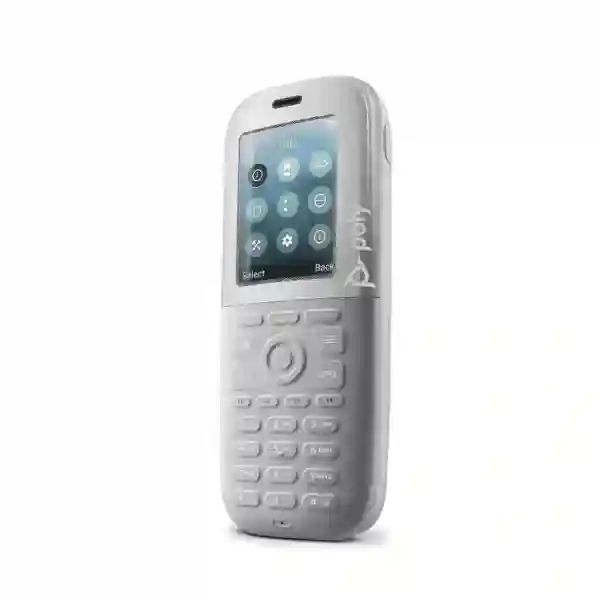
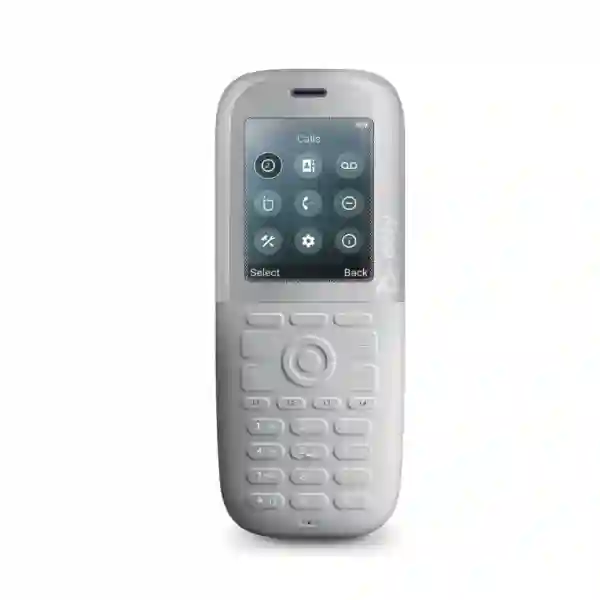
HP Poly Rove 40 Rugged Bluetooth DECT Handset
A rugged business handset for staff who move around the workplace. IP65 protection, Bluetooth headset flexibility and a programmable emergency key are most useful when paired with a properly designed Poly Rove DECT system.
Before ordering: the handset needs a compatible Poly Rove base and configured phone service. Confirm local radio suitability, coverage and all required accessories.
What matters before you buy
Best-fit roles
Mobile staff in covered offices, warehouses, support teams and service environments.
Key advantage
Rugged hardware combined with Bluetooth headset support and a programmable emergency key.
System requirement
A compatible Poly Rove base station and an appropriately configured business calling service.
Buyer action
Request a site-specific compatibility, coverage, capacity and regional-variant review.
Technical specifications at a glance
The following product facts are based on HP Poly product information. Figures described as “up to” are conditional; compatibility and regional suitability must be checked for the equipment actually quoted.
| Specification | Rove 40 information |
|---|---|
| Product category | Rugged business DECT IP phone handset |
| Display | 2.4-inch colour TFT, 240 × 320 pixels |
| Ingress and drop protection | IP65 dust-tight and water resistant; manufacturer-stated drops up to 2 metres |
| Bluetooth / headset | Bluetooth 4.2 for compatible headsets; 3.5 mm headset port |
| Battery | Rechargeable 1100 mAh lithium-ion; up to 18 hours talk / 300 hours standby |
| Typical indoor range | Up to 50 metres; actual site conditions vary |
| Controls | Four programmable line keys, softkeys, volume, push-to-talk, programmable emergency key |
| Operating temperature | -10°C to 55°C according to HP specification |
| Device weight | Approximately 171 g |
| Architecture | Requires a compatible Poly Rove DECT base and configured calling service |
| Important qualification | Confirm region-specific radio variant, platform support and local procurement terms |
What the Poly Rove 40 is—and what it is not
The HP Poly Rove 40 Rugged Bluetooth DECT Handset is a business wireless voice handset for staff who need to make and receive calls while moving around a site. It is intended to operate within a Poly Rove DECT IP phone environment, rather than being tethered to a single office desk. Its combination of rugged housing, a colour display, practical controls and headset options makes it especially relevant where employees alternate between communicating and carrying out hands-on work.
The most important distinction for procurement is that the handset is one part of a wider phone system. It communicates over DECT to an appropriate Poly Rove base station, which connects into a configured IP calling environment. The handset itself is not a mobile-network telephone, standalone Wi-Fi phone or independent internet calling device. A purchaser who has only the handset and charger will still need suitable supporting equipment and a working voice service before business calls can be placed.
Buyers should therefore evaluate the complete deployment rather than selecting a handset from a feature list alone. Establish how many people need simultaneous calls, which work areas require coverage, whether a business phone platform is already in use and who will configure the devices. Where those answers are still unknown, a system design discussion is more valuable than ordering a large quantity of handsets first.
A quick decision guide for workplace buyers
Consider the Rove 40 when the daily job involves moving, handling equipment, responding to requests or staying reachable away from a desk. Typical objectives include contacting colleagues without returning to a workstation, answering customer calls from another room or enabling duty staff to carry a dedicated business handset. A dedicated communications device can also fit policies that separate personal smartphones from workplace calling, provided the organisation has a suitable communications architecture.
Its strongest differentiators are a rugged IP65-rated design, Bluetooth headset connectivity and a dedicated programmable emergency key. Those features should be assessed against actual workflows. Bluetooth matters when users need hands-free conversations; rugged protection matters when work areas are dusty or prone to accidental splashes; the emergency key matters only when the organisation has configured and tested a meaningful response procedure behind it. There is little benefit in paying for a capability that will not be used.
A different device could be more appropriate when the requirement is public cellular coverage, outdoor wide-area communication, video calls, general mobile applications or operation without an IP phone infrastructure. Likewise, a fixed desk phone may be simpler for employees who remain seated. Identify the communication problem first, then determine whether a DECT handset is the correct device category.
IP65 rugged protection in practical terms
HP identifies the Rove 40 as IP65-rated, meaning its enclosure is designed to be dust-tight and to resist water jets under the relevant test conditions. HP also describes the rugged handset as drop-proof up to 2 metres. These attributes are useful where staff move through stockrooms, workshops, loading areas or high-activity service environments. They can reduce concern about ordinary incidental exposure compared with a less protected office handset.
The rating is not permission to immerse the device in water, expose it deliberately to chemicals or assume it will survive every impact. IP65 does not make the handset waterproof for submersion. Real outcomes depend on the condition of the housing, charging contacts and accessories, and an item damaged by misuse may behave differently from a new tested unit. Organisations should match site hazards to the manufacturer’s handling instructions and applicable workplace safety policies.
For implementation, think beyond the headline rating. Determine whether workers commonly wear gloves, carry tools, enter dusty zones or set phones down on hard surfaces. Plan where chargers will sit so they remain protected from moisture and contamination. Provide a clear procedure for reporting damaged housings or charging contacts. Ruggedness can help with routine work, but it is not a substitute for care, inspection or a sensible charging location.
Bluetooth 4.2 and wired headset choices
Built-in Bluetooth 4.2 is an important reason to select the Rove 40 over a simpler wireless handset. It supports compatible Bluetooth headset use so an employee can communicate without continuously holding the phone. This is useful for front-of-house coordination, inventory tasks and duties that require frequent hand movement. The handset also includes a dedicated 3.5 mm headset connection for a suitable wired headset, offering another way to take calls in a hands-free arrangement.
Bluetooth headset support should not be confused with Bluetooth calling through a laptop or smartphone. The Rove 40 remains a DECT business handset; Bluetooth is an accessory connection for a compatible headset. Pairing, audio routing, distance between handset and headset, battery status and interference can all affect the experience. It is prudent to confirm specific headset models and the required controls before making a bulk accessory purchase.
A sensible trial involves at least one employee from each major work role. Ask them to answer a call, adjust listening volume, transfer between handset and headset where supported, and operate in their usual environment. Check whether protective equipment or background noise changes the preferred accessory. A headset that works well at a quiet reception counter may be less suitable for a busy warehouse floor.
Display, keys and familiar calling actions
The Rove 40 has a 2.4-inch colour TFT display with a stated resolution of 240 by 320 pixels. For a business handset, the display provides a compact interface to calling information and menu controls without requiring the size or power consumption of a smartphone. Physical controls can be advantageous when a user wants to answer, end or manage a call quickly while standing or walking between areas of a premises.
HP’s family comparison lists four programmable line keys, three softkeys, dedicated volume controls, a push-to-talk control and an emergency key for the Rove 40. The usefulness of these controls depends partly on configuration. For example, a programmable key may need assignment to a line or function, while a push-to-talk workflow must be supported and arranged appropriately by the calling system. Avoid assuming every key will have a required business action immediately after unpacking.
During user acceptance, demonstrate the functions workers will actually use: placing a call, answering and ending a call, finding the right contact, changing volume, recognising missed calls and returning the handset to its charger. Written labels, short instruction cards and a consistent numbering plan can lower confusion. A well-configured device with a simple workflow often delivers more value than a feature-rich handset whose buttons have not been explained.
Programmable emergency key: useful, but not automatic rescue
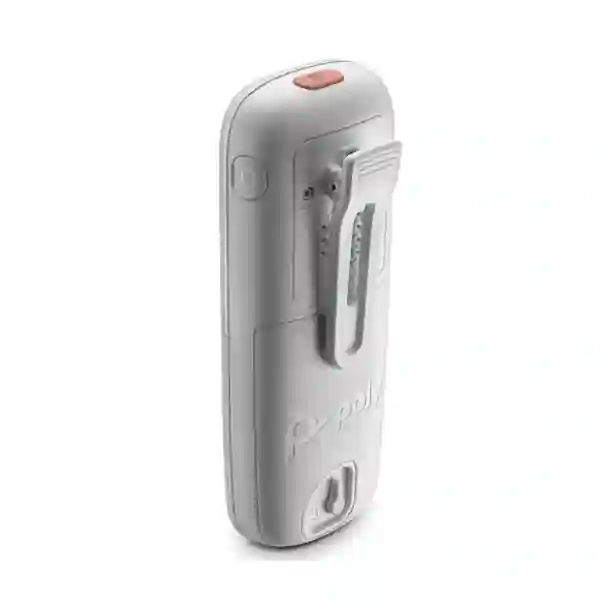
The dedicated emergency key is a notable Rove 40 feature. It can form part of a workplace alarm or escalation process when the supporting system is configured to recognise and route that action. For businesses with staff working between rooms or in more isolated internal areas, a purpose-designed key may be easier to locate than navigating a telephone menu. It is a potential operational aid, not by itself a complete worker-safety solution.
Before deployment, decide exactly what pressing the key should do. It might be configured for an internal response desk, designated contact or approved alert workflow, subject to platform support. Identify who receives the event, how it is acknowledged and what happens if the first recipient is unavailable. The right design must also account for coverage gaps, battery depletion, power outages and any network dependence. Do not assume the key automatically contacts public emergency services.
Test the end-to-end process under controlled conditions and train staff on its limits. Record how accidental activations are managed and whether the calling platform logs relevant events. Safety-critical arrangements need their own risk assessment, documented operating procedure and backup communications method. The Rove 40 can be one component of that approach, but the emergency-key label alone should never be treated as evidence that an emergency-response service is active.
How a Poly Rove DECT IP system works
In a typical deployment, a registered Poly Rove handset connects wirelessly to a compatible Rove DECT base station. The base is connected to the appropriate IP network and provisioned for a supported calling service. The wireless handset can then support business calls inside its designed coverage area. This separation between handheld endpoint and network-connected base is the foundation for planning the purchase correctly, especially for organisations adding more than one phone.
A single-base arrangement can make sense for a compact office or controlled space, while more complicated premises may call for multiple cells or a planned repeater arrangement. HP identifies Rove B1, B2 and B4 base families, and an R8 DECT repeater within the broader solution. Actual base choice depends on topology, the number of users, simultaneous calls, platform support and roaming needs. A repeater extends a designed system; it does not replace proper coverage engineering.
When requesting a quotation, specify whether the business already owns a supported Rove base and whether it needs additional handsets only. If no base exists, ask for a complete architecture that covers handsets, bases, possible repeaters, power, network connectivity and configuration. Verify the precise supported firmware and service before procurement. This avoids a common purchasing problem: receiving several perfectly good handsets with no compatible infrastructure to connect them.
Coverage planning: take site conditions seriously
HP publishes an indoor wireless range of up to 50 metres for the handset. That is a reference figure, not a guaranteed radius through every room or shelf aisle. Walls, reinforced concrete, metal racking, plant equipment, stairwells and the position of a base can change usable coverage. The signal required for clear calls may differ from a simple indication that the handset can detect a base station.
Map the routes employees actually use rather than drawing a circle on a floor plan. Test reception areas, corridors, storage aisles, back offices, stair landings and locations where urgent calls are likely to occur. Check coverage both when the site is quiet and during normal operations if equipment or doors alter the environment. If staff move between zones, verify how the proposed base arrangement supports roaming and ongoing calls.
A measured pilot is especially valuable for multistorey buildings and facilities with dense partitions. Record problem locations and the circumstances under which calls become unreliable. Only then determine if repositioning a base, adding an approved repeater or selecting a different multicell design is appropriate. Do not equate DECT coverage with Wi-Fi coverage; the two radio systems have different infrastructure, planning requirements and performance characteristics.
Capacity, concurrent calls and future growth
The number of registered handsets is not the same as the number of conversations a phone system can carry at one time. A site could have many employees carrying phones but only a few simultaneous calls, while a busy reception or logistics team may frequently need several conversations at once. The base station and supporting phone platform set practical capacity constraints that should be checked independently of the handset specification.
Before selecting the base architecture, estimate the highest number of simultaneous conversations during shift changes, customer peaks and incident handling. Include internal calls, external calls, transfers and any other workflows that consume the platform’s available resources. Then plan some headroom for additional staff and operational changes. HP provides different base models for different scales, but a design should use verified capacity figures for the exact model and firmware proposed.
Growing a deployment may involve more than buying additional Rove 40 units. It may require more compatible bases, repeaters, user assignments, service configuration or changes to coverage planning. Explain the intended expansion path to the system integrator before installation. This keeps a small initial project from becoming difficult to manage after extra departments or work areas ask to use the same wireless phone service.
Battery performance, charging and daily shifts
HP specifies a rechargeable 1100 mAh lithium-ion battery, with up to 18 hours of talk time and up to 300 hours of standby time. These are manufacturer-stated maximum figures under relevant conditions, not a promise of identical runtime for every user. Actual battery endurance depends on call activity, wireless conditions, headset use, configuration, battery age and how consistently the device is returned to its charger.
For shift-based operations, allocate a charging location that employees can access without disrupting their work. Establish who is responsible for checking that handsets are charged before a shift and who notices when a device fails to seat correctly in its cradle. If a role requires near-continuous availability, consider a documented handover process rather than relying only on a single battery percentage indicator. A backup communication method is sensible for critical functions.
Charging hardware also needs basic care. Keep contacts clean according to the manufacturer’s guidance, prevent chargers from being placed where they may be splashed and use suitable approved power accessories. Do not assume third-party batteries or chargers are interchangeable. In a multi-handset purchase, clear device labels and assigned parking positions can help users locate their handset and reduce misplaced equipment at the end of a busy day.
Security and privacy in a DECT deployment
HP describes the Poly Rove solution as DECT-security certified and says that its secure DECT approach is maintained when compatible bases and repeaters are added. This is a meaningful consideration for organisations handling internal operational conversations or customer communications. However, wireless-link security is only one part of an organisation’s overall voice security. Access to network equipment, administrative accounts and the connected calling service also requires suitable controls.
A responsible configuration includes management of credentials, approved firmware, network segmentation where appropriate and a process for removing lost or retired handsets from service. Phone directories and call records should be handled under the organisation’s own privacy and retention policies. A handset’s security feature does not establish that every connected PBX, trunk, administrator workstation or business process is automatically protected.
During commissioning, ask who will control provisioning, approve changes, manage user accounts and install updates. Test the response procedure for a missing handset and decide whether sensitive contact information needs a specific handling policy. Procurement teams should be wary of broad claims such as absolute privacy or immunity from interception; secure operation depends on the combined system and the way it is deployed.
Cleaning, hygiene and antimicrobial protection
The Rove 40 has a design intended to be easier to clean, including surfaces suited to routine wiping. HP also describes Microban antimicrobial product protection as available for Rove 40 handset models. The feature is designed to help resist microbial growth on treated product surfaces, but that is not equivalent to disinfection, sterilisation or protection for the person using the device. Availability and exact variant should be confirmed for the handset being purchased.
Shared handsets in clinics, hospitality operations or rotating-shift facilities call for a straightforward cleaning policy. Establish when the phone should be cleaned, which cleaning materials are permitted and how staff should prevent liquid entry into openings or charging points. Follow the current manufacturer guidance and any relevant workplace infection-control procedures. The antimicrobial treatment should not replace prescribed hygiene practices or create a false sense of safety.
If different employees share handsets, consider practical matters such as identifying devices, cleaning between handovers and storing accessories hygienically. Headsets often require their own cleaning and assignment plan. Teams responsible for clinical or otherwise regulated environments should review product suitability with their safety and infection-control specialists before purchase, rather than relying on an antimicrobial marketing claim as the deciding factor.
Warehouse and inventory operations
In a warehouse, personnel may move between goods-in, picking, shelving, dispatch and a supervisor station. The Poly Rove 40 can provide a dedicated communications endpoint for these movements where a correctly designed DECT system covers the working area. A worker could receive instructions or reach an internal contact without returning to a fixed desk, while a compatible headset may allow more freedom to work with both hands.
The most significant design challenge is usually not the handset’s feature set but the environment. High metal racks, moving stock, loading-bay doors and separate building zones can all affect radio propagation. A survey should include aisles at different points, loading areas and places where personnel must report exceptions. If the facility extends across buildings or outdoor yards, do not assume an indoor range figure establishes suitable coverage.
Operational planning should also distinguish ordinary telephone use from dedicated scanning or warehouse-management functions. The Rove 40 is primarily a voice handset; it is not a substitute for a barcode scanner, data terminal or mobile application platform. Choose the Rove 40 for voice coordination when that is the actual requirement, and specify the other systems separately rather than assuming they are built into the phone.
Manufacturing, maintenance and technical teams
Maintenance teams often need fast contact with supervisors, control-room personnel and colleagues on another floor. A rugged wireless handset can be useful when work involves moving between service points and plant rooms, provided the radio environment and worker-safety policies permit it. The Rove 40’s physical controls and hands-free headset option can suit short, focused conversations while staff coordinate routine tasks or ask for assistance.
Industrial locations require extra care in choosing communications equipment. Machinery, partitions and metallic structures can interfere with coverage, while certain hazardous areas may have equipment restrictions beyond ordinary ingress protection. IP65 and a drop specification do not establish an explosion-proof or intrinsically safe rating. Never use the handset in a classified hazardous location without independent verification that the exact device is approved for that environment.
A realistic pilot should include calls from commonly occupied maintenance areas, machine-side positions where communications are permitted and planned routes to response teams. Ensure the chosen headset does not compromise hearing protection or safe work practices. If the emergency key is considered for escalation, define exactly who receives the alert and test it as part of a broader incident response process.
Healthcare, clinics and support departments
Healthcare teams may value communication that follows workers between clinical support areas, store rooms, service desks and internal corridors. The Rove 40’s easy-to-clean design, rugged enclosure and headset option make it a candidate for evaluating these workflows. It may be particularly relevant for non-clinical coordination, estates services, reception or other approved environments where staff need a reliable internal voice endpoint.
Care settings have special requirements that go beyond a telephone specification. Infection control, device cleaning, patient privacy, equipment compatibility and critical-call escalation all need local review. The handset should not be represented as a medical device or a guaranteed clinical alarm system. If the organisation needs a nurse-call interface, a patient-safety workflow or other critical integration, obtain written confirmation of supported interoperability and test the complete arrangement.
Deployments can begin with a small team to identify whether the display, alert sounds, headset styles and call routing work as expected during busy periods. Pay particular attention to shared-device policies, missed-call handling and the availability of a backup when equipment is charging or unavailable. Manufacturer-stated antimicrobial protection, where present, does not replace cleaning, disinfection or clinical safety procedures.
Hospitality, service desks and guest operations
Hospitality operations frequently involve a mixture of stationary and roaming employees. Staff may move between a front desk, service corridors, housekeeping stations and maintenance rooms while needing to coordinate requests. A Rove 40 handset can form part of a central business calling arrangement when those spaces have planned DECT coverage and the appropriate user permissions. A headset may be useful for selected roles that need to speak while organising work.
The commercial value lies in call handling and internal responsiveness rather than in promising any particular response time. Define simple contact routes for front office, housekeeping, security and maintenance, and decide whether staff need separate extensions or shared role-based assignments. Configure easy-to-understand naming and transfer rules. A dedicated emergency key should only be offered to staff when the destination and escalation process are established.
Before procurement, walk through the actual property. Staircases, lifts, back-of-house concrete structures and separate wings can complicate coverage. A handset that performs well at the reception counter may not work equally well in a basement storeroom. If the site includes distant buildings or open grounds, design and test those areas explicitly rather than extrapolating from one indoor measurement.
Offices, campuses and facilities management
In offices, a wireless DECT handset can complement rather than replace fixed desk phones. Facilities staff, mailroom personnel, reception support and supervisors may move continuously through the building, while other employees remain best served by desk endpoints or softphones. The Poly Rove 40 makes most sense when a specific role requires voice availability across a defined site and the workplace prefers a managed shared or assigned handset.
The project should start with a coverage map and a short description of how each job uses the telephone. For example, a building services employee may need internal calling and quick access to a response desk, while a team leader may need both internal and external calls. Those requirements affect numbering, permissions, audio accessories and base-station sizing. A consistent configuration across handsets simplifies training and support.
A campus containing several buildings can have more demanding requirements than one office floor. Do not assume moving between disconnected premises will preserve a call. Confirm the base topology, supported roaming behaviour and any boundaries that users will encounter. For facilities teams responsible for many devices, plan provisioning records, device labels and a process for reassigning handsets when staff change roles.
Comparing Poly Rove 20, Rove 30 and Rove 40
The Rove family offers different ways to match features to roles. The Rove 20 is a more basic business wireless handset, while Rove 30 adds a rugged IP65-oriented design and a set of features intended for more demanding use. Rove 40 adds Bluetooth headset functionality and a dedicated emergency key to the rugged handset proposition. The most suitable choice is the least complicated device that meets the user’s real requirements, not automatically the top model.
If employees need a durable handset but have no requirement for Bluetooth accessories or a configurable emergency key, a Rove 30 may warrant consideration. When hands-free wireless headset use is essential, Rove 40 has a clearer role. If the work is mainly simple indoor calling without the same ruggedness needs, evaluate the relevant Rove 20 specification and price alongside the infrastructure costs. Confirm exact current regional product variants before settling on a bill of materials.
For mixed-role teams, standardising on one handset model may simplify training and spares, while selecting different models for different duties may better control total project cost. Compare accessories, user adoption, charging processes, installation overhead and platform support rather than the handset purchase price alone. The intended blend of models should be validated against the selected Poly Rove base and firmware.
Choosing Rove bases and repeaters
The base station is the component that links wireless handsets to the configured calling environment. HP’s Rove range includes B1, B2 and B4 base options intended for different arrangements, with R8 repeaters offered for suitable extension requirements. Which model is needed depends on single-cell or multicell goals, expected handset numbers, simultaneous call demand and how staff move around the site. Not every project requires the largest system.
For a compact location, a simpler approved base architecture may be sufficient. Larger or more partitioned sites may need multiple planned cells, and repeaters can be useful in supported scenarios where extension is preferable to another base. A system designer should validate registration limits, call-channel limits, frequency region, firmware requirements and supported roaming characteristics for the exact combination being proposed. Published maximums should not substitute for a site design.
Ask the supplier for a clear list of what is included and what is not. A handset carton is not the same as a complete DECT deployment, and base power or network accessories may be listed separately depending on the product. It is better to see a complete bill of materials early, with every charger, base, repeater and configuration activity identified, than discover omissions while staff are preparing to use the phones.
Business phone platforms and interoperability checks
A DECT handset can be physically compatible with a Poly Rove base while the wider voice service still needs specific configuration or support. Organisations using an IP PBX, hosted SIP service or an established collaboration platform should verify the complete Rove solution against current vendor interoperability guidance. Manufacturer materials mention supported platform pathways, but available features and certification claims can depend on edition, software release, gateway method and region.
Do not assume that seeing a familiar platform name in a brochure means every possible calling function is available on every configuration. Review basic calling, hold, transfer, directories, voicemail indications, emergency-key actions, provisioning and any requested push-to-talk behaviour separately. If the organisation needs a particular integration, request proof for the exact base model, firmware and phone-service version rather than treating general interoperability as a blanket guarantee.
An early technical conversation should establish who administers the phone service, how extensions are assigned, whether the network reaches all base locations and what security controls are required. Document the agreed features before installation. This protects the buyer from receiving equipment that can register and place basic calls but does not deliver one of the workflows that justified the purchase.
Regional DECT frequency and deployment suitability
DECT equipment can be supplied in different regional radio variants. HP’s documentation distinguishes frequency allocations by market, including North American and European-family product configurations. The right variant for a Tanzania deployment must be established before import, installation or commissioning. A vendor listing from another country may describe a model or part number that is not the correct selection for the intended local radio environment.
Do not derive local regulatory approval from a generic international product listing, an IP protection rating or a manufacturer’s certification statement covering another jurisdiction. The buyer and implementing provider should verify applicable Tanzania communications requirements, permitted equipment variants and any necessary approvals using current authoritative guidance. If a purchase is being quoted, ask the provider to name the exact regional product variant and document its suitability.
This check matters especially when ordering equipment through multiple channels or expanding an older deployment. Mixed regional variants may not be appropriate for a single installation, even if the handset names are similar. Verify compatibility of handsets, bases and repeaters before purchase, and retain those details with deployment records. The absence of a local compliance claim on this page is deliberate: it should be validated for the exact offer, not assumed.
A practical rollout sequence
Begin by listing users, work areas and call patterns. Identify who carries a handset all day, who shares one between shifts and which positions genuinely need Bluetooth or emergency-key features. Next confirm the existing calling platform, the number of internal extensions required and the desired behaviour for transfers, missed calls and escalation. This brief provides a useful basis for comparing different base designs.
Second, perform a coverage and capacity assessment. Mark expected base positions, confirm network and power access, and test representative routes. Where the facility is complex, use a small pilot rather than assuming published maximum range or registration capacity will apply in every room. Select the proper regional variant after local requirements have been checked. Include chargers, headsets and any approved repeaters in the trial where they matter to the use case.
Third, configure and test the actual call flows. Register the handsets, assign extensions or roles, check call quality and assess handover behaviour where multiple coverage cells are involved. Verify the emergency button only against the organisation’s approved procedure and confirm that push-to-talk works as intended if required. Finally, train users, record configuration details, label devices and hand the system to an owner responsible for maintenance.
What to ask for in a quotation
A useful quotation starts with the exact handset model and the number of units, then identifies whether the solution includes compatible base stations and any repeaters. It should state the required regional variant, the intended phone platform, accessory assumptions and the scope of deployment services. If a headset is required, ask for a named compatible model and confirm whether it is included in the price. For shared facilities, consider how many charging positions the team needs.
Ask the provider to separate equipment, design, configuration, user training and any ongoing service charges. Request clarity on base-station power needs and network prerequisites so the workplace can prepare before installation. Discuss how firmware and security updates will be handled. If the service uses a hosted or third-party IP phone platform, check its subscription, calling and support arrangements independently of the handset hardware.
Pricing, stock, delivery schedules and warranty handling should be confirmed in a current written quotation for Tanzania. They are not supplied on this page because exact local terms have not been verified. Be cautious about comparing two prices that include different bundles or services; a cheaper handset-only offer may be less suitable than a complete, tested communications solution for the actual site.
Total cost and return on operational value
The purchase price of a Rove 40 is only one part of deployment cost. Base stations, coverage design, possible repeaters, compatible headsets, installation labour, phone-service subscriptions and ongoing administration may also be involved. Larger facilities may need more testing and network preparation than smaller ones. A clear bill of materials helps distinguish a handset comparison from a full communications-system comparison.
An operational assessment can focus on questions that management can observe: how frequently staff need to contact colleagues, whether fixed phones cause unnecessary walking, whether headset use is essential and whether a managed device simplifies communication. Those questions can support a sensible business case without invented productivity percentages or promised financial savings. Where possible, run a pilot and document practical findings before expanding.
Consider the cost of training, device replacement procedures and changes in employee numbers. A deployment that can be managed consistently may be valuable even if its handset price is not the lowest. Equally, a full rugged handset rollout is difficult to justify where employees rarely move or only need occasional calls. Match the technical design to actual activity rather than purchasing on feature count alone.
Keeping devices working after installation
Operational ownership should be agreed at handover. Someone needs to know which handset belongs to which department, which base serves each area and how users report failed calls or missing devices. Maintain an inventory of handset identifiers and authorised assignments, without exposing sensitive provisioning details to people who do not need them. A consistent procedure for returning, charging and reassigning units can prevent simple support problems.
Set a routine for checking charger condition, visible damage, battery performance and the availability of replacement accessories. Agree how configuration changes and manufacturer firmware updates are evaluated before installation. A software change that affects an individual feature can matter to teams relying on a particular key or call flow. Keep a record of tests, especially when the handset is part of an established internal escalation workflow.
When a device stops working, distinguish handset issues from base coverage, network reachability and phone-service problems. Swapping equipment without testing the path may hide the real cause. Give support personnel a simple checklist that includes battery state, handset registration, location, call behaviour and any recent network changes. This approach makes troubleshooting more systematic and reduces unnecessary replacement of good hardware.
Limits and expectations to understand before ordering
The Rove 40 is built for business voice mobility across planned DECT coverage, not unlimited geographic reach. It does not replace a cellular service for employees travelling between remote locations, and Bluetooth headset pairing is not the same as pairing the handset to any smartphone or laptop for general application use. Its indoor range, battery life and durability figures are manufacturer-specified conditions rather than a guarantee of performance in every environment.
Ruggedness should not be interpreted as immersion resistance or approval for hazardous industrial zones. Antimicrobial product protection, where available, is not a replacement for proper cleaning. The emergency key requires supported configuration and a real response process. Similarly, a base station and a configured voice service remain essential even though the handset itself is wireless. These distinctions belong in a procurement decision because they affect safety, usability and cost.
Before placing an order, confirm the exact regional variant, compatibility with the selected bases and phone platform, coverage requirements, accessory needs and all local commercial terms. Where the solution is intended for a critical communication workflow, plan a fallback path and test it. A careful scope protects the investment and gives the team a more useful system than a product chosen from a short feature summary.
Frequently asked questions
Can the HP Poly Rove 40 work without a base station?
No. It is a wireless DECT handset intended for a compatible Poly Rove base-station system connected to an appropriately configured business calling service. A charger only supplies power; it does not provide telephone service. Confirm the complete list of equipment if no Poly Rove infrastructure is already installed.
Does the Rove 40 support Bluetooth headsets?
Yes. HP specifies Bluetooth 4.2 headset connectivity and a separate 3.5 mm headset jack. Confirm the precise headset model and the actions needed for your call workflow. A headset accessory connection does not make the handset a Bluetooth phone for ordinary smartphone or computer use.
Is the Rove 40 waterproof?
It has an IP65 rating, described by HP as dust-tight and water resistant, and manufacturer-stated drop resistance up to 2 metres. IP65 does not claim protection during submersion in water. Follow product handling instructions and do not use the rating as permission for immersion or harsh chemical exposure.
How long will the battery last?
HP states up to 18 hours of talk time and up to 300 hours of standby time from its rechargeable lithium-ion battery. Actual runtime depends on usage and conditions, so plan charging and handovers around real observed use. Critical roles should have a backup communication plan.
What does the emergency button do?
The Rove 40 includes a dedicated programmable emergency key. Its actual action depends on supported configuration and the organisation’s calling or alerting workflow. It should not be assumed to contact public emergency services automatically. Define, test and document the response path before staff rely on it.
Can it be used with an existing IP PBX?
Possibly, depending on the complete Poly Rove base-station solution and the PBX or hosted calling platform. Confirm current supported configurations, firmware and the features the organisation requires. Do not infer support for every feature from the fact that basic SIP calling may be possible.
What coverage can I expect inside a building?
HP specifies an indoor range of up to 50 metres. Actual performance depends on walls, floors, metal structures, installation positions and other site conditions. A site survey or representative pilot is important, especially for multistorey buildings, warehouses and premises with thick partitions.
Do I need one base station for every handset?
Not necessarily. Poly Rove bases are designed to support multiple handsets, but their registration and concurrent-call limits vary by model and system design. Choose the number and type of bases according to coverage, call capacity, roaming and confirmed product specifications rather than handset count alone.
Is the antimicrobial treatment a replacement for cleaning?
No. HP describes antimicrobial protection as available for Rove 40 models, but it is not disinfection or an alternative to cleaning protocols. Confirm the selected variant and follow manufacturer cleaning guidance and any workplace hygiene policies that apply.
How should I choose between Rove 30 and Rove 40?
Both are rugged options in the Poly Rove family, but the Rove 40 adds Bluetooth headset capability and a dedicated emergency key. Choose Rove 40 when those functions have a clear operational purpose. Otherwise assess whether a suitable Rove 30 configuration meets the role at a more appropriate total system cost.
Can the handset be used across multiple floors?
It can be considered for a multi-floor site, but coverage and roaming require engineering of the base arrangement. Reinforced floors, stairwells, lifts and equipment can create challenging areas. Confirm the network and base design with real measurements before promising continuous calling between floors.
Is a specific model approved for use in Tanzania?
Approval and radio suitability must be confirmed for the exact regional variant and applicable local requirements. A product name or a certificate from another market does not prove Tanzania approval. Request the precise part or regional variant details and verify the relevant requirements before importing or deploying equipment.
Request a Poly Rove 40 configuration and quotation review
Tell the team how many users need wireless calling, which areas require coverage, which phone platform is already in place and whether Bluetooth headsets or configured emergency-key actions are needed. Ask for the exact regional variant, compatible base options, required accessories and current Tanzania commercial terms before placing an order.
Next step: request a written, site-specific handset-and-base quotation with the intended calling workflow confirmed.




Reviews
There are no reviews yet.