
BUSINESS VOIP · TANZANIA BUYER GUIDE
HP Poly VVX 350 IP Desk Phone
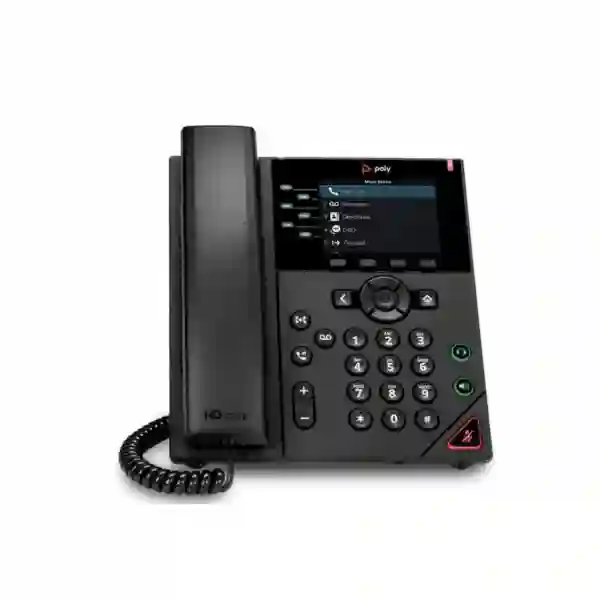
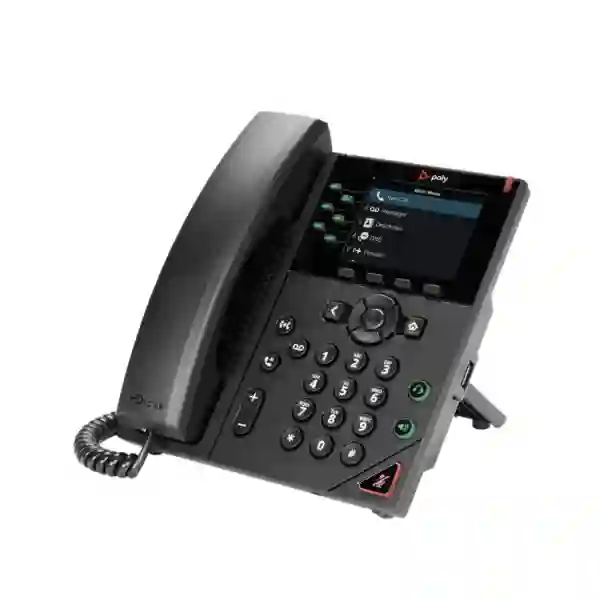
The HP Poly VVX 350 IP Desk Phone is designed for office workers who want clear conversations and direct access to familiar calling functions without operating a complicated desktop application. It combines six programmable line keys, a 3.5-inch colour screen, Poly HD Voice, Poly Acoustic Fence, two Gigabit Ethernet interfaces and Power over Ethernet in a conventional business handset. It can be useful at reception, in administration and at customer-service desks where employees regularly manage incoming calls and consult colleagues.
For a business evaluating IP telephones in Tanzania, the decisive question is whether the precise VVX 350 hardware and installed software will work with the chosen PBX or hosted SIP service. Confirm compatibility, network design, power arrangements and required headset accessories before placing an order. The handset is not a standalone telephone subscription, and advanced call features depend on the surrounding system. Ask for a quotation that identifies the exact software edition and what is included.
Six-line design · Colour LCD · HD Voice · PoE
Key features at a glance
Six line keys
Programmable access to configured lines and supported shortcuts.
3.5-inch colour LCD
320 × 240 display for call information and menu navigation.
HD Voice
Wideband-capable audio, subject to the full call path.
Acoustic Fence
Helps reduce distracting background noise at the microphone.
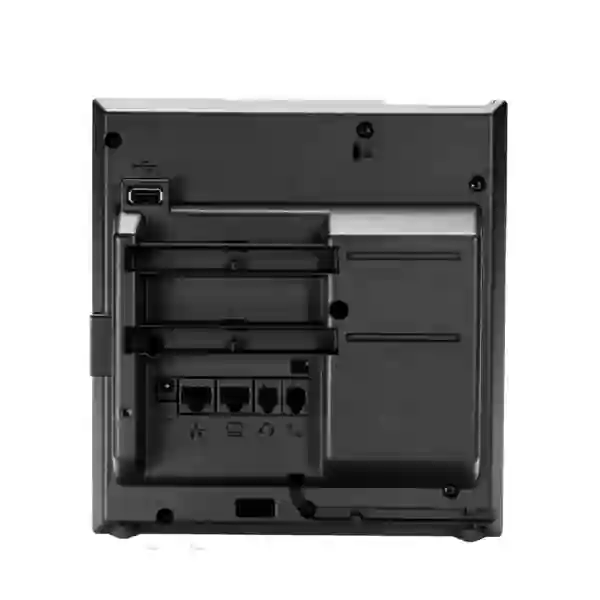
Gigabit Ethernet
Two network ports for an appropriate desk and PC connection.
PoE
IEEE 802.3af support through a compatible switch or injector.
Calling, provisioning, headset support and advanced features depend on your precise device and configured telephone service.
Who is the VVX 350 intended for?
This six-line model fits the middle ground between a basic extension phone and a large operator console. The physical buttons make it straightforward to answer, hold or transfer a call, and a colour display helps users navigate contacts and call information. An employee who receives only an occasional call may prefer a simpler device. A busy receptionist responsible for many monitored colleagues may need more line keys or a separate operator interface.
To decide, list what each person does during the working day. Consider inbound call volume, internal transfers, shared numbers, headset use and the need to see another extension’s status. Match those tasks to the phone and the features supported by the voice platform. A model chosen for an actual workflow is more likely to remain useful than a purchase based only on its headline specifications.
Six physical keys are not six free telephone numbers
The VVX 350 has six programmable physical line keys. That specification must not be confused with six pre-activated phone numbers, six independent subscriptions or a guaranteed number of simultaneous external conversations. Depending on the call-control service and provisioning profile, keys may identify extensions, shared appearances, frequently dialled contacts or supported monitoring functions. The user sees buttons; the PBX determines much of the underlying behaviour.
Ask your administrator to prepare a proposed key layout before installation. Reception might require a primary number and department shortcuts, while an office employee may need only a personal extension and a few colleague contacts. Check whether a desired busy-lamp-field indicator or shared-line function is supported by the selected telephone system. The printed keys alone cannot make unsupported features available. When comparing models, count the buttons users will actually need, not hypothetical features they may never use.
What the colour LCD contributes
The 3.5-inch colour LCD has a stated 320 × 240 resolution. It presents telephone status and compatible call information in a familiar compact format. The display is not a touchscreen tablet and the VVX 350 is an audio-only desk phone, not a video meeting unit. Navigation keys and context-sensitive controls work alongside dedicated physical call buttons. The combination lets employees perform everyday telephone tasks without shifting to a separate application.
Readability should be tested where the phone will sit. Desk lighting, viewing angle and whether the user works standing or seated can affect comfort. The screen can assist with caller identity, menu selection and directory information when the telephone system provides them. Do not assume every call server presents exactly the same screen options. During a pilot, ask staff whether they can find the functions they need without instructions from a technician. Practical ease of use matters more than display size alone.
Poly HD Voice and clearer business conversations
Poly HD Voice is intended to support natural-sounding, wideband-capable business speech. This matters when a caller is spelling a name, describing a technical problem or reading out an important reference number. The VVX 350 also supports a full-duplex speakerphone, making it possible for both sides to speak during a hands-free conversation. These capabilities can improve usability, especially for employees who move between a handset and speakerphone during the day.
Actual audio quality depends on the whole path, including codec selection, PBX configuration, the provider, internet stability and the far-end device. A wideband-capable handset cannot turn a narrowband external connection into guaranteed high-definition audio. Test an internal call, an external call and a call through the intended headset. Listen for echo, clipping, delays or interruptions while normal office network activity continues. Treat the manufacturer’s audio technology as a capability to validate rather than a promise that every caller will experience flawless sound.
Understanding Acoustic Fence and Acoustic Clarity
Poly Acoustic Fence is designed to reduce distracting ambient sound transmitted through the handset or suitable wired headset. Poly Acoustic Clarity supports aspects of full-duplex conversation and echo control. These features are complementary, but they address different problems. A noisy shared office, a reflective room or a poorly positioned microphone can still create intelligibility challenges. The technology is not a substitute for choosing the right headset and arranging workstations sensibly.
For an office with many simultaneous calls, test the microphone in the real environment. Have one employee speak while nearby colleagues hold their own conversations, then ask someone at the other end what they hear. Try the handset and a compatible headset to see which works better. At a quiet desk, speakerphone performance and comfort may be more significant. Choosing the right audio mode for the role can matter as much as the presence of a named noise-reduction feature.
Daily call handling: hold, transfer and conferencing
Dedicated controls give staff accessible ways to handle common business calls. The VVX 350 is documented for functions such as hold, transfer, forwarding and local conferencing, with actual operation dependent on the connected telephone system. A receptionist may put a caller on hold while finding a colleague; an administrator may transfer a supplier to accounts; a supervisor may use an approved conferencing function for a quick discussion. Users should not have to memorise complicated button sequences for the calls they handle most often.
Before rollout, describe those tasks and ask the system administrator to demonstrate them. Check what happens when the transfer destination is busy, when a caller is disconnected or when someone calls outside working hours. These rules are often configured in the PBX rather than the handset. A telephone can have an obvious Transfer key while the provider still restricts a particular transfer method. Testing avoids confusing a hardware capability with a guaranteed service feature.
Dual Gigabit Ethernet for modern workstations
The telephone provides two Gigabit Ethernet interfaces, commonly used for the network connection and a nearby desktop computer. In a typical wired office, one cable reaches the telephone from the network and another passes from its PC port to the workstation. That arrangement may reduce the need for separate wall outlets. The ports’ 10/100/1000 capability does not ensure that every connected computer will achieve a particular network speed; cabling, switch configuration and other equipment determine the actual link.
Voice and computer data traffic may need distinct settings. Managed switches, VLAN configuration and organisational security controls should be considered before placing a PC behind the phone. The VVX 350 is not a replacement for a managed network switch, router or firewall. Have IT validate how the phone and PC obtain network addresses and whether the arrangement meets network policy. If a user reports slow access after installation, test the computer connection separately instead of assuming that Gigabit branding guarantees a complete solution.
Power over Ethernet and office wiring
The VVX 350 supports IEEE 802.3af Power over Ethernet. A compatible switch or injector can carry both electrical power and network data through the Ethernet connection, reducing the need for a separate phone power adapter at each desk. This is especially helpful when many workstations are installed together. It also allows an organisation to consider central power protection for important voice equipment, provided the switches and other supporting components are connected to an appropriate backup system.
A normal Ethernet socket does not automatically supply PoE. Check each required port and the total power budget of the switch. Verify that the cable is suitable and that network equipment can support the intended configuration. A telephone may appear unresponsive simply because it is plugged into a data-only port. During a site survey, mark which desks have PoE and which require a different power approach. Doing this before equipment arrives reduces installation interruptions and emergency accessory purchases.
When an external power supply is required
Where Power over Ethernet is not available, the manufacturer identifies an optional external Poly power supply. The standard VVX 350 documentation refers to a 5 V DC supply rated at 3 A. Those values do not mean any third-party adapter with a similar connector is safe or suitable; connector type, polarity, quality and manufacturer approval must also be considered. Use an approved accessory for the exact product configuration and follow the manufacturer’s power guidance.
Check the sales package carefully. Some listings describe a PoE handset without including a separate mains adapter. If your office uses ordinary network switches, ask whether an approved power supply or a compatible PoE injector is required for every position. Compare that accessory cost with the practical alternative of a properly specified PoE switch. A reliable installation should have an intentional power design, not a mix of improvised adapters. Also confirm whether the router and PBX remain accessible during a power interruption.
Headsets for hands-free telephone work
The VVX 350 provides headset connectivity suitable for selected wired and USB headset products, with Electronic Hook Switch arrangements supported where the accessory and configuration allow. Employees who enter customer information while talking may find a headset more comfortable than holding the handset against a shoulder. A consistent microphone position may also improve what the caller hears. The best choice depends on wearing comfort, cable arrangement, ambient noise and how long calls tend to last.
Compatibility must be checked for the exact headset model. A supported connector does not guarantee that every headset, EHS interface or remote answer function will operate. Ask the supplier to identify the complete connection arrangement rather than simply stating that the headset is compatible with Poly. If staff work long shifts, test fit and microphone quality over a meaningful period. An inexpensive headset that causes discomfort can be a poor choice even when the phone itself is appropriate. Include the selected accessories in a pilot and in the quotation.
USB and the possibility of optional Wi-Fi
Manufacturer materials describe two USB Type-A ports in the VVX 350 family for supported peripherals and functions. These can be relevant for selected headsets and optional accessories. However, the presence of USB ports is not a promise that arbitrary storage devices, wireless dongles or other USB products will work. Supported functions depend on software, provisioning and the actual device being attached. Businesses should select accessories from suitable compatibility information and test them rather than assuming plug-and-play operation.
The base handset should not be advertised as having built-in Wi-Fi or Bluetooth. Certain configurations can use an optional supported Wi-Fi USB adapter, but the adapter and software compatibility need checking. For a fixed office desk, wired Ethernet remains the straightforward planning assumption. If cabling is genuinely impractical, assess wireless coverage and suitability with the telephone provider first. Voice quality over Wi-Fi depends on local radio conditions and network configuration as well as the telephone.
UC Software versus OBi Edition: a critical distinction
HP Poly documentation distinguishes between VVX x50 devices running Polycom UC Software and those running OBi Edition Software. These streams can have different provisioning methods and different levels of compatibility with hosted telephone services. A phone may look like a normal VVX 350 in a product photograph while arriving with a software edition that does not match the intended PBX. Hardware changes in some VVX x50 variants also affect software-conversion options. Never presume that converting one edition to another is simple, supported or appropriate.
Request the full hardware part number, hardware revision, installed software edition and firmware version from the seller. Then ask the telephone-system provider to approve that specific combination. If you are replacing a handset currently locked or provisioned to another service, confirm that it can be legitimately reset and used with the new service. Avoid installing unverified firmware as a shortcut. For a fleet, purchasing units with a consistent approved configuration makes provisioning, training and later troubleshooting much easier.
The phone still needs a business voice service
An IP desk phone is an endpoint, not an entire telephone exchange. To make calls, the VVX 350 requires appropriate network access and a compatible SIP-based PBX or hosted voice environment. A business may also need extension accounts, external telephone numbers, provider connectivity, an agreed dial plan and voicemail services. None of those items should be assumed to be included merely because a product description mentions six lines or business call handling.
An organisation replacing analogue phones should examine the existing arrangement before ordering new hardware. Determine whether the current lines terminate on an older PBX, how calls reach reception and whether important numbers can be retained through the intended service. The new handset will not simply plug into an ordinary analogue line socket. Have the voice provider explain the migration path and any requirements for external calling, emergency calling and business-hour routing. Approving the service design before the device count prevents expensive mismatches.
Evaluating 3CX compatibility realistically
Current 3CX documentation includes the Polycom VVX 350 among devices covered by its VVX setup guidance. This makes the model relevant to buyers using that platform, but it does not prove that every hardware variant, firmware level or feature is supported without limitations. The 3CX guide describes important constraints for some functions, so buyers should verify their actual workflows rather than relying on the model appearing in a list. Software and platform versions matter.
For a 3CX installation, test registration, incoming and outgoing audio, hold, transfer, voicemail indications and any required extension monitoring. Ask how phones are provisioned at local or remote sites and whether the selected variant is appropriate for the chosen deployment method. Features such as hot desking and certain computer-telephony behaviours must be checked against the current documented limitations. The safest result is a written compatibility confirmation and a successful pilot on the intended 3CX environment before purchasing many devices.
Working with other SIP and hosted PBX systems
Standards-based SIP capabilities make the VVX 350 a candidate for many business telephone environments, but they do not ensure compatibility with every provider. Hosted services may restrict supported device models, require specific firmware branches or manage provisioning centrally. Some functions may appear only when a vendor-approved profile has been applied. Network topology, security requirements and remote-site arrangements can also change the suitability of a particular endpoint.
Provide the prospective service provider with the exact VVX 350 model and software details. Ask which features work, how registration credentials are administered, whether secure calling is supported and who handles updates. If the service uses an SBC, VPN or managed router, agree on the supported method for connecting the phone. An outbound test call is a useful starting point, but it does not validate every reception or contact-centre workflow. Test the functions that matter to staff, including internal transfers and what happens when an extension is busy or unavailable.
Reception desk example
At reception, an employee may welcome visitors while simultaneously answering the main number, checking an internal extension and transferring a caller. The six physical keys can provide direct access to important functions or contacts when the PBX supports the requested layout. Dedicated hold and transfer controls are helpful when the user does not have time to navigate a complex screen. A compact colour display also makes the handset easy to recognise as a dedicated communication tool.
If reception monitors many departments, however, a six-key arrangement may be insufficient. Compare the required button map with the larger VVX 450 or a dedicated operator application. Test shared-line appearances, busy-lamp-field functions and the flow for unanswered transfers rather than assuming they are present. Document how calls should route outside business hours. Those decisions belong to the overall phone system, even though the receptionist performs the final actions through the physical telephone.
Administration and finance desk example
Administrative teams frequently confirm appointments, follow up deliveries and coordinate with colleagues. The VVX 350 can give these users a dedicated voice endpoint while they work with records on a computer. A suitable headset may be more valuable than extra line buttons for employees who type throughout a call. Staff can use the handset for a brief private exchange and the speakerphone where hands-free audio is suitable. The right arrangement depends on the workspace.
Configuration should reflect the employee’s role. A finance desk may need only a private extension and a few internal contacts, while an operations coordinator may want shared numbers and frequently called departments. These are examples of possible requirements, not promises of universal PBX support. Evaluate confidentiality as well: accounts discussions may need a quieter setting and controlled voicemail access. A system configured around the employee’s real tasks tends to be easier to use and maintain.
Customer-service and support-team example
For service staff who make and receive frequent calls, the VVX 350 offers a practical combination of direct controls, headset options and voice technology. Poly Acoustic Fence can help address microphone background noise in a shared office, while full-duplex audio supports more natural conversations. The telephone may be suitable for users who alternate between speaking to a customer and updating information on a desktop computer. A small pilot will reveal whether the six physical keys are enough.
Do not confuse the handset with contact-centre software. Queues, call recording, quality reports, agent logins, supervisor functions and CRM integrations are matters for the connected PBX and other applications. Some desired behaviours may be limited or unavailable for a particular model and platform combination. Before choosing a fleet, ask an actual service agent to complete representative tasks: answer, hold, consult, transfer and recover after interruption. Evaluate headset comfort and system behaviour together.
Management, common areas and shared desks
A manager who makes moderate numbers of calls may value a comfortable handset, clear speakerphone and convenient colleague shortcuts. The phone can also serve a staffed shared reception or common administrative position where a conventional fixed endpoint is useful. It is not designed to replace a dedicated video meeting solution. If an employee mainly communicates away from a desk, a cordless device or software phone may be a better match.
For shared desks, decide how personal identity and call data are managed. Some businesses need user sign-in, private call histories, shared extensions or automatic reassignment of keys. These functions cannot be assumed to exist simply because different employees can physically use the phone. In particular, hot-desking support depends on the PBX and endpoint integration. Test how users begin and end their shifts, whether voicemail remains private and how the next employee obtains the correct extension settings.
Network readiness before delivery
Check the site network before installing IP telephones. Each desk needs a suitable Ethernet connection or an explicitly approved alternative, and the phone must reach the relevant provisioning and call servers. Confirm switch port status, cabling, network addressing, DNS and any required DHCP options. For PoE installations, verify the switch’s port support and total power capacity. If the telephone will connect a nearby PC, confirm that the pass-through arrangement meets organisational network policy.
The administrator should also understand how the device reaches its service across the firewall or internet connection. Avoid opening broad network access without reference to the provider’s instructions. If voice traffic uses a dedicated VLAN, test the actual switch configuration. A simple site checklist should include desk location, cable status, planned extension, power method and responsible support contact. That preparation makes multi-phone installation more predictable and helps identify whether a problem originates in the telephone or elsewhere on the network.
Voice quality, bandwidth and congestion
Business VoIP depends on reliable packet delivery, not simply an advertised fast internet connection. High delay, packet loss or inconsistent network performance can cause dropouts and distorted speech. The VVX 350 supports network functions used in managed voice environments, including VLAN-related operation and quality-of-service mechanisms, but the rest of the network must be configured appropriately. A more advanced handset cannot compensate for an overloaded switch or unstable connection.
Test calls while other normal office tasks are active, such as uploads, cloud applications and video meetings. Listen for intermittent audio problems rather than only measuring peak download speed. If several phones suffer the same issue, investigate shared network components and the service provider. Where managed switches are used, IT may separate or prioritise traffic according to the organisation’s design. Keep notes of when problems occur and which routes are affected. These observations are often more valuable than resetting a phone repeatedly without identifying the underlying cause.
Power outages and business continuity
A PoE phone may benefit from centralised backup power where the network switch is protected, but this is only one part of resilience. The router, internet terminal, local PBX or hosted-service connection must also remain available. A handset that stays powered during an outage may still lose registration if a critical network component goes offline. Businesses that depend on incoming calls should consider failure scenarios before replacing their existing telephone system.
Discuss the importance of the main business number and whether the service provider offers appropriate continuity arrangements, such as forwarding during an outage. Where practical, test what happens after a switch restart or internet interruption. Explain to employees how to recognise a network-related phone failure and whom to contact. Do not describe a VVX 350 purchase as a guaranteed continuity solution; it is the service architecture and operational plan that determine the overall result.
Provisioning and a controlled rollout
Business IP endpoints can be configured through supported administrative and provisioning methods, but the exact process depends on the software edition and voice platform. A central configuration template can help ensure consistent extensions, key assignments and approved settings across a group of phones. Start with a single known-good device, record its model and software version and verify that it works on the intended system. Apply the approved approach to further devices only after the pilot is satisfactory.
For each unit, maintain a record of its desk location and assigned user without exposing telephone account passwords in public documents. Test registration, inbound and outbound calls, transfer, voicemail and any special features. When several devices are installed at different sites, keep configuration differences documented. Assign responsibility for firmware updates, network access and PBX administration. A clear handover makes replacement units easier to commission and reduces the temptation to make risky undocumented changes during troubleshooting.
Security and protected voice administration
Manufacturer information includes security features such as TLS-related signalling support, SRTP media encryption and secure provisioning mechanisms. Whether they are actually enabled depends on the service provider, firmware and configuration. Do not assume that every call is encrypted merely because the handset supports an encryption technology. Ask the PBX administrator which signalling and media protections are implemented and how account credentials are stored, distributed and changed.
Treat desk phones as managed network devices. Change applicable default administrative credentials, restrict unnecessary access, use approved firmware and remove old provisioning information when moving a phone between users or providers. If the organisation segments voice devices on a dedicated network, test that only required services are reachable. Call recording, privacy notices and retention policies are service-level and organisational matters; the handset alone does not establish compliance with those requirements. A secure deployment requires both suitable hardware settings and an appropriately managed telephone platform.
Buying checklist: exact unit and accessories
A sound quotation identifies the precise hardware variant, software edition and package contents. Confirm whether the seller supplies the telephone console, handset and cord, desk stand, network cable and any mounting components. The manufacturer describes an external power supply as optional, and headset or wireless accessories should never be assumed to be in the box. If the site needs an AC adapter, an EHS interface or a compatible USB accessory, ask for its exact model and compatibility confirmation.
It is also important to keep commercial assumptions separate from product specifications. The manufacturer may describe standard package components or warranty information for a particular region, but the actual seller’s terms govern the target offer. Request a clear statement of local price, currency, stock, delivery, warranty and service terms. Do not rely on prices from overseas websites. For a multi-device order, consistent hardware revisions and approved software configurations can simplify ongoing administration.
Comparing VVX 250, 350 and 450
HP Poly describes the VVX 250 as a four-line basic business phone, the VVX 350 as a six-line mid-range option and the VVX 450 as a twelve-line desk phone. The choice should reflect how many physical keys users truly need. An employee with a simple extension may find the VVX 250 sufficient. A busier administrative or reception role may appreciate the VVX 350. An operator who monitors many contacts may need more key capacity or a software console.
The larger phone is not automatically better. Compare screen usability, physical footprint, required accessories, exact software edition and compatibility with the intended PBX. The same telephone platform can expose features differently across endpoints and firmware levels. Test common work tasks on the shortlisted models rather than treating line count as the only criterion. If users primarily need a headset or more reliable network connection, addressing those needs may matter more than moving to a higher-numbered handset.
Troubleshooting power, registration and audio
A telephone that does not start may lack PoE or an appropriate external supply. One that powers on but cannot register may have incorrect credentials, an unsupported profile or network reachability problems. If a call connects but audio is missing, the cause could lie in the firewall, network path or service configuration. Intermittent distortion can result from congestion, packet loss or an unsuitable headset. These are possible categories for investigation, not a diagnosis of any particular phone.
Check the displayed status, cabling, network address and whether other phones on the same system are working. Compare a failing device with a known-good unit using the same software and settings. Keep the time of the incident and call symptoms available for authorised support staff. Do not post SIP secrets, personal contact details or call records publicly. When multiple phones fail together, investigate shared infrastructure before replacing handsets. A systematic approach saves time and helps identify the true point of failure.
Maintenance and responsibility after installation
The endpoint needs continued support as telephone platforms, security requirements and network arrangements evolve. Decide who will track firmware notices, review provider compatibility, change extension assignments and replace failed devices. Maintain records of the approved hardware revision and software stream so that updates are applied to the correct phones. An unsupported firmware change can create more problems than it solves, particularly where a provider expects a specific device configuration.
Routine business changes also matter. Staff may move desks, reception may gain new colleagues and extensions may be reorganised. Have a documented process for updating the line-key layout and reassigning the handset without exposing private call information. When a device is retired, remove organisational provisioning according to the relevant policy. Procurement is stronger when responsibility for the whole working life of the device is clear. A desk phone should remain manageable after the installer has finished, not simply work on its first day.
Tanzania installation considerations
For a Tanzania business, evaluate the actual office environment rather than assuming that a named city or mobile provider will offer a particular service. Confirm the existing internet or private network connection, the method for supplying telephone extensions, available wiring and the proposed power infrastructure. If the company already uses a hosted PBX, share the exact provider and software details with the supplier. If it has older analogue telephony, establish the migration requirements before selecting endpoints.
Do not infer that the VVX 350 automatically includes a Tanzanian telephone number, local SIP trunk, official regulatory approval, setup service or any specific network-provider compatibility. Those matters require separate verification. A useful enquiry lists the required number of telephones, office roles, current PBX, headset needs, PoE availability and any essential call workflow. This gives the supplier a clear basis for a technical review and quotation without inventing local stock, pricing, delivery coverage or authorisation.
A pilot and acceptance checklist
Install one representative unit before approving a fleet purchase. Ask real users to answer calls, transfer to colleagues, check voicemail indications and work with the intended headset. Confirm the telephone stays registered after a normal network restart and that the correct keys and contacts appear. Test an internal call, an external call and any important shared-line or reception workflow. Record what works and which features require further PBX configuration.
Keep the test realistic. An isolated demonstration on an empty network may hide problems seen during busy office hours. Include normal internet traffic and the actual desk position. If the phone fails an acceptance step, determine whether the issue comes from software edition, provider settings, cabling, power or the network. Resolve the root cause before adding more devices. A short documented pilot is one of the most effective ways to reduce disappointment and avoid purchasing incompatible equipment.
Making the final purchase decision
Choose the VVX 350 when the business genuinely needs six visible line keys, a conventional wired desk-phone experience and the documented voice and network functions. It is a candidate for fixed workstations where users handle regular calls and require straightforward physical controls. It is less suitable as a substitute for a cordless handset, built-in video system or specialised contact-centre console. Evaluate other phone styles if mobility, complex operator controls or integrated wireless operation are the primary requirements.
For the HP Poly VVX 350 IP Desk Phone, the final decision should connect three things: the user’s call workflow, the exact hardware and firmware combination, and the capabilities of the intended telephone system. Verify all three, then request the supplier’s complete commercial terms. Include any PoE equipment, power accessories, headsets and provisioning work in the assessment. A practical, compatible installation is more valuable than an attractive specification sheet that does not match the office.
Frequently asked questions
1. Is the VVX 350 an analogue phone?
No. It is a network IP telephone that requires a compatible business voice platform, suitable network access and power. It does not simply connect to a conventional analogue telephone wall socket. If existing lines are analogue, ask the telephone provider how numbers and call routing will be migrated before purchasing replacement desk phones.
2. Does six-line mean six phone numbers are included?
No. The device has six programmable line keys, but telephone numbers and extensions are provided and configured through the relevant voice service. Key assignments may represent lines or other supported functions. Ask the PBX administrator to confirm the required subscriptions, call capacity and button mapping for each user.
3. Does it support Power over Ethernet?
Yes. It supports IEEE 802.3af Power over Ethernet when connected to a compatible PoE switch or injector. A standard data-only switch will not supply the required power. Verify the switch’s power budget and the actual wiring. If PoE is unavailable, ask about an approved external supply.
4. Is a power adapter included?
Do not assume so. The manufacturer’s documentation identifies an optional external power supply. Package contents can vary with the hardware bundle and seller’s listing. Ask for an itemised quotation and confirm whether a suitable adapter or PoE source will be available at every desk.
5. Does the phone have Wi-Fi or Bluetooth built in?
Do not describe either as integrated by default. Some configurations support optional Wi-Fi through a compatible USB accessory, subject to software and hardware compatibility. Wired Ethernet should be the default planning assumption. A compatible headset connection should not be confused with universal direct Bluetooth support.
6. Can I connect a wired or USB headset?
The VVX 350 supports selected professional headset arrangements, including compatible wired and USB products, and certain EHS configurations. The precise headset model, software and any required adapter matter. Test call quality and remote answer functions before ordering multiple headsets.
7. Can I use the phone with 3CX?
3CX provides VVX configuration guidance that includes the VVX 350, but the exact hardware, software stream and platform version must be checked. Certain functions have limitations. Ask a qualified administrator to test registration, transfer, monitoring and other necessary features on the proposed deployment.
8. Is it compatible with all hosted VoIP providers?
No compatibility with every provider should be assumed. A SIP-based service can still require an approved firmware edition, endpoint profile, network arrangement or provisioning process. Give the provider the exact VVX 350 hardware and software details and obtain confirmation before making a purchase.
9. What is OBi Edition?
It is a different software stream associated with some VVX x50 configurations. Provisioning and platform compatibility may differ from Polycom UC Software. Hardware revisions can also restrict software conversion. Identify the exact edition and do not assume that a phone sold for one environment can be converted for another.
10. Does the VVX 350 record calls?
Do not assume call recording is provided by the handset. Recording is usually managed through a compatible PBX, call-centre platform or other approved service, with organisational privacy and consent requirements. Confirm both the technical service feature and the applicable operational policy.
11. Is it a suitable reception phone?
It can work for reception positions that need up to six conveniently placed physical line keys and supported call controls. A large switchboard with many monitored colleagues may call for additional key capacity or an operator application. Demonstrate the real reception workflow before choosing the endpoint.
12. Can it share an Ethernet socket with a computer?
The dual Gigabit Ethernet interfaces allow a common LAN-and-PC connection arrangement. The organisation’s switch configuration, VLAN rules and security policies still determine how this should be installed. Have IT test both the phone and the connected computer on the intended network.
13. Why might call audio sound poor?
Network congestion, packet loss, codec selection, an unstable provider route or an unsuitable headset can all affect speech. Poly HD Voice cannot overcome every problem in the surrounding system. Test calls at normal busy times, compare internal and external routes and involve the responsible network or voice administrator.
14. Does it include a SIP subscription?
No subscription, telephone number, PBX account or SIP trunk should be assumed from the phone’s specification. The device is an endpoint that must be provisioned on a compatible service. Confirm service charges, numbers, external calling and account setup separately from the hardware quotation.
15. What information helps with a Tanzania quotation?
State the quantity, planned PBX or hosted service, PoE availability, required headset type and any special call-handling needs. Request exact product identification, package contents and the seller’s verified pricing, currency, stock, delivery, warranty and installation terms. Avoid relying on overseas retailer pricing for a local order.
16. What if the office loses power?
A PoE handset will lose power if its supplying switch loses power, unless suitable backup electricity is provided. Routers and the telephone service must also remain available. Consider a complete continuity plan with the relevant provider rather than assuming PoE alone guarantees uninterrupted calling.
17. Can multiple employees share one VVX 350?
They can physically use a shared device, but individual sign-in, hot desking, personal voicemail and profile changes depend on the platform. Those features must be tested rather than assumed. Confirm how user settings and private call information are managed when shifts change.
18. What is the best way to start deployment?
Verify the exact hardware and software stream, confirm PBX support and perform a pilot at one representative workstation. Test power, registration, audio, transfer, headset operation and essential line keys. Record the approved configuration and rollout procedure before deploying additional devices.
Request an HP Poly VVX 350 quotation
Contact FourTeck Tanzania with the required number of telephones, the intended IP PBX or hosted service, your office network and PoE conditions, and any headset or call-handling requirements. Request confirmation of the exact hardware variant, software edition, accessories and current commercial terms.
Ask FourTeck Tanzania for a compatibility review and product quotation. No price, availability, delivery time, warranty term or regulatory approval is implied.




Reviews
There are no reviews yet.