
Analog endpoints, modern IP telephony
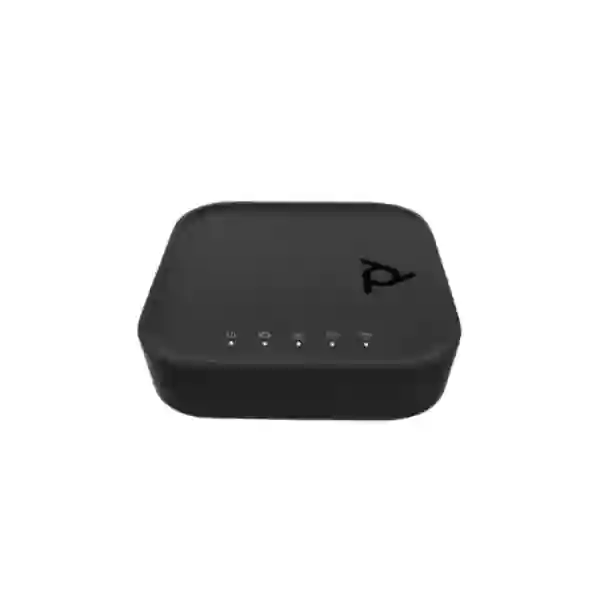
HP Poly ATA 402 Dual-Port Analog Telephone Adapter
Keep suitable analog telephones in service while moving supported calling functions to a SIP-based IP platform. The HP Poly ATA 402 Dual-Port Analog Telephone Adapter provides two FXS telephone ports for compatible touch-tone devices. It is a practical option for selective handset reuse, staged office migrations and supported fax scenarios—not a replacement for the voice subscription or network it needs.
Before buying in Tanzania, confirm your phone type, SIP provider, number-routing plan and power or internet continuity needs. Request a quote that identifies exactly which hardware, configuration and support services are included.
At a glance: verified product capabilities
Open SIP
T.38 fax capability
Optional USB Wi-Fi accessory
HP’s regional information identifies the Poly ATA 402 with manufacturer product code 8F3H5AA. It lists a compact 9.6 × 9.6 × 2.2 cm body and 85 g weight. Published specifications and guidance should be checked against the delivered regional hardware, particularly for power supply and network connector details. No Tanzania-specific listing SKU, stock, price, tax, warranty entitlement or type approval is asserted here.
| Buyer question | Practical answer |
|---|---|
| What connects? | Up to two supported analog physical endpoints through FXS ports |
| What carries calls? | A compatible configured SIP voice service and working IP network |
| Can fax be used? | Potentially, where the provider and end-to-end service support it |
| What is not included? | Do not assume phone numbers, SIP account, Wi-Fi dongle or installation |
What the HP Poly ATA 402 actually does
A conventional analog telephone expects a telephone socket to supply its dial tone and electrical signalling. An IP telephone system, by contrast, transfers voice through a data network. The Poly ATA 402 connects those worlds: a compatible touch-tone handset plugs into one of its analog phone sockets, while the adapter communicates with an appropriately configured voice service using SIP. The user can continue to lift a familiar receiver, dial a number and speak normally while the supporting network and telephone service operate differently behind the scenes.
This matters when a business has useful existing handsets but needs to modernize its calling arrangements. Replacing every physical telephone is not always the first step. An adapter may provide a practical transition for selected analog endpoints. However, the device is not a stand-alone telephone company, a prepaid calling package or a source of public telephone numbers. It requires a suitable hosted or on-premises SIP environment, network access and power. Confirm the provider’s support before planning procurement.
Understand the two FXS phone ports
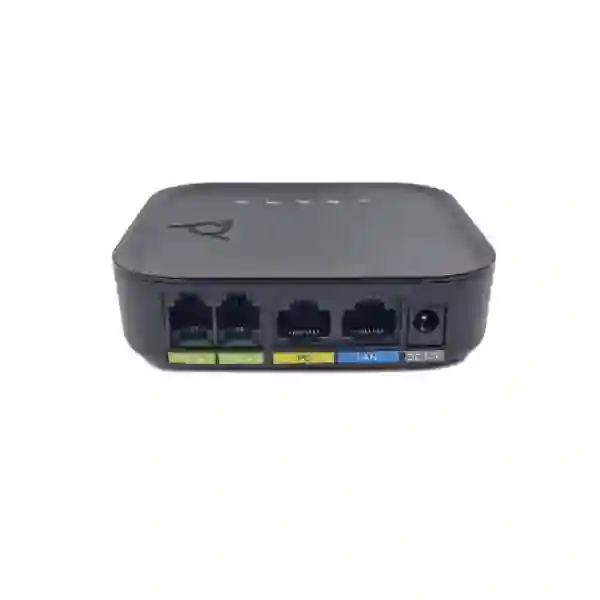
The key distinguishing feature of the ATA 402 is its pair of FXS analog phone interfaces. Each FXS port is intended to connect a supported analog telephone or suitable analog endpoint. In a simple office deployment, one telephone can occupy Phone 1 and another can occupy Phone 2. Port assignment, incoming call routing and outgoing identity depend on the chosen configuration and service provider. Two physical ports should not be confused with two bundled telephone numbers, two independent subscriptions or unlimited simultaneous calls.
An FXS port provides the type of connection a basic telephone expects. It is not an FXO port intended to accept an incoming public switched telephone network line from a wall socket. Before ordering, identify whether the buyer wants to attach handsets to SIP or capture an existing copper telephone circuit. Those jobs need different interface types. This small distinction prevents an expensive design error, especially during an office migration involving old PBX equipment.
Best-fit buyers and deployment goals
The adapter is worth evaluating when a business wants to keep a small number of working analog phones while using a modern IP telephony service. Examples include a reception desk with a familiar handset, a back-office station that rarely changes, a single fax device that needs testing over a supported service, or an extension in a low-use room. The fit is strongest where only one or two analog endpoints are required at the location and the organization has control over its network and voice provider settings.
Buyers should define the outcome before selecting the model: retain an existing handset, add a basic extension, continue limited fax use, or stage a migration away from legacy wiring. Each objective has different acceptance tests. The adapter can reduce the need to replace particular endpoints, but it does not automatically deliver every feature of a modern native IP phone. If employees rely on programmable keys, large directories or advanced visual call handling, compare dedicated IP desk phones instead.
Situations that need a different solution
The ATA 402 is not the universal answer to telephone modernization. It is a poor choice when the requirement is to bring an existing analog trunk from the public network into an IP PBX; that generally calls for a suitable FXO gateway or another provider-approved interconnection method. It is also not a substitute for the licensing, connectivity or calling plan of a SIP service. A large number of analog extensions may justify a higher-density gateway rather than multiple small adapters.
Avoid treating an analog alarm panel, elevator phone, payment terminal or legacy modem as automatically compatible merely because the plug fits. Such systems can depend on timing, signalling, supervision, service continuity or legal requirements that ordinary voice calls do not cover. Confirm the device manufacturer’s recommendations, the service provider’s supported use case and local requirements. Where life safety or legally required communication is involved, use a validated, purpose-designed solution.
How a typical VoIP call travels
At the user end, the handset behaves much as it always has: lift the receiver, wait for dial tone and dial. The Poly ATA 402 translates supported analog signalling and audio into network voice communication. SIP registration and call handling are performed according to the configured service. Voice then travels through the local network and upstream internet or private voice connection to the destination environment, where the provider handles onward routing. Incoming calls follow the reverse path to ring the assigned analog port.
That workflow has several separate dependencies. The handset must be suitable, the adapter must be configured correctly, the router and network must pass the required traffic, and the SIP account or PBX must be active. If one element fails, an analog phone may still look functional while calls cannot complete. A buyer should therefore request both a device compatibility check and a clear setup plan rather than assuming an Ethernet cable alone will make the telephone operational.
Existing handset compatibility checks
HP’s documentation identifies touch-tone analog telephones as the intended phone type. Traditional pulse-dial telephones are not supported in the referenced Poly ATA guidance. Check that the handset uses normal DTMF tone dialing and has an appropriate modular connector. Examine older devices for nonstandard wiring, proprietary signalling or additional power requirements. If the existing telephone came from a proprietary key system, it may not behave like an ordinary independent analog handset even when its cable looks similar.
The physical connector is only one part of compatibility. Test off-hook detection, dialing, ringing, caller identification and any feature keys the staff actually need. Hook-flash functions may depend on the service provider and handset timing. For a business that intends to reuse several older devices, test representative samples before committing to a full rollout. Label which physical port and which SIP identity serve each device so future support calls can identify the affected extension quickly.
Fax support: possible, but not automatic
HP states that the Poly ATA 402 supports fax over SIP-based services including T.38. This makes fax use a relevant buying scenario, but it does not guarantee that every fax machine, SIP trunk, cloud PBX or receiving network will work together. T.38 support must be aligned across the relevant service path, and successful fax delivery can also depend on transport stability and the remote destination. A normal voice call passing through an adapter is not proof that a fax workflow is reliable.
A sensible buying decision begins with the number of pages, document types, destinations and frequency of fax use. Ask the chosen provider whether it supports the required fax transport and whether the chosen account configuration permits it. Test sending and receiving multiple pages, including real destinations and busy conditions. Keep records of failed sessions, negotiated modes and relevant logs. For a business with mission-critical fax traffic, compare managed fax services or a dedicated supported solution before relying on analog-to-IP conversion.
Open SIP and provider compatibility
The model is marketed by HP with Open SIP support, which gives purchasers flexibility to evaluate SIP-based services. Open SIP is not a promise that every provider will provision or support every feature. The SIP platform may require a device profile, firmware level, account credentials, server address, registration settings or a provider-specific onboarding method. Some services restrict which equipment is permitted, while others allow bring-your-own-device configuration under defined support boundaries.
Before purchase, ask the intended provider to identify explicit support for Poly ATA 402, not merely for analog adapters as a broad category. Confirm how many extensions or registrations can be provisioned under the subscription, whether both physical phone ports may be used as planned, and what happens if the service is changed later. Verify incoming and outgoing calling, transfer methods, voicemail indication, emergency-call treatment and any specific routing features. Test these with the exact account type intended for production.
Planning the data connection
The adapter needs a working path between its network interface and its SIP environment. A conventional wired local-area network is usually the simplest foundation for predictable troubleshooting. The device must receive appropriate addressing and be able to reach the provider or PBX according to the site’s approved network rules. DNS, routing and firewall policy can affect registration and calling. A network that supports browsing may still have restrictions that interfere with SIP signalling or real-time media.
Have the IT or voice administrator check the provider’s documented network requirements before opening ports or changing router settings. Network changes should follow the organization’s security controls. Where a business maintains a voice VLAN, quality-of-service policy or managed firewall, document how this adapter will be connected and monitored. If the site has intermittent internet access, a successful demonstration during a quiet period is not enough; test during normal business load and assess the effect of an outage.
Voice quality and everyday reliability
A satisfactory call requires more than an active SIP registration. Packet loss, delay, variation in packet arrival time and network congestion can all affect how speech sounds. The provider and device must agree on a suitable audio codec and call path. HP’s ATA 400-series documentation describes support for several voice codecs, but the codec actually used depends on service configuration and negotiation. A phone can ring correctly yet deliver poor sound if the network is unstable.
Before deployment, test calls in both directions while ordinary office applications are running. Listen for clipping, one-way audio, echo, unexpected disconnects and delayed dialling. Repeat the checks at the busiest times relevant to the business. Document how staff should report a fault, including date, extension and whether the problem affected incoming, outgoing or all calls. Clear evidence helps distinguish adapter settings from a wider ISP, PBX or endpoint issue.
Power and continuity planning
The ATA depends on electrical power, and an IP calling path usually depends on powered networking equipment too. An existing analog handset may previously have worked during certain local outages because the legacy telephone network supplied line power. Connecting that handset to an IP adapter changes the power and resilience assumptions. The phone’s familiar appearance should not be mistaken for a traditional landline’s failure behaviour. No automatic PSTN fallback is implied.
Identify the supplied power adapter for the actual regional unit and use the power accessory specified for that hardware. Do not select a replacement voltage by analogy with an unrelated model. If uninterrupted communication matters, evaluate backup power for the ATA, router, switching equipment and any upstream connectivity equipment, as well as the provider’s failover choices. Test the complete chain using a controlled exercise rather than assuming one battery-backed item keeps the telephone service operational.
Optional Wi-Fi: a useful option with limits
HP documents optional Wi-Fi through a compatible USB adapter that is sold separately. This can be useful when the desired telephone position lacks a convenient wired Ethernet outlet. It is not a claim that Wi-Fi hardware is included in the basic package or that any generic USB wireless dongle will work. Confirm the exact compatible accessory and supported software revision before including wireless connectivity in a quote. A wired connection remains worth considering where stability and predictable diagnosis are priorities.
For a wireless deployment, evaluate signal strength where the adapter will actually sit, not only near the access point. Test voice during roaming activity, crowded periods and ordinary office movement. Ensure the network’s authentication method, segmentation and management policy permit the device. A weak signal or congested channel may be less noticeable during casual internet use than during live speech. Select Wi-Fi for a documented need and validate the resulting call quality.
Physical placement and cable layout
Choose a dry, stable location with suitable ventilation, accessible power and a clear path to the approved network connection. HP lists a compact body for the model, which helps it fit on a desk or equipment shelf, but convenient placement should not come at the expense of safe cabling or maintenance access. Keep the adapter away from situations that can pull at its phone cords, cover ventilation or subject it to excessive heat. Use appropriate cable lengths and protect exposed wiring.
Label each phone-port cable at both ends when possible. Identify which telephone belongs to which account in the site documentation; these details are easy to lose after an office move. The adapter should remain distinguishable from the router or PBX, especially in a cupboard containing several small black devices. Avoid extending its analog ports through unknown building wiring without qualified assessment. Such wiring may carry foreign voltage or connections to equipment that was never intended for the ATA.
A sensible installation sequence
Start by confirming the business requirement and the SIP provider’s device support. Next, identify the analog endpoints to be retained and test that they are suitable touch-tone devices. Prepare the required SIP accounts or extensions, collect the approved provisioning instructions, and verify that the local network meets the provider’s published requirements. Check the contents of the delivered package and record its device identity without exposing administrative credentials in a public inventory.
Then connect the analog endpoint to its intended FXS port, attach the approved network connection, and apply the supplied power accessory. Configure the adapter using the permitted management method and current administrator guidance. Test registration before starting call scenarios. Verify incoming calls, outgoing calls, the correct caller identity, ringing, audio in both directions and disconnect behaviour. If fax is required, carry out its separate test programme. Save a sanitized configuration record and operating notes for the responsible support team.
Account design and number assignments
Two analog sockets do not determine how many public numbers the organization owns. A SIP provider or business PBX controls identities, assigned extensions, numbers, permissions and call routing. A company may use internal extension numbers for local staff, public numbers for callers, or shared inbound routing according to its subscribed service. These arrangements must be planned independently of the hardware. A buyer should ask for a simple port-to-extension-to-number map before purchasing or installing the adapter.
The map should include the intended caller ID, who may make external calls, how inbound calls reach the handset and what should happen if the endpoint is unavailable. If a port is used for a fax machine, avoid accidentally assigning it to a voice-only call queue. If two departments share the device, check whether the provider’s restrictions permit the desired separation. A short written call-flow diagram prevents a working installation from becoming an administrative problem.
Security and responsible configuration
IP-connected voice equipment belongs within the organization’s security programme. Administrative credentials should be unique, protected and disclosed only to authorized staff. Configuration backups may contain sensitive service details and should be handled accordingly. Apply supported software updates through a controlled process, and remove or restrict management access that is unnecessary for the deployment. If a third party administers the telephone service, agree who can change credentials, review logs and approve upgrades.
HP documents secure provisioning capabilities for the series, but the protection achieved in practice depends on configuration, firmware and the surrounding service. Avoid advertising the device as inherently secure under every configuration. The SIP provider may publish guidance for authentication, supported encrypted signalling and media, trusted network ranges and device management. Follow that documentation rather than opening unrestricted internet access for convenience. Record the approved baseline so a troubleshooting change can later be reviewed or reversed.
Remote provisioning and device management
HP describes Poly Device Management Service for Service Providers, or PDMS-SP, as a mechanism for configuring, maintaining and troubleshooting ATA devices, with provisioning and monitoring features. This is relevant to service providers and organizations operating several endpoints. Availability of a particular management portal, API or cloud administration workflow is not guaranteed by hardware purchase alone. Access, enrollment, licensing and operational responsibility depend on the chosen service and support arrangement.
For one small office, a supported provider-managed setup may be more useful than designing a separate device-management platform. For a distributed organization, ask about configuration templates, firmware governance, inventory records, troubleshooting access and how lost or failed units are replaced. Establish who owns each task. The benefits of centralized administration depend on the actual service design; they should be evaluated as part of a solution rather than assumed to be free, universally accessible functions.
A realistic fax acceptance test
Fax is often the application that exposes weaknesses hidden by ordinary voice calling. A test should include a short page, a multi-page document and both directions of transmission. Include the destinations that matter to the business, because success with one receiver does not guarantee identical results with another. Capture whether failures occur at call setup, negotiation, transfer or completion. Record the machine model, settings, network conditions and service account involved in every repeatable issue.
Ask the SIP provider which fax settings it supports and whether a T.38 route is available end to end. Do not improvise unsupported low-level settings simply because a forum suggests them. Where the organization sends important documents, verify that recipients actually receive readable pages and not just a machine-generated success tone. Define what the staff should do when a fax fails, and consider an alternate documented delivery method. Fax suitability is a tested workflow result, not a blanket claim on a product page.
Considerations for a Tanzania business
For a business evaluating IP telephony in Tanzania, the practical starting point is the service actually available at its premises. Confirm reliable connectivity, the intended SIP provider, calling-number arrangements and who will support configuration. Do not assume that a specific mobile operator or fixed-line provider offers a compatible SIP trunk merely because it provides internet access or traditional telephone services. Request its current technical requirements and supported device policy in writing if the deployment depends on those capabilities.
Tanzania’s communications regulator, TCRA, administers communications numbering and related regulatory arrangements. The buyer should distinguish use of an existing number through a licensed provider from applications for numbering resources or other services that may have separate requirements. This product description makes no claim that the adapter has local type approval or that a particular tariff, number range or operator service is included. Confirm any applicable import, equipment and telecom requirements through the responsible provider and official channels.
Keep public numbers and subscriptions separate from hardware
A customer may describe the project as moving a desk telephone to VoIP or retaining an existing office number. The second goal needs particular care. Number retention, porting and routing are controlled by the current and future providers and by applicable numbering processes. Purchasing an ATA does not transfer a telephone number. The buyer should ask the relevant providers whether the exact number can be retained, which documentation is needed and when a planned cutover can take place.
Write down the current number, the service that carries it, the new destination and any fallback arrangement before making changes. A pilot extension can often help test the adapter without immediately disrupting the published office number. Agree how inbound calls will be handled during a migration and who is authorized to approve routing changes. Avoid disconnecting a functioning service until the receiving provider confirms its arrangements and the business has completed its acceptance tests.
Emergency and critical calling must be checked
An IP-adapted analog telephone may not behave like a conventional fixed line during network or power failures. Emergency dialing, location information and permitted destinations depend on provider configuration and applicable requirements. Staff should never assume that a successful routine outbound call proves emergency calling is properly supported. The organization should ask its provider how emergency services are handled and whether any location registration, routing rule or separate arrangement is required.
Where the business uses telephones for security, medical, lift, industrial or other safety-related purposes, obtain specialist confirmation that the proposed solution meets the operational and legal need. Do not substitute a generic small-office voice adapter for a certified or specifically approved safety communications system without such verification. Document an alternate way to call for help when a site loses power or connectivity, and include that procedure in staff training. Reliability planning is part of the solution, not a promise made by the adapter itself.
Common business scenarios worth evaluating
Reception and administration: keep one or two familiar touch-tone handsets while moving voice service to a supported SIP platform. The value is continuity for staff who do not need an entirely new phone interface. Shared workspace: provide a simple endpoint at a secondary desk or in a room with low call volume. The value is avoiding unnecessary replacement when the existing handset meets the user’s needs. Document and reception areas: evaluate whether a compatible fax machine can remain operational with an appropriate provider service and thorough testing.
Phased office migration: install and validate one or two analog extensions while a wider PBX change proceeds. The value is controlled change rather than replacing all equipment simultaneously. Distributed sites: consider standardized small-endpoint configurations where the organization can provide support and reliable network access. For every scenario, list the required calls, integrations and continuity expectations first. A device that is right for a rarely used desk may be wrong for a busy operator console or a critical monitored line.
Poly ATA 400 versus Poly ATA 402
HP’s Poly ATA 400 family includes the single-port ATA 400 and the two-port ATA 402. The clear selection question is the number of analog endpoints required at the installation point. Where one basic touch-tone handset is needed and no second endpoint is planned, a single-port model may be sufficient, subject to the same SIP and service checks. Where two separate analog physical connections are required in one location, the ATA 402 is the relevant family member to evaluate.
Count actual attached devices rather than the number of users who occasionally share a handset. Verify how the selected service handles each port and whether two simultaneous use cases fit the proposed subscription. If future growth requires many analog phones, compare the support overhead, cabling and total cost of multiple small adapters against an appropriate multiport gateway. The best model is not necessarily the one with the most connectors; it is the one that matches the planned call flows.
FXS adapter versus an FXO gateway
The difference between FXS and FXO is one of the most important purchasing checks. The Poly ATA 402 presents analog phone interfaces so compatible handsets can connect to a SIP environment. An FXO interface, on the other hand, is designed for connection to an existing analog telephone line supplied by a telephone exchange or other suitable source. Those interface roles are not interchangeable. An FXS adapter should not be described as a direct gateway for accepting an incoming copper trunk.
If a site has a legacy PBX with analog trunk cards, first establish whether the aim is to keep that PBX, connect it to IP telephony or retire it. The correct architecture may involve an FXO gateway, a SIP trunk, an IP PBX configuration change, or a different migration plan. Ask an installer to draw the existing and proposed connection diagrams. A five-minute interface check can save the expense of purchasing a device that physically cannot perform the desired job.
ATA 402 versus a new IP desk phone
A native IP desk phone connects directly to an IP network and may offer screens, directories, software keys, more sophisticated call handling or direct platform features. The Poly ATA 402 instead retains an analog handset interface and moves the transport and service side toward VoIP. The key advantage is reuse of suitable existing equipment. The tradeoff is that the analog handset may not expose the full user experience of a modern IP phone, even when some telephony functions are available through the provider.
Choose reuse when the handset performs a simple job, staff understand it, and the provider supports the required functions. Choose a native IP phone when users need advanced call controls, frequent transfers, visual voicemail, integrated presence or a richer collaboration workflow. Neither option is automatically the lowest total cost. Include licensing, support, cabling, backup power, training and future replacement cycles when comparing options.
Total solution cost: look beyond the adapter
The purchase price of the hardware is only one component of a working analog-to-IP connection. The budget may also need to cover the SIP subscription or PBX entitlement, telephone numbers, compatible optional Wi-Fi accessory, setup services, network adjustments, power protection and ongoing support. A fax scenario may need additional testing or provider services. Those costs depend on the chosen environment and are not included by implication when a customer buys the adapter.
Ask for a quote that clearly distinguishes device supply from service provisioning, configuration, commissioning and support. Confirm who handles firmware, credentials and a failed device after installation. A cheap-looking hardware-only purchase can become expensive if the customer discovers later that the intended provider will not support it. Conversely, keeping a suitable handset may be cost-effective where the call requirements are simple and the existing infrastructure is prepared. Compare the complete operational outcome rather than only the box price.
Procurement questions before requesting a quote
State the exact model name, required quantity and whether the connection will serve handsets, fax machines or another type of analog endpoint. Describe the telephone system or cloud voice service, and identify whether the provider already supports the device. Supply the approximate number of locations, the planned ports at each, and any network restrictions. Say whether Wi-Fi is required or only a wired connection. These details make a quote more meaningful and reduce the risk of receiving equipment that will need to be returned.
Request confirmation of the actual regional product configuration, packaged accessories, applicable support terms and any manufacturer part-number variant. A manufacturer product code is not the same thing as a seller’s inventory SKU. Ask separately about local availability, delivery, payment, pricing and warranty terms; those details should come from the actual offered listing or quotation. Do not rely on global marketing pages for a Tanzania-specific commercial commitment. The quotation should make all such terms explicit.
Troubleshooting when a phone will not call
Start by identifying the symptom. No power indicators suggest an electrical or accessory issue; no dial tone may involve handset, port, service or configuration. A dial tone with failed outbound calls can point to call permissions, SIP registration or dialing rules. Incoming calls that do not ring may reflect number routing, registration or port assignment. One-way audio can indicate a media path or network policy problem. An issue affecting only fax needs its own provider and protocol checks.
Record the affected port, times, destinations and any recent changes. Confirm the analog device and cabling, then check the approved network and provider registration diagnostics. Do not publish SIP usernames, passwords or detailed configuration screenshots in a public support ticket. If the device is provider-managed, contact the responsible support team before factory-resetting it, because a reset may erase a working enrollment or configuration. Use a repeatable test checklist to separate handset faults, adapter faults and service faults.
Ongoing maintenance and change control
Small voice adapters are easy to overlook once installed. Keep a record of physical placement, responsible contact, connection details, approved firmware level, provisioned account identifiers and the last successful service test. Maintain this information in the organization’s protected asset inventory rather than attaching credentials to the device. Review the support life cycle and firmware guidance at intervals appropriate to the service. When a vendor announces a relevant security or reliability fix, plan its deployment through the responsible administrator.
Changes to telephone numbers, call groups, network firewalls or internet providers may affect the adapter even when nobody touches the handset. Include this endpoint in relevant change plans. After a maintenance event, run a short incoming and outgoing call test on both used ports. Where fax is important, add a sample send and receive. A basic maintenance record reduces the time needed to diagnose a problem and helps the next support technician understand what the installation is supposed to do.
How to accept the solution before going live
Define success in advance. For a standard voice station, verify registration, incoming calls, outbound calls, correct number presentation, intelligible two-way audio, ringing, hang-up behaviour and the functions staff use every day. For two ports, test them separately and, where relevant, at the same time. For a fax installation, confirm actual readable delivery in both directions with the intended service. Include the most common destinations and a busy-period network test.
The go-live signoff should name the tested handsets, provider service, extension assignments, responsible administrator and any known limitations. Confirm that staff know who to contact for service issues and how to communicate during a network outage. Where continuity is important, check the documented backup method rather than promising the ATA will supply one. A completed test is stronger evidence than a generic claim of compatibility. It also provides a practical baseline for future troubleshooting and service reviews.
Questions to send with a quote request
A useful enquiry states whether the buyer already owns compatible analog phones, the number of intended connections, the preferred network method and the name of the SIP platform being used or considered. If the buyer plans to retain an office number, make that a separate provider discussion. If fax is involved, identify the fax machine and how often it is used. Include any operating constraints such as difficult cabling, site access, planned office relocation or limited network administration.
The response should distinguish confirmed device facts from solution-specific tasks still requiring validation. Ask the supplier to explain what is included, what the customer must provide, who handles provisioning and which tests are part of commissioning. Do not assume a quotation guarantees support from an unrelated hosted PBX provider. A clear written scope helps buyers compare proposals fairly and reduces disputes after delivery. It also gives the installer a concise baseline for a successful handover.
Frequently asked questions
Can I connect two analog telephones?
Yes. The Poly ATA 402 has two physical FXS phone ports intended for supported touch-tone analog devices. Whether they use different extensions, numbers or calling permissions depends on the actual SIP configuration and provider. Confirm the intended account arrangement before ordering, then test each port separately.
Does it include a SIP telephone service or phone number?
No bundled SIP subscription or public number should be assumed. The adapter is hardware that connects compatible analog devices to an appropriately provisioned voice environment. The buyer needs a compatible service, account and network connection. Ask the provider to confirm registration requirements, call charges and number arrangements.
Can it connect directly to an existing PSTN copper line?
Not for the purpose of receiving an analog trunk into a PBX. Its two FXS ports are for connecting appropriate analog endpoints, not for acting as FXO telephone-line inputs. A site that needs to integrate an existing public analog line should have its interface requirements assessed before purchasing hardware.
Will every old telephone work?
No. HP’s guidance describes touch-tone analog telephones and does not support pulse-dial phones. Older proprietary or unusual handsets also require checking. Confirm the phone’s interface and test dialing, ringing, audio and any required feature keys with the exact service environment.
Can I use it with a fax machine?
The model supports fax-oriented functions including T.38, according to HP, but successful fax operation depends on the selected service and end-to-end compatibility. Check provider support and conduct realistic send-and-receive tests. Do not assume that a successful ordinary voice call proves fax reliability.
Is a Wi-Fi adapter included?
Do not assume one is included. HP describes optional Wi-Fi through a compatible USB accessory sold separately. Confirm accessory compatibility and the regional package contents with the supplier. For critical voice traffic, assess wired connectivity first and test wireless performance under normal site conditions if required.
Will the phones work during a power or internet outage?
The ATA and its IP calling path require power and working network connectivity. A backup power arrangement for one component does not necessarily preserve the whole service. Ask the voice provider about failover and emergency-call behaviour, and arrange an independent continuity method appropriate to the site’s needs.
Does the device work with Microsoft Teams or Zoom?
HP describes platform support including Microsoft Teams SIP Gateway and Zoom certification, but exact eligibility, provisioning and features depend on current platform requirements and the particular service plan. Verify current supported-device guidance and the intended account with the platform administrator before promising deployment compatibility.
What is the difference between Poly ATA 400 and ATA 402?
In HP’s ATA 400 family, the ATA 400 provides one FXS phone port and the ATA 402 provides two. Select based on the number of required analog physical connections, the SIP service configuration and the future operating plan. Neither automatically includes a telephone service.
Is the HP product number the same as FourTeck’s SKU?
Not necessarily. HP identifies the Poly ATA 402 using manufacturer product information, including the code 8F3H5AA on its product pages. A specific seller’s SKU is a separate inventory identifier. Confirm that SKU only from the actual FourTeck listing or its supplied inventory record, rather than copying another retailer’s identifier.
Is local Tanzania availability or TCRA approval confirmed here?
No. This description does not confirm Tanzania stock, a local warranty, tariffs, delivery coverage or regulatory type approval. Commercial terms require a current FourTeck quote or verified listing, and any applicable communications or equipment requirements should be checked with the responsible parties.
What information should I share to get the right recommendation?
Provide the intended handset or fax model, number of analog endpoints, SIP provider or PBX, preferred wired or Wi-Fi connection, number-routing needs and any continuity requirements. Ask for confirmation of the proposed package, configuration scope and support arrangements before ordering.
Request a Poly ATA 402 compatibility review and quote
Tell FourTeck Tanzania what analog telephones or fax devices you want to retain, which SIP service you plan to use and how many physical connections are needed. Ask for a quote that confirms the exact regional unit, accessories, configuration scope, commercial terms and supported deployment plan. No price, stock level, local warranty or installation commitment is implied by this informational description.
A successful purchase starts with the right interface and a tested service path. Request confirmation before ordering, especially for fax, emergency calling or critical communications.




Reviews
There are no reviews yet.