
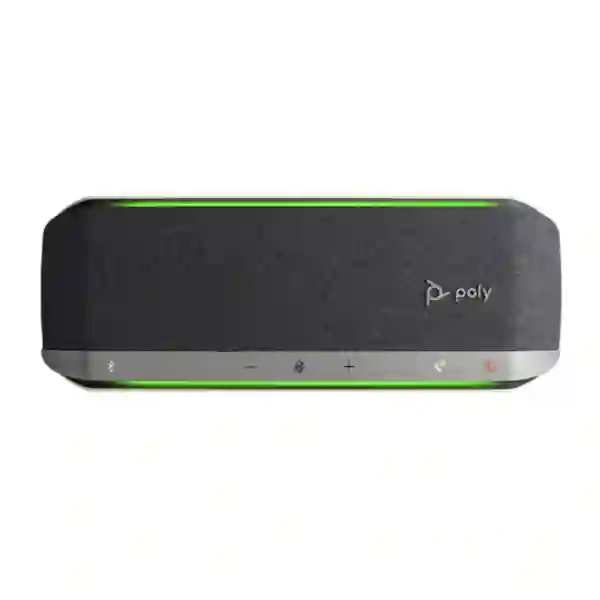
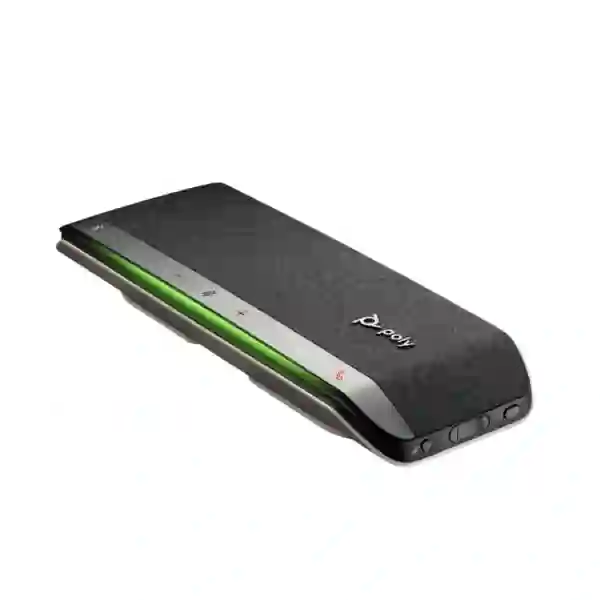
HP Poly Sync 40 USB Bluetooth Speakerphone
A dedicated meeting-table speakerphone for clearer group conversations, straightforward USB laptop connection and Bluetooth smartphone calling. Built for flexible offices and huddle rooms, with a rechargeable battery and easy-to-use call controls.
Choose the exact configuration that matches your workplace: standard Sync 40, a Teams-certified variant or a Sync 40+ adapter bundle. Request the confirmed variant and commercial terms before ordering.
At a glance: verified capabilities
| Best-fit use | Small huddle rooms, flexible meeting tables and shared workspaces |
|---|---|
| Computer connection | USB-A or USB-C connection, depending on supplied cable/adapter configuration |
| Phone connection | Bluetooth 5.1 on the specified standard model |
| Audio processing | Three steerable microphones, full-duplex audio, noise and echo reduction |
| Microphone reach | Up to about 2.5 m manufacturer-rated pickup guidance |
| Speaker | 50 mm driver; specified speaker response 75 Hz–20 kHz |
| Battery | Rechargeable lithium-ion; up to 30 hours stated talk time; charging under 5 hours |
| Size and weight | Approx. 273 × 102 × 38 mm; 610 g |
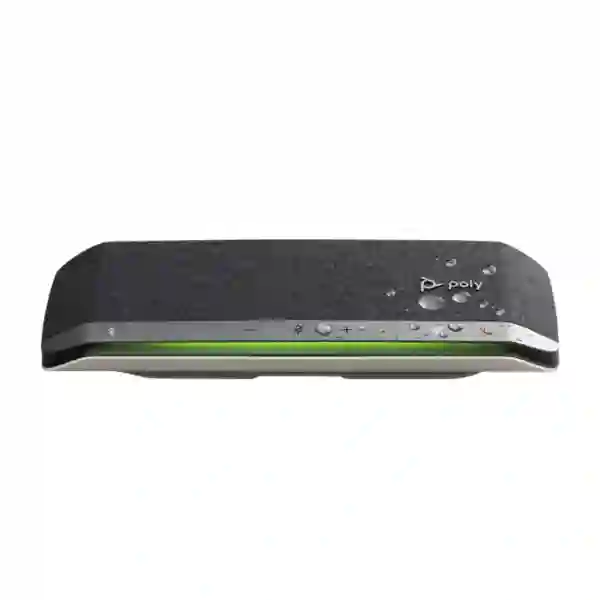
| Protection | IP64 dust and splash resistance—not waterproof immersion |
| Variants | Sync 40, Sync 40+ adapter package and separate Teams-certified configuration |
These are product-family or identified standard-model specifications based on HP documentation; confirm the part number and box contents for the unit actually quoted. Room dimensions and battery figures are planning guidance, not guarantees.
Where this model fits best
A strong fit
Small collaborative rooms, laptop-led calls, short project meetings, a mobile-device host and shared tables where several people need one audio endpoint.
Test before buying
Long tables, reflective spaces, rooms with strong background noise, frequent wireless laptop use and groups expecting two units to extend coverage.
Consider alternatives
Auditoriums, large boardrooms, video-only room kits, public-address sound, noisy factory floors and confidential individual calls in open offices.
A shared meeting needs shared audio
A laptop can run a video meeting, but its built-in microphone and speakers do not necessarily serve people spread around a table. Someone sitting nearest the computer may sound loud while a colleague at the opposite end must lean forward. The HP Poly Sync 40 USB Bluetooth Speakerphone addresses that specific audio problem: it provides a dedicated speaker and microphone system that can be placed where the group is talking. It is designed for flexible workspaces and smaller huddle-room conversations, not as a replacement for an entire boardroom audio installation or a video camera.
For a team arranging regular calls with customers, suppliers, colleagues or remote managers, the useful buying question is not simply whether the device has Bluetooth. Ask whether everyone can hear the remote participant, whether the microphones can capture conversation around the table, and whether the connection method suits the meeting host’s computer. The Sync 40 offers a practical portable option where people bring their own laptop or phone and do not want a permanently installed audio system.
How its microphones support clearer conversation
The Sync 40 uses a three-microphone steerable array. In everyday terms, that means several microphones work together rather than relying on one tiny microphone beside a laptop keyboard. The design concentrates on people speaking in the meeting space and incorporates noise and echo reduction. That can improve intelligibility when a group speaks from different seats, although every room has different reflections, background sounds and participant positions. It is sensible to assess microphone performance in the actual room rather than assume that the word ‘noise reduction’ makes every environment quiet.
HP lists a microphone pickup range of up to approximately 2.5 metres for the Sync 40 series. Treat this as planning guidance, not a promise that soft speech at the far edge of any room will sound identical to speech near the product. A participant facing away from the unit, a loud fan or a heavily reverberant meeting room may still affect a call. Start with the speakerphone centrally positioned on a stable surface, make one short test recording or call, and adjust seating before the meeting begins.
Full-duplex calling and natural turn-taking
Full-duplex audio is especially useful in business conversations because it allows incoming and outgoing voices to be handled at the same time. One participant may give a quick acknowledgement while another is speaking, or a remote attendee may ask a question during an explanation. With a conventional poor-quality speaker setup, these overlapping moments can become clipped, interrupted or confusing. HP describes full-duplex operation as a core Sync 40 feature, intended to let conversations flow more naturally across the room and the remote connection.
This does not mean every meeting will be free of interruption. Conferencing software, internet quality, microphone placement and the other end of the call all affect results. If participants routinely ask each other to repeat words, test the full chain: local microphone, local speaker, selected software devices, network and remote participant equipment. The Sync 40 improves the local meeting audio arrangement, but it cannot correct a congested internet connection, a misconfigured virtual meeting or audio equipment being used elsewhere on the call.
A speaker designed for calls and shared listening
HP specifies a 50 mm high-performance speaker and a speaker frequency range of 75 Hz to 20 kHz for the relevant Sync 40 specification. The product also uses a bass-reflex design with dual passive radiators. The important customer benefit is a fuller shared listening experience than the narrow audio of some laptop speakers, particularly when several participants need to understand a remote voice. Status indications and conveniently located controls also help everyone around the table know whether a call is active or muted.
The Sync 40 can also be used for compatible media playback, but it should be evaluated primarily as a conferencing speakerphone. Its sound system is not intended to replace a dedicated room sound system for public-address announcements, high-volume events or music-focused installations. For private listening in an open-plan office, a headset is often the more appropriate tool. For a small group attending the same call, a central speakerphone is useful precisely because nobody needs to share earbuds or huddle around one computer.
Choosing the right room and table size
HP’s Sync 40 technical information describes a small meeting-space use case, with guidance around a 4 by 4 metre room and a microphone pickup range up to 2.5 metres. Those numbers are better understood as starting points for a room assessment than as a guaranteed number of people or a universal coverage boundary. A long, narrow table and a square table of the same floor area behave differently. So do rooms with glass walls, hard floors, open doors or machinery operating nearby.
Place the device as near the centre of the active conversation as practical. Keep paper stacks, large notebooks and laptop screens from blocking the path between speakers and microphones. For a long table, test participants at the ends before deciding that one unit is sufficient. If the team often needs much greater reach or has widely spaced participants, compare a two-unit Sync 40 arrangement with a purpose-built larger-room system. Buying a device solely from its advertised room dimensions can lead to an avoidable mismatch.
USB connectivity for laptop-hosted meetings
A wired USB connection is often the simplest route for a laptop that is hosting a meeting. HP specifies computer connectivity through USB Type-A or USB Type-C arrangements for the Sync 40, with the exact cable or adapter form depending on the package. Connect the supplied supported cable to the computer, then choose the Sync 40 as the microphone and speaker in the meeting application if the software has not selected it automatically. A USB connection avoids depending on a separate Bluetooth pairing process whenever a different employee brings a laptop to the room.
When evaluating a quotation, ask the seller to identify the precise USB connection included in that package. Different photographs and marketplace descriptions sometimes show a combined cable, separate cables or an adapter. Do not assume every regional bundle has the same contents. If a corporate computer has limited ports, confirm which ports are available and whether a dock affects audio routing. Before a high-stakes meeting, start the application early, select the correct devices, check mute state and verify that the far-end participant hears the room clearly.
Bluetooth calling from a smartphone
Bluetooth gives the Sync 40 a second practical role: a person can connect a compatible smartphone without placing the phone itself in the centre of the table. HP lists Bluetooth 5.1 for a standard model. To establish a mobile connection, power on the speakerphone, enter Bluetooth pairing mode and select Poly Sync 40 in the phone’s Bluetooth settings. Once connected, verify that the phone’s active call or conferencing application routes audio to the speakerphone rather than its own earpiece or another paired device.
Bluetooth is convenient, but it is not identical to USB in every workflow. Wireless reliability depends on the host device, radio conditions, nearby equipment and configuration. A phone may remember multiple previously used accessories, so it is worth checking the selected audio output before joining a meeting. HP lists support for several Bluetooth profiles, but a buyer should still confirm the intended app and handset behavior during testing. Where a predictable shared laptop workflow is the priority, direct USB is a useful default; where a phone is the host, Bluetooth is the natural starting point.
Battery-powered flexibility without treating it as unlimited
The built-in rechargeable lithium-ion battery is one of the reasons the Sync 40 fits temporary meeting spaces. HP states up to 30 hours of talk time and a charging period of less than five hours for the relevant configuration. These are manufacturer’s figures under test conditions; actual endurance changes with volume, connection use, battery age and charging habits. A fully charged unit may support several sessions away from a wall socket, but do not plan a critical all-day event around the theoretical maximum without first checking its real-world behavior.
A simple charging routine prevents the most common meeting-day frustration. Return the speakerphone to a known USB charging location at the end of use, inspect the battery indication and include charging responsibility in the room’s closing checklist. If a meeting will be unusually long, consider keeping a suitable USB power connection available. The battery reduces dependence on fixed power outlets, but the phone or laptop running the meeting still needs power, and a remote meeting still needs functioning network connectivity.
Visible controls and fast meeting etiquette
The Sync 40 provides touch controls for answering or ending a call, muting, adjusting volume, Bluetooth pairing and a programmable function. Physical controls handle power and wireless linking. HP also describes clear status lighting so users can recognise call activity at a glance. This matters in shared spaces: a visible mute indication helps prevent a side discussion from being accidentally transmitted to remote participants, while an obvious call indicator makes the product less mysterious to someone borrowing the room for the first time.
Teams get the most value when they adopt a short routine. Check that the conference application is using the Sync 40, ask the remote side whether the room sounds clear, confirm the mute control works, and end the call before disconnecting a personal device. Users should remember that a hardware mute and an app’s mute control can operate in different layers; always observe both before discussing confidential information. A one-minute orientation is usually more effective than leaving a long technical manual on the table.
Linking two compatible Sync 40 units
HP says two compatible Sync 40 speakerphones can be wirelessly linked for a larger meeting-space arrangement. This can be useful when participants are spread farther apart than one tabletop placement comfortably accommodates. Importantly, the manufacturer’s guidance ties the linking scenario to a suitable wireless connection; the wireless daisy-chain feature should not be assumed to operate while a speakerphone is connected to a computer using a USB cable. Verify the current firmware and intended host setup before ordering a second unit expressly for this purpose.
Two linked devices do not automatically transform a difficult acoustic room into a fully engineered conference installation. Users must still consider distance between units, local interference, seating, loudspeaker level and the number of simultaneous talkers. A simple pilot in the planned room is valuable: connect the host, link the units using the supported controls, ask remote colleagues to listen to voices at both ends and check the result during normal conversation. If this setup remains inconsistent, a dedicated larger-room solution may be a better investment.
Which model is being offered?
The name ‘Sync 40’ covers more than one commercial configuration. The standard Poly Sync 40 is commonly positioned for USB connection to a computer and Bluetooth connection to a smartphone. The Sync 40+ package is associated with an included USB Bluetooth adapter for wireless computer connection, while a separately identified Microsoft Teams-certified variant exists. HP documentation distinguishes these versions. For this page, the product title alone does not prove which exact manufacturer part number, Teams version or adapter bundle a Tanzania quotation includes.
Ask for written confirmation of the exact variant before comparing offers. A lower quotation might cover the standard unit without an adapter; another may include the Bluetooth USB accessory or a Teams-oriented edition. The speakerphone’s core calling purpose is similar, but the working experience and accessory contents may differ. A buyer should compare the actual configuration, not simply product photographs or the phrase ‘wireless speakerphone.’ Where certification is a procurement requirement, require the precise model’s certificate or manufacturer listing rather than relying on a general claim about the family.
Microsoft Teams, Zoom and other meeting applications
Most organisations need to know whether a speakerphone will work with the platform their people already use. The Sync 40 is an audio input and output device, and HP offers standard and Microsoft Teams-certified versions. This distinction matters: basic use as a microphone and speaker is not the same as a particular app’s certified feature set, special button behavior or managed deployment status. Standard editions are described in vendor material as Zoom-certified, but this page does not assign a certification to an unidentified stock unit.
For Teams-centric organisations, confirm the exact Teams-certified manufacturer variant before buying. For Zoom or other softphone applications, test microphone selection, loudspeaker routing, mute synchronisation, call controls and the host computer’s permissions. Features such as joining a meeting, sharing a screen and displaying video come from the computer or app, not from this standalone audio accessory. A Poly Sync 40 can improve the audio path within an existing collaboration workflow; it does not provide a camera, display or standalone meeting-room codec.
A practical device for flexible work and shared desks
A fixed conference room is not the only useful deployment. Many businesses need a small audio device that can move from a private office to a temporary project table or an interview space. With USB and Bluetooth choices plus battery operation, the Sync 40 can support that changing pattern of work. It is particularly relevant when several colleagues use a shared room but bring their own laptops, so the room does not need to be permanently assigned to one conferencing computer.
Shared equipment works best when everyone can find it. Consider a labelled storage position, a dedicated charging cable and an agreed routine for returning accessories after meetings. If users carry the product between buildings, plan for protective handling and secure storage rather than treating a dust- and splash-resistant rating as impact protection. In regulated or confidentiality-sensitive work, consider the organisation’s rules for shared Bluetooth accessories and decide whether connections should be cleared between users. The right process is as important as the hardware itself.
Uses in sales, procurement and customer meetings
Sales teams frequently arrange calls where two or three people at a customer site need to discuss a proposal with an external specialist. A tabletop speakerphone lets those participants share the same conversation without passing a handset around. Procurement and supplier review teams can use the same setup to discuss quotations, clarify delivery requirements or review a technical proposal. The benefit is not a particular industry claim; it is the ability for multiple people in one small space to participate with a single meeting host.
During important calls, establish who will host the conference and who will manage shared audio. One laptop or mobile phone should normally act as the intended host for the speakerphone to avoid accidental feedback from multiple open microphones in the same room. Ask participants with their own laptops to mute or disconnect local computer audio as needed. This small operational detail often matters more than adding another accessory. It can prevent the characteristic echo that occurs when two nearby machines join the same virtual meeting with speakers and microphones active.
Training, education and interview scenarios
The device can also be considered for small-group training, mentoring, interviews and remote consultations where the participants are seated in a compact space. An interviewer and note-taker may need to hear the same remote candidate, or a facilitator may want a few learners to ask questions of a remote trainer. The Sync 40 provides a shared audio endpoint for these cases. Its role is narrow and useful: handle voices from a local group and play the distant participant’s audio into that group.
For teaching in a larger classroom, presenting to an audience or recording complex sessions, a portable speakerphone may not provide the right coverage. Those use cases can require external microphones, amplification, video equipment or managed recording systems. For private interviews, first consider whether shared loudspeaker audio is permitted, whether the room has adequate acoustic privacy and whether recording consent is needed under the organisation’s policies. A convenient device should support an appropriate meeting process, not bypass it.
Supporting mobile professionals without overcomplication
For employees who split time between home, an office and visits to different meeting locations, the Sync 40 can reduce the need to learn a separate conference system in every room. A USB laptop connection is familiar; smartphone Bluetooth pairing gives another route when a mobile device is the call host. The controls for mute and volume are on the unit rather than buried in a computer menu. These practical details can make short ad-hoc calls easier to begin, especially for participants who do not use professional conferencing equipment daily.
Portability also introduces tradeoffs. The product occupies space in a bag, needs charging, and may be less private than a headset in a busy workspace. It is better suited to a group at a table than to one person taking confidential calls in a crowded public area. Before buying one for every employee, examine the actual use pattern. A department may benefit more from a few bookable shared units, while employees making mostly solo calls may be more comfortable with individual headsets.
Managing deployment across multiple rooms
For an IT team, the challenge is often consistency rather than the first installation. Different employees may use different operating systems, meeting clients and docks, and a device can appear to be faulty when a laptop is sending its audio elsewhere. HP identifies Poly Lens as a tool that can support device management and software updates for its compatible equipment. Confirm current application support and organisation policies before making it part of a rollout. The availability and management scope of any service must be checked rather than assumed.
A sensible pilot uses one speakerphone, one representative meeting room and the main corporate laptop types. Record successful USB connection steps, any approved wireless adapter requirements, expected firmware handling and a quick fault-isolation checklist. After the pilot, standardise the set of accessories that stays with each device and record which exact variant is deployed. This makes future support clearer: an employee can report the device model and connection method instead of only saying that ‘the meeting speaker stopped working.’
Using the IP64 rating correctly
The Sync 40 specification carries an IP64 dust- and water-resistance rating. Broadly, that points to dust ingress protection and resistance to splashing water; it does not mean the product can be submerged, washed under running water or treated as rugged outdoor audio equipment. Buyers should interpret the rating as an added measure of resilience for normal shared-workspace handling, not permission to expose a powered electronic device to rain, liquids or careless cleaning methods.
In practice, keep drinks away from the microphone area, wipe surfaces according to the manufacturer’s current care instructions and avoid abrasive cleaners or liquids entering the ports. If a spill occurs, stop use and follow official support guidance rather than immediately reconnecting power. The IP rating does not establish drop resistance, guaranteed survival after an accident or local regulatory certification. For transport between offices, simple protective storage and careful cable handling still matter.
Smartphone charging: useful, but secondary
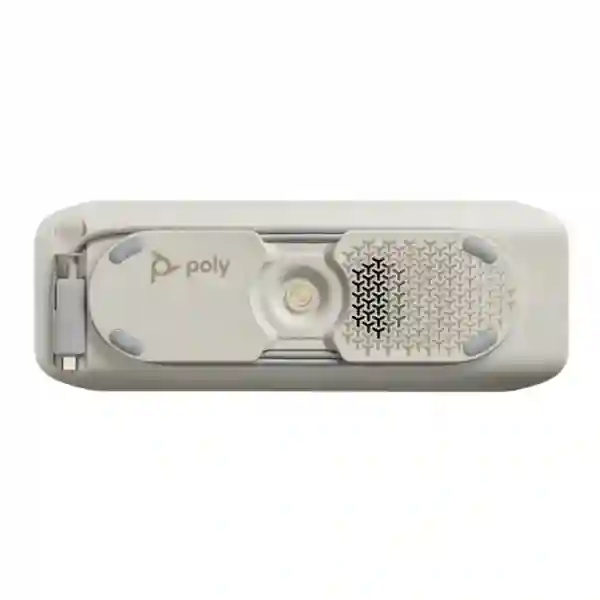
HP’s Sync 40 family documentation identifies a USB-A charging port that can be used with a smartphone cable. This is a convenience feature when a meeting host’s mobile phone needs some additional power, especially during a longer Bluetooth call. It should not be confused with a high-capacity phone power bank or treated as the main reason to purchase the device. Power available for phone charging depends on the speakerphone being powered on and having sufficient battery charge according to the operating guidance.
Before relying on this feature, verify the exact product’s port, the cable needed for the phone and the device’s remaining battery. If the unit is also providing conference audio, prioritise completing the call. Charging a phone uses energy that could otherwise support speakerphone operation, so the advertised talk time and phone-charging convenience should not be counted as completely independent resources. A dedicated charger is more appropriate when rapid or guaranteed phone charging is required.
What this product does not replace
A clear purchase decision includes the limits. The Sync 40 is a speakerphone, not a conference camera, touch controller, display, meeting-room computer or network router. It will not make an unreliable internet connection stable. It does not remove the need for a correctly configured conferencing application or appropriate permissions on a managed laptop. And it cannot ensure that a person speaking beyond the intended microphone range will be heard clearly regardless of room acoustics.
It also may not be the best choice for an open office where a shared loudspeaker would disturb colleagues, for a sensitive one-to-one conversation, or for a large meeting room with many widely separated participants. In those environments, evaluate a professional headset, personal speakerphone, paired-device configuration or purpose-designed room system. Starting with the communication task prevents overspending on functions the team does not use and avoids disappointment from asking a small-room device to serve an auditorium.
Compare with smaller and larger alternatives
The Poly Sync family includes products intended for different settings. A more personal model such as the Sync 20 is aimed at individual and very small-group usage, while a larger-room model such as the Sync 60 is positioned for broader conference-room coverage. The Sync 40 occupies a practical middle ground for flexible and huddle rooms. These are planning distinctions, not a claim that every meeting with a particular headcount needs a particular model. Seat spacing, microphone placement and audio privacy can be more relevant than an advertised number of attendees.
To make a fair comparison, use the same meeting application and place the products in the same proposed room. Ask remote listeners to evaluate speech from the nearest, middle and farthest seats; test volume without distortion; examine cable requirements and decide whether battery operation is essential. A headset may win for individual privacy, a compact speakerphone for a personal desk, and a larger audio system for a permanent conference table. The right decision follows the room and the user, not a simple ranking of product sizes.
Check connectivity and accessories before quotation approval
A request for quotation should state whether the organisation wants USB laptop use, Bluetooth smartphone use or wireless laptop operation. These are different practical requirements. For wireless laptop connection, determine whether the offered package is the Sync 40+ with an appropriate USB Bluetooth adapter or whether a separately supported accessory is needed. Do not assume that the name ‘Bluetooth speakerphone’ means an adapter comes in the box. The precise bundle, host-device port and IT security rules should be agreed before a purchase order is issued.
A second check is the preferred conferencing platform. If a Microsoft Teams-certified unit is required, the quotation must identify that exact version. Confirm the included charging and connectivity components, any selected optional accessories, and the manufacturer part number stated by the supplier. If the equipment will be moved regularly, discuss storage and charging arrangements. These small questions give procurement a meaningful basis for comparing offers and reduce the chance of receiving a technically related but operationally unsuitable model.
Installation and first-call checklist
Unpack the speakerphone on a clean desk and identify the supplied cable or adapter before removing any packaging that may be needed for asset records. Charge the unit if required. For a laptop, connect by the supported USB interface and open the computer’s audio settings; for a phone, power on the speakerphone, initiate Bluetooth pairing and select the device. Open the actual meeting application used by the organisation and choose the Sync 40 for both input and output where selectable. Do not rely solely on the operating system’s default device.
Run a short call with a colleague outside the room. Ask that colleague to listen as a few participants speak from their normal seats and at their normal levels. Test mute, volume and incoming audio, then check that the desired device remains selected after the laptop has been unplugged and reconnected. If using two speakerphones, validate the manufacturer’s supported wireless-link procedure separately. A five-minute acceptance test can catch wrong-device selection, an unsuitable room or an overlooked accessory before the first customer meeting.
When audio quality is disappointing
Begin by identifying which side of the conversation is affected. If local participants cannot hear the remote attendee, check speaker volume and the conferencing application’s output device. If the remote attendee reports muffled or distant voices, confirm the microphone selection and physical placement. If voices cut in and out, isolate the connection type: try a supported USB connection where appropriate and check wireless signal conditions on Bluetooth calls. Ask whether other equipment in the same room is also broadcasting sound into an open microphone.
Remember that the device and application may have separate mute controls. Review both. For a persistent problem, consult the manufacturer’s current setup instructions and approved software-update process, then document the exact model and host device before requesting support. Avoid changing several settings at once; make one change, test and record the result. A consistent troubleshooting sequence is especially valuable for shared rooms where the next user may not know what the previous user connected or adjusted.
Keeping shared equipment ready
Small routines have a large effect on the reliability of shared meeting technology. Give the device a clear home location, keep the correct charging and USB accessories together, and check the battery condition periodically. Store it where accidental knocks and cable tension are less likely. When multiple people use Bluetooth, agree whether the speakerphone is a personal accessory or a shared room device, and follow the manufacturer’s procedures for handling remembered pairings and shared-use settings where the chosen configuration supports them.
IT or facilities staff can add a simple periodic review to existing room checks: confirm it powers on, test a short call, verify visible mute status, check for damage and ensure the expected accessories are present. If firmware changes are centrally managed, follow an approved change process and test core conferencing behavior after updates. This routine does not guarantee zero faults, but it creates clearer ownership and makes the equipment easier for users to trust.
Buyer checklist for Tanzania
For an organisation buying the HP Poly Sync 40 USB Bluetooth Speakerphone for use in Tanzania, begin with the working environment and exact model requirements. Identify the likely room dimensions, seating pattern, conferencing applications, device ports and preferred call host. Next, request a quotation that names the specific variant and spells out included accessories. Ask the supplier to confirm current pricing, taxes, availability, delivery arrangements and applicable warranty terms for the actual offer; this page does not assert any local stock position, price or fulfilment promise.
If the purchase is for several rooms, seek a demonstration or trial of the proposed connection method before approving a larger order. Clarify who will handle setup, pairing, internal support and ongoing updates. Where a procurement team requires compliance documents or platform certification, request evidence for the exact quoted part number. Keep the final decision tied to call quality, usable coverage, operational simplicity and a clearly identified configuration rather than a generic feature list.
A five-point decision check
- Confirm the actual room layout and test microphone pickup from normal seats.
- Choose USB laptop operation, Bluetooth smartphone operation or an appropriate wireless PC package.
- Confirm the exact model number, Microsoft Teams certification requirement and included adapter.
- Plan charging, storage, shared-device privacy and basic troubleshooting.
- Request a current local quotation with variant, price, availability and fulfilment terms explicitly identified.
Frequently asked questions
Is the HP Poly Sync 40 a Bluetooth speaker or a conference speakerphone?
It is a conference speakerphone with both speaker and microphone functions. Bluetooth is one of its connection methods, not its entire purpose. It is designed to help a small group participate in calls and remote meetings. Unlike a general-purpose wireless music speaker, it has a three-microphone steerable array, call controls and full-duplex audio processing. It can play compatible audio, but the principal buyer benefit is two-way conversation.
Can I connect it to a laptop without Bluetooth?
Yes. The Sync 40 supports a USB connection to a compatible computer. Check whether your exact package supplies the connection arrangement needed for the laptop’s USB-A or USB-C port. After connecting, choose the speakerphone as the microphone and audio output in the operating system or meeting application. If company computers use docks or have restricted USB policies, verify the full setup before rolling out multiple devices.
Does the standard Sync 40 include a USB Bluetooth dongle?
Do not assume it does. HP distinguishes the standard Sync 40 from Sync 40+ packages associated with an included USB Bluetooth adapter for computer use. A manufacturer part number and the written contents of the quoted bundle are the reliable way to confirm what is being purchased. If wireless computer connection is essential, include that requirement in the quotation rather than relying on the general word ‘Bluetooth’ in a listing.
Is every Poly Sync 40 Microsoft Teams certified?
No. The product family includes a separately identified Teams-certified variant, while standard configurations are marketed differently. A Teams application may still use a compatible speakerphone for basic audio, but platform certification and dedicated Teams features are separate questions. Buyers who must meet a formal Teams certification requirement should ask for the exact manufacturer model and its current certification evidence before placing an order.
How large a room can one unit cover?
HP’s technical guidance positions the Sync 40 for small flexible or huddle rooms, with an indicative room size around 4 by 4 metres and microphone pickup up to approximately 2.5 metres. These values do not establish a guaranteed headcount or identical results in every room. Table shape, room reflections, fan noise, speaking volume and placement can make a significant difference. Test the intended seats during a real call.
Can two Sync 40 speakerphones be used together?
HP supports wireless linking of two compatible units for expanded meeting arrangements. The connection method matters: do not assume the wireless daisy-chain function is available while the primary unit is connected to a computer by USB cable. Check the applicable user guide, software level and supported Bluetooth host arrangement, then test the configuration in the proposed room before buying a second unit solely to gain more coverage.
How long does the Sync 40 battery last?
HP states up to 30 hours of talk time for the relevant model, with charging in less than five hours under its specified conditions. Battery performance depends on usage, volume, age and charging conditions. For important meetings, charge the product in advance and check its status before the call. If a session is especially long, have a supported power source available rather than depending on the maximum rating alone.
Will the Sync 40 fix a slow or unstable internet connection?
No. It deals with local microphone and loudspeaker audio. Poor broadband, wireless congestion, packet loss or a malfunctioning meeting application can still produce broken audio even when the speakerphone works correctly. For a useful diagnosis, test the USB or Bluetooth connection, the selected input/output devices, internet conditions and the remote attendee’s equipment separately. Keep network troubleshooting and acoustic troubleshooting as different tasks.
Is it suitable for confidential meetings?
It can be used in an appropriate private room, but a speakerphone broadcasts the remote participant’s voice into that room. Check acoustic privacy, access controls, conferencing security and the organisation’s policies before using shared equipment for confidential discussions. Pay attention to the physical mute status and the application’s mute state. In an open workspace or when private listening is essential, a headset may be the more suitable device.
What should I ask for when requesting a quote in Tanzania?
Specify the number of units, typical room size, computer operating systems, needed USB connectors, smartphone usage and preferred conferencing application. Ask for the precise Poly Sync 40 or Sync 40+ variant, any Teams-certified requirement, included cable or Bluetooth adapter, current TZS quotation if offered, delivery and stock confirmation, and local warranty or support terms. None of those commercial details should be assumed solely from this product overview.
Can it charge a mobile phone?
HP describes a USB-A smartphone charging function on the Sync 40 family. You need the phone’s compatible cable and sufficient charge in the speakerphone, and the device must be operating in the supported condition. Because this draws on the same battery used for calls, it is a useful emergency convenience, not a replacement for a dedicated high-capacity phone charger. Confirm the physical port on the exact variant being supplied.
Does it include a camera or run video meetings by itself?
No. The Sync 40 is an audio peripheral. It contributes microphones and a speaker to a call hosted by a connected computer or compatible mobile device. A separate camera, screen and meeting application are needed when video is required. For an all-in-one conference-room solution, compare room systems that are explicitly designed to handle video, audio and meeting control together rather than expecting a speakerphone to perform those functions.
Request a Poly Sync 40 quotation in Tanzania
Tell FourTeck Tanzania how the speakerphone will be used: room size, number of meeting spaces, laptop or phone connection, and whether Microsoft Teams certification or a Bluetooth USB adapter is required. Ask for the exact model, accessories, current pricing, availability and fulfilment details. A confirmed specification is the best starting point for a purchase that meets your team’s needs.
Next step: request a product configuration check and written quotation from FourTeck Tanzania.




Reviews
There are no reviews yet.