
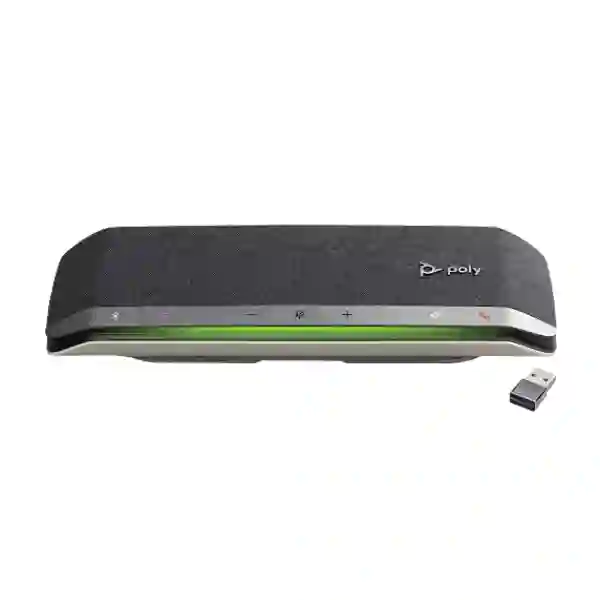
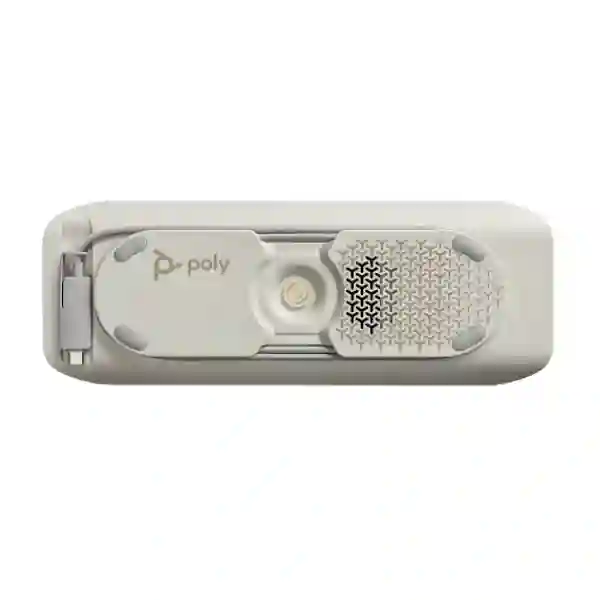
HP Poly • Teams-certified group audio • BT700 bundle
HP Poly Sync 40+ Microsoft Teams Speakerphone with BT700 Adapter
Clearer small-room meetings begin with an audio device placed near the people speaking. This portable, Teams-certified speakerphone combines a three-microphone array, full-duplex speech, flexible USB and Bluetooth connections, and a bundled BT700 USB-A adapter. It is designed for the everyday meeting table, not as a replacement for an entire video conferencing room system.
The decision in one minute
Choose this model when a small group needs to join Microsoft Teams calls from one shared speakerphone, when both wired and wireless computer audio matter, and when the BT700 USB-A adapter should be included. Confirm the actual seating distance, USB ports, meeting-software setup and the complete package before ordering. For pricing, stock and locally applicable support arrangements, request a written Tanzania quotation rather than relying on another market’s listing.
Who should choose this speakerphone?
The HP Poly Sync 40+ Microsoft Teams speakerphone is a practical option for a business that wants several people around a small meeting table to join an online conversation from one computer. Instead of passing a laptop around or asking every participant to connect separately, the group shares a microphone and speaker designed for conversation. The Microsoft Teams version is especially relevant when Teams is the organization’s standard meeting application and staff value a dedicated Teams control. The BT700 adapter in this bundle supplies a wireless computer connection option alongside the speakerphone’s wired USB connection.
Typical buyers include office administrators preparing a shared huddle space, IT teams standardizing meeting accessories, and managers equipping a flexible workplace. The most important questions are not merely whether the device is Bluetooth enabled, but how large the room is, where participants sit, which computer ports are available, and whether the meeting platform is managed by the organization. A speakerphone can make informal collaboration easier, but it is not a replacement for a complete video-room system when cameras, displays, room scheduling or dedicated conferencing controls are required.
Room size and microphone reach
HP describes the Sync 40 series as suitable for a room of up to approximately 4 by 4 metres, with a microphone pickup range of up to 2.5 metres. Those figures are useful planning references, not a guarantee of equal clarity in every room. A hard-surfaced room with noisy ventilation will behave differently from a quiet room with soft furnishings. Seating arrangement, distance from the centre of the table and speaking style all influence what remote listeners hear. The sensible approach is to place the speakerphone where normal speakers are reasonably close and to test the farthest occupied seat before standardizing a room.
For a small shared meeting table, central placement typically gives the microphone array access to voices on multiple sides. Avoid positioning the unit immediately beside a laptop fan, directly under an air-conditioning outlet or behind piles of papers. The recommended room dimensions should not be interpreted as a fixed number of seats: a compact room with closely seated participants may work well, whereas a large table in the same room can put people beyond the intended microphone reach. If the meeting space is substantially larger, evaluate an additional linked speakerphone or a conference solution designed for broader coverage.
Three microphones and natural conversation
The unit uses a three-microphone steerable array. In everyday language, its microphone system is designed to concentrate on speech rather than indiscriminately collecting every sound in the room. HP also describes noise and echo reduction, both important when one participant is speaking while others join remotely. Echo reduction is particularly valuable because the speaker and microphones operate in the same enclosure: sound played for local participants should not simply return to remote participants as distracting repetition. These processing features help, but they cannot eliminate every distraction or make a loud room silent.
Full-duplex audio is another meaningful distinction from basic speaker devices. It supports simultaneous speaking and listening, which helps meetings feel conversational when one person interrupts with a clarification or two people briefly speak at once. A half-duplex experience can cause voices to cut each other off. With the Sync 40+, participants should still follow good meeting etiquette, but they do not have to wait for an artificial pause before every response. If an office has unusually strong background chatter, take a trial call under realistic conditions instead of assuming microphone processing will solve every acoustic problem.
Microsoft Teams certification and controls
This bundle is the Microsoft Teams-certified configuration, distinguished from non-Teams variants of the Sync 40 family. It includes a dedicated Microsoft Teams touch control in addition to ordinary call, mute and volume functions. For an organization built around Teams meetings, the dedicated control can reduce the steps required to work with the application. The user still needs a correctly configured computer, access to Teams and an appropriate account. Certification of this speakerphone does not supply a Teams subscription, telephone number, meeting license, room account or any other software entitlement.
Teams certification is a specific buying criterion. It should not be treated as proof that every feature will behave identically in all third-party applications, operating-system versions or corporate configurations. Standard audio connections can be useful across many communications applications, but platform-specific controls may depend on the application and its state. Ask IT to verify the intended meeting software, permissions and device policies. If the business primarily uses a different conferencing service, consider whether the Teams-specific model is still the best fit or whether the alternative UC configuration would meet its requirements more simply.
Three ways to connect
The Sync 40+ supports a wired USB connection to a compatible computer, a wireless computer connection using the included BT700 USB-A adapter and Bluetooth connectivity to supported mobile devices. This combination is a reason to consider the plus bundle for shared or mobile workspaces. The right connection depends on the environment rather than on a universal claim that wireless is always preferable. A wired USB connection is often an excellent first choice for an assigned meeting computer because it offers a predictable physical link and avoids relying on wireless pairing during a scheduled call.
The BT700 option helps when staff want the speakerphone positioned away from the laptop without routing a cable across the meeting table. It also offers a dedicated Bluetooth USB accessory for the host computer. Mobile Bluetooth is useful when a participant needs to take a compatible smartphone call through the speakerphone. A procurement checklist should distinguish these workflows: connecting an office PC through BT700 is not the same as connecting a smartphone directly through Bluetooth, and the included adapter does not convert the device into a standalone telephone or internet-connected meeting appliance.
Connection testing is particularly important on managed corporate laptops. USB accessories may be restricted, operating-system audio permissions may be controlled centrally, and the Teams client may default to a different speaker or microphone. Before a room goes live, confirm both input and output selection in the computer and meeting application, then hold a real test conversation. A successful Bluetooth pairing indicator alone is not proof that every participant can hear and be heard.
What the BT700 adapter adds
The plus sign in this configuration matters because the package includes a Poly BT700 Bluetooth USB-A adapter. For a Windows or macOS computer, that adapter provides an additional wireless connection method that can make table placement and user movement easier. It is especially useful to evaluate where the computer is near a display or docking station but the participants are seated farther away. The adapter is a physical USB-A device, so confirm that the computer has an accessible, permitted USB-A port before relying on that workflow.
Do not confuse the BT700 with a mobile network modem, Wi-Fi adapter, Teams license or external microphone. It connects compatible audio equipment to the host computer; the meeting application, internet connectivity and user account remain on the host. Although HP lists a wireless range of up to 30 metres for the product, that is an upper specification, not a promised reliable distance through partitions, metal furniture or interference. Plan the desk-to-table path conservatively, and test connection stability in the actual environment before choosing a permanent placement.
USB-A and USB-C deployment considerations
HP lists compatibility with PCs through USB-A and the supplied USB-A-to-USB-C adapter, and the bundle includes the speakerphone cable connection. This supports practical deployments across different laptop generations: a traditional office desktop may offer USB-A, while a newer notebook may primarily have USB-C. Users should verify the actual connector arrangement and the computer’s available ports before a meeting. Keep the included adapter with the unit rather than moving it between unrelated devices, and label the accessories in shared rooms so the next user can find them quickly.
USB-C is a connector style, not evidence that every hub, monitor or docking station will behave identically. If the speakerphone works when connected directly to a computer but not through a dock, test another direct port and review the dock’s USB settings. In a highly managed environment, IT may need to approve the accessory or update device software. The supplied USB-C adapter is useful for the supported cable arrangement; do not assume it extends every possible BT700 installation or guarantees operation with an arbitrary mobile USB-C accessory.
Bluetooth with a smartphone
A compatible smartphone can use Bluetooth to make the speakerphone useful for mobile audio calls. This can be convenient for a manager moving from an individual conversation to a small group discussion without gathering everyone around the phone’s built-in speaker. It also supports a flexible environment where the same physical room does not always have an assigned PC. Bluetooth 5.1 and the profiles listed by HP indicate conventional wireless audio support, although the precise experience is determined by the phone, operating system, application and current device pairing.
Before joining an important call, check the smartphone’s selected audio route, the microphone permission requested by the calling application and the battery level on the speakerphone. Keep the phone reasonably near the unit; do not use the maximum stated wireless range as a placement target. In a shared room, disconnect personal devices when finished so the next meeting does not unexpectedly route through a previous participant’s phone. Where confidentiality matters, make sure the phone’s notification sounds and unrelated calls cannot interrupt the meeting.
Battery life and charging
HP specifies up to 30 hours of talk time from the internal rechargeable lithium-ion battery and a charge time of less than five hours. The words ‘up to’ are important. Actual operating time can vary with volume, connection conditions, use patterns, battery age and other factors. For mobile office use, the long rated talk time can reduce the need to search for a socket between meetings, but a calendar full of calls should still be supported by a consistent charging routine. A charging stand is mentioned by HP as a separately sold accessory rather than something included in this package.
For a shared meeting room, assign responsibility for charging and make the cable easy to reach without creating a trip hazard. If employees move the speakerphone between rooms, return it to the same storage location after each meeting. Test charging after deployment and ensure the host computer or approved power arrangement provides the required supply. Battery capacity should not be translated into a guaranteed number of meetings because calls differ in duration and setup. Businesses operating frequent long sessions should evaluate whether a wired setup is simpler than depending entirely on battery use.
Speaker performance for speech and media
The Sync 40+ includes a 50 mm speaker driver, and HP lists a speaker bandwidth from 75 Hz to 20 kHz. HP also describes a bass-reflex system with dual passive radiators. These features support a richer audio presentation than a tiny laptop speaker might provide, especially when remote voices need to be heard by a group seated around a table. Volume is adjustable using the speakerphone controls. The priority in a business meeting should be intelligible speech at a comfortable listening level, not simply the loudest setting the hardware can produce.
The device can also serve for compatible media playback, but choosing it as a conference accessory is different from buying a dedicated music system or public-address system. A conference room may require a larger loudspeaker arrangement if participants sit far apart or face different directions. If a team frequently plays training videos, test both speech and multimedia at the volume normally used. Also verify that the meeting application’s output device remains selected correctly when a video starts or a headset is plugged into the same computer.
Linking two units for a larger table
HP describes wireless daisy-chain support for linking two compatible Poly Sync speakerphones. This provides an upgrade route when one unit does not offer convenient coverage for an extended table or distributed seating arrangement. It is not the same as claiming that a single Sync 40+ can cover a large boardroom. A second speakerphone must be obtained separately, and buyers should verify the intended pairing configuration and current firmware guidance. Room dimensions, acoustics and seating position still matter after a second device is added.
Before deciding to pair two units, compare the cost and operating simplicity with a purpose-built room audio solution. A linked pair may be attractive where meetings occasionally outgrow the normal huddle layout, while a permanently large meeting room may benefit from a more integrated installation. Plan which device connects to the host, where each unit will sit, how both will be charged and how users will recognize that pairing is active. Document a recovery process so employees know what to do if the two devices stop linking before a meeting.
Portable design and IP64 rating
At approximately 0.61 kg and 27.3 by 10.2 by 3.8 cm, the speakerphone is portable enough to move between a cabinet, desk and meeting table. HP lists an IP64 protection rating, indicating protection against dust ingress and splashing water under the relevant test conditions. That does not mean the product is waterproof, designed for immersion or appropriate for heavy rain. It remains business electronics and should be handled carefully, particularly around charging points, liquids and connector openings.
Portability is most valuable when the business has a defined storage and handover process. In a hot-desking office, leave clear instructions near the unit explaining connection options and how to mute a call. In a training facility, carry the speakerphone with its adapter and cable rather than expecting every room to have a compatible spare. Avoid leaving it in direct sunlight or locations where it can be knocked from the table. Its protection rating should be understood as a design attribute, not permission to ignore normal care and maintenance.
Where it fits in Tanzanian workplaces
For organizations in Tanzania, a portable speakerphone can support routine conversations between staff in different offices, remote colleagues, customers and external partners. The practical setting could be a small project room, administrative office, consultancy meeting space or training breakout area. The value is not tied to a specific city: the same questions about acoustics, computer ports and connection quality apply wherever the equipment will be used. The product itself does not provide internet access, and effective online meetings depend on the organization’s network and the software being used.
Consider the reliability of the local meeting environment before purchasing. If power interruptions affect laptops, routers or Wi-Fi access points, battery operation on the speakerphone alone cannot keep a cloud meeting running; the host and network also need power. If internet quality varies, conduct a realistic test call using the connection and meeting platform employees actually use. Procurement teams should confirm the exact Teams version, bundled adapter, commercial terms and support arrangements rather than assuming that international retailer pricing or promotions apply to a Tanzania quotation.
Typical meeting and collaboration scenarios
A small departmental stand-up is a natural application: the group gathers at a table, connects one laptop and speaks with colleagues who are working elsewhere. A consultant visiting a client can use the portable unit for a scheduled discussion without depending solely on laptop audio. A training coordinator might use it for a small interactive breakout meeting where participants need to respond to an instructor online. These scenarios benefit from fast connection, understandable speech and the ability to position the audio equipment near the people speaking.
Not every meeting scenario calls for a tabletop speakerphone. For a confidential one-to-one conversation in an open-plan office, a headset is usually more appropriate because it reduces the chance of other people overhearing remote participants. For a formal boardroom with many seats, multiple displays and integrated video, assess a dedicated room system. A speakerphone also cannot capture video; if remote participants must see a whiteboard or room participants, a suitable camera or other video equipment is required. Select the equipment around the meeting workflow, not around one attractive specification.
Quick initial setup checklist
Start by charging the speakerphone sufficiently for the intended meeting. Place it on a stable surface near the middle of the participants and within the recommended pickup range. For a wired computer setup, use the supplied compatible USB cable arrangement. For a BT700 setup, connect the USB-A adapter to a supported computer and follow the device’s pairing guidance if necessary. A compatible smartphone can be connected through Bluetooth using its normal audio-device controls. Keep the speakerphone unobstructed and avoid placing it next to obvious noise sources.
On the computer, select the Poly speakerphone as both the microphone and playback device in the operating system and in Microsoft Teams, then make a test call. Check the mute state, talk from the most distant seat, verify that the remote participant hears clear speech and confirm that incoming audio is comfortable for everyone present. If users switch between a headset and speakerphone during the day, verify the active device again before each group call. Record a short local setup guide so employees can solve ordinary routing issues without starting each meeting with a support request.
Device administration with Poly Lens
HP identifies Poly Lens as a tool that helps IT teams manage Poly devices, including inventory visibility and updates. For organizations with several meeting spaces or a mobile fleet of accessories, centralized oversight may be valuable. Instead of relying on individuals to remember when they last reviewed firmware, IT can define a supported management practice and check which tools are available for the organization’s environment. Exact feature availability depends on the applicable Poly Lens software, device configuration, operating system and management approach.
A sensible rollout begins with a small pilot rather than deploying every unit at once. Confirm recognition on standard company laptops, check any permissions required for the management software, and test the Teams experience after device updates. Decide who owns support, what staff should do if pairing fails, and where replacement cables or adapters will be stored. Device administration improves consistency, but it does not replace ordinary IT governance: employee access, meeting policies, application licensing and network performance still require separate management.
Privacy and meeting etiquette
A shared speakerphone makes incoming speech audible to everyone nearby. That is useful in a team discussion but unsuitable when sensitive information is discussed in a busy communal area. Choose a room with appropriate privacy, close the door when necessary and confirm who is physically present before starting. The mute control helps manage interruptions, but staff should also understand mute indicators and avoid assuming a device has been muted simply because nobody is speaking. Observe the meeting application’s own recording and participant-notification policies.
After a meeting, end the call in the application and disconnect or return personal Bluetooth devices as appropriate. This reduces accidental audio routing during the next session. Keep meeting notes, recordings and confidential customer information in the organization’s approved systems; a speakerphone does not supply privacy controls for those records. For public-facing offices, position the unit so visitors are not unintentionally included in internal conversations. Training on these small behaviors can be as important as the microphone specification when deploying any group audio accessory.
How to compare the Sync 40+ with alternatives
Start with room size and connection needs. A personal headset is strong for private individual work, while a compact personal speakerphone may fit a single desk. The Sync 40+ addresses group conversations around a small table, with an included BT700 adapter and the Microsoft Teams variant’s dedicated control. A bigger conference device can be better for a permanently large room. Avoid choosing purely by the number in a model name or by assuming that every product with Bluetooth provides the same microphone coverage, connection accessories or platform controls.
Within the Poly Sync family, compare the exact configuration rather than just the general series. The standard Sync 40 and the Sync 40+ can differ in the bundled wireless USB adapter, while Teams and UC variants differ in their intended software experience. HP lists this bundle under product number 77P36AA, which should be checked when preparing a quotation. Treat that manufacturer product number as an identification aid, not as proof of the SKU used by a particular seller. An equivalent-looking listing may have different included accessories, so the full description matters.
Questions to settle before requesting a quote
Measure the room and note the longest seat-to-device distance. Identify whether the host will be a fixed meeting PC, several employee laptops or mobile phones. Confirm the required meeting application and ask whether the Teams-certified edition is a deliberate company standard. Check the availability of USB-A and USB-C ports, corporate Bluetooth policies and any docking-station arrangements. Decide whether one device is enough or whether the room needs a different audio design. These simple details prevent expensive buying errors caused by selecting a speakerphone only on its headline battery life.
For a Tanzania purchase enquiry, give the seller the complete model description and HP product number 77P36AA, specify the BT700 USB-A adapter and ask for confirmation of the exact package. Request written clarification of local pricing, tax treatment, availability, delivery arrangements and the warranty or support applicable to the offered unit. Those commercial details are not established by the manufacturer’s global specifications and should be verified in the quotation. If the device will be standardized across multiple rooms, ask whether one test unit can be evaluated in the intended setup before placing a wider order.
Common setup problems and sensible checks
If remote callers cannot hear the room, begin with the simplest causes: microphone permission, Teams input selection, the device mute state and whether a different audio accessory has taken priority. If participants cannot hear remote callers, inspect speaker output settings and volume both in the app and on the speakerphone. When a wireless link seems unreliable, try a shorter distance, reduce obstructions and test the BT700 connection again. A wired USB test can help isolate whether the problem is with the wireless path or with audio routing.
If the speakerphone connects to one laptop but not another, compare operating-system versions, company security policies and USB port behavior. Do not immediately assume that the product is faulty. If a pair of linked units becomes disconnected, follow current HP pairing guidance and test the units individually before attempting to link them again. Keep the relevant model details and firmware information available when contacting support. Record any recurring issue and the configuration where it occurs, because that evidence is more useful to IT than describing the device as ‘sometimes not working.’
Daily care, storage and dependable operation
Regular care is straightforward: keep the speakerphone clean, protect the cable from sharp bends, and store the BT700 adapter where it will not be misplaced. Follow manufacturer care advice rather than spraying cleaning liquid directly into microphone openings or connectors. Avoid placing food and drinks next to the unit during long meetings. If the device moves from room to room, use a consistent check-in or storage practice and keep the cable and adapter together. A short equipment label can help staff recognize the product when similar-looking devices are stored nearby.
Plan battery charging around actual use and do not assume the device will always be fully charged because it was plugged in the previous day. Before an important customer meeting, verify that the computer recognizes the intended microphone and loudspeaker, confirm the internet connection and do a brief audio check. In a shared office, put the setup guide somewhere visible rather than keeping it only with the original packaging. These low-effort operational habits help protect meeting time and are relevant whether a business purchases one unit or equips several huddle spaces.
Technical specifications at a glance
The table below collects the core manufacturer-listed facts for this exact Teams-certified BT700 package. It is intended as a buying reference rather than a substitute for testing the device in your environment. Values such as talk time and wireless range are maximum or rated figures under specified conditions; they should not be interpreted as fixed real-world outcomes. Hardware accessories, compatible software and connector options should be checked when comparing different sales configurations.
HP identifies the product number as 77P36AA. Its physical specifications make the speakerphone suitable for portable tabletop use, while the microphone and audio design target smaller collaboration spaces. For corporate purchasing, the most decision-relevant entries are often the room guidance, included adapter, computer compatibility and Teams certification. These address whether the product fits the meeting process more directly than a long collection of packaging measurements.
Buyer questions and practical answers
Is this the Microsoft Teams version of the Poly Sync 40+?
Yes. HP identifies the 77P36AA configuration as the Microsoft Teams-certified Sync 40+ package with a BT700 USB-A adapter. It includes a Teams touch control. Confirm the exact manufacturer product number in the quotation because similar names can refer to different bundled accessories or UC versions. The certification relates to the speakerphone and its intended software experience; it does not include a Microsoft Teams account, license, meeting subscription or managed room installation.
Does the BT700 adapter come inside the package?
HP’s package contents list a BT700 Bluetooth USB adapter alongside the speakerphone and a USB-A-to-USB-C adapter. The BT700 is a USB-A accessory intended for compatible host computers. If a computer only has USB-C, discuss the approved connection arrangement with IT rather than assuming any USB-C hub will work as expected. The adapter’s inclusion is one of the key reasons to verify the plus model rather than buying a similarly named standard model.
Can several people use one speakerphone for a meeting?
Yes. The Sync 40+ is intended for small group conferencing, and HP gives room guidance of up to 4 by 4 metres and microphone reach up to 2.5 metres. It is not appropriate to promise a specific number of participants without considering the room layout. Seat users near the speakerphone, test the farthest position and avoid placing the device behind objects. A large table or noisy room may call for a different conferencing arrangement.
Can it be used without a computer?
A compatible smartphone can connect through Bluetooth for supported mobile audio calling, so a computer is not required for every type of call. However, the speakerphone is not an independent phone service, cellular handset or internet meeting endpoint. For Microsoft Teams meetings on a PC, the computer and relevant software remain necessary. Before using a smartphone application, check its audio route and microphone permission so the call actually uses the speakerphone rather than the phone’s built-in audio.
What is the difference between USB and BT700 connections?
The wired USB method makes a physical connection between the speakerphone and a compatible computer. The BT700 method supplies a wireless audio link through a dedicated USB-A adapter connected to the computer. Either can be useful depending on table placement and company device policy. A fixed meeting computer often benefits from the predictability of wired USB, while the BT700 approach may be convenient when people need the speakerphone away from the laptop. Test both in the real environment.
Does the Teams button replace Teams software?
No. The dedicated control supports the Teams-certified device experience, but it cannot create an account, provide access to meetings, purchase a subscription or bypass organizational permissions. The computer must be set up with the appropriate software and user credentials. Some control behavior can depend on the active application and device configuration. IT should verify the intended experience before deploying units across many rooms, particularly when employees also use other calling services.
What battery life should a team expect?
HP rates talk time at up to 30 hours and lists a charge time below five hours. These are manufacturer specifications, not a guarantee for each day of use. Battery age, call conditions, volume and connection method may change operating time. For shared offices, adopt a routine charging location and confirm battery readiness before long meetings. A charging stand is described as an optional accessory sold separately and should not be assumed to be part of this bundle.
Does IP64 mean the speakerphone is waterproof?
No. HP lists an IP64 rating, which concerns dust protection and resistance to water splashes under specified test conditions. It does not mean the device can be submerged, left outdoors in heavy rain or washed under a tap. Treat it as a portable office accessory, keeping connectors dry and following normal electronics care. The protection level is helpful context when considering everyday handling, but it should not be confused with an all-weather field communication device.
Can two Sync speakerphones work together?
HP describes a wireless daisy-chain capability for compatible Poly Sync units. A second unit is not included in this single-unit BT700 package, and the room should be evaluated for acoustic suitability before planning a pair. Check the pairing guidance and compatibility of the exact devices and firmware. If the room is permanently large or complex, compare the support and deployment implications with a dedicated conferencing system instead of assuming two tabletop units always provide an ideal solution.
Will it work with a Windows or Mac laptop?
HP lists Windows 10, Windows 11 and macOS among compatible operating systems for this configuration. The available wired and wireless connection arrangements still need an appropriate port and the host’s permission to use the accessory. Corporate software restrictions, docking stations and application audio settings can affect practical operation. For a multi-device office, pilot the speakerphone on the standard laptop images used by employees and document the correct audio settings before placing a wider order.
Is this a video conferencing camera?
No. The Poly Sync 40+ is an audio speakerphone with microphones and a loudspeaker, not a camera or an all-in-one video bar. If a meeting requires remote participants to see people, documents or a whiteboard, the host computer or room will need suitable video equipment. It also does not replace the network, display or conferencing application. This distinction is important for buyers building a complete meeting room instead of simply improving audio on an existing computer.
Can it make calls over a mobile network by itself?
No. A speakerphone exchanges audio with a connected computer or mobile device; it does not contain a mobile-network subscription or independently place telephone calls. A mobile phone can use Bluetooth for supported calling, while a computer can use the speakerphone with its installed communications application. The underlying call, network connection, data charges and platform permissions belong to the host service. For offices with uncertain internet reliability, assess the network separately from the speakerphone’s battery life.
What information should a Tanzania buyer include in an enquiry?
Provide the full Teams-certified product name and HP product number 77P36AA, mention the required BT700 USB-A adapter, and describe the intended room and connection method. Ask for confirmation of package contents, local price, tax treatment, stock, delivery and support conditions for the actual quotation. These details cannot be reliably inferred from an international product sheet. If the purchase is for several meeting spaces, include the approximate room sizes and the operating systems used by staff.
How does the Sync 40+ compare with a headset?
A headset is generally better for individual privacy in a shared office because remote audio stays close to the wearer’s ears. The Sync 40+ is intended to let several people gather around a table and join a conversation through one audio device. The choice should follow the meeting setting. For employees taking confidential calls at their desks, headsets may be the sensible default; for scheduled group discussions in a suitable small room, the speakerphone provides a more inclusive arrangement.
Can this unit overcome a poor internet connection?
No. Clear microphones and good speaker hardware can improve the local audio capture and playback, but they cannot repair network congestion, an unstable Wi-Fi signal or interruptions to the meeting service. Before important calls, verify the computer’s internet connection and whether the conferencing platform is functioning normally. If users repeatedly experience dropouts while the speakerphone’s local test succeeds, the issue may be network-related. Investigate the host and network rather than assuming a replacement speakerphone will solve it.
Is a local warranty or Tanzanian price confirmed?
HP publishes a manufacturer warranty specification for the product, but the exact commercial warranty, claim route, local stock, import arrangements and selling price for a Tanzania quotation have not been verified here. Ask the seller to confirm the applicable written terms for the exact 77P36AA package. Do not rely on prices, return policies or promotional offers published in another country. A proper quotation should separately clarify what is included, what optional accessories cost and how the device will be supported.
Request a quote for the exact Teams BT700 bundle
Ask FourTeck Tanzania about the HP Poly Sync 40+ Microsoft Teams Speakerphone with BT700 Adapter, identified by HP product number 77P36AA. Share the intended room size, the number and arrangement of participants, whether staff use Windows or macOS, and whether the host computer has USB-A or USB-C. Request confirmation of the exact included accessories, a local quotation, availability and applicable support terms before purchase. A site-specific product SKU has not been supplied or verified; the HP product number is included only to help distinguish the correct configuration.
Next step: Contact FourTeck Tanzania to confirm the configuration and request a quotation.




Reviews
There are no reviews yet.