
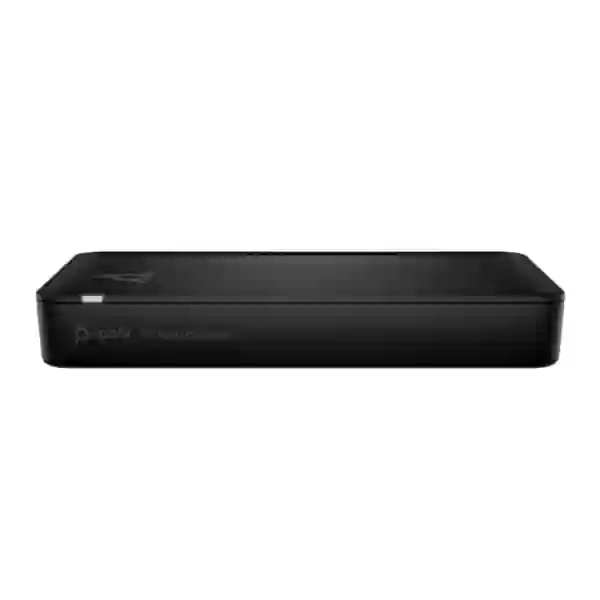
HP Poly Studio G62 Modular Video Conferencing System
Build a professional room around how your people actually meet. The HP Poly Studio G62 modular video conferencing system is a compact room appliance designed to work with selected external cameras, microphones, speakers, controllers and displays.
Designed for customized conference and training spaces, it brings flexible physical connections, supported native conferencing options and management through Poly Lens. A complete solution requires separately selected and confirmed peripherals; request an itemized configuration before ordering.
Specifications at a glance
The figures below describe published capabilities of the relevant standard G62 family. Final configuration and available behavior depend on exact variant, software mode and compatible peripheral selection.
| What it is | Modular room conferencing appliance; camera and audio peripherals are selected separately |
|---|---|
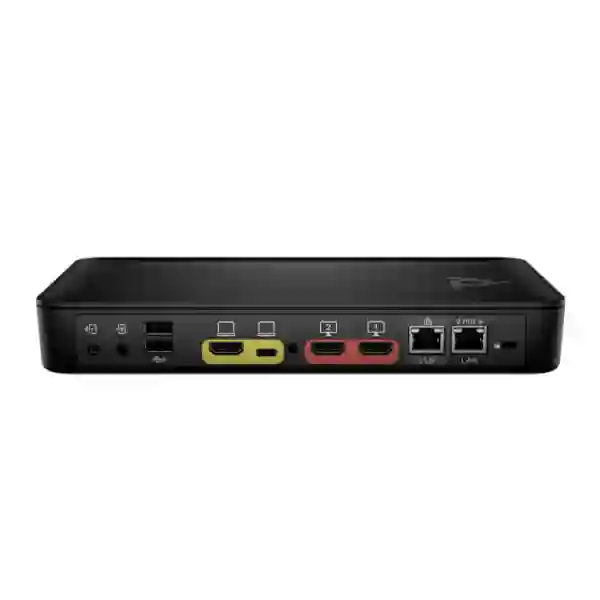
| Video interfaces | One HDMI 2.0 input; two HDMI 2.0 outputs; USB-C with DisplayPort Alt Mode input |
| USB interfaces | Two USB Type-A 5 Gbps ports; one USB Type-C 5 Gbps port |
| Audio interfaces | One 3.5 mm line input and one 3.5 mm line output; compatible IP audio options |
| Network and power | Primary PoE+ Ethernet connection; separate link-local network port; suitable IEEE 802.3at/bt power source |
| Output capability | Up to 4K at 30 fps in applicable output specifications; meeting-stream behavior varies |
| Room software | Microsoft Teams, Zoom and Poly Video options, subject to mode and current compatibility |
| Management | Poly Lens on supported configurations |
| Typical buyers | Organizations specifying customized conference, boardroom and training-space AV |
| Core dimensions | Approximately 247.7 × 152.4 × 34.9 mm for HP’s cited standard variant |
| Package caution | Base appliance and quoted room bundle can have materially different inclusions |
What the Poly Studio G62 is
The HP Poly Studio G62 modular video conferencing system is the central room appliance for organizations that need more flexibility than a fixed video bar. It connects selected cameras, microphones, loudspeakers, displays and room controls into a coherent meeting-room design. Rather than imposing one camera position or microphone pickup pattern on every room, the modular approach lets an audiovisual designer choose the components that suit the furniture layout, seating capacity, acoustic conditions and collaboration platform. That makes the G62 particularly relevant to boardrooms, conference rooms, training spaces and other installations where the people, not the hardware, should determine the room design.
A crucial purchasing distinction is that the G62 base unit is not, by itself, an operational all-in-one video conferencing room. A complete solution needs compatible video and audio peripherals and normally requires room display equipment, suitable power and networking, and an appropriate user-control arrangement. The precise components included in an offer depend on the quoted configuration. Buyers should therefore distinguish a base-codec quotation from a turnkey room bundle before comparing prices. FourTeck Tanzania can use the proposed room layout and preferred meeting service to prepare an accurately scoped configuration request; no local inventory or installation commitment is implied by this page.
Choose this platform when the existing room deserves a designed solution rather than a single device placed below a screen. Long tables, dispersed seating, speech from a lectern or multiple displays can make a fixed camera-and-microphone position less suitable. The G62 offers a way to keep the processing appliance discreet while placing the appropriate capture and playback devices where they work best. The resulting experience still depends on correct component selection, physical installation, room acoustics, network design, system configuration and user training. Those practical factors should be evaluated as part of the purchase, not postponed until commissioning.
Why modular design matters in real meetings
A modular system separates the room’s computing and conferencing functions from the camera and audio pickup points. In a conventional room, the display might be near one wall while the principal speakers sit along a deep table or move between an audience and presentation position. A carefully selected camera can be placed for useful framing; a microphone can be located for voices rather than visual symmetry; and loudspeakers can be designed around listening coverage. These choices matter when remote participants need to hear every contribution and distinguish who is speaking, not just see the whole room in one broad shot.
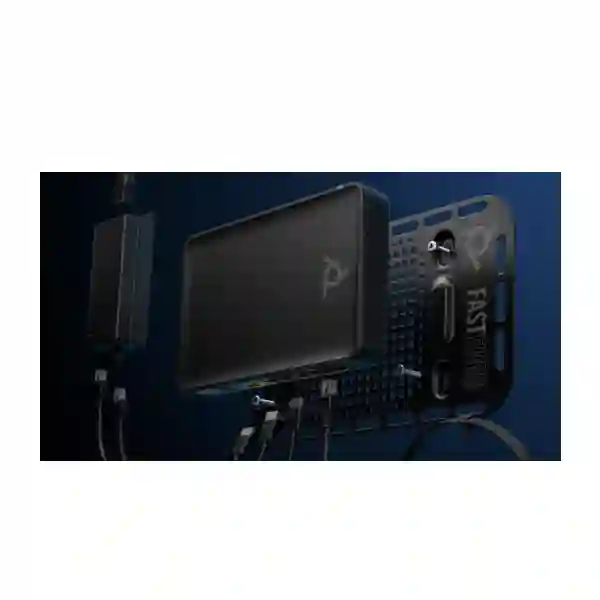
The G62 is compact enough to support unobtrusive room integration, but the available mounting method must be confirmed for the selected package and surface. HP describes magnetic mounting options and Power over Ethernet Plus for the codec. Those conveniences can reduce the number of visible connections around a wall display or furniture cabinet, although they do not eliminate the need to design cable routes, peripheral power and suitable equipment access. The aim is serviceable installation: tidy cabling, reachable connections, correctly secured equipment and a sensible procedure for replacing a peripheral later.
Modularity also changes how a project is budgeted. Instead of asking whether the core unit has a particular built-in microphone pickup range, buyers evaluate the chosen microphone array or certified audio processor and its expected performance in the actual room. Instead of assuming a fixed camera zoom specification, they consider a compatible fixed or pan-tilt-zoom camera with the required field of view. This avoids comparing the G62 against an all-in-one video bar by a single camera or microphone figure that the G62 does not inherently contain. It is the configured system that must be judged.
Core hardware and confirmed interfaces
HP’s published specifications for the standard Poly Studio G62 conferencing system identify two USB Type-A ports with 5 Gbps signaling, one USB Type-C port with 5 Gbps signaling and DisplayPort alternate-mode video input, one HDMI 2.0 input, two HDMI 2.0 display outputs, separate 3.5 mm line-level audio input and output, one PoE+ Ethernet connection, and a link-local network connection. These are connection capabilities of the core appliance; the number and type of peripherals that can be used simultaneously depend on software mode, supported accessories and the approved connection topology. Physical connectors alone are not a promise of arbitrary device compatibility.
The two HDMI outputs enable a dual-display meeting-room arrangement, subject to display capabilities and the active conferencing application. HP describes video operation up to 4K at 30 frames per second for the applicable outputs. Buyers should distinguish display resolution, content-sharing input resolution, camera acquisition and actual meeting-stream resolution: those are not necessarily identical and can be limited by the chosen service, bandwidth, software mode, connected equipment or remote endpoint. A 4K-capable port does not mean every participant sees a 4K call in every scenario. Ask for an end-to-end design that reflects the actual meeting workflow.
The USB-C video-input capability uses DisplayPort Alt Mode, which is an important detail when planning a table connection for presenting from a laptop. A USB-C connector that looks physically identical may not carry the same signals on every laptop, dock or cable. Similarly, the HDMI input is a source for wired content within supported configurations; it should not be confused with an additional HDMI display output or an unrestricted camera-ingest port. Verify supported input formats, cable length, adapters and the behavior of content sharing under the exact room software before building the conference table connectivity.
The core device has published physical dimensions of approximately 247.7 by 152.4 by 34.9 millimetres and a weight of approximately 798 grams for the cited standard configuration. These dimensions are useful when checking the space behind a display, in a shelf or within a furniture enclosure. Keep enough access for cables, power, ventilation and future service. Installation at the back of a display may be attractive aesthetically, but a neatly concealed codec that cannot be reached for diagnosis can increase operational inconvenience. The surrounding AV equipment and cabling will often consume more design space than the codec itself.
Cameras and intelligent framing
HP lists compatible camera families such as the Poly Studio E60, E70 and E360, as well as selected other supported devices. They serve different placement and capture goals. A camera for a long boardroom is not automatically the best camera for a teaching position or a flexible workshop with people moving around the space. Selection should start with camera distance, field of view, participant seating, lighting, mounting location and the required image composition. Confirm the specific camera model, firmware and supported connection method against HP’s compatibility guidance for the planned software mode.
Poly DirectorAI features may include group framing, speaker framing, people framing and presenter-oriented behaviors, but the precise framing features available depend on the selected camera, software version and meeting mode. The G62’s ability to work with intelligent cameras should not be interpreted as every attached camera gaining all DirectorAI capabilities. If auto-framing is important, ask for a demonstration of the exact proposed camera and its operating behavior. Consider whether the camera should follow an active presenter, frame the full table or give remote participants a stable wide shot during group discussion.
Camera placement is a human-factors decision. A high camera can show the room but feel less natural during conversation; a very low camera can give an unflattering viewpoint; an aggressively wide image can make distant participants appear small. In a room with two displays, identify the screen people naturally look toward when speaking so the camera angle does not suggest that local participants are looking away from remote colleagues. In rooms where presentation content and the speaker are equally important, agree on how the camera view and presentation will coexist across the display arrangement.
A modular solution may allow a camera to be positioned apart from the codec, but the run between them must comply with the supported IP, USB or other interface method for that exact device. Network-connected peripherals are not universally interchangeable with arbitrary network cameras. Multicamera arrangements are also platform- and firmware-dependent; do not plan a multi-camera room solely because additional physical ports exist. The system integrator should validate the intended number of cameras, switching behavior, control method and meeting-service presentation before ordering equipment. An approved bill of materials is more dependable than a generic camera compatibility claim.
Microphones, speakers and audio quality
Clear speech is often the decisive feature of a successful conference room. The Poly Studio G62 can work with compatible Poly IP microphone arrays and selected external audio components; HP’s specification references support for up to three IP microphone arrays. The number and placement that make sense for a particular room depend on table dimensions, seating pattern, ceiling height, air-conditioning noise and the ability to route cabling neatly. A microphone count is not a substitute for acoustic assessment. The design objective is intelligible speech from ordinary seated and standing positions without requiring participants to lean toward a device.
HP describes audio-processing capabilities in the G62 ecosystem, including Poly NoiseBlockAI, Acoustic Fence-related functionality, automatic gain control and echo cancellation. Exact capabilities and outcomes depend on the configuration and its audio peripherals. Noise reduction can help with certain distractions, but it cannot reliably overcome a highly reverberant room, strong background speech, poor microphone positioning or excessive loudspeaker feedback. A practical procurement plan should allow for room testing and, where necessary, acoustic improvements such as softer furnishings or treatment of reflective surfaces.
Loudspeaker choice is another system decision. The G62 includes a line-level audio output, but the base codec is not a self-contained high-output loudspeaker system for a large conference space. An appropriate external speaker or approved audio path should be specified based on room dimensions, listening positions and integration with any existing sound reinforcement. If the venue uses amplified microphones for a local audience as well as a remote meeting, the audio architecture deserves particular attention. Separate local reinforcement, far-end audio and microphone mixing requirements can create echo or double-audio problems when poorly designed.
Some larger rooms use an external digital signal processor, or DSP, for microphone mixing and acoustic control. HP provides mode-specific compatibility guidance for supported third-party peripherals and processors. Buyers should not assume that any USB DSP, ceiling microphone or audio matrix will be recognized simply because it connects physically. Identify the exact manufacturer, model, interface, firmware and service mode, and verify whether the intended functions are supported. When a room already has an installed audio system, a technical survey should determine whether it can be reused without compromising meeting quality or supportability.
An effective commissioning test includes every normal speaking location, including the farthest chair, a side participant, a standing presenter and someone who speaks quietly. Have a remote listener evaluate speech clarity, interruptions and room noise while local participants listen for echo and comfortable volume. Test both single-speaker and overlapping conversation scenarios. The meeting system is supposed to support spontaneous discussion, so audio that works only when one designated person speaks from the center of the table is inadequate for many boardroom uses. Good audio deserves a larger share of planning attention than cosmetic cable concealment.
Microsoft Teams, Zoom and standards-based workflows
HP identifies Microsoft Teams, Zoom and Poly Video among the G62’s supported or certified collaboration options. This gives buyers a route toward a room experience aligned with their organization’s meeting service. The platform selected for the room matters: native room applications, Poly Video mode and device-oriented workflows can differ in supported functions, peripherals, content behavior and administrative requirements. A statement that the product supports a meeting platform does not mean one configuration provides every feature of that platform at once. Confirm the current certified operating mode and supported software release for the exact deployment.
For organizations standardized on Microsoft Teams, procurement should begin with the desired Teams Rooms experience, meeting-room resource account, licensing, touch control, calendar integration and administration approach. The G62’s physical hardware is only one element. Camera-framing controls, dual-screen experiences, external audio accessories and content ingestion may depend on current Teams-specific certification and firmware. A written configuration should distinguish features confirmed by HP for Teams Rooms from those available only in a different operating mode. This prevents an attractive hardware specification from turning into a user experience that differs from the IT team’s expectations.
For Zoom-oriented rooms, consider how users will join scheduled meetings, share local content, switch between participant and presentation views, and operate the room without bringing a laptop as the primary conferencing processor. Verify the selected version of Zoom Rooms, associated license arrangements and current support for the planned camera, microphone and controller. A feature described as available in Zoom mode may not behave identically in Microsoft Teams or Poly Video mode. Real-world demonstrations should include the common actions users perform rather than a single successful test call.
Poly Video mode can be relevant for standards-based calling and broader interoperability. HP lists H.323 and SIP capabilities in the appropriate Poly application mode, including a published bandwidth specification of up to 6 Mbps for that mode. Compatibility with a remote organization, meeting bridge, cloud gateway or calling service still needs validation because security settings, dialing conventions, codecs and network policies vary. Do not assume that SIP and H.323 support applies inside every native third-party meeting-room application. If standards-based conferencing is part of the requirement, write that into the project specification before the system is selected.
Some buyers need to use guest meetings from multiple services. That requires a separate workflow discussion about native apps, interop capabilities and any laptop-based device mode or alternative meeting join method available in the chosen firmware. A compatibility logo alone does not establish seamless cross-platform guest access. Define the most important meeting platforms and example invitation types, then test joining, content sharing, audio selection, camera behavior and meeting control for each. Where a separate interop service or license is required, it should be included in the commercial scope rather than discovered after installation.
Wired and wireless content sharing
Screen sharing is fundamental to boardroom meetings, training and design reviews. HP lists HDMI input, USB-C input and wireless options including Apple AirPlay and Miracast among the G62’s content-sharing capabilities. Their availability and exact behavior can differ with room mode, software release, network policy and the presenting device. Buyers should decide whether they need an uncomplicated wired connection at the table, managed wireless presentation, or both. A demonstration should include the Windows and macOS laptop types actually used in the organization, not just one test notebook supplied by the installer.
A wired HDMI route can be useful when a visitor has a compatible output and does not want to join the organization’s wireless network. USB-C may simplify furniture connectivity for compatible laptops, but only if the device, port and cable support the appropriate video signal. If the room needs longer cable runs, integration with a table cubby or an AV switcher, the designer should verify the supported extension approach and signal integrity. Do not assume that the G62’s HDMI input independently accepts every adapter, presentation switch or unsupported resolution. Define the user journey from laptop connection to content visible on the room display.
Wireless sharing offers the convenience of fewer table cables but relies on service discovery, network segmentation and security rules that are sometimes strict on corporate networks. IT should consider whether guest presenters, managed laptops and different operating systems can discover the room appropriately. AirPlay and Miracast are not universal equivalents, and wireless sharing may be limited by policy or the available network path. In a meeting room visited frequently by external guests, preserving a simple wired alternative is a sensible design choice even when wireless presentation is the preferred daily workflow.
Dual displays can help a meeting separate the remote participants from a spreadsheet, slide deck or architectural drawing. The two HDMI output ports provide the physical foundation for such a layout, yet the actual allocation of content and participants is governed by the active application and configuration. Confirm whether the expected screen arrangement is supported in the selected room mode. Also consider readability at the far end of the table: a large display can still make small spreadsheet text difficult to see, while a carefully planned camera and room arrangement can support more natural conversation during screen sharing.
Network, power and information security
The G62 uses PoE+ for powering the central appliance, with HP specifying compatibility with suitable IEEE 802.3at/bt power sourcing equipment or a PoE injector. Before installation, verify the switch or injector budget, physical patching, cable condition and the power needs of every peripheral. Powering the codec from a network cable does not automatically power the camera, display, external amplifier or other equipment attached to the room. If the room must remain usable through brief mains interruptions, the network switch, relevant AV equipment and internet connection may require an appropriately sized uninterrupted power supply.
Video meetings are sensitive to packet loss, jitter and interruptions even where headline internet speed seems adequate. HP lists network capabilities such as IPv4, IPv6, link negotiation and lost-packet recovery technologies, but these cannot replace stable enterprise connectivity. The network design should account for expected meeting traffic, firewall policy, DNS, time services, software updates and the organization’s quality-of-service conventions. When a site has both office data traffic and high-priority meeting traffic, coordinate with the IT team rather than assuming a default switch configuration is sufficient for consistently good calls.
The G62 has a separate link-local network interface as well as the primary PoE+ network connection. Their purposes should be understood from HP’s current deployment guidance before cabling peripherals. Avoid treating all RJ-45 sockets as interchangeable general-purpose LAN ports. IP microphone arrays, compatible cameras, controllers and other devices may require particular networks, port types or discovery conditions. A room diagram should document which device connects to which port, where its power originates and which network segment it uses. That documentation makes both commissioning and future support materially easier.
Enterprise security work is part of the project rather than an optional finish. HP’s technical specifications list 802.1X support and certificate-enrollment capabilities alongside network security features. Actual enforcement requires a compatible corporate network and correctly configured policies, credentials and lifecycle processes. Organizations with restrictive networks should establish device onboarding procedures, allowed destinations, credential storage rules and the process for firmware maintenance. Information security teams should review management connectivity and any remote support access in advance. Do not promise compliance with an organization’s policy solely because a feature appears in a product specification.
Conference devices can process sensitive discussions, so purchasing teams may also need privacy and operational controls. Decide who can administer the system, how access is logged, when updates occur, and what operators should do if a device appears offline. Camera privacy behavior depends on the selected peripheral rather than a universal shutter built into the G62 codec. Consider whether the room needs a physical camera privacy mechanism, a visible call-status indicator or local policy for secure use. The right arrangement combines product capabilities with user behavior and well-documented administrative controls.
For Tanzania-based deployments, assess the quality and resilience of the specific building’s wired network, upstream connectivity and power distribution. Avoid assuming that any particular connection provider, city, building type or service tier guarantees meeting quality. Where a room is mission-critical, design around observed conditions: test the real uplink under load, agree on a fallback meeting procedure, consider supported redundancy where available and check the power path for critical network equipment. Local conditions are a project input to verify at the installation site, not a specification that can be inferred from the country alone.
Poly Lens and operational ownership
HP identifies Poly Lens as a management option for the G62 environment. For IT teams operating several rooms, centralized device visibility and administration can reduce the effort of locating faults and checking basic device state. The actual dashboard features and device information available depend on supported hardware, service arrangements and configuration. A prospective owner should confirm whether the organization permits the required management connectivity and whether administrators already use a broader device-management system. It is better to establish ownership before the room goes live than to discover later that nobody is responsible for updates.
Device management is useful only when paired with a maintenance process. A practical plan identifies the team that receives user reports, the route for escalating camera or microphone faults, authorized configuration changes and a suitable window for testing software updates. Firmware changes can affect peripheral compatibility and behavior, particularly in rooms that use several third-party components. HP publishes compatibility and release information; consult it for the versions deployed and validate any planned upgrade against the room’s full bill of materials. Avoid assuming that every new software release is automatically appropriate for every established setup.
Remote support also relies on good physical documentation. Keep a simple diagram of the codec, displays, cameras, audio devices, network ports and any power injectors, together with non-sensitive inventory records and support contacts. Record the room’s intended meeting service, controller behavior and instructions for switching to a supported fallback mode. For corporate teams with offices at multiple sites, such records can make a room familiar even to a technician who did not install it. They should be stored in the organization’s approved systems rather than printed with credentials near the equipment.
User experience is an operational metric too. If employees repeatedly bring a laptop because they cannot trust the room controller or content sharing, the designed room is not delivering its intended value. Pilot the room with typical meeting hosts and visitors, observe where instructions are confusing and simplify the visible workflow. The target is straightforward: enter the room, join or start the appropriate meeting, be seen and heard clearly, share content, and end the meeting with confidence. Training and accessible instructions often produce more value than adding rarely used advanced functions.
Planning for different room types
In an executive boardroom, eye contact, natural speech and discreet hardware are likely to be priorities. A suitable design may combine a carefully positioned camera with distributed microphones and dual displays, while keeping the codec hidden in an accessible location. Table finish, cable access and meeting confidentiality also matter. Before specifying the equipment, create a seating plan and decide whether remote viewers need to identify individual speakers or see the whole table. The most expensive camera is not necessarily the best choice if its position or framing does not match the conversation pattern.
In a training room, participants may alternate between watching an instructor, asking questions from seats and viewing detailed presentation content. That creates different video and audio requirements from a conventional boardroom. Assess the instructor’s movement, whether audience questions need to be captured and how content must appear to local and remote viewers. A camera with suitable presenter-oriented functions may help, but those functions must be verified for the chosen device and software mode. Decide whether a local sound reinforcement system is necessary in addition to the conferencing audio path.
An adaptable meeting area may be reconfigured for workshops, project reviews and hybrid all-hands sessions. In that case, plan for the camera viewpoints and microphone coverage needed across the permitted furniture layouts. A system tuned only for one layout may perform poorly after tables are moved. It may be wiser to define two or three official room arrangements and test them than to promise perfect performance in every imaginable setup. A modular appliance gives the designer options, but it cannot automatically compensate for physical changes without a corresponding audio and camera strategy.
For higher-education, healthcare, professional-services and public-sector organizations, requirements may include detailed document sharing, accessibility, private conversation or simple operation by users with limited technical assistance. The core procurement question remains the same: which workflows must succeed on the first try? Describe those workflows and any organizational restrictions without assuming that this product confers industry-specific regulatory compliance. Particular institutional security, retention, accessibility or recording obligations are determined by the overall service and deployment, not by the mere presence of a Poly conferencing codec.
A room used frequently for meetings with external organizations should place extra emphasis on guest invitations, interoperability, laptop sharing and recovery from unexpected platform differences. A room used almost exclusively for internal Teams meetings may instead favor a highly consistent native Teams Rooms workflow. Another organization may prioritize standards-based video endpoints. All three can lead to different configuration decisions even though the physical codec is the same. Establish the hierarchy of requirements so the design is optimized for what users do most, while documenting any less-common workflows that require a separate procedure.
How it compares with simpler options
An all-in-one video bar generally bundles some combination of camera, microphones and loudspeakers into one enclosure, simplifying procurement and installation for an appropriately sized room. That can be the right answer for a small or uncomplicated space. The G62 is a better candidate when the room layout calls for separate capture and audio equipment, when an integrated bar would be mounted too far from participants or when the AV design includes specialized devices. Neither category is automatically superior: the deciding factors are room geometry, meeting workflows, expected support effort and total installed cost.
Compared with a laptop-based USB conference system, a dedicated G62 room can offer a more standardized appliance-led experience for supported native conferencing modes. However, it requires suitable licensing, networking, peripherals and ongoing device management. A bring-your-own-laptop arrangement may remain attractive for a room where meeting platforms vary substantially or where staff are accustomed to using their own applications. Ask whether the room needs a permanent, single-tap meeting service or mainly requires access to a shared camera, microphone and display. That one distinction can steer the architecture.
Compared with an existing modular room solution such as an older video codec, the value of changing to G62 depends on compatibility with installed equipment, the desired platform, supported software and the cost of integration. Reusing a display or cable infrastructure may be feasible, while a camera, microphone or controller might require replacement. Do not budget on the assumption that every legacy accessory will continue to operate. The best comparison is an itemized proposal including the core device, required new peripherals, installation, network changes, configuration, support and any recurring meeting-service entitlements.
When evaluating suppliers, request comparable scope rather than comparable headline appliance prices. One quotation may include only the G62 processor and cables; another might include compatible cameras, microphones, touch control, speaker system, mounting parts and commissioning. Some offers may be specific regional or compliance-oriented variants with different product numbers and packaged accessories. Ask for the exact product identifier and complete box contents in writing. This avoids false price comparisons and gives procurement a clear basis for assessing exclusions, future changes and maintenance responsibility.
A practical path from enquiry to room sign-off
Start with a short discovery brief covering room dimensions, seating capacity, table arrangement, display locations, ceiling height and typical meeting activities. Include photographs or a simple sketch where practical. State which conferencing services employees use and whether the room will be managed as a dedicated corporate endpoint. Note any existing cameras, microphones, speakers, displays or AV switchers that the organization hopes to reuse. This information lets a technical team begin evaluating fit without assuming that the G62 base hardware alone will solve every requirement.
Next, agree on the desired user journey. Should a participant tap a scheduled meeting on a room controller, connect a laptop, present wirelessly or dial a standards-based address? Will presenters move around or remain seated? Should one screen display people and the other display content? What happens when a guest invites the room to a different meeting service? Record the priority workflows and explicitly identify the ones that require further compatibility testing. These decisions inform the selected software mode, control interface, camera type and content connection strategy.
The technical design should then specify an itemized bill of materials. Include the exact G62 variant, approved camera model and firmware, audio capture components, speakers or DSP, displays, controller, mounting accessories, suitable network power and required cabling. A network drawing should show which devices connect to which interfaces and what infrastructure the building must provide. Clarify installation responsibilities, administrative accounts, licensing, site readiness and the limitations of existing equipment. For complex rooms, ask for an acceptance-test plan before the order is finalized.
Commissioning should cover more than a successful call. Test a scheduled meeting, an ad hoc call, local and remote voice levels, camera framing, content from supported laptop types, each display, normal audio mute behavior, room-controller operation and recovery after a restart. Where multiple applications or source inputs are part of the design, test them individually. Record results and remaining limitations. Sign-off should be based on the previously agreed scenarios, so both the buyer and technical team can distinguish a genuine defect from an optional feature that was never part of the scope.
Finally, decide how the room will be supported over time. Assign an internal owner, document configuration and support contacts, establish a routine for reviewing HP compatibility guidance and provide staff with short instructions. Arrange a sensible process for reporting failures and consider a user feedback review after the room has been in regular use. A conferencing investment should be evaluated by how reliably people can meet and collaborate, not simply by how many technical features are listed on a product page.
Detailed buying checklist
Before requesting a quote, confirm whether the proposed item is the base G62 appliance or a complete room kit. Check what is included in the package and whether the camera, microphones, speakers, touch controller, display devices, mounts, PoE+ injector or switch, and software entitlements are separate. Specify the exact room size and intended configuration. Where buyers are comparing offers from several suppliers, ask each to identify included accessories, exclusions and all third-party equipment by model. The same G62 name can appear in materially different commercial packages.
Check the number of concurrent microphones and cameras required, the intended camera tracking behavior, support for existing AV equipment and the chosen conferencing mode. Ensure that compatibility is supported in the relevant current HP documentation, not just in an older product brochure. Confirm the supported software versions before placing an order and plan the update process. If the system will connect to a restricted corporate network, obtain early approval from the network and information-security teams so site acceptance is not delayed by access requirements.
Review the site’s installation conditions: available PoE+ budget, network ports, quality of data cabling, display inputs, equipment ventilation, room acoustics and convenient locations for peripherals. Decide whether a test of the room’s internet performance is necessary and how interruptions to the building power would affect meetings. If the room already contains a controller, DSP or AV switcher, treat reuse as a feasibility question until exact compatibility has been confirmed. A site survey should identify physical constraints before they become unplanned extras.
Specify the commercial outcomes as well as the hardware. Ask for a written scope of supply, deployment and commissioning tasks, acceptance criteria, training requirements and the support arrangement. Request confirmed local pricing, lead time, applicable warranty terms and delivery conditions for the chosen Tanzania quotation; none is presumed here. If an organization needs a formal procurement specification, the project brief should separate essential requirements from desirable extras so vendors can offer a realistic, supportable solution.
Frequently asked questions
Does the HP Poly Studio G62 include a camera and microphones?
The base codec should not be treated as a complete all-in-one conference system. HP explains that a complete room solution pairs the G62 with compatible Poly camera and audio peripherals. The listed standard package for one HP Africa configuration includes the G62, HDMI cable, Ethernet cable and warranty documentation, but not an integrated camera or built-in room loudspeaker. Other bundles can have different inclusions. Request an itemized bill of materials showing the exact camera, microphones, sound output, room controller and mounting accessories before you compare quotations. The relevant choice is the finished room experience, not just the price of the processing unit.
What room sizes is the G62 intended for?
HP positions the G62 for larger and more customized meeting spaces, but useful sizing depends on the complete system rather than an intrinsic microphone pickup range or fixed camera field of view. A modest room with complex furniture might benefit from modular peripherals, while a much larger training space requires particularly careful sound and camera planning. To determine fit, provide dimensions, seating pattern, ceiling height, display locations and the types of meetings hosted. A technical designer can then assess coverage, signal paths, equipment positions and whether another product category might serve the room more simply.
Can it run Microsoft Teams Rooms or Zoom Rooms?
HP lists Microsoft Teams and Zoom among supported certified options for the G62 family. The practical room experience depends on the software mode, current device firmware, application certification, licenses and the selected peripherals. A Teams-focused room and a Zoom-focused room may have different controller behavior, content-sharing options and compatibility requirements. Do not assume both native services run at the same time or that every peripheral feature is available in both modes. Confirm the target platform with the supplier and ask for a supported configuration and demonstration against the organization’s actual use cases.
Is Poly Studio G62 the same as a Poly Studio video bar?
No. The G62 is a modular room conferencing appliance intended to work with selected external camera and audio devices, whereas an all-in-one video bar integrates several major conferencing components into one device. A video bar can be economical and easy to place in a simple room, while a modular design can be better suited to unusual room geometry, long tables, distributed microphones or specialist cameras. The comparison should include installation complexity and total system cost. A modular device is valuable when those extra choices solve real room requirements rather than merely adding equipment.
Can I connect two room displays?
The standard HP specification lists two HDMI 2.0 video outputs, supporting the hardware basis for a two-display room. What appears on each screen is determined by the active meeting application, firmware, meeting state and display configuration. Verify that the planned platform supports the desired participant and presentation arrangement rather than relying only on the connector count. In a larger room, also check display dimensions, viewing distances, resolution and where people naturally face when speaking. Those choices contribute as much to usability as the presence of two video outputs.
Does it support 4K video?
HP lists video frame rates up to 30 frames per second at up to 4K resolution for the relevant device specifications, and the appliance offers dual HDMI display outputs. That should not be read as a guarantee of 4K meeting streams to every remote participant. Camera capture, local output, shared content and cloud meeting-stream resolutions are different stages, each influenced by peripherals, application restrictions, available bandwidth and remote endpoints. Specify the required outcome: for instance, legible 4K-capable local content presentation versus a particular far-end camera stream. Then validate the end-to-end workflow.
Can employees share from laptops without joining the meeting?
The G62 provides HDMI and USB-C content-input options, and HP lists AirPlay and Miracast among supported sharing technologies. Available methods can vary by room mode and network configuration. A wired input may be practical for guests, while compatible wireless sharing can make day-to-day meetings more convenient. Before choosing table connectivity, test the relevant laptop models, adapters and cables; USB-C video requires an appropriately capable port and connection. Check how the room indicates that content is being shared and how users end the session so that the workflow remains straightforward.
Does the codec power the whole room through PoE+?
No. HP specifies PoE+ as a power method for the central G62 unit when a compatible switch or power injector is used. Displays, some cameras, loudspeakers, third-party signal processors and other accessories can have their own power requirements. The design must account for all those devices, the network switch’s power budget and any power backup needed for the room. An installed PoE+ connection is valuable because it simplifies power for the core appliance, but it does not remove the need for a complete electrical and network plan.
Can it reuse our existing microphones, cameras or AV processor?
Possibly, but reuse must be checked at the level of exact product models and the intended software version. The G62 has several connection types, yet physical connection alone does not establish that an older camera, USB audio processor or custom control system is supported. HP publishes model- and mode-specific compatibility guidance, which should be reviewed before a reuse decision is included in the budget. An integrator may need to examine firmware versions, peripheral audio paths, cable lengths and control requirements. If any critical component is unsupported, specify a replacement or a different architecture rather than relying on a workaround.
What is the benefit of Poly Lens?
Poly Lens provides supported device management and visibility functions for HP Poly environments. For an organization operating multiple meeting rooms, it can help technical staff monitor device status and manage aspects of configuration and maintenance within the supported deployment. Actual capabilities depend on the product, administrator permissions, connectivity, software and organization’s management policies. Before adopting it, decide who will administer the room, how changes will be approved and what happens when users report faults. Good management software is most useful when accompanied by clear ownership and documented support procedures.
Is the Poly Studio G62 suitable for a Tanzania business?
It can be a candidate for organizations in Tanzania that need a customizable professional video-conferencing room, but suitability depends on the site, selected peripherals and conferencing service. Assess the building’s network stability, power supply, available cabling and physical room conditions. Confirm local product configuration, pricing, lead times and any supply or support terms through a current quotation. This page does not assert that a particular variant is in stock, that a defined installation service is available at every location, or that the hardware has country-specific approval. Those are separate items to verify before purchase.
Can G62 use SIP or H.323 video calling?
HP lists SIP and H.323 capabilities for the appropriate Poly Video application mode. Whether a specific partner endpoint, bridge or dialing arrangement connects successfully still depends on the chosen service, network firewall, security policy and supported software. This feature should not be confused with equivalent access inside every native Teams or Zoom room application. If calling standards-based endpoints is an essential requirement, include the target systems and typical dialing workflow in the specification. Ask for a live interoperability check and document any gateway or service entitlement that is required.
How do I select a camera for a long conference table?
Start by measuring the longest camera-to-participant distance and checking the camera’s intended field of view and available framing behavior. The lens must capture people without making the farthest seats appear too small, while the mounting location should remain near the main eye line of remote conversation. Poly Studio E60 and E70 family devices offer different camera approaches, so an appropriate model must be matched to the room rather than chosen by name alone. Confirm current G62 support and test framing, lighting and camera switching if relevant. An image captured in an empty demonstration room is not a substitute for testing occupied seats.
How much does a Poly Studio G62 system cost in Tanzania?
A meaningful cost depends on whether the quote covers only the codec or a finished system with camera, microphones, audio output, controller, displays, mounting, networking and commissioning. Some configurations use different product numbers or specialist components. There is no verified Tanzania selling price in this page, so no shilling amount is stated. Request a detailed quotation with hardware identifiers, inclusions and exclusions, required licenses, applicable taxes, delivery arrangements and support terms. Comparing the total installed scope is more useful than comparing a base-unit price against another supplier’s complete room bundle.
What information should I send for a configuration quotation?
Provide the room dimensions and photos or floor plan, usual and maximum seating, preferred meeting platform, number of displays, typical presentation needs and any installed AV equipment you want to reuse. Note whether the room hosts trainings, board meetings, remote interviews or a mix of activities. Share relevant IT constraints such as controlled networks or existing room-resource account policies, without placing passwords or access credentials in the enquiry. Ask that the proposal itemize the exact G62 variant, compatible cameras and audio devices, room controls, cabling, licenses, installation assumptions and commissioning tests.
Is a controller necessary?
A dedicated touch controller can make supported room workflows simpler by giving users a consistent place to manage calls and content. HP describes the Poly TC10 as a relevant room-control accessory, with actual support dependent on the selected configuration. Whether a controller is required for a particular package or operating mode must be verified rather than assumed. Consider how employees will start meetings, adjust volume, mute audio, control the camera and share content. If the room is intended to be a permanent native meeting endpoint, the control workflow deserves the same attention as its camera or display specification.
Request a Poly Studio G62 room configuration
Planning a boardroom, hybrid classroom or flexible conference space in Tanzania? Ask FourTeck Tanzania for a configuration quotation specifying the exact G62 variant, supported cameras, microphones, speakers, room control, meeting platform, network requirements and commissioning scope. Share the room layout and expected workflows so that the proposed system addresses your real needs.
Buying note: Pricing, product stock, delivery, warranty applicability and any installation or support availability must be confirmed for the particular quotation. No unverified local commercial terms are implied.




Reviews
There are no reviews yet.