
FourTeck Tanzania · Microsoft Teams Rooms infrastructure
HP Poly Studio 5 Room Compute for Microsoft Teams Rooms
Make a shared Microsoft Teams meeting room easier to operate with a dedicated Windows room-compute platform. The HP Poly Studio 5 Room Compute for Microsoft Teams Rooms combines Intel Core Ultra 5 processing, 16 GB memory and a 256 GB SSD in a compact device built to anchor a supported Microsoft Teams Rooms setup. HP recommends it for standard spaces using one or two cameras.
This is the computing foundation rather than a guaranteed all-in-one conference kit. Your actual room also needs supported audio/video hardware, an appropriate control interface, displays, networking and a valid Teams Rooms license. For a complete purchase decision, plan those components together, verify the exact configuration and request an itemized FourTeck Tanzania quotation.
At a glance: what to confirm
Purpose
Dedicated compute for Microsoft Teams Rooms on Windows
Room design
HP positions Studio 5 for standard one- or two-camera installations
Compatible peripherals
Select and verify camera or video bar, audio and Poly TC10 controller
Licensing
A room resource account and eligible Teams Rooms license are required
Procurement
Check exact hardware bundle, service scope and local commercial terms
Limitations
A compute-only offer is not a complete equipped meeting room
Technical reference
The following information reflects HP’s published Studio 5 family guidance and referenced regional configuration. Validate the supplied part number against the actual quote.
| Product role | Dedicated Microsoft Teams Rooms on Windows compute |
|---|---|
| Processor | Intel Core Ultra 5 family; HP references Core Ultra 5-335 |
| Memory | 16 GB RAM |
| Internal storage | 256 GB PCIe NVMe SSD |
| Form factor | Mini PC |
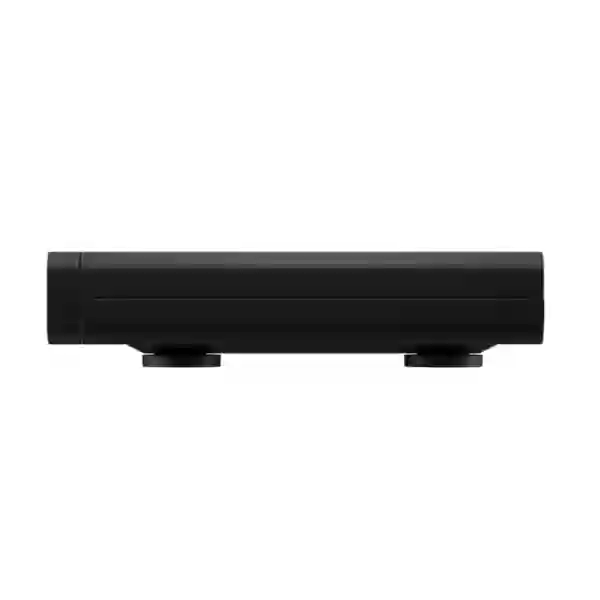
| HP reference dimensions | 17.7 × 18.1 × 3.4 cm for the referenced Africa-region configuration |
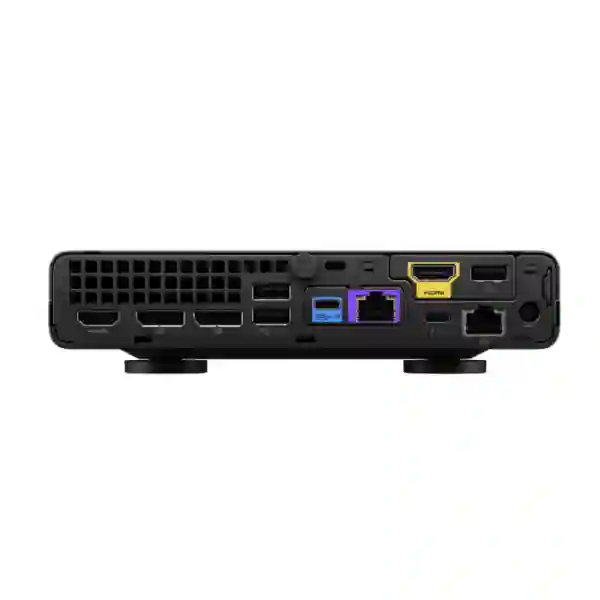
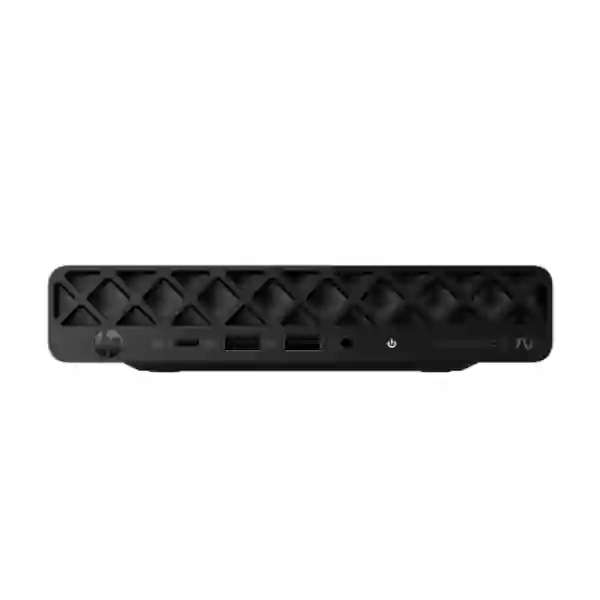
| HP reference front connections | One USB-C 10 Gbps, two USB-A 10 Gbps, one combination audio jack |
| Recommended room controller | Poly TC10, with bundle inclusion to be verified |
| Camera design | Standard one- or two-camera room configurations |
| License | Teams Rooms Basic or Pro according to service requirements; confirm separately |
| Manufacturer reference identifier | DS1E8AW on HP’s Africa-region specification; not a verified FourTeck SKU |
Buying & deployment guide · 01
What the Room Compute actually does
The HP Poly Studio 5 Room Compute for Microsoft Teams Rooms is the dedicated computer at the centre of a Windows-based Teams meeting room. It runs the room experience, connects the relevant audio and video devices, and supports the displays and control equipment that let people join scheduled meetings without relying on a participant’s laptop. HP positions the Studio 5 for standard configurations with one or two cameras. This makes it a practical foundation for organizations planning consistent Teams Rooms installations across a portfolio of spaces.
A room compute is not the same item as a webcam, a soundbar, or an all-in-one video conferencing appliance. The compute provides processing and software, but the room still requires appropriately selected capture, playback and control equipment. The actual bill of materials depends on the room dimensions, table arrangement, desired viewing angles and procurement configuration. Buyers should confirm exactly what is included in the quoted package rather than assuming that every photograph of a finished room represents the contents of the computer’s box.
For a Tanzanian organization, the immediate question is whether a Windows-based Microsoft Teams Rooms workflow is the preferred way to operate a shared meeting space. If it is, the Studio 5 offers a defined compute platform around which compatible Poly peripherals and approved Teams Rooms licensing can be specified. Ask for a room-by-room equipment schedule before finalizing a purchase so that the result is a deployable meeting environment, not just a mini computer sitting beneath a display.
Buying & deployment guide · 02
Who should consider this solution
This product is relevant to offices that host frequent hybrid meetings and need a dedicated, predictable experience for visitors and employees. Typical buyers include IT managers, workplace technology teams, facilities coordinators and procurement officers responsible for conference rooms or huddle spaces. They may want scheduled meetings to appear on a room controller, microphones and speakers to stay connected, and consistent equipment across several locations. The Studio 5 supports that planning approach when the room design stays within its supported configuration.
A central meeting room for management reviews, a training room used for remote speakers, and a client-facing conference room may have different acoustic and visual needs even when all three use Teams. These differences affect camera choice, microphone coverage, display placement, control position and sometimes the number of cameras. The computer should therefore be chosen alongside a realistic room design, not solely from a headline processor speed or a picture of a completed installation.
Organizations seeking general-purpose desktop computing, walk-up laptop docking or an unmanaged personal video call device should examine whether a dedicated Teams Rooms system is appropriate. A room system introduces resource-account administration, software update procedures and room-device licensing. Those requirements create a more managed meeting experience, but they also require an owner inside the IT team. The correct decision weighs operational consistency against installation complexity and long-term support responsibilities.
Buying & deployment guide · 03
Room sizing is about layout, not just capacity
HP describes the Studio 5 as a room compute for standard configurations with one or two cameras across different room sizes. That description does not mean every camera or microphone will suit every room. A small enclosed meeting room needs a different field of view and pickup pattern from a long boardroom. Seating geometry, wall positions, glass surfaces, ambient noise and display sightlines are important variables. Specify the experience at the farthest seat before selecting accessories.
In a smaller space, a compact USB video bar may be enough if it provides the required camera angle, speaker output and microphone coverage. A medium room may benefit from a larger video bar and careful cable routing. In a larger boardroom, the far end of a long table may be outside a particular bar’s intended pickup area, making additional design work essential. Avoid setting camera quantities or coverage distances from generic marketing descriptions; confirm the selected peripheral’s own technical documentation.
A useful initial site survey records the seating plan, approximate room dimensions, natural light, shared-wall noise and the location of power and data outlets. It should also identify whether guests need to view a presentation while remote participants remain visible. These observations prevent an inexpensive-looking compute-only quote from becoming an unsuitable or unexpectedly costly final configuration.
Buying & deployment guide · 04
Verified processing, memory and storage
HP identifies an Intel Core Ultra 5 processor for the Studio 5 family and describes the current Microsoft Teams Rooms model with an Intel Core Ultra 5-335 processor. HP lists 16 GB of memory for the Studio 5, and its regional product specifications show a 256 GB PCIe NVMe solid-state drive for the referenced configuration. Microsoft also lists the HP Poly Studio 5 Room Compute with a Poly TC10 touch controller among certified Teams Rooms on Windows systems, with Core Ultra 5, 16 GB and 256 GB.
These figures describe a purpose-built room compute platform, not a promise that adding arbitrary software or a large collection of peripheral devices will always work. The Teams Rooms application and device compatibility matrix remain the deciding factors for the planned deployment. A buyer should compare the exact HP regional configuration offered on the quotation with the current Microsoft certification entry and ensure that the selected room controller and AV peripherals are approved for the chosen system.
The internal SSD holds system software and operating components; it should not be treated as a media archive for meeting recordings. Similarly, room-compute memory should not be confused with the capacity of a normal desktop workstation. The value lies in reliable service as a dedicated meeting endpoint within a managed configuration. The complete procurement specification should identify the offered manufacturer part number, operating environment and included accessories without treating a regional HP identifier as FourTeck’s own SKU.
Buying & deployment guide · 05
What AI-ready hardware means in practice
HP promotes the Studio 5’s Intel Core Ultra 5 platform as suitable for AI-driven collaboration and specifies neural processing capability of up to 47 NPU TOPS for the processor family. An NPU is a processing component designed to accelerate selected artificial-intelligence workloads. Its presence can help a platform support applicable processing features when the operating system, Teams Rooms software and connected devices actually expose them. It does not, by itself, activate every AI meeting feature.
Customers should distinguish three separate questions: what the processor can calculate, what Microsoft makes available in a particular Teams Rooms release and license, and what the room’s chosen camera or audio devices can capture. A camera’s auto-framing behavior, for example, must be verified for that camera and software combination. Meeting summaries, transcription, speaker recognition and other advanced experiences may require service configurations or licensing beyond the computer’s silicon.
Treat ‘AI-ready’ as an architectural consideration rather than a blanket performance guarantee. If a procurement requirement calls for a specific intelligent camera feature, ask for an exact compatibility demonstration, software version and license dependency. This avoids buying extra capacity for a feature that is not part of the chosen setup. It also gives IT teams a more useful acceptance test than an abstract processing benchmark.
Buying & deployment guide · 06
Why Microsoft Teams Rooms on Windows matters
A dedicated Microsoft Teams Rooms on Windows setup is designed around a shared meeting space rather than one employee’s computer. Users can invite the room resource to a meeting, enter the room and operate the scheduled session from the room interface. This reduces dependence on a particular attendee remembering a laptop adapter, selecting a microphone or navigating desktop audio settings. It is especially useful when teams change throughout the day and the equipment must serve multiple departments.
The Windows platform brings a defined administration and update lifecycle. The organization’s Microsoft 365 administrators need to create the room resource account, assign the appropriate Teams Rooms license, apply suitable sign-in and device policies, and maintain supported application and firmware versions. The computer should remain a dedicated room system instead of being repurposed for unrelated office tasks. A standard build is easier to document, troubleshoot and reproduce across several rooms.
Teams Rooms on Windows should also be distinguished from an Android-based conferencing appliance or a bring-your-own-device meeting arrangement. Those categories can be valid choices, but their peripheral support, deployment workflows, security controls and licensing assumptions may differ. When evaluating alternatives, compare the entire room experience and ongoing management model rather than comparing only processor specifications or the price of a single box.
Buying & deployment guide · 07
Pairing with an HP Poly Studio USB video bar
HP recommends different USB video bars for different meeting-space needs. Its current portfolio guidance names HP Poly Studio V12 for smaller rooms, V52 for medium rooms and V72 for larger rooms as options for the Studio Room Compute family. These are selection starting points, not an instruction that any one bar is included in this compute listing. Each video bar has its own feature set and environmental requirements, and the exact combination should be checked against current manufacturer and Microsoft guidance.
A video bar can consolidate important room functions into a manageable installation, but it still needs to be mounted where people can be seen and heard clearly. Pay attention to the height of the lens, the length of the table, display glare and nearby air-conditioning noise. If wall-mounting places the camera too high or too low, even a technically compatible bar may produce an unflattering or difficult view. Test real seated participants, not only an empty-room picture.
Before requesting a quotation, describe the number of people normally present, whether participants sit in a line or around a table, and whether one or more displays are planned. Ask for confirmation of the exact bar and compute pairing, required cables and microphone coverage. A simple bill of materials can then identify what is included and what remains optional, preventing the video bar from being overlooked during procurement.
Buying & deployment guide · 08
Using a separate room camera instead
Some spaces already have audio infrastructure or need a camera angle that an integrated USB bar cannot provide. HP’s Studio Room Compute guidance includes compatible camera options such as the HP Poly Studio E60 and E70 for larger-room scenarios. A camera-only device should not be mistaken for a complete audio solution. The room still needs appropriate microphone pickup, speaker output and any required interface hardware selected for the supported Teams Rooms configuration.
Separate camera designs can be useful where the presenter’s position differs from the main table, where a room is unusually long or where a specialized visual workflow matters. However, a separate camera also increases the importance of cable planning, capture device recognition and audio-video coordination. The fact that a peripheral uses USB is not sufficient evidence of Microsoft Teams Rooms certification or support in a specific combination.
Where more than one camera is proposed, verify the exact camera-count limits of the selected room compute and the Microsoft Teams Rooms license. HP positions the Studio 5 for standard one- or two-camera setups, while the Studio 7 targets more customized multi-camera environments. A request for complex automatic switching, multiple capture sources or advanced room control may warrant a different design rather than assuming that the lower-tier compute can be extended indefinitely.
Buying & deployment guide · 09
The role of the Poly TC10 touch controller
The HP Poly TC10 provides the in-room touch interface associated with the Studio Room Compute ecosystem. HP describes automatic pairing between the compute and compatible TC10 controller, making controller setup more straightforward in supported configurations. The controller is a distinct device and should be confirmed as an included or separately quoted component. Microsoft lists the Studio 5 plus Poly TC10 combination in its certified Teams Rooms hardware catalogue.
Controller positioning affects usability. For a traditional table arrangement, participants need access to meeting controls without standing or reaching across other people. For a room with movable furniture, a wall-mounted or appropriately placed controller might be more practical. The required network path and power arrangement must be included in the installation design. HP notes that a local Power over Ethernet switch is required for certain multiple-controller configurations and that this equipment is sold separately.
An in-room controller is not a substitute for the Microsoft 365 room mailbox or a valid Teams Rooms license. It provides the interface through which the configured room joins, starts and manages meetings. Ask the integrator to demonstrate the complete flow: book a calendar event, invite the room, view the meeting on the console, join it and leave the room ready for the next user. That demonstration tests usability rather than hardware connectivity alone.
Buying & deployment guide · 10
A complete bill of materials prevents surprises
The first procurement document should separate the room compute from audio/video devices, the touch controller, displays, mounting accessories, cabling and networking. HP’s regional specification for the referenced Studio 5 package lists the computer, external power adapter and cable, DisplayPort-to-HDMI adapter, magnetic mounting kit, Ethernet cable, setup sheet and warranty card. The listing does not establish that a camera, video bar, display, room controller or Teams Rooms license is included in every offer.
A detailed quotation should list quantities for each line and explain the installation responsibilities. Is the existing display being reused? Who supplies the data point behind the screen? Will the controller require an available PoE network port? Is cable concealment, furniture drilling or electrical work included? Who configures the room resource account and who performs sign-off? These questions are practical and often more important to the end user than differences between closely related processor models.
Do not rely on the phrase ‘Teams Rooms kit’ without an itemized schedule. Some suppliers use that term for a compute and controller bundle, while other offers refer only to the compute appliance. Require explicit confirmation of model identifiers, region-appropriate power accessories, bundled components and the exact support responsibilities. FourTeck Tanzania can then prepare a request for quotation based on the actual room requirements instead of an assumed universal kit.
Buying & deployment guide · 11
Network readiness and meeting reliability
A meeting-room computer is only one part of the connection path. The organization also needs stable internet access, functioning internal networking, correctly configured Microsoft 365 services and a supportable connection for attached devices. For fixed meeting rooms, a planned wired network path can make troubleshooting simpler, although the final connection method must follow manufacturer instructions and local network policy. Verify available ports and the exact configuration before specifying additional adapters.
Before deployment, test the route from the room to the services that Microsoft Teams Rooms requires. Review DNS resolution, authentication, firewall policies, proxy requirements and time synchronization with the network administrator. Quality of service settings and bandwidth planning should reflect the organization’s wider voice and video design rather than an invented fixed speed per room. A connection that works for ordinary web browsing may still be unreliable for sustained, interactive video meetings.
Schedule representative test calls during normal business hours as well as quieter periods. Watch for packet loss, unstable wireless conditions, audio dropouts or display freezes, and establish the process for escalating network incidents. In offices with several rooms, label data ports and document their associated switches. This operational detail can shorten troubleshooting considerably when a problem occurs minutes before a client meeting.
Buying & deployment guide · 12
Displays, content sharing and cable paths
A successful Teams Room must show remote participants and presentation content in a layout that fits the meeting. Decide whether the room needs one display or multiple displays and then verify the chosen arrangement against Microsoft Teams Rooms licensing, supported system outputs and the exact HP hardware configuration. Microsoft currently identifies dual-screen capability as a Teams Rooms Pro feature, so it would be misleading to promise the same dual-screen experience with every license.
Choose display sizes by viewing distance and content type. Fine spreadsheets, architectural drawings and detailed slides require a different viewing experience from a simple group video call. Work out where the presenter will stand, whether people at the back can read shared material, and how a participant will present from a laptop. HDMI ingest, wireless sharing or other content-sharing routes require separate compatibility checks; do not assume an arbitrary connector automatically enables a Teams Rooms feature.
Plan cable runs to keep power lines, video connections and network services accessible for maintenance. If the compute is mounted behind a screen, make sure technicians can inspect labels and replace a lead without dismantling the whole installation. Confirm any adapter that is needed and test the actual display resolution and refresh behavior. The goal is a room that operates reliably after furniture has been moved and ordinary staff members have begun using it.
Buying & deployment guide · 13
Mounting, ventilation and electrical planning
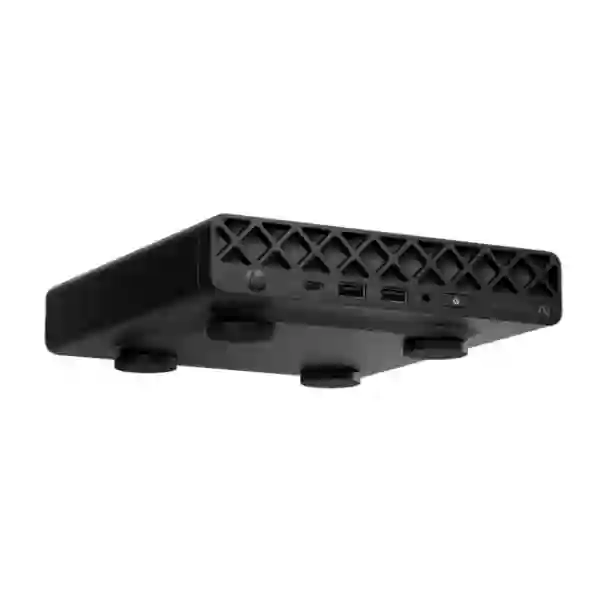
The Studio 5 uses a compact mini form factor. HP’s Africa-region specification for the referenced configuration gives dimensions of 17.7 by 18.1 by 3.4 cm and a device weight of approximately 1.07 kg. It also lists a magnetic mounting kit among the included items for that configuration. These details can help plan concealed placement, but they do not override the manufacturer’s mounting and ventilation instructions for the specific supplied model.
Choose a location where the computer is secure, serviceable and protected from accidental disconnection. Do not trap the unit against heat sources or place it in a sealed cavity without confirming permitted ventilation. The regional product sheet specifies an operating temperature range of 10 to 35 degrees Celsius for the referenced model. Air-conditioning conditions and rack-enclosure temperature therefore matter in the installation survey, especially where equipment is hidden behind a display.
The plan also needs reliable electrical power for the compute, screens, networking and AV peripherals. An external power adapter must be connected according to the supplied requirements. If the organization needs power continuity during short interruptions, the suitability and sizing of any backup equipment should be assessed by the responsible technical team. Neither a compact chassis nor a magnetic mount guarantees that a room will remain available during an outage.
Buying & deployment guide · 14
Teams Rooms Basic versus Teams Rooms Pro
Microsoft requires a Microsoft Teams Rooms license for a shared Teams Rooms device. A standard Microsoft 365 user subscription is not a substitute for the room license. Teams Rooms Basic provides core meeting experiences for eligible certified systems and is subject to Microsoft’s entitlement rules. Microsoft documents a limit of 25 Teams Rooms Basic licenses per organization. The room still requires administrative setup, a resource account and explicit assignment of the correct license.
Teams Rooms Pro adds advanced room capabilities and administration features that may be important to organizations operating several meeting spaces. Microsoft’s current comparison includes features such as dual-screen support, multi-camera support, more detailed device management and specific advanced meeting experiences under the Pro plan. The relevant decision should be based on the functions the organization will actually deploy, not simply the room’s size or the number of employees who use it.
Licensing is a separate commercial consideration from purchasing the physical computer. Ask the Microsoft 365 administrator to confirm which subscriptions are already available, which rooms require Pro and how licenses will be assigned. Product quotations should state clearly whether any subscription procurement or configuration is included. The computer’s existence does not grant a permanent right to all Microsoft Teams Rooms features, and Microsoft can change service packaging and feature eligibility.
Buying & deployment guide · 15
Set up the room resource account correctly
Each Microsoft Teams Rooms installation normally needs its own dedicated Microsoft 365 resource account. Microsoft explains that this account is tied to the room mailbox used for booking and also lets the Teams Rooms device sign in. Its identity should represent the shared meeting space rather than an employee. A clear naming convention helps administrators distinguish rooms and prevents confusion when employees send a meeting invitation to a location.
Create or confirm the account, establish the mailbox calendar behavior, assign the required Teams Rooms license and configure authentication according to current Microsoft guidance. The booking policy should reflect the organization’s rules for recurring meetings, automatic acceptance and meeting duration. For a deployment in Tanzania, confirm the mailbox and calendar time-zone configuration rather than accepting a default that may have been designed for another region.
Before installation is accepted, book a test meeting from an ordinary user’s calendar. Check that the room invitation is accepted, that the event appears on the in-room interface and that the console starts the correct session. Test a second meeting immediately after the first. This practical sequence confirms that identity, scheduling and the physical endpoint work together instead of proving only that the hardware can display a welcome screen.
Buying & deployment guide · 16
Security and device administration
Shared meeting-room computers deserve a different security approach from personal laptops. Many people interact with the room, but very few should have administrator privileges. Keep the device managed under the organization’s approved endpoint policies, restrict unnecessary local changes and follow vendor guidance for operating system, application, firmware and peripheral updates. The expected Teams Rooms behavior is most dependable when the system is not casually repurposed for unrelated desktop applications.
HP identifies security capabilities in the Studio Room Compute portfolio, including HP Sure Start and HP Wolf Security for Business. Confirm the exact available protections and configuration for the quoted model rather than assuming that every advertised portfolio feature is activated by default. On the Microsoft side, some advanced governance and monitoring capabilities depend on the assigned Teams Rooms license, device enrollment and the organization’s wider Microsoft 365 security policies.
Agree on the operational ownership of the room before it goes live. Someone must be responsible for reviewing alerts, testing scheduled changes, maintaining access credentials through secure procedures and responding when a device is offline. Record the serial information from the supplied equipment, software inventory and connection diagram in the organization’s internal asset system. Good documentation makes a standardized fleet of rooms more manageable than a collection of individually improvised installations.
Buying & deployment guide · 17
Poly Lens and remote room visibility
HP describes Poly Lens Cloud management for Studio Room Compute devices and connected Poly equipment. Its HP Poly Studio Room App supports configuration and remote inventory, monitoring and management of applicable PC-based conferencing peripherals. This can help IT teams understand which devices are connected and see selected health information without visiting each room. Availability of particular features depends on the deployed device, app version, cloud configuration and applicable entitlements.
Remote tools reduce the need to physically inspect every room, but they do not eliminate local troubleshooting. A loose cable, blocked camera, switched-off screen or incorrect meeting-room setting still may need attention on site. Establish an escalation process that starts with checking service and device status and then moves to a room inspection when required. The aim is to identify faults quickly and distinguish an internet issue from a peripheral, software or sign-in problem.
Poly’s documentation also describes specific installation and connectivity requirements for the Studio Room App. IT teams should check required ports and protocols and avoid conflicting management applications. For production deployment, use the manufacturer’s instructions for the exact Windows Teams Rooms build rather than treating arbitrary software downloads as interchangeable. Include management configuration and alert verification as explicit tasks in the commissioning checklist.
Buying & deployment guide · 18
Compare Studio 5 with Studio 7 before buying
HP positions the Studio 5 for standard one- or two-camera Microsoft Teams Rooms designs and the Studio 7 for larger or more customizable environments with multiple cameras. The HP portfolio lists a Core Ultra 5 platform and 16 GB RAM for Studio 5, compared with a Core Ultra 7 platform and 32 GB RAM for Studio 7. Those hardware differences matter primarily in relation to the room architecture and supported features, not as a stand-alone ranking of meeting quality.
For a straightforward huddle room or conventional conference room, the Studio 5 may be the more appropriate starting point when supported peripherals can provide the required coverage. If the room must capture multiple zones, automate more complex camera arrangements or integrate a highly specialized AV system, review the Studio 7 and alternative room architectures before committing. The correct system should follow the approved camera design and operational requirements.
Do not buy the higher model solely because the room has a large display, and do not buy the lower model solely because it has fewer participants than another room. Ask what simultaneous video sources, audio paths, displays, content inputs and controllers are actually needed. Then assess which tested system supports those requirements, with a reasonable margin for planned changes. That avoids both unnecessary spending and a future rebuild.
Buying & deployment guide · 19
Typical Tanzania deployment considerations
A meeting-room design in Tanzania should begin with the needs of the individual workplace rather than broad assumptions about the country. An organization may be improving one conference room, standardizing several branches or preparing a room for meetings with overseas teams. Each situation changes how much emphasis should be placed on remote support, equipment consistency, lighting, network resilience and scheduling. The compute platform can be evaluated without making unverified claims about local stock or installation coverage.
Assess the internet connection actually serving the site, its stability during busy periods and any alternative connection available under the organization’s own arrangements. Confirm how power interruptions affect the full chain of equipment, including the router, network switch, room computer, screens and peripherals. Where buildings have high ambient noise or substantial daylight, address microphone selection, room acoustics and camera exposure during site design instead of expecting the room compute to solve physical environmental problems.
For cross-border meetings, consider working hours and booking practices, and verify the room mailbox’s time zone. Test sessions with the actual participants’ collaboration environment before declaring the room ready for important meetings. If the organization operates sites with different network policies, record any variations in configuration. These practical checks are useful throughout Tanzania without implying a particular provider partnership, local certification, delivery commitment or service footprint.
Buying & deployment guide · 20
A practical pre-installation survey
Start with a simple room sketch showing the entrance, table, chairs, main displays, expected camera location, available power sockets and data outlets. Record the normal and maximum number of people and note whether meetings are mainly presentations, interactive discussions or hybrid workshops. Identify any accessibility requirements for controller placement and screen visibility. This gives the AV designer a factual basis for choosing peripherals rather than selecting equipment from room-capacity labels alone.
Next, identify existing assets that might be reused. A display may have an adequate panel but no reliable input path, while a camera may support an ordinary laptop call without being validated for a dedicated Teams Rooms system. The existing switch may have data capacity but no available Power over Ethernet budget for the selected controller arrangement. Test compatibility before listing an item as reusable. A replacement that is discovered during installation can alter cost and timing.
Finally, agree on clear acceptance criteria. Examples include reliable scheduled meeting join, intelligible audio from each seat, usable camera framing, successful screen content sharing, visible management status and a recovery procedure after a restart. These criteria should be adapted to the approved solution and licenced feature set. The survey becomes a useful procurement and handover document rather than just a list of device part numbers.
Buying & deployment guide · 21
Installation workflow and commissioning
Installation normally moves through several coordinated stages: confirm the room design, check cabling and power, mount the display and compute, connect approved AV devices, pair the controller, prepare Microsoft 365 room resources and run test meetings. The exact order and tools should follow the latest HP, Poly and Microsoft setup instructions. Any electrical or structured-cabling work should be performed by appropriately qualified personnel under the site’s applicable requirements.
The first functional test should validate hardware recognition and the Teams Rooms interface. Then check the room calendar, camera output, microphone input, loudspeaker behavior, screen layouts and supported content-sharing path. Test an external attendee where permitted by organizational policy. If the design includes multiple displays or multiple cameras, confirm that the assigned subscription and the current software build support those features in the tested combination.
After technical testing, perform a short user-acceptance demonstration with the people who regularly book the room. Confirm that they can locate and invite the room, start or join a meeting and end it cleanly. Leave a concise quick-start guide and an internal support contact. The meeting room should not depend on the original installer remembering hidden settings after handover.
Buying & deployment guide · 22
How to evaluate the full cost
The price of the compute alone is not the total cost of a Microsoft Teams Room. Other project items can include an approved controller, video bar or separate cameras and audio, displays, wall mounts, electrical and network preparation, cables, service work and the appropriate subscription. The organization may also need ongoing administrative effort for patching, support, compliance checks and replacement of failed components. Compare complete designs at the same scope rather than comparing headline device prices.
Request quotations with separate lines for the computer, all peripherals, network hardware, software licensing and services. State whether existing equipment will be reused and who is responsible for verifying compatibility. Ask whether configuration, onsite commissioning, training and post-installation support are included or excluded. Make any additional warranty or support provision explicit, rather than assuming that a global product specification creates the same commercial terms in Tanzania.
No Tanzanian shilling price is asserted here because a verified price for this exact FourTeck Tanzania listing has not been provided. Likewise, stock, lead time, customs charges and delivery arrangements should be confirmed through the actual quotation process. The useful purchasing decision is the one that identifies total project scope, expected operation and support ownership before financial approval.
Buying & deployment guide · 23
Operational support after the first meeting
A conference room is a shared business service. Even a successful installation needs maintenance for firmware, Teams Rooms application changes, account access and peripheral health. Agree on a change window that avoids important meetings and record the known-good configuration before any substantial update. This helps the IT team distinguish issues introduced by changes from cable damage, electrical interruptions or temporary service problems.
Establish simple first-line checks for nontechnical staff: confirm that displays have power, that the appropriate source is selected, that the console is responsive and that the booked meeting appears in the calendar. More sensitive checks, including sign-in status, network policy and software repair, should remain with authorized administrators. Avoid teaching users to reset a shared room account password or modify system settings as the first reaction to an interrupted call.
For organizations operating multiple rooms, a common naming convention, asset register and escalation process make maintenance easier. The team can compare like-for-like rooms when troubleshooting and replace components using a known design. A room that works consistently over several months is ultimately more valuable than one that looks impressive on installation day but cannot be supported economically.
Buying & deployment guide · 24
Questions to confirm with FourTeck Tanzania
Before requesting a purchase quotation, specify how many rooms need upgrading and the intended use of each room. Provide a seating plan or rough dimensions, your Microsoft 365 environment, the number of intended displays and whether a camera or audio system is already installed. Indicate whether you expect a computer-only quote, a compute-and-controller bundle or a complete meeting-room installation. These details directly affect the appropriateness of the selected system.
Ask for the exact manufacturer configuration being supplied, the operating platform, the included box contents and a list of compatible, separately priced peripherals. Verify which controller will be used and whether the proposed camera count, display arrangement and license support the intended meeting experience. Request confirmation of installation scope and who will create the resource account, assign licensing and test the completed system.
Also request written clarification of price in the applicable currency, stock or sourcing status, delivery, warranty terms and after-sales support for the specific offer. None of those commercial conditions should be inferred from international catalogues. A clear technical and commercial proposal makes it much easier for both the buyer and the supplier to prevent omissions, compare alternatives and approve a room that meets everyday business requirements.
Frequently asked questions
Is the HP Poly Studio 5 a complete video conferencing kit?
No. It is the room compute component. The final installation requires a compatible camera or video bar, appropriate audio, a room controller and display arrangements, plus Microsoft Teams Rooms licensing and configuration. Confirm whether the seller’s particular quote includes any peripherals, since different bundles can contain different items.
Can it run Microsoft Teams Rooms on Windows?
Yes. HP markets the Studio 5 in a Microsoft Teams Rooms on Windows configuration, and Microsoft’s certified hardware list includes a Studio 5 system paired with a Poly TC10 controller. Exact supported combinations and software versions should be verified at the time of installation.
What processor, RAM and storage are specified?
HP’s Studio 5 material identifies Intel Core Ultra 5 processing, 16 GB of RAM and a 256 GB solid-state drive for the referenced Teams Rooms model. Individual regional configuration codes should be matched to the actual quoted unit rather than assumed to be identical across all markets.
Does the compute include a camera?
Do not assume that it does. HP positions the compute to work with compatible AV products, including selected Studio V-series bars and E-series cameras. A camera or video bar should be included as a separate line item unless the exact sales bundle explicitly says otherwise.
Is the Poly TC10 included in the box?
The HP Africa specification for the referenced compute-only configuration does not list a TC10 among the included items. HP describes the compatible controller and its pairing behavior, but inclusion must be confirmed on the actual seller quotation. A certified combination does not mean every component is supplied together.
Can a single Studio 5 support multiple cameras?
HP describes the Studio 5 for standard configurations with one or two cameras. Actual support depends on the approved devices, software, integration and Teams Rooms license. For extensive multi-camera designs, the higher Studio 7 platform or a customized design may be more appropriate.
Is a Microsoft Teams Rooms Pro license mandatory?
Not in every situation. Microsoft offers Teams Rooms Basic for eligible certified systems, subject to its organizational limit and feature restrictions. Pro is required for certain advanced capabilities, including features Microsoft assigns exclusively to that plan. Your administrator should determine the right room license before ordering.
Can an ordinary Microsoft 365 user account replace the room account?
A shared Teams Rooms installation should be built around the dedicated resource account and valid Teams Rooms licensing defined by Microsoft. A normal user’s office subscription is not a general replacement. Resource accounts also make meeting-room booking and administration separate from individual employees.
Is this the same as an ordinary mini desktop computer?
It has a compact computer form factor, but its intended function is a dedicated, certified meeting-room endpoint. It should be configured and maintained under the supported Microsoft Teams Rooms workflow. Unrelated desktop applications, casual user changes or unsupported peripherals can complicate operational reliability and support.
Does the Studio 5 provide AI meeting features automatically?
No. HP identifies an AI-capable Core Ultra processor with an NPU, but actual meeting features depend on the Teams Rooms application, licensing, attached cameras, audio hardware and supported software versions. Confirm each desired feature independently rather than treating NPU capability as an all-inclusive entitlement.
Can the equipment be mounted behind a display?
Its mini form factor and HP-listed magnetic mounting accessories can support compact installations. The chosen mounting location still must respect permitted ventilation, access for service, cable strain relief and the manufacturer’s instructions. Confirm the contents of the regional configuration before assuming mounting hardware is supplied.
What should a business in Tanzania prepare before asking for a quote?
Share the number of rooms, seating arrangements, planned displays, typical meeting use, existing AV equipment and Microsoft 365 licensing status. Indicate whether you need only the compute or a complete room solution. Ask for verified local commercial terms separately, because this page does not claim stock or Tanzanian pricing.
Does it work with any USB camera or video bar?
A matching connector alone does not guarantee supported operation in Teams Rooms. Use the currently validated HP and Microsoft compatibility information for the actual camera, controller, room compute and software build. If you have existing equipment, request an explicit compatibility check before including it in the room design.
How does Studio 5 differ from Studio 7?
HP positions Studio 5 for standard one- or two-camera room designs and Studio 7 for more complex, often larger multi-camera environments. Studio 7 also has a higher-tier processor and greater listed RAM. Room topology and actual feature requirements matter more than simply choosing the largest specification.
Who maintains the system after installation?
The organization should appoint an IT or managed-service owner for accounts, licensing, software updates, peripheral checks and escalation. A remote management platform can assist with visibility, but physical power, network and cabling problems may still require local attention. Agree on support responsibilities before commissioning.
Can we reuse current screens or audio equipment?
Possibly, but reuse should be treated as a verification task rather than a guarantee. Check available connectors, supported resolutions, acoustic coverage, device compatibility and installation layout. A site survey and tested bill of materials are the safest way to determine what can remain in service.
What should be tested before accepting a new room?
Run a real booked meeting from the room calendar, verify remote audio and video from different seats, share presentation content, confirm the intended display layout and check the room’s management and restart behavior. Record any advanced functions and their license dependencies in the sign-off document.
How do we request an appropriate quotation?
Tell FourTeck Tanzania whether you need the compute unit alone or a complete Microsoft Teams Rooms installation, and provide practical room information. Request an itemized proposal showing the exact manufacturer configuration, compatible controller and peripherals, licensing assumptions, installation scope, commercial terms and support responsibilities.
Request a Microsoft Teams Rooms configuration quote
Tell FourTeck Tanzania about the intended room sizes, seating plan, existing displays or audio equipment, Microsoft 365 environment and whether you need compute only or a complete deployment. Request an itemized proposal for the HP Poly Studio 5 Room Compute, compatible peripherals, licensing assumptions, installation scope and after-sales terms.
No unverified price, availability, delivery deadline, support entitlement or destination link is implied. Obtain current terms directly through the FourTeck Tanzania quotation process.




Reviews
There are no reviews yet.