
Conference audio accessory | Black finish
HP Poly Studio A2 Table Microphone Black
Extend clear conference-table speech pickup across compatible Poly Studio rooms with a compact, wired A2B microphone designed for scalable layouts.
Fast product facts
Check compatibility before you buy
This accessory is not a universal laptop microphone. Match it to the precise Poly Studio host, software version and bridge or direct-connection arrangement. The maximum of eight microphones applies only to supported configurations; a Studio V12 supports one. Confirm the full bill of materials, cabling, installation responsibilities and local quotation terms before placing an order.
Make every seat easier to hear
Hybrid meetings often expose a simple weakness in a room: the people nearest the video bar sound clear while colleagues farther along the table seem distant. The HP Poly Studio A2 Table Microphone Black is intended to bring microphone pickup closer to participants in a compatible Poly Studio environment. Instead of asking every speaker to lean toward the screen, planners can position a discrete table unit where discussion actually happens. It is an expansion microphone within an integrated room-audio system, not a universal USB desktop microphone or an independent speakerphone.
The purchasing decision therefore starts with your installed room platform, not with microphone appearance alone. A suitable host device, supported software, appropriate cabling and—in most configurations—the Studio A2 Audio Bridge are part of the overall design. Once those pieces are confirmed, the black microphone can help an office, training room or boardroom capture contributions more consistently from around a shared table. For a quotation, provide the current video system model and a basic room layout so the correct accessories can be assessed.
Who should consider this microphone?
This model is particularly relevant to organisations already using, or planning to deploy, supported HP Poly Studio video systems. Procurement teams may be replacing improvised table microphones with a coherent room solution; IT administrators may want an expansion path for a long table; and facilities teams may need a compact microphone that does not dominate the furniture. The strongest fit is a fixed or semi-permanent meeting space where participants speak from predictable seats and the system can be installed with a tidy cable route.
It may not be the best purchase for someone who wants to plug a microphone directly into a laptop, record a podcast without a host system, or connect to an older unsupported Poly video bar. Those use cases require different device categories. Buyers should also distinguish between needing better voice pickup and needing improved loudspeaker output: the Studio A2 table microphone addresses the input side of the conversation. If participants cannot hear remote attendees, room speakers, acoustics and call settings need separate attention.
Four microphone elements, one practical purpose
Inside the small enclosure are four unidirectional cardioid microphone elements. Their directional pickup characteristics form part of the audio design used to capture speech at the meeting table. The point is not that a microphone can make every room perfectly quiet; it is that a properly configured system can favour useful conversation over some unwanted sound. HP also documents microphone switching behavior in supported system configurations. How that behavior is presented and controlled depends on the host video system and software version.
This is an important distinction when comparing microphones. Buyers sometimes see a high element count and assume every element or every connected microphone records independently and simultaneously. A multi-microphone room system is managed as an audio solution, and its switching and mixing behavior should be checked for the installed release. Consider a demonstration or commissioning test with people speaking from the intended seats. The evaluation should focus on remote-participant intelligibility, balanced pickup and dependable mute operation rather than impressive-sounding specifications taken in isolation.
What the published pickup figures mean
HP lists up to a 1.8-metre pickup radius when Poly NoiseBlockAI is off and up to 4.3 metres when it is enabled. These are manufacturer-stated ranges, not a promise that speech will be equally intelligible from any direction, distance or room. Background chatter, glass walls, ceiling height, microphone position, participant volume and HVAC noise can all affect the result. A radius should therefore be treated as a useful starting reference for design, never as a replacement for a room assessment or a listening test.
For a short table, a well-positioned single microphone might be the appropriate starting point if the connected host permits it. For a long rectangular table, additional pickup locations may be more sensible than relying on the maximum published radius from one position. The wider NoiseBlockAI-on figure also presumes the relevant processing mode and compatible host behavior. In tender documents, identify both the required operating mode and the actual table seating arrangement. That makes the microphone quantity defensible and reduces the chance of overbuying or leaving particular seats difficult to hear.
Understand Poly NoiseBlockAI
Poly NoiseBlockAI is part of the supported HP Poly audio-processing environment and is intended to reduce certain distracting background noises during calls. HP associates the Studio A2 microphone with different published pickup radii depending on whether this processing is enabled. A purchasing comparison should not describe the microphone as magically eliminating all noise, because acoustic results depend on the room and on device configuration. The technology complements good placement, meeting etiquette and the host system’s audio settings; it does not remove the need for them.
When evaluating a conference room, test typical interruptions: a chair moving, nearby papers being handled, ventilation running and someone speaking softly at the far end. Listen from a remote participant’s perspective rather than judging sound locally beside the microphone. Compare appropriate system settings without changing multiple variables at once. If the room has unusually persistent noise or reverberation, physical acoustic treatment and equipment placement may deliver larger improvements than adding microphones indiscriminately. Ask the installer to document the selected settings as part of handover.
Small design, tidy tabletop installation
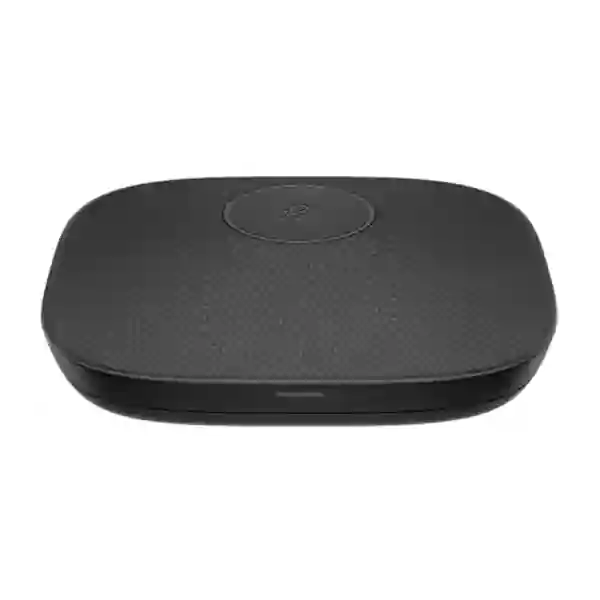
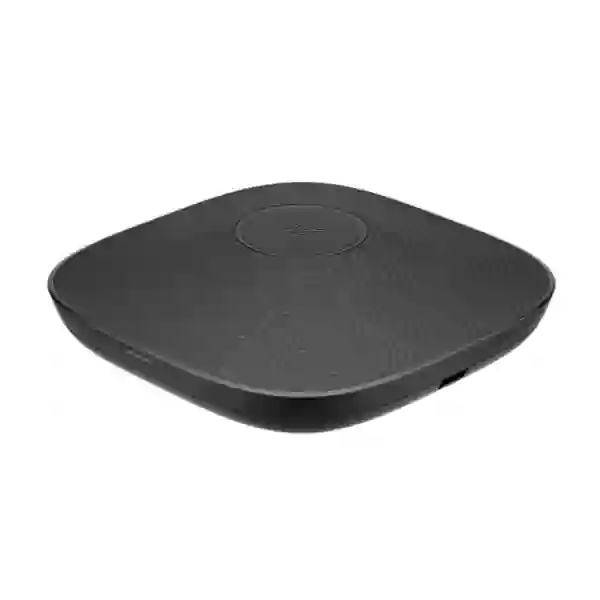
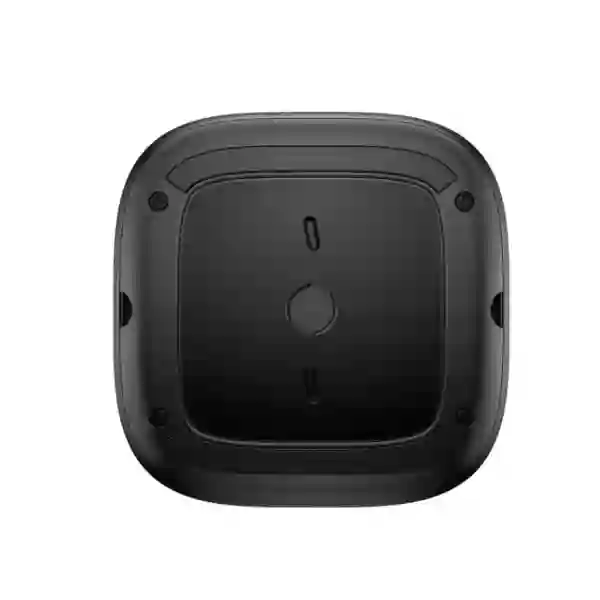
The black microphone measures 92 × 92 × 24 mm and weighs approximately 120 g. Its compact, low-profile housing is suited to placement among laptops, documents and meeting-room controls without requiring a large tabletop footprint. HP includes a mounting plate and describes cable-management provisions within the Studio A2 design. Black is a practical option for darker desks or rooms where equipment needs to blend into the furniture, but the correct colour is primarily an interior-design decision rather than an audio-performance difference.
Installation quality matters beyond visual neatness. Microphones should not sit where notebooks routinely cover them, where cups are placed, or where someone can accidentally disconnect a lead while moving a chair. Route cables according to the approved mounting and wiring instructions, and consider how cleaning staff will access the table surface. A carefully planned mount makes a room easier to operate and maintain. If furniture is rented or must remain unmodified, agree on a reversible installation method before any drilling or adhesive placement occurs.
A2B audio bus: what connects to what
The Studio A2 Table Microphone uses the A2B digital audio bus rather than a conventional 3.5-mm microphone jack or a general-purpose USB audio connection. HP specifies a four-pin JST input and a three-pin JST output. The microphone belongs to a supported Poly audio chain and should not be treated as a standalone network endpoint. In bridge-based deployments, the Studio A2 Audio Bridge connects the room system with the microphone chain and supplies the relevant bus connection; the bridge is a separate equipment requirement.
This architecture lets integrators extend table pickup while using the intended HP Poly room-system management model. It also means that a cable with a physically similar connector is not automatically a valid replacement. Confirm the precise connector, polarity, pinout and maximum cable arrangement before ordering or commissioning. Use supported cabling methods from the relevant HP installation documentation. When a project involves building renovation, have the AV installer coordinate routes with the furniture contractor and the IT team so audio wiring does not become an expensive afterthought.
Daisy chaining without exceeding limits
Selected Studio A2 installations can use multiple microphones in daisy-chain arrangements. HP describes support for up to eight microphones in an eligible system and up to four independent chains from an A2 Audio Bridge. That does not mean every Poly Studio video device accepts eight microphones. The bridge, host device, software and topology determine the permitted count. For example, a layout that suits a large G62 installation must not be copied unchanged into an X32 room, where the stated maximum is lower.
The purpose of a chain is to reach seats that would otherwise be too far from a pickup point, not to place the highest possible number of units on every table. More microphones involve more mounting positions, cable routes and commissioning checks. Map the seating positions first, then work backward to a reasonable number of microphones and supported chain layout. Check whether the table can be reconfigured for training or board meetings and whether the cable arrangement can accommodate that change. The best design provides useful coverage with manageable installation complexity.
Model-by-model compatibility before ordering
Compatibility is the single most important technical check. HP lists the Poly Studio G62 with support for up to eight A2 table microphones; Studio X72 and V72 with up to four; Studio X52 and V52 with up to four; Studio X32 with up to two; and Studio V12 with a single microphone. These are product-family limits supplied by HP, not a guarantee that any particular installation is ready immediately. Appropriate software versions, interfaces, power and configuration must still be verified for the exact device.
Be precise about model suffixes. A room marked “Poly Studio” does not tell a buyer whether it is an X52, X50, X70 or something else, and those differences matter. HP describes the A2 Audio Bridge as not backward compatible with older X70, X50 and X30 solutions or Poly G7500. Those existing systems may use different microphone accessories. Before purchasing, find the complete model designation in the room administration interface or equipment inventory. Include that designation in any quotation request and ask for explicit compatibility confirmation.
The Studio V12 exception
Poly Studio V12 deserves separate attention because HP supports one A2 table microphone connected directly to the V12 without the separate Studio A2 Audio Bridge. This can simplify a small-room setup when the host and installation requirements are met. The published limit is one microphone, so it is not the right platform for a plan requiring multiple A2 units along an extended boardroom table. The direct connection should still use the correct supported interface and cabling rather than an improvised adapter.
For a small huddle room with a meeting table set away from the screen, a single tabletop microphone may put audio pickup where discussion happens. Even so, microphone positioning remains important. Avoid placing the unit beside a fan, beneath paper piles or directly in a high-traffic point on the table. Establish an appropriate route back to the V12 and confirm that the host software supports the intended microphone behavior. If a room has expanded beyond the practical capabilities of one unit, review the overall host-system design rather than assuming the V12 can simply be daisy-chained further.
Audio Bridge requirements on other systems
For the G62, X72/V72, X52/V52 and X32 families, HP documents the Studio A2 Audio Bridge as part of the supported A2 microphone configuration. The bridge is not included simply because a box contains an A2 table microphone; it must be accounted for separately unless an existing verified installation already has it. HP describes the bridge as using appropriate Power over Ethernet arrangements and connecting compatible Poly video devices with the A2 microphone bus. Some host configurations also require an approved USB-to-Ethernet adapter.
A purchase request that names only the microphone can therefore leave a critical integration component unspecified. Ask the project owner whether this is an addition to an operational A2 installation or the first A2 microphone in the room. For a new installation, document the bridge, supported network path, power arrangement, approved adapter where needed, microphone chains and host software baseline. Do not assume a normal office Ethernet port powers the microphone directly. The design should be signed off against the relevant HP configuration guide before any wiring is committed.
What comes inside the microphone package
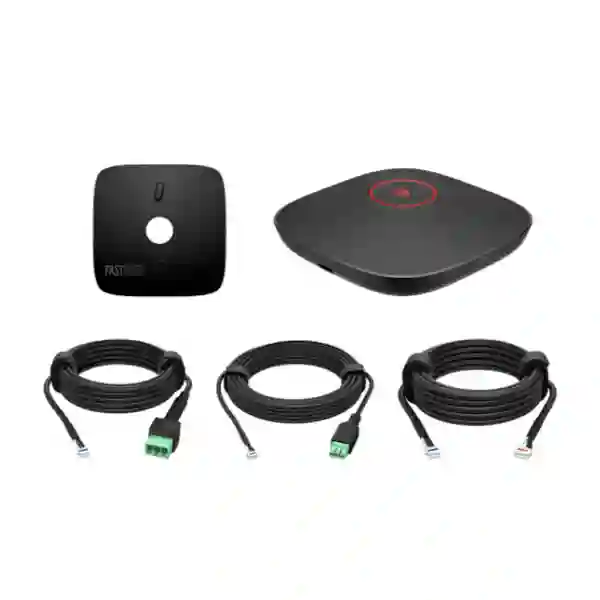
HP’s specification for the black model lists the A2 table microphone, a mounting plate, a 6-metre JST-to-Phoenix input cable, a 2-metre JST-to-Phoenix daisy-chain output cable and a 1.8-metre JST-to-JST daisy-chain cable. Quick-start and safety guides plus a warranty card are also listed. These supplied parts provide a useful starting point for a standard installation, but a large or unusually shaped room may need a different approved cable plan and additional system components.
The package list should not be confused with a complete conferencing solution. A Poly video bar or codec, display, speakers, appropriate Audio Bridge, network components, controller, commissioning service and room wiring are not automatically included by buying one table microphone. Confirm what is already installed and what the proposed quote covers. Also check the supplied cable reach against the planned route, allowing for under-table routing, bends and furniture access rather than measuring only a straight line across the tabletop. Product-box contents should be confirmed again against the exact regional quotation.
The right placement for a rectangular table
Long rectangular tables create predictable audio problems: people at the far ends may speak at noticeably different levels from those nearest the camera. HP recommends distributing microphones so participants have reasonably similar distances to a pickup point and so direct sound is favoured over reflected sound. Multiple microphones can be useful where people sit along both long edges. Start with the seating plan and natural direction of speech rather than placing units at equal intervals merely because that looks symmetrical.
Keep microphones clear of obstacles such as desktop monitor stands, open laptop screens and piles of files. If a room includes a video bar with an integrated speaker, HP’s placement guidance specifies a minimum separation of 2.5 metres between the bar and a table microphone in the illustrated layouts. Check that guidance for the installed host. A trial call can reveal seats that need adjustment before mounting becomes permanent. Remember that a more even microphone layout does not cure a room with severe echoes, reflective walls or poor acoustic treatment.
Small-room and huddle-room planning
A small meeting space might accommodate four to six participants seated fairly close together, but headcount alone does not decide the microphone requirement. The length and width of the table, the video device’s location, the participants’ speech habits and the selected NoiseBlockAI setting all matter. HP’s published guidance gives a single A2 table microphone as a typical option for Studio V12 in a small-room arrangement, and one or two as a small-room option with Studio X32. These are planning references, not guaranteed results for every room.
For an office considering one unit, ask whether each chair is within practical range of the proposed position. Have someone sit in the seats at the edges and speak at a normal conversational level. Check remote audio from a test call while HVAC is running as it usually would. If the room often changes from a small conference to training seating, document both layouts. Buying the technically supported maximum before testing may add cost without making the room materially easier to use.
Medium-room planning and growth
A medium meeting room frequently has a longer table, an audience seated on two sides and greater variation in speaker distance. The Studio X52 and V52 families can support up to four A2 table microphones, subject to their documented setup requirements. HP’s room-size guidance uses one to four microphones as a planning reference for medium rooms with these hosts. The final count should reflect the furniture and the desired quality of remote speech pickup. A lower count may be sufficient in a compact room; a longer table may justify more distributed units.
Plan cabling for how the room will actually be used. Some companies hold regular video calls with five people; others use the same space for design reviews with twelve people and laptops spread across the table. The microphone layout must avoid the locations most likely to be occupied by equipment. Confirm whether the room’s host video bar is installed in a supported configuration and whether a bridge, adapter or firmware update is necessary. Record the as-built cable plan so future maintenance or reconfiguration does not require rediscovering hidden connections.
Large and extra-large boardrooms
Larger boardrooms raise the stakes because a remote attendee may struggle to hear one speaker even when the overall meeting seems loud enough in the room. HP positions the Studio X72 and V72 families for larger arrangements with up to four A2 microphones, and the Studio G62 for custom or extra-large rooms with up to eight. An appropriately designed multi-microphone system can distribute pickup points across a long table rather than making one centrally located device responsible for every chair.
The room shape matters as much as nominal floor area. An unusually wide table, U-shaped furniture or a boardroom with a side presentation area may need careful evaluation of speaking positions. A microphone designed for the table does not automatically capture a presenter walking around the room at a consistent level. If lectern speech or audience questions are essential, ask the integrator to assess the complete audio requirement. Treat published system limits as boundaries for design, and have the final microphone count and positions justified by an audio plan and test.
Touch mute and visual status
The A2 table microphone includes a capacitive touch mute control and integrated status LEDs. HP documents visual states associated with initialization, active calls, mute status, pairing and certain maintenance operations. During a normal supported call, green and red status indications can help users understand whether a microphone is active or muted. A physical control at the table can be easier to find than a remote touch-screen menu, particularly when several people share the room and are unfamiliar with the conferencing controls.
A good handover explains what the indicators mean in the actual installed configuration. Users should know whether muting one tabletop unit changes the whole room’s outgoing audio, how the host application represents mute state and what to do if an indicator behaves unexpectedly. Administrators should also establish how to check the microphone connection and software status. Clear instructions prevent the common confusion of assuming that the remote call is muted simply because one local control has been touched. Verify the mute workflow with the specific system before training staff.
Poly Lens and day-to-day administration
HP lists Poly Lens as management software associated with the Studio A2 family. In an integrated deployment, administrators should manage the microphone arrangement through the supported Poly room ecosystem rather than treating the unit as an independent computer peripheral. The range of settings and diagnostic information available can depend on the host video device, management permissions and software release. This makes a documented commissioning process more useful than simply plugging in a microphone and assuming the installation is finished.
For everyday operation, assign a responsible IT or AV owner, keep an inventory of model numbers and document the bridge and microphone topology. After updates, make a brief test call from the most challenging seats. If speech pickup changes unexpectedly, check device connections, host settings and audio processing before moving hardware. A practical support record should state which room has which host, how many A2 microphones are installed, the cable path, and the settings chosen during commissioning. That information saves time when equipment is moved or a room changes function.
Cable lengths and extension decisions
The supplied cables include 6-metre input, 2-metre daisy-chain output and 1.8-metre JST-to-JST daisy-chain leads. HP also publishes digital-transport and extended-cabling guidance for supported Studio A2 installations, including configurations where devices are separated by longer runs. However, an extended distance is not a blanket approval to use any cable or connector. Maximum distances, conductor type, approved termination and total system topology must be verified for the specific host and audio chain.
Before ordering, draw the physical route from the host and bridge to each microphone. Include the path around table legs, cable trays and floor boxes, not simply the seating distance. Check whether the meeting table is movable, whether equipment can be serviced without dismantling furniture and where strain relief is required. Avoid coiling large excess lengths in ways that interfere with cable management. If the project needs custom-length cables, ask the AV installer to follow HP’s documented wiring requirements. Unsupported modifications can create difficult-to-diagnose audio or power problems.
Software and commissioning checks
A compatible hardware model is necessary but not sufficient. HP’s Studio A2 release documentation describes software support on Poly VideoOS 4.6 and later for specified room products. Actual feature behavior and adapter requirements can evolve with software versions, so the administrator should check the relevant current release notes for the exact system. A room deployed years ago may need a supported upgrade plan before new A2 components are added. The aim is a stable, supported configuration rather than an assortment of parts that merely connect physically.
Commissioning should include identification of each microphone, a verification that all intended units appear in the host configuration, checks of mute indicators, a test of automatic audio behaviour where available, and real calls with remote listeners. Document firmware versions and the initial settings so they can be compared after maintenance. If an update is required, evaluate its impact on the room’s broader video environment. An audio accessory should not trigger an unplanned interruption to conferencing operations simply because prerequisite software and change windows were overlooked.
What the microphone will not do
This product is not a USB microphone for arbitrary computers, not a Bluetooth speakerphone and not a self-contained meeting-room conferencing system. It also does not add new meeting-platform subscriptions or transform an unsupported older Poly device into a compatible one. Its role is table-based microphone pickup in an approved Studio A2 environment. The system audio processing and host certification remain separate considerations; do not assume the microphone itself carries independent Microsoft Teams or Zoom certification.
Avoid selecting this accessory as the answer to every meeting problem. Remote participants sounding faint may indicate microphone distance or room acoustics, but delays, dropped calls, poor loudspeaker sound, camera framing and network outages have different causes. Identify the problem before purchasing hardware. A short discovery exercise—current system model, number of seats, table shape, operating software and an example of the audio complaint—usually reveals whether a table microphone is relevant. That discipline protects the project budget and creates clearer expectations of the result.
Use cases across Tanzanian workplaces
A corporate boardroom may need pickup across an extended decision-making table. A training space may require seated participants to be audible while a display presents remote instructors. A consulting office may conduct hybrid workshops in which people regularly speak from opposite ends of a table. Universities and public-sector teams may have similar meeting-room requirements where a supported Poly platform is already deployed. These examples describe possible applications of conference microphones, not claims about installations, supply arrangements or existing customers in Tanzania.
The practical requirements are common across settings: match the microphone to the host, plan around seating, avoid acoustic obstacles and test the system in a real call. Some rooms will need one unit; others may need a supported multi-microphone layout. The objective is dependable participation, not simply higher microphone quantity. For organisations evaluating a new conferencing environment, include the table microphone decision within the broader room design, along with camera coverage, display visibility, network reliability, power continuity, control usability and maintenance responsibility.
Operating environment and physical care
HP specifies an operating temperature range of 0 to 40 degrees Celsius and operating relative humidity of 15 to 80 percent for the black Studio A2 table microphone. Those are environmental specifications for the device; they are not proof that it can be exposed to outdoor conditions, splashing water or excessive dust. Meeting rooms with strong afternoon sun, poor ventilation or frequent humidity changes should be assessed against the manufacturer’s requirements and the conditions at the intended mounting position.
Routine care should protect the microphone openings, connector points and cables. Clean only according to the appropriate HP guidance and avoid liquid entering the device. Make sure table reconfiguration does not pull on the connectors and that cable trays do not leave delicate leads where feet or chair wheels can damage them. If equipment is moved between rooms, keep the mounting accessories and chain identification with it. Good handling reduces avoidable faults and keeps the microphone ready for the next meeting without making unsupported claims about lifetime or ruggedness.
Materials and environmental considerations
HP states that the Studio A2 table microphone contains at least 60 percent recycled plastic content and uses paper-based packaging. For procurement teams with sustainability requirements, these manufacturer-stated attributes are relevant product information. They should be described accurately, without implying that the whole device is recyclable, carbon-neutral or independently certified for an environmental standard that has not been demonstrated for the specific offer. The product’s compact dimensions and modular role may also suit a design where room capacity changes, although its actual environmental impact depends on the complete deployment.
Sustainable purchasing is not only about materials. Correctly selecting a microphone that will work with the intended host helps avoid unnecessary exchanges, duplicate accessories and redundant installations. Where a room already has supported hardware, plan improvements around confirmed needs rather than replacing an entire system without an assessment. Ask suppliers for the manufacturer’s available environmental and product documentation if a tender requires evidence. Treat claims about local recycling services, take-back arrangements or disposal requirements as separate matters needing location-specific verification.
Choosing between black and white finishes
The Studio A2 table microphone family is available in different finishes, including black and white. The black product is suitable for buyers who prefer dark, neutral equipment on a conference table and want the microphone to visually integrate with black video accessories or darker furniture. Colour choice should not distract from the necessary technical checks: microphone element arrangement, host compatibility, cable configuration and supported quantity are more important to room performance than the finish.
When specifying a multi-room project, name the finish in each line item so procurement and installation teams are aligned. Where some rooms have pale surfaces and others use dark conference furniture, a consistent equipment standard may still simplify maintenance and spare management. Do not assume that a similarly named white or special-compliance variant has exactly the same commercial identifiers as this black model. Refer to the manufacturer product number associated with each proposed item and confirm the exact regional variant on the supplier’s formal quote.
How to evaluate a quotation
A useful quote should separate the microphone quantity from other system components. Ask whether it includes the Studio A2 Audio Bridge where required, supported adapters, a power arrangement, any extra approved cabling, mounting work, configuration and acceptance testing. Distinguish supply-only pricing from a complete installed room solution. The manufacturer product number for the standard black microphone is B22X6AA; that is an HP product identifier, not a verified FourTeck Tanzania stock-keeping unit.
Commercial details such as price in Tanzanian shillings, stock, delivery lead time, support arrangements and applicable local warranty handling need confirmation for the specific offer. They should not be inferred from prices or guarantees in other countries. When comparing bids, make the scope equivalent: a low price for a single microphone cannot fairly be compared with a proposal covering a bridge, cable extension and commissioning. Request a detailed bill of materials and a statement of assumptions, especially if the room’s host equipment has not yet been inspected.
A buyer’s pre-order checklist
Start with the host: record the exact Poly Studio model, its software version and whether it is already running any Studio A2 components. Next, measure the table, count the normal and maximum seats, and describe whether participants speak from fixed positions. Identify obstacles such as laptops, fans, wide tables and nearby loudspeakers. Then compare the published compatibility ceiling with the proposed microphone count and ask which cable topology the installer recommends.
Finish with integration and acceptance. Confirm the Audio Bridge requirement, supported network adapter where applicable, PoE arrangements for the bridge, cable lengths, mounting method and responsibility for configuration. Request testing from the farthest seats and evidence that mute and status indications work as expected. Finally, ask for written confirmation of product variant, quoted items, taxes, delivery arrangements and applicable warranty terms. This checklist turns a product name into an actionable procurement specification without assuming anything about local inventory or installation coverage.
Before requesting a Tanzania quotation
For a quicker and more accurate discussion with FourTeck Tanzania, prepare a concise room brief: meeting-room type, approximate dimensions, table layout, seating capacity, current Poly Studio hardware and number of microphones already installed. Explain the problem you need to solve in ordinary language, such as people at the far end of a table being hard to hear on calls. If there is a room drawing, list the proposed microphone positions and available cable pathways. These details help determine whether this model suits the requirement.
Do not purchase based only on the headline capability of daisy-chaining up to eight units; that applies to supported configurations and not every host. Ask for confirmation of the exact black product, the total component list and any needed compatibility work. FourTeck Tanzania can then be asked for a quotation and product information relevant to your project; availability, pricing, installation service and terms must be confirmed rather than assumed. The goal is a room-audio specification that is technically supportable, easy for users to understand and appropriate for the actual meeting space.
Compatibility at a glance
These figures are HP’s maximum numbers of Studio A2 table microphones on each named host system, subject to the required supporting configuration.
| Poly Studio host | Maximum A2 microphones | Configuration note |
|---|---|---|
| G62 | 8 | A2 Audio Bridge |
| X72 / V72 | 4 | A2 Audio Bridge |
| X52 / V52 | 4 | A2 Audio Bridge; check adapter needs |
| X32 | 2 | A2 Audio Bridge; check adapter needs |
| V12 | 1 | Direct connection; no Audio Bridge |
Verify software, adapter, cable and power requirements for the exact system.
Questions buyers often ask
Is the HP Poly Studio A2 Table Microphone Black a standalone microphone?
No. It is an A2B-connected accessory for supported Poly Studio conferencing systems, not a general USB microphone for a laptop. Check the exact host model and required connection equipment before buying. A separate Audio Bridge is normally part of bridge-based installations, while the supported Studio V12 configuration permits one directly connected microphone.
How many Studio A2 microphones can I connect?
The limit depends on the host: HP lists up to eight for Studio G62, four for X72/V72 and X52/V52, two for X32, and one for V12. These are maximum supported counts rather than recommended quantities for every room. Seating geometry and the required installation topology should determine the final number.
Does it work with Poly Studio X50 or X70?
HP identifies the Studio A2 Audio Bridge as not backward compatible with earlier X50, X70 and X30 systems, or Poly G7500. A similarly branded video bar is not proof of A2 compatibility. Existing systems may have their own supported expansion microphone options; verify the precise device before specifying accessories.
Does the microphone require the Studio A2 Audio Bridge?
Yes for supported G62, X72/V72, X52/V52 and X32 configurations described by HP. The Studio V12 is the documented exception: a single A2 table microphone connects directly. The bridge is a separate component and its own powering and host connectivity requirements must be checked.
Can I plug it directly into a laptop with USB?
No universal USB computer connection is specified for this table microphone. Its documented audio ports are JST connectors for the A2B bus. If your requirement is direct laptop conferencing without a Poly room system, consider a separate USB microphone or speakerphone category instead of assuming an adapter will make this model compatible.
What pickup distance does HP publish?
HP specifies up to 1.8 metres with Poly NoiseBlockAI off and up to 4.3 metres with it on. Those figures describe product capability under defined operating conditions; they are not guaranteed speech intelligibility at every seat. Noise, reverberation, placement and the host system all influence a real-room result.
Is Poly NoiseBlockAI the same as soundproofing?
No. NoiseBlockAI is audio processing within a supported configuration. It may help manage some distracting noise, but it does not physically stop sound entering the room or eliminate reverberation. Good microphone placement, suitable acoustic conditions and a correctly configured host are still important.
What are the microphone dimensions and weight?
HP specifies 92 millimetres wide, 92 millimetres deep and 24 millimetres high, with a weight of about 120 grams. This low-profile form factor is intended for conference-table installation. Allow additional practical space for cable routing, mounting and unobstructed microphone pickup.
What cables are supplied?
HP lists a 6-metre JST-to-Phoenix input cable, a 2-metre JST-to-Phoenix daisy-chain output cable and a 1.8-metre JST-to-JST daisy-chain cable. A mounting plate, quick-start guide, safety guide and warranty card are also listed. Verify the exact supplied contents against the offer before relying on them for the installation plan.
Can more than one microphone be daisy-chained?
Yes, when connected in an HP-supported Studio A2 topology. The maximum permitted count is determined by the Poly host model and supported A2 Audio Bridge configuration. Do not assume the presence of an output connector means a V12 or other limited host supports multiple units.
Does the A2 microphone need a PoE connection?
The microphone itself uses the A2B audio bus. HP describes appropriate Power over Ethernet arrangements for the separate Studio A2 Audio Bridge used in most multi-component installations. Do not confuse powering the bridge with plugging the table microphone into an ordinary Ethernet wall socket.
Can we manage it through Poly Lens?
HP lists Poly Lens management for the Studio A2 family, typically through the supported room-system environment. Available controls and visibility depend on the host and software release. An administrator should verify monitoring, identification, updates and diagnostics during commissioning instead of assuming the microphone appears as an independent managed endpoint.
Is it suitable for a large boardroom?
Potentially, when used with a supported host such as Studio G62 or the applicable X72/V72 configuration and a properly designed microphone layout. Large-room success depends on more than a maximum microphone count. Assess table shape, seating, acoustic reflections, speaker position and cable routing with an installer or an appropriate room-audio plan.
Can it improve the remote participant’s listening experience?
It can help place speech pickup nearer local participants in supported meeting rooms. Whether that improves what remote listeners hear depends on the existing problem and the room setup. Test a normal-volume conversation from the most distant seats and address room acoustics or call settings separately where needed.
What does manufacturer number B22X6AA mean?
B22X6AA identifies HP’s standard black table microphone product. It should not be assumed to be FourTeck Tanzania’s SKU, stock code, local price code or proof of inventory. Quote the manufacturer number to disambiguate the variant while asking the seller to confirm the exact listed product and commercial details.
Is there a verified Tanzania price or delivery date?
No Tanzania-specific price, stock level or delivery promise has been established in this product information. Ask FourTeck Tanzania for a current written quotation covering the required units, accessories and any applicable installation scope. The final offer should state commercial terms separately from manufacturer technical specifications.
What is the difference between the microphone and the Audio Bridge?
The table microphone captures speech at the conference table. The Audio Bridge provides the documented connection between supported Poly room systems and A2B microphone chains in relevant configurations. They are different products with different installation roles. One product should not be assumed to be included when the other is ordered.
What should an IT team check after installation?
Verify that each microphone is detected in the supported host configuration, test speech from intended seating positions, check mute and LED operation, confirm any NoiseBlockAI and switching settings and document the cable topology. Retain the software versions and commissioning notes so future updates can be compared with the original room behavior.
Request a compatible room-audio quotation
Contact FourTeck Tanzania with your Poly Studio model, planned seating capacity, table dimensions and existing A2 equipment. Ask for a product quotation and confirmation of the bridge, cables, network requirements and commissioning scope appropriate to your room. Local pricing, stock, delivery arrangements and warranty handling must be confirmed in the formal offer.
Product manufacturer number: B22X6AA | Finish: Black




Reviews
There are no reviews yet.