
WIRELESS WORK AUDIO | TANZANIA BUYER GUIDE
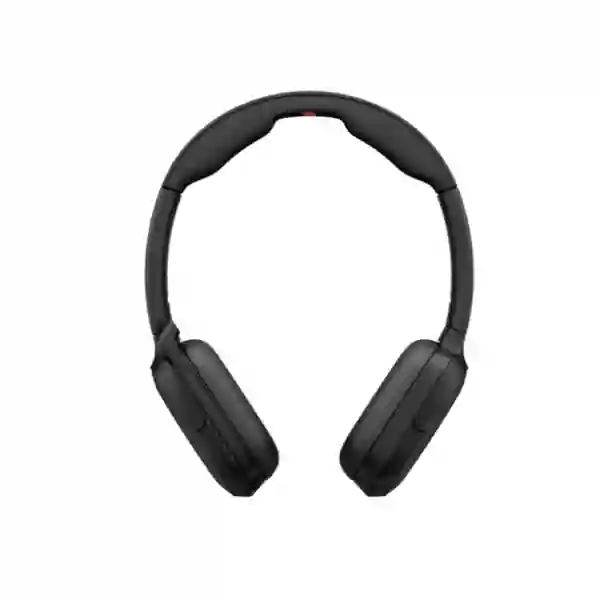
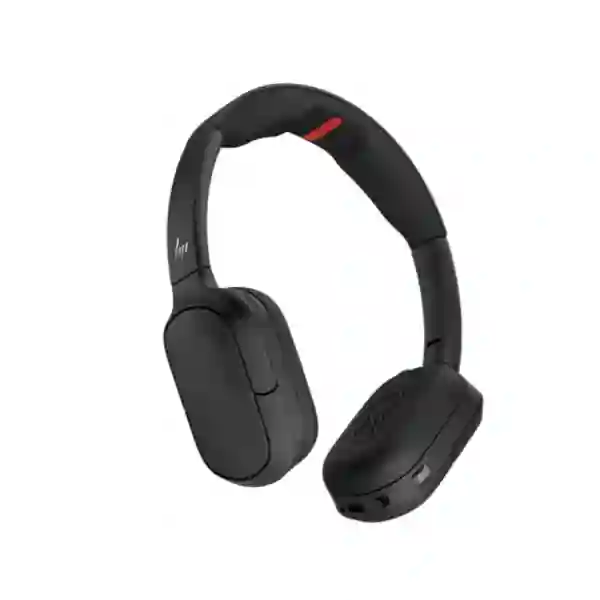
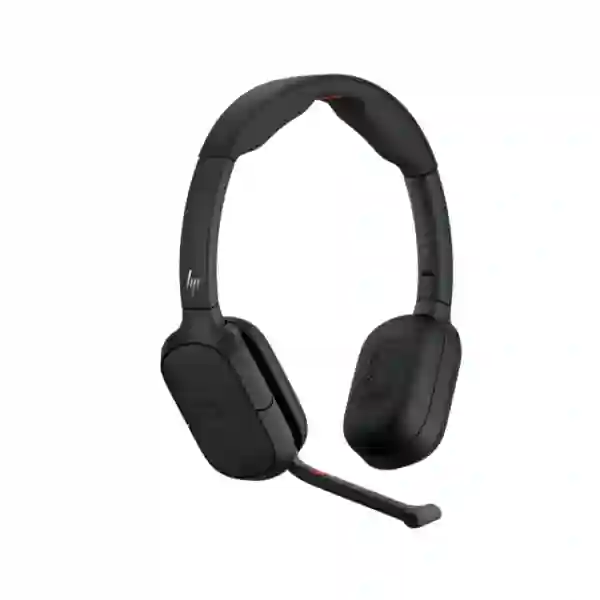
HP Poly Focus 620 Stereo Bluetooth Headset
Professional stereo listening, hybrid active noise cancellation and enhanced microphone noise reduction in a slim, non-folding Bluetooth headset. Explore the real specifications, fit considerations and questions to ask before requesting a quote.
At a glance: is this headset right for you?
Choose this headset for evaluation when you need wireless meetings, a voice-focused microphone system, and the option to reduce distractions for the person listening. The HP Poly Focus 620 Stereo Bluetooth Headset is a strong functional match for hybrid office users who want a single communication device for calls and work audio. It is not a universal desk-phone replacement, a certified hearing-protection device, or a promise of noise-free calls in every setting.
Laptop meetings, mobile work, office collaboration, customer conversations and mixed listening tasks.
Exact variant, headset fit, meeting-app controls, adapter, charging accessories and locally quoted terms.
A wireless work headset for focused communication
When the same working day includes video meetings, detailed customer conversations, independent concentration and mobile calls, the headset has to do more than produce sound. The HP Poly Focus 620 Stereo Bluetooth Headset is intended for someone who wants stereo listening and a dedicated microphone system in one wearable device. Its on-ear design, concealed boom microphone, hybrid active noise cancellation and wireless computer connection address those different moments without forcing the user to change equipment between every task. It is a practical candidate for professional users who divide their time between laptops and phones.
For buyers in Tanzania, the right question is not simply whether a headset is Bluetooth enabled. It is whether it will fit the communication environment, connect to the devices employees actually use, support their meeting software and remain comfortable across the expected working pattern. A quiet private office, a shared office and an employee who travels between appointments present different needs. The Focus 620 is worth evaluating when a user wants call-oriented microphone processing alongside personal noise reduction. Confirm the precise quoted configuration before ordering, particularly if the buyer expects a charging accessory or a particular platform certification.
What the six-microphone system means
HP specifies six digital MEMS microphones in this configuration, but that should not be confused with six microphones all serving the same role. Four are associated with transmitting voice and enhanced voice noise reduction, while other microphone functions support active noise cancellation. That distinction matters: microphone noise control is primarily about helping the person at the other end of a call hear the speaker; ANC is primarily about reducing distracting sound heard by the wearer. Those are related, but they solve different problems.
In a shared workplace, a nearby conversation or keyboard sound can affect the clarity of a call. A headset that isolates the user’s voice can make discussion easier for colleagues and customers, although performance still depends on where it is worn, how the microphone is positioned and the nature of the noise. Likewise, ANC should not be described as creating complete silence. Buyers comparing conference headsets should assess both the microphone audio heard by a remote listener and the listening experience of the person wearing the headset. Testing only music playback misses half the decision.
Acoustic Fence 2.0 for the far end of the call
The Focus 620 uses HP Poly Acoustic Fence 2.0 enhanced voice noise reduction. This technology is designed to limit unwanted nearby sound transmitted during calls, making speech easier to distinguish for the remote participant. It is particularly relevant when an employee is discussing order details, explaining a technical issue or coordinating work while other activity is taking place in the room. The benefit should be evaluated as more intelligible communication rather than a promise to eliminate every environmental sound.
A good pilot test is to call someone who is not in the same room and ask them to judge the voice under several normal conditions: a quiet desk, ordinary conversation nearby and some movement around the workspace. Listen for how naturally words come through, whether speech is clipped and whether unwanted noise competes with the speaker. Repeating the test through the organisation’s real calling application is more useful than judging a microphone from a promotional recording. A practical headset choice should be based on the team’s actual acoustic environment and workflows.
Hybrid ANC for the person wearing the headset
Hybrid active noise cancellation uses microphone information from inside and outside the earcups to reduce certain background sounds reaching the listener. In everyday work, that can help people stay engaged with the speaker in a meeting, follow a training recording or concentrate on an uninterrupted task. It complements the stereo on-ear cushions rather than replacing them. The actual reduction varies with sound type, earcup fit, movement and ANC settings, so it should not be described as a universal barrier against noise.
This is an important distinction when comparing the headset with basic Bluetooth headphones or simple USB communication headsets. A product may offer microphone noise cancellation while providing no active noise reduction for the wearer, or it may reduce listening noise without being especially suitable for voice transmission. The Focus 620 addresses both sides of that experience. Employees who spend long periods in busy rooms may appreciate the flexibility, but they should still be encouraged to manage listening volume and use suitable breaks. The headset does not replace a quiet workspace when privacy is essential.
Transparency mode and situational awareness
There are times when reducing environmental sound is useful and times when it is inconvenient. Transparency mode gives the wearer a way to hear more of the surroundings without simply removing the headset. That can matter when a teammate needs to speak, an announcement is expected or someone is moving between a quiet focus session and a more collaborative activity. It adds a degree of control to the listening experience, particularly for users who alternate between meetings and office conversations.
Staff should nevertheless use common sense around traffic, machinery and other situations where full situational awareness is essential. A headset with transparency capability is not a safety device, and electronic sound processing cannot guarantee that every external warning will be heard. The ability to switch modes should be tested with the user rather than assumed to suit every environment. In procurement discussions, describe transparency mode as a convenience for moving between listening contexts, not as a substitute for removing the headset where direct awareness or safe communication is required.
Stereo listening for more than calls
The Focus 620 has an on-ear stereo wearing style, 32 mm speakers and a stated speaker bandwidth of 20 Hz to 20 kHz. Stereo reproduction can be useful for presentations, recorded demonstrations, learning materials and general media between calls. HP also describes spatial audio for a more immersive presentation of compatible content. The significance for a professional buyer is versatility: the same device can be used for real-time conversation and for listening-focused work when a user does not want separate audio equipment on the desk.
Actual sound quality depends on source material, platform processing, Bluetooth audio mode and the fit of the headset. Speech-focused call audio and high-quality music streaming may behave differently because the connection and application can prioritize different functions. Therefore, buyers should try a normal meeting, a voice recording and a representative media clip before deciding. This helps set realistic expectations about bass, speech intelligibility and stereo separation. The product is best assessed as a communication-first headset with broader listening capability, rather than being judged solely against specialist studio or high-fidelity headphones.
Comfort, weight and working-day fit
HP lists a weight of approximately 208 grams and describes soft cushioned earcups and an ergonomic headband with attention to pressure distribution. Those characteristics are relevant for someone who wears a headset through consecutive meetings, but a comfortable fit remains individual. Head shape, glasses, hairstyle, temperature and the length of uninterrupted wear all affect the experience. A headset that feels comfortable during a short demonstration may feel different toward the end of a busy workday.
For team deployment, invite representative employees to wear a test unit during a genuine work session rather than evaluating only the appearance. Check whether the ear cushions sit comfortably, whether the headband remains secure during routine movement and whether a glasses wearer experiences pressure. Because this is an on-ear model, users who prefer earcups around rather than on the ears may have a different preference. Short adjustment breaks, sensible volume and clean ear cushions can help with day-to-day use. Comfort is a valuable selection criterion, but no single headset design can guarantee the same experience for every employee.
The non-folding design and concealed boom
The standard Focus 620 Stereo Bluetooth Headset is a non-folding design. Its microphone boom can be moved into a less prominent position when not actively in use, making the headset easier to move between a customer call and a meeting where a discreet appearance is preferred. HP lists a 135-degree boom rotation. The microphone should be positioned according to the product guidance and the user’s comfort rather than moved repeatedly in a way that stresses the mechanism.
The non-folding construction matters when choosing travel accessories. This is not the same item as the separately identified Focus 620 Fold model, and a purchaser should not assume the two products pack in the same way or have identical accessory bundles. If a user frequently carries a headset in a compact bag, evaluate the space it requires and whether the provided pouch gives sufficient everyday protection. If portability is the main buying priority, compare the specified standard model with the folding alternative before a purchase decision. Clear naming is also important in a shared purchasing list so the requested configuration is not replaced inadvertently.
Connecting with the supplied BT700 adapter
HP’s listed package for the identified standard configuration includes a BT700 Bluetooth USB-C adapter plus a USB-C-to-USB-A adapter. This can be useful when a computer is the primary calling device and users want a straightforward accessory supplied with the headset. The BT700 is a computer connection option, not an indication that the headset is a wired-only device. It uses wireless technology while the adapter occupies a physical USB port on the host.
Before deployment, verify that the computer has a suitable port, that the relevant operating system is supported and that the organisation’s device policies permit the use of Bluetooth or USB peripherals. Some corporate laptops have restrictions on adapter installation or peripheral drivers. Teams should also establish where small adapters will be stored when users move between docking stations and laptops. If the quote relates to a different sales package, confirm the adapter type and included pieces rather than relying on a generic photograph. This simple check can prevent a mismatch between the headset that was selected and the computers it is expected to serve.
Direct Bluetooth and mobile-device use
The Focus 620 also supports Bluetooth connectivity for compatible devices. That makes it relevant to an employee who works with a mobile phone as well as a computer, provided the intended device and calling application are tested. HP lists a capability to remember up to ten paired devices. Paired-device capacity should not be confused with a guarantee that ten devices can play audio or handle calls simultaneously. Pairing history, active multipoint behavior and call switching are separate concepts.
When evaluating cross-device workflows, pair the actual business phone and laptop, make a short test call on each and confirm how incoming-call alerts behave. Check whether a mobile call interrupts a computer meeting, how the user returns to the original application and whether mute status is consistent. Such behavior can vary with device settings and the collaboration software in use. Employees should be given a short setup guide that specifies a preferred main calling device and an approved connection method. The goal is dependable day-to-day switching, not an assumption that every Bluetooth feature behaves identically on every device.
Operating systems and application compatibility
HP lists compatibility with Windows 10, Windows 11, macOS, Chrome OS, iPadOS, Android and iOS for the relevant Focus 620 configuration. These operating-system listings are useful starting points, but they do not mean every application and call-control function is identical. Audio may work on a system while a dedicated button, status indicator or call-handling shortcut requires additional setup or platform support. Company IT policies, software versions and Bluetooth management can also influence the experience.
A procurement checklist should therefore name both the device and the communication service. An employee using a Windows laptop for Microsoft Teams may have different accessory-management requirements from someone joining meetings on a browser-based platform or receiving calls on an Android phone. HP Poly’s published desktop compatibility information identifies the Focus 620/625 family among its supported devices for several leading meeting clients, subject to the details of the specific software configuration. A short pilot using the organisation’s actual endpoints is the most reliable way to verify microphone selection, speaker output, mute behavior and the user experience before a larger rollout.
Working with Microsoft Teams and other meeting tools
The official specification includes a Microsoft Teams control among its headset buttons, and HP Poly publishes meeting-client compatibility information for the product family. That supports a practical use case for colleagues who spend much of their day in online meetings. However, a button on a headset should not be treated as proof of every possible certification, tenant integration or device-management feature for the exact part being quoted. Certification and supported functions can vary by configuration and application release.
For deployment, check that the preferred meeting tool recognizes the headset as both speaker and microphone. Test answering and ending calls from the headset where needed, muting while speaking and moving between meetings without accidentally leaving the wrong microphone selected. If call-control buttons are important to help-desk or customer-facing roles, obtain confirmation for those functions under the exact software environment. This avoids a familiar procurement problem in which basic audio works well but users are frustrated by the secondary features they expected. A short written acceptance test is more dependable than a simple compatible-or-not-compatible label.
HP Poly Studio app and device management
HP Poly documents Focus 620/625 support within its current Studio desktop and mobile application ecosystem. Depending on the host and supported features, these applications can assist with device preferences, updates and support information. For organisations that manage many headsets, the availability of a recognizable management tool may simplify the task of keeping settings consistent and helping employees resolve straightforward issues. It should still be assessed alongside the company’s security controls and preferred software deployment process.
Before requiring everyone to install the app, IT teams should review the current official release information, approved operating systems and the permissions required in their environment. If end users cannot install software themselves, prepare an administrator-led process and confirm whether updates can be applied through the expected connection method. A standard profile for microphone, listening and call controls can reduce confusion when people move between desks. Do not assume every enterprise reporting feature is included with a basic headset purchase, because some management capabilities may depend on separate licensing, organisation setup or platform support. Verify which features are essential and available.
Controls that support work without screen hunting
The listed user controls cover functions including volume adjustment, mute, answering or ending calls, media playback, pairing, ANC and transparency modes. Voice alerts report certain conditions such as mute state, connectivity and battery level. For someone moving through a series of calls, being able to adjust a common setting without opening an application can save small interruptions and help maintain attention on the conversation. The benefit is particularly visible in meetings where looking away from a shared document is inconvenient.
The value of physical controls depends on how accurately they work in the chosen application. A mute action on a headset and the mute icon in a meeting client do not always mean the same thing unless the integration is supported and functioning. Staff should know how to confirm their effective microphone state, especially before discussing sensitive business information. During onboarding, demonstrate the most frequently used controls and have each employee repeat a call test. A simple one-page reference is often more useful than giving people every feature description at once. Employees should also be shown how to recover when a meeting client selects a different audio device.
Battery expectations under real conditions
HP provides different battery figures depending on ANC and the online indicator. For the listed configuration, the figures reach up to 25 hours of talk time when both ANC and the online indicator are enabled, and up to 30 hours when they are switched off. For listening, HP lists up to 42 hours with ANC on and the online indicator off, and up to 52 hours with both switched off. Those are maximum manufacturer figures measured under stated conditions, not fixed daily operating times.
A buyer should plan around the user’s actual pattern, which may include calls, music, idle periods, connection changes and varied volume levels. Battery age, environmental conditions and software settings can also affect runtime. Teams with frequent long calls may prefer a predictable charging habit rather than depending on the theoretical maximum. If a shared headset is used across shifts, clarify who is responsible for charging and how it is stored between users. An employer assessing a group purchase should evaluate how much active call time people really need, not simply select the largest battery number displayed in a specification sheet.
Charging time and quick top-ups
For the relevant standard configuration, HP lists approximately one hour for a wired recharge and approximately three hours for wireless charging where a suitable charging accessory is used. HP also specifies that roughly ten minutes of wired charging can provide up to four hours of talk time or up to six hours of listening under conditions with ANC and the online indicator switched off. These figures are useful for planning, but they remain conditional and should not be treated as guarantees under every charging source and usage pattern.
The basic headset package should not be assumed to include a wireless charging stand. A purchaser who wants desktop drop-in charging should request the exact stand and compatibility details in the quote. For a mobile employee, the supplied USB-C charging cable may be a practical approach; for a shared desk, a designated charging station can make the routine easier. Avoid relying on improvised cables or power supplies of unknown quality. A straightforward charging policy, particularly for meeting-heavy teams, reduces the chance that a headset is unavailable when a call begins.
Understanding the included accessories
HP’s published box list for the standard headset configuration identifies the wireless headset, travel pouch, BT700 USB-C adapter, USB-C charging cable, USB-C-to-USB-A adapter, quick-start guide and warranty card. This is useful information when checking whether a laptop user can begin setup without buying a separate computer adapter. However, packaging can vary by sales configuration and market; the buyer should confirm the items written on the supplier’s quotation rather than rely on a generic list alone.
It is equally important to recognize what is not established by that standard box list. An external wireless charging stand, premium protective case or spare cushions should not be presented as included unless they appear in the exact offered bundle. The Focus 620 Fold and headset-plus-stand variants may have different equipment descriptions, so similar names are not interchangeable. For business purchases, ask for an itemized description and match it with the model code and the receiving checklist. This protects purchasing staff, IT administrators and end users from disputes about missing extras when the order arrives.
Specifications at a glance: how to read them
The technical details below are based on HP’s specification for a documented standard Focus 620 Stereo Bluetooth Headset configuration. They help with comparison, but the seller’s exact part number and package should be checked before the specifications are applied to a purchase order. In particular, marketing names can cover region-specific or accessory-specific variants. The model family includes non-folding and folding editions as well as separately bundled charging accessories.
Some values are directly useful to most buyers, such as the stereo on-ear style, weight, headset connection options and stated battery scenarios. Others are primarily helpful during engineering comparison, for example microphone bandwidth, speaker impedance or nominal frequency range. No single numerical specification establishes the quality of a call. The most relevant combination is whether the wearer is comfortable, the far end can understand speech, the required application recognizes the device and the charging setup fits the workday. Use the specification table as a starting point for a practical evaluation rather than a substitute for it.
A sensible day-one setup sequence
A useful onboarding sequence begins before the first important meeting. Charge the headset, confirm the contents, identify the computer’s preferred wireless connection and check the host operating system. If using the supplied BT700, insert it into a permitted port and allow the computer to complete its normal accessory setup. If using direct Bluetooth, follow the pairing instructions for the specific device. Select the headset as microphone and speaker in the operating system and then within the meeting application, since those selections may be separate.
Next, complete a test call with a colleague who can comment on the far-end microphone sound. Try normal speaking volume, mute, answer and end controls if supported, and the ANC or transparency setting appropriate for the workspace. Check battery status and establish the user’s charging method. Record any special settings that helped the device behave consistently. For a department rollout, doing these steps with a small pilot group can reveal policy restrictions or unfamiliar controls before many employees depend on the hardware. A clear start-up routine can be as important as the advertised feature list.
A practical test for shared offices
Shared offices pose a particular audio challenge because a headset needs to support the person speaking without turning the room into a soundproof environment. A fair evaluation should reflect realistic conditions: two colleagues speaking nearby, ordinary keyboard activity and a normal customer call. The person at the other end should judge whether the speaker remains understandable, while the wearer should report whether the listening audio remains clear enough to follow the conversation. Both observations matter.
Compare performance across a few common tasks rather than testing only in the noisiest possible situation. Try a scheduled online meeting, a spontaneous audio call and a stretch of independent work. Note whether background noise changes how naturally the user speaks, whether their own voice feels comfortable and whether ANC affects the awareness they need to work safely. A positive result in a pilot supports the buying case for similar desks; a poor result can identify that a quieter location, different headset style or revised microphone positioning would be more effective. No headset should be sold as a complete substitute for a suitable acoustic workspace.
Hybrid and remote work scenarios
For a person splitting time between home, office and travel, consistent call equipment can reduce setup differences across locations. The Focus 620 provides a recognizable headset interface even when the employee changes between supported computers and mobile devices. The travel pouch, compact boom arrangement and Bluetooth connectivity are relevant conveniences for this working pattern. The standard non-folding design means the employee should still consider the space available in a bag and the protection needed during transport.
Remote-working conditions may also expose problems that a headset cannot resolve, including a weak internet connection, an incorrectly selected microphone or poor room privacy. Buyers should therefore evaluate the whole work setup. A headset can improve audio capture and listening, but it cannot repair packet loss or ensure a secure network. A simple remote-work guide should explain audio-device selection, keeping the headset charged, testing before high-stakes calls and choosing a private space for confidential discussion. Those practices make the hardware more useful without promising a perfect call regardless of the surrounding infrastructure.
Customer service and consultation use cases
Advisers, salespeople, support specialists and project coordinators may spend many hours explaining details to people who cannot see the surrounding office. The Focus 620’s call-focused microphones and stereo listening can be relevant to those conversations, especially when the employee frequently alternates between a meeting platform and a mobile phone. For a person listening to a customer while documenting information, comfort and reliable mute controls may matter as much as audio quality.
However, a wireless Bluetooth headset is not automatically the correct answer for a tightly integrated contact-centre workstation, a desk-phone environment or specialist telephony platform. Those deployments may depend on a precise softphone, call-control integration, base station or compliance process. Confirm compatibility with the actual call system and consider whether an organisation prefers dedicated wired equipment for fixed desks. If the headset is intended for sensitive consultations, assess privacy procedures and recording requirements independently. The right choice is a tested workflow that helps an employee communicate clearly, not a category claim that every business phone or call-centre solution will work.
Buying for teams: create an acceptance checklist
Before purchasing multiple units, define what the headset must accomplish in everyday use. The checklist should identify the intended laptop and phone models, operating-system versions, main meeting or calling application, desired connection method, expected daily talk time and charging arrangement. Add user requirements such as glasses comfort, on-ear preference and the need to hear colleagues during work. These concrete details help separate essential capabilities from attractive but rarely used features.
A small pilot can then be scored against the checklist. Ask one user with frequent calls, one mobile employee and one person from a shared office to try the headset. Observe how quickly they can connect, whether the same microphone remains selected, how they perceive listening comfort and whether recipients understand their speech. Record any setup steps requiring IT support. For a Tanzania-focused purchasing team, confirm the exact item description, commercial terms and after-sales arrangements with the seller instead of assuming international catalogue information represents a local offer. An acceptance checklist makes the procurement decision reproducible and easier to support.
Considerations for IT administrators
IT administrators should treat the headset as part of the endpoint environment rather than merely a personal accessory. Questions include whether Bluetooth use is allowed, whether the BT700 adapter can be attached to managed laptops, what software is permitted for updates and how devices are handled when employees leave or change roles. The answer may differ between highly managed corporate computers and employee-owned mobile devices. Clear rules reduce support tickets and inconsistent configurations.
For a deployment, document the approved connection path and application settings, then confirm the procedure for software updates through the relevant HP Poly tool. Maintain a small stock of replacement consumables only if sourcing and compatibility have been confirmed. Set an expectation for employees to report audio issues with useful details such as the application, operating system, adapter type and whether the problem occurs on all calls. This makes troubleshooting more precise. Compatibility tables published by HP Poly are valuable, but they cannot replace a local test because application versions, permissions and managed-device policies change over time.
Power, connectivity and the Tanzania context
Organisations planning headset purchases in Tanzania may operate across office, home and mobile environments with different power and network conditions. The relevant decision is not whether the headset has a Tanzania-specific calling feature; it is whether employees have reliable charging and a stable calling platform wherever they work. Bluetooth links the headset to a nearby device, but an internet meeting still depends on that device, its application and the available network. Mobile calls likewise depend on the phone and its normal service.
A useful deployment plan includes a convenient charging arrangement, a test of the real workplace internet connection and a way to reconnect after an interruption. Employees who rely on online meetings can benefit from knowing how to check which speaker and microphone are active after a computer resumes or a dock is changed. These are general operational considerations, not claims about network coverage, local regulatory approval or service availability. Any local delivery, stock, warranty-handling or price information should come from a verified quotation for the exact product and destination rather than being inferred from the headset’s global product description.
What the headset cannot solve
Even a capable wireless headset has limits. Hybrid ANC may reduce some ambient sounds for the listener but cannot erase every conversation or make an unsuitable workspace private. The voice microphones can reduce unwanted sound transmitted to others, but they cannot guarantee intelligible speech when the microphone is incorrectly positioned or the environment is extremely loud. Bluetooth freedom does not mean a meeting will continue when the computer’s internet connection fails. And operating-system compatibility does not guarantee every third-party application’s button integration.
These limits should be part of the buying decision rather than hidden after the product description. Someone working beside heavy machinery may require approved hearing protection rather than an ordinary communication headset. Someone with a fixed desk-phone system may need a specifically supported telephony connection. A traveller may place a higher value on folding construction than on the standard Focus 620’s styling. Clear expectations help buyers choose the correct device the first time and avoid spending money on features that do not address their primary problem.
Choosing between standard, folding and bundled versions
The Focus 6 family includes versions with similar headline positioning but different physical designs or package combinations. The standard Focus 620 Stereo Bluetooth Headset discussed here is non-folding. HP separately identifies a Focus 620 Fold configuration, and published product records also show headset bundles that include a wireless charging stand. The existence of these related options does not mean an accessory or folding mechanism is supplied with every Focus 620 order.
For a mobile professional who frequently packs a small bag, the folding edition may deserve comparison. For an employee working mostly at a fixed desk, a charging stand may be useful if available as a verified, compatible accessory. For a purchaser prioritizing the standard headset, the listed USB-C adapter and cable may be the more relevant items. Confirm the precise manufacturer product number, whether the headset itself is folding, which charging components are included and what appears on the seller’s invoice. This eliminates avoidable confusion between the family name and the actual commercial configuration being offered.
Accessories, care and long-term usability
A headset used every day benefits from modest, consistent care. Keep the ear cushions clean and dry according to the manufacturer guidance, avoid twisting the boom unnecessarily and store the headset where it will not be crushed by books or laptop equipment. The supplied travel pouch is useful for ordinary carrying, but users should not assume it provides the same protection as a rigid transport case. Keep the charging cable and adapter in a predictable place to reduce loss.
For organisations, nominate a process for handling damaged cushions, misplaced adapters or units that no longer charge as expected. Replacement parts should be matched to the actual model and sourced through an appropriate channel, rather than relying on compatibility guesses based only on a similar product name. Regularly check whether software updates are recommended through HP Poly’s supported management application. Establishing these small maintenance practices can support a more consistent user experience over time. It is not necessary to promise a particular product lifespan or repair outcome to explain why basic care matters.
Questions to confirm before requesting a quotation
A well-written quotation request should state the full product name and explain the required form factor. If the organisation wants the standard non-folding Focus 620, say so explicitly. State whether the headset will be paired with a laptop, a mobile device or both, and identify the main calling platform. Ask which Bluetooth adapter, cables, pouch and charging accessories are included in the exact item being quoted. When a team rollout is planned, describe the number of users and whether an evaluation unit is required.
The buyer should also request the actual manufacturer part number, country-specific commercial terms and the supplier’s confirmed support arrangements. Do not treat a manufacturer warranty statement from another region as a promise about how a local transaction will be serviced. If the quotation includes a charging stand or other accessory, it should have its own clear identification. These details make offers easier to compare and reduce the risk of ordering a superficially similar headset with a different accessory package. A precise request is the fastest route to a useful, comparable response.
A buyer-friendly comparison with simpler headsets
Compared with a basic communication headset, the Focus 620 offers a combination of hybrid ANC, microphone noise reduction, stereo reproduction and wireless computer connectivity. Those attributes can be valuable for employees who move between conversation and concentration. By contrast, an inexpensive wired headset may still be a sensible choice for someone at a fixed workstation who needs only dependable voice input and does not require mobility or ANC. More features are not automatically better if the deployment is simple and tightly controlled.
Likewise, ordinary music-focused wireless headphones may be attractive for listening but should not be assumed to offer equivalent business call handling or microphone performance in a shared workspace. The comparison should be organized around the buyer’s actual priorities: call intelligibility, app integration, comfort, device portability, charging routine and manageability. An employee who spends most of the day listening might make a different selection from one who conducts external meetings continuously. This is why scenario-led evaluation is more helpful than an unqualified claim that a single headset is best for every workplace.
A final fit check before the order
The Focus 620 is most compelling when the intended user needs a communication-focused wireless headset, stereo listening, active noise control and a familiar setup across compatible computing or mobile devices. Its design and published features are appropriate subjects for a business pilot. The most important unanswered questions at quotation stage are commercial rather than technical: exactly which variant is being supplied, which accessories are included and how the supplier will handle the transaction and subsequent support.
Start by matching the product to the actual call workflow, checking the required application and trying the headset with the intended devices. Verify that its on-ear fit and non-folding construction suit the user, and compare the charging solution with the working day. If those checks are positive, a clear quotation for the precise configuration is the next practical step. Request current Tanzania-market pricing, availability and relevant terms directly rather than assuming details that have not been verified. This approach keeps the purchase centered on communication quality, appropriate fit and predictable deployment.
Technical specifications: standard Focus 620 configuration
Published manufacturer details for a documented standard configuration are summarized below. Verify every quoted part number and accessory bundle against the supplier’s itemized description.
| Specification | Manufacturer-listed detail |
|---|---|
| Design | Non-folding, on-ear, stereo, black |
| Headset weight | Approximately 208 g |
| Speakers | 32 mm; published 20 Hz to 20 kHz speaker bandwidth |
| Microphones | 6 digital MEMS microphones across voice and ANC functions |
| Voice processing | Acoustic Fence 2.0 enhanced noise reduction |
| Listening controls | Hybrid ANC and transparency mode |
| Connectivity | Bluetooth; BT700 USB-C adapter in listed standard package |
| Remembered pairings | Up to 10 paired devices; not 10 concurrent active connections |
| Talk-time scenarios | Up to 25 hours with ANC and online indicator on; up to 30 hours with both off |
| Listening scenarios | Up to 42 hours with ANC on; up to 52 hours with ANC off, online indicator off |
| Charging | Approximately 1 hour wired; approximately 3 hours wireless with suitable accessory |
| Quick charge | Approx. 10 minutes wired for up to 4 hours talk or up to 6 hours listening under specified settings |
| Operating systems | Windows 10/11, macOS, Chrome OS, iPadOS, Android and iOS |
| Published standard-box items | Headset, pouch, BT700 USB-C, USB-C cable, USB-C-to-USB-A adapter and guides |
Battery and charging times are conditional manufacturer maxima or approximations, not assured results. The standard package does not establish inclusion of a wireless charging stand.
Frequently asked questions
Is the HP Poly Focus 620 a stereo Bluetooth headset?
Yes. The standard Focus 620 is an on-ear stereo Bluetooth headset intended for calls, meetings and listening. It is a non-folding design, so check the precise product name if a compact folding model is needed. The main value for a business user is the combination of stereo sound, call-oriented microphones and personal listening controls. Confirm the quoted version to avoid confusion with related Focus 6 family packages.
Does it have active noise cancellation?
Yes. HP describes hybrid active noise cancellation for the listening side of the experience, plus enhanced microphone noise reduction for the voice being transmitted. These are two distinct functions. ANC can help the wearer focus, while microphone processing aims to make the speaker more understandable to other people. Neither function guarantees complete removal of all surrounding sound, and actual results depend on the environment and fit.
How many microphones does the Focus 620 use?
HP’s specification lists six digital MEMS microphones for the identified configuration. HP also describes four noise-cancelling microphones associated with voice pickup and enhanced voice processing. The difference arises because microphones can serve different signal-processing roles, including voice transmission and active noise cancellation. For a purchaser, the important test is whether speech remains clear to the remote participant in the actual calling environment.
Can it connect to both a laptop and a phone?
The headset supports Bluetooth and is designed for computer and mobile use with compatible devices. HP lists the ability to pair with up to ten devices, but this should not be interpreted as ten simultaneous active connections. If staff need to move between a laptop meeting and a mobile call, test that workflow on their actual devices and communication apps. Connection switching and call handling can vary by configuration.
What is the BT700 adapter for?
The BT700 is a Bluetooth adapter used for a computer connection. HP lists a USB-C BT700 adapter and a USB-C-to-USB-A adapter in the documented standard package. It can be useful for laptops where the organisation prefers the manufacturer’s connection accessory. Check the actual product bundle and the computer’s permitted USB connections before ordering. A Bluetooth adapter does not guarantee support for every softphone call-control feature.
How long does the battery last?
HP gives several conditional figures, including up to 25 hours of talk time with ANC and the online indicator enabled, or up to 30 hours with both off. It also lists listening maxima of up to 42 hours with ANC on or 52 hours with ANC off under specified indicator conditions. Actual runtime varies with usage. Choose a charging plan based on how employees work instead of treating a maximum as an assured shift length.
Does the standard package include a wireless charging stand?
Do not assume it does. HP’s listed contents for the standard headset package include a USB-C charging cable and other connection accessories, while separately named configurations are available with charging stands. A wireless charging accessory should appear explicitly in the seller’s itemized quotation if it is expected. The approximate wireless charging time published by HP applies when a suitable wireless charging arrangement is used.
Will it work with Microsoft Teams, Zoom or other meeting platforms?
HP Poly publishes compatibility information for the Focus 620/625 family, and the standard headset specification lists a Teams control. For a business purchase, compatibility should be checked against the actual operating system, installed meeting application and connection method. Basic speaker and microphone functionality is not the same as complete call-control integration or certification for a particular product variant. Carry out a real call test before purchasing in volume.
Can the headset be used with a desk phone?
Do not assume universal desk-phone compatibility. Some phones and telephony platforms may offer supported connection paths, but this depends on the phone model, software and the manufacturer’s compatibility information. Organisations needing a headset for a desk phone or contact-centre station should provide the exact equipment and ask for a verified compatibility assessment. A normal Bluetooth connection to a mobile device does not establish that every office desk phone will work.
Is this the same as the Focus 620 Fold?
No. The standard Focus 620 Stereo Bluetooth Headset is listed as non-folding. HP publishes a separately identified Focus 620 Fold variant. Closely related names can also describe bundles with different charging or travel accessories. If bag space, protection or a specific accessory is important, compare the exact manufacturer product numbers and package lists rather than relying on the shared Focus 620 family name.
Does the Focus 620 need special software?
Basic audio operation depends on the host and its connection setup. HP Poly Studio desktop and mobile applications provide supported management, preference and update functions for the Focus 620 family. Whether software installation is required for a specific advanced feature depends on the function and environment. Business IT teams should review current app guidance and their endpoint policies before deployment, especially where call-control or fleet-management requirements are involved.
What information should I include in a Tanzania quotation request?
State that you need the HP Poly Focus 620 Stereo Bluetooth Headset, clarify that the requested product is the standard non-folding model, and identify the devices and calling platform it must support. Request the exact manufacturer part number, itemized accessories, current price, verified availability, delivery terms and confirmed warranty or support arrangements for the quoted transaction. A clear quote avoids unsupported assumptions about local stock, service coverage and optional charging stands.
Request a Focus 620 quotation for Tanzania
Specify the non-folding HP Poly Focus 620 Stereo Bluetooth Headset, the computers and meeting applications your team uses, and whether a separate charging stand is required. Ask for the exact model code, itemized box contents, current price, availability and applicable transaction support terms before placing an order.
Contact FourTeck Tanzania to request the exact configuration and a current quotation.




Reviews
There are no reviews yet.