
Professional wireless audio • Tanzania buying guide
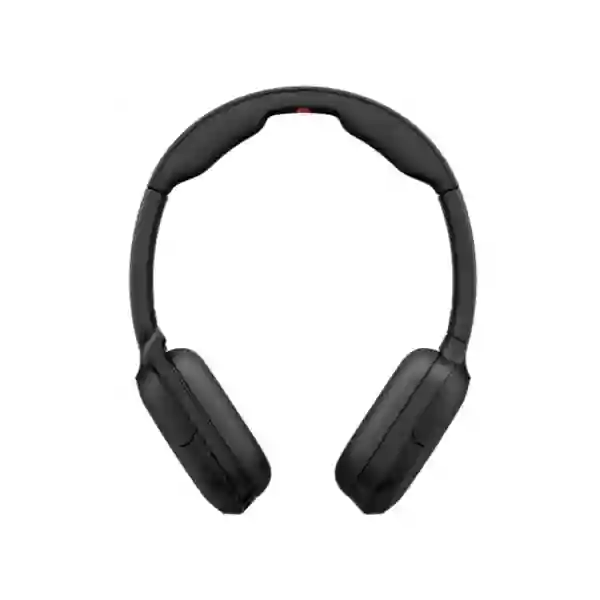
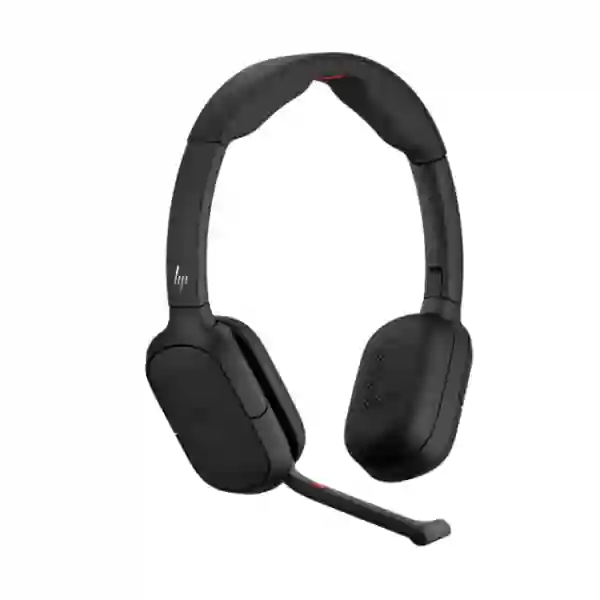
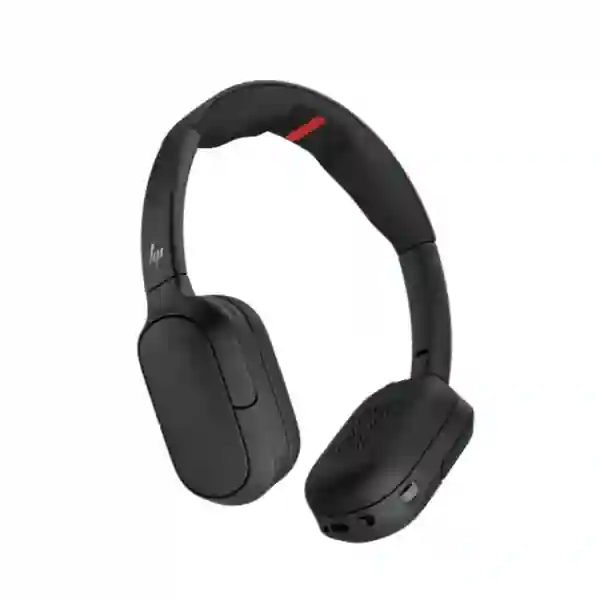
HP Poly Focus 620 Fold Stereo Bluetooth Headset
A headset for the worker who does not stay at one desk: take calls, focus during meetings, listen to media and fold the headset away when work takes you elsewhere. The HP Poly Focus 620 Fold combines a stereo on-ear fit, a hideaway microphone boom, hybrid active noise cancellation and professional voice-noise reduction in a portable format. It suits users who need consistent everyday communication without giving up the freedom to use a laptop and phone.
Before buying, match this specific foldable configuration to your computer ports, meeting applications, calling workflow and travel routine. Ask for a Tanzania quotation that identifies the exact product configuration and commercial terms rather than assuming all Focus 620 or Focus 625 packages are identical.
At a glance: what you are choosing
Who is this foldable business headset designed for?
The strongest fit is a professional who divides the day among laptop meetings, telephone conversations, focused work and movement between locations. That may describe an account manager visiting customers, a supervisor working between departments, a consultant carrying a laptop to meetings or a remote employee who needs a dependable headset at home and in a shared office. The stereo format helps the wearer listen with both ears, while a dedicated boom microphone provides a different approach from relying on a laptop microphone placed across a desk.
It is also worth considering for a small or growing team trying to standardise how people speak on calls without restricting everyone to an identical desk arrangement. The foldable housing is particularly meaningful when users frequently pack their equipment. A fixed headset may be perfectly adequate for one workstation; this model becomes more compelling when mobility, portable protection, different connection options and convenient controls matter as much as sound.
What makes the Focus 620 Fold different from ordinary Bluetooth headphones?
General-purpose wireless headphones may offer music playback and a microphone, but workplace communication asks for several things at once. The person on the other end needs understandable speech, the wearer needs to hear participants clearly, the user must manage mute reliably, and the headset needs a sensible computer connection. HP positions the Focus 6 series around those work scenarios. The Focus 620 Fold adds a practical folding design to the stereo communications platform rather than simply presenting consumer headphones with a business label.
The distinction should guide purchasing rather than become a blanket performance claim. The right test is whether the headset works with the actual calling client, operating system and equipment used every day. A well-designed boom and noise processing can improve the communication experience, but they cannot fix a congested internet connection, a poorly configured softphone or a collaboration platform that does not implement the same call-control functions.
Four voice-noise-reducing microphones and a six-microphone design
HP specifies six digital MEMS microphones in the hardware and describes four microphones used for enhanced voice noise reduction with Acoustic Fence 2.0. These are not conflicting counts: the product specification identifies the total microphone arrangement, while the feature description explains the microphones involved in isolating speech from nearby distractions. Acoustic Fence 2.0 aims to make surrounding voices and other noise less prominent to the far end of a conversation. This distinction is important when comparing headsets that advertise different microphone totals.
Consider the typical problem of an employee making a client call near colleagues who are also talking. The microphone system is designed to prioritise the speaker rather than reproduce the full surrounding room. For best results, wear the headset as intended, position the rotating boom correctly and evaluate sound with a real call. The environment, speech level, application processing and microphone placement can change results. No noise reduction system should be sold as a guarantee that all background sound will disappear.
Hybrid active noise cancellation: a benefit for the listener
Hybrid ANC uses microphones associated with the ear cups to help reduce environmental noise heard by the person wearing the headset. This is separate from Acoustic Fence voice processing, which principally addresses what remote callers hear. That separation matters because a buyer might need both outcomes: clearer outgoing speech during meetings and less distraction while listening to a long presentation or concentrating on a report. The Focus 620 Fold offers both capabilities, with their effects depending on the surrounding sounds.
ANC is useful in a shared working area, a home environment or while travelling, but it is not a substitute for a quiet room when confidential work requires privacy. Conversation and sudden noises may remain audible. It is sensible to compare ANC on and off in the locations where the headset will actually be used. If constant awareness is more important than reduced background sound, select Transparency mode and keep appropriate attention on the surroundings.
Transparency mode and awareness during the working day
Not every task benefits from isolating outside sound. Staff may need to hear a colleague speak, notice an announcement or remain alert while moving around the workplace. Transparency mode provides a way to bring more environmental sound into the listening experience without having to remove the headset for every brief interruption. HP lists ANC and Transparency controls among the headset user controls, making the adjustment part of the everyday workflow rather than a complicated technical exercise.
Use the modes deliberately. ANC can be appropriate during a planned online meeting or a concentrated desk session; Transparency can be helpful when the wearer needs to remain aware of nearby activity. Neither mode removes the need for safe behaviour, especially around vehicles, equipment or public spaces. Organisations evaluating the headset for mixed work environments should explain the difference to users during onboarding, instead of leaving everyone to discover the settings through trial and error.
Stereo sound, spatial audio and working with media
The headset uses an on-ear stereo configuration and 32 mm speakers. HP lists a speaker frequency bandwidth of 20 Hz to 20 kHz and describes spatial audio as a way to make supported listening content more natural and immersive. For users who alternate between voice meetings, training videos, recorded briefings and music during breaks, a stereo headset provides a more flexible listening format than a single-ear call-centre headset. Speech intelligibility remains the central criterion for professional use.
Spatial presentation is an enhancement rather than a promise that every application will deliver the same effect. The source content, operating system, audio mode and application may influence the result. A procurement evaluation should include ordinary business tasks: understand the person speaking from a laptop, follow an instructional video, join a group conversation and switch back to a phone call without excessive adjustments. That practical evaluation is more valuable than judging the product from one technical audio specification alone.
Comfort for long meetings and extended daily wear
HP describes an ergonomic headband with a pressure-relief gap and soft cushions shaped to work with the ears. The headset weighs approximately 208 g, a useful specification when comparing a portable professional headset with heavier over-ear designs. The low-profile stereo construction and hideaway boom are intended to reduce the sense of carrying a large office headset. For an employee who regularly attends back-to-back calls, fit can affect willingness to keep using the headset consistently.
Comfort is also personal. On-ear cushions contact the ear rather than fully enclosing it, and users may feel different levels of pressure depending on head shape, glasses and duration of wear. Where a team is standardising equipment, allow a representative wearer to test the fit for a meaningful period. Encourage breaks and clean cushions as required. Replaceable cushions are a useful maintenance consideration, but confirm the exact replacement parts and their availability before treating them as an included ongoing service.
Foldable construction and portability between work locations
The defining feature of the Fold configuration is its ability to pack down for movement between locations. The headset can accompany a laptop bag during a commute, travel with a field employee or move between a home office and a shared workstation. HP’s published package information includes a travel pouch, and its feature information describes a travel case. The portable design is a genuine difference from the non-folding Focus 620 versions, particularly when protecting equipment while carrying other accessories.
Foldable does not mean indestructible. Pack the headset without pressure on the microphone boom, keep small cables and the USB adapter together, and avoid leaving it exposed to liquids or direct heat. For an organisation distributing several units, teach users how to fold and store the product rather than assuming it is obvious. The value of this feature is the regular convenience of transporting a properly stored work headset, not a claim that the hinges need no care.
A hideaway microphone for calls and everyday appearance
The Focus 620 Fold has a rotating, hideaway microphone boom. HP lists a boom rotation of 135 degrees and a 70 mm boom length in its product specifications. For video meetings, the boom places the communication microphone in a deliberate position near the mouth. Between calls, users can move it out of the way for a less prominent profile. This helps the product adapt to both dedicated calls and ordinary listening without the visual bulk of a permanently exposed microphone.
Placement is still part of good call quality. A microphone pushed away from the intended position may pick up speech differently, especially in a busy room. Users should learn where the microphone sits when active, how to engage mute and how the device behaves when switching from a laptop call to mobile audio. During an initial rollout, a short audio recording and a test call can reveal poor placement before it affects a customer conversation.
How the Bluetooth connection works on a computer
HP lists Bluetooth connectivity and includes the BT700 Bluetooth USB-C adapter with a USB-C-to-USB-A adapter in the specified package. This offers a useful route for a laptop or desktop computer, particularly when the organisation prefers a supplied headset adapter rather than relying exclusively on an internal Bluetooth radio. The adapter’s physical fit is easy to assess: check whether the selected computer has an available USB-C or USB-A port and whether any docking arrangements might obstruct access.
Do not assume that every USB port or operating system will provide identical controls. The headset’s supported operating systems are listed broadly, but application-level functions may differ between a managed Windows workstation, a personal Mac and a shared computer. Before ordering many units, test the full sequence: plug in the adapter, select the headset for microphone and speaker, join a meeting, mute, end a call and reconnect after a restart. These steps identify integration issues early.
Pairing with smartphones and switching between work devices
The headset also supports Bluetooth use with compatible mobile devices. HP lists pairing memory for up to ten devices, which is a helpful distinction from the number of devices a headset actively uses at a given moment. Pairing memory means the headset can remember previously associated devices; it does not mean ten calls or media streams can be operated simultaneously. For employees who use both a company laptop and a phone, this makes a realistic dual-device workflow possible to investigate.
Plan how users should handle competing notifications and incoming calls rather than promising automatic behaviour in every application. A call on one connected device may affect audio from another, and call priority may differ by platform or setting. Test the intended setup with the exact mobile operating system and laptop software. Team administrators should also decide whether personal devices are allowed and whether connecting the headset to a shared computer meets workplace privacy expectations.
Connection range and real-world movement
HP describes a Bluetooth wireless range of up to 50 metres for the Focus 620 Fold. This is a manufacturer maximum under suitable conditions, not a guaranteed indoor operating distance. Walls, reinforced construction, surrounding radio equipment, desk placement and the location of the Bluetooth adapter can all change the practical experience. A person may be able to step away from a workstation for a moment, but that does not mean every room or corridor will maintain call audio reliably.
A useful office trial should include the actual paths staff take during a conversation: from their desk to a nearby document cabinet, around a meeting-room wall, or to a quiet standing area. The user can observe when audio begins to change and establish a comfortable working boundary. Remember that moving outside the computer’s Wi-Fi coverage does not improve the underlying internet connection. Bluetooth range and network reliability are separate links in the communication chain.
Practical physical controls and smart sensors
The Focus 620 Fold offers direct controls for common tasks including call answer and end, microphone mute, volume, media playback, power, pairing and ANC or Transparency modes. HP also describes a tactile volume jog wheel and smart sensors that can automate selected actions, such as answering calls or pausing music. These features may save time when a call arrives unexpectedly or when the user is moving between meetings. Simple, predictable controls are especially valuable in a busy environment.
Function availability can still depend on the application and configuration. A button that works as expected for media playback may not behave the same way in every desktop calling application. Provide users with a short control reference and test each organisation-critical action: mute and unmute, audio device selection, accepting an incoming call, returning to a held call and ending the call. If a control differs from the software interface, use the application’s own button rather than assuming the headset always overrides it.
Battery life: understand the test conditions
HP’s published battery figures provide several useful benchmarks. Talk time reaches up to 25 hours with ANC and the online indicator enabled, or up to 30 hours with those functions off. Listening time reaches up to 42 hours with ANC on and the online indicator off, or up to 52 hours with ANC and the online indicator off. These are manufacturer up-to figures measured under specified conditions; they should not be interpreted as the same endurance for every user or every combination of settings.
For a purchasing decision, start with the job rather than selecting the largest number on a data sheet. A colleague who makes calls all day should focus on talk-time conditions, while somebody who mostly listens to training material may care more about listening time. Battery life can vary with volume, connection conditions, call activity, environmental noise, device age and settings. Encourage users to check battery status before important meetings rather than relying on a theoretical maximum.
Charging, quick top-ups and optional accessories
HP lists approximately one hour for wired charging and approximately three hours for wireless charging under its specified conditions. It also states that around ten minutes of wired charging can provide up to four hours of talk time, or up to six hours of listening, with ANC and the online indicator off. These quick-charge estimates are useful for a worker who notices a low battery between appointments, but they are still conditional manufacturer figures rather than assured operating time.
The named Fold package includes a USB-C charging cable. HP also markets compatible wireless charging stands, but a charging stand should not be assumed to be in every box. Check the exact quoted package before treating any stand, spare battery or other accessory as included. For workplaces where shared charging points are desirable, compare the additional accessory cost and desk space against the convenience of a dedicated place to leave the headset at the end of a shift.
Operating systems and software setup
HP identifies Windows 10 and 11, macOS, Chrome OS, iPadOS, Android and iOS among supported operating systems for the product. That broad list makes the headset relevant to organisations with a mixture of computers and mobile devices. However, operating-system support does not mean that every device configuration, audio codec, security policy and softphone feature has been separately proven. IT teams should check any managed-device restrictions affecting Bluetooth, USB peripherals and application permissions.
HP Poly Studio software provides a way to manage supported device settings. Where a business needs consistent audio preferences, support processes or troubleshooting, the management route can be useful. Confirm the appropriate software edition and functions for the particular workstation, then document a straightforward setup path. Staff should know how to select the correct microphone and speaker in a meeting application, how to check that the headset is the active device, and how to update supported software through the approved IT process.
Using the headset with meeting and collaboration applications
The HP Poly Focus 6 family is positioned for collaboration work and HP discusses compatibility with leading meeting platforms. This makes the product a candidate for teams that routinely join web meetings, hold calls with customers or conduct internal audio discussions. The practical point, however, is to confirm the specific headset configuration and application combination, including whether a particular certified or application-optimised feature is required by procurement policy.
During evaluation, run a complete meeting rather than only checking that the computer recognises the headset. Verify two-way voice, mute indication, meeting controls, device changes and reconnection after unplugging the adapter. If staff use several services, perform the same basic checks in each one. Certification on a product-family page should not be stretched into a promise that every platform or variant exposes every advanced control in exactly the same way.
Why call quality still depends on the working environment
A sophisticated headset helps manage the audio coming into and going out of a call, but the wider meeting setup still matters. A poor internet connection can create delayed speech, dropouts or interruptions regardless of how good the headset microphone sounds. A laptop running competing audio applications can select the wrong input device. A desk next to an extremely loud machine may exceed what ordinary voice-processing technology can comfortably isolate.
Think of the headset as one component in a communication workflow. Provide adequate network capacity, select the correct audio source in each application and encourage staff to move to a suitable space for sensitive conversations. A short pre-call test is helpful before high-value client meetings, interviews or remote training. These good habits do more to protect the customer experience than promising that a wireless headset will solve every possible audio problem by itself.
Work scenarios: sales, customer-facing and consulting teams
A salesperson or account manager may work from a laptop in the morning, take a mobile call while travelling and later join an online demonstration. The foldable shape helps with transport, the BT700 adapter gives the laptop a defined connection route, and the headset can be paired with supported mobile equipment. In this scenario, the strongest advantage is not an exotic feature but the ability to carry one familiar audio device between different parts of the day.
Consultants and project managers may have similar needs, with additional emphasis on presentation clarity and comfort during long discussions. The hideaway boom keeps the product relatively discreet outside calls; stereo listening is useful when reviewing recorded material. The procurement check should include the actual calendar and calling apps used by staff. If the work relies on wired desk phones or specialist consoles, compatibility must be verified separately before committing to the model.
Work scenarios: remote workers, administrators and managers
A remote worker may share living space with family members, television audio or other distractions. The voice noise-reduction system can be valuable for the far-end listener, while hybrid ANC can help the worker focus on a presentation. Managers who alternate between desk work and short conversations with nearby colleagues may also appreciate the ANC and Transparency controls. The correct use of each mode is more important than leaving one setting enabled permanently.
Administrative staff and operations coordinators often value quick call handling, reliable mute and easy charging as much as any advanced audio feature. Consider how many calls arrive during a normal shift and whether workers need to move around. Some roles require constant awareness of the room; a transparent listening mode and appropriately adjusted volume can help, but the organisation should still choose equipment that is safe for the environment. Not every office user requires a foldable premium headset.
Work scenarios: training, shared spaces and field visits
Online training and professional development can involve listening for longer periods than speaking. Stereo reproduction and the available ANC modes make the Focus 620 Fold a reasonable candidate for these tasks, while the microphone keeps it useful for questions and group activities. In a shared office or temporary desk, the compact travel arrangement and supplied adapter can simplify movement, provided the user retains control of personal accessories and follows local IT policy.
For field visits, employees should consider storage, carrying comfort and connectivity before the appointment. Keep the headset charged, test the mobile connection, and check whether the planned location is appropriate for confidential calls. The device can support work in changing settings, but it is not a substitute for professional judgement about where to conduct a conversation. When travelling, the included USB-C-to-3.5 mm audio cable may serve supported wired listening situations, not every possible audio device.
What is included in the specified HP package?
HP’s technical listing for the Focus 620 Fold configuration identifies the headset, spare ear cushions, a travel pouch, the BT700 USB-C Bluetooth adapter, a USB-C charging cable, a USB-C-to-USB-A adapter, a USB-C-to-3.5 mm audio cable, a quick-start guide and warranty documentation. This is valuable for cost comparisons because a low headline quote may not be comparable if a different variant excludes an adapter or travel accessory. Always request a quote for the exact configuration rather than relying on a generic picture.
Packaging and accessories can vary by regional configuration or special-order product code. Ask the seller to confirm the contents of the unit being offered in Tanzania and record any exceptions in the purchase order. The presence of a listening cable does not make this a conventional analogue boom-microphone headset for every device. Test the specific wired media use case separately and do not infer that the microphone or all controls will operate through that cable.
Technical specifications that matter in procurement
The device is a black, foldable, on-ear stereo Bluetooth headset. HP lists six digital MEMS microphones, 32 mm drivers, a nominal headset weight of 208 g and physical dimensions of 180 × 150 × 50 mm. The Bluetooth implementation is qualified against Bluetooth Core 6.0, and HP publishes the supported profiles AVDTP 1.3, AVRCP 1.6, HFP 1.8, HSP 1.2 and A2DP 1.3.2. These details help a technically minded buyer compare products without confusing a wireless headset with a USB-only model.
SoundGuard Digital is among HP’s acoustic protection technologies, but advanced features and configuration can depend on the companion software. The rechargeable battery and replaceable wearing parts should also be considered in the lifecycle plan. Specifications provide a baseline, not an independent measure of call experience. Before standardising the headset, validate audio, comfort, accessory availability and the actual user workflow. Confirm the exact commercial product number on the supplier quotation rather than treating an internet specification as proof of the target site’s SKU.
Choosing this Fold model instead of a non-folding alternative
The key decision is whether the portability features matter enough to the intended user. The ordinary Focus 620 and the Fold model belong to the same professional headset family, but the Fold version is built for packing away and travel. If someone works at one desk, rarely transports their headset and values a dedicated charging position, a non-folding headset or another stationary model may be sufficient. If the person spends significant time between offices or client locations, the Fold form factor has a clearer practical purpose.
Also compare on-ear and over-ear preferences, headset weight, microphone position, connection method and the accessories included in each quote. Do not assume that a product with a similar number is exactly the same configuration. HP publishes separate commercial identifiers for Focus 620, Focus 620 Fold and Focus 625 Fold variants. For the actual purchase, the product title, part number, accessory bundle and platform requirements should all agree.
Using it alongside existing desk phones and business calling systems
Many organisations operate with a mixture of computer softphones, browser-based meetings, mobile calls and physical desk telephones. The Focus 620 Fold is primarily presented as a computer-and-mobile Bluetooth headset. A desk phone that supports Bluetooth or a USB accessory may be technically connectable in some configurations, but that alone does not guarantee every call-control function will work. Specific phone models can behave differently, especially for hold, mute synchronisation or headset-button actions.
If the purchase is tied to a particular PBX, SIP desk phone or contact-centre platform, ask for a model-specific compatibility check. The test should cover incoming and outgoing calls, mute from both devices, hold and resume, call transfer where relevant, and audio recovery after disconnection. IT teams should record the desk-phone firmware and headset connection method used. This approach is more useful than an unsupported blanket claim that every VoIP platform is compatible.
Tanzania procurement: what to verify before requesting a quote
For an organisation buying in Tanzania, a useful purchase enquiry begins with the intended user count, laptop types, mobile-device mix and principal communications applications. State whether the headset is for an executive who travels, a meeting-heavy remote worker or a group of employees receiving standard equipment. Those details allow a supplier to check the right configuration and identify whether accessories such as charging stands are needed. Procurement teams can compare equivalent offers rather than different bundles with similar names.
Ask the vendor to confirm the exact quoted product, quantity, current stock status, delivery arrangements, payment terms and applicable warranty support in writing. Local price, availability, distribution status and service coverage have not been established here and should not be assumed. It is also sensible to check whether the organisation has a policy for USB Bluetooth adapters and whether its users work from corporate-managed devices. These checks help avoid surprises after the equipment arrives.
Deployment checklist for IT teams and office managers
Start with one pilot user from each relevant working group. Record the computer operating system, USB access, Bluetooth policy, softphone and meeting application. Pair the headset using the planned connection method; then test both the computer and any authorised mobile device. Make a real call with background conversation present, compare ANC modes, confirm microphone mute and listen for unusual audio changes. Test the workflow at the desk and at the maximum distance staff expect to use.
Next, confirm the battery and charging routine, identify where the adapter and cable will be stored, and establish an issue-reporting process. If users depend on video meetings, check what happens when the computer wakes from sleep or when the application is restarted. A small, documented trial gives an organisation evidence about the local deployment instead of relying only on published specifications. For larger purchases, retain the pilot results and clearly define which headset configuration was approved.
Ownership, cleaning and replaceable parts
Everyday care affects the experience over the usable life of a headset. Keep the ear cushions clean according to manufacturer guidance, store the product in its travel pouch when transporting it and avoid pulling on the boom or folding mechanism. Staff should know where the charging cable is kept and how to check battery-level alerts. Consider providing a simple checklist for users who travel frequently, since misplaced adapters are a common operational inconvenience with small accessories.
HP indicates that certain components, including cushions and batteries, can be replaced, with replacement items sold separately. That is useful when a procurement team thinks beyond the initial purchase, but a replacement part should never be assumed to be immediately available in a specific market. Confirm the appropriate item codes, service method and commercial support route for the chosen headset. For shared headsets, establish a hygiene policy and do not assume that spare cushions alone solve every shared-equipment concern.
Decision guide: when to choose another headset
The Focus 620 Fold is not automatically the best choice for everyone. A dedicated wired headset may fit a tightly controlled desk environment where Bluetooth is restricted. A single-ear model may suit workers who must continuously hear the room. A specialist contact-centre headset may be preferable where a certified desk-phone integration, shift-long wearing pattern or centralised management is mandatory. Someone seeking complete over-ear enclosure should also check the on-ear form factor before placing an order.
Similarly, a traveller should not assume that the provided wired listening cable delivers all the features of a purpose-built analogue headset. Wireless range is subject to surroundings, active noise cancellation reduces rather than eliminates sound, and meeting-button behaviour can depend on software. By acknowledging these limits, a buyer can make a better decision: choose the Focus 620 Fold when its combination of portable stereo listening, practical business calling and adaptable connectivity matches real requirements.
Buying checklist before approving the order
Write down the exact name and configuration offered; confirm that it is the Focus 620 Fold, not a non-folding Focus 620 or a different Focus 625 package. Check whether the quotation includes the BT700 adapter, USB-A converter, charging cable, travel accessory and wired media cable. Ask whether a wireless charging stand is an optional add-on. Compare the warranty documentation and local service arrangements rather than relying on general information from a different region.
Then validate the daily experience: does the headset fit the people who will wear it, connect to their computers, work with their meeting software and provide acceptable speech in a typical office? Are the quoted battery conditions suitable for the actual shift? Does the team need portable storage or a dedicated desk setup? Once the answers are recorded, procurement can ask for an itemised, comparable quotation and approve the purchase against clear expectations.
Quick technical reference
| Specification | HP-published detail |
|---|---|
| Product form | Foldable, on-ear stereo Bluetooth headset |
| Audio and voice | 32 mm speakers; six MEMS microphones; four voice-noise-reducing microphones with Acoustic Fence 2.0 |
| Listening controls | Hybrid active noise cancellation and Transparency mode |
| Weight and size | 208 g; 180 × 150 × 50 mm |
| Wireless specification | Bluetooth qualified against Core 6.0; up to ten paired devices remembered |
| Computer connection | BT700 USB-C Bluetooth adapter; USB-C-to-USB-A adapter |
| Talk time | Up to 25 h with ANC and online indicator on; up to 30 h with both off |
| Listening time | Up to 42 h with ANC on; up to 52 h with ANC off; online indicator off in both cases |
| Charging | Approximately 1 h wired / 3 h wireless, under HP test conditions |
| Quick charge | Approximately 10 min wired charging for up to 4 h talk or 6 h listening with ANC and indicator off |
| Supported OS families | Windows 10/11, macOS, Chrome OS, iPadOS, Android, iOS |
Figures are manufacturer specifications for the standard HP Poly Focus 620 Fold product configuration. Maximum battery figures, range and application functions depend on conditions. Confirm the exact commercial variant in the order.
Frequently asked questions
Does the HP Poly Focus 620 Fold have two earcups?
Yes. It is a stereo, on-ear headset with an over-the-head wearing style. Both ears receive audio, which can be helpful for meetings, recorded training and multimedia. The on-ear design is not the same as a fully enclosing over-ear headphone, so a fitting trial is useful for people who wear glasses or remain in calls for long periods.
What is the difference between microphone noise reduction and ANC?
Microphone noise reduction focuses on helping the person at the other end hear your speech rather than surrounding noise. Hybrid active noise cancellation primarily reduces environmental noise heard by the wearer. The Focus 620 Fold includes both, but neither system can remove every sound. Evaluate the actual workplace because performance changes with noise type, microphone placement and application settings.
How many microphones are in this headset?
HP specifies six digital MEMS microphones in total and separately describes four noise-cancelling microphones used for voice-noise reduction. Those numbers describe different aspects of the same product. For buyers comparing models, it is more useful to assess call intelligibility in the intended workplace than to treat the raw microphone count as an independent call-quality score.
Is this a good option for laptop meetings?
It is designed for business communications, and the included BT700 USB-C Bluetooth adapter provides a defined computer connection path with a USB-A converter. Nevertheless, confirm the precise operating system and meeting application. A pilot call should test speaker and microphone selection, mute indication, call controls, reconnection and behaviour after the laptop resumes from sleep.
Can I use it with a smartphone?
HP lists Android and iOS among supported operating systems and identifies Bluetooth connectivity for mobile use. Pairing the headset with the phone is one part of the setup; accepting calls and switching audio while another device is active may depend on device settings. Test the exact smartphone and work application before relying on a multi-device workflow.
How long does the battery last with ANC enabled?
HP states up to 25 hours of talk time when ANC and the online indicator are on. For listening, it lists up to 42 hours when ANC is on and the online indicator is off. These are different tests for different activities. Real battery life will depend on use, volume, settings, surrounding conditions and battery age.
Can the headset be charged quickly?
According to HP, around ten minutes of wired charging can provide up to four hours of talk time or up to six hours of listening when ANC and the online indicator are disabled. That is a useful planning benchmark for a short break. It should not be treated as a guaranteed result with every charger, battery condition or listening level.
Does a wireless charging stand come in the box?
Do not assume it does. HP offers wireless charging accessories for the product family, while the standard Focus 620 Fold package list identifies the charging cable and other accessories but not a stand. Ask the supplier to confirm the exact commercial bundle and quote any charging stand as an identified optional accessory if required.
Will it work with a physical desk phone or PBX?
Compatibility needs to be checked against the exact phone, connection method and firmware. A physical telephone may support Bluetooth or USB audio without supporting every headset control. For a business calling rollout, verify incoming calls, mute synchronisation, hold, transfer and reconnect behaviour rather than making a blanket assumption about all desk phones or PBX platforms.
Does the foldable model include a wired audio option?
HP includes a USB-C-to-3.5 mm audio cable in the specified Fold package, intended for supported wired listening situations such as travel media. That does not establish that microphone input, call control or all functions will work through every wired device. Buyers needing continuous two-way analogue communication should verify that requirement with their exact equipment.
Can the headset cancel voices in an open office?
Acoustic Fence 2.0 is intended to make nearby distracting sounds less prominent in transmitted speech, while hybrid ANC helps the wearer reduce some outside sound. The effect varies with loudness, distance and noise type. A busy open office is an excellent place to run a real test call, but it would be misleading to promise complete voice elimination.
Is the HP Poly Focus 620 Fold suitable for travel?
Its foldable form, carrying accessory, relatively light 208 g design and supplied listening cable make it travel-oriented. The real benefit is being able to take a familiar work headset between locations. Pack the headset carefully, keep the BT700 adapter with it and check power and device connection before a scheduled meeting away from the office.
Is it compatible with Microsoft Teams and other meeting platforms?
HP positions the Focus 6 family for collaboration, but an organisation should check the exact product configuration and current certification or application-control requirements. Basic audio may work in an application even where particular buttons or integrations behave differently. Test the platforms your staff actually use instead of treating broad family-level messaging as a guarantee for every variant.
What should a Tanzania buyer confirm first?
Confirm the quoted model, included accessories, supported computers, intended calling software, warranty route and local commercial conditions. Price, stock, delivery and service coverage need explicit confirmation for the particular offer. Do not rely on a product-family description to establish current inventory or assume that accessories sold elsewhere are part of the Tanzania quotation.
Request a quote for the HP Poly Focus 620 Fold
Choosing the correct business headset starts with the way your people work. Share your required quantity, laptop or mobile devices, meeting software and whether users need the foldable travel design or any additional charging accessories. Ask for a configuration-specific quotation and written confirmation of current Tanzania commercial terms, warranty handling and included items.
Next step: Contact FourTeck Tanzania to confirm the exact HP Poly Focus 620 Fold Stereo Bluetooth Headset configuration and request a tailored quotation. No unverified price, stock commitment or delivery promise is implied.




Reviews
There are no reviews yet.