
Portable focus. Ready at your desk.
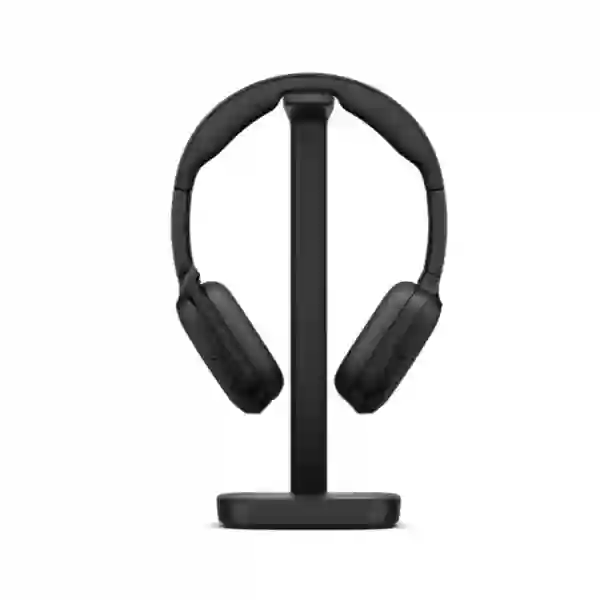
HP Poly Focus 625 Fold Headset with Wireless Charging Stand
Foldable professional audio with a dedicated wireless charging stand for hybrid work, clear calls and simpler daily charging. Manufacturer product number: C56XZAA.
For Tanzania purchasing enquiries: request an exact-configuration quotation and confirmed commercial terms.
A clear answer for business buyers
If your workday moves between video meetings, telephone calls, focused work and travel, you need a headset that can move with you without adding clutter to your desk. The HP Poly Focus 625 Fold Headset with Wireless Charging Stand combines a foldable stereo Bluetooth headset and its own wireless charging home base. It is intended for professionals who value clearer conversations, portable design, flexible listening and a consistent place to leave their headset between sessions.
This is the specific foldable bundle identified by HP product number C56XZAA. Its included wireless charging stand distinguishes it from the foldable headset-only package. It also differs from the non-foldable Focus 625 charging-stand bundle. If a purchasing team is standardising workplace audio, checking this distinction first helps prevent an otherwise avoidable ordering mismatch.
For customers evaluating this headset in Tanzania, the next step is to request a configuration-confirmed quotation. Ask for the exact HP product number, current local availability, applicable commercial terms and delivery details rather than assuming overseas product listings establish those facts. The guidance below explains the verified technical capabilities and the practical questions worth resolving before purchase.
What the bundle solves
A business headset is not only an audio accessory. It influences how quickly someone can join a scheduled call, whether colleagues hear the speaker clearly, how comfortable prolonged listening feels and whether the equipment is ready after a busy day. The Focus 625 Fold addresses these connected needs with a portable form factor, dedicated voice processing and a stand that creates a familiar storage and charging point.
On the desk, the wireless stand gives the headset a deliberate place rather than leaving it under paperwork or connected to a loose cable. On the move, the foldable headset can be packed away and used with a laptop or supported mobile device. This combination makes sense for people who repeatedly shift between stationary and mobile working rather than keeping a fixed headset at one workstation.
The right choice still depends on the operating environment. Noise reduction does not remove every surrounding sound, a Bluetooth connection is affected by physical barriers, and battery ratings describe test conditions rather than every real-life workload. Evaluate those constraints alongside the convenience of the bundle so the headset is selected for a genuine use case rather than a headline feature alone.
Foldable design for changing workplaces
The Fold model is intended to reduce the inconvenience of carrying a full-size office headset. Its folding construction is useful for commuting, travelling between customer locations and packing a shared work bag. HP lists the headset at 208 g and describes a slim profile, soft ear cushions and an ergonomic headband. Those characteristics matter because a device that is easy to carry is more likely to be used consistently.
The microphone boom can be tucked away when the wearer is not speaking. That helps the headset look less like a fixed call-centre accessory when listening to a recording, reviewing training material or moving between meetings. For active calls, positioning the boom properly remains important; the physical microphone location is part of a good voice-capture setup even with digital noise processing.
A travel pouch is included in HP’s official box-content list. Pack the headset with reasonable care and avoid pressure on the earcups, headband or microphone boom. Do not rely on an unverified claim that the bundle includes a rigid protective case: check the supplied packaging for the exact regional configuration if case type is material to your purchase.
Two different kinds of noise control
Headset buyers often hear the phrase noise cancellation without knowing which side of the conversation it improves. Hybrid Active Noise Cancellation, or ANC, is primarily a listening feature: it aims to reduce some surrounding sound reaching the wearer. Microphone-side noise reduction is a separate function that aims to make the wearer’s voice more intelligible to the people on the call.
The Focus 625 Fold supports Hybrid ANC and a Transparency mode. ANC is useful when the room contains steady background sound and the wearer wants to concentrate. Transparency mode is useful when awareness of people or activity nearby is more important. These modes are tools for different moments of the day, not guarantees of silence or substitutes for awareness in an environment where safety requires hearing announcements or nearby movement.
For outgoing speech, HP describes Acoustic Fence 2.0 with enhanced noise reduction. This processing helps reduce the effect of distracting sounds near the speaker, but it cannot guarantee that a loud surrounding conversation, wind or a sudden impact will be inaudible. The best outcome still comes from combining the headset with a suitable meeting location and the correct microphone position.
Microphone clarity for meetings and customer calls
HP’s technical specification lists six microphones in the headset system: two transmit microphones, two microphones shared between transmit and ANC functions, and two ANC microphones. HP also describes four noise-cancelling microphones for voice capture. These statements are compatible when the different roles of the microphones are understood; it would be misleading to present every microphone as a dedicated outgoing-speech microphone.
That distinction matters to reception teams, account managers, remote consultants and support specialists. A client may care little about the number of microphones but will notice speech that is less affected by nearby office activity. Acoustic Fence 2.0 is designed to improve that experience, while the actual result depends on the acoustic environment, speaking volume, microphone placement and software call settings.
Before deploying units widely, place a test call from the real working environment. Have a colleague listen for keyboard noise, nearby speech, HVAC noise and the naturalness of the speaker’s voice. Repeat with the microphone correctly positioned and with relevant application settings checked. A short practical trial is a more useful procurement measure than assuming one laboratory specification predicts every meeting.
Battery life that should be read in context
HP quotes up to 25 hours of talk time with ANC and the online indicator switched on. With those functions switched off, the quoted talk-time maximum rises to 30 hours. For listening, HP lists up to 42 hours with ANC on and the online indicator off, or up to 52 hours with both off. These are distinct scenarios, so do not combine the largest figure with the most demanding configuration.
Actual runtime varies with how the headset is used, including talk-versus-listen time, volume, radio conditions, feature settings and battery age. Someone moving between long video meetings and music may see a different result from an employee who mostly handles short telephone calls. A procurement decision should account for the daily duty cycle and how reliably the headset can be recharged between sessions.
There is also a useful wired top-up option. HP specifies an approximately 10-minute wired charge delivering up to four hours of talk time with ANC and the indicator off, or up to six hours of listening with those functions off. These short-charge figures are conditional and should not be understood as a promise under all settings.
Wireless charging stand: what is included
The C56XZAA bundle includes HP’s standard wireless charging stand. Set the headset on the dock between calls to give it a repeatable charging location. HP describes a magnetic attachment that helps the headset align when docked facing forward or backward. The stand also has a non-slip base to support stable placement on an ordinary desk.
HP lists an approximate full charge time of three hours using wireless charging, compared with approximately one hour using the USB-C wired method. Wireless charging therefore favours convenience and regular top-ups rather than minimum possible charge time. For someone who forgets to plug in a cable at the end of the day, the visible dock can help build a practical charging habit.
The included stand is designed for headset charging. It must not be confused with HP’s separately described Multi-Device Premium Wireless Charging Stand, which supports compatible personal-device charging. Do not promise phone charging, a Qi2 pad or a power adapter in this bundle unless the actual regional package explicitly confirms those features.
Setting up the stand on a practical desk
Place the stand on a firm, reasonably clear surface close to the user’s normal workspace. It should be easy to reach without pulling on cables or interfering with the keyboard, monitor stand or other equipment. HP lists the stand dimensions as 116 × 106 × 253 mm and its weight as 368 g; these measurements help facilities or IT teams plan desk space accurately.
Connect the charging arrangement using the supplied USB-C cable and an appropriate supported power source. The actual power source and any country-specific plug accessories should be confirmed with the supplier rather than inferred from illustrations of other regional packages. Keep the cable routed so that the stand remains stable and people do not pull it accidentally when moving equipment.
A sound rollout practice is to demonstrate docking once during user handover. Show the user how the headset seats against the stand, where the charging indication appears and how to recognise a normal charging session. This simple step reduces requests caused by incorrect placement and helps employees know when wired charging may be more convenient.
Bluetooth connection and included BT700 adapter
The headset supports Bluetooth connectivity and includes a BT700 USB Type-C Bluetooth adapter. HP also lists a USB-C to USB-A adapter in the box, supporting different computer port arrangements. This gives the buyer an identifiable connection method for supported workstations rather than relying solely on whatever Bluetooth implementation happens to be installed in a particular laptop.
The practical decision is not just whether a computer has Bluetooth. IT teams should consider how the headset is meant to operate with the organisation’s meeting application, whether the correct input and output devices are selected, how the USB adapter is handled and whether endpoint policies permit the device. A managed computer may need approval before new USB peripherals or software can be used.
HP states a wireless range of up to 50 metres. That is a maximum specification, not a promise that conversations will remain stable through multiple concrete walls, closed doors or heavy wireless interference. Test the actual path between the computer and the user’s normal movement area. Where call reliability is important, keep the connection arrangement consistent and avoid unrealistic roaming assumptions.
Platform and operating-system planning
HP lists compatibility with Windows 11, Windows 10, macOS, ChromeOS, iPadOS, Android and iOS. The existence of an operating system in a compatibility list is a useful starting point, but it does not independently establish that every conferencing feature, button assignment or management option will behave identically in every software release.
For a typical business deployment, check the meeting client version, operating-system policies, Bluetooth permissions, microphone access and available USB ports. Verify that the correct audio devices are selected inside the meeting application. If an organisation uses web-based calling in a managed browser, test that specific workflow instead of assuming behaviour is identical to a native desktop application.
Before a volume order, evaluate at least one device against representative laptop and mobile configurations. Record what happens during incoming calls, mute changes, device switching and reconnection after sleep. A short compatibility checklist is especially valuable when a business has a mixed device fleet or employees share desks.
Microsoft Teams and collaboration workflows
The Focus 625 Fold is built for workplace communications and HP lists Microsoft Teams-related controls and Open Office certification information for the Focus 625 family. The headset has controls for call handling, mute, volume and meeting activity. This makes it relevant to organisations where communication depends on fast responses and reliable basic audio functions rather than specialist sound production.
Certification or design for a platform should not be interpreted as universal feature parity. The specific USB adapter configuration, client software, account policy, firmware and endpoint operating system can affect how dedicated buttons or call indicators work. When those controls matter to a team, test them in the exact organisation environment before promising a uniform experience.
The simplest user guidance is to make a test meeting with a colleague. Confirm microphone selection, speaker selection, call answer and end behaviour, mute indication and return from standby. Keep the computer’s general sound settings and the meeting app’s audio settings aligned. Many perceived headset problems originate in conflicting software selections rather than the audio hardware itself.
Listening, music and awareness
The stereo on-ear design can support more than telephone conversation. HP specifies 32 mm speakers with a listed bandwidth of 20 Hz to 20 kHz. The device is therefore relevant to training videos, recorded briefings, music during focused tasks and other everyday audio alongside business calls. The sound experience still depends on the programme material, connection mode, fit and listening environment.
ANC and Transparency mode help the wearer choose between concentration and awareness. ANC may suit a busy shared office when an employee needs to review detailed material. Transparency may suit a moment when a colleague is expected to speak or there is an important announcement. Users should choose the setting that is appropriate for what is happening around them rather than leaving one mode enabled automatically in every setting.
HP also describes spatial audio for media. Treat that as a listening-experience feature, not as a substitute for acoustic planning or evidence of improved call intelligibility. For voice calls, microphone quality, application configuration and connection stability are usually more important procurement considerations.
Comfort and all-day use considerations
Comfort is personal, particularly when an on-ear headset is worn repeatedly throughout the workday. HP describes soft ear cushions shaped around the ear’s natural contour and an ergonomic headband with a pressure-relief design. These are practical design choices, but they do not establish that every wearer will find the same fit comfortable for every duration.
Where headsets are issued to many users, have a small sample of staff test the fit during a normal work session rather than only for a minute. Consider glasses, hair styles, preferred clamping pressure, typical meeting length and whether a person needs to hear part of the room. A headset that performs well acoustically but is uncomfortable will not deliver the intended daily benefit.
Encourage employees to adjust the headband and take sensible listening breaks. Store the headset securely and avoid exposing it to excessive heat or moisture. Replace worn accessories according to HP guidance and check compatible parts before ordering replacements, because the correct cushion design matters for comfort and fit.
Who benefits from the Fold plus stand combination
Hybrid workers are a clear fit: they may need portable audio for travel but appreciate a predictable charging station when back at a desk. The Fold design is useful for packing, while the stand offers a home base at the regular workstation. This is especially attractive when the same employee uses several environments in a normal week.
Managers and professionals with many scheduled meetings may value a headset that can remain on a stand until the next session. Support agents or sales teams may appreciate the microphone-side noise reduction in a shared office. Trainers, consultants and field coordinators may value the ability to listen to material and join calls without carrying a separate wired headset for every location.
The headset will be less compelling when a person never leaves a fixed workstation and does not need foldability. A cost-sensitive organisation that only requires basic wired calling may prefer a simpler solution. The objective is to match headset features to work patterns, not to treat a premium bundle as automatically necessary for every employee.
Comparing the main Focus 625 packages
HP uses separate product numbers for configurations that sound very similar. C56XZAA identifies the foldable Focus 625 with a wireless charging stand. C56XSAA identifies the foldable headset without that stand. C56XXAA identifies the non-foldable Focus 625 with a charging stand, while C56XPAA identifies the non-foldable headset without the bundled stand. These are manufacturer product identifiers, not verified FourTeck listing SKUs.
An employee who travels often and also works at a permanent desk has a straightforward reason to choose the Fold bundle. Someone who travels but rarely uses a desk stand may prefer the headset-only Fold model. A person who remains at one desk may find the non-foldable stand bundle sufficient. These comparisons help establish configuration fit without assuming a difference in local stock, pricing or supply arrangements.
Always compare quotations by full description and product number, not just the words Focus 625. Also check whether the quoted package contains the expected BT700 adapter, charge stand and audio cable. Accessory omission or substitution is easy to overlook when a purchasing request contains only an abbreviated model name.
Wired audio and situations without Bluetooth
HP’s foldable package includes a USB-C to 3.5 mm audio cable. That is a useful distinction from some other configurations because it offers an additional listening path when a 3.5 mm audio source is available. It may be relevant to compatible entertainment systems, older audio outputs or a travel situation where Bluetooth use is restricted or inconvenient.
Do not assume that every wired connection enables the complete microphone and conferencing feature set. Audio input behaviour depends on the cable, connected equipment and supported operating mode. A buyer who specifically requires corded headset calling should test that use case and obtain confirmation rather than treating the presence of an audio cable as proof of complete wired call support.
The headset also supports charging through USB-C. Keeping the supplied cable accessible can be helpful when wireless charging is not available, when a fast top-up is required or when a travel schedule does not provide time to use the desk stand. Confirm the actual supported combination of charging and audio use for the intended device workflow.
A sensible Tanzania procurement checklist
For a Tanzania purchasing team, the technical specifications should be separated from the commercial details that need quotation-level confirmation. HP’s manufacturer product number identifies the requested configuration, but it does not establish that the product is currently held in local stock, available for next-day delivery or sold with any particular Tanzanian warranty arrangement. These matters require direct verification.
A good request for quotation states the product name, the HP number C56XZAA, the intended quantity and the main endpoint devices. It also asks whether the quoted package includes the wireless charging stand and expected cables, whether any local plug accessory is needed, and which warranty and support terms apply to the supplied units. Do not assume a foreign-market price represents a Tanzanian selling price.
If several employees will use the same model, collect one set of device and platform requirements before buying. This saves the time of resolving the same software, port and desk-space questions repeatedly. If the headset is needed for regulated or specialised environments, seek any relevant technical or regulatory confirmation for that exact deployment; do not infer local certification from the manufacturer’s international catalogue.
Rolling out multiple headsets to a team
The best enterprise rollout begins with a small pilot. Select users representing the highest-call-volume team, a typical hybrid worker and someone with a mixed laptop-and-mobile routine. Give each tester a normal schedule and ask them to record call clarity, comfort, wireless stability, control behaviour and whether the charging stand is convenient at their desk.
Document a consistent first-use routine: connect or pair the headset, choose the proper microphone and output, check the preferred noise-control mode, complete a trial call and demonstrate wireless docking. Make the BT700 adapter easy to identify so it is not accidentally swapped or lost when users change computers. A brief written setup card may reduce avoidable support tickets.
For ongoing device administration, HP describes options through the HP Poly Studio software ecosystem. Before promising central controls or reporting, confirm which functions and management arrangements are currently supported for the exact headset and the organisation’s endpoint environment. IT teams should distinguish between device-level settings and centrally managed capabilities instead of assuming all features are automatic.
Desk sharing and hybrid schedules
In workplaces with occasional desk sharing, the most important question is who owns the headset and who owns the charging stand. A personal headset can follow the user while the stand remains at an assigned workstation, but hot-desking arrangements may require a different storage policy. Agree on the ownership model and any cleaning guidance before the equipment is distributed.
If employees frequently move among meeting rooms and workstations, decide whether the BT700 adapter should remain with the laptop or in a documented accessory case. An otherwise functional headset can become frustrating when the required adapter is left behind. Similarly, an employee who uses the wireless stand at the office may need to rely on wired charging while travelling.
The Fold bundle gives buyers flexibility, but it does not remove the need for a simple equipment policy. Clear handling of cables, adapters and device assignment is often more important to a successful hybrid-work experience than a long list of hardware features.
Audio performance in challenging rooms
Open-plan offices, reception areas and shared support spaces expose headset microphones to several kinds of noise at once. Repetitive keyboard sounds differ from nearby voices; intermittent door impacts differ from constant ventilation. Acoustic Fence 2.0 is intended to reduce background distractions in speech transmission, while Hybrid ANC addresses the wearer’s listening experience. Neither replaces careful selection of the call location.
When testing, use realistic conversational volume. Ask another participant whether words remain intelligible when people speak nearby and whether sudden environmental sounds cause the conversation to become difficult. Also listen for any unintended processing effects, such as changes in the speaker’s tone. This gives a more honest indication of real suitability than simply switching on ANC and judging the resulting silence.
Consider office-wide conditions as well. Lowering unnecessary background noise, choosing quieter areas for important calls and training employees to mute when not speaking all help. A premium headset works best as one element of a sensible communication environment rather than the only response to a noisy workplace.
Battery habits and power interruptions
A wireless headset is easiest to manage when charging fits the workday. The included stand supports a simple routine of docking between calls and at the end of a shift. Where a fixed charging location is unavailable, the wired USB-C method is an alternative. Because the stated full charging times differ, users should know which method suits their schedule.
In an office where power is interrupted, a wireless headset can continue operating only while it retains enough charge and the connected computer or phone and meeting service are also operational. A charged headset alone does not guarantee communication continuity. Consider the power resilience of laptops, networks and other critical equipment separately from the headset specification.
For business users who spend long periods away from their desks, plan the recharge opportunity rather than assuming a maximum battery-life number guarantees a full operating week. When several headsets share equipment cabinets, label adapters and cables and make users responsible for returning the correct components.
Physical specifications and what they mean
HP lists the foldable headset dimensions as 180 × 150 × 53.5 mm, with a weight of 208 g. The wireless charging stand measures 116 × 106 × 253 mm and weighs 368 g. The headset uses an on-ear stereo configuration with 32 mm speaker drivers. These are helpful planning facts for desk allocation, portable storage and equipment inventories.
The headset’s microphone uses digital MEMS technology and the published microphone bandwidth is 35 Hz to 21 kHz. HP lists supported Bluetooth profiles and pairing memory for up to ten paired devices. These specifications describe the product’s technical capabilities; they are not promises that all remembered devices can be used actively at the same time or that every device supports every control feature.
For ordering purposes, the most critical physical fact remains the foldable construction and inclusion of the separate stand. Dimensions, packaging and accessories can matter to an IT logistics team, but a clear configuration description prevents more costly purchasing errors than any isolated number.
What comes in the manufacturer-specified package
HP’s published contents for C56XZAA are a wireless headset, charging stand, travel pouch, BT700 Bluetooth USB-C adapter, USB-C charging cable, USB-C to USB-A adapter, USB-C to 3.5 mm audio cable, quick-start guide and warranty card. The presence of both the stand and the 3.5 mm audio cable is particularly useful for differentiating this foldable bundle from related Focus 625 configurations.
When receiving stock, check the carton and included components against the accepted quotation and manufacturer’s packing list. Keep the adapter and cables associated with the intended user. If accessory packaging differs from expectations, resolve the discrepancy before units are issued to employees rather than relying on a generic image of the product family.
HP publishes a standard two-year limited warranty for the model, but the actual applicable terms, claims process and territorial support arrangements for any Tanzania transaction should be confirmed on the supplied documents. A global warranty statement does not by itself verify a particular local repair, replacement or service commitment.
Care, cleaning and everyday handling
A headset used every day benefits from simple preventive care. Store it on the stand when convenient, keep it away from spills and dust, and avoid stretching or twisting the boom or headband unnecessarily. When travelling, use the supplied pouch and protect the headset from heavy objects inside a bag. Regular handling practices can help preserve the comfort and practical usability of the device.
Cleaning should follow the current HP care guidance for the specific headset materials and cushions. Avoid soaking electronic parts or applying aggressive chemicals simply because they are available in a shared office. In multi-user environments, confirm an appropriate hygiene process before headsets are transferred between staff and check the condition of ear cushions periodically.
If a device becomes uncomfortable, stops charging consistently or behaves differently during calls, investigate basic setup issues before replacing it. Check that it is seated correctly on the stand, that cables are connected, that the computer has selected the proper audio devices and that relevant software and firmware are current under organisational policy.
Questions to resolve before placing an order
Start with the commercial identity: is the quoted item explicitly HP Poly Focus 625 Fold with Wireless Charging Stand, manufacturer number C56XZAA? Is the charge stand included rather than optional? Are the expected BT700 USB-C adapter, USB-A adapter and USB-C to 3.5 mm cable included? These are simple questions that protect against receiving a related but different Focus 625 configuration.
Next, confirm the deployment: which laptops, mobile devices and collaboration platforms will be used? Does the organisation allow the USB adapter and relevant management software? Are users expected to roam while connected? Is desk charging convenient, or would the headset spend most of its time away from its stand? Consider a pilot if compatibility, comfort or noise conditions are critical.
Finally, confirm the transaction: current price in the agreed currency, quotation validity, taxes where applicable, product availability, delivery arrangements, warranty documentation and support route. These details depend on the actual offer. No unsupported stock, shipping, tax or local service promise should be substituted for clear written confirmation.
Why the right configuration is more valuable than a longer feature list
The point of a headset purchase is dependable communication with manageable daily effort. Foldability is valuable if it reduces the nuisance of packing a device. A wireless dock is valuable if it creates a reliable charging habit. Microphone processing is valuable if people on the other end can understand the speaker more readily. Features should be judged by these outcomes rather than by their names alone.
This is why the Focus 625 Fold plus stand is best considered as a complete work pattern solution: personal audio that travels and a desk accessory that gives it a familiar place to recharge. It is not automatically the cheapest option, the most suitable option for every role or a replacement for a quiet meeting room. Some employees will be better served by a simpler fixed or wired configuration.
For procurement and IT teams, a short pilot, documented compatibility check and exact part-number quotation provide a stronger basis for approval than generic promotional claims. The final recommendation should be based on the employees’ actual calling environment and the commercial offer available to the organisation.
Technical specifications at a glance
| Specification | Verified detail |
|---|---|
| Manufacturer product number | C56XZAA |
| Headset format | Foldable, stereo, on-ear Bluetooth |
| Noise control | Hybrid ANC; Transparency mode; Acoustic Fence 2.0 |
| Microphones | Six listed in total, with different transmit/ANC roles |
| Speaker drivers | 32 mm |
| Headset weight | 208 g |
| Headset dimensions | 180 × 150 × 53.5 mm |
| Stand weight | 368 g |
| Stand dimensions | 116 × 106 × 253 mm |
| Talk time | Up to 25 hours with ANC and online indicator on |
| Listening time | Up to 42 hours with ANC on and indicator off |
| Charge time | Approximately 1 hour wired; 3 hours wireless |
| Wireless range | Up to 50 m under suitable conditions |
| Paired-device memory | Up to 10 |
| Colour | Black |
Published maximums and charging estimates depend on test conditions. This table is a buyer’s summary of HP’s official product specifications, not evidence of local availability or commercial terms.
Frequently asked questions
Is the HP Poly Focus 625 Fold headset bundle actually foldable?
Yes. HP identifies C56XZAA as the foldable Focus 625 with a wireless charging stand. The folding construction is intended to make the headset more convenient to pack when changing workplaces. Verify the exact manufacturer number on the accepted quotation because the non-foldable bundle uses a different product identifier.
Does the charging stand come in the same box?
HP’s official package contents for C56XZAA include a wireless charging stand alongside the headset, BT700 adapter, cables and travel pouch. Ask the supplier to confirm that the quotation is for the complete bundle, not the Fold headset-only configuration. Do not infer included accessories from a picture of a related model.
What is the difference between C56XZAA and C56XSAA?
C56XZAA identifies the Focus 625 Fold with a bundled wireless charging stand. C56XSAA identifies the Focus 625 Fold headset without the bundled charging stand. Both identifiers are manufacturer product numbers; neither is evidence of a separate FourTeck store SKU. Use the full identifier when comparing quotations.
How long can I talk before recharging?
HP rates up to 25 hours of talk time with ANC and the online indicator enabled, or up to 30 hours with both switched off. Your actual results depend on usage, volume, features, wireless conditions and battery age. Plan charging around the user’s real schedule rather than treating an upper-limit figure as a guarantee.
How quickly does the headset recharge?
HP lists approximately one hour for a full wired charge and approximately three hours for a full wireless charge. It also specifies conditional fast top-up figures for a ten-minute wired charge. If rapid charging is a priority, keep the USB-C cable accessible as well as the charging stand.
Does the standard included stand charge a mobile phone?
Do not assume so. The bundled standard stand is described for headset charging. HP markets a different Multi-Device Premium Wireless Charging Stand with additional personal-device charging capability. If you need a phone-charging pad, request confirmation of the separate accessory and its compatibility.
Can I use the headset with a laptop and a smartphone?
HP lists support for major desktop and mobile operating systems and Bluetooth connectivity. The best call-control experience depends on the exact devices, software, adapter arrangement and organisational policies. Test switching between the target devices if that workflow is important; a pairing-memory figure alone does not verify every simultaneous-use scenario.
Will ANC stop people near me hearing or being heard?
ANC mainly reduces background sound heard by the headset wearer. Acoustic Fence 2.0 is the separate microphone-side technology designed to reduce distracting sounds transmitted to call participants. Neither can guarantee complete isolation from surrounding noise, so quiet locations and correct microphone positioning remain valuable.
Is the headset suitable for Microsoft Teams meetings?
HP lists Microsoft Teams-related controls and open-office certification information for the Focus 625 series. Teams behaviour can still depend on the installed client, operating system, USB adapter and organisation configuration. Test the relevant call, mute and button functions in your own workplace before deploying a large number.
Can I connect with a 3.5 mm cable when travelling?
HP lists a USB-C to 3.5 mm audio cable in this foldable package. It provides an additional audio connection path for compatible sources, but you should not assume it supports every microphone or application feature. If corded two-way calling is essential, confirm and test that particular setup.
How far can I walk from my computer during a call?
HP publishes a maximum wireless range of up to 50 metres. Actual coverage changes with walls, furniture, radio interference and device setup. Test your real office layout instead of assuming the specification guarantees a stable call throughout a whole building or across different floors.
Is the headset comfortable for full workdays?
HP uses soft on-ear cushions and an ergonomic headband with a pressure-relief design, and lists a 208 g headset weight. Comfort varies by wearer and duration. Where practical, run a representative user trial, including employees who wear glasses or handle extended calls, before standardising the model.
Is a Tanzania price or delivery date confirmed?
No local selling price, stock position, delivery window, tax arrangement or support coverage has been verified for this particular FourTeck listing. Request written confirmation with the exact product number and intended quantity. Manufacturer data establishes the model’s capabilities, not the commercial terms of a local transaction.
What should I send when requesting a quote?
Provide the full product name, HP manufacturer number C56XZAA, required quantity, primary computers or mobile devices, collaboration software and any essential compatibility conditions. Ask the supplier to confirm the charging stand, included accessories, quotation terms and applicable warranty documentation. This makes the response easier to compare with competing configurations.
How do I confirm that I have received the correct model?
Check the package and documentation for the foldable Focus 625 charging-stand bundle and compare the manufacturer product number with your accepted quotation. Confirm the stand, BT700 adapter, expected cables and pouch are present. If the description or accessories do not match, resolve the difference before distribution to users.
Is the standard global warranty automatically a local service guarantee?
HP publishes a standard limited manufacturer warranty for this model. That does not, on its own, verify the exact territorial service procedures, local support commitments or supplier obligations for a Tanzanian sale. Ask for the warranty terms applicable to the actual units and retain the supplier’s paperwork.
Request a configuration-confirmed quote
Ask FourTeck Tanzania about the HP Poly Focus 625 Fold headset and wireless charging stand bundle, product number C56XZAA. Include your quantity, endpoint devices and collaboration platform so the quotation can address the configuration you actually need.
Confirm the exact packaged accessories, current local price, availability, delivery arrangements and applicable warranty terms before placing an order. A destination for an online quote was not verified, so no unverified link is provided.




Reviews
There are no reviews yet.