
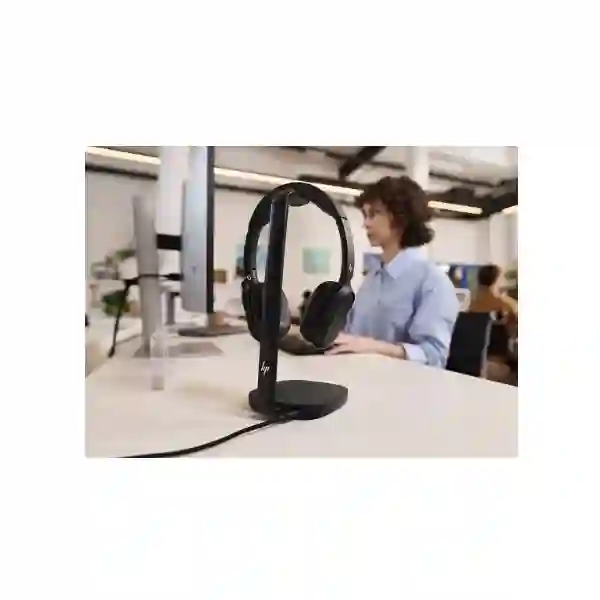
HP Poly Focus 620 Fold Headset with Wireless Charging Stand
The HP Poly Focus 620 Fold headset with wireless charging stand brings together a foldable professional calling headset and an HP-confirmed compatible desk charging accessory. It is a practical option to evaluate for frequent meetings, shared workspaces and travel. Confirm the exact combined package with your supplier before purchasing.
For the wearer
Move between calls, focused listening and portable work with a folding on-ear headset, noise controls and accessible communications functions.
For the desk
A compatible magnetic charging stand gives the headset a repeatable home position between meetings, reducing the chance it is left without a charging routine.
For the buyer
Verify the exact Fold variant, bundled stand, computer adapter, commercial terms and meeting-platform requirements before placing an order.
Where focused work meets everyday mobility
Professional conversations rarely happen in a perfectly quiet room. A customer may call while colleagues are speaking nearby, a meeting may start while someone is working from home, or a project team may need to join an online review while travelling. This headset is designed to make those transitions less disruptive rather than forcing every conversation to happen at a fixed desk.
The HP Poly Focus 620 Fold is a stereo, on-ear wireless headset with a folding design, a hideaway microphone boom and controls designed for frequent calling. Its attraction is the combination of portable physical design and business-oriented communications features. It can serve people whose schedules mix spoken collaboration with concentration on documents, messages, training or media.
When a compatible wireless charging stand is part of the proposed setup, the user has a specific place to return the headset between tasks. The stand does not replace sound isolation, software configuration or a good meeting environment; it makes the charging routine more convenient. Buyers should confirm whether a stand is actually included in the quoted package rather than assuming that every Focus 620 Fold box contains one.
For a Tanzania-based organization considering a headset for individual employees or a wider rollout, the practical questions are straightforward: will the wearer be comfortable, will callers hear understandable speech, will the preferred computer and meeting application work as expected, and will the selected charging arrangement suit the desk? These are the decisions this guide helps make.
Choose this kind of headset if your work includes frequent spoken meetings, concentration in shared spaces and movement between locations. If you only occasionally make a voice call, a simpler headset may be adequate. If your work requires complete acoustic isolation or specialist broadcast-quality recording, evaluate those needs independently rather than assuming an office headset addresses them.
What the Fold headset and stand combination means
The Focus 620 Fold and the Focus wireless charging stand are separately identifiable HP Poly products. HP identifies the charging stand as compatible with the Focus 620 Fold, so the two can form a practical headset-and-dock configuration. However, a compatible accessory is not automatically proof of a specific packaged bundle. Your quote should identify every item supplied.
Ask the seller to state whether the offer provides the foldable headset, the standard Focus wireless charging stand, any required charging cable, the computer Bluetooth adapter and the relevant setup documentation. Product contents can vary between stand-alone products, packages, promotional configurations and regional product versions. An item photographed beside a headset should not be assumed to be in the box.
HP documentation for the individual headset describes a BT700 USB-C Bluetooth adapter, a USB-C to USB-A adapter, charging and audio cables and travel accessories for a referenced configuration. Those details are useful when checking an offer, but the seller must confirm the actual contents of this Tanzania listing. Do not treat a general manufacturer contents list as a substitute for the invoice.
The compatible standard stand is designed to recharge the headset, not to charge every nearby wireless device. HP also offers a separate premium multi-device stand with different capabilities. If your procurement requirement mentions phone charging, multiple devices or a particular power adapter, confirm the exact stand model instead of relying on the word wireless.
This page describes the intended headset-plus-stand solution and the verified relationship between its parts. It deliberately does not assign a bundle part number or merchant SKU, because neither is established for this precise listing. Such identifiers should come from the actual supplier quotation or product record, not from an unrelated regional catalog.
Clearer voice pickup for collaborative calls
The Focus 620 Fold uses a voice-oriented microphone system rather than relying only on the earcup microphones found on basic listening headphones. HP describes four noise-cancelling microphones involved in voice pickup, supported by Acoustic Fence 2.0 enhanced noise reduction. This arrangement aims to make a speaker’s voice more prominent when other activity is happening nearby.
Microphone noise reduction and listener-side active noise cancellation solve different problems. The first is intended to reduce distracting sound sent to remote participants; the second changes what the person wearing the headset hears. A strong calling setup needs both intelligible outgoing speech and sensible incoming audio levels, especially when conversations involve clients or multiple departments.
The hideaway boom lets the wearer keep a comparatively streamlined appearance when the microphone is not needed. When the user returns to a call, appropriate microphone positioning remains important. Moving the boom too far from the mouth or changing the way the headset sits may affect pickup; always test with the actual communications application before a critical meeting.
Noise management helps, but does not guarantee that a busy room will sound silent to remote listeners. Loud nearby voices, wind, unexpected impacts and room acoustics can still intrude. For a high-stakes customer presentation, reduce competing noise where possible and run a short test recording or call to check how speech sounds at the far end.
IT teams evaluating a headset for customer-facing roles should involve the people who receive the calls, not only the headset wearers. Ask whether words are easy to understand, whether the level remains consistent during natural movement and whether software-based noise filtering causes artifacts. That evidence is more useful than judging microphone performance from appearance alone.
Hybrid ANC and Transparency mode: when to use each
Hybrid active noise cancellation, commonly shortened to ANC, is a listener-side feature. It uses microphones to help reduce some surrounding sound so that the wearer can follow spoken meetings or focus on a task with fewer distractions. It is particularly useful where ambient sound would otherwise encourage the listener to raise the headset volume unnecessarily.
ANC effectiveness depends on the type and frequency of the noise, the fit of the cushions and the surrounding environment. It should not be described as soundproofing. People may still hear a colleague, an announcement or nearby movement. For safety and situational awareness, select a suitable mode and volume whenever you need to remain attentive to your surroundings.
Transparency mode offers a different balance, allowing the user to remain more aware of activity around them. That can be useful when a colleague approaches the desk, an announcement is expected or the user is briefly working in a setting where awareness matters. Switching between modes is a purposeful decision, not simply an audio enhancement to leave untouched.
An on-ear headset also behaves differently from an earplug or sealed hearing protector. Physical cushion pressure, hairstyle, glasses, head movement and individual ear shape can change passive isolation. If your role needs industrial hearing protection or compliance with a workplace noise safety program, choose equipment designed and approved for that separate purpose.
For everyday business use, start by selecting the ANC mode that keeps speech comfortably audible at a moderate volume. Move to Transparency when awareness is the higher priority. Ask employees to learn the headset’s control placement during onboarding so that they can change modes without hunting through computer settings in the middle of a conversation.
Comfort across meetings, documents and calls
Long listening sessions are as much about fit as about electronics. HP describes shaped ear cushions, an ergonomic headband and a pressure-relief design intended to distribute contact more comfortably. The Focus 620 Fold is a stereo on-ear model, so users experience cushion contact on the ears rather than the around-ear enclosure of larger headphones.
The published headset weight is about 208 grams for the referenced Fold model. That gives buyers a useful comparison point, but weight alone does not determine comfort. Pressure from the headband, cushion material, glasses, temperature, and how the wearer moves through the day can matter more after several consecutive meetings.
A trial should last longer than the few seconds it takes to put the headset on. Let a representative user attend a normal meeting, type at the keyboard, move the head and adjust the boom. Check whether the headset stays positioned and whether users experience ear pressure or rubbing after extended periods of conversation.
Users who alternate between listening and speaking may appreciate the two-ear format because both sides of an online conversation can sound balanced. Others may prefer a single-ear style when continuous interaction with people in the room is essential. Wearing style is a personal and operational choice; a two-ear headset is not automatically ideal for every receptionist or front-desk workflow.
Keep cushions clean and inspect them periodically for wear. Worn materials can affect comfort and passive isolation, and damaged cushions may change how ANC feels. When procuring for a team, ask how replacement cushions are sourced and what support channels are available for the chosen configuration, rather than treating consumable parts as an afterthought.
Foldable form for travel and flexible desks
The defining physical difference of the Fold version is its ability to fold for transport. This makes practical sense for employees who carry a notebook between meetings, change workstations or split their time between locations. It also matters when a headset must fit alongside a laptop, charger and documents in a limited amount of bag space.
A foldable hinge is useful only if staff handle it properly. Close the headset according to the supplied instructions, keep cables from catching around the folding areas and avoid placing heavy objects on top of it. A compact shape improves packing convenience but does not turn an electronic headset into an impact-resistant piece of equipment.
HP lists travel accessories with the referenced Focus 620 Fold configuration and describes corded audio through a USB-C to 3.5 mm cable. This option may be handy for compatible listening connections when Bluetooth is inconvenient. Verify exactly what functions the corded connection supports before relying on it for a telephone conversation or softphone microphone input.
The foldable format can simplify a shared-desk routine: remove the headset from its stand, take it to a meeting room, return it to the workstation and place it back on charge. The portable headset and stationary stand serve complementary purposes, rather than competing ones. One supports movement; the other offers a consistent home position.
For staff who never leave their assigned desk, the folding feature may be a secondary benefit. For travelling specialists, trainers, project managers and hybrid team leaders, it can influence daily convenience. Evaluate the actual employee routine before deciding whether the Fold version is worth selecting over a non-folding headset.
Battery life with realistic operating assumptions
HP specifies up to 25 hours of talk time with ANC and the online indicator enabled, and up to 30 hours with both disabled, for the referenced Focus 620 Fold. The same published specifications list up to 42 hours of listening with ANC enabled and the online indicator disabled, and up to 52 hours with both disabled.
These figures are test-condition maximums, not promises that every user will obtain the same endurance. Audio level, connection behavior, call activity, settings, battery age and surrounding conditions all influence practical usage. An employee who spends hours in continuous meetings may experience a different pattern from someone who listens to short recordings throughout the day.
HP lists an approximate one-hour wired charging time and an approximate three-hour wireless charging time for the headset in the referenced specification. Wired charging can therefore be the more appropriate choice when replenishment speed matters. Wireless docking is attractive because it can make charging a habitual part of leaving the desk.
The technical sheet also describes a quick wired top-up: around ten minutes of wired charging can provide up to four hours of talk time with ANC and the online indicator disabled under specified conditions. Treat this as a manufacturer test statement, not as an emergency guarantee. It is wise to check battery level before long presentations.
An effective workplace policy is simple: return the headset to its verified stand when convenient, keep the proper wired charging cable available, and avoid depending on the last few percent of battery for important calls. Employees should learn the battery alerts and have an alternative communications method when recharging is necessary.
What the compatible wireless charging stand contributes
The standard HP Poly Focus wireless charging stand is a dedicated accessory for compatible Focus 6 Series headsets. HP describes magnetic docking that allows the headset to sit facing forward or backward. This reduces the precision needed when returning the headset to its position and makes it easier to create a repeatable charging habit.
The stand has a no-slip base intended to keep it steady on a suitable desk surface. Its design places the headset visibly in the workspace, making it more likely the user will notice whether the headset has been returned after a meeting. A tidy location can also protect the headset from being left loose among papers or cables.
HP specifies USB-C power connectivity for the standard stand and identifies a USB-C to USB-C cable among its listed contents. Confirm the exact supplied power source and any local plug or adapter requirement before installation. Do not assume that a charging cable and a mains power adapter are interchangeable or included in every package.
A stand should be located where it will not obstruct a monitor, keyboard movement, document tray or walking path. Avoid unstable surfaces and cable tension that could pull a stand out of position. Check that the user can lift and replace the headset naturally without twisting the microphone boom or bending the charging connection.
If another employee has a different Focus headset model, confirm compatibility against HP documentation before sharing the stand. The standard Focus wireless charging stand is not the same product as the premium multi-device model. A buying decision should specify the desired accessory by exact description, even when the primary reason for purchase is desk organization.
Connecting computers and supported personal devices
The Focus 620 Fold is a Bluetooth headset intended to work across common modern operating systems. HP lists Windows 10 and 11, macOS, ChromeOS, iPadOS, Android and iOS in its published specifications. Actual features may depend on the device, the transport method, the calling application and any required permissions.
For computer deployments, the referenced headset package includes a BT700 USB-C Bluetooth adapter and a USB-C to USB-A adapter. A supported USB adapter can simplify consistent connection behavior, but IT should still verify that ports are available and allowed by endpoint-management policy. Some organizations restrict removable devices or require specific driver and firmware handling.
HP describes pairing memory for up to ten devices. Paired-device memory is not the same thing as ten simultaneous active audio connections. If a user needs to work between a phone and a computer, check the supported connection behavior, call handoff and priority rules in the actual firmware and configuration before standardizing a workflow.
Computer audio settings often contain separate choices for speakers, microphones and communications devices. After connecting, deliberately select the headset for both audio output and microphone input inside the operating system and meeting software. This avoids the common situation in which the user can hear through the headset but colleagues receive audio from the laptop microphone.
Test a real incoming call, a real outgoing call and a scheduled meeting on the equipment that staff will use. Bluetooth radio behavior can differ between notebooks, firmware versions and busy wireless environments. An isolated successful pairing is helpful, but it does not establish that every function will operate identically across a large fleet.
Working with collaboration applications
HP presents the Focus 6 Series as designed for mainstream collaboration workflows, including Microsoft Teams, Zoom and Google Meet environments. Certification or a dedicated application control can vary by exact product variant, software version and connection setup. Before buying for a standardized meeting platform, confirm the offered unit and its current compatibility listing.
Users should distinguish between ordinary audio operation and enhanced call controls. A headset may carry voice and sound successfully while a dedicated button behaves differently in a particular application. Features such as answering, ending or muting calls should be tested using the specific meeting client deployed by the organization.
If the organization relies on a softphone, browser calling system, cloud contact-center tool or local PBX application, first establish whether it supports a standard computer audio device. Then test the functions employees actually need, including call alerts, mute indication and interaction with other communications software. Do not infer deep integration from the Bluetooth label alone.
A practical pilot uses the same accounts, authentication method, operating-system permissions and network security settings as production. Check behavior after sleep, restart, reconnection and switching between a meeting and another audio source. Small friction points that seem harmless during a brief demonstration can become costly across dozens of daily calls.
Where a help desk maintains approved firmware, device settings and training guides, involve it before deployment. Users should know how to select the headset, switch noise modes, check mute status and recover from a disconnected call. Clear instructions often produce more reliable meetings than relying on every employee to discover the controls independently.
A straightforward first-use setup
Begin by checking the delivered package against the purchase description. Identify the exact headset, stand and supplied accessories before removing packaging from every unit in a large deployment. Look for the quick start instructions and any model identifiers provided by the manufacturer, because neighboring Focus 6 Series products can have similar visual designs.
Charge the headset with the supplied or manufacturer-approved arrangement before the first extended call. If a stand was purchased, connect it using the appropriate supported USB-C cable and power arrangement, then dock the headset according to the instructions. Observe the charging indicator behavior and confirm that the device is receiving power.
Next, connect the headset to the intended computer or mobile device using the supported method. Select the headset as both a playback and input device, open the preferred conferencing application and check the device configuration there. Make a short test call with a colleague to assess clarity, audio volume, microphone position and mute controls.
Practice switching ANC and Transparency mode in a normal environment. Check the location of volume controls, call controls and power or pairing controls without waiting for an urgent conversation. Staff who know these operations from the start can respond to an unexpected meeting interruption without disturbing everyone else on the call.
Finish by documenting the user’s normal end-of-day routine: return the headset to the stand where applicable, store it safely when travelling and check charging before long sessions. For managed devices, record the relevant approved setup instructions and support contact so employees have one predictable path when a pairing or firmware issue arises.
Fit for different workplace roles
A consultant or project manager may move between focus time, scheduled calls and occasional travel. The folding design and portable charging options help make that pattern manageable. The compatible desktop stand can act as a home base when the employee is working at a regular workstation, without making the entire solution dependent on one location.
An administrator or executive assistant may spend much of the day managing voice communication and switching to other tasks. Easy access to mute, volume and call controls matters here. The wearer should test whether stereo on-ear listening provides a comfortable balance between concentrating on calls and maintaining awareness of colleagues nearby.
Training staff, remote supervisors and customer-success teams may use the microphone for repeated explanations, demonstrations and follow-up calls. The voice-noise-reduction design may be valuable when they cannot always find a separate meeting room. They should still prioritize good microphone placement, reliable connectivity and a quiet location for sensitive conversations.
IT and procurement teams may evaluate the headset for employees with mixed hardware. Their main benefit may be the documented operating-system support and the availability of a defined USB adapter. A successful standardization decision, however, also depends on rollout logistics, software compatibility, replacement parts, charging accessories and the real needs of workers.
In environments where callers need both ears open to traffic, machinery or people, a two-ear on-ear device may not be the right everyday choice. Similarly, users who require a physical wired connection for every call should verify whether the available corded audio function meets that requirement. Define the operating context before selecting any headset style.
Practical Tanzania deployment considerations
For Tanzania workplaces, assess the actual setting rather than assuming every office has the same noise profile, power availability or collaboration habits. Teams may work from a fixed desktop, a laptop used across several rooms, or a combination of office and home locations. Each routine affects where charging accessories belong and how a headset should be stored.
Reliable online meetings also depend on the network and the computer, not only the headset. Before a customer demonstration or management review, check internet performance, meeting-software updates, available power and the selected audio devices. A premium microphone cannot correct dropped network packets or a meeting client that has selected the wrong input.
Power arrangements require particular care when importing or specifying accessories. Ask which charging cable and power adapter are supplied for the selected commercial package, what mains connection is required and whether the setup is suitable for the intended workspace. Do not infer a Tanzania-specific adapter, approval or electrical configuration from a product listing for another country.
Procurement documents should state whether pricing includes the compatible stand and any required charging accessories. They should also request the quoted currency, lead time, applicable warranty terms and service arrangements for the intended delivery location. These are commercial details to confirm with the seller; this page does not assert a current local price, inventory level or coverage promise.
If employees routinely move between sites, include a simple plan for secure transport and access to the right charging method. If they remain in one location, prioritize a practical stand position and cable management. The same headset can support different working patterns, but the accessory plan should match how the organization actually operates.
How to compare this option with alternatives
Compared with a basic consumer wireless listening headset, the Focus 620 Fold emphasizes professional voice pickup, a hideaway boom, calling controls and features designed for meetings. Buyers should compare actual microphone recordings and supported communications functions instead of assuming that an attractive speaker specification means superior spoken communication.
Compared with the non-folding Focus 620 or a similar office headset, the main buying question is portability. Employees who regularly pack a bag may appreciate a folding mechanism, while those assigned permanently to one desk may place more importance on fit, battery routine or cost. Foldability should be evaluated as a useful workflow feature, not as a sound-quality guarantee.
Compared with a purely wired business headset, this wireless option removes the need to remain tethered to a computer during normal Bluetooth use. That convenience introduces charging, pairing and radio-environment considerations. Teams with strict wired-only security policies should verify acceptability before purchasing, rather than treating a wireless headset as a drop-in replacement.
Compared with over-ear headphones, the stereo on-ear design has a different physical feel. Some people favor a smaller contact area, while others prefer cushions that surround the ears. A listening demonstration and a realistic fitting period are the most reliable ways to establish personal preference, especially for employees who wear glasses.
The charging stand should also be compared as a distinct accessory. A standard headset-only configuration may meet the needs of frequent travellers, while an office desk may benefit from a matching dock. If simultaneous charging of a phone or another personal device is essential, investigate the exact premium stand rather than assuming the standard stand includes that capability.
Technical details that matter when specifying a quote
Manufacturer specifications identify the Focus 620 Fold as a foldable stereo on-ear Bluetooth headset with a hideaway boom. The reference model has approximately 208 grams of headset weight, 32 mm speakers and digital MEMS microphones. HP lists six microphones in the technical inventory, while describing four noise-cancelling microphones used in its voice-noise-reduction feature.
The device supports multiple common operating-system families, and HP describes Bluetooth pairing memory for up to ten devices. This is relevant when employees work with a phone and computer, but it should not be converted into a claim that ten devices can stream simultaneously. Exact connection and control behavior deserves its own compatibility test.
Battery specifications distinguish talk time from listening time and describe different results with ANC and the online indicator enabled or disabled. A purchasing comparison should preserve those conditions. Otherwise an apparently simple headline figure can make different products seem comparable when the test assumptions are not the same.
The standard Focus wireless charging stand is a separate accessory with a magnetic docking arrangement, no-slip base and USB-C connection. Manufacturer materials describe compatibility with the Fold headset. The buyer should still confirm the accessory part identification and included power items on the quotation; the stand is not the same as a general-purpose phone charger.
Specifications can change with product revision or regional packaging. Ask for the exact offered part references, current technical sheet and package contents when comparing proposals. The product name on this page is a descriptive buying title, not an independently verified all-in-one manufacturer bundle number or a confirmed merchant SKU.
Rolling out headsets to a team
For a team purchase, begin with a small representative pilot rather than distributing every unit immediately. Include someone who spends much of the day on calls, someone who travels frequently, someone who works in a shared room and someone who relies on a specific collaboration platform. Their daily experiences will reveal different requirements.
Prepare a short test plan: evaluate incoming audio, outgoing speech, comfort, mute status, connection recovery, ANC behavior, stand docking and charging. Record the host computer type and application version when a problem occurs. This makes it easier to distinguish a headset issue from an operating-system configuration or network problem.
Consider the desk footprint and power-cable route for each proposed stand. A centralized purchase can fail to produce a consistent experience when workers have different desk layouts or no convenient USB power. Agree on who will supply adapters and how cables will be secured before ordering the accessories in quantity.
Build a basic user guide around the controls employees actually need. A few illustrated steps for powering on, checking battery, answering, muting, switching listening modes and returning the headset to charge can reduce avoidable support tickets. Keep the guide specific to the purchased configuration, not to an unrelated Focus model.
Lastly, establish how the organization will replace worn cushions, handle lost USB adapters, manage defective accessories and document warranty claims. Commercial terms and support availability must be confirmed for the seller and country involved. These operational details influence lifetime value even though they are not immediately visible in a product photograph.
Keeping the headset reliable over time
Routine care can preserve comfort and help employees notice wear before it affects a call. Wipe external surfaces according to the official device instructions, avoid harsh chemicals and do not saturate the cushions. A headset used by one person every day faces a different cleaning and hygiene pattern from equipment moved between users.
Inspect the headband, cushion surfaces, folding joints and boom regularly. If a component becomes loose or damaged, do not force it into position or continue folding it against resistance. Check the supported replacement or repair route before attempting disassembly; improvised repairs can damage an otherwise serviceable electronic device.
Keep charging contacts and the stand’s docking area free from obstructions. Place the stand on a stable surface and make sure the cable is not pinched behind furniture. If wireless charging appears inconsistent, begin by checking seating, the connection to power and visible debris rather than immediately assuming battery failure.
Battery performance can change with age and usage. For employees who rely on the headset all day, a periodic practical battery check can identify when charging habits or replacement planning need attention. Do not interpret an old battery’s performance as proof that the manufacturer’s original published maximum was inaccurate.
Where device management software is supported, follow the organization’s approved update process rather than installing unknown packages. Test important changes in a limited group before rollout. Keep a record of the observed symptom, device configuration and corrective action, which makes future support conversations more precise and efficient.
Common issues and sensible checks
If a user can hear others but cannot be heard, verify the meeting application’s selected microphone, operating-system permission and headset mute state. The laptop’s microphone may be selected even though output audio is going to the headset. A test recording helps isolate the problem before anyone replaces hardware.
If callers report inconsistent volume, check microphone boom position, source input level and any communications-software processing. The wearer should speak naturally rather than continually adjusting distance during the call. Ask a colleague to evaluate the result at the receiving end because the headset wearer cannot reliably judge remote audio quality alone.
If the wireless connection drops or audio switches devices unexpectedly, check the intended audio route, nearby paired devices, computer sleep behavior and supported adapter configuration. Repeat the test in a typical work location. Radio congestion, device settings and software can affect an otherwise functioning headset.
If ANC seems ineffective, confirm which listening mode is selected and whether the cushions are positioned comfortably. Remember that ANC is intended to reduce some environmental sound, not every nearby voice or sudden noise. The correct mode for a shared office may differ from the mode needed when someone approaches your desk.
If the stand does not appear to charge, check the exact stand model, power connection, cable and headset position. A compatible docking arrangement still requires an appropriate power source. Avoid testing with random accessories that have not been approved for the device, and contact the supplier with the actual product identifiers when the problem persists.
Buying checklist before you request a quote
First, specify the model as HP Poly Focus 620 Fold rather than only saying HP Poly Focus headset. Verify that the requested unit is the folding stereo variant, and ask whether the offer includes the standard compatible wireless charging stand. This distinction avoids confusing it with non-folding models, other headset generations or the separate premium charging accessory.
Second, request a written list of the supplied accessories. Confirm the USB Bluetooth adapter type, any USB-A conversion adapter, charging cable, audio cable and travel accessories as applicable. Ask the seller to document included items instead of assuming that a manufacturer picture or a stand-alone headset specification describes the actual quoted bundle.
Third, match the headset to your users’ operating systems, collaboration applications and device-management policies. If call-control integration is important, test it with the organization’s software rather than assuming every conferencing logo means that every button is supported on every system. Arrange a realistic wear test for staff with long meeting schedules.
Fourth, obtain locally applicable commercial terms: price, currency, tax treatment where relevant, delivery availability, warranty coverage and support procedure. These must come from the actual quotation and supporting documentation. No price, local stock status or service promise should be inferred from an overseas product page or from this informational description.
Finally, confirm the receiving team’s acceptance criteria. A useful sign-off is that staff can connect, make a clear call, switch modes, charge the headset and pack the Fold model safely. An approved configuration with a documented charging routine is a better outcome than ordering a long feature list that the intended users never need.
At-a-glance specification reference
The figures below summarize manufacturer’s reference information. Confirm the exact product revision and package before ordering; maximum battery figures depend on the stated test conditions.
| Headset design | Foldable stereo, on-ear Bluetooth headset |
|---|---|
| Voice technology | Four noise-cancelling voice microphones; Acoustic Fence 2.0 |
| Microphone inventory | Six microphones specified overall, including ANC functions |
| Listening modes | Hybrid active noise cancellation and Transparency mode |
| Headset weight | Approximately 208 g for the referenced Fold model |
| Battery claim | Up to 25 hours talk time with ANC and online indicator on |
| Charging time | Approximately 1 hour wired or 3 hours wireless |
| Computer adapter | BT700 USB-C adapter listed for referenced headset package |
| Stand compatibility | Standard HP Poly Focus wireless charging stand |
| Stand style | Magnetic docking, forward/backward placement, no-slip base |
| Operating systems | Windows, macOS, ChromeOS, iPadOS, Android and iOS listed |
| Bundle identification | Exact supplied package and listing SKU require seller verification |
Frequently asked buying questions
These answers focus on the exact Fold design, its compatible charging accessory and checks a workplace should complete before purchase.
Is the HP Poly Focus 620 Fold a wireless headset?
Yes. HP identifies it as a Bluetooth stereo headset designed for business communications. Confirm the supplied USB adapter and connection method for the exact package, especially if your organization standardizes on particular notebook models or operating systems.
Does the headset physically fold for travel?
Yes. The Fold variant is specifically designed to fold for transport. Handle the folding points according to the included instructions, and confirm which travel pouch or case is supplied with the actual quoted configuration.
Does the Focus 620 Fold support active noise cancellation?
Yes. It has hybrid active noise cancellation to reduce some sound heard by the wearer. Its voice-oriented microphone noise reduction serves a different purpose: helping people on the other side of a call hear speech more clearly.
How many microphones are specified?
HP lists six microphones in the technical specification and highlights four noise-cancelling microphones associated with clear voice pickup. These numbers describe different ways of counting or grouping microphones and should not be presented as contradictory headset models.
How long does the battery last?
HP lists up to 25 hours of talk time when ANC and the online indicator are enabled, with different higher limits under other test conditions. Practical endurance varies with settings, usage and battery age, so plan charging around real work patterns.
How quickly can the headset charge?
The manufacturer specifies approximately one hour for wired charging and three hours for wireless charging for the referenced headset. These are approximate specifications; a compatible power setup and actual usage conditions matter.
Will the standard wireless charging stand work with the Fold model?
Yes. HP lists the standard Focus wireless charging stand as compatible with the Focus 620 Fold. The stand uses a magnetic docking design, but compatibility does not prove that it is included with every headset purchase.
Can the stand also charge a mobile phone?
Do not assume so. The standard Focus wireless charging stand is a dedicated headset accessory. HP has a distinct premium multi-device stand; if phone charging is a requirement, request the exact compatible premium accessory specifications before buying.
Is the headset suitable for Microsoft Teams, Zoom or Google Meet?
HP positions the Focus 6 Series for leading collaboration services, but precise certification, software controls and function support should be checked for the exact supplied variant, operating system and connection method before an organizational rollout.
Can the headset pair with multiple devices?
The referenced HP specification lists pairing memory for up to ten devices. That does not mean ten simultaneous audio sessions. Verify the real phone-and-computer behavior needed for your daily workflow.
What accessories should I expect in the box?
Ask the seller for the exact package-content list. HP’s referenced headset configuration identifies a BT700 USB-C adapter, charging and audio cables, USB-C to USB-A adapter and travel accessories, but the combination offered here has not been verified as a single factory bundle.
Is there a confirmed Tanzania price or listing SKU?
No local selling price, stock status or exact merchant SKU has been established for this requested listing. Request a written quote specifying the Fold headset, the compatible wireless charging stand and the applicable local warranty and support terms.
Request the right headset-and-stand configuration
For the HP Poly Focus 620 Fold headset with wireless charging stand, request a quote specifying the foldable 620 headset, the compatible standard Focus wireless charging stand, the included computer adapter and accessories, and the applicable Tanzania commercial terms. This helps ensure the proposal matches your actual workplace rather than an assumed bundle.
Ask FourTeck Tanzania to confirm package contents, availability, price, delivery and warranty before purchasing. No published internal destination has been verified for a linked checkout or quote button, so this call to action intentionally remains non-linked.




Reviews
There are no reviews yet.