
BUSINESS AUDIO • TANZANIA
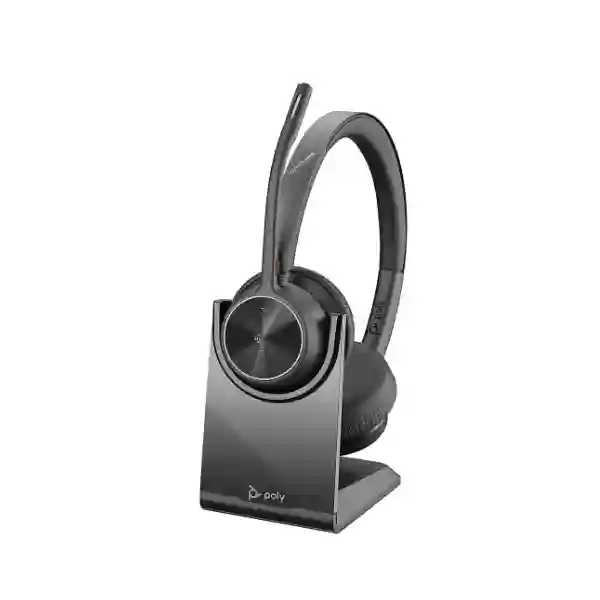
HP Poly Voyager 4320 UC Headset with Charging Stand
The HP Poly Voyager 4320 UC Headset with Charging Stand is a stereo on-ear wireless business headset built for clear spoken communication and flexible working. It combines a two-microphone noise-cancelling system, Poly Acoustic Fence technology, Bluetooth connectivity and practical desk charging. It is suited to people who move between computer meetings, softphone calls and compatible mobile conversations. HP documents a USB-A charge-stand bundle with a BT700 adapter, while other connector and meeting-platform variants exist. Buyers in Tanzania should therefore confirm the exact quoted package before purchasing. The key decision is whether its comfortable, mobile calling workflow matches the employee’s equipment and environment.
Noise-cancelling microphones
Charging stand
Wireless + USB audio
Who should consider this headset?
The HP Poly Voyager 4320 UC Headset with Charging Stand is worth considering for office professionals, remote workers, hybrid teams and staff who regularly switch between computer and phone conversations. It offers a dedicated microphone boom, headset-based call controls, Bluetooth mobility, and an organised charging routine. It is not automatically the best fit for users who need strong listening isolation, a physical desk-phone connection without extra accessories, or a guaranteed button integration with an untested softphone. Confirm the work pattern first, then match the USB connector and exact bundle to the employee’s devices.
At a glance: verified specifications
The following details describe HP’s documented USB-A Voyager 4320 UC stereo charging-stand configuration. Confirm the selected variant when buying, as package names, connectors and supplied accessories can differ.
| Design | Stereo, on-ear wireless business headset |
|---|---|
| Microphones | Two; microphone noise cancellation with Acoustic Fence |
| Computer connection | BT700 USB Bluetooth adapter in documented charge-stand bundle |
| Phone connection | Bluetooth for compatible smartphones |
| Rated wireless range | Up to 50 m under suitable conditions |
| Rated talk time | Up to 24 h with online indicator off; up to 18 h when on |
| Rated music time | Up to 47 h under specified conditions |
| Charging time | Less than 1.6 h in documented USB-A configuration |
| Charging accessory | Desktop charging stand in requested bundle |
| Additional operating mode | Corded audio over USB |
| Bluetooth version | 5.1 in the HP-documented USB-A bundle |
| Headset weight | Approx. 162 g in the documented USB-A variant |
Maximum performance figures are manufacturer ratings, not guaranteed outcomes for an individual deployment.
A practical headset for people who spend the day talking
Work calls are easier to manage when the audio device follows the person rather than keeping the person at a desk. The HP Poly Voyager 4320 UC Headset with Charging Stand is designed for employees who need a dependable microphone, two-ear listening, flexible computer connectivity, and a tidy place to return the headset between sessions. It is particularly relevant to staff who alternate between scheduled video meetings, telephone conversations handled through computer applications, and short discussions away from their workstation. The included charging stand gives the device a predictable home instead of leaving it loose beside cables, notebooks, and other equipment.
The main value is not a single headline specification. It is the way the headset supports a complete working routine: connect the adapter to a computer, pair a suitable phone, manage calls using controls on the headset, and recharge it when the workday allows. The design can suit an individual employee or an organisation equipping multiple users. Buyers should still confirm the precise USB connector, collaboration-platform edition, and package contents for the quoted unit. A charging stand is part of this requested configuration, but other Voyager 4320 retail configurations may be sold without one.
Understand what Voyager 4320 UC means
Voyager identifies the Poly business-headset family, while 4320 refers to the two-ear stereo model in the Voyager 4300 UC series. The related 4310 design uses one ear rather than two. The UC designation is associated with unified communications use: calling, meetings, and computer-based collaboration. It does not mean that every application or desk telephone will behave identically without setup. Device controls, mute synchronisation, and meeting shortcuts can depend on the connected application, operating system, adapter, software version, and exact headset variant.
The charging-stand package is an especially useful distinction. HP documents a USB-A Voyager 4320 UC stereo bundle containing the BT700 USB-A adapter, stand, charging cable, travel pouch, and headset. USB-C and Microsoft Teams-focused versions also exist within the wider family, so a name that omits the connector is not enough to identify every item in a procurement order. Ask for the final manufacturer part number or package confirmation when comparing quotations. Do not treat the supplier’s stock-keeping unit, the manufacturer’s product number, and the model name as interchangeable identifiers.
Stereo listening and the everyday meeting experience
The Voyager 4320 uses an on-ear stereo layout with a speaker at each ear. That arrangement can make speech from a remote meeting feel more balanced and can help a user remain focused on the conversation without relying on a single earpiece. HP lists 32 mm speakers and an audio bandwidth of 20 Hz to 20 kHz for the verified USB-A configuration. Those figures describe technical characteristics, not a guarantee that every meeting will sound identical. Network conditions, application processing, the caller’s microphone, and audio settings all influence the final experience.
An on-ear design is different from an over-ear headset that surrounds and seals the ears. The Voyager 4320 is a good candidate when employees want a lightweight business headset rather than a large headset intended primarily for isolation or immersive music. At the same time, it may not be the right answer for someone who needs substantial physical isolation from a very noisy room. The cushions rest on the ears, so personal comfort is worth checking during a longer trial, particularly for people who wear spectacles or spend many consecutive hours in calls.
Noise-cancelling microphones: what the technology actually helps
The headset features a pair of microphones and Poly Acoustic Fence microphone noise-cancellation technology. These elements are intended to make the wearer’s voice clearer to people at the other end of a call by reducing unwanted surrounding sound captured by the microphone system. This is relevant in shared offices, reception environments, households with occasional background activity, and work areas where conversations occur nearby. A microphone system that prioritises speech is valuable because the distant listener cannot control the noise around the person speaking.
Microphone noise cancellation should not be confused with active noise cancellation for the wearer’s own ears. The Voyager 4320 UC is not presented here as an active-noise-cancelling listening headset. The person wearing it can still hear some environmental sound, and the technology cannot remove every sudden or loud noise from a transmitted call. Position the boom microphone properly, maintain reasonable speaking distance, and use a quieter location for confidential or high-stakes conversations. A short test recording in the actual workplace is more informative than expecting a laboratory feature description to predict every office situation.
Computer connectivity through the BT700 adapter
The BT700 USB Bluetooth adapter provides a straightforward way to connect a compatible laptop or desktop computer to the wireless headset. In HP’s documented USB-A charging-stand package, the BT700 adapter uses a USB-A connection. The adapter can remain connected to a workstation while the wearer moves within the supported operating range. It is generally preferable to confirm that the adapter is selected as both the microphone input and speaker output in the computer’s audio settings before joining an important meeting.
USB-A and USB-C ports are not the same shape, even though both are used by modern business computers. Some Voyager 4320 variants include different adapters or cables, and it is unsafe to infer the connector from the words Voyager 4320 UC alone. Procurement teams should inspect the intended laptop fleet and match the selected bundle to its available ports. If computers use docking stations, test the headset both docked and undocked. Also check how company endpoint security rules handle Bluetooth accessories and USB adapters so deployment does not surprise employees on the first day.
Using a smartphone alongside a laptop
Bluetooth phone connectivity can help employees who alternate between computer meetings and incoming mobile calls. HP lists compatibility with smartphones over Bluetooth, and its verified specification for the USB-A bundle states support for up to two paired devices. This offers a useful work pattern: keep the computer connected for scheduled conferencing and use the phone when a customer, colleague, or supplier calls the mobile number. The headset provides one familiar listening and speaking device for different communication contexts.
Two connected devices do not mean that audio from both sources is mixed continuously or that every call can be answered in every possible application combination. Priorities and call handling depend on the particular devices and software. Teams should practise what happens when a mobile call arrives during an active computer meeting, including whether a call is held, declined, or switched. Where employees are assigned separate business and personal telephones, confirm how pairing is intended to be managed. A predictable call-routing policy is more important than simply counting the number of available Bluetooth connections.
Wireless freedom with realistic range expectations
HP specifies wireless range of up to 50 metres for the Voyager 4320 family with the relevant adapter under suitable conditions. That can be useful when an employee stands to consult a document, walks to a nearby filing area, or changes position during a long discussion. It should not be interpreted as a promise of clear audio through every wall or across every floor of a building. Metal furniture, partitions, other wireless equipment, building construction, and the position of the computer can all reduce the distance at which a stable connection is maintained.
In a real deployment, test the places where the user expects to speak rather than measuring only an unobstructed corridor. Walk from the desk to a meeting corner and back while monitoring the conversation. Keep the adapter away from crowded USB hubs if interference occurs, and investigate workstation power-management behaviour if connections disconnect when a laptop sleeps. HP mentions a longer range with an optional Voyager Office base, but that accessory is a separate configuration and should not be assumed to accompany the desktop charging stand. The supplied charging stand is a charger, not a replacement desk-phone base.
Battery life in the context of a working day
HP rates the Voyager 4320 UC for up to 24 hours of talk time when the online indicator is switched off and up to 18 hours of talk time when that indicator is on. The manufacturer’s specification also quotes up to 47 hours of music playback and up to 50 days of standby time under stated conditions. These are maximum figures rather than guaranteed results for every user. Actual endurance can vary with volume, connectivity, battery age, feature settings, and how the headset is used throughout the day.
Think of these specifications as capacity for planning, not as permission to neglect charging. An employee handling short calls may have a very different daily charging rhythm from a team member who attends continuous conferences. For busy reception or customer-contact roles, create an easy habit of returning the headset to its stand during breaks and at the end of a shift. If the headset is shared between employees, record who is responsible for charging it. Organisations should also distinguish online-indicator settings when comparing battery claims; quoting 24 hours without the condition can create misleading expectations.
Why the charging stand matters
The desk charging stand is more than a convenient accessory. It creates a consistent storage location, encourages regular top-ups, and helps prevent the headset from being left under papers or carried between desks unintentionally. In environments where the same person begins each day at the same station, a visible stand also serves as a reminder to collect the headset before joining the first call. For hot-desking, the stand is most useful when the organisation has a clear policy about assigned devices and whether accessories remain at a shared workspace.
HP lists charge time below approximately 1.6 hours for the verified USB-A charging-stand package. The stand needs an appropriate USB power connection, so its placement should take account of available ports, cable routing, and access to power. It does not charge a headset from a distance or remove the need for a cable into the charging stand. Confirm the quoted package explicitly includes the stand rather than assuming all Voyager 4320 versions do. A dedicated charging location can simplify daily routines, but the quality of the routine still depends on users returning the headset correctly.
Corded USB audio as a useful fallback
A notable feature of the Voyager 4300 UC series is the ability to use audio over a USB cable in corded mode. This offers another way to continue working when wireless battery power becomes inconvenient or when a particular workstation calls for a cabled connection. For people whose days include unexpectedly long meetings, the option reduces reliance on a fully charged battery. HP refers to wired USB audio as a way of extending the headset’s practical use beyond its untethered talk-time limit.
Corded use does not mean that every ordinary USB cable, port, meeting application, or power setup will provide identical results. The correct cable and operating mode should be checked against HP’s guidance for the precise configuration. In a corporate environment, verify whether the operating system switches audio devices automatically when the cable is attached, and explain that process to employees. A short trial with the organisation’s main calling application can establish the expected behaviour. If the business depends on uninterrupted calls, document both the preferred wireless procedure and a tested fallback instead of assuming the transition will always be invisible.
Headset controls that reduce small interruptions
The Voyager 4320 UC provides headset controls for power, answering or ending calls, muting the microphone, volume adjustment, and pairing. HP also documents voice alerts covering events such as connection status, mute state, low battery, and talk time. These features help the wearer deal with common actions without constantly searching through on-screen meeting menus. The value becomes more obvious when an employee is standing, reviewing a paper document, or switching attention between several open applications.
Call controls should be tested with the actual software used by the organisation. A mute indicator in one application may behave differently from another, and software updates can affect integration. Encourage users to verify that they are muted in both the headset and the conference application before discussing something unrelated to the call. Also show them where the microphone control sits and what the voice prompts mean. For team rollouts, a two-minute demonstration of answer, end, mute, and volume functions can prevent more interruptions than a lengthy technical introduction delivered only to IT staff.
Choosing the right Teams or UC configuration
Businesses often use the terms Teams headset and UC headset as though they always describe the same item. The Voyager 4300 family includes standard UC and Microsoft Teams-oriented variations, which may differ in dedicated control behaviour or manufacturer part numbers. HP support instructions explicitly describe certain Teams-launch functions as applying to Teams models with the desktop application installed. Therefore a buyer who needs a dedicated Teams button or a specific platform certification should verify that requirement against the exact quoted bundle before ordering.
This distinction matters equally when staff use Zoom, Google Meet, softphones, or a mixture of collaboration applications. Basic speaker and microphone audio may work while specialised call buttons or mute-synchronisation features vary. Rather than promising universal control integration, test the intended platform, client version, operating system, and adapter combination. Ask whether the purchase decision is driven by audio quality, certified call control, a dedicated Teams experience, or shared use across platforms. Choosing on those grounds is more reliable than buying purely because a listing uses the words business headset or UC compatible.
Comfort, fit, and practical daily handling
HP identifies the USB-A configuration as an on-ear stereo headset weighing approximately 162 grams, with artificial-leather-surface ear cushions. The relatively compact design is intended for communication work rather than the bulk of a large over-ear headset. Still, comfort is personal. Head shape, glasses, hairstyle, headband adjustment, room temperature, and the length of uninterrupted calls can change how the same headset feels to different employees. A demonstration unit can reveal more about comfort than a numerical weight figure by itself.
Set the headband so both ear cushions sit securely without excessive pressure, and position the microphone boom for clear speech without touching the face. Encourage employees to take appropriate listening breaks when work allows, regardless of how comfortable the headset appears. A dedicated owner should maintain ear cushions and wipe touch surfaces using the cleaning method in the manufacturer’s guidance. In shared environments, consider whether a single headset assigned to one person will be more hygienic and easier to maintain than rotating equipment without clear responsibility.
Hearing protection and sensible listening levels
HP specifies SoundGuard Digital acoustic protection technology for the Voyager 4320 UC. This is intended to help manage certain sudden or excessive sound exposures as described in the manufacturer’s technical documentation. That capability is useful in communication equipment, but it does not justify listening at high volume all day. Different workplaces, individual hearing needs, and application audio levels still require reasonable listening habits. The listener should be able to understand speech comfortably without turning the speakers up unnecessarily.
During setup, begin with moderate volume and check levels in the actual softphone or meeting application. Employees should understand that both the computer and headset may have their own volume controls. If remote participants sound unusually loud or distorted, investigate the application’s audio settings before simply increasing or decreasing headset volume repeatedly. Where occupational hearing requirements apply, follow the organisation’s safety programme and qualified guidance; no product description should be mistaken for a site-specific workplace risk assessment or a promise of regulatory compliance.
Device configuration and IT management
Enterprise deployments benefit from a consistent process for software settings, firmware updates, and device support. HP’s Poly software ecosystem supports the Voyager 4300 UC family through its desktop device-management tools, and published compatibility documentation identifies the series among supported devices. That allows IT teams to evaluate supported functions for configuring and maintaining headsets, subject to operating system and connection-method requirements. It does not mean every function is automatically available to every user without installing or authorising the relevant software.
Before deployment, decide whether employees may change audio prompts, indicators, or other personal settings and who is responsible for firmware maintenance. Establish a way to record the equipment identifier and assigned employee without exposing personal information in public notes. For remote workers, give clear guidance on approved update procedures and what to do if a headset disconnects. IT administrators should test any management application against endpoint security policies before distributing it widely. Good device management is a process built around the hardware, not an automatic outcome of buying one particular headset model.
A useful fit for different business roles
For administrative staff, this model can provide flexible call handling while preparing documents, checking calendars, or moving around a workstation. Sales and account teams may appreciate a single headset for computer meetings and selected mobile conversations. Managers who join several scheduled meetings can benefit from the desk stand as a consistent charging point. Remote and hybrid workers can carry the headset between work locations while keeping the included adapter and cable organised in its pouch.
In a customer-contact environment, the assessment should be more demanding. Teams should test background noise, call-control behaviour, shift patterns, and how quickly a headset can be replaced if damaged. For a busy reception counter, consider whether hearing the local environment is important or distracting. A stereo on-ear headset can suit some workflows but not every situation. Workplaces with particularly loud machinery, mandatory protective equipment, or a requirement to hear safety alarms need their own suitability assessment. The correct headset is the one that fits real working conditions, not merely the one with the most features listed.
Tanzania workplace considerations
For organisations evaluating business headsets in Tanzania, practical deployment issues include the types of laptops already in service, the main meeting applications, the quality of internet connections, and whether staff work primarily in one office or across several locations. The headset carries audio between the person and the connected device, but it cannot correct unstable broadband, delayed cloud calls, or problems in a remote conferencing system. A headset pilot should therefore distinguish local microphone performance from network issues that may affect the same conversation.
Power routines also matter. The charging stand needs a reliable USB power source, and users should know where their adapter and charging cable are kept. Offices operating multiple shifts should establish a charging handover process. For mobile employees, check how the adapter is stored so it is not lost during travel. Avoid deciding that this is a locally stocked product, that it comes with installation, or that a specific delivery schedule is available solely from a general product description. Those commercial details should be confirmed for the actual Tanzania quotation and supplied package.
Procurement checks before requesting a quote
A buyer should begin by counting the number of employees who need headsets and identifying how each person will connect. A standard office user with a USB-A laptop, for example, may need a different adapter package from an employee whose ultrabook provides only USB-C ports. Make a note of the preferred stereo format, whether the charging stand is mandatory, and the calling platforms that must be tested. Where a team is being equipped, record a single approved configuration to reduce confusion between similar-looking Voyager models.
Ask the supplier to confirm the exact part number, connector type, stand inclusion, and contents of the sealed package. Also request the applicable quotation, payment terms, fulfilment arrangements, and warranty handling information for the specific transaction rather than relying on descriptions written for other countries. If the headset will be used with desk phones, verify whether an additional Voyager Office base or another supported accessory is required; the charging stand alone is not a telephone interface. This checklist helps separate useful technical evidence from assumptions that create ordering mistakes and costly returns.
USB-A versus USB-C: a small detail with a big effect
HP documents a charging-stand configuration with a BT700 USB-A adapter and has other Voyager 4320 offerings that use USB-C connectivity. The headset’s broad communication purpose may be similar across those versions, but the adapter must physically fit the port available on the computer. Some modern laptops have a mixture of ports; others use a USB-C-only design or depend on a dock. Checking this before purchase is especially important when a business plans to distribute many headsets to different departments.
Do not assume that a generic converter or dock will provide identical call-control integration in every setup. If the computer model is standardised, test the intended package once and record the result. If the fleet is mixed, identify whether separate approved versions are preferable to a collection of untested adapters. The charging stand’s USB power cable is another detail to confirm, particularly when desks have limited power connections. The clearest purchasing instruction is the exact configuration, not simply the phrase Voyager 4320 headset. This avoids confusion when comparing several apparently similar quotations.
Comparing wireless, wired, and more isolated alternatives
A wireless stereo headset with a stand is most attractive when staff benefit from movement around the desk and a routine place to recharge. A basic wired USB headset may be simpler where users never leave their workstation, share equipment frequently, or prefer not to manage batteries. A single-ear model can be more appropriate for someone who needs to listen to local colleagues while remaining on a call. Conversely, a headset designed with active noise cancellation may deserve consideration when the wearer’s chief challenge is hearing speech amid persistent room noise.
The Voyager 4320 UC sits between those use cases. Its microphone noise reduction is intended to improve transmitted speech, its two-ear design supports focused listening, and its wireless adapter allows mobility. It is not a substitute for a specialised hearing-protection device, a desk-phone base, or an ANC headset when those are essential requirements. A useful comparison should examine microphone performance in the intended room, comfort during long calls, integration with the calling platform, charging routines, and the full accessory cost. Brand alone cannot settle those practical differences.
A straightforward first-day setup sequence
Before the first call, unpack the headset and confirm that the stand, appropriate USB adapter, charging cable, and other quoted accessories are present. Place the stand on a stable desk with a suitable power connection and charge the headset following the supplied instructions. Insert the BT700 adapter into the intended computer port and let the computer recognise the audio device. Then open the operating system’s sound controls and select the Poly device for microphone input and speaker output if it has not been chosen automatically.
Make a test call through the main business application. Verify incoming and outgoing speech, headset volume, mute behaviour, and whether call answer and end commands work as expected. If a smartphone is part of the intended workflow, pair it separately and test a mobile call. Walk to the farthest normal working location and check for interruptions. Finally, return the headset to its stand and confirm it is charging. For a larger rollout, document the successful configuration with simple screenshots or internal instructions so every employee follows the same tested path instead of improvising on a live customer call.
Troubleshooting problems before they disrupt work
If colleagues cannot hear the wearer, first check whether the headset or meeting application is muted, then confirm the selected input device. If the wearer cannot hear the meeting, check the output device and headset volume. These are often quicker checks than resetting a Bluetooth connection. If sound moves to a laptop’s built-in speakers after docking or undocking, revisit the computer’s default audio settings. When the headset works with a phone but not the computer, focus on the adapter, application settings, and operating system connection rather than assuming the headset itself has failed.
If wireless audio is intermittent, reduce obstacles and nearby interference, move closer to the adapter, and check that the headset has sufficient charge. Where permitted, use the manufacturer-supported software and instructions to review firmware and configuration. Do not perform unplanned firmware updates in the middle of an important meeting. A useful support record should include the exact model variant, computer operating system, calling application, symptoms, and the steps already tested. That information helps staff distinguish a headset issue from an account, meeting-platform, USB, or network problem.
Maintenance, ownership, and replacement planning
A headset will remain easier to use when simple maintenance is part of the workplace routine. Store it on its stand, prevent the microphone boom from being crushed under other desk items, and keep the adapter with its assigned computer or transport pouch. Follow HP’s cleaning and handling guidance rather than exposing the electronics to excessive moisture or aggressive chemicals. Inspect the condition of ear cushions and cables periodically, especially in environments where a headset is worn for much of each working day.
Organisations purchasing several units should also decide how replacements will be handled. Record which employee has a headset, which adapter belongs to it, and whether the stand is kept at a fixed station. A replacement device may require a fresh pairing or sound-setting check before work resumes. Confirm support, returns, warranty, and accessory ordering channels with the actual supplier for the relevant market rather than assuming terms from another region apply in Tanzania. A small amount of inventory discipline can prevent lost adapters and unused chargers from becoming more disruptive than the original hardware problem.
Security, privacy, and meeting etiquette
Wireless headsets are used for conversations that may contain customer data, internal decisions, or private personnel information. The Voyager 4320 UC can improve convenience, but it does not by itself make a conversation private. Employees should avoid speaking confidentially in public areas and should confirm the correct meeting participant list before sharing sensitive information. A noise-cancelling microphone is designed to manage unwanted sound, not to stop bystanders from hearing what the wearer says aloud.
Where a headset is paired with both a personal phone and a business computer, define how the equipment should be used. Users should recognise which device is currently handling audio and avoid accidental handoffs during customer calls. IT teams can help by recommending approved conferencing applications, current supported software, and sensible device-update practices. Simple meeting etiquette matters too: check mute status, speak clearly toward the boom, keep volume comfortable, and return the headset to its stand after use. These habits make the headset’s capabilities dependable in daily practice.
Planning a multi-user pilot and deciding what success looks like
Before ordering a large quantity, select a small sample of employees with different working patterns. Include someone who spends most of the day in video meetings, someone who receives regular mobile calls, and someone who works in a busier shared area. Give each person the same basic setup instructions and ask them to test for several normal work sessions. Record microphone clarity, comfort, adapter connectivity, battery routine, and whether the charging stand fits the way their desk is arranged.
Evaluate the pilot against specific requirements rather than a vague satisfaction score. Did customers hear the employee clearly? Did call controls behave consistently in the organisation’s actual application? Could the wearer move to the planned locations without losing audio? Was the headset comfortable through a typical meeting schedule? Did the stand make charging more reliable? If any result is weak, determine whether a software adjustment, different USB connector bundle, or another headset category would solve the problem. This evidence-led approach can protect budgets and improve adoption more effectively than simply purchasing one model for every role.
What to verify in the supplied package
HP’s documented USB-A bundle includes the stereo headset, BT700 USB-A Bluetooth adapter, desktop charging stand, USB Type-A charging cable, travel pouch, and quick start guide. This is useful evidence for a charge-stand package, but the buyer’s requested product name does not specify the exact regional part number. An item described merely as Voyager 4320 UC may be a headset-only offering, a differently connected bundle, or a Teams-oriented option. The purchase order should resolve that ambiguity before payment.
Ask for written confirmation of the exact contents, including the USB connector that fits the recipient’s computer, any necessary power accessory, and the specific type of charging stand. Do not infer that the package includes the optional Voyager Office desk-phone base. If the team needs phone-system integration beyond standard computer softphone audio, describe that requirement in the quotation request. A transparent package checklist lets the buyer compare like with like and prevents a low-priced headset-only offer from being mistaken for a complete stand-and-adapter package.
A confident buying decision without unsupported promises
The strongest reason to consider this headset is a combination of practical features verified by HP: stereo on-ear listening, microphone noise cancellation with Acoustic Fence, Bluetooth connectivity with a BT700 computer adapter in relevant bundles, up to 50 metres of rated wireless range, and a stand-based charging routine for the specified package. The corded USB option adds flexibility when the user needs an alternative connection mode. Together, those elements support work that moves between meetings, calls, and desk-based tasks.
A good purchase decision also recognises what the specification does not establish. It cannot prove local stock, current Tanzanian shilling pricing, delivery timing, accessory inclusion for every listing, universal softphone integration, or performance in a particular building. Confirm those items with a written offer and a short workplace test. Buyers can then choose the correct Voyager 4320 UC variant for their computers and communication platform, rather than relying on a broad family name. Request a quotation with the charging stand and preferred USB connector clearly stated so the supplied configuration matches the intended use.
Frequently asked questions
These answers address common purchasing and deployment questions. They describe documented capabilities and important limitations without making unsupported promises about a particular supplier’s stock, delivery or local service.
Is the HP Poly Voyager 4320 UC a wireless headset?
Yes. It is designed for wireless business communications, with Bluetooth connectivity and a BT700 computer adapter in the documented USB-A charge-stand package. It also supports audio over a suitable USB cable as a corded alternative. The exact adapter interface must be confirmed for the item being quoted. Wireless operation is still subject to range, interference, battery state, and compatible devices.
Does the charging stand come in the box?
The configuration requested here includes a charging stand, and HP documents a USB-A Voyager 4320 UC bundle that contains one. Not every package in the broader Voyager 4300 UC family necessarily includes that accessory. Ask the supplier to state stand inclusion and the manufacturer part number in writing before confirming the order, particularly when comparing offers with different descriptions.
How long does the headset battery last?
HP specifies up to 24 hours of talk time with the online indicator off, or up to 18 hours with that indicator on, for the documented variant. Music playback is rated up to 47 hours under specified conditions. Actual battery endurance depends on use, settings, age, and volume. The desk charging stand helps users maintain a predictable routine between calls.
Can the Voyager 4320 UC connect to both a computer and a phone?
HP describes computer connectivity through the included BT700 adapter for the USB-A bundle and Bluetooth smartphone pairing. The published specification lists support for up to two paired devices. Exact switching and call-control behaviour depend on the devices and applications, so employees should test what happens when a phone call arrives during a computer meeting.
Will it work with Microsoft Teams?
The Voyager 4300 family includes Microsoft Teams-oriented configurations as well as UC versions, and HP discusses Teams integration for applicable models. For a dedicated Teams button or a particular certification, confirm the exact model and software requirements rather than assuming every listing has the same controls. Basic microphone and speaker function should be tested with the organisation’s deployed Teams client.
Does Acoustic Fence cancel noise for the person wearing it?
Acoustic Fence is described as microphone noise-cancellation technology. It is intended to reduce unwanted sound transmitted to the person listening remotely. It is not the same claim as active noise cancellation for the wearer’s ears. If strong listening isolation is essential, compare an alternative headset designed specifically for that purpose before buying.
What wireless distance can users expect?
HP lists up to 50 metres of wireless range with the relevant configuration under favourable conditions. Walls, desks, interference, and computer placement can lower the usable range. Businesses should test the intended walking route in the actual office rather than treating the maximum specification as a guaranteed distance through every partition or across floors.
Can this charging stand connect the headset to a desk telephone?
No such capability should be assumed from the charging stand itself. It is a desktop charging accessory. HP separately refers to a Voyager Office base for certain desk-phone configurations. If the requirement includes a physical telephone, identify its make and model and verify the supported base and integration before ordering.
Is the headset suitable for people working from home?
It can be a practical choice where the employee uses a compatible computer for video meetings and wants an on-ear stereo headset with microphone noise cancellation. The charging stand encourages regular charging. However, it cannot fix poor internet connectivity or provide complete isolation from family and street noise. Testing the headset in the home environment is recommended.
Which is better for my laptop: USB-A or USB-C?
Choose the adapter version that matches the available computer ports and the organisation’s approved connection method. HP offers different variants in the Voyager 4320 family, and the charging-stand USB-A package is one documented option. A laptop with only USB-C may require a different approved bundle. Check docked and undocked behaviour before large-scale purchasing.
Can employees use the headset while it charges?
HP documents corded audio over USB as a supported operating option that can extend practical use when battery power is low. That is distinct from simply placing the headset on the desktop stand. Follow the manufacturer guidance for the applicable cable and operating mode. Test audio-device switching in the main meeting application before relying on it during important calls.
What should a Tanzania buyer confirm before placing an order?
Confirm the exact manufacturer variant, adapter connector, charging stand, package contents, and compatibility with the intended computers and calling software. Request current pricing, delivery terms, warranty handling, and fulfilment details from the actual supplier. No specific local availability, price, delivery schedule, or supplier authorisation is established by this product description alone.
Is it a better choice than a wired USB headset?
That depends on the work pattern. Wireless mobility, phone pairing, and a charging stand can be valuable for people who change position frequently. A simple wired headset may be better where employees remain seated and do not want to maintain a rechargeable device. Compare call clarity, fit, application controls, charging practices, and total package requirements rather than focusing on wireless capability alone.
How should IT teams prepare a larger rollout?
Begin with a pilot using representative staff and the actual meeting platforms. Test microphone quality, USB adapter fit, mute synchronisation, wireless range, and charging. Agree on supported device software, update procedures, user ownership, and spare accessory handling. A documented setup and a clear internal support route make the hardware easier to operate across multiple teams.
Request the correct Voyager 4320 UC charging-stand configuration
Tell FourTeck Tanzania which laptop ports and calling applications your employees use, how many headsets are required, and whether the charging stand is essential. Request confirmation of the exact model, BT700 adapter connector, box contents and current commercial terms. This makes the quotation more useful and reduces confusion between standard UC, Teams-oriented and alternative connector variants.
Request a product quotation and package confirmation from FourTeck Tanzania.




Reviews
There are no reviews yet.