
Professional PC calling • Tanzania buying guide
Clearer conversations, secure DECT mobility, one ear free
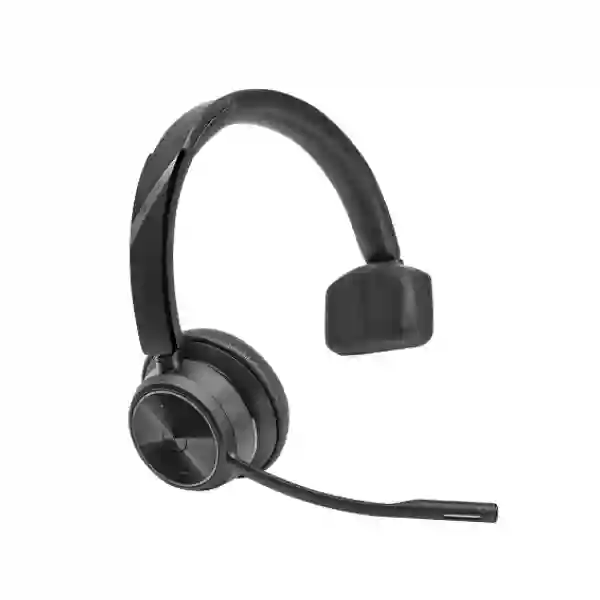
The HP Poly Savi 7310 UC Monaural DECT Headset is designed for professionals who spend much of the working day on computer-based calls and need dependable wireless movement without losing awareness of colleagues nearby. Its noise-cancelling microphone with Poly Acoustic Fence technology, single-ear fit and D400 USB DECT connection make it a focused choice for service desks, customer support, administration and confidential business discussions. Before purchasing for Tanzania, confirm the precise regional wireless variant and your calling-platform requirements.
Product at a glance
The Savi 7310 UC is a professional headset built around a simple workflow: connect the supplied D400 wireless adapter to a supported computer, wear the single-ear headset, and handle software calls without remaining tied to the workstation by an audio cable. The charge stand gives the headset a predictable resting place between calls. This is not the same buying proposition as a mobile Bluetooth earbud or a desk-phone bundle; it is aimed primarily at people whose business conversations take place through a PC or laptop.
Manufacturer specifications for the Savi 7310 UC family list up to 13 hours of talk time, up to 52 hours of standby and charging in under two hours. Wireless range is stated as up to 137 metres in open line-of-sight conditions and up to 40 metres in a typical office environment. Those figures describe rated conditions, not a guarantee for every room. Building materials, interference and the placement of the computer can affect the distance users experience.
The core value is the combination of conversation-focused audio, a monaural wearing style and a managed wireless workflow. When ordering several devices for a team, it is worth checking every computer’s available USB port, the exact part number, approved radio-frequency version, software support and replacement accessory plan rather than choosing on headset appearance alone.
- Design: one-ear, on-ear wireless DECT headset with adjustable microphone boom.
- Connection: D400 USB Type-A DECT adapter, with USB-A to USB-C adapter listed in the regional manufacturer package.
- Microphone: noise cancelling with Poly Acoustic Fence technology.
- Audio protection: SoundGuard Digital, with operation dependent on applicable configuration and software.
- Battery: rechargeable lithium-ion polymer; rated talk, standby and recharge figures are maximum or typical manufacturer specifications.
Who should choose this headset?
A receptionist, admissions coordinator, account manager or internal support specialist may need to hear a visitor or co-worker while handling a call. The monaural design leaves the second ear uncovered, which can be valuable in an office where quick side conversations or ambient awareness are part of the job. It also avoids the full two-ear listening experience that some users find too isolating during long shifts. This is a preference and workflow decision, not a claim that one-ear headsets are universally more comfortable or safer.
The Savi 7310 UC also suits staff who routinely move between a chair, a nearby filing cabinet and a shared workspace while staying connected to a computer call. A DECT radio link reduces the inconvenience of a trailing headset cable. Call continuity still depends on wireless coverage, battery charge, the running softphone and the computer’s connection to the organization’s communications service. It is sensible to walk-test the intended area before a large deployment.
Teams dealing with financial, personnel, patient or customer information may value the device’s specified DECT security features and microphone noise reduction. However, a headset alone cannot make a conversation private, make a business compliant with a data-protection law or prevent all nearby people from hearing the speaker. The wider calling system, room, staff practices and access controls remain essential.
For employees who mostly use mobile phones, must switch between several personal devices, or rely on a traditional desk telephone, another headset configuration may be more appropriate. The first question is not simply whether the headset sounds good; it is whether its PC-centred connection matches how the employee really works.
Understanding UC, Office and Teams versions
UC stands for unified communications. On this product, the UC designation identifies the computer-oriented Savi 7310 configuration that uses the D400 USB DECT adapter. It is intended for softphone and computer communication workflows. Do not assume that an ordinary UC bundle includes the separate office base normally associated with desk-phone connectivity. A business that needs direct desk-telephone integration should examine an appropriate Savi Office configuration and its phone compatibility.
Poly offers more than one Savi 7310 configuration, including regional radio-frequency versions and variants specifically designated for Microsoft Teams. Similar names do not make those products interchangeable. In purchasing records, a single suffix or certification label can change what is supplied or what integration a fleet administrator expects. Ask the supplier to confirm the complete product number and the exact package before an order is approved.
A non-Teams-specific UC headset can be suitable for computer-based communication, but software support and certification should be checked against the organization’s actual calling application. The fact that microphone performance is described by HP in relation to a Teams open-office specification does not mean that every Savi 7310 UC sales variant is identical to a separately listed Teams-certified SKU.
Prepare a simple requirement statement for procurement: number of seats, operating system, USB availability, calling platform, desk-phone requirement, approved DECT frequency band and whether Teams-specific certification is mandatory. That short statement can prevent an expensive mismatch between a familiar product name and the configuration employees need.
Why DECT matters for professional calls
DECT is a wireless technology used for many business telephony devices. The Savi 7310 UC uses it to connect the headset with the D400 adapter attached to a computer. This separates the user’s headset radio link from the computer’s wired or wireless connection to a UC application. It can be a practical arrangement for workplaces that prefer a dedicated headset connection rather than pairing a personal Bluetooth accessory with each PC.
DECT does not automatically give unlimited range, uninterrupted audio or compatibility with every corporate security policy. Physical layout, radio density and equipment choices matter. Offices with many headset users should evaluate wireless behaviour in representative rooms rather than extrapolating from a one-person demonstration. An open hallway, a room full of metal shelving and a meeting room behind reinforced walls may give very different results.
The Savi 7310 UC is especially worth considering when work involves frequent professional voice calls and sensitive dialogue. The manufacturer highlights enhanced DECT security for the family, but purchasing teams should still confirm that the offered frequency variant is suitable for local operation. Wireless product specifications issued for other markets must not be treated as proof of regulatory approval in Tanzania.
If staff primarily need casual phone music playback or direct pairing with their mobile devices, the value of a dedicated PC DECT system may be less compelling. Match the radio technology to the communication workflow, not to a broad claim that one wireless technology is always better than another.
One ear free: the everyday value of monaural design
Monaural means that the headset has one ear speaker rather than two. In the Savi 7310 UC, that allows the user to monitor a software conversation with one ear while the other remains open to normal office sounds. Front-desk staff may prefer this arrangement when responding to nearby colleagues; a service-desk analyst may appreciate it when discussing a ticket with a team member while keeping the caller informed.
Whether monaural is the right choice depends on the environment. In a reasonably quiet office it can balance telephone listening and awareness. In a persistently noisy shared room, some workers may prefer a dual-ear design to reduce distraction. People who are easily disturbed by surrounding conversation should try both options if possible. Neither configuration eliminates the need to keep the listening level comfortable or take sensible breaks.
The official specification identifies an on-ear design with artificial-leather-surface ear cushioning and a headset weight of approximately 120 grams. Real-world comfort depends on the headband adjustment, ear shape, shift length, glasses and personal preference. The most useful pre-purchase test is not a brief photograph comparison but a realistic call session with the headset adjusted as a particular employee would wear it.
For shared-use settings, agree on hygiene practices and check whether compatible replacement cushions or other service parts can be obtained through the chosen supply route. Teams may also prefer assigning each employee a personal headset, leaving only the software workstation shared. The decision should follow workplace hygiene needs and the practical availability of accessories.
A microphone built for clearer speech
Professional callers need their voice to be intelligible, particularly when they speak from a busy office rather than a quiet private room. HP identifies a noise-cancelling microphone enhanced with Poly Acoustic Fence technology on the Savi 7310 UC. Its purpose is to reduce the unwanted environmental sound that reaches the far end of the conversation, helping a caller focus on the speaker’s voice.
This feature does not make the microphone silent to every surrounding event. Sudden loud sounds, another person speaking very near the boom, changes in microphone position and excessively reverberant rooms can all influence what remote participants hear. For best results, position the microphone as directed in the product’s user guidance, avoid rubbing the boom against clothing, and perform a short recording or test call before important meetings.
HP lists the microphone bandwidth at 100 Hz to 10 kHz. That is a technical capability of the microphone path, not a promise that every conferencing application or telephone call will transmit the same bandwidth. The complete audio experience also depends on codec settings, the network connection, application processing and the equipment used by the person on the other end.
When a business compares headsets, listening to actual sample calls is more useful than relying solely on labels such as noise cancelling. Have two staff members test from realistic workstations, including a normal level of background conversation. Assess voice clarity, the need to repeat information and whether the microphone’s position can be maintained comfortably across a full working period.
Audio clarity and hearing considerations
The Savi 7310 UC is engineered primarily for speech communication, but the manufacturer also specifies an audio path capable of multimedia playback. HP lists speaker bandwidth of 100 Hz to 6.8 kHz in wideband mode and 20 Hz to 20 kHz in multimedia mode. Those figures describe supported modes rather than guaranteed audio quality across every softphone or music source. Call quality will be constrained by the actual meeting or telephone service in use.
SoundGuard Digital is the audio protection technology listed for this headset. Organizations should follow HP’s applicable software and configuration instructions so the intended functions are properly enabled. A named protection feature should not be understood as permission to use excessive listening volume, nor as a substitute for occupational hearing-health practices. Users can still control volume and should choose a comfortable setting appropriate to the room.
The headset includes controls for volume adjustment, microphone mute, call answer or end and power. Voice alerts are listed for events such as a low battery, connection status, mute and volume limits. These on-device signals can reduce the need to keep checking an application window, but the exact response of call-control buttons depends in part on the supported software environment.
Organizations concerned about fatigue should consider workload design alongside hardware choice. Long listening sessions benefit from scheduled pauses, a comfortable fit and realistic call-volume policies. Choosing the right headset makes these habits easier to maintain, but it cannot replace them.
DECT security: useful protections with sensible limits
HP lists AES 256-bit encryption, AES 128-bit authentication and DECT security certification for the Savi 7310 UC family. The manufacturer also describes DECT Security Step C in its product feature material. These are relevant differentiators for organizations that handle sensitive discussions and want to evaluate wireless headset security as part of a broader communications architecture.
Security claims need careful interpretation. Encryption protects a specified part of the wireless link; it does not mean that an entire meeting, computer, network, recording workflow or customer-information database is secured by the headset. An attacker, unauthorized user or unintended listener can exploit weaknesses elsewhere if policies, access management and endpoint protection are neglected. A microphone with environmental noise cancellation also does not prevent someone beside the employee from overhearing the employee’s own speech.
For procurement, ask the IT or security team to verify the exact product variant, firmware management process, approved wireless equipment policy and any application-specific requirements. Where a business has regulatory obligations, the responsible compliance team should assess the complete communication chain. Avoid describing a headset as legally certified for a particular Tanzanian sector without explicit evidence and a defined scope of certification.
The most helpful way to evaluate this headset is as one component of a well-managed voice system: a protected radio connection, user-level controls, suitable software, a secure workstation and deliberate practices for confidential calls. That layered approach provides a more reliable buying decision than marketing language about absolute privacy.
Wireless range: what the published numbers mean
According to HP’s regional specifications, the Savi 7310 UC has a rated wireless range of up to 137 metres in an open area and up to 40 metres in a typical office environment. These two figures are not contradictory. The larger number reflects more favourable line-of-sight conditions, while the smaller figure gives a practical reference for indoor use where walls, furniture and other obstacles may weaken a radio link.
A user moving from a desk into a nearby records area may benefit from that freedom, but the actual coverage must be assessed in the intended building. Stairwells, partitions, long corridors, enclosed rooms and radio traffic can affect performance. Do not promise uninterrupted calling throughout a building, an entire floor or an outdoor compound on the basis of an advertised maximum alone.
During a pilot, connect the D400 adapter at the intended workstation and conduct a call while walking a normal staff route. Note where audio degrades or a disconnection occurs. Repeat at the busiest expected time and include the actual computer arrangement, especially if the USB adapter is surrounded by metal equipment or placed in an obstructed position.
That simple walk test can prevent later disappointment. It also helps determine whether one headset type can serve the whole team or whether employees working across distant rooms need a different communications arrangement. Coverage planning should be based on tested locations, not an assumed radius drawn around each desk.
Battery life and the rhythm of a working day
HP states up to 13 hours of talk time and up to 52 hours of standby time for the Savi 7310 UC, with charging time under two hours in the specified configuration. The rechargeable lithium-ion polymer battery is intended to support a substantial portion of a normal business day, but real battery performance varies with usage pattern, battery age, conditions and settings. Maximum published figures should not be converted into a guaranteed shift duration.
For a busy contact-handling employee, the routine is straightforward: start with a charged headset, return it to its stand during non-call periods and watch or listen for battery status alerts. A charging area should be arranged so the cable and stand do not interfere with desk work. Shared charging arrangements can work, but they should not create confusion about which headset is assigned to which employee.
Battery planning matters particularly where workers move between shifts or a team expects back-to-back calls. Estimate realistic daily talk time rather than elapsed working hours. A person who speaks continuously will use the battery differently from someone who joins short meetings separated by long breaks. An organization with critical call coverage may want a spare operational headset or a documented charging routine.
When comparing purchase costs, include the useful life of rechargeable batteries and the availability of approved service components. Do not assume that every battery or charging accessory sold for another Savi model fits this one. Match replacement parts to the exact headset and follow manufacturer guidance for handling and disposal.
Computer connection and USB compatibility
The UC configuration connects to a computer using a D400 USB DECT adapter. The regional HP package listing includes a USB Type-A D400 adapter and a Type-A to Type-C adapter, which provides flexibility for modern laptops with different port arrangements. The wireless link is between the headset and the D400 device; the computer still needs its normal network connection to run its communications application.
HP lists compatibility with Windows 10, Windows 11 and macOS for the relevant model family. That operating-system list is a useful starting point, but it does not guarantee full call-control interoperability with every version of every softphone. An organization should confirm its particular platform, application permissions, device-management policies and audio-device selection before ordering across many workstations.
USB port access is often overlooked. Some laptops have limited ports, docking stations or restrictive endpoint policies. Check whether the adapter can remain in place safely, whether the supplied USB adapter arrangement is convenient, and whether the corporate PC allows approved USB audio devices. A USB-C laptop should be assessed with the actual supplied adapter rather than an assumed connection method.
A useful acceptance test includes making and receiving a call, changing speaker and microphone selection inside the meeting application, checking mute status, confirming volume adjustment and testing operation after the computer is restarted. The software experience should be judged on the organization’s actual deployment image rather than a generic demonstration laptop.
Softphones, meetings and platform selection
The value of a UC headset depends on its relationship with the calling software. The Savi 7310 UC is intended for PC communications, making it relevant to voice-focused workflows using enterprise calling or meeting applications. Software support is more than hearing audio: users may also need one-touch answering, application mute synchronization, device updates and a predictable experience when several communications tools are installed.
Before deciding it is compatible with an organization’s platform, distinguish between three questions. First, can the computer recognize it as an audio input and output device? Second, do integrated controls behave as expected in the particular application? Third, does the purchaser require a named certification or administration feature? These answers can differ even for the same headset.
If a Microsoft Teams-specific certification is a formal requirement, confirm that the exact quoted Savi 7310 variant carries the required designation. Do not infer it from the family name or from HP’s description of the microphone. Similarly, a generic reference to UC capability should not be interpreted as a commitment that all advanced features work identically across every calling service.
For mixed-software workplaces, pilot each major workflow. Test scheduled meetings, incoming softphone calls, headset mute, alert behaviour and changes between applications. Capture the application versions and any configuration choices that produced a reliable result. This gives IT a repeatable setup standard when new staff or replacement computers are introduced.
Simple setup for an individual workstation
A sensible first installation starts by checking the contents of the product package against the confirmed variant. Place the charging stand on a stable, convenient surface, connect it using the appropriate supplied charging cable, and charge the headset according to the manufacturer instructions. Avoid positioning the stand where it is easily knocked to the floor or where cables create a trip or snag hazard.
Next, connect the D400 USB adapter to a suitable computer port, using the included USB-A to USB-C adapter if that is the correct arrangement for the supplied kit. Allow the operating system to recognize the device. Follow the applicable HP Poly pairing or subscription procedure if a headset and adapter are not already associated. Do not assume that a separately purchased replacement adapter will automatically connect without configuration.
Open the intended conferencing or calling application and select the headset as the speaker and microphone device. Make a brief test call, adjust the fit, position the microphone boom properly and check the mute control. Walk a realistic short route to observe coverage. If audio is unclear, confirm the selected microphone before changing network or security settings.
Finally, document the working setup for the employee. Include a plain-language instruction covering charging, microphone position, muting, call controls and basic issue reporting. In managed organizations, have IT review firmware and companion software through approved device-management procedures rather than encouraging staff to install unapproved utilities independently.
Call controls and practical daily habits
The Savi 7310 UC provides buttons for call answer and end, microphone mute, volume adjustment and power. These controls are useful because employees should not need to search through a meeting window for every small action. HP also lists voice prompts for states such as low battery, connection, volume limits and mute changes. The way these indications integrate with an application can depend on platform support and configuration.
One good habit is to check the mute state before sharing confidential information with a colleague. The visual state displayed by a meeting application and the headset’s local status should be verified during the team’s setup test, especially when users switch software. Do not rely on an assumed mute indication during a sensitive conversation without testing it in the current application.
Another useful habit is to return the headset to its stand between calls or at the end of a shift. This reduces the chance of starting a critical conversation with an unexpectedly low battery and gives staff a known location for the device. During active work, choose a comfortable volume rather than increasing it to overcome office noise.
Managers can improve adoption by providing a one-page quick guide for common tasks rather than asking each employee to discover button behaviour. Employees who understand mute, charging and call-routing functions tend to need fewer avoidable help-desk interventions, though the outcome depends on training and the surrounding software.
Deploying several headsets in the same office
Buying one professional headset is a straightforward equipment choice; equipping an entire department is a small IT deployment. A company should begin with a sample of representative users and actual computer configurations. Include the busiest calling area, a quieter meeting space and any location with challenging wireless conditions. Test comfort, audio, call controls, charging and the reliability of the wireless link over ordinary staff movement.
HP describes support for conferencing multiple headsets using the D400 adapter, with a maximum of four headsets in the stated use case. This feature may be useful for supervised calls or team coaching, but administrators should verify the supported pairing procedure, exact models and application behaviour. It is not equivalent to every feature of a training or call-recording platform.
For larger groups, keep a simple asset record showing the device assignment, product variant, D400 adapter, charging equipment and service history. Label equipment where local practices permit and avoid mixing up adapters when troubleshooting. A structured rollout can reduce time spent on mismatched devices or repeated setup steps.
Do not assume that the advertised DECT range or manufacturer comments about wireless density translate into a fixed number of simultaneous users for every site. The office layout and frequency environment deserve attention. Coordinate purchasing decisions with IT and, where necessary, facilities or security staff before placing a large order.
Communications security and workplace policy
A headset can support a workplace security policy, but its features must be considered in context. Staff handling payroll, customer accounts, case notes or other sensitive conversations should follow rules for authenticated sign-in, application access, approved devices and suitable meeting locations. The Savi 7310 UC’s DECT security features help address the wireless audio link; organizational governance covers everything around it.
Consider where calls occur. A person speaking near a public reception area may be overheard regardless of microphone noise reduction or encrypted transmission. For particularly sensitive work, use an appropriate room, restrict access to call recordings and avoid placing confidential details in exposed notifications. If the room or network does not meet the required controls, changing headsets alone will not correct the risk.
Organizations with restrictions on wireless hardware should have their technology team review the exact RF variant and local rules. The absence of Bluetooth as the primary headset link may be relevant to a particular policy, but it is not proof that the device is approved in every restricted setting. Security teams should make that determination against their own documented criteria.
The practical buying message is to select the headset as part of an approved endpoint setup, maintain a managed software process, teach employees realistic privacy practices and review equipment when requirements change. Technical terminology is useful only when it leads to a sound operational choice.
Where this headset fits in a Tanzanian workplace
Businesses in Tanzania may use a mixture of desktop computers, laptops, remote meetings and customer-facing telephone systems. The HP Poly Savi 7310 UC Mono headset is most relevant where employee calls are handled primarily on a computer. A customer-service team, professional office, administrative department or internal help desk can evaluate the device using the same basic criteria: platform fit, comfort, microphone clarity, coverage and manageable procurement.
Local purchasing considerations deserve separate attention. Ask for the full regional part number and technical specifications of the exact item being quoted. DECT products can be sold in more than one frequency version, and an international catalogue entry does not establish authorization for use in Tanzania. The purchaser or supplier should verify applicable local radio requirements before purchase or deployment.
Power and connectivity also matter. A headset may be fully charged while the computer or network connection is unavailable. Businesses relying on voice applications should assess the workstation, network service and any required power-continuity arrangements as a complete system. A headset cannot compensate for a failing internet link or an unsuitable software licence.
No Tanzanian price, current stock, delivery promise, installation territory or locally applicable warranty is assumed here. Confirm those terms through an actual quotation for the specified product. That keeps the decision grounded in the equipment the organization will receive rather than a price or specification copied from another market.
Compare the Savi 7310 UC with your alternatives
Compared with a dual-ear or stereo business headset, the monaural Savi 7310 UC places more emphasis on awareness of the room. Someone working beside other people may appreciate keeping an ear available for conversation. Someone in a noisy environment who needs stronger acoustic separation may prefer a suitable stereo option. The better choice depends on where calls happen and the preferences of the wearer.
Compared with a conventional wired USB headset, this DECT model adds freedom to move and a separate charging routine. Wired headsets may suit fixed desks where charging, wireless coverage and adapter management would create unnecessary complexity. A wireless purchase should be justified by actual movement and workplace needs, not by wireless technology as an end in itself.
Compared with a typical Bluetooth headset, the Savi 7310 UC has a PC-focused DECT adapter and security-related features highlighted for professional communications. A Bluetooth option may be preferable if direct connectivity to a mobile phone or frequent switching between personal devices is the dominant requirement. Check the exact connection capabilities rather than assuming every wireless headset supports the same hosts.
Finally, compare UC and Office versions within the Savi family. If a conventional desk telephone is essential, the UC package may not be sufficient. If the business only needs computer calling, purchasing a more elaborate office configuration might add cost and complexity without delivering a useful benefit. Write down the required endpoints before choosing.
Specifications worth confirming on the quotation
Published product specifications can help buyers create a consistent shortlist, but regional variants and bundled items must match the exact quotation. HP’s listed reference values for the Savi 7310 UC include a monaural on-ear design, a D400 USB DECT connection, a noise-cancelling microphone, SoundGuard Digital and a charge stand. Technical figures such as weight or wireless distance are useful for comparison, but real performance still depends on setup and environment.
Frequency bands deserve special care because the Savi 7310 UC name appears across more than one radio version. A manufacturer page for an 1880–1900 MHz model does not mean that a different part number uses the same band. Only put a specific RF band or manufacturer product number on an order once it has been verified for the item offered and considered against local requirements.
Package details should also be confirmed. HP’s reference listing includes the headset, D400 USB Type-A adapter, charging stand, USB charging cable, USB-A to USB-C adapter, travel case and quick-start guide. A supplier’s quotation should state exactly what is included; bundles, replacement units and regional packages may differ.
Ask the supplier to document the applicable warranty terms, service process, replacement-part access and commercial conditions for Tanzania. This page presents technical context, not a locally verified sales offer. An accurate quotation is the point where the business can confirm the parts, cost and obligations relevant to its particular purchase.
| Attribute | Manufacturer reference |
|---|---|
| Wearing style | Monaural, on-ear |
| Connection | DECT via D400 USB Type-A adapter; USB-A to USB-C adapter in reference package |
| Microphone | Noise cancelling; Poly Acoustic Fence |
| Wireless range | Up to 137 m open area; up to 40 m typical office |
| Talk / standby | Up to 13 hours / up to 52 hours |
| Charge time | Under 2 hours |
| Headset weight | Approximately 120 g |
| Security | AES 256-bit encryption; AES 128-bit authentication |
| Host OS | Windows 10, Windows 11, macOS listed |
| Acoustic feature | SoundGuard Digital |
A practical pre-purchase checklist
Start with the use case: are calls mainly conducted from a Windows or macOS computer, or must staff also connect directly to a desk phone? Identify the primary meeting or calling platform and whether basic audio support is sufficient or integrated buttons and a specific certification are mandatory. This initial decision will often determine whether the UC configuration is suitable at all.
Check the hardware next. Record computer USB ports, docking arrangements, headset allocation, charging locations and any device restrictions. Confirm whether staff use a quiet room, a busy shared office or a customer-facing desk. A monaural headset’s open ear can be welcome in one space and distracting in another. Where several team members will use the model, organize a realistic trial before standardizing.
Confirm the exact product number, supplied D400 adapter, radio-frequency variant and applicable local radio requirements. For procurement in Tanzania, do not rely on a retailer listing intended for a different regulatory market. Ask for product-specific documentation and a clearly itemized offer.
Finally, review the lifecycle. Find out who handles firmware updates, replacement cushions, charging equipment, batteries, warranty support and new-user onboarding. A comfortable, compatible device with a practical support plan is generally a stronger operational choice than a headline feature that employees cannot use in their actual environment.
- Main calling endpoint identified: PC/UC or desk phone.
- Required platform and certification identified.
- USB and software permissions reviewed.
- Monaural comfort tested by representative users.
- DECT band and local requirements checked.
- Exact package and commercial terms confirmed.
What to expect in the box
HP’s reference package list for the Savi 7310 UC includes the wireless monaural headset, a D400 USB Type-A DECT adapter, a charging stand, a USB Type-A charging cable, a USB-A to USB-C adapter, a travel case and a quick-start guide. This combination supports a conventional workstation setup and gives the user a place to store and charge the device when it is not in use.
Before distributing equipment, count and record the included components. It is easy for a small adapter to be mistaken for a spare USB accessory or lost when a laptop is reassigned. A missing D400 adapter can prevent normal wireless operation, and an incompatible charging cable can delay onboarding. Check the product documentation for the correct reconnection procedure whenever components are replaced.
If the headset is intended for a shared office, decide whether employees take the headset home or leave it at work. The travel case can help organize transport, but transport policy should also consider cleaning, protection and asset responsibility. Do not assume that an accessory supplied in a regional catalogue is included with every sale or replacement unit.
Ask the supplier to confirm the contents in writing for the exact product variation. This is particularly important when the item is described only as ‘Savi 7310’ without the UC suffix, when a Teams-designated variant is involved, or when a replacement headset is supplied without the full original kit.
Care, cleaning and long-term use
A business headset is handled frequently, so straightforward maintenance can affect user satisfaction. Keep the microphone and ear cushion reasonably clean, use the charging stand as intended, and inspect cables and adapters for visible damage. Follow HP Poly’s current cleaning guidance for the particular model and avoid harsh chemicals or methods that may degrade the ear cushion, microphone or electronics.
Workers should not share a headset casually when hygiene requirements are high. If shared devices are necessary, establish an approved cleaning method and make clear who is responsible between shifts. Wearing comfort may decline when cushions are worn or the headband is poorly adjusted, so occasional inspection is worthwhile.
Rechargeable batteries lose capacity with age and use. An older headset may no longer achieve the stated maximum runtime. If charging becomes unreliable, check the stand connection and confirm that the equipment is seated correctly before diagnosing a battery problem. Use manufacturer-approved parts and repair routes rather than improvised electrical modifications.
For managed fleets, record recurring failures and distinguish between hardware, firmware, application and connectivity issues. A user who hears a distorted call may be experiencing a network problem or wrong microphone selection rather than a broken headset. Basic fault records help an organization make informed replacement and support decisions over the equipment’s service life.
Troubleshooting common call issues
If a caller cannot hear the headset user, confirm that the microphone is not muted, that the boom is correctly positioned and that the intended software application has selected the Savi headset microphone. Check computer-level input permissions and recording-device selection before replacing hardware. A separate test recording can help distinguish a microphone issue from the behaviour of a particular meeting platform.
If the user cannot hear the caller, inspect the application speaker selection, headset power, volume setting and wireless connection status. A software update or newly connected speaker can change a computer’s default output device. Test ordinary system sound as well as an actual call to isolate the problem.
If the wireless connection becomes unreliable, check the D400 adapter placement and the distance to the workstation. Try a call closer to the adapter, away from obvious physical obstructions, and compare the result in different areas. Following HP’s approved reconnection procedure may be necessary after exchanging or resetting equipment. Avoid assuming that a maximum open-area range will be achievable through internal walls.
If the headset does not seem to charge, verify the correct stand, cable connection and power source and inspect for physical damage. For repeated issues, consult current HP Poly support documentation and the supplier’s agreed service path. Keep troubleshooting consistent with corporate security and software management policies.
Questions buyers frequently ask
Is the Savi 7310 UC a Bluetooth headset? No. The UC configuration discussed here uses a D400 USB DECT connection for computer calling. Do not purchase it expecting ordinary direct mobile-phone Bluetooth pairing unless a specific, verified configuration independently supports your required connection.
Does monaural mean I can still hear the room? It means one ear is not covered by the headset speaker. Many people use this design to remain aware of colleagues and visitors. Background noise may still distract the listener, so a stereo option can be worth testing for particularly noisy desks.
Can it connect directly to my desk phone? The standard UC configuration is designed around a computer and D400 USB adapter. A desk-phone requirement should be matched to a compatible Savi Office package or another verified solution rather than assuming the UC kit contains an office base.
How long can I speak before charging? HP lists up to 13 hours of talk time, with up to 52 hours standby. These are manufacturer ratings; actual duration depends on the device’s condition, settings and patterns of use. Test runtime against the work pattern before depending on a precise number.
How far can I walk from my computer? HP states up to 137 metres in open conditions and up to 40 metres in typical offices. Internal walls and radio conditions may reduce usable coverage. A walk test in the actual workplace is the sensible way to assess movement.
Is it automatically Microsoft Teams certified? Do not assume that every similarly named variant has the same certification. HP offers specific Teams-designated Savi 7310 UC models. Confirm the complete part number and the certification your IT policy requires.
Does Acoustic Fence stop people around me from hearing what I say? No. It is microphone noise-reduction technology intended to improve the audio received by the remote participant. People near the employee may still hear the employee speaking. Use an appropriate room for confidential conversations.
Is the headset secure enough for financial or healthcare work? HP specifies advanced DECT security features, but suitability depends on the organization’s complete security and compliance requirements. A protected headset radio link does not by itself satisfy the data, network or privacy controls of any sector.
Can I use it with a USB-C laptop? HP’s regional package includes a USB-A to USB-C adapter for use with the D400 USB-A device. Confirm the exact package and test your laptop, docking arrangement and corporate USB permissions before standardizing.
Can more than one headset join a call through the D400? HP describes a conferencing capability for up to four headsets with the D400. Confirm supported headset models, pairing steps and whether the workflow fits the organization’s training or supervision needs.
Which DECT frequency should I order in Tanzania? The product family has regional variants. Ask the seller to identify the exact frequency band and verify its suitability under the applicable local requirements. An overseas manufacturer listing alone is not evidence of Tanzanian authorization.
Does the quoted price include warranty, delivery and setup? Those commercial details are not established by the product name. Ask for a written local quotation covering the exact variant, package, applicable warranty and after-sales arrangements. Avoid relying on a price shown for another country.
Request the right HP Poly Savi 7310 UC configuration
The HP Poly Savi 7310 UC Monaural DECT Headset is a strong candidate for computer-based professional calling when a single-ear design, a noise-cancelling microphone and a dedicated DECT link match daily work. The best next step is to request a product-specific quotation rather than assume that a broad model name establishes radio band, included accessories, platform certification or local commercial terms.
When contacting FourTeck Tanzania, specify your computer operating systems, calling platform, expected user count, USB ports, preference for standard UC or Teams-designated variants, and whether desk phones are involved. Ask the team to confirm the precise part number, the applicable Tanzanian requirements, the complete supplied kit and current commercial conditions. This information gives your procurement and IT teams a clear basis for a practical deployment decision.




Reviews
There are no reviews yet.