
Professional audio for computer-based work
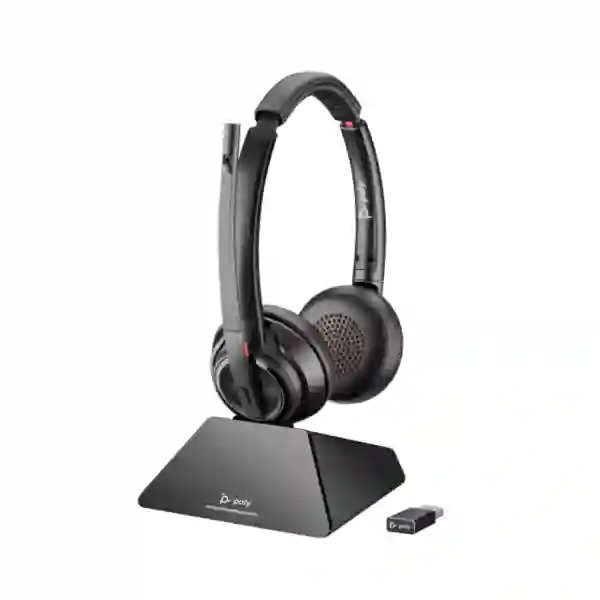
HP Poly Savi 8220 UC Stereo DECT Headset
A wireless stereo headset for clear computer calls, focused listening and practical movement around the desk. Compare the exact UC variant, connectivity and accessories before buying for your team in Tanzania.
Key details at a glance
| Designed for | PC-based unified communications, meetings and softphone workflows |
|---|---|
| Wearing style | Stereo, on-ear, over-the-head |
| Wireless connection | DECT link to a compatible computer-connected USB adapter |
| Listening and speech | Active noise cancellation for the wearer; noise-cancelling boom microphone for outgoing speech |
| Rated operation | Up to 13 hours talk time; up to 50 hours standby; charging under 3 hours for referenced package |
| Published range | Up to 180 m in open conditions and about 55 m in typical offices for referenced versions; actual results vary |
| Controls | Answer/end, mute, volume, power and ANC |
| Primary buying check | Confirm exact UC variant, part number, adapter, application behavior and included accessories |
Product figures are manufacturer specifications for referenced configurations, not guaranteed local performance, stock, price or certification of every variant.
Made for computer-first business calling
The HP Poly Savi 8220 UC Stereo DECT Headset is aimed at people whose working day is built around calls on a computer. It combines an over-the-head stereo design, a boom microphone, a USB DECT connection and a dedicated charging stand. That mix is useful when a person wants to hear both sides of a remote meeting clearly while remaining free to move away from the keyboard. It is particularly relevant for reception support, customer service, sales discussions, internal collaboration and concentrated desk work. Unlike a simple music headset, its controls and microphone arrangement are designed around voice communication. The important qualification is the UC designation: this is primarily a computer-connected headset system. Buyers who must connect directly to a conventional desk telephone or switch between a mobile phone and desk phone should evaluate the separate Savi Office family instead of assuming every Savi 8220 package has the same connections.
What UC means for the buyer
UC stands for unified communications, a category of computer-based calling and collaboration rather than a guarantee that every application provides identical remote call control. The Savi 8220 UC uses a compatible USB DECT adapter to communicate with the headset while the computer handles the meeting or softphone application. This distinction changes how an office should specify equipment. List the applications used for calls, the operating systems installed, whether staff use shared computers, and which physical ports are available before approving a purchase. Audio input and output may work with a supported operating system even when answering a call from the headset requires an additional application or configuration. For a business replacing older wired USB headsets, the UC version may be a straightforward upgrade in mobility. For a business whose primary calling device is an analogue or IP desk phone, compatibility must be checked against a different product configuration.
Two-ear listening and practical concentration
The stereo design gives the wearer two on-ear speakers rather than leaving one ear uncovered. This can help people hear speech and meeting audio more consistently when workstations are close together. It also makes the headset suitable for occasional training videos, recorded messages and computer media between calls. Stereo does not mean that all callers will send stereo audio; voice platforms commonly transmit speech in a narrower communication format. It also does not mean the wearer becomes unaware of the surrounding room. Colleagues should still have a sensible way to get the employee’s attention, and teams working in safety-sensitive spaces should decide whether a two-ear design is appropriate. For users who must constantly hear visitors, announcements or nearby colleagues, a mono model may be preferable. The buying decision should reflect how the employee actually works, not merely which headset appears more premium.
Active noise cancellation explained
The Savi 8220 includes active noise cancellation, usually shortened to ANC. ANC acts on sound reaching the listener’s ears, making it easier to concentrate when there is steady background noise. It is not a promise of complete silence and its effect depends on the character of the noise, headset fit and surroundings. Sudden close conversations, alarms and other variable sounds may remain audible. A useful test is to wear the headset in a realistic workspace, turn ANC on and off, and listen for improvement without increasing volume unnecessarily. This feature is separate from the boom microphone’s noise-cancelling function, which is intended to help the other person hear the wearer. Understanding that difference prevents inflated expectations. A buyer looking primarily to stop transmitted background conversations should assess microphone behavior and the calling application’s own noise processing as well as the ANC specification.
Microphone quality and close conversations
Clear outgoing speech matters as much as comfortable listening. The Savi 8220 UC uses a noise-cancelling boom microphone, and HP documentation describes close conversation limiting to reduce pickup of nearby talkers in appropriate settings. That is valuable in shared offices, but no microphone can make every room or every voice sound identical. The best assessment is a real call from the intended desk, with a colleague listening at the other end and reporting on speech intelligibility. Position the boom near the mouth according to the supplied instructions without touching the face, and make sure the microphone points in the correct direction. Ask the test listener to evaluate normal speech, pauses, typing noise and someone speaking at a neighboring desk. Where confidential conversations are involved, use suitable room layout and organizational privacy practices rather than relying on microphone processing alone.
Understanding DECT wireless technology
DECT is a wireless technology commonly used in professional headsets and telephone systems. On this UC headset, it forms the link between the wearable device and its computer-connected adapter. That is different from treating the headset as an ordinary Bluetooth accessory that pairs directly to any mobile device. An office choosing this model should plan for the adapter to remain with the relevant workstation, particularly where laptops are moved between meeting rooms and shared desks. DECT can provide useful roaming freedom for a professional calling workflow, yet it is still a radio system influenced by physical obstructions, distance and the local environment. The headset does not independently connect to the internet or replace the company’s network. The meeting app, computer connection, internet service and any enterprise telephony systems still determine whether a call can be established and maintained.
Planning real wireless range
HP documentation for the Savi 8220 UC family describes long-range operation, with specifications reaching up to 180 metres in open areas and about 55 metres in a typical office environment for certain versions. These are reference conditions, not a guaranteed distance in every building. Walls, floors, metal shelving, dense furniture, radio conditions and the exact deployment can reduce usable reach. A sensible workplace pilot begins at the desk and checks speech quality at the places an employee genuinely needs to visit: a printer, filing area, nearby meeting space or shared counter. Repeat the test with doors closed and while the building is occupied. The benefit is freedom to take brief steps away from the desk without immediately removing the headset, not an assurance that a person can roam through an entire multi-storey building. When a site has difficult coverage, redesign the workflow or workstation placement instead of depending on a headline maximum.
Computer connectivity and USB ports
The UC package is built around a USB-connected DECT adapter. HP describes compatible PC connectivity through a USB Type-A adapter, and specific packages include a USB Type-A to USB Type-C adapter for newer computers. Confirm the precise box contents of the version being supplied rather than assuming every regional bundle is identical. On laptops with limited ports, the headset adapter will occupy a connection and should be considered alongside a keyboard, docking station, webcam and security key. It is also worth checking how the organization’s docking stations behave when a computer sleeps, disconnects or changes between home and office arrangements. IT teams should test the headset through the actual port or approved dock in use. Avoid promising direct USB-C connectivity until the appropriate adapter is identified, and avoid listing direct mobile Bluetooth pairing as a normal UC feature.
What the charging stand contributes
A dedicated charging stand gives the headset a defined home between calls. Instead of leaving a wireless headset loose on a desk, a user can return it to its stand at the end of a session and begin the next shift with a more predictable charging routine. The stand is not the same as the multi-connection telephone base associated with Savi Office packages. That visual distinction is important because product images from the same family can look similar while hiding very different connection options. Before outfitting a desk, check space near the computer, the availability of an appropriate power or USB connection and whether cables can be routed safely. Shared desks need a clear arrangement for storing the headset and preserving accessories. For mobile workers, the stand may remain at the main work position while the headset and adapter travel using the included accessories for the specified variant.
Battery life in a full working day
HP rates the Savi 8220 UC at up to 13 hours of talk time and up to 50 hours of standby, with a charge time under three hours on referenced regional specifications. These are manufacturer-rated figures rather than an individual guarantee, and real-world duration changes with battery age, usage, volume, environmental conditions and charging habits. For most buying decisions, the useful question is whether the user’s expected call load fits comfortably inside a normal shift with a charging opportunity between shifts. A contact-centre agent who spends nearly every minute on calls should test the workflow differently from a manager who joins intermittent meetings. Encourage staff to return the headset to the charging stand after work and to pay attention to battery alerts. If a team needs continuous operation across exceptionally long shifts, plan charging rotations or alternative equipment rather than treating the rated maximum as a service-level promise.
Call controls that reduce interruptions
The headset provides controls for answering or ending calls, muting, changing volume, powering on or off and switching ANC. Audible status prompts can help users understand when a microphone is muted or a battery is low. These practical details matter because frequently returning to the computer interface can disrupt a conversation. However, hardware controls and software behavior are not the same thing. A particular collaboration application may require a supported integration or desktop utility before its answer-and-end functions respond as expected. Include this in acceptance testing: start a call, answer from the headset, mute and unmute, adjust listening volume, finish the call and confirm that all states match what the application shows. Staff should know where their app’s mute indicator appears. An easy-to-reach physical mute control is useful, but it should not replace disciplined meeting etiquette or privacy procedures.
Audio for speech and media
The Savi 8220 UC is specified for business speech and computer multimedia. HP lists wideband speaker performance for calls and a broader frequency range for multimedia mode, which is relevant when a worker alternates between voice discussions and recorded training content. Actual sound depends on what the source application transmits, the computer settings and the fit of the headset. A low-quality internet call will not become high fidelity simply because the headset has a broad multimedia specification. For evaluation, play a familiar voice recording and conduct a live meeting using the software staff actually use. Check whether speech sounds natural, whether quiet words remain understandable and whether a long conversation becomes tiring. When testing recorded material, remember that intelligibility and comfortable volume are more important for office use than exaggerated bass or entertainment-style sound effects. Set consistent input and output defaults so staff do not accidentally use the computer’s built-in microphone.
Comfort for repeat use
The model uses a padded, adjustable over-the-head design with on-ear cushions. HP lists a headset weight around 160 grams for the referenced stereo configuration. Weight alone does not determine comfort: head shape, ear sensitivity, glasses, temperature and hours of continuous wear also affect the experience. A well-run trial gives different users time to assess pressure at the ears, the headband position, microphone movement and whether the headset stays secure when standing or walking. Staff who wear hearing protection or specific head coverings should assess fit with their actual equipment. For prolonged calls, short breaks and suitable listening levels remain sensible even with a comfortable headset. Do not assume the same wearing style suits every employee. Where people need a very light or single-ear format, compare the Savi 8210 UC or other appropriate options before standardizing a large order.
A sensible first-day setup
Start with the exact package contents and the manufacturer’s instructions for the supplied version. Position the charging stand on a stable surface, connect the required cables, attach the supported DECT USB adapter to the computer, and charge the headset as directed. Next, select the correct playback and microphone devices in the operating system and the meeting or softphone application. A test call should confirm both directions of audio before staff use the equipment for customer conversations. Check the mute control, ANC switch, comfort and wireless coverage around the desk. Where policy permits, the IT team can review supported HP Poly software for settings or device administration. Avoid applying firmware or software changes without following organizational change management. Record the adapter and headset allocation for shared or managed devices. If the computer shows no headset, verify adapter connection and device selection before assuming a hardware defect.
Using the headset with meetings and softphones
Computer-based telephony covers many applications, from browser meetings to installed softphones and enterprise collaboration tools. The Savi 8220 UC can be considered for these workflows, but buyers must distinguish basic USB audio functionality from app-specific call control, certification and deployment support. The normal UC name by itself should not be marketed as proof of Microsoft Teams certification; HP lists separately designated Teams-certified variants. Ask the organization which version of Teams or other platform is in use, whether the correct certified variant is mandated, and whether staff need headset-side call answering. Test joining meetings, handling incoming calls, switching between audio sources and ending sessions. In environments where several apps compete for microphone access, agree on default device behavior and educate users about possible conflicts. This makes procurement decisions based on actual software compatibility instead of assumptions derived from broad brand claims.
UC and Office models are not interchangeable
The Savi 8220 UC and Savi 8220 Office share a family name and stereo headset concept, but their systems target different connection requirements. The UC version is designed mainly for computer use through a USB DECT adapter and charging arrangement. The Office version is built around a different base for broader desk-phone, computer and mobile workflows. A purchaser who needs to receive desk-phone calls should not buy the UC model merely because a product image shows a base-like accessory. Confirm the exact variant name, manufacturer part number and package before placing an order. If the only requirement is PC calling, the added connectivity of an Office configuration may not be necessary. Conversely, if a receptionist answers calls on a physical telephone and moves calls to a computer, a compatible Office package could be worth investigating. This distinction can prevent returns, extra accessories and frustrating installation delays.
UC versus mono headset choices
The Savi 8220 UC is the stereo member of its group, while a Savi 8210 UC offers a one-ear alternative. Two ears can be attractive when the worker wants more separation from surrounding speech, participates in long virtual meetings or plays training media. A single-ear design may suit reception staff who must hear a visitor, warehouse administration teams that need to notice a colleague, or people who simply prefer a less enclosed listening experience. It is not necessary to give every employee the same model if their roles differ materially. Ask users how often they must listen to the room, whether they need active noise cancellation and how much daily calling is expected. Review safety expectations before issuing headphones that occupy both ears in an active work area. A small mixed-model trial may produce a better result than selecting a model solely on specifications or one manager’s preference.
DECT compared with typical Bluetooth headsets
Bluetooth and DECT solve related but different needs. Many Bluetooth headsets emphasize pairing with phones, tablets or several personal devices, while a UC DECT system is often chosen for a dedicated business computer connection and professional roaming pattern. The Savi 8220 UC should not be sold as if it simply pairs directly to every Bluetooth smartphone; its computer-focused architecture is central to the product choice. The fact that some HP technical listings mention a Bluetooth version does not mean a buyer can ignore differences between UC and Office packages. When comparing alternatives, test the specific connection path, call control, range within the building, microphone behavior and the need to carry an adapter. For workers who regularly switch among a computer and personal phone, a different headset architecture may be more suitable. For a fixed desk with intensive softphone use, the Savi UC approach may be simpler to manage.
Noise in shared Tanzania workspaces
A Tanzania-based organization may have shared desks, open-plan administration space, a busy service counter or staff working from a home office. The specific acoustic conditions matter more than the city name. Before choosing the headset, note the most common interruptions: air-conditioning sound, neighboring conversations, road noise entering through windows, printers or other office equipment. ANC may improve what the employee hears, while microphone noise processing can help the remote caller understand the employee. Neither feature replaces a quiet place for highly sensitive calls. A practical site trial should include the busiest period of the day, not only a silent demonstration room. For customer-facing teams, collect feedback from both the wearer and the person receiving the call. FourTeck can use the resulting requirements to guide a quote conversation without assuming stock, service coverage or a particular local infrastructure condition.
For customer support teams
Support agents often move between a customer conversation, internal notes and an application that holds the customer’s history. A wireless headset can allow a short movement to a nearby file or colleague without unplugging the audio connection. The Savi 8220 UC also provides a clear physical mute action that can be incorporated into an established support workflow. Managers should still assess the call platform and whether headset controls interact correctly with it. A pilot can measure how often users disconnect inadvertently, how rapidly they learn the mute behavior and whether recorded examples remain understandable. Noise from a cluster of agents should be checked in a real working shift. If agents are tied to a desk phone rather than a computer softphone, the variant selection needs reconsideration. An informed purchase also considers spare adapters, charging routines and the procedure for replacing equipment, not only what one headset can do on its first day.
For sales and account management
A salesperson may spend much of the day on computer calls, virtual demonstrations, follow-up discussions and occasional internal meetings. A stereo DECT headset can serve those activities when the communication platform is PC-based and the user values freedom to stand or move briefly. On a product demonstration, the user should test microphone consistency while turning toward another screen or consulting notes. The boom should remain positioned correctly, and the computer must continue to use the expected input device after an application change. If sales staff switch frequently to mobile-network phone calls, ask whether the UC version covers their actual routine before ordering. A mobile-first salesperson might need a different configuration. The strongest buying rationale is not an abstract promise of higher sales, but reliable audio, fewer awkward equipment transitions and a headset that staff choose to wear through frequent professional conversations.
For internal meeting-heavy roles
Project managers, analysts, finance teams and other employees may join several video meetings each day while also needing quiet time between calls. The Savi 8220 UC’s two-ear audio, ANC and dedicated charging stand may fit a desk-centered routine. During evaluation, include both one-to-one calls and larger meetings, because a busy group call can reveal a different comfort or audio experience. Users should practice muting before speaking to somebody in the room and checking that the application confirms their microphone state. Screen sharing and meeting features are controlled by the conferencing application, not the headset. Organizations should avoid claiming that any headset automatically improves productivity or collaboration metrics without measuring local results. Instead, gather practical feedback: whether instructions are easy to hear, whether the microphone works consistently, and whether the wearer can remain comfortable through the typical calendar.
For hybrid and home-office users
Employees who divide time between home and office need more than theoretical portability. They need to know whether their setup can be transferred, what accessories must travel and how the employer manages a lost USB adapter. The UC architecture uses a computer-connected DECT adapter, so a user should not assume they can leave it behind and still connect normally. Test the setup on the approved home laptop or workstation and confirm whether a permitted USB-C converter is required. The range figure measured in an open office may not describe a home with thick walls or several floors. A tidy desk position for the charger and a reliable way to store the headset can be more valuable than maximum claimed range. The travel case listed for certain HP packages is a useful convenience, but exact supplied items should be confirmed before the buyer relies on them.
For reception and front-desk work
Reception jobs vary. Some workers speak to callers through a softphone on a PC; others rely on a physical desk telephone, need to monitor the entrance or must hear instructions from visitors. These differences determine whether Savi 8220 UC is appropriate at all. If the receptionist primarily uses a computer calling application and can safely wear stereo headphones, the headset may be worth testing. If the user needs direct desk-phone integration, the Savi Office architecture should be examined instead. If awareness of people entering the room is essential, a single-ear alternative deserves consideration. Do not use ANC as a substitute for a workplace safety assessment or a visitor alert process. In a pilot, observe what happens when the worker receives a call while greeting a visitor, leaving the desk or transferring a caller. A configuration that works technically must also fit the service experience.
For supervisors and IT purchasers
Buying headsets for a team introduces questions that do not arise when purchasing one for a private desk. IT may need a repeatable setup procedure, clear asset records, compatible application versions, spare accessories and a policy for device updates. Supervisors need equipment that people actually use rather than abandoning because of discomfort or confusing controls. The Savi 8220 UC should be evaluated with representative staff, including those who wear glasses or spend long periods on calls. Use one documented test checklist for every trial device. Record the computer model, operating system, UC application, adapter connection, audio settings, call-control behavior and observed roaming limitations. The result is a practical equipment standard tied to the organization’s environment. It also helps procurement distinguish confirmed requirements from preferences and protects the business from ordering a similar-looking but incorrect product variant.
Buying for a multi-desk rollout
For several workstations, begin with an inventory of where audio calls happen and which users need a headset of their own. Count desks that have USB-A ports, desks requiring approved USB-C adapters, computers attached to docking stations and employees who split time across locations. Decide whether the wireless adapter stays with the user or with the workstation. Confirm charging space and safe cable management. Where staff share desks, determine how headsets are cleaned and stored between shifts. Pilot one or two representative positions before expanding to the whole team. Keep a record of issues such as app permissions, unexpected audio device selection and reduced radio range in particular rooms. This rollout process is usually more valuable than assuming a headset that works on one laptop will behave identically across every machine. Ask for the exact Savi 8220 UC variant in the quotation to prevent substitutions.
Software and device management
HP Poly provides software resources for supported headsets, and some call-control or configuration features may depend on a compatible desktop application. For managed business computers, the IT administrator should decide whether the current supported Poly utility is permitted, who is allowed to install it and how device settings are maintained. Avoid downloading tools from unverified mirrors or giving ordinary users broad administrative privileges solely to set up an accessory. Before deploying an update, confirm that it applies to the precise headset and adapter, and test it on a noncritical device where possible. Record the approved audio settings and support steps in a short internal guide. When a user moves to a new computer, verify that the headset and adapter are still matched and that default audio devices are selected correctly. This practical governance can reduce avoidable support tickets in shared calling environments.
Security and call privacy
HP identifies the referenced Savi UC headset as DECT security certified. That describes safeguards associated with the wireless headset link; it should not be interpreted as end-to-end encryption of every conference, a guarantee of regulatory compliance or proof that an entire organization’s communications are private. The computer, softphone, service provider, network and user behavior remain important parts of the security picture. Confidential conversations should be held in appropriate spaces with good access controls and clear internal rules for recordings or speakerphone use. The noise-cancelling microphone can help limit unwanted nearby speech, but it cannot guarantee that sensitive background words will never be transmitted. For highly sensitive teams, review the exact product’s technical documents and organizational requirements before deployment. Treat secure wireless design as one useful feature within a broader information-security and workplace-privacy program.
Listening levels and hearing care
Professional calls should be intelligible without forcing users to raise the volume excessively. HP lists SoundGuard Digital acoustic protection on the referenced model, but that specification is not a reason to ignore ordinary listening precautions or workplace policies. A comfortable starting point is a moderate level that lets the wearer understand speech clearly. In a noisy workspace, assess whether ANC, seating or microphone arrangements can improve the experience before simply increasing loudness. Staff should be able to adjust volume, take reasonable listening breaks and report discomfort. IT administrators may need to review settings when different communication apps deliver substantially different levels. If an employee has specialized hearing or accessibility needs, evaluate the headset with them rather than assume that one configuration is universally suitable. Good audio practice combines suitable equipment, thoughtful working conditions and user training.
What is in the referenced package
HP’s regional listing for a standard Savi 8220 UC USB-A configuration identifies a wireless stereo headset, charging stand, USB Type-A charging cable, USB Type-A DECT adapter, USB Type-A to Type-C adapter and travel case. Box contents can vary by part number, region or package revision, so the written quotation should identify what is actually being offered. A buyer should not infer the presence of desk-phone cables, electronic hook switch devices or a multi-device office base from the Savi family name. Before accepting an order, check that the adapter type suits the target laptop and that charging and storage accessories meet the intended use. When comparing supplier quotes, insist on like-for-like model and package information. Accessories that seem minor in a single purchase become operationally important when many users are being equipped across a team.
Maintenance and day-to-day care
Like other business headsets, the Savi 8220 UC benefits from ordinary care. Keep the ear cushions clean using procedures compatible with the manufacturer’s guidance, avoid excessive moisture and do not leave the device where it could fall or be crushed. Check the charging contacts and cable routing if the headset begins to charge inconsistently. Store the USB DECT adapter so that it is not misplaced during laptop transport. Supervisors of shared-desk environments should establish hygienic handling and consider whether users need assigned headsets rather than swapping head-worn equipment. Physical comfort issues may be solved by adjustment rather than immediate replacement, but damaged components should not be ignored. Keep original packaging information and the exact model reference for support discussions. Battery performance changes with time, so repeat real usage checks if operating duration becomes noticeably shorter than it was when the equipment was new.
Troubleshooting audio selection
If an employee can hear the meeting but others cannot hear them, start by checking that the application is using the headset microphone rather than the laptop’s built-in input. Then inspect the mute state both on the headset and in the software. If the user can speak but cannot hear callers, verify the output device, listening volume and operating-system sound settings. Unexpected silence after docking a laptop may be related to changing default devices or a disconnected adapter. Work through one variable at a time and make a short test call after each change. If the headset appears absent from the device list, inspect the approved USB connection and consult the manufacturer’s setup guidance. These steps are basic diagnosis, not a guarantee that every fault is software-related. Persistent issues should be documented with the application, operating system and exact product version before escalating for service.
Troubleshooting range and interference
A user who experiences audio breaks while walking should first return near the computer and determine whether the call stabilizes. If it does, the problem may be tied to coverage or obstructions rather than the remote caller. Check whether the adapter is buried behind metal equipment, whether the employee passes through several walls and whether the issue appears at the same location. Keep changes within the manufacturer’s guidance and local workplace IT policies. If audio still fails at the desk, check the calling platform and internet connection as well. Internet packet loss and headset radio coverage are separate potential causes even though both can sound like broken speech. A useful incident report notes where the failure happened, what application was active and whether other users experienced the same problem. Testing these details avoids promises of flawless roaming in every building.
Comparing cost and operational value
The correct way to judge a professional headset is to compare total fit, not only the quoted unit price. Include the correct variant, compatible adapter, charging arrangement, time required for initial setup and the support process for the organization’s software. Consider whether staff will use stereo ANC, whether DECT roaming is necessary and whether a desk phone must also be supported. A simpler wired headset may be more economical for a fixed workstation with very few calls. A Bluetooth model may serve people who switch among personal devices. The Savi 8220 UC is most compelling when a computer-first user genuinely benefits from its wireless architecture, controls and listening design. No Tanzania price or availability is implied here: request a current quotation for the exact configuration, and compare included accessories and terms before making a decision.
How to assess a demonstration
A proper demonstration should resemble a normal working hour, not a few seconds of music playback. Have the intended user wear the headset, make an actual call, test the mute button, switch ANC on and off and move to a nearby area that is part of their job. Listen to the outgoing microphone from another device, ideally with ordinary background activity present. Check comfort with glasses or other work accessories, and ask the user whether the controls can be operated without interrupting the conversation. Confirm that the computer recognizes the adapter after sleep or docking changes. For a team, capture feedback using consistent questions rather than a simple yes-or-no verdict. Record any app-specific limitations and verify the variant being tested is the same version that would be ordered. A realistic pilot will expose unsuitable assumptions before they become a procurement problem.
Questions to include in a quotation
A buyer can make a request more precise by specifying the product name, number of users, computer operating systems, USB port types and the communication applications involved. Say whether staff need a standard UC variant or a specifically certified collaboration version. Describe the workplace briefly: quiet private rooms, shared offices, service desks or home-working setups. Indicate whether the user must hear the surrounding room and whether the existing equipment includes physical desk telephones. Ask the supplier to identify the exact model and package contents in writing, along with any currently applicable commercial terms. Do not treat an unrelated retailer SKU or model number as this listing’s verified inventory code. This information allows a more meaningful quote and compatibility discussion while avoiding unsupported assumptions about stock, pricing, delivery, warranty fulfilment or location-specific installation.
A simple acceptance checklist
Before signing off a purchase, confirm that the headset feels comfortable for a realistic calling session. Verify that it connects to the intended computer through the expected adapter; that both incoming and outgoing audio function; and that mute, volume and call control behave correctly in the chosen application. Test charging and battery alerts, assess the desired walking route and listen for distracting background audio. Record which software settings were changed and which accessories were supplied. Revisit the decision if the user requires direct mobile pairing, simultaneous desk-phone connectivity or all-day awareness of surrounding people. Those requirements may make a different Savi version or headset category a better choice. The purpose of acceptance testing is not to prove that every claimed specification can be reproduced on demand; it is to confirm that the device solves the team’s actual work problem consistently and safely.
Specification notes and practical limits
Manufacturer ratings provide a useful starting point but should always be read in context. The referenced Savi 8220 UC is stereo and on-ear, uses a noise-cancelling boom microphone, provides ANC, and has physical audio and call controls. Battery figures are stated as up to 13 hours of talk time and up to 50 hours of standby. Published radio range depends on test conditions, variant and surroundings; it is not a promise of coverage through walls or across a site. A charging stand is included in referenced packages, while the exact supplied adapter and accessories should be confirmed against a part number. The stated DECT security feature addresses the headset radio link, not the security of an entire communications service. Finally, application compatibility and remote call controls require testing with the software used in the organization. Clear limits make procurement more reliable than marketing claims that ignore the working environment.
Why a precise variant matters
Names in this product family can be deceptively similar. Buyers may encounter Savi 8210, Savi 8220, UC, Office, standard UC and Microsoft Teams-certified versions. The two numerical models differ in their mono or stereo presentation, while UC and Office identify different system architectures. Certification and regional radio configurations can introduce further part-number differences. This matters when ordering replacement equipment, checking compatibility or comparing two prices that initially seem to refer to the same product. Always request the exact manufacturer’s variant and confirm the listed accessories. The HP Poly Savi 8220 UC Stereo DECT Headset discussed here is the computer-focused stereo UC system, not a promise that an unspecified Savi base will connect simultaneously to all business devices. Making that scope explicit protects the buyer from a technically sound headset that is nonetheless wrong for the intended workstation.
Next step for Tanzania buyers
If you are considering this headset for staff in Tanzania, begin with the number of intended users and the device and calling environment they will use. A single remote worker, a customer support desk and a multi-seat office may all need different rollout arrangements even when they prefer the same headset. Request confirmation of the precise variant, its adapter and included accessories, and the compatibility of the target calling software. Ask for current pricing, local availability and applicable service or warranty details as part of a written quotation rather than relying on a generic product description. A useful quote discussion should also identify whether stereo listening and ANC are priorities and whether the employee needs direct desk-phone or mobile connectivity. The latter requirement may point toward a different model. This approach keeps the purchase centered on real working needs and avoids assumptions about local stock or services.
Frequently asked buyer questions
Is the HP Poly Savi 8220 UC a stereo headset?
Yes. The Savi 8220 UC is the two-ear, on-ear model in this part of the Savi family. The separate Savi 8210 UC is a mono alternative. Stereo may be useful for focusing on computer calls or media, but consider whether employees must also hear nearby people before choosing two-ear coverage.
Does it connect to a computer without a cable from the headset?
The headset communicates wirelessly through a DECT adapter connected to the computer. The adapter still needs a compatible physical connection to the computer, and the headset needs charging. This is not the same as a headset that pairs independently with any Bluetooth phone. Verify the exact adapter and laptop port before ordering.
Can it be used with a USB-C laptop?
HP lists a USB Type-A to Type-C adapter among the accessories for certain standard Savi 8220 UC configurations. Confirm that this is included in the exact package offered. An approved laptop connection or dock should be tested with the organization’s operating system and collaboration software before a team-wide purchase.
Does it connect directly to a desk phone?
The UC system is designed mainly for computer calling through its USB DECT adapter. Direct desk-phone workflows are associated with the separate Savi Office system and its different base. If a physical telephone is central to the job, do not assume the UC charging stand will provide desk-phone connectivity.
Is the standard UC version Microsoft Teams certified?
The model family includes separately identified Microsoft Teams-certified variants. Do not infer that every headset named Savi 8220 UC has the same certification. If formal platform certification or dedicated application behavior is a purchase requirement, ask for the exact manufacturer part number and confirm it against the relevant HP documentation.
Does active noise cancellation stop other people hearing my surroundings?
ANC principally reduces unwanted sound reaching the wearer. The noise-cancelling boom microphone and any supported close conversation limiting are separate features intended to improve outgoing speech. Neither feature guarantees that all ambient sounds disappear. Test outgoing call quality in the real workspace and preserve appropriate room privacy for confidential matters.
How far can someone walk during a call?
HP’s published specifications for referenced versions describe up to 180 metres in an open area and about 55 metres in a typical office. Actual range can be shorter because of walls, floors, metal or other environmental factors. Walk the intended route during a live test instead of treating a maximum rating as a site-wide coverage guarantee.
How long does the battery last?
HP lists up to 13 hours of talk time and up to 50 hours of standby for the referenced Savi 8220 UC headset. Charge time is listed as under three hours for the specified configuration. Battery condition, usage and charging habits affect real results. For high-volume calling shifts, confirm the actual work pattern during a pilot.
Can I take calls while walking around an office?
Yes, wireless DECT connectivity is intended to give the wearer more movement than a wired headset while remaining within reliable range of its adapter. The headset still relies on the computer and calling application for the active call. Test the normal walking route and remember that building layout influences radio coverage.
What should I do if the microphone does not work?
Check that the intended headset input is selected in the operating system and calling app. Confirm that neither the hardware nor software mute function is enabled. Inspect the adapter connection and make a short test recording or call. If the issue persists, record the exact application, computer configuration and model for further diagnosis.
What comes with the headset?
The HP standard regional listing describes a headset, charging stand, USB-A charging cable, USB DECT adapter, USB-A to USB-C adapter and travel case. Regional bundles and revisions may differ. Compare the supplier’s written quote with the exact manufacturer’s configuration before assuming every accessory is supplied.
Can the headset pair directly to my mobile phone?
Do not buy the UC version on that assumption. Its normal computer-focused DECT architecture differs from the multi-device Savi Office configuration and from common Bluetooth headsets. If direct phone pairing is important, specify that requirement clearly and choose a variant whose supported connection path has been verified.
Will call answer and end buttons work in every meeting application?
The headset offers hardware call controls, but application-specific answer and end behavior can depend on software support and configuration. A microphone and speaker being recognized does not automatically prove full remote control. Test the exact softphone or meeting client and any required supported Poly application before committing to a deployment.
Is it a good option for a busy open-plan office?
It can be a useful candidate because it provides stereo listening, ANC and a noise-cancelling boom microphone. Suitability depends on how noisy the space is, whether the wearer must hear colleagues, and whether calls run on a computer. Use a real workspace trial and seek feedback from the far-end caller before deciding.
Is this headset suitable for call centres?
It can suit computer-based customer contact and support workflows where a user benefits from DECT mobility and headset call controls. Check the actual call software, volume of daily calls, charging routine and comfort during long shifts. If agents use physical desk phones, compare the Savi Office architecture or another appropriate system.
What is the difference between ANC and microphone noise cancellation?
ANC makes unwanted sound less prominent to the person wearing the headphones. Microphone noise cancellation aims to help the person on the other end hear the wearer more clearly. Both may be useful in a shared workspace, but they solve different problems and should be evaluated separately in a realistic call.
Does DECT security mean every conversation is end-to-end encrypted?
No. HP’s DECT security certification relates to security features of the headset’s wireless link. The security of a complete voice conversation also depends on the computer, application, network, provider and workplace policies. Do not use headset specifications alone as evidence of end-to-end security or compliance with a particular regulation.
What should I tell FourTeck when requesting a quote?
Provide the product name, approximate quantity, computer and USB-port types, calling platforms, and whether staff need Teams certification or direct desk-phone connectivity. Mention whether users work from one desk, share workstations or move between office and home. Request the exact variant, included accessories and current commercial terms in writing.
Request a quote for the exact Savi 8220 UC configuration
Share the number of users, their computer ports, calling software and whether they need ordinary UC functionality or a certified platform-specific variant. Ask for written confirmation of the exact model, package contents, Tanzania availability, pricing and applicable commercial terms. If you need direct desk-phone or mobile connectivity, mention that requirement before selecting this headset.
Contact FourTeck to discuss product fit and request a current quotation.




Reviews
There are no reviews yet.