
Professional office communications
Poly Savi 8420 Office: focused calls across desk phone, computer and mobile
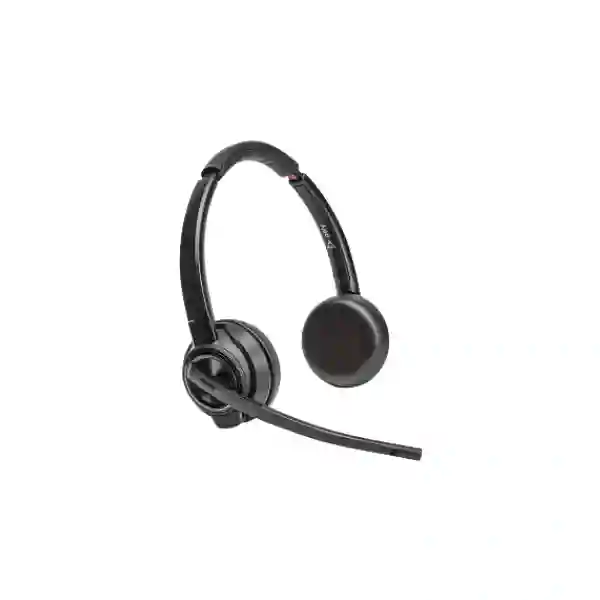
The HP Poly Savi 8420 Office Stereo DECT Headset brings wireless stereo listening, a noise-cancelling microphone and a multi-device office base to professional call handling. It is intended for people who need freedom to move while working with more than one calling device. The most important buying step is to verify your exact desk phone, calling software and regional headset variant before placing an order.
Request a configuration review and quotation from FourTeck Tanzania.
At-a-glance features
Manufacturer specifications are indicative. Functionality and performance depend on variant, connected devices and working environment.
Who benefits most?
Speak while entering records and handling customer requests; test audio in the real open-office environment.
Move between computer, desk telephone and mobile calls from one base-centric system.
Evaluate the compatible multi-headset conferencing function for small-group coaching.
A headset for people who work across more than one calling device
The HP Poly Savi 8420 Office Stereo DECT Headset addresses a familiar office problem: one employee may answer a customer through a desktop telephone, take an internal meeting on a computer and receive another work call on a mobile phone. Switching between unrelated audio accessories can disrupt the conversation and complicate basic call handling. The Savi 8420 Office combines a stereo wireless headset with an office base intended to connect these three call sources. That makes it worth evaluating for people whose working day involves a mix of telephone and software-based communication.
The product is not simply a Bluetooth headset that pairs directly with every device. The headset uses DECT wireless communication with its office base; the base provides the connection options for a computer, compatible desk telephone and mobile phone. This distinction matters when specifying the system for a reception desk, customer-service position or shared workspace. Check which physical and software connections will be used before purchasing, rather than relying on the broad label of wireless connectivity.
Why the office base matters
The office base is the centre of the Savi 8420 workflow. It gives the user a common point for selecting or managing call sources and provides a charging location for the headset. This can reduce the need to change headsets when moving from a softphone call to a conventional telephone conversation. For teams that handle inbound calls as well as scheduled online meetings, the base layout can be as important as the headphones themselves. Position it where the user can see the relevant controls without blocking the desk.
Three-way connectivity means the system is designed to work with a computer, desk phone and mobile phone; it does not mean that every possible model or calling application has identical functions. For example, answering a desk-phone call remotely can depend on the handset and its interface. When planning a deployment, identify the actual telephone model and the softphone before deciding whether the standard cables are sufficient. Ask how the user will answer, end, mute and transfer calls in the specific environment.
Stereo listening for focused work
The Savi 8420 is a dual-ear, on-ear headset, rather than a single-ear model. Its stereo wearing style can help a user concentrate on a conversation when colleagues are speaking nearby, particularly in open offices where telephone calls and online meetings happen at the same time. This makes it relevant to customer service, account management, administration and professionals who regularly participate in longer calls. A stereo design also means both ears are covered, so the user should consider whether that suits the demands of their workspace.
For some roles, keeping one ear uncovered is important because the wearer must listen for visitors, colleagues or local announcements. In those cases a mono headset may be more appropriate. Stereo should be a deliberate choice based on working style, not an assumption that it is universally better. During a trial, evaluate comfort, awareness of the room, the frequency of interruptions and the user’s need to move between focused work and face-to-face discussion.
Noise control for two sides of the conversation
The noise-cancelling boom microphone is designed to reduce surrounding sound picked up and transmitted to the other participant. HP also describes close conversation limiting, intended to reduce the effect of nearby speech. This is especially relevant when several agents are on calls in the same room. Clearer voice capture can help callers follow explanations, account details or support instructions, but a microphone cannot eliminate every sound in a highly noisy environment. Microphone positioning and sensible workstation spacing remain essential.
Active noise cancellation serves a different purpose: it helps reduce background sound experienced by the person wearing the headset. Buyers should distinguish this listening benefit from microphone noise reduction when comparing office headsets. One improves the wearer’s working environment; the other aims to improve what the caller hears. Both can be valuable, yet neither replaces clear speech, suitable room acoustics or a stable calling connection. Test the headset using the real noise profile and calling applications of the intended team.
DECT wireless freedom with realistic range expectations
DECT provides the wireless link between the Savi headset and its office base. HP quotes up to 180 metres of range in open, line-of-sight conditions and up to about 55 metres in a typical office. These are maximum or indicative figures, not a promise that every corridor, floor or room will have the same reception. Walls, building structure, competing radio systems and the location of the base all influence practical coverage. A floor-plan walk test is the most useful way to understand how far users can move while maintaining a conversation.
Use the stated range as a planning reference rather than as a coverage guarantee. For example, an office user may want to walk to a nearby printer or reference a document while speaking. That is a reasonable use case to test. Roaming to a different building, relying on reception through reinforced concrete or assuming full coverage across multiple storeys needs separate assessment. The signal is anchored to the office base, so the base location matters when placing a workstation or shared calling point.
Battery life for a full working schedule
HP lists up to 13 hours of talk time and up to 50 hours of standby time for the Savi 8420 Office. This can suit many working schedules in which the headset is used for telephone calls, meetings and periods of standby throughout the day. Actual endurance will vary with usage, settings, battery condition and operating circumstances. For roles with continuous outbound or inbound calls, confirm the duration of a normal shift and the opportunity to recharge during quieter periods. A manufacturer’s maximum is not the same as a guaranteed per-shift result.
The office base and charging cradle provide a logical place to return the headset between conversations. Establish a routine that keeps the headset charged without leaving it unattended in places where it might be damaged. For shared positions, decide who is responsible for charging and whether multiple people need their own headsets. Battery condition should also be checked during long-term maintenance planning. Treat talk-time figures as one factor alongside fit, ease of use and call-control compatibility.
Charging, docking and everyday handling
A predictable charging routine prevents minor headset issues from becoming operational problems. Place the supplied charging cradle in a location that is easy to access and protected from spills, cable strain and accidental knocks. After a call, returning the headset to its cradle helps the next user begin with a charged device. Staff should know how to identify charging status and what to do if the headset is not seated correctly. The supporting power connection must remain secure and suitable for the workstation arrangement.
For a service desk with rotating shifts, practical handling instructions can be more valuable than a lengthy technical manual. Agree where the device is stored, how it is cleaned and who checks its condition. If users repeatedly leave the base behind equipment or put the headset in a drawer, the benefits of simple docking can be lost. Include the cradle and power adapter in the physical inventory, especially when relocating or reconfiguring the office.
Computer calling with USB-A and USB-C connections
The supplied cables support connection of the office base to a compatible computer using USB-A or USB-C. This makes the Savi 8420 relevant to teams whose communication takes place through a softphone or meeting application on a desktop or laptop. Before ordering, identify the operating system, application version, available USB ports and any company policy governing audio devices. A computer may recognise an audio device while still requiring application-specific settings for call-answer buttons, ring notifications or device selection.
A simple acceptance test should include outgoing and incoming audio, microphone choice, mute behaviour, volume control and an actual call through the intended application. If staff use docking stations or switch between office and laptop setups, include those scenarios. The aim is not only to hear sound but to give staff a repeatable workflow at the start of each shift. Confirm compatibility with the exact software environment rather than assuming that all products described as UC-ready behave in the same way.
Desk-phone integration requires a model check
A desk-phone connection can be important for receptionists, office administrators and customer-support teams whose telephone numbers terminate on physical desk devices. The Savi office base includes telephone interface connectivity, and a telephone interface cable is included in the standard HP package description. However, desk-phone compatibility varies by manufacturer and model. Call control from the headset may require a supported electronic hookswitch accessory or another approved mechanism, so the physical connector alone does not prove every function will work.
Before specifying units for multiple users, record the desk-phone make, complete model number, firmware version if relevant, and whether remote answer/end is required. Ask for confirmation of any additional cable, electronic hookswitch or handset lifter. Test whether the phone rings correctly, audio is clear in both directions and the user can control the call as expected. This prevents a rollout in which audio works but essential daily actions still require walking back to the handset.
Mobile calling through the office base
The Savi 8420 Office also supports mobile-phone connectivity using Bluetooth through its office base. This arrangement is useful when a professional handles calls across a desk phone, PC and personal or work-issued mobile device while remaining at the same workstation. The base-based Bluetooth connection should not be confused with a claim that the headset can be taken away and used like a conventional standalone Bluetooth travel headset. The DECT connection to the base remains central to the operating model.
For deployment, check the mobile device’s Bluetooth compatibility, the pairing procedure and the organisation’s policy on personal phones at work. It is sensible to test call routing after switching between sources and confirm how mobile notifications interact with computer calls. If an employee needs a headset for commuting or working far from the base, evaluate that requirement separately. This product is best understood as an office communications system with mobile integration, not merely as a portable accessory.
Call controls and user confidence
Headset controls for answering or ending calls, changing volume and muting can reduce small interruptions during conversations. Staff can continue typing notes or looking up information without reaching for a phone or computer each time. The exact behaviour of a control may depend on the currently selected connection and supporting application. Training should therefore follow the real sequence of tasks employees perform, such as answering a desk-phone call, muting during a discussion and switching back to a computer meeting.
Explain the difference between muting the microphone, lowering listening volume and placing a call on hold in the application or telephone system. These functions are not interchangeable. Users should also recognise headset status prompts and know whom to contact if control behaviour changes after an update. A small printed desk guide with the team’s tested workflow can shorten the learning curve, especially where new starters share a busy customer-facing workstation.
Conference and training use cases
HP says the Savi 8400 Office system can conference up to four headsets with a compatible base. This feature can be useful for supervised customer calls, agent training and situations where a colleague needs to listen to a live conversation with permission. It offers a different collaboration pattern from simply joining a large online meeting: the shared base can bring several compatible headsets into one calling session. Verify the supported headset models and actual conferencing procedure before planning a training programme.
Training use must account for confidentiality and customer expectations. Ensure callers are informed where required by policy or law, restrict access to sensitive discussions and establish a clear process for adding or removing a participant. The feature should not be presented as unlimited multi-user broadcasting. Its value lies in focused, small-group call coaching and collaboration. A supervisor who occasionally joins a call may find it valuable; an entire contact centre will still need appropriate telephony and supervision tools.
Choosing the correct standard or Microsoft Teams version
The phrase Savi 8420 Office covers closely related configurations, and the exact product title matters. HP lists a standard Poly Savi 8420 Office Stereo DECT 1880–1900 MHz model under manufacturer part number 8L5B2AA, while a separate Microsoft Teams Certified configuration appears under 8L5B3AA. These are manufacturer identifiers, not confirmation of a FourTeck inventory SKU. The standard model name supplied for this page does not independently prove that a Teams-certified edition is being offered.
If a team relies heavily on Microsoft Teams, ask which certified version is required and whether dedicated base controls are part of the specification. Conversely, a business using a mix of desk-phone calls and general UC applications should evaluate the standard configuration against its own software and call-control needs. Do not assume features, frequencies or certification details are interchangeable across markets. The exact quotation should state the offered model and regional variant before procurement is approved.
Understanding regional DECT variants
Wireless office headsets are sold in regional configurations, and the frequency range is part of their identity. HP describes the 8L5B2AA version as a DECT 1880–1900 MHz model. Other Savi 8420 variants in manufacturer materials can use different frequency bands, especially versions intended for other markets. Selecting by the generic family name alone therefore risks confusion when a purchasing team compares online specifications from different countries. Require the proposed part number and regional designation on the final quote.
For use in Tanzania, product selection should include verification of the applicable radio and equipment requirements by a qualified supplier or relevant authority. Do not infer a Tanzanian equipment approval merely because an HP Africa product page exists. Site conditions and regulatory suitability must be assessed separately from audio quality. This is particularly relevant when specifying devices in quantity for offices that intend to operate the same model over several years.
Fit for reception and front-desk staff
Reception teams often alternate between greeting visitors, answering a physical desk phone and checking appointments on a computer. The Savi 8420 can be useful if the role requires hands-free audio across several calling devices, but the stereo wearing style deserves careful evaluation. Covering both ears may help concentration during calls yet make spontaneous face-to-face interactions less convenient. Ask the receptionist to trial the headset during a representative period rather than a quiet demonstration away from the normal front desk.
Check the location of the base, cable routing, desk-phone compatibility and whether the headset can be removed and replaced without disrupting the next call. Staff who regularly greet walk-in visitors may prefer a different wearing style. If the priority is listening clearly to callers while using both hands to search records, the stereo model may be suitable. The right answer comes from the balance of phone activity, visitor interaction and the organisation’s service expectations.
Fit for customer service and help-desk work
Customer-facing staff may need to talk while entering tickets, locating records or checking instructions. A hands-free stereo headset can make these activities more practical than holding a handset throughout the conversation. The Savi 8420’s noise-reduction features are also relevant when several colleagues speak at neighbouring desks. However, clarity depends on microphone positioning, a properly configured calling application and the quality of the network or telephone service. The headset should be evaluated as one component of the wider service setup.
A pilot should include typical incoming and outgoing calls, periods of high call volume and the actual background noise of the workplace. Ask users whether they can hear low-volume callers, whether callers notice excessive office noise and whether the headset remains comfortable during extended use. Where calls are recorded or monitored, confirm the organisation’s processes and system compatibility independently. Good headset selection supports service quality but does not by itself resolve telephony or network limitations.
Fit for managers and hybrid communication roles
Managers, project coordinators and account executives may switch between a desk-phone line, a computer meeting and a mobile call in one day. The office base’s multiple connection paths can simplify that mix when the user works regularly at a fixed workstation. Its wireless design can also make it easier to stand, review a nearby document or move briefly while remaining connected. These are practical advantages for people whose calls involve both conversation and screen-based work.
The distinction between a fixed office system and a travel headset still matters. An employee who works mainly from different cafés, vehicles or client premises may need a simpler portable Bluetooth solution. An employee who spends most of the day at a dedicated office desk may benefit more from the Savi arrangement. Discuss working location, device mix and how often users need to leave the base behind. This helps avoid buying a sophisticated desk system for someone whose primary use case is mobile travel.
Office mobility without confusing it with roaming networks
The ability to walk away from a workstation is often a major buying reason for DECT headsets. In a normal office, a user may want to retrieve documents, consult a nearby colleague or stand during a long call. Test these movements with the base installed at its intended location. Practical range should be measured where the conversation will take place, especially around corners, behind partitions and near equipment rooms. A manufacturer’s open-area range is not a substitute for an office walk test.
The Savi 8420 does not create a cellular connection or a building-wide roaming infrastructure by itself. Its wireless coverage is associated with the base and site conditions. Moving beyond effective range may interrupt the headset link even if the desk telephone or softphone remains connected. Make sure staff understand this difference. For organizations needing wide-area mobility, portable telephony and network roaming should be evaluated as separate system requirements rather than expected from one workstation headset.
Wearing comfort and shared-desk hygiene
A stereo headset may be worn for several hours across calls and meetings, so fit should be reviewed before an organisation buys units for an entire department. Consider ear pressure, headset balance, headband adjustment and the ease of moving the boom microphone into a good position. Different employees can have different comfort preferences. A short test call may not reveal issues that appear during a full shift, so gather feedback over realistic daily use when possible.
Shared workstations introduce additional concerns. Agree whether each employee should have a personal headset, how contact surfaces will be cleaned and how devices will be stored. Follow the manufacturer’s cleaning guidance and avoid harsh agents that could damage the ear cushions or electronics. Keep the headset off dusty work surfaces and return it to its cradle. Hygiene and physical care are part of operational readiness, not simply housekeeping matters.
How to assess microphone quality during a pilot
A controlled test can show whether microphone performance fits the workplace. First make a call in a quiet room to establish a clear reference. Then repeat the call while normal conversations take place nearby. Ask the person at the other end to report whether the intended voice remains understandable and whether surrounding speech is distracting. Avoid relying only on how the user hears themselves, because microphone pickup and incoming audio are different aspects of headset performance.
Repeat the test using the intended application and desk telephone where both are required. Confirm that the boom sits at an appropriate distance from the mouth and that mute is easy to recognise. If the team works near fans, air conditioning or busy corridors, include those sounds. The objective is not to produce a laboratory score but to identify whether callers can follow the conversation consistently under realistic conditions. Record any application settings adjusted during the pilot.
How to assess listening quality
Listening quality should be tested using the kind of calls the employee actually receives. A short internal call between two quiet desks may not reveal problems with a distant customer speaking softly or with conference calls that contain several participants. Test normal speech, varied accents and the transition between a computer call and a desk-phone call. Users should be able to adjust volume without pushing it to an uncomfortable level. Ask whether active noise cancellation improves concentration in the intended environment.
Also check situational awareness. A dual-ear design may be productive for focused calling but unsuitable in areas where employees must hear local instructions or safety announcements. Headset selection should never override workplace safety requirements. If a user must hear colleagues constantly, a mono configuration or other communication arrangement may be better. The strongest evaluation balances voice intelligibility, comfort, surrounding awareness and realistic daily duties.
What comes in the standard package
HP’s package description includes the wireless stereo headset, office base, charging cradle, AC power adapter, USB Type-A cable, USB Type-C cable and telephone interface cable. These components support the system’s core computer and telephone setup. Exact packaging and accessory availability should be confirmed against the quoted variant and regional supply. A standard cable list must not be interpreted as a promise that every desk-phone make and model will support remote call control without any additional accessory.
When comparing quotes, ask the supplier to list the components being supplied and identify separately any optional electronic hookswitch accessory, handset lifter or replacement consumable. This is especially useful for multi-seat procurement because a missing accessory can delay a whole installation. Do a physical check against the delivery documentation before distributing units to users. Keep the base and headset identifiers together in the asset register so replacement or support requests can be handled accurately.
Operating systems, software and administrator planning
HP lists Windows 10, Windows 11, macOS, Android and iOS in the broader Savi 8420 Office compatibility information. Operating-system support does not guarantee that every meeting tool, telephony client or USB docking arrangement has the same call-control features. IT administrators should test the actual calling platform in use and verify whether software settings, device management utilities or firmware updates are needed. This is particularly important where security policies restrict the installation of peripheral-management software.
Document the tested combinations of operating system, application version, computer type and desk phone. If employees receive new laptops or the telephony system is upgraded, the same compatibility test may need repeating. A controlled rollout is better than assuming successful audio playback proves the entire communications workflow. Where the organization manages devices centrally, include the headsets in its approved hardware and support procedures.
Desk layout, cabling and power planning
Place the office base where its controls are accessible, its cables are not strained and the user can dock the headset consistently. Review the available USB connection, telephone interface cable path and power socket before setting up the workstation. Keep power and signal cables clear of moving chair wheels and areas where people place drinks. A tidy installation is more than cosmetic: it reduces accidental disconnections and makes basic troubleshooting quicker for users and support teams.
For a reception counter or shared desk, the base should not obstruct visitors or force the user to reach across paperwork to answer a call. For densely populated teams, plan how several bases will be located and tested without promising a specific wireless capacity. Existing DECT equipment and building materials may be relevant to a larger deployment. Involve the IT or telephony team during desk planning rather than leaving placement solely to furniture installers.
A sensible first-day setup sequence
Start by confirming that the delivered product is the intended Savi 8420 Office variant and that the package contains the required components. Connect the base to power, attach the appropriate computer connection and, if needed, connect the desk-phone interface according to the manufacturer’s instructions. Pair or configure the mobile connection only where it is part of the user’s working setup. Follow the current HP setup guidance for exact button sequences rather than improvising from a different Savi model.
Next, check audio input and output in the calling software, then make a real test call from each intended source. Verify the user can hear, speak, mute and finish the call. If a desk phone is part of the setup, establish whether any extra accessory is needed to answer or end calls remotely. Finally, show the user where to dock the headset and how to recognise normal status indications. Record any non-default settings so the configuration can be restored after computer replacement or maintenance.
Call-routing checks before a team rollout
Multi-device connections are most valuable when users understand where each call will go. During testing, initiate a computer call and confirm that the intended audio device is selected. Then test the desk phone and the mobile connection, one at a time. Check whether switching between sources is intuitive and whether microphone mute behaves as the employee expects. Pay attention to applications that automatically select another audio device after an update or after a laptop is removed from a docking station.
Staff should also know that answering an incoming call, switching an audio source and transferring a caller within a telephone system can be different actions. Do not advertise an unsupported automatic transfer function. If a role depends on transferring calls to colleagues, verify that process in the actual phone or softphone system. The purpose of the headset is to make conversations easier to handle, while the organization’s call-platform features continue to determine transfer, queue and routing capabilities.
Troubleshooting when users cannot hear a caller
When incoming sound is absent, begin with simple checks. Confirm that the headset is powered and within effective range of the base, that the correct call source has been selected, and that listening volume is appropriate. On a computer, check the output device in both the operating system and the calling application. A newly connected monitor or USB accessory can sometimes change the default audio path. On a desk phone, inspect the interface connection and any required call-control accessory.
If the caller cannot hear the employee, check mute state, microphone positioning and the active input device. Test on another call source to narrow down whether the problem belongs to the headset, computer software or telephone connection. Record error symptoms rather than repeatedly changing every setting at once. If basic checks fail, follow HP’s published support and troubleshooting guidance for the exact model and configuration.
Troubleshooting range and intermittent audio
Wireless interruptions may occur when the user travels outside effective base coverage or when a particular part of the building blocks the signal. Ask where the problem happens and whether it repeats in the same location. Compare performance near the base with performance at the farthest intended working position. If the signal is stable at the desk but weak in a corridor, relocating the base within acceptable cable and power limits may help, but any change should be tested.
Not every audio drop is caused by the wireless headset. Computer-network quality, a softphone service or a desk-phone connection can also affect what a caller hears. Distinguish headset-link symptoms from wider telephony issues by testing different call sources and nearby positions. In larger workplaces, coordinate with IT before changing multiple wireless installations. This keeps troubleshooting evidence-based and avoids creating additional connection problems while trying to solve one isolated issue.
Planning a small pilot before purchasing in volume
A pilot can reveal problems that a specification sheet will not show. Choose a few users who represent the intended roles: perhaps a receptionist, a customer-service agent and a manager who switches between devices. Have each person use the Savi 8420 Office with the exact desk phone, computer and application they normally rely on. Review microphone clarity, listening comfort, mobility, charging habits and whether all required controls work consistently.
Record specific feedback instead of collecting only a general opinion. Ask which tasks became easier, whether any calls required unexpected manual intervention and whether the stereo design affected awareness of colleagues. Compare performance over normal workdays, including busy periods. If the pilot succeeds, use its documented configuration to prepare the broader rollout. If it exposes compatibility gaps, resolve them before ordering multiple units instead of expecting staff to work around an unfinished setup.
Deployment checklist for IT purchasers
For procurement, a short compatibility worksheet can prevent expensive assumptions. Capture the exact manufacturer variant, regional DECT designation, number of intended users, desk-phone model, softphone platform, operating systems and computer USB ports. Note whether staff need mobile pairing, remote answer and end controls, shared call training or access beyond the desk. Confirm the complete component list and identify any additional accessories or software required for the proposed environment.
The purchase request should also specify who will install and test the equipment, how user instructions will be delivered and what acceptance criteria will be used. For a large rollout, confirm whether a representative site survey or multi-base test is appropriate. This level of planning helps buyers compare offers on the basis of a working solution rather than on headset price alone. It also gives the support team enough information to investigate problems after installation.
Tanzania purchasing considerations
Businesses evaluating professional headsets in Tanzania should start with their actual communications setup: a traditional desk-phone network, computer-based calling, or a combination of both. The Savi 8420 Office can address mixed-device roles, but the suitability of a quoted unit still depends on model identity, compatible interfaces and the conditions of use. Ask for the exact regional product specification rather than assuming a model shown in another country is appropriate for local deployment.
Pricing, availability, delivery arrangements, any applicable warranty service and regulatory requirements should be confirmed for the specific offer. This page does not represent a verified Tanzanian stock statement or certification claim. A buyer should obtain a written quotation identifying the supplied model and any required accessories. FourTeck Tanzania can be contacted for a product enquiry and configuration discussion; the final commercial and technical scope must be confirmed before an order is placed.
How to compare the Savi 8420 with a basic USB headset
A simple wired USB headset can be appropriate when an employee only takes computer calls at a fixed desk and values straightforward setup. The Savi 8420 Office is more relevant when cordless movement and connection to several types of calling device are genuine requirements. It adds an office base, charging routine and compatibility considerations that a single-cable headset may not have. Buyers should identify whether those extra capabilities solve daily problems or merely increase the number of components to manage.
Compare the two approaches using the job itself. Does the employee walk away from the desk while speaking? Are desk-phone and mobile calls both part of the workflow? Is a stereo headset preferred for concentration? Are the team’s softphone controls compatible? The lowest-priced device is not necessarily the least costly choice if it creates recurring handling problems, but an advanced wireless office system is not automatically justified for every role. Purchase for a clear use case.
How to compare stereo and mono office headsets
Stereo and mono models serve overlapping but different requirements. A stereo headset places speakers over both ears and can support focused listening during longer calls. A mono design leaves one ear uncovered, which some reception, hospitality and front-counter roles prefer for awareness of the room. The Savi 8420 Office is the stereo choice within its product family. Buyers deciding between wearing styles should test the position rather than treating speaker count as a measure of professional quality.
A useful evaluation includes call clarity, environmental awareness, comfort and the number of face-to-face interruptions during the day. For a person working with confidential customer information in a busy open office, stereo listening may be helpful. For someone who must continually respond to visitors, mono may be more practical. The correct decision often differs across departments, even within the same company. Standardizing the entire organization on one wearing style is not always necessary.
Comparing an office DECT system with portable Bluetooth
The key distinction is how the headset will be used. The Savi 8420 Office is designed around a fixed base that supports connections to several calling devices, with DECT linking the headset to that base. A portable Bluetooth headset is often selected for direct pairing with laptops or phones while travelling. Neither approach is universally superior. The office system can suit structured call-heavy work at an assigned desk; a portable model can suit employees who frequently change location without taking a base.
Ask whether the user needs to take calls from a physical desk phone, how often they move away from a fixed workstation and whether they can keep the charging base connected. The mobile connection on the Savi system is useful within its office model but should not be assumed to provide direct, standalone headset-to-phone operation everywhere. Distinguishing these usage patterns early helps avoid frustration after purchase.
Audio privacy and responsible use
HP identifies the Savi 8400 Office system as DECT security certified, which is relevant for organizations evaluating the wireless link. That description should not be inflated into a blanket guarantee that every business conversation is private. Calls can still be exposed by weak account security, shared computers, poor physical access controls or inappropriate recording practices. Organizations handling client information need clear policies for meetings, device pairing, call monitoring and the handling of sensitive discussions.
Users should keep their headsets and bases in controlled areas, avoid casually adding extra listeners and understand when an application or phone system is recording. A conference-headset function is useful for authorized coaching, not a reason to bypass consent or confidentiality procedures. IT and compliance teams should review applicable internal requirements independently. Secure wireless design is one layer of a sensible communications environment, not a substitute for it.
Long-term upkeep and asset management
Wireless headsets become more useful when they are treated as managed work equipment rather than disposable accessories. Record the headset and base together, maintain the current configuration notes and keep the charging accessories associated with the correct workstation. Teach staff how to clean the ear cushions according to manufacturer guidance and how to report charging or microphone problems. Periodic checks can reveal damaged cables or worn components before they interrupt a customer’s call.
When an employee changes desk, move and retest the complete setup rather than assuming the old cable arrangement will work unchanged. If a computer or phone is replaced, confirm device selection and call-control behaviour again. Spare parts and service arrangements should be verified with the supplier for the actual variant; do not assume every item is included or locally available. A modest maintenance process supports predictable operation and more meaningful support requests.
What to include in a quotation request
An effective quotation request identifies the business problem and the equipment environment. State that you are evaluating the HP Poly Savi 8420 Office Stereo DECT headset, list the number of positions, and provide the desk-phone make and model where applicable. Explain which computer applications and operating systems are used, whether mobile calling is needed and whether employees must answer or end calls while away from the desk. Ask the supplier to confirm the offered regional variant and all necessary connection accessories.
Also request a clear list of included items, any separately priced components, and the applicable commercial terms for the specific quotation. If an installation or compatibility trial is needed, discuss its scope rather than assuming it is included. This produces a more useful response than asking only for the price of a headset family name. The buyer can then compare a properly specified solution with alternatives while avoiding unsupported assumptions about stock, delivery or service.
When this headset may not be the right choice
The Savi 8420 Office is not automatically suitable for every caller. It may be excessive for someone who takes occasional laptop meetings and never uses a desk telephone. Its stereo form may be inconvenient for staff who must constantly hear visitors or safety announcements. Someone who needs a travel headset far from a desk base may prefer a different design. And where a specific telephone or softphone cannot support required call controls, another solution may be easier to deploy.
Identifying these limits is part of selecting equipment responsibly. Start with the employee’s usual location, calling sources, required mobility and workflow. Then decide whether the office-base model offers a meaningful advantage. If several departments have different needs, a mixed headset strategy may be more sensible than a single fleet specification. The decision should be based on compatibility and practical work patterns rather than promotional descriptions alone.
Key questions to settle before ordering
Confirm the exact model, including whether the requested configuration is the standard Savi 8420 Office or a separately certified Teams variant. Confirm the regional DECT specification for intended use in Tanzania. Check the computer and calling application, the desk-phone model and any accessories needed for remote controls. Verify whether users need the mobile connection through the office base. These questions address the most common uncertainties hidden behind a short product name.
Next, assess the workplace: is stereo listening desirable, where will the base sit, how far do users need to move and how will devices be charged? Ask for the quotation to identify included items and any additional requirements. If possible, test one complete setup with real calls before scaling the purchase. The best outcome is a headset deployment that employees can use confidently on day one and that IT can support without guesswork.
Frequently asked questions
Can the Savi 8420 Office connect to a computer, a desk phone and a mobile phone?
Yes. HP describes three-way connectivity through the office base for these call sources. The exact desk-phone and software configuration should be checked first, and support for individual call-control actions can depend on the connected device.
Does the headset pair directly with a mobile phone when away from its base?
The Office system’s Bluetooth mobile connection is provided through the base, while the headset communicates wirelessly with the base using DECT. Do not treat it as a standalone travel Bluetooth headset without verifying an alternative configuration.
How long does the battery last?
HP states up to 13 hours of talk time and up to 50 hours of standby time. These are maximum figures under specified conditions; settings, wear and the pattern of use can affect real results. Return the headset to its charging cradle between sessions.
How far can I walk from the office base?
HP quotes up to 180 metres in open conditions and around 55 metres in a typical office. Actual range depends on walls, building layout and other environmental factors. Carry out a walk test in the intended workspace.
Does it cancel background noise?
The headset includes a noise-cancelling microphone with close conversation limiting to reduce distracting sound transmitted to callers. It also includes active noise cancellation for the wearer. These features address different sides of a call and cannot eliminate every background sound.
Is the standard Savi 8420 the same as the Teams-certified version?
No. HP identifies a standard 1880–1900 MHz model as 8L5B2AA and a separate Microsoft Teams Certified variant as 8L5B3AA. Confirm the exact version required for your calling platform and do not assume the same controls or certification across variants.
Will it work with my existing desk telephone?
It may, but you must confirm the exact telephone model and connection requirements. The supplied telephone interface cable does not guarantee every remote answer or end-call function. Some phones require an electronic hookswitch accessory or a different supported arrangement.
Can more than one headset join a call?
HP describes conference support for up to four compatible headsets through the office base. Verify the compatible headset models and setup procedure before using this feature for coaching or collaboration, and follow your organization’s consent and privacy rules.
Does the box include a charging station and cables?
HP lists a headset, office base, charging cradle, AC adapter, USB-A and USB-C cables, and a telephone interface cable. Ask the supplier to confirm contents for the exact regional variant being quoted and whether any optional desk-phone accessory is needed.
Is the Savi 8420 appropriate for a contact centre?
It can be worth considering where agents need hands-free stereo calling and the connected telephony platform is compatible. Test real background noise, remote call control, fit and charging needs with a representative pilot before ordering for multiple agents.
Can this headset replace our office phone system?
No. It is an audio and call-control peripheral. The desk phone, softphone service and network still provide the underlying telephone and call-routing functions. Features such as queues, call recording and transfer depend on the connected communication platform.
Is this product confirmed in stock or approved for use in Tanzania?
This description does not establish local stock, pricing or Tanzanian regulatory approval. Request a written quotation identifying the exact regional variant and confirm suitability and applicable requirements before purchasing.
What information should I send to request a suitable quote?
Share the required number of headsets, desk-phone models, operating systems, softphone or meeting applications and any mobile-use requirements. State whether remote answer and end-call controls are essential. This helps the supplier identify the configuration and accessories to evaluate.
What if our team uses a mix of Windows and macOS computers?
HP lists both Windows and macOS among supported operating systems, but call-control behaviour can vary by application and setup. Check the actual software and USB connection on both platforms during a pilot rather than assuming identical functions.
Request an HP Poly Savi 8420 quotation
Tell FourTeck Tanzania how many users need headsets, which phones and calling applications they use, and whether remote call control is essential. Ask for the exact regional variant, applicable accessory list, commercial terms and a configuration review. No price, stock position or Tanzanian regulatory approval is implied by this product description.
Enquire with FourTeck Tanzania for the correct office-headset configuration.




Reviews
There are no reviews yet.