
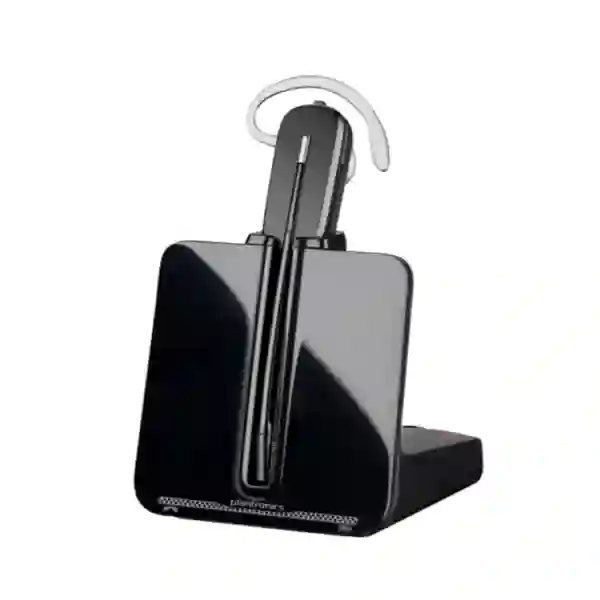
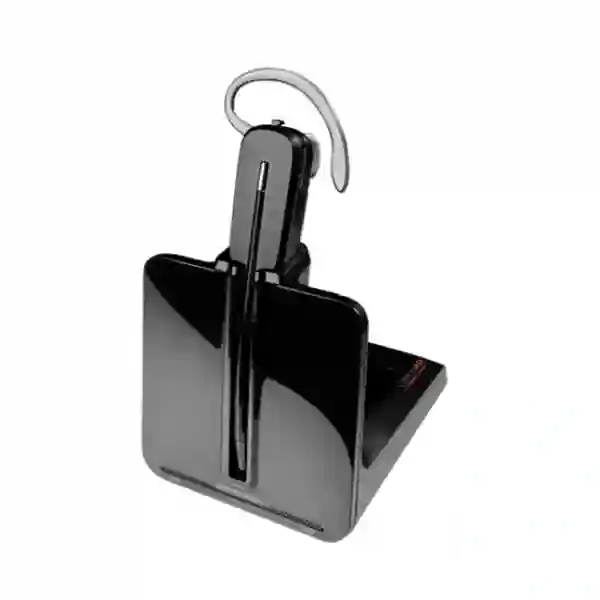
HP Poly CS540 Convertible DECT Wireless Headset
Move around a compatible desk-phone workstation while keeping your hands free, with lightweight single-ear comfort, a noise-cancelling microphone and a dedicated DECT office base.
For a suitable office configuration, ask FourTeck Tanzania to check your desk-phone model and quote the required headset and connection accessories. This is not a direct Bluetooth or USB headset for laptops or smartphones.
Quick buying answer
The HP Poly CS540 wireless headset is a practical choice for business users who make calls through compatible physical desk phones and want hands-free movement around the office. Its single-ear convertible design supports two supplied ways of wearing it, while the office base manages the wireless connection and charging. The most important purchase checks are the exact desk-phone interface, required remote-answer function and regional headset variant.
Before purchasing for a Tanzanian workplace, confirm the phone make and model, how calls are answered today and whether staff need to pick up an incoming call without returning to the phone. The answer determines whether the standard connection is sufficient or an optional compatible electronic hook-switch cable or handset lifter is needed. Ask for a full configuration quote rather than comparing unqualified headset prices.
Key specifications at a glance
These are manufacturer specifications for the CS540 family, not a guarantee of individual-site performance or proof that a particular regional model is included in a quotation.
A desk-phone headset built around the way people work
The HP Poly CS540 wireless headset is intended for people whose workday revolves around a desk telephone but who do not want to hold a handset throughout every discussion. A receptionist may need to consult a colleague while a caller remains on the line. An accounts officer may need to open a filing cabinet, check an invoice or enter information. A customer-service representative may want to keep both hands free for notes. The CS540 supports those everyday activities through a dedicated wireless connection between its headset and desk-phone base.
The important buying distinction is that this is a desk-phone headset system, not a general-purpose Bluetooth headset. Its office base connects to an appropriate telephone using a telephone interface cable. Choosing the product therefore begins with the desk-phone make and model, the physical ports available and the workflow required for answering calls. It is a particularly practical option for established telephone desks where users want mobility without replacing the phone itself. Buyers seeking computer softphone or mobile connectivity should evaluate a different headset category rather than assume an adapter will deliver the same experience.
What the convertible design actually means
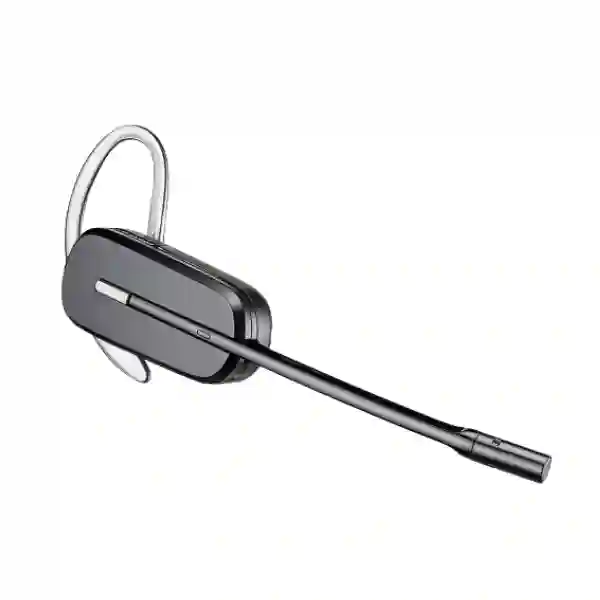
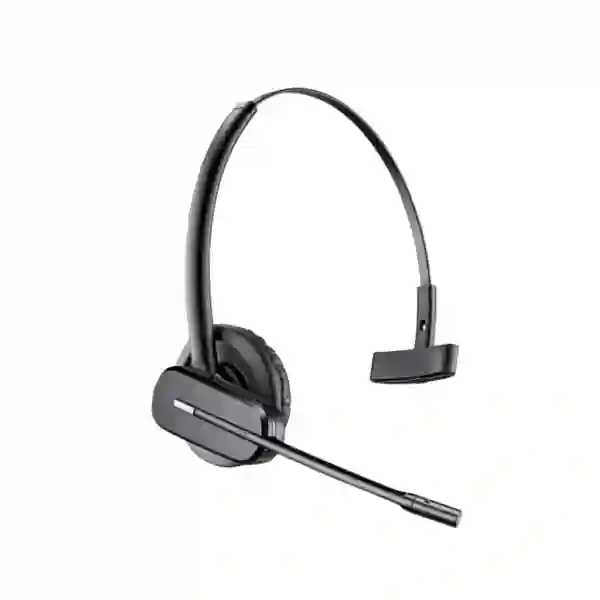
Convertible describes the choice of wearing arrangement, not an ability to convert between telephone and computer connection modes. The CS540 package provides fittings for an over-the-ear configuration, where an earloop supports the small headset, and an over-the-head configuration using a headband. A user can select the arrangement that feels most secure during their normal routine. Because the unit is single-ear, the other ear remains open to conversations, visitor greetings and ambient sounds in the immediate workplace.
An optional behind-the-head neckband has also been described in the CS540 accessory family, but it should not be assumed to be inside the standard box. For shared equipment, check the available earloop and eartip sizes and whether each user can obtain a comfortable personal fit. The ideal arrangement is the one that keeps the microphone consistently positioned and allows reliable access to the call and volume controls. If workers need two-ear listening or isolation from extremely noisy surroundings, a different form factor may be better suited to their needs.
Comfort across a working day
HP specifies a headset weight of approximately 21 grams. That light on-ear design can make the CS540 appealing for reception, administration and customer-contact work where calls are frequent and a bulky headset can become distracting. Weight is only one factor in comfort, however. The shape of the ear, size of the earloop, position of the eartip and adjustment of the headband all matter. Teams should allow users to test both supplied wearing options before selecting one for prolonged use.
Comfort also depends on how the headset is worn and maintained. The microphone should be positioned consistently, without forcing the earloop to sit too tightly. A suitable eartip should feel secure rather than press painfully into the ear. During long shifts, normal breaks and reasonable listening volume remain important regardless of headset weight. For shared desks, hygiene and fitting components should be considered part of the equipment plan. Buying more units does not solve discomfort if users have not been shown how to adjust the fittings correctly.
DECT wireless: what connects to what
The CS540 uses DECT technology to carry audio between the wearable headset and its powered office base. This connection is separate from a building’s Wi-Fi network. A phone call still travels through the existing desk-phone service and telephone infrastructure; the headset simply replaces the need to hold the handset. For organizations retaining dedicated desk phones, this arrangement can provide movement within the workplace without changing the underlying call service or introducing a new computer application for the headset.
It is useful to think of the desk phone, base and headset as three components with different jobs. The desk phone places and receives telephone calls. The base connects to the phone and provides charging and wireless communication. The headset lets the user hear, speak and control supported call functions. If the telephone is not compatible or the connection is incorrectly configured, DECT range alone cannot make the system work. Confirm the desk-phone interface and the correct regional headset version before making a deployment decision.
Wireless range in real offices
HP lists a maximum wireless range of up to 120 metres for the CS540 family. That figure is a product specification rather than a promise that every office will achieve the same distance. Walls, metal shelving, concrete structures, floor layout, other radio systems and the position of the base may reduce usable range. A headset that sounds excellent beside its charging station may behave differently across a busy office, along corridors or inside a separate room.
Evaluate range against a realistic walking route, not just the distance printed on a product sheet. For instance, a staff member may need reliable audio between a reception counter and nearby records cabinets, while a supervisor may move among desks and meeting spaces. Test the farthest necessary points while speaking and listening, then assess audio stability before treating the system as suitable. Wireless freedom does not imply unrestricted building-wide coverage, and the headset is not intended to replace a mobile phone for off-site calls.
Microphone clarity in conversation
The CS540 incorporates a noise-cancelling microphone intended to reduce distracting sound picked up around the speaker. This is valuable when a caller needs to understand names, numbers, instructions or a problem description while nearby colleagues are working. A noise-cancelling microphone is not the same as total removal of background sound, and it does not make an open-plan office silent. The level of benefit depends on room acoustics, background activity, microphone position and the user’s speaking technique.
To improve caller experience, adjust the boom so it sits in a sensible position near the mouth without obstructing speech. Make a test call from the actual desk and ask the listener whether speech is clear, too quiet or distorted. Test during a typical period of activity instead of only in an empty office. A good headset should support understandable two-way communication, but room design, telephone settings and user behaviour remain part of the overall audio result.
Listening audio and wideband choices
The CS540 supports narrowband and wideband audio modes, and HP lists a speaker bandwidth of 20 Hz to 6.8 kHz. Wideband may provide more natural-sounding speech where the telephone system and connection support it. However, selecting a wider audio mode cannot upgrade a telephone service that does not deliver compatible audio. The relevant outcome for business users is whether the caller’s words are easy to distinguish, especially during detailed discussions where repeating information wastes time.
A practical setup process includes checking the base configuration, desk-phone volume and microphone levels before deciding whether sound quality is satisfactory. Excessively high volume can make conversations uncomfortable and may increase perceived distortion. HP’s operating guidance notes that wideband use can reduce achievable talk time, so the best choice is not always the setting with the broadest advertised frequency response. Test audio and battery expectations together, particularly where a user is continuously on calls.
SoundGuard and sensible listening habits
HP identifies SoundGuard as the acoustic protection technology used in this headset family. It is designed to limit exposure to abrupt, excessively loud sounds, an important consideration when staff regularly receive unexpected noises over a telephone connection. This protective feature complements, rather than replaces, sensible listening practices. Users should still keep sound levels comfortable, avoid unnecessarily high amplification and report persistent audio abnormalities to their equipment administrator.
Organizations should not interpret an acoustic protection specification as a medical guarantee or a substitute for workplace health and safety procedures. Listening comfort varies by person, call volume, room noise and duration of use. Supervisors can help by encouraging appropriate volume settings, normal breaks and prompt checks when employees describe discomfort. The advantage of a headset equipped with sound-management technology is most useful when paired with proper configuration and realistic operating practices.
Call and mute controls within reach
The CS540 headset incorporates onboard call control and volume or mute functions. This is convenient when the user is away from the exact spot where the telephone sits. The functions available on a particular call depend on how the base interfaces with the telephone. A headset call button is not automatically permission to answer or end every call remotely: standard desk-phone installations may still require lifting the handset or pressing a phone control to connect the line.
This distinction should be explained during initial user training. A staff member who expects one-button remote answering may be frustrated if a standard wired interface has been installed without the necessary accessory. During installation, demonstrate the actual sequence for answering, muting, adjusting volume, ending a call and returning the unit to its charger. When the operating sequence is predictable, the headset supports faster and less distracting telephone work. When it is not explained, ordinary connection behaviour can be mistaken for a defective product.
Battery performance and charging
HP lists up to seven hours of talk time on a full charge for this product family. This is a maximum figure, not a guaranteed shift length under every combination of settings. Wideband mode, greater distance from the base, battery condition and individual use patterns can affect the time available. A person handling occasional short calls will have a different charging routine from someone taking consecutive customer calls for most of the working day.
The CS540 user guide describes approximately three hours for a full charge and recommends charging before initial use. Place the headset correctly in its powered charging base and verify the charging indicator rather than assuming a nearby headset is charging. Teams with uninterrupted call duties should plan breaks and docking habits around actual traffic. If an older unit loses capacity, investigate battery condition and approved replacement parts instead of assuming that its original battery specification will remain unchanged indefinitely.
Desk-phone compatibility comes first
This headset is designed for compatible desk phones, and the supplied telephone interface cable links the base to the telephone. Exact compatibility is not determined only by the existence of a similar-looking modular socket. Different telephone models have different headset ports, handset interfaces, electronic hook-switch behaviour and setup requirements. A buyer should provide the telephone brand, model and, where relevant, hardware version so the interface method can be checked before purchasing.
Also decide whether staff will use the phone handset and headset interchangeably, whether a dedicated headset button is present and whether call pickup is expected while walking away from the desk. Some configurations allow standard wired connection without an additional remote-answer accessory. Others need a compatible EHS cable or handset lifter to deliver the desired convenience. An IT administrator should validate the setup for the exact equipment already installed, instead of assuming that all phones from one manufacturer connect in the same way.
Standard connection without extra lifting equipment
For a basic installation, the office base is connected to the desk phone with the appropriate telephone interface cable, and the power supply connects to the base. The original telephone handset can continue to be used in supported configurations. Following the product user guide, the installer checks the base configuration and makes a test call. Depending on the phone connection, the user may need to operate the physical handset or the telephone headset key as well as the headset’s call button.
This straightforward method can suit a fixed desk where staff mainly remain near the telephone and need free hands while speaking. It should not be presented as a complete remote call-answering solution. Before handing over the equipment, confirm that incoming and outgoing audio both work, that the speaker can be heard at a reasonable volume and that the person at the other end receives clear speech. Label any required phone-button sequence so new staff can use the desk without repeated assistance.
When an EHS cable makes sense
An electronic hook-switch, or EHS, cable is an optional accessory used with compatible desk phones to support electronic remote call control. In a suitable combination, an incoming call can be managed from the headset without physically lifting the telephone handset. This is useful for users who frequently move to a shelf, nearby printer or adjacent workstation while remaining within dependable wireless range. It can also reduce the need to return to the desk merely to operate a handset.
The important word is compatible. EHS cables are not universal, and a cable that works with one desk-phone series should not automatically be specified for another. The required connector and control behaviour must be verified against the exact phone and the current compatibility documentation. The CS540 box should not be presumed to contain an EHS accessory. When requesting a quote, list the telephone models and explicitly state that remote answer and end functions are required so the appropriate accessories can be assessed.
When an HL10 handset lifter may be appropriate
The optional HL10 handset lifter is a different way of enabling remote call handling on suitable traditional desk phones. It physically lifts and replaces the telephone handset, simulating the action a person would otherwise perform by hand. This can be helpful when a phone does not provide a suitable electronic hook-switch connection. The fit depends on the shape of the phone, placement of its receiver and successful movement of the handset in and out of the cradle.
A handset lifter is mechanical, so installation needs more than simply inserting a cable. Its position and lift height must be adjusted, and repeated incoming-call tests should verify that calls connect and disconnect reliably. Noise or missed calls may result when the lifter is poorly aligned. The accessory is not part of the standard CS540 package according to HP’s support information. Buyers should ask whether a handset lifter or EHS cable is the better method for their particular telephone, rather than purchasing both by default.
A practical installation sequence
A sensible deployment starts by recording the exact desk-phone model and whether the user expects ordinary hands-free calling or full remote call pickup. Next, identify the standard telephone interface and determine whether an EHS cable or HL10 lifter is required. Connect the base and power supply according to the product guide, then charge the headset. Choose the eartip or headband configuration before conducting a test, because a poorly positioned microphone can make troubleshooting misleading.
Test an outgoing call, an incoming call, the mute function, both volume directions and the correct end-call sequence. Walk the actual workspace while speaking and confirm that the call remains intelligible. When a remote-answer accessory is installed, specifically test remote pickup and hang-up several times. Record the working settings for the telephone model. This short checklist makes later installation at additional desks easier and gives support staff a useful baseline if a user reports a problem.
Where reception teams benefit
Reception desks often combine telephone calls with visitor greeting, appointment checking and coordination with colleagues. A single-ear wireless headset can allow the receptionist to hear someone approaching while continuing a phone conversation, subject to office procedure and the need to protect caller privacy. The ability to move a short distance from the counter can also be useful when checking a nearby register or confirming that a meeting room is ready.
Reception workflows are especially sensitive to missed calls, so remote answering should be considered at the quote stage rather than discovered as a missing capability after installation. Check the phone’s incoming call notification, the expected answering sequence and the accessory needed for remote operation. Receptionists may also alternate between handset and headset, making clear training important. Where several people share a counter, personal-fit accessories and cleaning arrangements deserve attention alongside the headset’s technical specifications.
Administrative and finance desks
Administrative employees may need to read documents, type notes, search internal records or consult a colleague while a call is in progress. The CS540 supports hands-free movement around an individual workstation, helping users keep their attention on the conversation and the information they need. Its lightweight configuration can be useful where telephone calls are a regular part of duties but not necessarily continuous throughout the day.
For finance and records staff, confidential discussions and accuracy matter more than the novelty of wireless technology. Users should take care not to read sensitive information aloud while walking through a public area. The headset does not provide room privacy or change document-handling policies. Plan where staff can speak discreetly, test call quality around their working area and make sure their desk-phone interface allows reliable call management. The right fit is a headset that makes their existing procedures easier without introducing communication risks.
Customer-support and service-desk work
A service-desk agent may spend a call looking up an account, consulting a technical note and entering a case summary. Having both hands available can reduce the awkwardness of holding a handset during these tasks. The CS540’s microphone, adjustable wearing options and accessible controls align with this pattern of desk-phone communication, particularly where agents already have a dedicated business phone rather than a browser-based calling application.
An important screening question is how the support team actually receives calls. If calls are handled directly in a computer softphone, a USB or computer-compatible headset may be the appropriate class instead. If the desk phone remains the call endpoint, the CS540 becomes more relevant. Ask team supervisors to evaluate battery sufficiency, microphone intelligibility and comfort during the representative shift. An isolated five-minute trial may not reveal whether the user can comfortably manage a full day of intermittent or continuous call activity.
Sales teams and account management
Sales and account managers may spend time discussing quotations, confirming orders and following up with customers while reviewing information at their desks. With the CS540, a user can remain on a desk-phone call while checking a printed offer or moving to a nearby file. This is a modest but practical form of mobility: it reduces dependence on the exact telephone position without changing the telephone number or underlying calling process.
The most important measurements for this role are whether the customer can hear clearly, whether the user can mute reliably during internal consultation and whether the connection remains steady across their usual route. Staff who regularly travel outside the office need a mobile device or another communications solution as well; the CS540 does not turn a desk telephone into a cellular handset. A procurement review should distinguish between mobility inside the office and communication while away from the premises.
Managers, supervisors and collaborative calls
Supervisors may need to review a document, confer briefly with a nearby team member or move between adjacent desks during a telephone conversation. A single-ear headset can support awareness of the immediate room, while a dedicated desk-phone interface preserves existing call routing. The CS540 family has been described with headset conferencing capabilities for compatible equipment, but organizations should verify the exact supported combinations and operating procedure before treating this as a requirement.
For collaborative work, plan how callers are informed that another person is joining and respect workplace confidentiality rules. A headset is not the same as a meeting-room speakerphone, and personal audio may be preferable when a manager needs to discuss sensitive matters. Assess whether staff need two-way collaboration around one telephone, computer meetings or a more elaborate communications platform. Choosing the correct category at the start avoids buying a comfortable desk-phone headset for a task it was never designed to perform.
Tanzania office planning without assumptions
For a Tanzanian organization, the most useful purchasing information is often an accurate equipment inventory rather than a long list of marketing features. Record how many desks use compatible telephones, which phone models are installed and which employees genuinely need wireless movement. Include any sites with different telephone generations. A single headset model can still require different connection accessories depending on the phone hardware at each location.
Check the exact regional variant offered in the quotation, including any model suffix and applicable radio-frequency specification. HP publishes regional CS540A variations, so importing a model number from a foreign retail listing is not enough to establish the right local configuration. Do not assume local stock, regulatory status, installation coverage, warranty terms or delivery times until these are confirmed for the specific offer. Buyers can use the verified specification and a written compatibility check to compare proposals consistently.
Power and physical workplace conditions
The CS540 office base uses an external power adapter and functions as the headset’s charging point. Position it near a suitable power outlet and the relevant desk phone, while keeping the workstation tidy and accessible. In workplaces where utility power is unreliable, consider the broader continuity plan for the telephone, network and headset base. Keeping only the headset charged does not ensure that the telephone service itself will remain available during a disruption.
Desk layout can also influence everyday performance. Avoid placing the base where it is regularly struck, covered by files or blocked from easy docking. Leave enough room for the headset to sit correctly in its charging cradle. The device is for normal office use rather than harsh outdoor conditions; an organization planning a dusty or unusually hot deployment should verify the product’s suitability and the operating environment before purchase. Good placement often prevents more user frustration than later adjustments to volume or wireless settings.
Managing several workstations
A multi-desk rollout needs more than multiplying the single-unit price by the number of seats. Inventory each telephone model, confirm the compatible cable and remote-answer requirements, then separate common configurations from exceptions. If staff rotate between desks, decide whether headsets remain assigned to stations or to individuals. Consistency in docking location, charging and instruction cards can reduce support requests when employees work at unfamiliar desks.
Start with a small representative test group that includes the different phones and user roles. Confirm reliable call pickup, audio, charging and range in each physical area before ordering the remaining units. Record which accessories are included and which must be purchased separately. Maintain a clear list of device assignments, spare wear components and replacement-battery needs. This approach is especially important when multiple offices use different generations of desk-phone infrastructure or have varied procedures for handling incoming calls.
Shared desks, hygiene and personal fit
Hot desks and shared reception stations introduce considerations beyond technical connectivity. An eartip or earloop that suits one employee may fit another poorly, and a shared headset should be cleaned according to the manufacturer’s care guidance. Businesses may prefer individually assigned wear components or an individual headset for employees who take frequent calls. The suitable policy depends on staff rotation, hygiene expectations and the organization’s equipment budget.
Training should include adjusting the microphone, selecting a comfortable wearing style and placing the headset on the charger after a shift. If the headband is swapped for an earloop, users should confirm that the microphone is still correctly aligned. Establish a simple process for reporting loose fittings, low battery capacity or unreliable connections. These small operating standards help prevent the mistaken conclusion that a headset is unsuitable when the issue is actually fit, maintenance or inconsistent setup.
What is included in the standard package
HP’s CS540 product information lists an office base, AC power adapter, headband, telephone interface cable and a headset with pre-installed battery, eartip and earloop. A kit of additional eartips and earloops is also identified. These components support the standard convertible desk-phone arrangement. Buyers should still check the exact packing list for the quoted regional variant, especially when purchasing multiple units, replacements or an offer described as a bundle.
Do not assume that accessories displayed in a photograph or discussed in a product description are included. The HL10 handset lifter, electronic hook-switch cable and optional neckband are separate accessories unless an exact quotation specifically lists them as part of a bundle. Ask for an itemised quotation showing the headset system and any required connection accessories. This lets the organization compare complete working configurations, not just box prices that may exclude an important remote-answer component.
How to choose optional accessories
Accessories should solve an identified use problem. An EHS cable may be appropriate for a compatible telephone that supports electronic remote call control. An HL10 lifter may suit a traditional phone where a mechanical handset pickup is the available method. Optional wearing components may help a user obtain the preferred fit. Replacement eartips, earloops and approved batteries are primarily maintenance needs rather than reasons to change the telephone infrastructure.
The safest buying sequence is to describe the job before selecting the accessory. State whether the user must answer a ringing call while away from the desk, whether a personal-fit option is needed, and whether the device will be used at a single or shared station. Then check product and phone compatibility documentation. An accessory labelled for another Poly family or a superficially similar connector may not be the correct choice. Ask the supplier to identify every necessary component in writing before confirming the order.
Care, cleaning and battery upkeep
Routine care should be simple and consistent. Keep the charging contacts and base free from accumulated dirt, follow the manufacturer’s cleaning instructions and avoid excessive moisture around the electronics. Inspect the eartip and earloop periodically for wear or damage. Return the headset to the charging cradle when it is not in use, and verify that it sits correctly rather than balancing against the edge of the dock. These practices support reliable daily operation without requiring complicated maintenance.
If talk time becomes noticeably shorter after extended service, consider the condition and age of the rechargeable battery. The user guide identifies a replaceable battery and specifies using the correct battery type. Do not improvise with an unrelated cell or charger. Any replacement should follow the manufacturer’s current instructions and safe-handling guidance. Keep a short maintenance record for heavily used units, especially at service counters where headset failure can interrupt customer calls during an active shift.
A straightforward approach to troubleshooting
When the caller cannot hear the employee, begin with the simplest checks: make sure the microphone is positioned correctly, the headset is not muted and the telephone or base speaking-volume settings are reasonable. If the employee cannot hear the caller, inspect the telephone’s active audio route, headset listening volume and the base configuration. A missing dial tone can indicate an incorrect phone interface or configuration rather than a failed wireless headset.
For a headset that disconnects or sounds unstable, check charging status, proximity to the base, physical obstructions and whether the behaviour changes in a different part of the workspace. If remote pickup does not work, confirm that the required EHS cable or HL10 lifter is fitted and configured for that exact phone. Compare the installation with a known working station where possible. Avoid repeatedly changing several settings at once; controlled tests make it easier to identify the actual cause.
Comparing the CS540 with other headset categories
Choose the CS540 when the primary need is single-ear, wireless calling from a compatible physical desk phone. Its advantages are not measured by the number of apps it supports, but by dependable integration with the existing phone and user comfort during work. A simple wired desk-phone headset may be sufficient for staff who never move from their desks, while a dual-ear headset may suit employees who need greater isolation from surrounding conversation.
A computer-compatible USB headset is a more natural starting point when calls are handled through software on a laptop or desktop. Bluetooth models may be preferable where direct mobile-device pairing is essential. Some multi-connectivity business headsets are designed to manage combinations of desk phone, PC and mobile device, but those are different purchasing categories and their features need independent verification. Comparing the intended call endpoint, wearing style and remote-control requirements makes the choice clearer than comparing advertised wireless range alone.
Regional variant and frequency verification
HP’s Africa product information identifies a CS540A DECT 1880–1900 MHz version, while other regional listings show different variants. These names and radio configurations should not be treated as automatically interchangeable. The product being described here is the CS540 family requested by the buyer; a final purchase must identify the actual regional part offered. The applicable frequency, labeling, power supply and suitability for local use should be confirmed against the exact quoted unit and relevant requirements.
A procurement form should request the complete manufacturer product designation and technical documents, not only the shorthand name CS540. This is especially important when an organization sources equipment for more than one country or consolidates purchases from different distributors. Do not infer Tanzania-specific regulatory approval from a product’s presence in another market. The best outcome is a documented match among the buyer’s desk phone, the correct headset variant and any necessary accessories.
Assessing total ownership value
The purchase price of a wireless headset system is only one part of its useful cost. Organizations should include the required EHS or handset-lifter accessory, any extra fitting kits, training effort and potential battery replacement over the equipment’s service life. A lower quoted unit price may not represent the best value if it excludes accessories needed for the intended call-handling workflow. Similarly, an unnecessary accessory increases cost without improving the actual experience.
Create a simple comparison that records the complete configured cost per desk, included accessories, written compatibility confirmation and terms offered in the current quotation. Verify any commercial warranty or support conditions for the specific sale rather than relying on another country’s retail page. For business-critical teams, a spare unit may be worth considering so one failed headset does not stop telephone coverage. The decision should reflect operational need, verified specifications and total installed cost.
Before requesting a quotation
Prepare a concise list of telephone models, quantities, office use cases and special requirements. Include whether users need to answer calls away from the phone, how long calls typically last and which wearing option they prefer. Mention if the equipment will be shared, if users work across several desks, or if a site has areas where wireless coverage must be tested. This information enables a more relevant compatibility and accessory review than the headset model name alone.
Ask the quotation to specify the exact regional headset variant, the package contents, any separate EHS or HL10 accessories and the available product documentation. Also request confirmation of local commercial terms, including price, taxes, lead time and support arrangements; these details are not established by the general product specification. Buyers should make a final decision only after the complete working configuration has been identified for their installed telephone environment.
Frequently asked questions
Will the Poly CS540 work with any desk phone?
No. It is intended for compatible desk phones, but connection methods differ by telephone make and model. Confirm the model and its handset or headset interface, then determine whether a standard cable, an EHS cable or a handset lifter is needed.
Does this headset pair directly with a laptop?
No native PC USB or Bluetooth pairing should be assumed. It is designed around an office base connected to a desk phone. If your calls run through computer software, ask for a headset expressly designed for that application.
Can I use the CS540 with a mobile phone?
Not as a direct Bluetooth mobile headset. The CS540 uses a DECT connection to its dedicated base. People who need smartphone pairing should compare models built for mobile or multi-device use.
How far can I walk from the desk?
HP states a wireless range of up to 120 metres in suitable conditions. Actual coverage depends on layout, floors, walls, objects and radio conditions. Test the routes your staff genuinely need before relying on that distance.
How long does the battery last?
The published maximum talk time is up to seven hours. Wideband mode, distance from the base, battery condition and call habits may reduce it. Build regular docking into the working routine and test performance under representative use.
How long should charging take?
The CS540 guide describes approximately three hours for a full charge, with charging recommended before first use. Ensure the charging cradle is powered and the headset is correctly seated. Follow the relevant guide for the quoted variant.
Is the headset suitable for noisy offices?
Its noise-cancelling microphone can help reduce some background sound reaching the caller, but it does not eliminate all noise. Try a real test call during normal office activity and consider whether single-ear listening suits the environment.
What wearing styles are provided?
The normal package supplies earloop and headband options for a convertible single-ear fit. An optional behind-the-head neckband is a separate accessory unless the specific bundle says otherwise. Confirm package contents before ordering.
Can I answer calls while away from my desk?
Remote answer and end capability may be available with a compatible electronic hook-switch cable or an HL10 handset lifter. These accessories are not necessarily included, and compatibility must be checked for the exact desk phone.
Is an HL10 lifter required for every installation?
No. Some desks use a basic interface with manual handset or phone-button operation, while others use a compatible EHS cable for remote pickup. Choose a lifter only when it suits the telephone and the intended workflow.
Can colleagues share one headset?
A shared unit may be possible operationally, but comfort, hygiene, fit adjustment and charging responsibility need attention. Evaluate separate personal wear components or individually assigned headsets when employees make frequent calls.
Does the product include a warranty in Tanzania?
HP publishes manufacturer warranty information for its products, but the exact local sale terms must be confirmed with the current quotation and regional variant. Do not assume that terms advertised in another country apply automatically.
What information should I send for compatibility checking?
Share the full desk-phone manufacturer and model, number of users, whether remote call answering is required, and whether staff also need computer or mobile calling. A photo of the telephone ports may help your technical team identify the correct configuration.
Is the CS540 a good replacement for a wired headset?
It can be a useful upgrade when compatible desk-phone users need movement and hands-free calling. Compare total configured cost, battery management, fit and remote-call requirements with the simplicity of a wired alternative before choosing.
Request a CS540 compatibility check and quotation
Tell FourTeck Tanzania which desk phones you use, how many headsets you need and whether remote call answering is essential. Request confirmation of the exact regional unit, included components, any separate EHS cable or HL10 lifter, and the commercial terms for your order.
Next step: Contact FourTeck Tanzania for a tailored headset and desk-phone compatibility quotation.




Reviews
There are no reviews yet.