
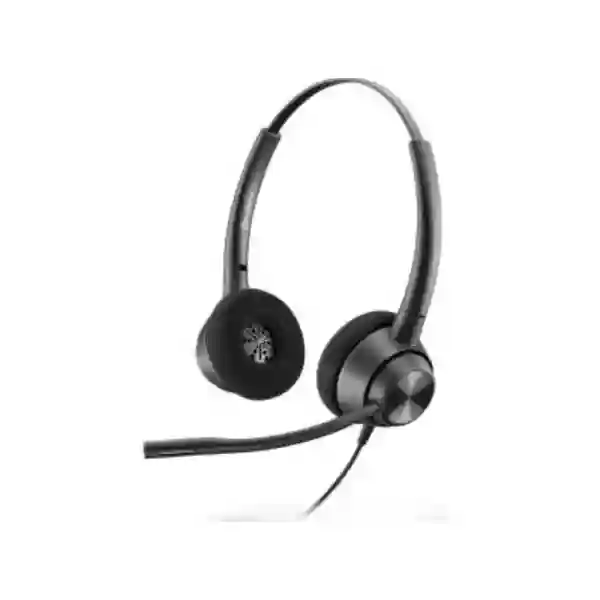
HP Poly EncorePro 320 Stereo QD Headset
Keep customer conversations clear and your headset choice practical. The EncorePro 320 uses dual on-ear receivers, an adjustable noise-cancelling boom microphone and a QD connection for compatible business calling setups. Check the required desk-phone cable or computer audio processor before ordering.
Quick product facts
| Product family | HP Poly EncorePro 300 |
|---|---|
| Model and style | EncorePro 320; stereo, on-ear, over-the-head |
| Connection | Wired Quick Disconnect (QD); compatible accessory required |
| Microphone | Flexible noise-cancelling boom |
| Listening | Dual on-ear receivers; voice-oriented audio |
| Acoustic management | HP Poly SoundGuard technology |
| Ear cushions | Soft foam; replaceable according to HP family information |
| Manufacturer reference | 77T26AA (legacy Poly 214573-01); verify offered package |
| Box and extras | HP specifies headset and user guide; confirm connection cable/adapter separately |
| Country-specific selling terms | Request a current Tanzania quotation; do not infer stock, delivery or price |
Who this stereo QD headset is made for
The HP Poly EncorePro 320 Stereo QD Headset is designed for business conversations where employees spend substantial time speaking with customers, colleagues, or service users. It combines an over-the-head, dual-ear wearing style with a wired Quick Disconnect connection and a flexible, noise-cancelling microphone. For a call-centre manager, the central question is not simply whether the headset produces sound. It is whether the chosen headset and connection method suit the team’s existing phones, calling workflow, and daily listening demands.
This model is particularly relevant when an organisation already operates compatible Poly-style QD accessories, is replacing older corded headsets, or prefers a structured headset-and-adapter setup. Both ears receive call audio, so the user can concentrate on a conversation without deliberately leaving one ear uncovered. The on-ear cushions provide physical coverage of both ears, although the headset is not a fully enclosed over-ear model and should not be described as an active noise-cancelling listening device.
For Tanzania-based procurement teams, the first useful step is to record the exact desk-phone model or computer calling setup before requesting a quotation. The name of the headset alone does not confirm that it will connect to a particular handset, PBX terminal, laptop, or collaboration platform. The headset uses QD rather than a built-in USB connector, so a suitable bottom cable, amplifier, or QD-to-USB adapter may be required. Confirming the connection path first prevents unnecessary accessory purchases and delays in rollout.
- Designed for voice-led work rather than consumer entertainment
- Dual-ear on-ear fit with an adjustable boom microphone
- QD connection must be matched to the calling endpoint
At-a-glance product identity and verified characteristics
The EncorePro 320 belongs to HP Poly’s EncorePro 300 contact-centre family. The 320 is the stereo member of the range, while the 310 is the single-ear option. The QD designation identifies the quick-disconnect termination, not USB-A, USB-C, Bluetooth, or an ordinary 3.5 mm audio plug. This distinction is essential when comparing online product listings that share the same EncorePro 320 name but refer to different connection variants.
HP’s published product information identifies the headset as a wired, on-ear stereo design with a noise-cancelling microphone, voice-focused audio characteristics, and a standard Poly acoustic protection feature called SoundGuard. The product information also describes soft, replaceable foam ear cushions, a flexible microphone boom, and earpieces that fold flat. These features address routine work such as taking calls, wearing a headset between conversations, cleaning equipment, and replacing consumable cushions when they become worn.
HP identifies the Quick Disconnect stereo variant with manufacturer reference 77T26AA and the earlier Poly reference 214573-01. These are manufacturer identifiers and should not be mistaken for a seller’s inventory SKU. As configurations and packaging can vary, buyers should verify the complete manufacturer reference on the quotation or carton. No Tanzania selling price, current inventory quantity, delivery promise, or local warranty entitlement is implied by those references.
- Manufacturer: HP Poly; product family: EncorePro 300
- Wearing style: stereo, wired, over-the-head, on-ear
- Connection: Quick Disconnect (QD), not direct USB
- Manufacturer reference for the documented QD version: 77T26AA; legacy reference: 214573-01
What the noise-cancelling microphone actually does
A busy support floor can contain nearby conversations, keyboard noise, movement, ventilation, and other sounds that make speech harder to follow. The EncorePro 320 uses a noise-cancelling boom microphone intended to make the wearer’s speech more prominent relative to some surrounding sound. Its adjustable boom helps position the microphone near the speaking area, where it is better placed to pick up the user’s voice than a microphone positioned far away on a desk.
Noise-cancelling microphones do not eliminate all external noise or guarantee clear calls in every room. A loud colleague immediately beside the user, a fan blowing across the microphone, clipping from excessive levels, or noise introduced by a poor connection can still affect the remote listener. Equally, this microphone feature is not the same as active noise cancellation in the earcups. The two ear cushions provide a degree of passive separation from room sound, but they do not electronically remove ambient noise.
A practical acceptance test is to place several calls under ordinary working conditions and ask listeners whether the agent’s voice remains intelligible during normal background activity. Test at a typical speaking volume rather than requiring staff to shout. Adjust the microphone boom according to HP’s fitting guidance, then listen for breathing noise, plosive bursts, or muffled voice pickup. Good microphone placement and a correct audio path often matter as much as the headline specification.
When evaluating microphones for an entire team, use the same quiet-room and busy-room test phrases so different headsets can be assessed consistently. Include more than one voice type and speaking style, especially if agents handle callers across different languages or accents. The aim is reliable comprehension, not a dramatic marketing demonstration. A measured pilot can expose issues that technical data alone cannot reveal, including user positioning habits and variations between desks.
- Flexible boom supports microphone placement near the mouth
- Noise reduction targets transmitted speech, not electronic noise cancellation at the ears
Stereo listening and concentration on shared floors
The stereo version has two on-ear receivers. For workers whose main responsibility is listening and responding to callers, using both ears can feel more immersive than using one receiver while the other ear remains open to the office. The cushions form a physical contact area over each ear, giving some passive separation from the immediate room. Whether this improves concentration depends on the user, call volume, headset fit, and local operating practices.
A dual-ear headset is not necessarily the best choice for every job. Reception staff who must respond frequently to people standing nearby may prefer a mono headset. A supervisor who alternates between calls and face-to-face conversations may also value the uncovered ear offered by a single-sided design. Conversely, an agent handling continuous support calls may appreciate audio in both ears. Matching the headset to the task is more meaningful than treating stereo as universally superior.
On-ear designs differ from large circumaural headphones that surround the ears completely. They tend to have a smaller contact footprint, but cushion pressure and heat still matter over long shifts. A five-minute product demonstration cannot determine comfort across several hours. Ask representative employees to use the headset during normal work, check headband tension, and identify whether glasses, hair, or personal preference affect fit. Comfort is individual rather than a guaranteed result of a lightweight specification.
A practical workplace policy should explain when a user may disconnect, how colleagues can get attention without interrupting a call, and whether both ears must remain covered during particular tasks. These considerations become more important when a floor has frequent short interruptions. Buyers should evaluate the stereo design in the context of employee safety, office communication, and the priority given to uninterrupted customer conversations.
- Choose stereo for both-ear call listening
- Consider mono when staff need constant awareness of nearby colleagues
Understanding Quick Disconnect before you order
QD stands for Quick Disconnect. It describes a dedicated connection between the headset lead and a matching accessory cable or adapter. The intention is to allow the user to separate the headset from the connected equipment without repeatedly removing a plug from a phone or computer. This can be useful at an agent desk where someone needs to stand up, swap positions, or take a planned break. The actual call behaviour on disconnection depends on the equipment and software in use.
The QD plug is not a universal computer interface. It does not fit directly into a standard USB-A or USB-C port, and it is not a conventional headset jack. A compatible Poly QD bottom cable can complete the connection to an appropriate desk phone; a suitable QD-to-USB audio processor can provide a computer connection. Depending on the endpoint, a specific amplifier or interface may be necessary. The accessory must be selected against the actual device, not merely the connector’s visual appearance.
It is risky to assume that any QD lead will support every phone. Handsets and headsets can differ in pin wiring, electronic signalling, audio levels, and the way call buttons function. The correct adapter may depend on the phone’s exact make, model, firmware, and headset port rather than only its manufacturer. Before ordering many units, ask for a documented compatibility check or validate one full headset-to-phone combination. That includes the headset, connecting lead, handset or PC, and calling application.
Some descriptions of QD accessories suggest that disconnecting automatically places a call on hold. Do not rely on that claim without testing your own phone or application. The headset’s QD separation, device mute state, and telephone’s hold function are separate concepts. During a pilot, unplug at a safe moment on a test call and verify what the remote listener hears, how the call appears on screen, and what occurs after reconnecting. Train users based on the verified behaviour.
- QD is an accessory interface, not USB or Bluetooth
- Match the bottom cable or adapter to the exact endpoint
- Test disconnection and reconnection behaviour before deployment
Desk phone compatibility: follow the whole connection chain
A desk phone may have a dedicated headset socket, a handset socket, an electronic hook switch interface, or several connector options. These interfaces are not interchangeable. The EncorePro 320 QD headset can form part of a desk-phone solution, but the required bottom cable or other accessory must suit the particular phone. Begin with the full manufacturer and model number printed on the telephone, and check whether the user’s intended workflow requires a separate phone-headset button.
If the business currently uses an older QD headset, that does not automatically prove that the new unit will work unchanged. Retain the old cable’s reference number, inspect its condition, and confirm the connector family. Cables can be worn, mismatched to a revised telephone model, or adapted for a particular deployment. When replacing a headset, record whether the purchase includes only the head-worn component or a complete kit with a compatible connection cable.
Testing should cover both directions of audio, not only whether a dial tone is audible. Place a call, check that the other party hears natural speech, and listen for hum, excessively low volume, echo, or distortion. Confirm how the user answers and ends calls, where mute is controlled, and whether the required call-handling functions remain available. Some features belong to the desk phone, cable, or accessory rather than the QD headset itself.
Where a business operates several different phone models, create a small compatibility matrix rather than purchasing one assumed-universal cable. The matrix can record endpoint model, cable or processor reference, confirmed audio function, call-control method, and any known limitations. This simple step becomes valuable when phones are replaced or desks are rearranged. It also helps procurement teams separate a faulty headset from a cable or phone issue during subsequent support work.
- Collect exact desk-phone model and headset-port information
- Validate receiving, speaking, mute, answer/end, and reconnect behaviour
PC calling and softphone deployments
Computer-based calling introduces a different set of requirements. The QD model is not plug-and-play through a bare USB port. A supported QD-to-USB adapter or audio processor is typically needed to present the headset as an audio device to the computer. HP’s general support information lists Windows and macOS operating systems for the EncorePro 320 family, but actual functions depend on the particular accessory, audio driver, calling software, and operating-system configuration.
A business using a browser-based customer service application or installed softphone should test the entire combination. Confirm that the computer detects the attached audio interface, that the calling application allows the intended device selection, and that microphone and speaker routing remain correct after login or restart. If a workstation also has laptop speakers, a webcam microphone, and a dock, users can accidentally select the wrong input or output even though the headset is physically connected.
Computer call controls need special attention. Buttons on a USB audio processor, when present, are not automatically replicated on the bare QD headset. Software support for mute, volume, answer, and end may vary by adapter and application. Do not promise a native one-touch meeting control or automatic presence integration without checking the exact hardware combination. The marketing capabilities of a wider headset family may describe USB variants that are different from the QD package being offered.
For a successful pilot, test an incoming call, an outgoing call, a conference call, microphone mute, device switching, and reconnection after moving from the desk. If a business has a mixture of USB-A and USB-C ports, verify the chosen adapter and any approved conversion arrangement. IT teams should document a standard setup so users do not have to discover the correct sound settings repeatedly. A stable audio configuration reduces avoidable helpdesk incidents.
- A compatible QD-to-USB audio interface is required for PC use
- Check softphone, operating system, adapter, and call-control compatibility as one system
Practical applications across Tanzania organisations
The product may be relevant to Tanzanian businesses that depend on frequent voice conversations, including service desks, customer enquiry teams, internal helpdesks, contact centres, and administrative units. In these environments, employees need to hear callers clearly while keeping their hands available for typing or reviewing records. A wired headset avoids battery charging as a daily task, although its cable and external connection accessories still need sensible management.
For an incoming customer enquiry team, a useful pilot scenario is a busy period when several agents are speaking at once. Evaluate microphone performance, how comfortably users hear low-volume callers, whether each desk has sufficient cable reach, and how easily agents manage short breaks. These conditions reflect normal work more closely than an empty-office product demonstration. Use feedback from both the employee and the remote caller before deciding on a rollout.
For a technical helpdesk, callers may need to spell names, read reference numbers, or describe a sequence of steps. Speech intelligibility and stable microphone placement can be more important than broad music reproduction. Test with realistic serial-number dictation and repeated instructions. For an administrative office, the balance may be different: staff might need to speak to nearby colleagues as well as customers, in which case the mono EncorePro 310 or another wearing style could be a stronger fit.
No particular city, sector, or employer should be treated as proof of local stock, installation services, or a guaranteed support arrangement. A Tanzania-based buyer should obtain a quotation that clearly identifies the headset variant, all required connection accessories, applicable taxes, delivery location, and warranty handling process. The headline product name is only the starting point; the usable solution is the complete approved set of components.
- Call centres, helpdesks, customer support, and voice-led administration
- Validate real workplace noise and user comfort before quantity orders
Comfort and adjustability during a working shift
A headset can meet every electrical requirement and still be unsuitable if staff find it uncomfortable. HP describes the EncorePro 300 family as using soft, replaceable cushions and a lightweight form. The EncorePro 320 sits on the ears, with a headband that supports both receivers. Its flexible boom enables the microphone to be positioned near the mouth without requiring the user to hold an external microphone, leaving both hands available for work.
A fitting session should begin by adjusting the headband so the ear pads are centred and the weight feels balanced. Place the boom in a consistent position, then test speech. Watch for excessive clamping pressure, pads that do not sit evenly, and cables that pull the headset to one side. Employees who wear spectacles may need a slightly different fit to avoid pressure where the temple arms pass beneath the pads. No single adjustment suits everyone.
Users should also understand the fold-flat receiver design. HP describes earpieces that can lie flatter for convenient wearing around the neck between conversations. That is a convenience feature, not a reason to twist joints beyond their normal travel. During training, show users how to handle the headband and pads rather than tugging on the cable when removing the headset. Routine habits influence how well a shared fleet holds up over time.
Replaceable cushions have a useful maintenance advantage. Pads that have become compressed, damaged, or unhygienic need not automatically require replacement of the entire headset, provided a correct compatible part can be obtained. Buyers should confirm the exact cushion reference and supplier availability before planning a long service life. Comfort trials should use both new and normally worn cushions where possible, because the feel can change as materials age.
- Soft on-ear pads and adjustable boom
- Fold-flat earpieces for handling between calls
- Plan for compatible replacement cushions
SoundGuard and listening-level management
HP identifies SoundGuard acoustic limiting technology as part of the EncorePro 300 series. Its published description references protection from acoustic shock through limiting high-level sound to below 118 dBA. This is a product feature, not a substitute for an employer’s hearing-health programme, and it should not be presented as eliminating all listening risk. Total exposure still depends on listening level, duration, call conditions, and workplace policy.
The loudness experienced by an agent may depend on telephone settings, a USB processor, operating-system controls, and the incoming caller’s audio. Staff sometimes increase volume to compensate for room noise or a badly positioned headset. Encourage users to start at a comfortable level, adjust only as necessary, and report unexpectedly loud or distorted audio. An equipment review should examine the complete signal chain rather than attributing every problem to the headset.
For organisations with shared seats, standardising connection accessories and permitted volume settings can make troubleshooting easier. Training should distinguish the microphone mute command from listening volume and from telephone hold. If a team needs specific acoustic safety settings, verify those requirements with occupational safety personnel and the manufacturer documentation applicable to the actual accessory combination. Do not assume that a software-based hearing-protection control exists on a passive QD headset.
It is useful to keep incident reporting simple. If an employee experiences an unexpectedly intense sound, a sudden volume change, or abnormal distortion, record the call time, device combination, and circumstances, then remove any suspected faulty component from use pending evaluation. The presence of SoundGuard should not discourage reporting or inspection. A headset forms one element of a wider approach to reliable and comfortable workplace communication.
- HP SoundGuard acoustic limiting is a documented family feature
- Comfortable volume and appropriate usage remain important
Everyday handling of the QD cable and accessories
Quick Disconnect can make it more convenient to leave a workstation without repeatedly unplugging the telephone or computer-side accessory. That convenience depends on using the connector as intended. Disconnect by holding the connector bodies rather than pulling the headset cable, and reconnect with the parts correctly aligned. Repeated twisting, tension, or abrupt pulling can damage even a connector designed for frequent use.
HP notes that the EncorePro 300 series QD mechanism was tested for more than 30,000 cycles. That is a manufacturer durability test reference, not a promise of a fixed service life in every working environment. Field performance still depends on cable strain, accidental drops, cleaning practices, and the quality of the connected accessory. Keeping the cable out of chair wheels and desk drawers is a simple preventative action.
A wired design also creates a practical workspace constraint. Staff need enough reach to sit, turn, type, and use documents without placing stress on the connector. The headset lead itself is not a room-roaming cable. If workers need to walk substantial distances while actively speaking, a properly evaluated wireless business headset may suit that workflow better. The correct choice depends on mobility needs, office policy, and supported calling endpoints.
When a QD connection behaves intermittently, first inspect the adapter and both connector ends for visible damage or contamination. Try an approved known-working cable and endpoint if available, then assess whether the failure follows the headset, adapter, or workstation. Avoid forcing incompatible connectors together or improvising wiring. A standard troubleshooting process protects equipment while giving the IT team information it can act on.
- Grip connector housings rather than pulling the cable
- Protect lead routing at desks and shared workstations
Choosing between QD, USB-A and USB-C EncorePro 320 variants
The EncorePro 320 name appears on several wired configurations. In a QD version, the headset connects through a separate compatible cable or processor. USB-A and USB-C versions provide the corresponding computer interface in their designated configurations. The main buying decision therefore begins with what the employee connects to, not a preference for the most familiar-looking product image. A buyer selecting a headset for a laptop should check whether QD flexibility is actually needed.
QD may appeal to an organisation with existing compatible desk-phone infrastructure or one that wants to standardise on a headset that can be paired with approved endpoint-specific accessories. However, this flexibility adds a compatibility and accessory-selection step. A direct USB model can be easier to understand for a workstation that only uses computer calls, provided its USB interface, operating system, and software features match the deployment.
A mono version such as the EncorePro 310 QD is a different wearing-style decision. It leaves one ear uncovered, which can help in roles requiring frequent face-to-face interaction. The EncorePro 320 stereo model delivers the call signal to both ears and may be preferable for extended voice-focused tasks. Neither approach guarantees higher productivity; the best choice depends on hearing preferences, ambient noise, contact with coworkers, and hours of use.
When comparing costs, assess the complete solution rather than only the headset line item. A QD headset without its required adapter may look inexpensive while remaining unusable. A USB variant may include different controls, a different cable arrangement, or other model-specific capabilities. Request a quote that separates the headset from additional processors and cables, identifies the exact variant, and states which functions have been tested for the intended calling platform.
- QD: check a compatible bottom cable or audio processor
- USB-A or USB-C: consider when the endpoint is a computer
- Mono versus stereo: select the wearing style by workflow
A structured compatibility assessment for IT teams
A repeatable checklist can turn an uncertain purchase into a documented technical decision. Begin with the endpoint inventory: desk-phone manufacturer and model, any headset ports, workstation operating system, intended calling application, and existing headset accessories. Record the number of desks in each configuration. If one office has different phone models, treat them as separate test groups rather than assuming a cable validated on one terminal covers all others.
Next, identify the precise headset reference and the proposed cable or audio processor reference. Confirm that they are a supported combination for the intended endpoint. On a computer, check recognition as an input and output device; on a desk phone, verify the physical socket and required headset operating mode. If answer and end controls are business-critical, explicitly test them rather than equating successful audio with complete call integration.
Then run a real-call functional test. Include an inbound call, outbound call, remote speech clarity, microphone level, listening volume, mute, normal disconnection, and reconnection. Repeat after restarting the workstation or power-cycling the endpoint. Where agents use multiple applications, verify that sound is not silently routed to an unrelated speaker or microphone. Document known differences between hardware controls and software controls so training material remains accurate.
Finally, obtain user feedback and sign-off. A small pilot should represent the actual staff mix, including glasses wearers, different shift patterns, and agents with distinct roles. Log any cable failures, fit complaints, call-control problems, or application-specific limitations. The outcome should be a short compatibility matrix and an approved bill of materials. This protects the buyer from treating one successful demonstration as validation of an entire heterogeneous fleet.
- Inventory endpoints and software
- Validate exact headset and accessory combination
- Pilot audio, controls, comfort, and reconnection
- Document approval for each endpoint type
Procurement considerations for contact-centre managers
Contact-centre buyers often compare headset prices before clarifying all deployment requirements. A more reliable approach is to define a standard working kit: headset, required bottom cable or QD-to-USB processor, compatible connection to the assigned endpoint, and any planned replacement ear cushions. Identify which elements are included in the quoted package. The manufacturer’s QD headset reference alone should not be interpreted as a promise that every accessory is supplied.
Assess how the headsets will be allocated. Individually assigned units can simplify personal fit and hygiene, while shared stations require a clear cleaning and cushion-replacement policy. A mixed fleet may require more spare cable types than a standardised fleet. Buyers can reduce ambiguity by requesting separate quantities for each phone or workstation configuration and checking that procurement has not combined unlike accessories under a single generic description.
Before approving a larger order, confirm any manufacturer-reported warranty period and the terms that apply to the specific supply transaction. HP’s product materials describe a standard two-year limited warranty for the relevant family, but the practical purchase decision still requires clarity about local eligibility, claim route, proof of purchase, exclusions, and handling of accessories. Do not assume that an overseas listing describes the conditions of a Tanzania supply agreement.
An effective quotation request should also address price in the correct currency, tax treatment, delivery location, expected availability, possible substitutions, and who is responsible for compatibility confirmation. These are questions to ask, not facts to assume. For a budget-sensitive organisation, the least expensive headline item can become costly if staff later need another cable or cannot use expected call controls. A clearly specified kit makes offers more comparable.
- Quote the complete compatible kit, not the headset alone
- Confirm the specific supply, delivery and warranty terms
- Request a working sample for larger or mixed-endpoint orders
Supporting agent adoption and daily workflow
Once the correct hardware has been selected, a short onboarding routine can make the headset easier to use. Demonstrate how to adjust the headband, position the microphone, connect the QD interface, and identify the correct volume and mute controls on the phone or associated adapter. Staff should know whether disconnecting the QD affects the call itself, and they should understand the approved way to step away from an active conversation.
Consider creating a one-page workstation guide with photographs of the approved connection chain and a simple audio check. The guide can remind users to select the correct microphone in a softphone, check that the boom is positioned properly, and report cable damage early. If several different phone or computer setups exist, label each guide with the relevant equipment reference. This is more useful than a universal instruction that does not match the actual controls.
For supervisors, new-hire coaching and quality assurance should distinguish communication technique from equipment problems. A caller who cannot hear an agent may be experiencing incorrect microphone selection, a loose connector, or unusually high room noise, rather than poor speaking technique. Recording the equipment state during a test helps identify the cause. Resolving simple connection issues promptly can also prevent agents from unnecessarily turning their listening volume to uncomfortable levels.
After a rollout, collect user observations at sensible intervals. Ask whether cushions remain comfortable, whether microphone positioning is stable, whether connections are secure, and whether particular calls expose a problem. Use the results to refine training, spare-parts planning, and the approved accessory list. Even a well-known product benefits from feedback grounded in the organisation’s own calling patterns.
- Train users on QD behaviour and application controls
- Keep endpoint-specific instructions close to the workstation
Cleaning, storage and replaceable components
A headset used for many hours sits in close contact with the face, hair, and ears, so cleaning and storage are operational considerations rather than afterthoughts. Follow HP’s applicable cleaning and handling instructions for the materials in use. Avoid soaking the headset, spraying liquid directly into the microphone or speakers, or using aggressive chemicals without manufacturer approval. Disconnect according to the equipment procedure before cleaning.
Foam cushions are wear components. Their condition affects how the headset feels and how consistently it contacts the ear. Inspect pads for tearing, flattening, staining, or loss of secure fit. When replacement is needed, obtain the part confirmed for the exact headset variant. A similarly shaped generic cushion may not fit correctly or behave as intended. Record replacement procedures where multiple staff share equipment.
Store the headset in a place where the microphone boom will not be crushed and the connector will not be trapped under heavy objects. Avoid winding the cable tightly around the headband, since repeated sharp bends can stress the wire near strain relief points. The fold-flat earpieces can help with storage, but should be moved only through their intended range. A desk hook or suitable holder can make careful handling easier.
For shared desks, employers should define a practical cleaning interval and explain which parts can be replaced or issued to individuals. Staff should not be required to improvise disinfectant procedures or share visibly damaged cushions. A small inventory of verified spares can help keep desks operational, although availability and pricing of replacement parts must be established separately. Good hygiene and cable care protect the user experience as well as the equipment.
- Use manufacturer-approved care methods
- Inspect cushions and cables regularly
- Store without crushing the boom or sharply bending the lead
Troubleshooting common headset symptoms
If the headset is silent, inspect the whole audio path before assuming the speaker drivers have failed. Check that the QD connectors are fully seated, that the desk phone is in its correct headset mode, and that a computer’s chosen output device is the expected USB audio processor. If the call application is muted or routed to a monitor speaker, a physically perfect headset can appear faulty. Use a known-working test call to narrow the source of the problem.
If the remote caller cannot hear the agent, check microphone position, application input selection, adapter connection, and the endpoint’s mute state. Try a controlled test in a quiet setting. If speech is present but faint, review microphone sensitivity and the approved audio path rather than bending the boom beyond its intended movement. Intermittent loss may point to cable strain or an imperfect connector, so test a verified spare where available.
If sound is distorted or unusually loud, reduce the level using the designated device control and suspend normal use until the cause is understood. Confirm that there is no unintended amplification from two components in the signal chain. Persistent buzzing or crackling can arise from the phone, adapter, cabling, or external electrical conditions. Replacing the head-worn component without a comparative test may not fix the problem.
If a call drops when QD is disconnected, determine whether the behaviour belongs to the phone system, USB audio processor, or calling software. Do not assume the QD interface guarantees a hold state. Record the circumstances and test with the exact setup before telling users how to take breaks. Where a fault follows one particular cable or adapter across headsets, replace that confirmed faulty component rather than treating the entire product family as incompatible.
- No audio: verify connection path and output selection
- No microphone: verify input, mute, and boom placement
- Disconnect issue: test endpoint call handling, not QD alone
Frequently asked questions
Is the HP Poly EncorePro 320 Stereo QD Headset a USB headset? No. The QD version has a Quick Disconnect interface. To use it with a computer, a compatible QD-to-USB adapter or audio processor is typically required. HP also offers distinct USB versions within the EncorePro 320 family; these should not be confused with the QD variant. Check the exact manufacturer reference and the contents of the quoted package.
Does the headset connect to any desk phone? No universal compatibility should be assumed. The correct cable or amplifier depends on the phone model and its available interface. A successful connection must also support the intended microphone, listening and call-control workflow. Provide the complete endpoint model to the supplier and validate the proposed combination before purchasing units for a mixed phone fleet.
Is this an active noise-cancelling headset? The documented feature is a noise-cancelling boom microphone that helps with transmitted speech. The stereo on-ear receivers may provide some passive separation from nearby sounds, but they do not provide electronic active noise cancellation. If electronic suppression of surrounding noise in the wearer’s ears is essential, compare models that specifically list that capability.
Is the EncorePro 320 better than the EncorePro 310? They address different needs. The 320 is stereo and provides sound to both ears. The 310 is mono and leaves one ear open. An agent handling continuous customer calls may favour stereo, while a receptionist who needs to hear nearby people may prefer mono. Select the design after a representative user trial rather than treating one wearing style as an automatic upgrade.
Can I use it for computer softphones and web calling? It can form part of a computer-calling setup when matched with a suitable QD-to-USB interface. Actual audio and call-control compatibility depends on the computer, operating system, accessory and application. Test the complete configuration. Do not infer that a certification announced for some EncorePro 300 products applies to every QD and adapter combination.
Do I need to buy a bottom cable separately? You should verify exactly what is included in the seller’s package. HP’s support listing identifies the headset and user guide, and a compatible connection accessory may need to be purchased separately. Even if an accessory is bundled, its reference should be checked against the intended telephone or computer. A bundle is valuable only when its components work together.
Does Quick Disconnect place callers on hold? The headset includes a QD connection, but hold behaviour is determined by the connected equipment and calling workflow. Never promise or depend on automatic hold without a test on the target system. Instruct staff to use the phone or application’s proper hold control when required by the organisation’s call-handling policy.
What does SoundGuard do? HP describes SoundGuard as acoustic limiting technology for the EncorePro 300 family. It is intended to reduce exposure to unusually high sound levels. It is not a reason to listen at excessive volume, nor does it replace appropriate workplace hearing protection and operating procedures. If your organisation has a formal acoustic policy, validate the whole headset and adapter combination against it.
Can the ear cushions be replaced? HP describes the EncorePro 300 series as using soft, replaceable cushions. Check the specific replacement part and its availability before ordering. Keeping compatible replacement cushions can make routine maintenance easier in teams that wear headsets for long shifts or use shared workstations. Use the manufacturer-approved cleaning procedure for all reusable parts.
Is the microphone suitable for a busy customer support floor? Its noise-cancelling design is intended for voice communication, and the flexible boom helps with placement. Performance in a noisy room depends on the actual background sound, audio setup, and speaking behaviour. A short real-world pilot with remote-listener feedback is the most useful way to judge fit for a specific floor.
Is a price or delivery date available for Tanzania? Those details must be established from the current quotation for the required quantity, configuration and destination. A manufacturer’s international page does not establish local stock or the applicable sale price. Ask for an itemised offer that includes the connection accessories, delivery conditions, tax treatment and warranty arrangements.
What should an IT manager provide when requesting compatibility assistance? Share the exact headset variant, phone or computer models, calling application, operating system where applicable, current cable or processor references, and required features such as mute or answer/end. This makes the request actionable and helps avoid buying a correct headset with the wrong connection accessory.
Pre-purchase checklist for a confident order
Before requesting a quote, identify every environment in which the headset will be used. A team of twenty agents may have twenty identical desk phones, a mixture of desk phones and PCs, or a shared pool of workstations. The required accessories will differ. List the device models and quantities separately, then confirm whether the chosen headset’s QD connector is part of the preferred connection strategy for each group.
Include a small proof-of-compatibility step where possible. Verify microphone clarity, both-ear audio, comfortable fit, QD mating, mute, call handling, and reconnection with the exact equipment. If the team has special requirements, such as long periods on calls or frequent headset sharing, add those to the pilot rather than discovering them after full deployment. Have both technical staff and end users sign off on the trial.
Request written clarification about the complete package. The quote should identify the exact HP Poly model or manufacturer reference, each necessary cable or adapter, which parts are bundled, any replacement cushions being purchased, applicable warranty terms, and the fulfilment conditions for the target Tanzania delivery. Avoid assuming that a photographed accessory or a capability associated with a different USB model will be included.
The final purchasing decision should weigh comfort, intelligibility, compatibility, supportability, and complete solution cost. A well-selected wired QD headset can suit structured voice environments, while a direct USB or wireless design may better serve different workflows. The goal is not to add features that staff will never use; it is to provide a reliable headset configuration that works predictably with the organisation’s actual equipment.
- Exact headset manufacturer reference and quantity
- Phone/computer make, model, and calling software
- Compatible bottom cable, amplifier, or QD-to-USB adapter
- Working pilot and clear accessory inclusions
- Confirmed local quotation and support terms
Connection selection guide
| Setup | Main requirement | Key check |
|---|---|---|
| QD headset + desk phone | Correct bottom cable or amplifier | Exact phone model, port and controls |
| QD headset + PC | Compatible QD-to-USB audio interface | OS, softphone, sound routing, call control |
| EncorePro 320 USB variant | Correct direct USB type | Do not confuse with QD package |
| EncorePro 310 mono | Single-ear alternative | Room awareness versus two-ear audio |
Request a compatible headset quotation
Ask for the HP Poly EncorePro 320 stereo QD version and include the exact desk-phone or computer setup, quantity, required adapter, and delivery destination in Tanzania. Request confirmation of connection accessories and applicable purchase terms. This helps ensure the complete solution, not only the headset, is suitable for your team.
No unverified product stock, price, delivery time or local service entitlement is represented here. A written compatibility confirmation and itemised quotation are the appropriate next steps.




Reviews
There are no reviews yet.