
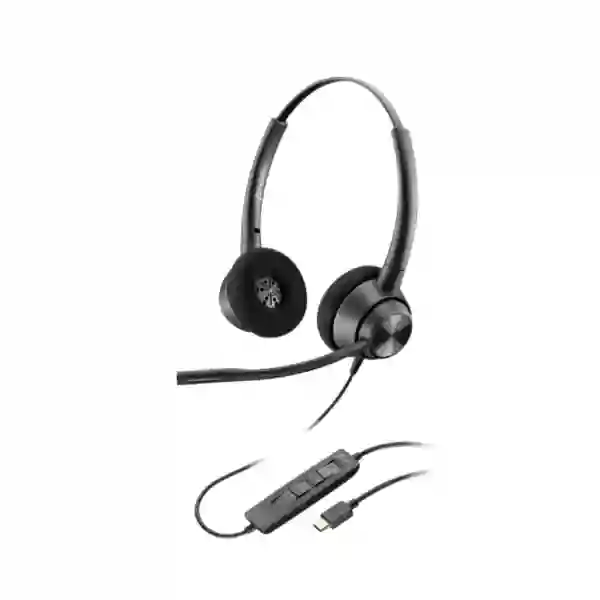
Business calling | Wired USB-A | Stereo
HP Poly EncorePro 320 Stereo USB-A Headset
For contact-centre agents, service desks and office teams who need clear two-way conversations through a compatible computer. Explore the fit, connection and operational considerations before requesting a quotation in Tanzania.
At a glance: who should consider this headset?
The HP Poly EncorePro 320 Stereo USB-A Headset is a practical candidate for fixed computer-based calling stations. It brings together a two-ear wearing style, flexible noise-cancelling microphone and the operational simplicity of a wired connection. It is especially relevant when employees spend substantial time handling spoken conversations and do not need wireless movement during a call. Before buying, check the exact connector, user comfort and behaviour in the business’s calling software.
Its main trade-offs are straightforward: the cable keeps the user near the workstation, both ears are covered rather than one, and application features depend on the connected computer and software. The headset is not a complete telephone system, not a USB-C model and not an active noise-cancelling headphone. A well-targeted pilot is the best way to confirm fit for an individual desk or a larger team.
Core features and practical benefits
Stereo on-ear listening
Two earpieces support concentration on computer-based conversations; choose mono for roles requiring more awareness of nearby activity.
Flexible noise-cancelling microphone
A positionable boom is designed for speech clarity while reducing interfering sound entering the mic.
Wired USB-A connection
Connects to a suitable computer without wireless pairing or charging; check ports before deployment.
SoundGuard protection
HP Poly acoustic protection technology is part of the EncorePro 300 Series design.
Call and volume controls
USB-A variant supports answer/end, mute and volume adjustment, subject to application integration.
Replaceable ear cushions
A maintenance-oriented family feature; confirm spares and their availability when ordering.
Specifications and verification notes
| Brand and series | HP Poly, EncorePro 300 Series |
|---|---|
| Model / wearing style | EncorePro 320, stereo / two-ear, on-ear |
| Connection | Wired USB Type-A, intended for compatible PCs |
| Microphone | Flexible noise-cancelling boom |
| Acoustic protection | SoundGuard (as described for the family) |
| Controls | Answer/end, mute, volume + / – on USB-A configuration; integration varies |
| Operating-system families | Windows 10, Windows 11, macOS per HP support information |
| Manufacturer reference | 767G0AA for HP’s USB-A TAA-labelled variant; not a FourTeck SKU |
| Usage | Computer-based business calls, support desks and contact-centre workflows |
| Exact price, stock and local terms | Confirm with FourTeck Tanzania before placing an order |
Technical references identify a model family and manufacturer variant; confirm the exact configuration in the supplier’s offer. No Tanzania-specific price, stock, delivery, certification or seller warranty is stated here.
Common workplace scenarios
Customer support desks
Agent follows a customer record while speaking; evaluate two-way speech clarity and cable routing.
Internal IT help desks
Technician talks through software problems while using a computer; test the chosen support and calling applications.
Sales and reservations teams
Employee handles frequent customer enquiries; check call controls and headset comfort over the expected shift.
Training and remote coaching
Staff plays voice recordings and joins conversations; remember recording tools are supplied by external software.
Shared service workstations
Multiple agents use one desk; establish cleaning, storage and personal-equipment rules before rollout.
Built for work that depends on clear conversations
A support representative may need to hear a name correctly, a sales adviser may have to confirm an order detail, and a service desk may need to guide someone through a technical problem. In each case the headset becomes part of the working process, not simply an accessory for playing sound. The Poly EncorePro 320 Stereo USB-A Headset is designed around spoken communication, with two on-ear earpieces and a flexible microphone boom. For organisations evaluating equipment for a computer-based calling environment, it provides a clear starting point: a wired connection, speech-oriented design and features intended for repeated business conversations.
This product is most relevant when the user works at a Windows or macOS computer equipped with a suitable USB-A connection. It is not a Bluetooth headset and should not be purchased on the assumption that it will connect directly to every desk telephone or mobile phone. A simple pre-purchase check of the workstation, calling application and daily working routine helps ensure the selected headset actually matches the role.
Why a wired USB-A connection can be useful
A wired headset can suit desks where consistent setup and straightforward equipment management matter more than walking freely around the workplace. The USB-A model is made for a computer connection using that connector. Staff do not need to manage a wireless battery, track a charging cradle or plan a Bluetooth pairing routine before starting a shift. A cable does, however, define the user’s working range; a team that regularly leaves the desk while speaking may prefer a different category of headset.
Check the physical port rather than relying only on the computer’s age or brand. Many desktops and some laptops offer a full-size USB-A socket, whereas thinner devices may provide only USB-C ports. An adapter can sometimes bridge the physical difference, but the organisation should test its specific adapter, docking station and computer before buying at scale. Connecting through an unfamiliar hub can introduce a separate point of failure that should be evaluated independently of the headset.
What the stereo design changes
The EncorePro 320 is the two-ear, or binaural, model in its family. Both ears receive audio, which can help a user concentrate on the conversation rather than alternating attention between the caller and the immediate surroundings. That can be attractive on a shared office floor where neighbouring staff are also handling calls. The on-ear cups offer a physical boundary from nearby activity, but they are not a promise of silence and should not be described as active noise-cancelling headphones.
Stereo is a choice about working style as much as specification. Some employees prefer both ears covered during focused calls, while others need to hear a colleague or public announcement and may prefer a single-ear model. For reception desks, supervisory roles or environments where situational awareness is essential, compare the monoaural EncorePro 310 family rather than assuming the 320 fits everybody. A short user trial can resolve comfort and awareness questions more effectively than a specification sheet alone.
A flexible boom microphone for the person on the other end
In customer conversations the receiving party cares about intelligibility. The EncorePro 300 Series uses a flexible, noise-cancelling microphone boom intended to emphasise speech and reduce competing sound entering the microphone. Proper positioning matters: a microphone that sits too far from the mouth or directly in the path of breathing may produce inconsistent results even when the hardware is appropriate. Give new users a brief demonstration of how to position the boom, speak naturally and check microphone levels in the application.
Noise cancellation on the microphone is not the same as removing every noise that the wearer hears. Office acoustics, keyboard use, air conditioning, background speech and the computer’s software processing all affect the final result. For demanding floors, test real calls while other staff are working instead of judging the headset only in a quiet meeting room. This also helps determine whether room treatment, better workstation spacing or application settings are needed alongside the headset.
Speech-first listening rather than entertainment-first tuning
A headset designed for calls should help the wearer distinguish words, not merely produce an impressive music demonstration. HP describes voice-optimised frequency response as a design priority for the EncorePro 300 Series. That emphasis is valuable for help-desk scripts, name confirmation, customer instructions and collaborative troubleshooting, where a missed syllable can create extra work. Stereo audio can also play training clips, recorded examples and general computer sound when the connected software allows it.
A business calling headset is not automatically the right device for audio mastering, gaming or professional music monitoring. Nor does the presence of stereo earpieces guarantee that a particular voice platform will deliver high-fidelity audio; codecs, network conditions and application configuration also play a part. Buyers should define the dominant task before comparing products. If nearly every hour is spent on speech, voice handling, fit and controls deserve more weight than a music specification taken in isolation.
SoundGuard and practical hearing considerations
HP identifies SoundGuard acoustic protection as part of the EncorePro 300 Series feature set. This technology is intended to limit sudden high sound levels and help manage acoustic shock exposure. It is one part of a responsible approach to audio at work, not a substitute for an organisation’s hearing-safety policy, safe listening habits or appropriate volume settings. Employees should still use comfortable listening levels and report unusual distortion, sudden loud sounds or physical discomfort to their supervisor or IT team.
A headset’s protective features must be considered together with the audio source and work environment. Maximum application volume, operating-system settings, training material and sudden changes between incoming calls can all influence what the wearer experiences. For a controlled call centre rollout, establish sensible default volumes, teach users how to adjust them and confirm any specialised safety or occupational requirements with the appropriate professionals. Avoid interpreting a series-level protection claim as a guarantee of workplace compliance without assessment.
Comfort through a full schedule of calls
Contact-centre and office users often keep their headset on between conversations. The EncorePro 300 Series is promoted by HP for a lightweight design, soft replaceable ear cushions and earcups that can fold flat. These characteristics can help make daily wear more practical, particularly when staff move between calls, brief discussions and administrative tasks. The on-ear wearing style should still be tried by the people who will use it because head shape, glasses, personal preference and shift length vary.
Good fit means more than adjusting the headband once. Check whether the earpieces sit evenly, the microphone stays in position and the cable is routed without pulling on the headset. Invite feedback from workers who wear glasses or head coverings. A small fit trial is especially worthwhile before a large purchase, since a headset that looks identical on the specification page can feel different after several hours. Encourage regular short breaks according to local workplace practice and staff needs.
Accessible everyday call controls
The USB-A configuration is listed by HP with call answer or end, microphone mute and volume controls. These functions can reduce the need to search for controls on screen during a busy conversation. They may also support a more consistent desk routine: confirm the line is active, adjust listening volume to a comfortable level, mute when consulting a colleague and return to the caller when ready. Users should learn what the headset controls do in their actual calling application rather than assuming every button has identical behaviour everywhere.
Application integration is a separate compatibility question. A button may manage the headset’s local audio function while a collaboration platform handles its own call state, permissions or device menu. Teams evaluating a cloud PBX, browser dialler, video meeting application or specialist contact-centre software should perform an incoming call, outbound call, mute and hang-up test. Where a platform or virtual desktop has special requirements, verify those requirements directly before standardising the fleet.
USB-A is not USB-C or Quick Disconnect
The EncorePro 320 family includes connection variants that serve different environments. The named model here is the stereo USB-A version, which connects to a suitable computer port. A USB-C version is a separate selection for machines using that connector. A Quick Disconnect version is intended for workflows involving a compatible QD connection and may require additional equipment depending on the endpoint. These should not be treated as interchangeable merely because the family name, earcups or microphone appearance looks similar.
During procurement, describe the connection in the product requirement, not just in an email subject. Ask the supplier to confirm the physical USB-A connector, the stereo wearing style and the correct manufacturer’s reference for the offered unit. A team replacing legacy telephone headsets should also confirm whether its existing phones or adapters are USB headset compatible. Choosing the wrong connector can create deployment delays even when every other feature suits the user.
Computer and operating-system checks
HP’s product support material lists Windows 10, Windows 11 and macOS among the compatible operating-system families for the EncorePro 320 USB-A. This offers a useful basis for shortlisting, but an operating-system name alone does not establish end-to-end compatibility with every enterprise application, device policy or custom image. A business using managed computers should confirm how the headset appears as an audio device and whether any endpoint restrictions prevent its use.
In a trial, connect the headset, select it for both speaker and microphone in the operating system, and then choose the same device inside the calling application. Record results for your standard Windows build, Mac configuration or managed laptop image. If the organisation relies on a thin client, shared session or virtual desktop, also test device redirection and call control behaviour. These straightforward checks can avoid the frustrating situation where the sound works in one application but not in another.
Working with softphones and meeting applications
Many office teams use a mixture of a calling platform, browser meetings and internal collaboration software. A headset that can carry computer audio is a useful foundation, but microphones, call-answer integration, mute synchronisation and software-side device switching should all be checked with the exact application and version. HP discusses broad collaboration-platform compatibility for the EncorePro 300 Series; that does not eliminate the need to confirm feature support for the specific USB-A model and your environment.
Create a simple test script: place an outgoing call, receive one, change volume, engage mute, leave and rejoin a meeting, and switch between two applications. Listen from the caller’s side as well as the user’s side. For organisations that use meeting rooms, browser permissions or a contact-centre agent desktop, note where application-specific settings live. This approach turns vague expectations about compatibility into a practical acceptance test that help-desk staff can repeat after equipment changes.
What the headset does not fix on its own
A clearer microphone is helpful, but it cannot repair a weak internet connection, overloaded computer, badly configured softphone or noisy work environment by itself. Users sometimes report robotic speech, delay or dropped calls when the actual issue is upstream. In Tanzania, as in any market, an organisation planning IP-based calls should evaluate its chosen connectivity, office network, endpoint performance and continuity arrangements separately from the headset purchase.
Consider distinguishing three layers when troubleshooting: the physical headset and USB port; the operating system and calling software; and the telephony or network service. Try a local microphone recording to establish whether the sound is clean before involving the live call path. If local recording is good but a remote caller still hears poor audio, investigate the wider call setup. This method helps teams spend on the correct remedy instead of repeatedly replacing functional headsets.
Individual staff desks and shared workstations
For an assigned desk, a wired headset can become part of a predictable daily setup. The employee keeps the same device, learns its controls and is less likely to misplace it when moving between tasks. A shared workstation has different needs: staff may rotate through the same computer, and headset issue, storage and hygiene become important. Decide whether headsets will be assigned to individuals or stored at each position before placing the order.
If workers share audio equipment, establish a cleaning and handover routine consistent with the manufacturer’s care guidance and your workplace policy. Replaceable ear cushions are useful from a maintenance perspective, but a replaceable part should not be assumed to be immediately available locally or included in every package. Record the exact replacement model and confirm supply options in advance. This consideration can be as important as the purchase price when many employees use the same equipment.
Contact-centre deployment for multiple agents
A multi-agent contact centre should evaluate the headset as one component of its operating system for customer conversations. Supervisors need predictable voice quality, agents need comfort and simple controls, and IT teams need units that are easy to identify and replace. A wired USB-A stereo model may suit fixed computer-based stations where users spend long periods speaking and monitoring caller information on screen. The selection should reflect the actual workflow, including simultaneous application use and shift patterns.
Before approving a larger order, run a small sample at representative seats. Include at least one workstation close to background conversation, one typical agent station and one machine running the normal communications software. Ask staff to rate incoming clarity, microphone clarity, comfort and cable convenience separately. Document any port or software issues. A short pilot produces a stronger buying decision than assuming that every headset with the same connector will perform identically in the organisation’s environment.
Customer service and front-office scenarios
The headset is also relevant outside large dedicated call centres. A reservations assistant may answer a stream of enquiries while updating a customer record; a school or clinic administration team may take calls between desk tasks; and an internal IT help desk may talk users through a login or connection problem. These roles benefit from easy access to computer audio and a microphone positioned for speech, provided their endpoint and workflow suit a wired stereo headset.
The question is whether the user needs both ears covered and can remain near the workstation throughout the call. A reception employee who frequently needs to hear walk-in visitors may prefer a one-ear design, while a support agent focused on detailed conversations may favour stereo. Buyer requirements should distinguish such roles rather than distributing one style solely because the organisation wants a single model. A headset standard is most effective when it remains practical for the people using it.
Remote and hybrid staff considerations
Staff working from different locations often use a wider mix of laptops, home workspaces and calling applications. The EncorePro 320 USB-A can suit a remote employee whose computer has the correct connection and whose main need is dependable desk-based speech. Because it is wired, there is no separate charging schedule to maintain. However, home working conditions differ, and the noise-cancelling microphone should be tested against common household sounds rather than assumed to eliminate them.
For a hybrid programme, publish a compact setup guide with photographs of the USB-A port, instructions for selecting the headset as the input and output device, and an approved test call procedure. Note whether staff are allowed to use adapters or docks and who supports them. When staff alternate between multiple company devices, verify the connection at each location. A little operational documentation reduces avoidable setup time during the first call of the day.
Training, coaching and recorded conversations
Supervisors may use sample calls, recorded demonstrations and practice conversations to train colleagues. Stereo listening can make these activities comfortable for many people, especially when the same device is used for live customer calls and training playback. The headset does not itself provide call recording, quality monitoring, transcription, coaching analytics or a contact-centre dashboard; such capabilities depend on external software and policies.
When integrating headset use into training, teach the mechanics of a good call: check your microphone, use mute deliberately, avoid touching the boom during conversation, and listen at a comfortable volume. Make a short demonstration recording in the intended application and review it with the new user. Explain any applicable organisational recording-consent and privacy requirements separately. Clear expectations about what the headset can and cannot do help prevent unnecessary disappointment after deployment.
Good audio starts with the workstation
Before a rollout, inspect the desk itself. An accessible USB-A port should not force the cable to stretch across a walkway or snag when a chair moves. Position screens and peripherals so the user can reach the keyboard and call controls naturally. If the headset is connected through a dock, make sure the dock is part of the acceptance test rather than treating it as an invisible accessory. A stable headset setup is the result of several ordinary physical details working together.
For shared benches, avoid arranging cables where staff may pull a neighbour’s device by mistake. Label equipment if the organisation uses assigned assets and document a simple procedure for unplugging and reconnecting. Although a headset is a relatively small purchase compared with a computer or telephone platform, poor cable management can create repeated support calls. Checking desk layout before bulk delivery is often easier than changing every station after installation.
Microphone positioning and a quick sound check
A well-designed microphone still benefits from consistent setup. Place the flexible boom near the mouth, slightly away from direct breath, and run a short test recording. Speak at the same volume used with customers. Listen for clipping, muffled speech, rattling from the boom, and environmental sounds such as a fan beside the workstation. If a caller says the agent sounds distant, investigate the microphone selection in software before assuming that the physical headset has failed.
Users should also know how to recognise the muted state, as muting in an application and on the headset can occasionally produce confusing results if controls do not synchronise. A standard check at the beginning of a shift can include selecting the correct audio devices, confirming the microphone is active and adjusting listening volume. These steps are easy to teach and can make the experience more consistent across a team without claiming that the headset automatically solves every audio issue.
Managing the product across a business fleet
A purchasing team needs information beyond the headline features. For a fleet of headsets, record the manufacturer and model, connector type, wearing style, date assigned, workstation and any relevant internal asset identifier. The manufacturer reference for the USB-A stereo TAA-labelled variant is 767G0AA in HP material; this is a manufacturer part reference, not the FourTeck Tanzania listing SKU. The exact delivered configuration and procurement paperwork should be matched before assets are registered.
When faults are reported, log whether the problem follows the headset or stays with a particular computer, port or application. Store a known-working test device where practical. Track physical wear such as damaged cushions, strained cords and microphone movement so replacements are planned rather than improvised. These simple fleet procedures allow an organisation to evaluate lifetime cost and user satisfaction with evidence instead of judging the purchase only by its initial invoice.
Cleaning, handling and storage
A headset used for many calls every day needs sensible care. Handle the cable by its connector rather than pulling it from the middle, avoid trapping it under chair wheels and store the device where the boom and earcups will not be crushed. Follow HP’s instructions when cleaning surfaces or cushions, and do not assume that a strong cleaning chemical is suitable just because the exterior is plastic. The correct routine should respect both hygiene requirements and material durability.
The EncorePro 300 Series is described with replaceable ear cushions, which can assist maintenance planning. Whether the appropriate spares are in stock, included with an order or obtainable through a particular local channel must be confirmed separately. Where a headset is allocated to an individual, label it discreetly and provide a safe storage position. Where it is shared, agree on handover responsibilities. Practical care can help preserve the utility of the product without making an unsupported promise about service life.
Compare alternatives before committing
The right headset depends on the endpoint and the user’s job. Compare the EncorePro 320 USB-A with a USB-C version when laptops have no USB-A ports; with the monoaural EncorePro 310 when the user must hear the room; and with a Quick Disconnect variant when a legacy telephony setup specifically uses that interface. For a role involving movement away from the desk, a compatible wireless headset may merit consideration even if a wired model is otherwise attractive.
A fair comparison should include microphone performance in the actual room, wearing comfort, useful call controls, software compatibility, physical connectors, cable routing and maintenance arrangements. Avoid comparing one model’s headline specification against another model’s retail photographs. If platform certification or specialised workplace requirements matter, request the exact variant’s applicable documentation and test the named application. Choosing by role and connection usually produces a better outcome than relying on broad claims such as best headset for every office.
Why the lowest unit price is not the whole decision
For a small purchase, the initial price may dominate. For dozens of seats, setup effort, replacement processes, comfort feedback and support tickets can have a similar effect on total cost. A wired headset removes some wireless management tasks but may introduce cable wear in high-movement roles. Replaceable cushions can be useful, yet their local supply and replacement cost need to be checked instead of assumed. A realistic procurement comparison accounts for these issues before choosing a model.
Ask vendors to quote the exact manufacturer variant and the quantity required, with any locally applicable commercial terms clearly stated. Confirm what arrives in the box and what must be purchased separately, and distinguish manufacturer documentation from the seller’s own warranty or support obligations. Do not infer availability, taxes, import charges, shipping cost or delivery speed from an overseas listing. A transparent, itemised quotation makes competing offers easier to compare on genuinely equivalent terms.
Planning a pilot before a wider Tanzania order
An organisation in Tanzania evaluating contact-centre equipment can use a simple pilot to reduce procurement risk. Choose representative people, workstations and calling applications, then decide what success looks like before the test begins. Examples include clear two-way speech, an acceptable fit after extended use, functional call controls, no unexpected connection issues and a cable layout that works at the desk. These are practical test criteria, not promised performance statistics for the headset.
Give staff a short questionnaire and separate observations from preferences. For example, a headset may pass every software test yet feel uncomfortable to an employee who wears glasses, or it may be comfortable while lacking a required control integration. Record those differences. Ask IT to confirm the chosen endpoint configuration and procurement to verify the exact ordered part. This shared review avoids a situation where purchasing approves a model based on price before its real users have assessed it.
A practical ordering checklist for procurement
Before requesting a quotation, identify the number of users, whether the headset is individually assigned or shared, and whether workstations have USB-A sockets. Confirm the need for two-ear listening, the primary applications and any special requirements arising from virtual desktops, call recording software or existing telephone equipment. Decide whether the order needs one uniform model or a small mix of styles for different roles. These details give the supplier a useful brief and make the quotation more meaningful.
Ask for confirmation that the proposed item is the Poly EncorePro 320 stereo USB-A variant and request the manufacturer’s matching reference and available product documentation. Then review current availability, commercial terms, actual local warranty arrangements and any accessory requirements through the sales channel. The objective is a purchase that arrives in the right configuration and works with the computers already in use, rather than an order placed solely on the strength of a product title.
The most important questions to resolve before purchase
If the desktop has USB-A, the employee spends much of the day on computer calls, and both ears covered is acceptable, this model is a reasonable candidate for evaluation. If the computer has only USB-C, the role requires direct desk-phone connectivity or the worker needs wireless mobility, confirm an alternative interface or model first. If the business depends on particular answer, mute or platform-certification behaviour, test it instead of treating broad family compatibility as proof of every function.
Also ask who will support the device when a user changes computer, moves desk or joins a new calling platform. A headset purchase is easiest to maintain when IT, operations and procurement share a basic compatibility checklist. FourTeck Tanzania can be asked for information on the offered configuration and a quotation; local stock, pricing, delivery, service terms and warranty coverage should be confirmed explicitly before any buying commitment.
Frequently asked questions
Is the EncorePro 320 a stereo headset?
Yes. The Poly EncorePro 320 is the two-ear, on-ear member of its family. Stereo here means audio is heard through earpieces on both ears. That can suit focused calls in a shared office, although some employees prefer a single-ear model so they can hear colleagues or visitors. Choose based on the user’s role and comfort preferences.
Does this model use USB-A or USB-C?
This listing concerns the USB-A configuration. HP also identifies a separate EncorePro 320 USB-C variant, so the connector should be specified explicitly in an order. Check whether the intended workstation offers a full-size USB-A port. If an adapter or dock is required, test it with the computer and calling application before ordering multiple units.
Is it a wireless or Bluetooth headset?
No. This is a wired computer headset. It does not rely on a Bluetooth pairing process or wireless headset battery, but the cable limits how far the wearer can move during a call. Teams whose agents need to walk around while speaking should assess a different, suitably compatible wireless solution rather than assume this device provides that flexibility.
Will it work with Microsoft Teams, Zoom or my softphone?
HP describes the EncorePro 300 Series as supporting major collaboration environments, but exact call-control behaviour can vary by application, version, operating system and device configuration. A computer may recognise the headset for audio even where a particular control is not integrated. Test sound input, sound output, incoming calls, mute and hang-up in the exact software your staff use.
What does the noise-cancelling microphone actually do?
The flexible microphone boom is designed to reduce competing background sound entering the microphone so the other person can hear speech more clearly. It does not make the room silent or guarantee that every neighbouring voice disappears. Correct microphone positioning, workstation acoustics and application settings remain important. Test a real call from the actual office area for a realistic assessment.
Does it have active noise cancellation for the wearer?
Do not confuse the microphone’s noise-cancelling function with active noise cancellation in the earcups. HP’s EncorePro 320 comparison identifies the series without headphone ANC. The stereo earpieces can offer some passive physical separation from the room, but they cannot be expected to suppress environmental noise in the way a dedicated electronic ANC headset is intended to do.
What is SoundGuard?
SoundGuard is HP Poly’s acoustic protection technology, identified in manufacturer information for the EncorePro 300 Series. It is intended to limit sudden excessive audio levels. It should be used alongside sensible listening volume, user guidance and any organisation-specific hearing-safety measures. Buyers with formal occupational requirements should assess the full workplace configuration and obtain any required documentation rather than relying on a short marketing description.
Can staff adjust volume and mute calls?
HP lists volume adjustment, microphone mute and call answer/end controls for the USB-A variant. How the answer/end function interacts with a particular browser dialler or meeting platform may depend on software integration. During the pilot, show agents where the controls are and verify that the on-screen and headset mute states behave as expected in the real calling workflow.
Is this a direct replacement for a desk-phone headset?
Not necessarily. USB-A and Quick Disconnect are different connection variants. Many telephone headsets use a specialised QD cable or phone-specific adapter, while this model is intended for a suitable computer connection. Before replacing a legacy headset, record the desk phone model, adapter and required connector. Ask for a compatibility check instead of assuming a USB-A plug can be attached directly.
Can the ear cushions be replaced?
HP describes soft, replaceable cushions for the EncorePro 300 Series. That is useful for hygiene and long-term care, but the correct replacement part and its availability need separate confirmation. Do not assume spare cushions are automatically included in the box or available for immediate local delivery. Include the spare-parts plan in a larger contact-centre purchasing decision.
What is the manufacturer’s part number?
HP’s published product comparison identifies 767G0AA as a manufacturer reference for the EncorePro 320 USB-A TAA-labelled variant, with an older Poly reference of 214570-01. These are manufacturer identifiers, not proof of the SKU assigned to a particular FourTeck Tanzania listing. The exact item offered should be matched against the supplier’s quotation and packaging before an order is approved.
Will it work on Windows and macOS?
HP support documentation lists Windows 10, Windows 11 and macOS for the USB-A model. That provides a compatibility starting point, but organisations should still confirm USB access, application audio selection and endpoint-management rules. If the headset is used through a virtual desktop, remote session or docking station, test that complete configuration rather than relying on the operating-system name alone.
Is it suitable for a Tanzanian contact centre?
It can be considered for a Tanzanian contact centre using compatible computer-based calling stations, particularly where staff value two-ear listening and a wired connection. Suitability depends on the site’s computers, application environment, workplace noise and user comfort. The headset does not itself provide internet, SIP service or call-centre software. Evaluate those systems separately and confirm commercial availability locally.
How can a buyer request a quote?
Prepare the desired quantity, intended device ports, calling platform and any requirements for comfort, shared use or additional accessories. Ask FourTeck Tanzania to confirm the exact EncorePro 320 stereo USB-A configuration, current stock position, pricing and applicable seller terms. Do not rely on foreign retail prices or an automatically converted currency value when budgeting for a Tanzania purchase.
Request an EncorePro 320 USB-A quotation
Tell FourTeck Tanzania the quantity you need, your computer connection type and the calling software your organisation uses. Ask for confirmation of the exact stereo USB-A model, current availability, the offer’s commercial conditions and suitable procurement documentation. No unverified delivery promise or local price is implied.
Next step: Contact FourTeck Tanzania to verify the configuration and request a quote.




Reviews
There are no reviews yet.