
Clearer computer calls while staying aware of your workspace
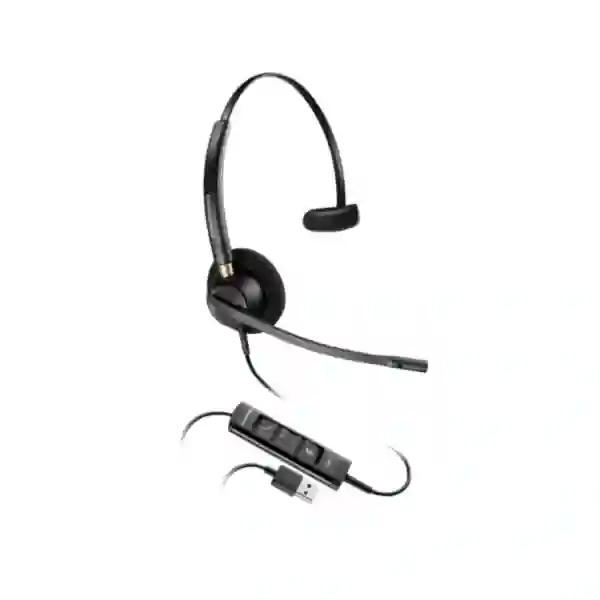
The HP Poly EncorePro 515 Mono USB-A Headset is a single-ear wired business headset for staff who speak with customers through a computer. It combines an adjustable noise-cancelling boom microphone, inline call controls and a lightweight on-ear fit. The uncovered ear supports awareness of nearby colleagues or visitors. Before buying for a team in Tanzania, confirm the exact model variant, computer connectors, softphone functions, included accessories and local quotation terms.
At a glance: practical fit
Verified product specification snapshot
The figures below are drawn from HP’s published standard EncorePro 515 specification. They should be checked against the exact variant and bundle offered in the quotation. In particular, USB-C accessory arrangements and collaboration-platform integration can vary by configuration.
A headset for voice-heavy work, not a general-purpose entertainment accessory
For teams that handle many conversations every day, a dependable headset should do more than produce sound. It should give the wearer a consistent way to hear the caller, position the microphone, manage basic call controls and return to the next conversation without repeatedly adjusting the desk setup. The HP Poly EncorePro 515 Mono USB-A Headset is designed around that routine. It connects to a compatible computer through a wired USB arrangement and uses a single on-ear speaker, leaving the other ear uncovered. That matters to receptionists, service advisers and coordinators who may need to hear a colleague or respond to someone approaching the desk while a call is active.
This is a focused communications product. It is not a Bluetooth headset, does not rely on charging and is not intended to provide a sealed, two-ear listening environment. The boom microphone is specified as noise cancelling for transmitted voice, but that does not mean the user receives active noise cancellation. A buyer evaluating headsets for a lively workspace should distinguish microphone performance for the caller from acoustic isolation for the wearer. Start by deciding whether staff need situational awareness or concentration through both ears; that single choice often determines whether a mono headset is the right investment.
How to decide whether the single-ear design fits your team
Monaural means that sound is played into one ear. In a customer service environment, this can be useful when an employee needs to hear a supervisor’s guidance or respond to short face-to-face questions between calls. Staff can keep one ear on the conversation while remaining aware of ordinary office activity. Because the opposite ear is open, this design is less suitable when employees need strong separation from nearby speech or when the room is consistently distracting. A dual-ear headset may be preferable in a loud shared floor, especially when a staff member spends nearly every minute concentrating on remote conversations.
The right choice also depends on the nature of the calls. Brief appointment confirmations, order enquiries and front-desk coordination may benefit from the easy interaction offered by one-ear listening. Detailed troubleshooting, sensitive conversations and continuous transcription can require a quieter listening environment. No headset design compensates for an uncontrolled room, unsuitable desk location or poor call audio from the network. Before standardising on a mono model, let a small group try the expected duties and assess whether they can clearly hear callers without turning the volume up unnecessarily.
Noise-cancelling boom microphone: what the caller can expect
HP specifies a noise-cancelling microphone and a flexible boom with positioning guides. These are relevant to people who speak in shared offices because microphone placement is one of the most important controllable factors in voice quality. A boom positioned correctly near the mouth can favour speech over sounds coming from farther away. That can make conversations easier to follow, although the result will vary with background noise, speaker volume, room acoustics, the computer and the conferencing application. The design is intended to improve the voice sent to the person on the other end, not to remove all conversations or keyboard sounds from the recording.
For consistent results, train users to place the microphone at the recommended position rather than far out beside the cheek or directly in front of breathing. Make a short test recording with the exact softphone used at work. Repeat the test near normal office activity, because an empty-room trial can hide weaknesses that appear during a full shift. Listen for intelligibility, mouth noise, clipping and changes when the user turns their head. If the caller reports muffled speech, inspect the boom angle and the computer’s selected microphone before treating the headset as defective.
Voice-oriented listening rather than bass-heavy playback
A contact-centre headset is selected primarily for intelligible speech. HP positions the EncorePro 515 as communications equipment and publishes audio specifications including a speaker bandwidth of 20 Hz to 20 kHz and microphone bandwidth of 35 Hz to 21 kHz for the referenced standard model. These are engineering measurements, not a promise that every online call delivers that entire range. Actual call quality is influenced by the conferencing service, codec, internet connection, microphone settings, room conditions and the source audio. In daily use, the essential question is whether a staff member can understand names, numbers and instructions without repeated requests for clarification.
When evaluating audio, use examples that resemble real work. Test unfamiliar names, spelled email addresses, reference numbers and softer voices, not just a casual conversation with a colleague. Check both incoming and outgoing sound and compare calls made through the browser and desktop client if employees use both. A headset can be functioning correctly while one application has the wrong input selected. Also remember that a single earcup will not produce the immersive listening effect of stereo headphones; if audio production, music monitoring or dual-channel evaluation is a core task, choose equipment designed for that purpose.
Comfort across a shift: weight, position and practical habits
HP lists the standard model at approximately 52 g and describes it as an on-ear headset with a cushioned ear contact and adjustable microphone boom. Low weight can help reduce the feeling of carrying a device over long periods, but comfort remains personal. Head shape, ear sensitivity, glasses, hairstyle, work temperature and how firmly the headset sits all affect the experience. The 290-degree boom rotation listed by HP adds flexibility when arranging the microphone position, but it should not be used as a reason to twist components beyond their intended travel. A fit that feels comfortable for a five-minute demonstration may behave differently after a full working session.
For larger deployments, ask different users to wear the headset during an ordinary block of calls. Observe whether they frequently reposition it, whether the ear cushion sits comfortably and whether the boom stays where they place it. Confirm whether replacement ear cushions or service parts are available for the exact supplied variant; their availability should not be assumed from the product name alone. Encourage reasonable breaks and appropriate listening volume. No published weight figure can guarantee a headset will be comfortable for every employee, so fit testing is a sensible part of procurement rather than an afterthought.
Inline call controls and realistic application expectations
The standard specifications list mute, volume up and down, and call answer/end controls. Putting these functions within reach can reduce the need to switch windows while working with a customer, especially when an agent regularly takes notes or searches records during a conversation. Mute is useful when speaking briefly to a colleague without transmitting that exchange to the caller. Volume control allows quick adjustment within the normal safe operating range. The important buying consideration is that a hardware button and a software feature are not always the same thing: the calling application must support the corresponding headset integration for every advertised action to operate as expected.
Before buying many units, test the actual business calling application and its version. Verify whether answer/end works with the chosen softphone, whether the mute state is reflected correctly in the application and whether the behaviour changes between a local desktop app and a web client. Some organisations restrict driver or desktop utility installation; these policies may affect the available experience. If a platform is managed by a telephony provider or IT partner, ask them which headset integrations they support. Treat successful audio input and output as one compatibility check and integrated button handling as a separate check.
USB-A connection and what to check before connecting
USB-A is the familiar rectangular computer connector, and it is central to this product’s name. HP also describes USB Type-A and USB Type-C connection flexibility for versions of the EncorePro 515 through an integrated connector arrangement or adapter. That wording does not prove that every retail pack contains a specific adapter. A buyer should inspect the exact supplied configuration, not infer box contents from a generic model description. For a laptop that exposes only USB-C ports, confirm how the offered unit will connect, whether an adapter is included, and whether company policy permits external adapters or docks.
A wired USB connection avoids batteries and radio pairing, but it still needs an available compatible computer port and the correct audio-device settings. On first use, plug the headset into an approved port, select it as the microphone and playback device, then make a test call. If a desk uses a docking station or USB hub, include that arrangement in the trial because switching between docked and undocked operation can alter device selection. Do not assume a USB headset can be connected directly to an analogue desk phone, an RJ9 socket or a headset quick-disconnect connection without an explicitly supported solution.
Operating systems, desktop policies and softphone compatibility
HP lists Windows 10, Windows 11 and macOS among compatible operating systems for the standard EncorePro 515 specification. That is useful for organisations with mixed computer fleets, but operating-system compatibility is not proof of complete functionality inside every voice application. IT teams should check the exact application, deployment version, client type, user permissions and any audio settings centrally enforced by policy. A browser-based calling interface may require microphone permission. A virtual desktop may also need correctly configured USB or audio redirection, which is a separate systems question from the physical headset itself.
Create a repeatable acceptance test rather than relying on a broad compatibility label. Include microphone pickup, speaker output, volume, mute, answering and ending calls, switching between meetings and phone calls, and reconnecting after sleep or docking changes. Test with the staff profiles that will actually use the equipment, including locked-down company devices. Where a compatibility claim is essential to procurement, request the relevant software vendor’s support documentation or confirmation from your IT team. That approach prevents a reliable USB headset being purchased for a workflow in which important application controls are unavailable.
Standard EncorePro 515 versus the Microsoft Teams-certified edition
The HP Poly EncorePro 515 family contains more than one variant. HP’s published product information distinguishes the standard mono USB-A model from a separately designated Microsoft Teams-certified mono version. This matters because a listing that says only “EncorePro 515” or “USB-A” is not enough to establish which edition is being supplied. The user should not assume that the standard model includes dedicated Teams behaviour or the exact certification associated with the Teams edition. Likewise, a product being capable of passing audio to a Teams meeting is not the same as every Microsoft Teams control or certification feature being validated for that device.
For organisations standardising on Teams, ask for the full manufacturer product identifier on the quotation, packaging and proposed order. Confirm whether the exact model is the Teams-certified variant, what call-control functions work in the deployed Teams client and what software policies are required. For organisations using another softphone, the certification question may be less important than tested microphone, speaker and button integration. This buying distinction also helps avoid paying for a specification the team does not need or inadvertently receiving a different edition than the procurement department approved.
SoundGuard Digital and responsible listening practices
HP lists SoundGuard Digital as the acoustic protection technology for the standard EncorePro 515. It is intended to provide additional protection against certain sound exposure conditions while maintaining a natural speech experience. An important manufacturer qualification is that Poly Lens Desktop software is required to enable SoundGuard Digital features. Consequently, a buyer should not treat a feature listed on a technical sheet as evidence that the complete software-supported protection configuration will be active in a locked-down deployment. IT should evaluate the necessary software, policies and available controls before rollout.
Hearing protection is also a workplace process. Check whether users know how to set listening volume appropriately, whether recorded calls or alerts are delivered at unexpected levels and whether the organisation’s policies address extended headset use. SoundGuard Digital does not make any listening level safe under every circumstance, nor does it replace applicable occupational health guidance. IT and operational managers should coordinate on safe volume practices, incident reporting and users who experience discomfort. The relevant question is not merely whether the headset carries a named protection feature but how that feature and sensible behaviour work together in the actual operating environment.
Roles where the EncorePro 515 can be a sensible fit
Consider a front-desk employee who must take computer-based customer calls and occasionally acknowledge a visitor. The single-ear configuration helps preserve awareness of someone standing nearby. A help-desk agent may similarly need to follow a call while asking a nearby colleague a short question. An appointment coordinator may spend the day confirming details while consulting an internal schedule. These are examples of workflows in which hands-free, one-ear audio and an adjustable boom can be useful. They are not claims that the headset has been tested or approved by a particular Tanzanian organisation or sector.
For a fully remote service role, the same wired design may offer a predictable desk setup without charging. The limiting factor is often the work environment rather than the headset: a noisy household, a poor internet link or a sensitive conversation may call for different working arrangements. In an open-plan contact centre, compare the mono experience with a stereo model using representative office noise. In a reception area, also consider privacy; leaving one ear uncovered improves awareness but does not prevent nearby people from overhearing the employee’s spoken side of a call.
Where a different headset design could work better
A buyer gets better value by identifying when not to choose the product. If the goal is to hear less of the surrounding workspace, a dual-ear solution may be a better starting point than an open mono design. If staff routinely move away from their desks during calls, a corded USB headset will not provide the freedom of a wireless model. If the organisation uses a desk phone with a headset socket rather than a computer softphone, a direct USB-A headset is not automatically the correct interface. If music listening, high-fidelity production or gaming audio is the priority, a speech-centred contact-centre model may not match the required experience.
It is equally important to separate a noise-cancelling microphone from active noise cancellation in the headphones. The former aims to improve what the caller hears; the latter aims to reduce what the wearer hears from the environment. The EncorePro 515’s product positioning and technical data support the first distinction, not a promise of immersive noise suppression for its single uncovered-ear design. A structured comparison based on the user’s actual tasks helps prevent disappointment and reduces the likelihood of later replacing an otherwise suitable device.
Planning a small pilot before a company-wide headset purchase
A pilot is useful even when the basic connector is familiar. Select staff from different roles and include at least one person who wears glasses, one who regularly handles long calls and one who works near normal office noise. Use the devices, docks, telephone software and permissions the business already relies on. Ask participants to run a call, mute and unmute, answer an incoming call when supported, change the volume, and reconnect the headset after a workstation restart. Keep the trial focused on day-to-day usability rather than subjective first impressions of packaging or brand recognition.
Document the results in practical terms: Did the customer understand the agent clearly? Could the agent hear low-volume speech? Was the control placement easy to learn? Did the headset remain comfortable after several sessions? Did the device work with the managed computer profile and target calling application? Where problems appear, distinguish configuration from hardware fit. A pilot gives a procurement manager evidence for an order quantity and allows IT to create a deployment guide before a larger shipment arrives, without promising that every device or software update will behave identically forever.
Deployment and support considerations for an IT department
An IT team should record the exact model or variant approved for purchase, the expected operating systems and the calling platforms in use. Confirm who can install Poly Lens Desktop if it is needed, how device-related changes are distributed and whether the organisation’s security controls allow the required settings. Device-management capabilities mentioned by HP can be relevant for enterprise deployments, but management access, subscriptions and compatibility should be verified for the organisation’s chosen setup. A device should not be described as centrally managed simply because the manufacturer offers a management platform.
Prepare a short user guide that names the correct input and output selection, shows the recommended boom position and explains how mute is handled in the approved software. For service teams, record a repeatable fault-reporting process: note the computer, app version, headset variant, USB connection and exact symptom. Separate reports of “the other person cannot hear me” from “I cannot hear the other person”, because they point to different settings. For shared devices, introduce a hygiene and ownership process appropriate to the organisation. Good deployment preparation often creates more value than adding another feature to a purchasing checklist.
What the published dimensions tell you about the setup
HP’s standard-model specification lists a cable length of 2,085 mm, equivalent to a little over two metres. That gives a useful reference when placing a computer under a desk or to one side, although actual working reach depends on the cable route and where the connector is attached. The listed dimensions are approximately 11.1 by 14.9 by 6.7 cm, with a boom length of 135 mm and a stated 290-degree microphone boom rotation. These measurements can assist in planning a desk arrangement, but should not be treated as unrestricted adjustment or a guarantee that the cable suits every desk layout.
For a real workstation, trace the cable path before buying in bulk. Allow enough slack to turn toward a monitor, consult paperwork and sit back without tugging the USB socket. Keep the cable away from chair wheels, sharp edges and walkways. A desk-mounted USB extension or hub might solve a layout problem, but it must be tested and approved by IT; an accessory can introduce another source of connection issues. When more freedom of movement is required than a fixed cable permits, it is better to evaluate a wireless communications headset than to stretch the cable or rely on untested accessories.
A clear specification snapshot with buyer-oriented interpretation
The manufacturer publishes several figures for the standard EncorePro 515 mono USB configuration. The most useful facts to verify against the offered variant are the single-ear wearing style, wired computer connection, noise-cancelling microphone, inline controls, operating-system support, cable length and weight. Values such as microphone bandwidth or sensitivity may help technical evaluation, but should not distract from whether the device works within the exact calling workflow. Older documents and differently certified variants can describe details differently, so the quotation should make the supplied edition unambiguous.
A procurement team should also separate a manufacturer’s specification from the contents and commercial conditions of a local offer. A manufacturer product number is not automatically the FourTeck listing SKU. An advertised connector option does not necessarily mean a particular dongle is in the package. A stated manufacturer warranty does not establish the seller’s applicable regional service terms. Use the specification snapshot as a structured starting point for questions, then request written confirmation of the exact delivered configuration.
Common audio issues and how to isolate them
If the headset appears connected but a caller cannot hear the employee, check whether the microphone is muted in the application or on the inline control. Confirm that the application selected the EncorePro headset rather than a laptop microphone or webcam. Review the operating system’s microphone permissions and input settings, especially after a browser or software update. Next, check the boom position and make a local test recording. If the recording sounds clear but the remote conversation does not, investigate the application, network or far-end settings before concluding that the hardware is faulty.
If the employee cannot hear the caller, check the computer’s playback-device selection, the softphone’s speaker setting, application volume and the headset’s inline volume control. Move to a known compatible direct USB port if a dock or hub is causing intermittent detection. When call answer/end buttons do not work but audio does, treat that as a possible software-integration limitation rather than immediate evidence of defective audio hardware. Record the tested configuration and seek support through the relevant device or application provider using the exact model identifier. Avoid indiscriminate driver changes on business-managed computers.
Care, handling and shared-workstation hygiene
A wired headset is handled repeatedly throughout the day: lifted onto the head, adjusted at the microphone boom, placed beside a keyboard and sometimes moved between desks. Encourage users to pick up the headset by its intended structural parts rather than the USB cable, avoid sharp cable bends and store it where the ear cushion cannot be crushed. Gently reposition the boom within its design limits and keep it clear of accidental knocks. Cleaning methods and disinfectants should follow the applicable manufacturer guidance and the organisation’s hygiene policy, particularly where several employees may use the same equipment.
For shared contact-centre stations, the sensible operating question is whether each employee has an assigned headset or a clearly defined shared-accessory process. Check whether compatible replacement cushions can be obtained for the exact variant before assuming a particular accessory will fit. Inspect cables and connectors during routine workstation checks, and remove damaged devices from service for assessment. Simple habits can reduce avoidable disruption, but they do not prove a specific product lifespan. Procurement planning should consider the cost of replacement, user training and support as well as the initial purchase price.
Tanzania purchasing considerations without unsupported promises
For a Tanzanian business evaluating the HP Poly EncorePro 515, the most useful first step is a precise specification request. State how many people will use the headset, whether their computers have USB-A or USB-C connections, which operating systems they run and which softphone or collaboration application handles calls. Add whether staff work at shared desks, from home or in mixed environments. These details help clarify whether the single-ear product matches actual operations. They also create a practical basis for comparing a quotation with alternative mono, stereo or wireless designs.
Local price, taxes, delivery arrangements, stock position, warranty handling and support conditions need confirmation for the actual offer. None of those facts follows from a global manufacturer specification. Ask the supplier to identify the exact model and certification variant, confirm included connection accessories and provide the commercial terms in writing. If the application has strict compatibility requirements, include an IT acceptance test before committing to a large quantity. This is a more reliable purchasing process than selecting by a familiar product name alone or assuming that a manufacturer’s regional page establishes Tanzania availability.
What to include in a purchase or quotation request
A useful request begins with the product name, the required quantity and the intended use: for example, single-ear USB headsets for customer-service staff operating a computer softphone. Include the operating systems and any relevant dock, headset management or application policies. Ask explicitly whether the quoted item is the standard EncorePro 515 or the separately designated Teams-certified version. Confirm the offered connector arrangement and whether a USB-C adapter is supplied if the users’ laptops require it. The seller can then respond to an identifiable technical requirement rather than an incomplete name.
Request a current written quotation that addresses the exact variant, included accessories, availability, local warranty process and any other purchasing conditions applicable to the transaction. If the organisation is replacing a different headset type, explain what failed with the previous setup: unclear outgoing voice, discomfort, unwanted isolation or mismatched connectors. The comparison should also address potential user training and desktop software requirements. A well-scoped request saves time for both the buyer and the supplier and produces a record that IT, operations and procurement can jointly approve.
The final buying decision: match the headset to a specific workflow
Choose this model when computer-based voice calling is the central job, a wired connection is acceptable and staff benefit from listening through one ear while remaining aware of their immediate surroundings. The verified core characteristics support that use: on-ear mono wearing style, a flexible noise-cancelling microphone, accessible inline controls and published support for common desktop operating systems. Do not interpret these characteristics as a guarantee of seamless integration with every softphone, active noise cancellation for the wearer, inclusion of every connector adapter or certification of every variant for the same platform.
For a business order, the strongest decision combines the product facts with a brief user trial and a precise quotation. Confirm the exact manufacturer variant, the way it connects to staff computers, the functions that operate in the chosen call software and the local commercial terms. If those checks pass, the EncorePro 515 can be evaluated as a purpose-built tool for clear, routine business conversations. If they do not, the appropriate next step is to compare another design rather than trying to make an unsuitable headset fit a fundamentally different job.
Frequently asked questions
Is the EncorePro 515 a mono or stereo headset?
It is a mono, or single-ear, headset. One on-ear speaker provides the call audio and the other ear remains uncovered. This arrangement can suit people who need to stay aware of colleagues or visitors. It is not the same as a two-ear stereo design that covers both ears. If the priority is limiting environmental distraction at the listening side, compare a dual-ear headset before placing a large order.
Does the noise-cancelling microphone block noise for the wearer?
No. The noise-cancelling microphone is designed to help the voice transmitted to the caller stand out from some surrounding sound. It does not turn the uncovered ear into an isolated listening environment and should not be mistaken for active noise cancellation in the headphones. Actual outgoing clarity depends on boom placement, noise levels and the calling system, so use a realistic test call to judge suitability.
Will it work with a laptop that has only USB-C ports?
HP describes USB-A and USB-C connection flexibility in the model family, including a USB Type-A/C adapter or connector arrangement. However, the contents of an individual retail offer must be confirmed. Ask the supplier to identify the exact supplied connector and any adapter in the package. Then test that configuration with the company’s laptop, dock and security policies rather than assuming that all packages provide the same accessory.
Do I need Bluetooth pairing or battery charging?
No Bluetooth pairing or headset charging is needed for normal operation of this wired USB model. It connects through a compatible computer USB arrangement and is intended to be used at a workstation. The trade-off is freedom of movement: staff remain limited by the cable and workspace layout. If employees must walk around while staying connected to calls, compare a purpose-designed wireless business headset instead.
Is every EncorePro 515 Microsoft Teams certified?
No. HP identifies a separately designated Teams-certified EncorePro 515 variant alongside the standard model. A product listing containing the family name alone does not prove which one is being offered. If Teams certification or specific integrated controls are procurement requirements, request the full manufacturer identifier for the exact quoted unit and validate functionality in the organisation’s deployed Teams client before approval.
Does the inline call button always answer calls in every application?
The hardware includes listed call answer/end, mute and volume functions, but application integration matters. Audio may work while a particular softphone does not respond to every button. Check the software vendor’s compatibility information and perform an acceptance test with the exact desktop or browser client used by employees. Document whether the controls behave as required before buying a fleet for a single calling platform.
What operating systems does HP list for the standard model?
HP lists Windows 10, Windows 11 and macOS for the referenced standard EncorePro 515 model. That establishes an operating-system compatibility starting point, not a promise about every virtual desktop, browser, dock or communication platform. If users work with managed or restricted machines, include those actual policies and configurations in testing. Check any specialised environment separately rather than extending the claim beyond the manufacturer’s stated support.
What is SoundGuard Digital, and does it need extra software?
SoundGuard Digital is the acoustic protection technology named in HP’s standard-model specifications. HP notes that Poly Lens Desktop is required to enable SoundGuard Digital features. Businesses should therefore confirm their ability to install and configure the appropriate software and should maintain sensible listening-volume policies. The technology is not a substitute for workplace hearing-safety practices or a guarantee that every acoustic exposure condition is harmless.
Can it plug directly into an analogue desk telephone?
A headset designed for a computer USB port should not be assumed to work directly with an analogue desk phone or a telephone’s proprietary headset socket. The interface and any necessary adapter depend on the telephone system and supported accessories. If the organisation uses desk phones rather than a PC softphone, provide the exact phone model when requesting advice and ask for a headset configuration that is expressly supported.
How long is the cable and how heavy is the headset?
HP’s published standard-model figures are a cable length of 2,085 mm and a product weight of approximately 52 g. These are useful planning details, but comfort and desk reach also depend on the wearer and where the computer sits. Test the actual cable route, especially with docks or computers under desks, and allow enough slack for normal movement. Confirm the offered variant if precise specifications are contractually important.
Does it include a USB-C adapter and spare ear cushions?
Do not infer package accessories from the product-family name. The HP specification identifies the headset and describes connection options, but a particular quotation must state the accessories included in the supplied pack. Ask whether the required USB-C arrangement, any spare cushions and any other items are part of the offer. If replacements are important for a shared headset programme, request compatible accessory details for the exact variant.
Is the EncorePro 515 suitable for a busy reception desk?
It can be a reasonable candidate when staff want one ear available for visitors or short interactions with colleagues while handling computer calls. The boom microphone also aims to support clearer outgoing speech. However, a very noisy reception area may make a single uncovered-ear headset harder to use. Evaluate it during normal service hours, check voice quality from the caller’s perspective and consider whether confidentiality or uninterrupted concentration would favour another design.
Can a company manage many headsets centrally?
HP describes Poly Lens management capabilities for its compatible headset ecosystem. The exact capabilities available in a business environment depend on the device variant, software deployment and management configuration. IT should confirm supported functions, access requirements and organisational policy before promising central visibility or remote updates. A pilot should verify both the user-facing audio experience and any intended device-management processes.
What should Tanzania buyers verify before ordering?
Confirm the full product variant, required quantity, computer ports, calling software, any required Teams certification and the precise accessories supplied. Ask for current stock information, local pricing, delivery terms and warranty or support arrangements in the written quotation rather than relying on a global manufacturer page. Where the headset will be deployed to many users, include a small real-work pilot so the procurement decision reflects the organisation’s own conditions.
What is the fastest way to evaluate the headset for a contact centre?
Choose a representative workstation, connect the quoted model and perform incoming and outgoing calls using the actual contact-centre software. Check microphone placement, intelligibility, comfort, mute, call answer/end, volume and behaviour after reconnecting the USB cable. Repeat with normal background activity, then record which functions passed and which require configuration. This gives operations and IT concrete evidence for an order rather than relying only on product descriptions.
How do we request a quotation for the right model?
Provide the product name, quantity, preferred mono wearing style, operating systems, computer ports and communication applications. State whether the standard or Teams-certified variant is required, and ask the seller to confirm the exact manufacturer’s identifier on its response. Request explicit confirmation of included accessories, applicable commercial terms and whether a pilot or compatibility review is possible. That information gives the supplier a clear specification to quote against.
Request a quote for your Tanzania team
Contact FourTeck Tanzania with the number of headsets required, your computer ports, operating systems and calling platform. Ask for written confirmation of the exact EncorePro 515 variant, included connector accessories, applicable warranty arrangements, availability and current commercial terms. If this is a larger deployment, request a compatibility review before procurement.
Next step: request a product-specific quotation and confirm the configuration.




Reviews
There are no reviews yet.