
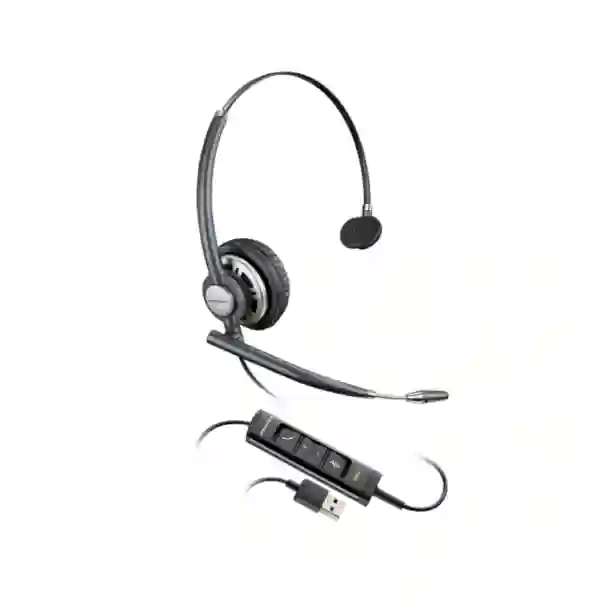
Professional wired communication
HP Poly EncorePro 715 Mono USB Headset
Help customer-facing teams concentrate on the conversation with a lightweight single-ear design, a noise-cancelling microphone, and wired USB connectivity. The HP Poly EncorePro 715 Mono USB Headset is suited to computer-based calling positions in contact centres, support desks, reception areas, and offices where clear voice communication and awareness of nearby colleagues both matter.
For Tanzania business purchasing, confirm the exact connector variant, application behaviour, order quantity, current quotation, and any required accessories before ordering.
Key specifications at a glance
The figures below describe HP’s published EncorePro 715 USB-A reference. Verify the exact quoted variant when ordering.
| Wearing style | On-ear, mono / single ear |
|---|---|
| Connection | Wired USB; verify exact connector bundle |
| Microphone | Noise cancelling; 100 Hz–6.8 kHz |
| Speaker | 28 mm driver; 150 Hz–6.8 kHz |
| Boom | 120–145 mm length; 290° rotation |
| Published weight | 53 g |
| Cable | 218 cm for HP USB-A reference |
| Compatibility | Windows 10/11 and macOS listed by HP |
| Controls | Answer/end, mute, volume up/down |
| Protection | SoundGuard Digital; Poly Lens app needed to enable features |
Made for conversations, not simply computer audio
A telephone conversation places different demands on a headset than a movie or a music playlist. A customer service adviser needs to understand names, numbers, addresses, and instructions while being heard clearly on the other end. The HP Poly EncorePro 715 Mono USB Headset is intended for this kind of voice-focused work. It combines one on-ear speaker, a noise-cancelling boom microphone, a wired connection to a computer, and straightforward controls for managing calls. Those choices make practical sense wherever the operator spends much of the day speaking with people rather than listening privately to entertainment.
The single-ear arrangement leaves the other ear uncovered. In an office, that may help an adviser hear a nearby colleague, notice a supervisor’s question, or remain aware of activity around the desk without repeatedly removing the headset. It also means the listener has less physical isolation from the workspace. If the team works in a particularly loud room and needs to concentrate on every word, a two-ear design may deserve consideration instead. The best selection depends on the work environment, not merely on whether a product is described as a premium headset.
This is a corded business headset, so it suits a computer-based calling position where predictable desk connectivity is more important than walking around. It is not a Bluetooth model, a standalone telephone handset, or a substitute for the customer’s telephony software. Before ordering, establish whether agents take calls on desktop PCs, laptops, browser-based applications, or an approved softphone. Then confirm how the headset will connect and which call controls the software supports. These small checks are often more valuable than selecting a headset on appearance alone.
Why the mono wearing style matters
Mono, monaural, and single-ear describe the same basic wearing arrangement here: one on-ear speaker rather than a speaker on each ear. An adjustable overhead band holds the ear cushion against one side of the head, while the microphone extends toward the mouth. This is particularly relevant for reception desks, service counters, help desks, dispatch roles, and supervisors who move between a conversation on the computer and a short discussion with someone nearby. The uncovered ear can preserve situational awareness, although the sound level of the room will still influence how easily a user can follow a call.
A mono headset is not automatically more comfortable for every person. Some users prefer having both ears covered for concentration, while others dislike feeling separated from the surrounding office. The EncorePro 715 is lightweight on paper, but comfort also depends on the headband fit, ear cushion contact, posture, and length of the working session. For a team order, a short trial with representative users is sensible. Include people who wear glasses and people who use headsets for long periods, because pressure points can differ from one wearer to another.
Think about the communication pattern. If employees routinely answer a question from a colleague while remaining on a call, the single-ear format may fit that workflow. If they work in a crowded contact centre where nearby conversations compete with the caller’s voice, stereo could reduce distraction for some users. Neither arrangement removes the need for appropriate office acoustics or call etiquette. Positioning desks, controlling room noise, and asking staff to mute when consulting colleagues can still make a substantial difference to the customer experience.
Noise-cancelling microphone for caller clarity
The EncorePro 715 uses a noise-cancelling microphone designed to favour the speaker’s voice over some surrounding sound. In a shared office, this matters when people nearby are talking, telephones are ringing, or routine workspace noise makes it difficult for a customer to follow the agent. The microphone is specified for a voice-band frequency range of 100 Hz to 6.8 kHz. This is a communications specification rather than a promise that background sounds will disappear. The achievable result depends on microphone placement, how loudly the agent speaks, the room, and the conferencing or calling application.
Microphone noise cancellation should not be confused with active noise cancellation for the listener. The published specification refers to the microphone that sends the user’s voice to the far end. It does not establish that the single earcup electronically cancels room noise for the person wearing it. This distinction is useful when comparing headsets for a busy help desk. If the problem is that customers hear office chatter, microphone design and positioning should be examined. If the problem is that agents cannot hear customers over the office, also consider room acoustics, listening volume, and whether a two-ear headset is a better fit.
For a meaningful evaluation, arrange a test call in the actual working environment. Ask the other party to listen for intelligibility when nearby colleagues speak at normal volume. Test ordinary speaking distance rather than holding the microphone against the lips. Repeat the test using the exact application and computer configuration expected after deployment. A brief recording or supervised call assessment can reveal whether the incoming voice sounds natural, whether the microphone level is correctly set, and whether any additional software processing is producing an unpleasant or inconsistent result.
Adjustable boom positioning is a practical feature
HP publishes a microphone boom length of approximately 120 to 145 mm and a 290-degree rotation specification for its EncorePro 715 USB-A reference. This adjustability makes it easier to move the microphone closer to the preferred speaking position without placing it directly in front of the user’s view. A well-positioned boom helps the microphone capture a consistent voice level and can reduce the temptation to raise the software microphone gain excessively. It also makes headset sharing or workstation changes more manageable, because different users may need slightly different adjustments.
In practice, start with the headband fitted securely and the ear cushion resting comfortably. Bring the microphone toward the side of the mouth rather than placing it directly in front of the airflow from speech. Make a test call, listen to the result, and adjust in small steps. If the voice is too quiet, check positioning and input device selection before applying large gain changes. If breath noise is prominent, move the microphone a little away from the direct path of air. Once a good position is found, encourage staff to use it consistently.
An extendable boom should be moved deliberately, without pulling on the microphone housing or cable. A headset is a regularly handled work tool, and careless adjustment can shorten the useful life of almost any wired device. Establish a routine in which users put the unit down safely between sessions, avoid trapping the boom under paperwork, and report obvious mechanical damage. These habits are especially worthwhile in shared workspaces where a device may be used by more than one operator over time.
Speaker design focused on spoken communication
HP specifies a 28 mm speaker and a speaker bandwidth of 150 Hz to 6.8 kHz for the EncorePro 715 USB-A reference. These figures are consistent with a headset designed primarily for human speech. They do not mean that the device is intended to reproduce the broad frequency range expected from dedicated music headphones. For the intended application, the important questions are whether the caller’s words remain understandable, whether the output level is comfortable, and whether the sound stays consistent across the calling tools used by the team.
A clear listening experience starts with a sensible volume level. The user should be able to hear a normal caller without turning the output unnecessarily high. If someone repeatedly increases volume to compensate for room noise, investigate the environment and application settings rather than treating maximum volume as the solution. Network quality, microphone quality at the other end, voice compression, and a poorly selected audio device can all affect perceived clarity. A headset is one part of a wider communication chain, not a guarantee against packet loss or low-quality source audio.
When assessing audio quality, compare the same caller and same application across devices. Try different accents and common customer-service vocabulary, including letters, numbers, and unfamiliar names. Check how quickly the agent understands a caller without repeated requests. This is more informative than relying on music playback as the principal test. If a team requires two-ear monitoring, multimedia listening, or wireless mobility, specify those needs separately. The EncorePro 715 is designed around the priorities of a single-ear, computer-connected voice workstation.
Lightweight construction and an on-ear cushion
The published weight for the EncorePro 715 USB-A model is 53 g, and HP identifies an artificial-leather surface material for the on-ear cushion. Those are useful starting points when considering a headset for a long shift, but weight alone does not establish individual comfort. The shape of the headband, pressure on the ear, whether a user wears spectacles, and how often the user takes a break also matter. A lighter headset may reduce the sense of bulk, yet a poor personal fit can still become noticeable during extended calls.
The over-the-head arrangement keeps the microphone in a relatively predictable position when the user sits, types, or turns to a second monitor. HP also describes premium nylon-composite materials in the EncorePro family. For procurement decisions, consider what this means in day-to-day handling rather than interpreting a material name as an unqualified durability guarantee. Staff may put the headset on and remove it many times, adjust the boom, and move it between desks. The most useful trial includes these routine actions, not just a few minutes of stationary wearing.
For shared equipment, think about hygiene as well as comfort. Give each regular user an identifiable headset where practical, or introduce a cleaning and cushion-management policy suited to the workplace. Do not assume replacement cushions are included in the product box. HP’s published box-content field for this reference identifies the headset. If spare cushions, carrying protection, or a particular connector accessory matter for your rollout, request those as separate line items or obtain written confirmation of inclusion before the purchase is approved.
Wired USB connection: straightforward with important checks
This is a wired headset for connection to a compatible computer. HP’s exact USB-A reference is described as connecting through USB Type-A, with HP also listing compatibility through a USB Type-A/C adapter. Some manufacturer marketing pages describe broader connector flexibility across presentations of the product family, so a purchaser should not assume every supplied unit or regional bundle has identical connector accessories. Verify the exact part number and connector arrangement shown on the quotation, especially when the computers have only USB-C ports.
Wired operation removes concerns about wireless pairing and headset battery charging. It does not remove every possible connectivity issue. The computer must recognise the audio device, the intended software must select it for both input and output, and any security or endpoint-management policy must permit the device to operate. A USB connection also does not turn an ordinary desk phone with a proprietary headset socket into a USB-compatible phone. If agents use physical telephone handsets rather than computer softphones, verify the connection method before choosing this model.
HP lists a cable length of 218 cm for the USB-A reference. This gives useful reach around a desk, but cable management remains part of an effective installation. Route the cord away from chair wheels, drawer slides, walkways, and places where it could be pulled accidentally. On laptops that are frequently carried between rooms, plan how the cord will be disconnected and stored. For desktops positioned below a desk, confirm that the available cable path is adequate without putting strain on the plug. These practical checks can prevent avoidable interruptions to calls.
Inline buttons reduce routine friction
HP lists user controls for call answer or end, microphone mute, and volume increase or decrease. For an adviser handling a high number of interactions, conveniently placed controls can be useful because the agent need not always reach for an on-screen control to adjust listening level or mute briefly. The value of these buttons depends on the calling application’s support. Audio volume and microphone muting may behave differently from call answer or end, because call-control integration can vary among desktop clients, browsers, and software versions.
Before a large deployment, test all intended controls with the real platform. Do not infer Microsoft Teams certification or guaranteed one-touch call answering for a particular service merely from the existence of a button. Check whether the application reports mute status correctly, whether using the headset button affects the active call, and what happens if several communication applications run at once. If a control is unsupported, tell users which on-screen action to use instead. Clear expectations are preferable to promising universal call-control behaviour.
A brief onboarding demonstration makes the controls easier to use. Show agents the difference between muting their microphone and reducing the volume they hear. Explain how to confirm that a caller can hear them after returning from mute. Encourage a moderate listening level, and confirm whether the computer’s operating system or the communication client also has a separate volume slider. Many apparently complicated headset problems are ordinary setting conflicts; a simple written guide can save repeated help-desk requests.
SoundGuard Digital and responsible listening
HP lists SoundGuard Digital acoustic protection for the EncorePro 715 USB-A reference. This is intended to provide additional management of potentially uncomfortable audio exposure in a communications setting. The manufacturer notes an important software dependency: Poly Lens Desktop App is required to enable SoundGuard Digital features. That qualification should remain visible in any purchasing or deployment decision. It would be misleading to promise that every advanced protection function is active on every computer without checking the necessary application and relevant configuration.
SoundGuard Digital is not a replacement for sensible operating practices. Teams should still use comfortable listening volumes, address unexpectedly loud audio sources, and give staff a way to report discomfort. An employer’s occupational-health procedures may impose additional requirements that cannot be satisfied merely by selecting a branded headset. The purpose of the manufacturer’s feature is to help manage acoustic exposure under its defined conditions, not to guarantee that all sound-related risks have been eliminated.
IT administrators should decide whether Poly Lens is permitted and how it will be installed and maintained on managed computers. Review company software policy, endpoint security, and the user’s operating system before planning the rollout. Where protection behaviour is a purchasing requirement, request confirmation of the applicable software setup and test it on a representative workstation. Record the configuration alongside the headset model and calling application. This produces a much clearer deployment specification than the vague instruction to provide a headset with hearing protection.
Operating systems, softphones, and meeting applications
HP lists Windows 10, Windows 11, and macOS as compatible operating systems for the EncorePro 715 USB-A reference. This establishes the broad computing environments identified by the manufacturer, but it does not verify every software feature in every communication platform. An audio device may function for listening and microphone input while a dedicated answer button behaves differently from one application to another. Compatibility therefore has at least two levels: basic audio recognition by the computer and the deeper call-control integration that users might expect.
If agents operate a browser-based contact-centre platform, check browser microphone permissions and the application’s selected device. For a desktop softphone, inspect its audio preferences and whether the application needs to be restarted after attaching the headset. For video meetings, confirm the chosen input and output before the meeting begins. When multiple communication clients run simultaneously, an incoming call can sometimes compete with other audio applications. A short test matrix should include the actual combinations in use rather than a generic statement that the headset works with all platforms.
For the IT team, it is useful to record the computer model, operating system release, communication application version, USB port used, optional adapter, and required call-control behaviour. Document any additional software that is deployed for headset management. If a platform vendor maintains its own device certification or compatibility list, consult that list for the exact headset variant and current application version. Do not substitute a product-family marketing claim for a specific compatibility confirmation when the purchasing decision depends on certification.
Realistic applications across different service teams
Customer support and inbound contact centres are obvious applications. Agents who remain at their desks can use the noise-cancelling boom microphone, wired USB connection, and inline controls while recording notes in a customer relationship management system. A mono design may help when a supervisor needs to provide a brief instruction or when an adviser occasionally consults someone nearby. The suitability still depends on room noise and the employee’s personal preferences. Evaluate speech intelligibility and comfort in a typical call queue rather than a quiet showroom.
Reception and appointment desks may benefit from the open-ear arrangement because the operator often alternates between a computer call and an in-person interaction. In a healthcare, hospitality, or professional-services environment, however, the team must manage privacy appropriately: the uncovered ear can pick up nearby speech, and the microphone is not a substitute for a confidential conversation space. Consider whether an employee needs to take a call privately and whether a headset is the right form factor for the location.
Help-desk and technical-support teams frequently consult an internal knowledge base while speaking with a user. The headset leaves hands available for typing, navigating software, and recording troubleshooting steps. A consistent microphone position may help the remote user hear instructions more clearly. Because technical support sessions may involve screen sharing or a second communication client, the deployment test should include the whole support workflow. Verify that audio switches correctly when the agent changes application or joins a remote-assistance session.
Training, scheduling, administration, and remote customer follow-up can also fit the device when the main job is speaking through a computer. An employee working from a home desk may appreciate not having to manage battery life. On the other hand, someone who regularly walks away from the desk, shares a room with loud household activity, or needs two-ear listening may be better served by a different model. Define how the headset will be used before treating it as a universal accessory for every employee.
A practical evaluation before purchasing many units
Begin by establishing a small set of measurable acceptance criteria. A headset should be comfortable enough for the intended duty cycle, audible at a normal listening level, and clear at the far end during typical background activity. The chosen connection must fit the computer hardware without an unplanned adapter. Muting and call control should work as the team expects, or the user instructions must explain any limitation. Decide which outcomes are essential and which are preferences before starting the evaluation, so the pilot is more than a subjective impression.
Test the unit on the actual workstation image and software build. Use the same browser or softphone employed in production, with the headset connected in the expected way. Include a normal inbound call, an outbound call, mute and unmute, a change of output volume, and a longer conversation. Test after a computer restart, not just immediately after plugging in the USB cable. If the organisation uses managed laptops or shared computers, test both scenarios. Record any settings that need attention so the IT team can reproduce the configuration consistently.
Invite feedback from several kinds of user: an experienced call handler, a new employee, a person who wears glasses, and somebody who works in a noisier area. Ask what they can hear, what callers hear, and whether the headset remains comfortable after sustained use. Document the microphone position, room, and application so results are comparable. The goal is not to prove that every employee will prefer one model. It is to make a repeatable selection that reduces avoidable purchasing mistakes and gives the procurement team a defensible basis for its decision.
Rollout and onboarding for shared or dedicated workstations
For a single workstation, installation may be as simple as connecting the headset to a suitable USB port and selecting the correct audio devices in the operating system and calling application. At scale, that same process should be documented. Establish which USB port or approved adapter to use, how the microphone should be positioned, which application controls the call, and where employees can request help. A one-page illustrated internal guide can prevent an unnecessarily high number of routine support tickets after the initial distribution.
For shared desks, clarify whether each staff member keeps an individual headset or whether the headset remains at the desk. The answer affects cleaning procedures, user identification, asset tracking, and replacement-cushion planning. If staff move between computers during a shift, confirm that switching devices does not require unexpected reconfiguration in each software client. In a contact centre, a poor setup process can waste time at the beginning of every shift. The headset should support the workflow rather than adding another step that agents must troubleshoot repeatedly.
If a manager requests a bulk quotation, prepare the technical details in a consistent format. Include the full product name, the intended wired USB connector, required headset quantity, expected computer types, and whether an adapter or spare component is part of the requirement. Include the calling applications used by the business and any mandatory device-management policy. This helps avoid comparing quotations that appear similar but include different accessories or product variants. A clear written request also makes subsequent acceptance testing and asset registration easier.
Everyday troubleshooting without unnecessary complexity
If the computer does not recognise the headset, begin with a physical connection check. Make sure the plug is seated properly, inspect the cable for visible damage, and try an approved port directly on the computer where policy permits. Check whether the operating system lists a new audio input or output device. A different USB port can help isolate a local connection issue, but it does not guarantee compatibility. Where a USB-C adapter is required, confirm that it supports the intended USB data connection and is approved for the workstation.
If the agent can hear the caller but the caller cannot hear the agent, first inspect the microphone mute state in both the headset controls and the calling application. Then confirm that the application has selected the intended microphone and that browser permissions, if relevant, have been granted. Check the boom position and perform a short test call. If the microphone is audible but excessively quiet or distorted, review input level and application processing settings rather than immediately replacing the headset. Escalate to the organisation’s normal IT process when the cause remains unclear.
If the user hears no audio or the answer button does not behave as expected, separate the issue into two questions. Does ordinary playback work through the device, and is call-control integration supported by the application? Adjust the correct output device and volume first, then examine the softphone configuration. A working microphone and speaker do not prove that remote call answering is integrated. Keep a record of repeated failures, software versions, and affected workstations. That information is more useful for support than a general report that the headset is not working.
How it compares with stereo, wireless, and quick-disconnect models
Choose the EncorePro 715 when one-ear listening, a stable computer connection, and a voice-focused microphone match the job. A stereo headset can be preferable when the wearer wants both ears covered to concentrate in a busy room, although it also changes awareness of colleagues and the environment. Wireless headsets offer freedom to move, but introduce battery, charging, range, and pairing considerations. There is no universal winner. A receptionist and an agent in a densely populated contact centre may make different choices even if they use the same calling software.
Do not confuse a USB EncorePro model with the quick-disconnect variants found elsewhere in the EncorePro family. Quick-disconnect units are intended for their own compatible connection arrangements, and may require additional equipment to work with a particular telephone or computer. The EncorePro 715 USB model is the computer-oriented wired option described here. An organisation migrating from a desk-phone system to a PC softphone should check the interface of its existing headsets before assuming that cable ends are interchangeable.
HP’s EncorePro range also includes other single-ear and two-ear configurations. Compare the precise variant rather than relying solely on the first three digits in a model name. Pay attention to wearing style, connector type, microphone, cushion material, boom adjustability, and supported controls. If a tender requires a specific manufacturer part or certified feature, capture that requirement exactly in the quote request. A seemingly minor substitution can matter when a company is standardising equipment across dozens of workstations.
Tanzania business purchasing: what to confirm
For a Tanzanian organisation, the useful starting point is the workplace requirement, not an unverified local price. Confirm the number of users, where the headsets will be connected, and which voice or meeting platforms the business operates. Specify whether staff need a single-ear or dual-ear design, and explain any requirements for all-day wearing, microphone clarity, or a particular USB connector. FourTeck Tanzania can be approached for a product enquiry or quotation, but current local stock, lead time, commercial terms, and delivery arrangements must be confirmed rather than assumed.
Confirm the exact product variant in writing. HP describes a USB-A reference with manufacturer part number 783N5AA and a TAA-labelled product name; this information should not automatically be used as the FourTeck listing SKU or treated as a guarantee that every item sold under the shorter EncorePro 715 name has identical regional packaging. If procurement rules call for a specific variant or proof of a certification, ask for the appropriate documentation. A manufacturer part number and a retailer’s internal SKU are different identifiers.
Ask the supplier to specify what is included in the offered package. HP lists the headset as the included item for its USB-A reference. Buyers should separately verify any USB-C adapter, spare cushion, case, cable accessory, or installation support they require. If a laptop fleet mixes USB-A and USB-C ports, a small accessory omission can affect many desks. Confirm the relevant product-support and warranty terms for the actual transaction instead of assuming that a warranty statement from another market automatically establishes service arrangements in Tanzania.
A quote comparison should examine more than the unit price. Consider whether the headset fits existing computers, whether users will need an adapter, how quickly problems can be reported and resolved under the agreed terms, and whether buying spares or replacement parts is appropriate for the organisation. Request a clear written description of the proposed item. This is especially valuable for public-sector, multi-branch, and business-to-business procurement where technical specification, acceptance, and documentation may be as important as the invoice amount.
Care, storage, and long-term operation
Good handling practices help a wired headset remain useful. Encourage operators to lift the headset by its headband rather than pulling the cable, and to disconnect by holding the plug rather than tugging on the cord. Avoid leaving it where a chair can roll over the cable or where the microphone boom may be crushed. If users carry it between workstations, provide a suitable protected storage arrangement if that is part of the organisation’s requirements. Do not assume a storage case is supplied with this product reference.
Clean the outer surfaces according to current manufacturer guidance and the workplace’s approved cleaning procedure. Do not saturate the ear cushion, spray liquid directly into the microphone, or use aggressive substances without checking compatibility. If multiple employees use the same headset, establish who is responsible for hygiene and what happens when a cushion becomes worn. Ear cushions are contact surfaces that deserve attention even if electronic operation remains normal. Keep a record of recurring physical damage to improve storage and handling practices.
Maintain a sensible endpoint-support process as computers and communication applications change. An operating-system update, a new softphone version, or a different USB adapter can affect how devices are recognised or how call controls behave. Test important updates on a representative headset before broad deployment where the business has that capability. If Poly Lens features are part of the configuration, include its management in the relevant software process. A modest amount of documentation makes future troubleshooting more reliable than repeated informal fixes.
Frequently asked questions
Is the EncorePro 715 a single-ear headset?
Yes. HP describes the model as monaural or mono, meaning its on-ear design covers one ear. This can help an operator remain aware of nearby activity, although the best wearing style depends on surrounding noise, user preference, and job requirements.
Does this headset connect to a desktop computer?
The USB-A reference is a wired computer headset. HP lists compatible operation with PCs using USB Type-A or a USB Type-A/C adapter. Confirm the connector and the exact supplied accessory arrangement before ordering for computers that have only USB-C ports.
Is the microphone noise cancelling?
Yes. HP specifies a noise-cancelling microphone. Its purpose is to improve the voice signal sent to the person on the call, but actual results depend on boom placement, background noise, application settings, and the calling environment. The specification does not establish active noise cancellation for the listener’s ear.
What operating systems does HP list?
The published HP specification lists Windows 10, Windows 11, and macOS for the EncorePro 715 USB-A reference. Before standardising a fleet, test the headset with the exact softphone, web browser, meeting client, and computer policy used by the organisation.
Can the headset answer and mute calls?
HP lists answer or end, mute, and volume controls. Actual integration, especially answering or ending a call from the headset, depends on the communication software. Test the controls with your chosen platform rather than assuming every calling or meeting application implements them identically.
Does SoundGuard Digital work without any software setup?
HP lists SoundGuard Digital for the USB-A reference and notes that the Poly Lens Desktop App is required to enable SoundGuard Digital features. Organisations using managed endpoints should verify installation permissions and configuration before relying on the feature in an operational standard.
Is the EncorePro 715 wireless or rechargeable?
No. The model discussed here is wired and connects by USB to a computer. It does not provide Bluetooth mobility or require the headset battery charging associated with wireless products. People who need to move away from a workstation during calls should compare appropriate wireless alternatives.
Can it be connected directly to a desk telephone?
Do not assume so. The USB version is described for PC connectivity. A desk telephone may use a different headset interface, and compatibility cannot be established merely because it has a connector. Check the exact telephone model and intended connection before purchasing.
What is included and is there a Tanzania price?
HP lists the headset as the box content for the USB-A reference. Any extra adapter or accessory should be confirmed against the specific offer. A Tanzania selling price, stock status, delivery timeframe, and transaction-specific support terms have not been verified for this listing; request a current quotation.
What should a business send when requesting a quotation?
Provide the product name, estimated quantity, computer ports, operating systems, calling platforms, and whether the users need single-ear listening. Mention any requirement for a USB-C adapter, specific manufacturer variant, or formal procurement documentation so that the offered configuration can be checked before ordering.
Request a headset quotation for your team
Tell FourTeck Tanzania how many HP Poly EncorePro 715 headsets you need, which computers and USB ports they will use, and which calling applications matter to your staff. Ask for confirmation of the exact product variant, included items, price, availability, and applicable commercial terms before placing an order.
Contact FourTeck Tanzania to discuss your requirements and request a current quote.




Reviews
There are no reviews yet.