
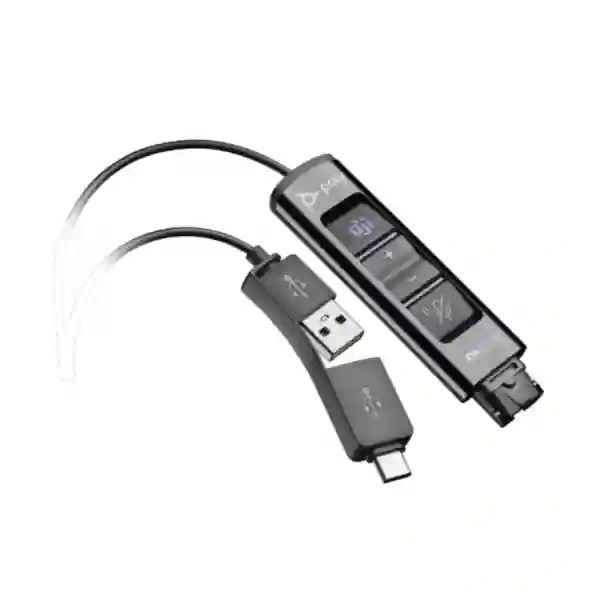
HP Poly DA75 USB to QD Adapter
Keep supported Poly Quick Disconnect headsets connected to computer-based calls with a digital adapter offering both USB-A and USB-C connection options. The DA75 is a practical choice for compatible wired headsets when software-based call controls fit the team’s workflow.
At a glance: why choose the DA75?
Reuse compatible QD headsets
A computer-facing USB adapter can support a migration from traditional headset connections to PC calling without automatically replacing every suitable existing Poly QD headset.
Fit mixed USB ports
Built-in USB-A and USB-C connectors offer a useful choice for businesses whose desktop and laptop computers do not all have the same type of port.
Simple, screen-led calling
This is the DA Series variant for users who are comfortable answering, muting and ending calls in their softphone rather than pressing hardware buttons on the adapter.
Quick specification summary
| Product | HP Poly DA75 USB to QD Black Adapter |
|---|---|
| HP product identifier | 786C6AA (manufacturer identifier; not a verified local seller SKU) |
| Headset connection | Poly Quick Disconnect (QD) for supported headset models |
| Computer connection | Built-in USB-A or USB-C option on the same cable |
| Audio features | Intelligent headset recognition; SoundGuard DIGITAL acoustic protection |
| Inline call buttons | None; use softphone interface for call functions |
| Published product weight | Approximately 0.038 kg |
| Manufacturer-listed box content | Adapter |
| Suitable buying context | Existing supported Poly QD headset; PC softphone use |
| Tanzania commercial terms | Price, stock, fulfilment and local warranty terms to be confirmed |
What the adapter does, in practical terms
The HP Poly DA75 USB to QD Adapter is a wired digital audio interface that links an appropriate Poly or Plantronics Quick Disconnect headset to a computer. On one side is the headset’s QD connection; on the computer side are built-in USB-A and USB-C connection options. It is intended for people who already use a compatible professional wired headset and need to speak and listen through a computer-based calling application rather than a traditional headset port on a desk telephone.
The distinction matters when a business is upgrading a contact centre or changing the way staff handle customer conversations. A familiar QD headset may still be useful even when the organisation adopts a laptop or desktop softphone. Instead of purchasing an entirely different USB headset for every workstation, the IT team can first establish whether the existing Poly QD equipment can be paired with the DA75. This is a suitability question, not a promise that every headset from every manufacturer will connect.
The DA75 carries audio between the headset and the host computer, but it does not supply a telephone service, a calling licence, a computer, or a headset. The buyer still needs a working application, account, appropriate audio permissions and a compatible headset. For a purchase in Tanzania, reviewing those elements together is a more useful starting point than comparing connector labels in isolation.
USB-A and USB-C on the same adapter cable
Workplaces often have a mixture of computers. A shared workstation may have conventional rectangular USB-A ports, while a newer laptop may rely on smaller reversible USB-C ports. The DA75 includes both connection types on the same cable, allowing a compatible computer port to be selected without buying a separate USB connector variant. This can simplify the accessories list for organisations working with different generations of PCs.
The USB-A and USB-C connections are alternatives for connecting the adapter to one computer; they are not a two-computer switching system. The adapter does not turn one QD headset into a simultaneous audio endpoint for two active PCs, and it should not be described as a USB hub, dock, charging device or network interface. When staff change computers, they move the connection to the appropriate USB port and check the selected audio device in the calling application.
Before ordering, check the physical access around the computer’s ports. Ports located beside bulky docking cables or closely spaced peripherals can be inconvenient in daily use. Also confirm whether the business intends to connect the adapter directly to a PC or through a dock. Testing the exact workstation setup helps identify any unexpected audio-device recognition or power-management behaviour before a larger deployment.
Understanding the Quick Disconnect connection
Quick Disconnect, normally shortened to QD, is a headset-side connection used on many professional Poly and earlier Plantronics wired headsets. It allows the headset cable to be separated from a matching connection point. In a contact centre, that can be useful when an agent needs to stand up briefly without removing the headband. The DA75 provides the relevant QD-to-USB link for supported Poly equipment.
The QD end is not the same as a 3.5 mm headphone plug, an RJ-style telephone cable, or USB-C. Connectors that look broadly alike can still carry different signals and require different accessories. This is why checking the actual headset part number or product family is more reliable than assuming that the word ‘headset’ implies compatibility. The published DA75 family information relates to Poly QD headsets, including supported EncorePro and legacy variants.
If your business owns wired headsets with a different manufacturer’s proprietary QD fitting, obtain confirmation before purchase rather than forcing the connection or ordering by appearance. Similarly, a headset that is already a native USB device usually does not need a separate DA75. The advantage of the adapter is most apparent when a business has functioning, suitable Poly QD headsets that must connect to computer-based communications.
Intelligent headset recognition and voice consistency
HP describes intelligent headset recognition as a key feature of the Poly DA digital-adapter family. When the DA75 is paired with a supported Poly headset, the adapter can identify that headset and adjust its audio handling accordingly. The intention is to support voice communications across different appropriate headset models without asking each agent to perform technical tuning from scratch. This capability is particularly relevant to organisations running a mix of older and newer supported Poly QD headsets.
Recognition does not mean that the adapter can repair a damaged microphone, remove all ambient noise, or overcome poor internet connectivity. The sound that another person hears also depends on microphone placement, the headset itself, acoustic conditions, application settings, computer configuration and the quality of the call path. A clear conversation is the result of the complete system operating well, not one accessory acting alone.
For supervisors and IT teams, the practical benefit is a more standardised starting point. After identifying the required headsets, test the combination with real calls, adjust microphone input levels in the operating system or softphone, and document the approved settings. Repeating that simple test at a representative workstation can be more effective than assuming every employee will have an identical audio environment.
SoundGuard DIGITAL: what the protection feature means
HP identifies SoundGuard DIGITAL acoustic protection in the DA75 product family, including advanced acoustic limiting, features associated with daily noise exposure, G616 and anti-startle functionality. These measures are designed to help manage potentially uncomfortable or excessive audio events in supported headset use. They are useful points for a buyer evaluating long periods of telephone work and appropriate listening practices.
Acoustic limiting is not a reason to disregard sensible volume levels or occupational hearing-care procedures. Actual exposure depends on how loudly someone listens, how long they listen, the headset configuration and the sound reaching the user. The DA75 should not be described as preventing all hearing damage or as replacing an employer’s noise-risk assessment. Organisations should follow their own relevant workplace safety practices and available product guidance.
When comparing adapters, ask whether the headset and audio path being deployed support the expected protection behaviour and whether software or firmware updates are recommended. For agents who work full shifts on calls, basic habits still matter: use a comfortable listening level, place the microphone correctly, take appropriate breaks and report persistent distortion or unusually loud call audio for investigation.
Important limitation: no inline call-control buttons
The DA75 is the streamlined member of the series and does not include inline answer, end-call, volume or mute buttons. HP’s user guidance explicitly notes that DA75 users must perform these tasks through their softphone interface. This is a central purchasing distinction, not a minor cosmetic difference. The glossy adapter body is not a call-control panel, and pressing it will not provide the functions available on a control-equipped model.
For many office and support-desk workflows, using the application’s familiar controls is entirely acceptable. An agent can answer an incoming call from the on-screen notification, change volume from the softphone or operating system, mute the microphone using the application’s controls, and end the call from the computer. The equipment choice is therefore about the preferred way of working rather than one model necessarily providing better productivity for every user.
If staff must adjust calls without returning to the keyboard or screen, consider evaluating the DA85 or an appropriate alternative in the same family. In particular, do not buy the DA75 on the assumption that it includes a dedicated Microsoft Teams hardware button. Selecting a model with physical controls should be a conscious requirement agreed with the people who will use it daily.
Who is likely to benefit from the DA75
An organisation is a strong candidate for the HP Poly DA75 USB to QD Adapter when it has compatible Poly QD headsets, uses or plans to use a computer-based softphone, and is comfortable with on-screen call controls. Typical environments include customer support, appointment handling, help desks, reservation teams, internal service centres and administrative offices that handle repeated voice conversations throughout the working day.
The adapter is also relevant when organisations are replacing desk telephones with software calling while keeping suitable wired headsets in service. A standard adapter can create a repeatable workstation specification across mixed USB-A and USB-C computers. Where several users share desks, the QD approach may also fit an established practice of using individually assigned headsets and leaving a workstation adapter in place, subject to the employer’s hygiene and equipment policies.
It may not be the ideal choice for someone who needs wireless mobility, integrated headset buttons, an analogue phone connection, or a device that allows independent simultaneous connection to multiple computers. It is also not necessary for every worker who already has a functioning native USB headset. Match the product to the existing equipment and the employee’s actual call workflow before deciding how many adapters to purchase.
Where it fits in a modern softphone setup
The usual audio path is straightforward: a supported Poly QD headset connects to the DA75; the DA75 connects to the computer using the suitable USB connector; the operating system recognises the USB audio device; and the softphone uses that device for its microphone and speaker. Calls themselves depend on the softphone application and the organisation’s communication service. The DA75 does not replace any of those software or network components.
Businesses may use different virtual meeting or customer-service applications. HP positions the DA Series for communications platforms, but the exact level of integration should be checked for the application version and organisation’s IT environment. Being able to hear and speak in a meeting is different from having certified device-specific call-control integration. The DA75 has no physical controls, so platform claims must not be interpreted as an included hardware answer or mute button.
For a practical pilot, test an incoming call, an outgoing call, mute and unmute inside the app, participant audio, microphone level and the behaviour when the QD headset is disconnected. Also check what happens after a computer restarts or resumes from sleep. Those everyday details are more valuable to a purchasing decision than an unsupported promise of universal plug-and-play operation.
DA75 versus DA85 and DA85-M: choose by workflow
The Poly DA adapter family includes models designed for related connection tasks but different levels of user control. The DA75 keeps the cable and adapter simple and relies on software controls. The DA85 adds inline controls; the DA85-M is the Microsoft Teams-focused variant with corresponding control features. All three should be considered distinct ordering choices rather than interchangeable names for the same item.
The value of inline controls depends on staff behaviour. A receptionist or call-centre agent who keeps a softphone window open may not need a hardware mute button. A worker who regularly changes applications, reads documents while speaking, or wants immediate access to call handling could find physical controls helpful. Confirm the exact model and requirements rather than choosing purely on appearance or assuming that a higher model number guarantees a better outcome for every desk.
The comparison below is intentionally limited to differentiators verified for the model family. It does not promise support for a named calling platform, guarantee particular business software behaviour, or imply that an accessory includes a headset. For Microsoft Teams-specific features, review the exact model variant and applicable desktop application requirements before ordering.
Which Poly DA adapter matches your needs?
| Model | PC connectors | Inline controls | Best question to ask |
|---|---|---|---|
| DA75 | USB-A / USB-C | No | Are on-screen softphone controls enough? |
| DA85 | USB-A / USB-C | Yes | Do users need hardware call controls? |
| DA85-M | USB-A / USB-C | Yes; Teams-focused variant | Is the supported Teams hardware workflow required? |
Comparison is about hardware workflow; exact softphone support, regional model variants and the purchasing offer still need confirmation.
Check headset compatibility before purchasing
Begin with the headset, not the USB port. Record the brand, full model name, connection type and, if available, the manufacturer part number printed on the headset or its paperwork. Poly and Plantronics EncorePro 300, 500 and 700 series QD headsets, as well as appropriate legacy Poly QD headsets, are identified in the series guidance as suitable connection families. Confirm the precise headset variant because a product-family name may be sold with different cable endings.
Next, inspect the existing connector in a well-lit area. Do not assume that a telephone-compatible plug or any generic quick-release fitting is a standard Poly QD. If your staff use a headset with a proprietary inline control unit, built-in USB interface or nonstandard adapter, document that assembly separately. A replacement adapter should be tested with the configuration that agents actually use, not just with a similar-looking sample.
Finally, verify the computer connection and the intended application. Keep the model numbers for the headset and adapter together in the purchase request. When several headset generations are in use, test at least one of each model before approving a bulk order. This short inventory exercise reduces ordering mistakes and makes later support easier because IT can identify exactly which device combination is at a user’s desk.
Planning a move from desk phones to PC calling
Replacing traditional desk-phone handling with computer-based calling is often a process change as well as an equipment change. A QD headset may have been connected through a desk-phone lead, amplifier or other accessory. In the new arrangement, the DA75 provides the USB audio path to a computer, while the softphone manages call setup and call handling. Those old desk-phone accessories do not necessarily remain part of the new connection.
A useful migration plan starts by listing which users have supported Poly QD headsets and which computer systems will host calls. The IT team can then select a small pilot group, verify the calling software, test audio input and output, and teach people where to answer, hold and mute calls. An application permissions or account problem should be distinguished from an adapter fault so that staff are not left replacing working hardware unnecessarily.
Before a larger roll-out, document the intended default microphone and speaker settings, supported headset models, connection instructions, and the person or team responsible for softphone configuration. If telephony service is provided by an external partner, confirm that calls can already be placed through the relevant application. A USB audio adapter is the final workstation connection, not a substitute for the organisation’s calling infrastructure.
A practical deployment checklist for IT teams
Start with an equipment register that notes headset family, headset connector, computer model, accessible USB ports and the application users will operate. Where desks are shared, identify whether the adapter is assigned to a seat or to an employee. The answer may affect cable management, asset tagging and what staff do when they move between stations.
Set up the representative workstation using the correct USB connection and a known compatible QD headset. Confirm that the DA75 is recognised as an audio device, then choose it explicitly in the operating system and calling application. A computer may otherwise continue using an internal laptop microphone, a monitor speaker, a dock audio output or another previously connected headset.
Test more than a single hello. Make an internal call and an external call where the service permits; confirm transmit and receive levels, speech clarity, volume adjustment in software, mute behaviour and reconnection after unplugging. Ask a colleague to evaluate whether the microphone is positioned well and whether room noise affects the call. Record the result and any agreed configuration changes.
Review device updates and managed-software policies with the IT administrator. HP’s current series guidance references HP Poly Studio desktop software for functions such as device configuration and firmware updates. The required software and privileges may depend on the chosen environment. Do not assume an end user can install everything on a managed PC without permission or that additional software creates physical buttons on a DA75.
Repeat the basic test on the organisation’s common computer types, particularly when USB-C-only laptops, docks or remote-working devices are involved. A successful result on one PC does not prove that every docking arrangement or endpoint image will behave identically. Complete the pilot before buying the full fleet, then use the documented settings and headset list to make installation repeatable.
How agents should use the adapter day to day
At the start of a shift, connect the headset securely to the DA75 using the QD fitting and confirm the USB end is connected to the intended computer port. Open the calling application and check its selected speaker and microphone. Many applications include an audio test or test call; using that option is worthwhile after moving desks, changing laptops or receiving an operating-system update.
During a call, work with the softphone’s visible buttons for answering, ending, muting and adjusting audio. Because the DA75 has no inline buttons, users should know how to reach these functions without losing focus on the customer conversation. A short agent guide with screenshots of the organisation’s chosen application can be helpful, although its steps should be tailored to the version actually deployed.
To leave the desk, the Poly Quick Disconnect feature permits separation at the QD join on supported equipment. This is a physical headset connection, not a universal promise that every application will automatically put a call on hold or maintain call state in a particular way. Establish a clear workplace procedure for leaving an active call and verify what the application does when the headset is unplugged or reconnected.
Use case: customer service and contact centres
Customer-facing teams often rely on clear spoken communication for long stretches of the day. If those teams already own compatible Poly QD headsets, the DA75 offers a route to computer-based calling without requiring a new connection technology at the headset end. The USB-A and USB-C options are helpful where newer and older PCs remain in operation together.
Agents should be trained on software-based mute and call controls before going live. Supervisors can evaluate sound levels and connection stability in the context of the actual customer-service platform, rather than assuming the adapter alone determines the entire call experience. For multi-seat purchases, standardising approved headset models and documenting a basic audio test can reduce the number of different troubleshooting scenarios.
Use case: IT help desks and internal support
Internal service desks may handle voice calls alongside ticketing systems, remote-support tools and technical documentation. A wired QD headset with a DA75 can keep the audio connection separate from the task being performed on screen. The agent does not need a specialised telephone headset socket on the computer; a suitable USB-A or USB-C port is sufficient for the audio adapter.
Because the DA75 does not include inline controls, the help desk should ensure its chosen calling interface is easy to operate while multiple windows are open. If users repeatedly need a dedicated hardware mute button, another adapter may be more appropriate. A short compatibility pilot with the ticketing and voice applications helps avoid selecting a connection that is technically valid but awkward in daily operation.
Use case: home and hybrid working
An employee using the same supported Poly QD headset at home and in the office may encounter different laptop ports. Having both USB-A and USB-C built into the DA75 cable can reduce the need to find an extra converter when moving between suitable computers. The headset remains a wired device, which some workers prefer for a predictable connection at a fixed desk.
However, remote audio quality still depends on the calling application’s settings, network conditions and the room itself. Close unnecessary noise sources where practical and place the microphone correctly. When a home laptop is managed by an employer, users may need IT assistance to install approved device-management software, change default audio settings or resolve permissions after an update. These are deployment considerations, not defects inherent to the adapter.
Use case: pooled workstations and rotating teams
At shared workstations, an organisation may wish to keep a DA75 installed at each PC while agents bring their individually assigned supported QD headsets. This can be convenient when desks rotate across shifts, provided the organisation’s equipment policy supports that arrangement. It also gives the IT team a consistent place to inspect the USB connection if a workstation has an audio issue.
Check how the calling application identifies devices at sign-in and whether settings are stored per user or per workstation. A successful call under one employee’s profile does not guarantee that the next employee’s profile selects the same device automatically. For health and hygiene reasons, make headset ownership and cleaning responsibilities explicit rather than suggesting that employees share one headset simply because the adapter remains at the desk.
Use case: training and quality-assurance pilots
Organisations introducing a new softphone can use a small DA75 deployment to assess whether their existing compatible QD headset fleet is suitable for computer calling. The initial aim is to capture practical results: can agents hear clearly, can customers hear them, can every agent locate the software mute function, and does the connection remain reliable during normal shift changes?
A structured pilot should include new and experienced agents rather than only technical staff. Feedback from the people answering calls can reveal issues that a quick equipment demonstration misses, such as confusing audio-device labels, awkward cabling or difficulty muting quickly. Training or supervisor-monitoring accessories are separate purchasing decisions and must not be assumed to be included in the DA75.
Physical installation and cable care
Place the adapter where the cable can sit without being pulled sharply by the user’s movement. Leave enough slack for comfortable head rotation and normal desk work, but avoid routing the cable across walkways, drawers or chair mechanisms. This is a compact in-line accessory, not an object that needs a permanent mount. Simple cable management can prevent accidental strain on the QD joint or USB plug.
Connect and disconnect by handling the relevant connector body rather than pulling on the cable itself. If a user frequently changes workstations, explain how to separate the QD connection correctly and how to reconnect it firmly. Check that USB ports are not loose or damaged and that desk surfaces do not trap the cable. A little care with a shared audio accessory can help avoid avoidable interruptions.
After a workstation move, verify the correct audio device again. Computer operating systems may change the default speaker or microphone when a dock, monitor, webcam or another USB peripheral is added. The first troubleshooting action should therefore be to check the audio route and application settings before treating the DA75 as failed.
Software configuration and device management
HP’s DA Series user documentation describes desktop software used for functions including configuration and firmware maintenance. An IT administrator should check the currently supported HP Poly Studio desktop software, operating-system requirements and the organisation’s application-control policy when deploying the adapter. Some softphones may require additional software for supported device interaction; this must be confirmed for the actual application and product configuration.
With the DA75 specifically, software does not create the inline call-control buttons found on other variants. Users continue to interact with their softphone for answering, ending, muting and volume management. For clarity, distinguish between the hardware’s USB audio function, the software application’s own controls, and optional management utilities. That distinction can prevent unrealistic expectations in procurement discussions.
In managed environments, decide who will maintain device software and how updates are tested before being installed broadly. Record a known-good configuration and a straightforward recovery procedure. After an update, verify audio input, output and device recognition on the most common workstations. The goal is dependable use across a real organisation, not an unverified promise that every update or softphone release will behave identically.
Troubleshooting: no sound in the headset
If the user cannot hear a caller, first inspect the QD connection and check that the appropriate USB plug is securely seated in an active computer port. Then open the operating system’s sound settings and confirm that the DA75 or corresponding USB audio device is chosen for output. In the softphone, confirm that the same output device is selected; applications sometimes override the system default.
Next, check listening volume in the softphone and operating system. The DA75 has no physical volume keys, so do not instruct the user to press buttons on the adapter. If another USB headset or docking-station audio device is connected, temporarily remove that competing device during diagnosis. A test call on an approved workstation can help distinguish an application routing problem from a damaged headset cable.
Troubleshooting: the caller cannot hear the agent
When incoming sound works but the microphone does not, make sure the softphone has selected the DA75 as its input device and that operating-system microphone permissions allow the application to use it. Confirm the application is not muted, then check microphone gain in its audio settings. Since there is no inline mute button on the DA75, the software interface is the first place to inspect.
Position the headset microphone boom according to the headset’s guidance. A boom that points away from the mouth can make speech quiet even if the correct hardware is connected. Test the QD connection and, if available, try a known-good supported Poly QD headset with the same adapter. Document the outcome before escalating, as it may point toward the headset, PC configuration or application rather than the USB adapter.
Troubleshooting: distorted sound or echo
Distortion may result from excessively high input or output levels, microphone placement, or the surrounding acoustic environment. Begin by lowering the softphone’s microphone or speaker level to a comfortable point and retesting. Avoid increasing every available slider to the maximum in an attempt to make an unclear call louder. Where the user can hear echo, check whether the laptop’s built-in microphone or speaker is active alongside the headset.
Close or pause unnecessary calling applications that may compete for access to the audio device, if that matches the organisation’s approved workflow. Run a short test call with a known-good headset and compare results across computers. If the issue only happens on remote calls, the network or communications platform may need investigation as well. The DA75 is one component in the path, so diagnosis should cover the full system.
Troubleshooting: recognition changes after sleep or a desk move
An adapter may stop appearing as an active audio device when the computer enters sleep, hibernation or a state that removes USB power. After the PC is fully awake, check the USB connection and the device list again. If local IT policy permits, disconnect and reconnect the adapter, then reselect it in the operating system and softphone. Avoid repeatedly forcing connectors or using damaged ports.
Docking stations and shared desks add another variable because the computer may detect multiple audio devices in a different order after each reconnection. The IT team’s workstation guide should state which device name to choose. If the problem returns, capture the PC model, software version, dock model and steps that reproduce it. Such information is more actionable than a general report that the headset sometimes stops working.
Troubleshooting: the QD joint disconnects unexpectedly
An accidental physical separation is different from a dropped internet call. Inspect whether the Poly QD connection is fully engaged and whether the cable is being tugged by a chair, drawer or user movement. Re-route the cable to avoid tension, reconnect it properly and test with a supported headset known to have a sound connector. Do not force a mismatched fitting into place.
If the connection feels unusually loose or shows visible damage, take the affected component out of service for assessment rather than repeatedly pulling or twisting it. Record whether the failure follows a particular headset or stays with a particular adapter. This simple swap test, carried out with known-compatible equipment, often helps a support team identify which item requires further inspection.
Troubleshooting: software controls behave unexpectedly
Remember that the DA75 relies on the softphone’s interface for call handling. If an on-screen mute or answer control behaves differently from what staff expect, check the application’s own documentation and whether the user has permission to change the relevant setting. Do not treat the absence of a DA75 hardware button as a fault. A different model is required if dedicated physical controls are a mandatory operational feature.
Where an application-specific integration is needed, confirm the exact software version, desktop management utility and device-support requirements with the organisation’s IT team. Test updates on a small group before applying them across many seats. The important distinction is between basic audio functionality, optional supported application features and the physical button set of the chosen hardware.
Specifications and verified product identity
HP identifies this model as the Poly DA75 USB to QD Black Adapter TAA, with manufacturer product identifier 786C6AA. The earlier Poly part reference 218266-01 is widely associated with this adapter family, but it should not be entered as a seller’s local inventory SKU. The product is an adapter, not a complete headset kit. HP’s published product details specify a weight of approximately 0.038 kg and list the adapter as the box content.
The principal functional specifications are the QD headset connection, built-in USB-A and USB-C computer connectors, headset recognition and SoundGuard DIGITAL acoustic features. The DA75 is the version without inline controls. Model-specific specifications and supplied items can vary by regional listing, so a buyer should confirm the exact offer rather than assuming that another region’s pack, warranty or included accessory applies automatically in Tanzania.
The quoted model name is intended to keep purchase requests unambiguous. It does not itself confirm FourTeck Tanzania stock, a local warehouse location, a local price, a supplied headset or a delivery date. For a commercial order, the seller should verify those details separately and state them in the individual quotation.
Buying considerations for Tanzania organisations
For a Tanzania-based business evaluating the DA75, the most useful purchase question is whether the adapter matches the headsets and computer-calling software already selected. Prepare a request that states the number of desks, the actual Poly QD headset models, the computers’ USB connections and the preferred softphone. A quotation can then be evaluated against a clear technical requirement rather than a broad request for ‘a headset USB cable.’
Ask the seller to confirm the exact supplied variant, price in the applicable quotation, expected fulfilment terms and any local warranty or support arrangement. These details have not been verified for the target listing and are deliberately not presented as fixed facts. Organisations ordering multiple units should also decide whether they need pilot samples, spare adapters, headset replacement stock or assistance with workstation setup.
IT teams in Tanzania may be managing mixed equipment across offices and home-working arrangements. A documented compatibility and audio test is useful regardless of the deployment location. Avoid making a local purchasing decision solely from an overseas retailer’s product code, advertised price or stock figure; those values do not establish the conditions of a Tanzania offer.
What to include in your quote request
Provide the requested quantity and the full product description ‘HP Poly DA75 USB to QD Adapter’. Include HP product identifier 786C6AA if it helps distinguish the variant, but do not use that identifier as a substitute for an unverified FourTeck listing SKU. State whether you require only the adapters or also need separate compatible headsets. An adapter-only quotation and a complete workstation audio package are different commercial requests.
List the key compatibility facts: existing Poly or Plantronics headset family, QD connector, computer models and the softphone application in use. Note whether the users are comfortable operating software-based mute and answer controls. If your team instead requires inline call buttons, say so up front so the intended hardware can be reconsidered before purchase.
For larger roll-outs, give the expected number of workstations and the planned deployment sequence. Request confirmation of commercial terms rather than assuming fixed inventory, delivery coverage or turnaround times. This approach helps purchasing teams compare like-for-like offers and gives technicians the information needed to validate the proposed adapter against the equipment already owned.
Frequently asked questions
Is the HP Poly DA75 a headset?
No. It is an adapter that links a supported Poly Quick Disconnect headset to a computer’s USB connection. The headset itself is a separate item unless a specific seller’s offer explicitly includes one. Check the contents of the quotation before ordering for a new workstation.
Does it connect through USB-A and USB-C?
Yes. The DA75 provides both USB-A and USB-C options on its adapter cable. Use the connector appropriate for the computer. Those connectors are alternate PC connections, not an integrated two-PC switch or an additional USB hub.
What type of headset works with it?
It is designed for supported Poly and earlier Plantronics Quick Disconnect headsets. HP’s series guidance identifies compatible EncorePro 300, 500 and 700 QD headset families and legacy QD models. Check the exact connector and headset variant rather than assuming a third-party or non-QD headset will fit.
Can the DA75 answer, mute or end a call from buttons on the cable?
No. The DA75 has no inline call-control buttons. Use the softphone’s on-screen answer, end, mute and volume functions. If physical controls are essential, evaluate a control-equipped model such as the DA85 before purchase.
Is the DA75 the same as the DA85?
No. They serve a similar QD-to-USB purpose but differ in hardware controls. The DA75 is the no-inline-controls variant; the DA85 has inline controls. The DA85-M is a separate Teams-focused variant. Check the exact model number when ordering.
Does it include a Microsoft Teams button?
No dedicated Microsoft Teams button is included on the DA75. Do not confuse it with the DA85-M model. Whether a chosen softphone works with the adapter as an audio device must be checked against that application’s current configuration and support requirements.
Will it work with a computer calling application?
The DA75 is designed for connecting suitable Poly QD headsets to PC-based communications. Actual operation depends on the computer, selected input and output devices, application permissions and supported software configuration. Test the specific calling application and headset combination before a bulk order.
Does SoundGuard DIGITAL eliminate all hearing risk?
No. HP lists acoustic limiting and related protection functionality, but workplace listening safety still depends on volume, duration of exposure and proper use. Treat SoundGuard DIGITAL as a product feature, not as a guarantee against every sound event or a replacement for workplace safety procedures.
Can staff unplug the headset from the QD connection?
The Quick Disconnect connection is intended to permit physical separation of a supported headset from the adapter. It does not guarantee that a live call will automatically hold, continue or end in a particular way. Confirm the calling application’s behaviour and train users on the workplace procedure.
Will the adapter solve poor internet call quality?
Not on its own. It provides an audio connection between a compatible wired headset and a computer. Unstable network access, softphone service problems, poor microphone positioning and application settings can still affect calls. Troubleshoot the complete audio and communications path.
How should we test the adapter before rolling it out?
Use a known-compatible Poly QD headset, select the DA75 as microphone and speaker, and make test calls on the actual applications and computers. Check mute in the software interface, both audio directions, reconnect behaviour, sleep recovery and any docking-station arrangement that staff will use.
What is included in the box?
HP’s product page identifies the adapter as the box content. A separate headset, telephone service, softphone licence or training accessory should not be assumed to be supplied. Ask for a clear itemised quote when you need a complete audio setup.
Is the Tanzania price or local stock confirmed?
No price, stock quantity, local delivery promise or regional warranty entitlement has been verified for this listing. Request a current quotation and product-variant confirmation for Tanzania before making a purchasing decision.
What information helps FourTeck prepare a suitable quote?
Share the intended quantity, the existing headset model and QD connection, the computer’s USB ports, and the software calling platform. Mention whether agents require hardware call buttons; this is the most important functional reason to select another DA-series variant instead of the DA75.
Request a DA75 compatibility check and quotation
Looking for the HP Poly DA75 USB to QD Adapter for a Tanzania office, support desk or contact centre? Ask FourTeck Tanzania for the exact available product variant and a current quote. Include the required quantity, your Poly QD headset model, the PC connection and the softphone in use. If staff need inline mute or answer buttons, mention that requirement so the model choice can be reviewed before ordering.
This is a quotation request, not a claim of current stock, price, warranty, delivery time or guaranteed compatibility. Confirm final technical and commercial details before purchase.




Reviews
There are no reviews yet.