
Poly Savi headset connectivity • Tanzania buyer guide
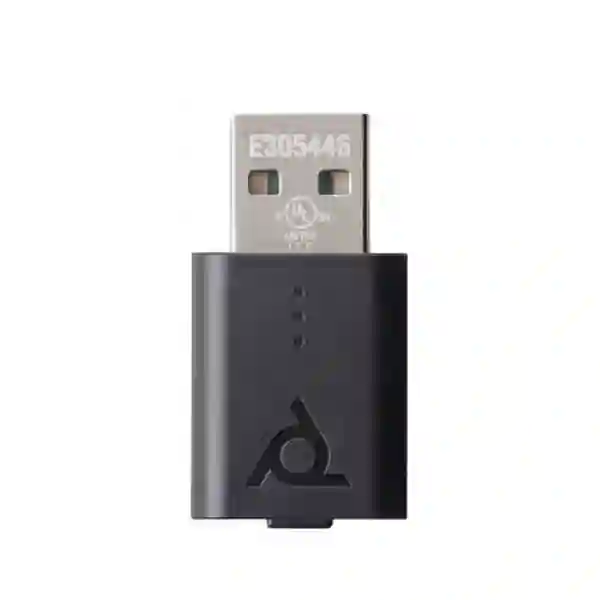
HP Poly Savi D400 USB-C DECT Adapter
For a compatible Poly Savi wireless headset, the D400 is a DECT USB receiver used to connect the headset to a computer. If your laptop has USB-C ports, the D400’s native USB-A plug requires an appropriate USB-A-to-USB-C accessory; confirm whether that accessory is supplied. Before ordering in Tanzania, verify your exact Savi model, the D400 regional radio variant, and whether you need the standard UC or Microsoft Teams-certified edition.
This buyer guide covers replacement use, pairing, application setup, practical troubleshooting, and the questions to ask for an accurate quotation. No particular SKU, radio band, price, stock status, local authorization, warranty period or USB-C converter bundle is assumed for the unspecified listing.
Key purchase facts at a glance
| Purchase check | What to verify |
|---|---|
| Product role | DECT USB receiver for selected compatible Poly Savi wireless headsets; not a complete headset kit |
| Computer connector | D400 uses USB-A; connect to USB-C through a compatible conversion accessory |
| Radio technology | DECT; frequency varies by regional adapter variant |
| Edition | Standard UC or designated Microsoft Teams-certified version, according to exact part number |
| Headset compatibility | Confirm specific Savi model and adapter variant with HP compatibility information |
| Accessory contents | Check whether an USB-A-to-USB-C converter is included in the quoted package |
| Tanzania quote | Price, availability, delivery, warranty and regulatory suitability require specific verification |
Who this adapter is for
The HP Poly Savi D400 USB-C DECT Adapter is relevant to people who use a compatible Poly Savi wireless headset with a computer and need the correct DECT receiver. It can be considered when the original D400 dongle has been lost, when a workstation is being replaced, or when an IT team is preparing a supported headset for another computer. The starting point is always the exact headset model, not simply the shape of the laptop’s USB port.
For a purchasing team, the central question is whether the offered D400 radio variant matches the existing headset and region. For an individual user, the practical question is whether the headset can connect reliably to the computer and appear as an audio device for calls. A USB-C laptop may be suitable, but the D400 connection requires a matching USB-A-to-USB-C conversion accessory. That converter is not automatically part of every adapter-only order.
This page explains the distinction between the DECT connection and the computer-side USB connector, how to narrow down the right version, what to check before paying, and what to do after receiving a replacement. It is written for Tanzanian organizations evaluating the equipment, without assuming local stock, approval, installation service, or price. For an accurate quote, provide the headset model and the part number printed on the existing receiver, if available.
Understanding the D400 and the USB-C wording
The D400 is a compact DECT radio adapter for selected Poly Savi headset systems. The D400 unit itself is described by HP as a USB-A adapter: it plugs directly into a computer’s USB-A port. When a computer offers USB-C ports instead, HP instructs users to connect the D400 through the accessory USB-A-to-USB-C adapter. Describing it as simply a native USB-C dongle could lead a buyer to order the wrong physical interface.
An adaptor between USB-A and USB-C changes the connector used at the computer; it does not change the DECT wireless protocol, the headset compatibility list, or the radio frequency supported by the D400. A USB-C connector on a docking station is also not proof that the radio receiver will operate correctly through a particular hub. HP’s troubleshooting guidance favors connecting the D400 directly to the computer rather than through USB splitters or hubs.
When comparing a product photograph with your requirement, identify the actual D400 dongle and any separate small USB conversion piece. Ask whether the quotation covers the D400 alone or the D400 plus the conversion accessory. If the computer still has a free USB-A port, a converter may be unnecessary. If the device is a thin laptop with USB-C only, make the correct converter an explicit line item or a verified box-content requirement.
What DECT contributes to a headset setup
DECT is the wireless link between this class of Savi headset and its appropriate base or adapter. On a computer-based UC setup, the D400 provides the headset’s radio connection to the PC. Computer software then handles the meeting, call, or communications application. The D400 should not be confused with a generic Bluetooth receiver, Wi-Fi adapter, or USB audio cable; those interfaces serve different purposes and are not substitutes for a headset’s required DECT radio link.
The advantage of the right receiver is operational continuity. Staff can continue using a suitable existing headset when a compatible dongle is needed, rather than immediately replacing the entire headset system. The adapter may also make sense for a support team holding a controlled supply of spares for a known headset fleet. Those practical benefits depend on correct subscription, version matching, application setup, and available drivers or device support.
DECT operation is subject to the radio version built into the product, the matching headset, the installation environment, and local rules. Do not assume an advertised coverage distance, number of simultaneous headsets, encryption profile, or frequency merely because the D400 name appears on a listing. These attributes need evidence tied to the exact variant and usage conditions. When selecting equipment for Tanzania, request the actual part number and radio specification before deployment.
Headset compatibility: verify the exact Savi model
HP’s accessory listings show D400 variants alongside selected Savi 7300, 8200 and 8400 family headsets, but that does not establish that every D400 will work with every product in those families. The manufacturer’s individual accessory page is more useful than a broad series name: it lists compatible products for a particular adapter part number. For example, HP identifies Savi 7310 Office, Savi 8220 UC and Savi 8420 Office variants on its 1880–1900 MHz D400 UC accessory page.
A model name with suffixes matters. Office and UC configurations can differ in the equipment supplied and intended connection arrangements. A Teams-certified headset variant is not evidence that any unverified Teams dongle will work with it. Check the full headset name, regional radio band and relevant manufacturer compatibility list. If the original receiver is present but faulty, its printed part number may be a valuable reference when searching for the replacement.
If a headset is not on the verified compatibility list for the proposed D400 variant, do not buy on the assumption that it is a standard USB headset accessory. Request confirmation from the supplier for the full combination. Also verify whether the headset needs resubscription to the replacement adapter. A headset and a new dongle do not necessarily arrive already linked; a subscription procedure may be necessary before the system produces audio.
UC versus Microsoft Teams-certified versions
Poly lists standard UC and Microsoft Teams-certified D400 variants. These are separate product variants, not interchangeable names for one universal SKU. For instance, HP’s Africa catalog identifies a D400 UC DECT 1880–1900 MHz adapter and a different D400 UC Microsoft Teams-certified DECT 1880–1900 MHz adapter. The Teams description is a specific manufacturer designation for that version; it must not be copied into a listing for an unverified standard variant.
A Microsoft Teams-certified dongle can be appropriate when a company standardizes Teams calling and wants the version intended for that ecosystem. Standard UC versions are relevant to supported general unified communications workflows. Neither label guarantees every meeting feature, mute synchronization behavior, or call-button action in every software version and operating system. Software integration and headset support must be checked for the full device and application combination.
Before ordering, tell the supplier which calling application staff actually use. A business running Teams as its primary desktop application may have different buying priorities from a company using a mix of softphones. Where IT policies prevent installation of device-management software, ask what basic audio functions work through the operating system and whether special call controls require further integration. This prevents confusing basic speaker-and-microphone operation with advanced application control.
DECT frequency and the Tanzania purchasing check
D400 is a family label spanning more than one radio-band version. Manufacturer accessories documentation identifies variants in bands such as 1880–1900 MHz and 1920–1930 MHz, depending on model and regional configuration. That is why a product title without a part number is not enough for responsible procurement. Two externally similar adapters may not be appropriate replacements for the same headset or jurisdiction.
For a Tanzania deployment, obtain the exact radio frequency and product number, then verify that the device can lawfully be used in the intended location under the current applicable requirements. Do not assume that an adapter sold for another market is suitable simply because it physically fits a laptop. Nor should a buyer treat an internationally marketed frequency as proof of a particular Tanzanian regulatory approval. Such approval is not confirmed for the unspecified unit described here.
When a company is replacing many accessories, record the part number, device family, frequency band and intended site before issuing a purchase order. This small process avoids mixed inventory, mispairing and uncertain regulatory status. Ask the seller to identify the region-specific model in its written quotation and request relevant compliance documentation where needed. Do not import a substitute radio-band version without confirming both technical and legal suitability.
What the adapter does not include or replace
The D400 is not a full wireless headset kit. An adapter-only listing should not be interpreted as including ear speakers, microphone boom, battery, headset charging cradle, office base station or desk-phone interface. Those are separate pieces in many Savi configurations. If an existing headset cannot charge or has a worn battery, buying a D400 is unlikely to resolve the underlying problem. Identify the failed component before choosing a replacement.
The accessory also does not turn an arbitrary wired or Bluetooth headset into a Poly Savi DECT headset. The USB-C converter, where needed, solves only the PC port mismatch. It cannot make an incompatible headset subscribe to the radio adapter. Similarly, the presence of a USB connector does not imply that the adapter supports a mobile phone directly; the normal usage discussed here is a compatible headset connected to a computer.
Packaging varies by exact SKU and seller. The contents of an existing Savi headset bundle should not be used as evidence of what comes with a separately purchased replacement D400. Ask for box contents to be stated on the quotation, including any USB-C accessory, quick-start material or other item. For budget planning, include any missing conversion accessory separately instead of assuming that a photograph showing two pieces represents the supplied package.
When a replacement D400 is the right purchase
A replacement receiver can be the right purchase when a compatible Savi headset is otherwise functional but its matching PC dongle is lost or damaged. It may also be useful after an IT asset move where the receiver was left with the previous computer. Start with a simple inventory check: find the headset model, locate any original D400 or office base and establish which connection the user previously used successfully.
Replacement is less certain when the headset itself does not power on, charge, or enter subscription mode. Problems limited to a meeting application can also arise from software settings rather than receiver failure. Before purchasing, test with a known supported computer where possible, inspect the USB connector for damage and check whether the PC detects the existing adapter. These steps help separate hardware loss from a configuration problem.
IT support should also distinguish a new installation from a replacement. An employee receiving a brand-new headset bundle may already have a suitable D400 in the box; a second receiver may be unnecessary. Conversely, a headset supplied for desk-phone use might require verification before it is repurposed for computer-based calling. A replacement decision is easiest when the exact before-and-after configuration is written down.
Pre-order information to send with an enquiry
| Before ordering | Information to confirm |
|---|---|
| Existing equipment | Full Savi model, version and present receiver/base |
| Physical connector | USB-A socket or USB-C port plus verified converter |
| Wireless version | Manufacturer part number and DECT band |
| Application | Primary softphone, Teams requirement and desktop environment |
| Commercial terms | Local quote, package contents and warranty |
| Acceptance test | Device recognition, subscription, audio and relevant call control |
Useful information is short and specific. Supply the Savi headset model from its label or procurement record, whether it is a UC or Office configuration, and the part number of the previous D400 if you have it. Add the laptop or desktop port type, operating system, principal calling application, quantity required and intended usage location. If the receiver has stopped working, describe whether the computer recognizes it and whether the headset can still charge.
Where a business has several generations of computers, specify whether users need direct USB-A connectivity or a USB-C conversion accessory. A product title saying USB-C may conceal an adapter-plus-converter arrangement. For teams that use Microsoft Teams, explain whether a Teams-certified version is required by your internal standards. If this is a replacement for an installed system, identify the currently approved radio variant rather than choosing a band by convenience.
Request written confirmation of the exact D400 part number, the compatible Savi headset model, the radio-frequency band, whether the conversion piece is included, and the appropriate warranty terms for the actual offer. Request local pricing and delivery information separately; those commercial details cannot be determined from a generic product description. With those facts confirmed, purchasing can compare quotations on the same technical basis instead of comparing ambiguous names.
Connecting the D400 to a computer
Begin with a computer-side port check. For a D400 with its original USB-A plug, insert it into a free USB-A port on the computer. For a laptop with USB-C only, fit the correct USB-A-to-USB-C conversion adapter first, and then connect the assembly to the laptop. HP’s support guidance recommends connecting the DECT USB adapter straight to the computer rather than using a USB hub or splitter during troubleshooting.
Wait for the operating system to recognize the device, then power on the compatible Savi headset. Depending on how the headset was previously configured, it may already be subscribed or may need to be connected to the new adapter through a subscription procedure. Do not assume that plugging in the D400 creates a connection with every nearby headset. A user should confirm both the adapter and the intended headset before beginning an important call.
Next, open the computer’s sound or communications settings and select the Poly headset or relevant audio device as both speaker and microphone where available. Test playback, microphone pickup and the calling application separately. This sequence identifies three different potential faults: the USB interface, the headset-to-adapter radio link and the software audio routing. If only the calling app fails, investigate its own settings rather than repeatedly replacing hardware.
Pairing and resubscribing a headset
Poly uses the term subscription for linking a Savi headset to its DECT adapter or base. A replacement D400 may require a fresh subscription to the specific headset. HP publishes model-dependent resubscription guidance, so the correct method depends on the headset family. Some Savi models use a headset control held for several seconds, while others use a different physical button sequence. Follow the procedure for the actual headset rather than a generic online shortcut.
On relevant D400 variants, the adapter provides visible subscription feedback. HP documents red-and-green flashing as subscription mode, solid green as a successful connected subscription, and a temporary red indication for subscription failure. These indications help confirm whether the issue is the radio relationship rather than a computer audio setting. LED behavior may differ for specific versions, so consult the matching official guide when interpreting an unfamiliar pattern.
If subscription does not complete, check that the headset is powered on, sufficiently charged and within a suitable distance during the procedure. Confirm that the dongle and headset belong to compatible variants, especially when equipment came from different regions or stock batches. Restarting the computer or reconnecting a USB device cannot fix an unsupported band or model pairing. Escalate with the exact headset and dongle identifiers if the prescribed steps fail.
Understanding the status lights
| Indicator example | Meaning in HP support guidance |
|---|---|
| Solid green | Headset connected; subscription completed |
| Fast flashing green | Incoming call |
| Flashing green | On call/on hold or streaming, depending on pattern |
| Solid red | Mute indication |
| Red and green flashing | Adapter subscription mode |
| Green flashing during service | An update may be in progress; consult matching guide |
| Teams white indications | Available on designated Teams variants; depend on Teams desktop integration |
The D400 LEDs are useful for first-line diagnostics because they indicate more than whether a USB port has power. HP’s standard indicator guide describes solid green for successful headset connection, green flashing patterns for call and update states, and solid red for mute. These are signs of the adapter’s reported status, not a guarantee that the external calling application is configured to use the correct microphone and speaker.
Microsoft Teams-certified models introduce additional white-light signals linked to Teams status. HP describes a solid white indication for a Teams connection and other white patterns for notification or connection issues. These Teams indications require the Teams desktop application and should not be attributed to every standard UC model. Always confirm which edition is installed before interpreting a white LED or reporting a hardware fault.
LED checks are most useful when combined with a controlled audio test. A connected adapter with no sound may indicate the wrong output device, a muted headset, a software permissions issue or application routing. A receiver that never appears in the operating system points the investigation toward the USB connection. A subscription error indicates a different class of problem. Record the sequence and colour pattern when opening a support case.
Poly device software and updates
HP provides Poly device software and support material for supported headsets and adapters. Poly Lens and the current HP Poly desktop tools can help with settings and firmware maintenance, subject to device support and software version. A company should use the manufacturer’s appropriate current supported application for its environment rather than assuming that an old management package remains the best option.
Updates are a maintenance activity, not a universal remedy. Before deploying firmware to a large group, review release information for the exact headset and receiver and test an initial unit. Make sure the connection is stable and the computer will not be interrupted. If an adapter is functioning as expected, schedule changes in a controlled way. Firmware versions and application support can evolve, so do not publish fixed version requirements without current device-specific confirmation.
For managed environments, document how an IT technician can identify the device, reproduce a problem, review firmware state and return the user to service. Some features depend on operating system and softphone integrations. Keep a record of the tested desktop application and headset combination. This avoids confusing device-recognition success with full compatibility for answer/end buttons, mute synchronisation or presence indications.
Using the D400 with calling and meeting applications
Once a supported headset is subscribed, a computer may present it as an audio device to communication applications. In Microsoft Teams or another softphone, the user must still choose the intended speaker and microphone. Application permissions, sound routing and call-control features are separate from the physical radio connection. A person may hear a test tone while a meeting remains silent because the meeting app is using a laptop speaker or a different microphone.
Where the main application is Microsoft Teams, confirm whether the proposed D400 is specifically the Teams-certified variant and check the headset’s applicable support. Where several UC tools are in use, prioritize verified microphone and speaker operation in each one. Call answer/end behavior, mute light synchronization and notifications can require additional software or integration support. The name UC is not a guarantee of feature parity across every platform.
Before rolling out adapters to many users, build a short acceptance test: detect the receiver, establish the headset link, play audio, capture a microphone sample, join a test meeting, activate mute and verify expected call controls where supported. Record any application-specific restrictions in employee instructions. This lets IT support distinguish a real incompatibility from a user who has simply selected the wrong default audio device.
Troubleshooting: a computer does not detect the receiver
First verify the physical connection. Remove the D400 from a dock or hub and connect it directly to the computer, following HP’s troubleshooting preference. If the laptop has only USB-C, confirm that the conversion accessory is a suitable USB-A-to-USB-C adapter rather than an unrelated cable or connector. Check for a loose fit, obvious damage and a USB port disabled by corporate policy. Do not force a connector into an incompatible port.
Next, test the computer’s USB device list or audio settings. Reconnect the adapter and allow the operating system time to enumerate it. A restart can clear a temporary USB state, but it does not establish model compatibility. If one computer recognizes the receiver and another does not, investigate the second machine’s port, policy, driver environment or connector accessory before condemning the adapter.
If the receiver is recognized but its status light does not show a headset link, move to the subscription procedure. If subscription succeeds but audio is missing, move to sound routing and application checks. If an adapter is consistently absent from more than one supported computer when connected properly, record the part number, symptoms and test configuration for the supplier. Avoid claiming a replacement is defective based on a single failed video call.
Troubleshooting: the headset connects but calls fail
A connected DECT link does not mean every application is using that audio path. Check the computer’s default input and output devices, then check the meeting or softphone application. Make a local test recording or use the app’s test-call feature when available. Confirm that the headset microphone is not physically muted and that the application’s own mute control is in the expected state. Compare incoming and outgoing audio separately.
If audio works in one application but fails in another, the radio adapter is less likely to be the immediate cause. Review permission prompts, app-selected devices and call control support for the second application. If remote colleagues hear a different microphone, the laptop may be capturing audio instead of the Savi headset. When users alternate between USB headsets, Bluetooth devices and conference speakers, default-device changes are a common source of confusion.
Intermittent issues need more context than ‘the headset drops’. Record whether the USB receiver disconnects, the headset loses its subscription indicator, the app changes devices, or the network call itself has problems. Try a controlled local audio test to separate DECT and USB behavior from internet telephony. For repeat incidents, document the headset model, adapter part number, operating system, software versions and whether a dock was present.
Office, UC and desk-phone deployment differences
Some Savi configurations are designed primarily for computer-based UC use, while Office systems can include additional bases or connections for desk-phone arrangements. A D400 is a PC-side DECT receiver, not a substitute for an office base’s telephone interface and charging functions. When a business has a mixture of desk phones and softphones, inventory the entire headset system before deciding which accessories to order.
An employee moving from a desk-phone-only workflow to a computer calling application may need a more detailed compatibility review than an employee simply replacing a lost USB dongle. The Savi family name alone does not tell the purchasing team whether a particular headset will support the desired configuration with the selected D400. Confirm the exact headset, its intended mode of operation and the manufacturer’s supported combinations.
For hybrid workers, the main convenience may be keeping a familiar headset while moving between approved computer setups. However, the adapter should not be presented as a universal multi-device switch. A single D400 does not automatically enable simultaneous connections to arbitrary computers, mobile phones and desk phones. Plan the user’s actual calling route first, then verify which Poly accessories provide it.
Practical scenarios for Tanzanian businesses
A customer-support desk may have a working Savi UC headset whose D400 was lost during a PC refresh. The economical question is whether the exact compatible dongle can restore the setup. A useful request includes the existing headset’s complete model and previously used regional part number. The operator should test audio and the call application after subscription, rather than assuming that a connected LED confirms the full workflow.
A company replacing older desktops with USB-C-only laptops faces a different question: does each headset require a new receiver, or only a verified USB-A-to-USB-C conversion accessory? When existing D400 units are functional, changing the physical PC connector may be all that is necessary. An IT team should test the final hardware configuration, particularly where docks and enterprise security settings are involved.
An organization rolling out Teams calling to a larger group should determine whether its standardized accessory specification requires a Teams-certified D400 version. It should not retrofit that label to an existing standard unit without checking its part number. For distributed offices, capturing variants in an asset register makes spare allocation more reliable. None of these scenarios assumes a particular Tanzanian office location, local stock position or guaranteed service availability.
Fleet management for IT and procurement
A small dongle can create a disproportionately large support issue if it is not tracked with the headset it serves. For businesses with multiple Savi users, record the headset model, paired adapter type, approved DECT band, USB conversion requirement and responsible department. A clear asset record is more useful than a single free-text entry reading ‘Poly USB headset’, because that phrase hides the part that must be compatible.
Establish a straightforward spare-handling procedure. On receiving a replacement, check the manufacturer identifier against the purchase order, confirm the package contents and perform a subscription and audio test with an approved headset. Label the spare by its exact model or radio variant, not only by a generic name. Do not mix units from different procurement regions without a deliberate compatibility and regulatory review.
After a workstation move, instruct staff to keep the D400 with its associated headset or hand it back through the company asset process. Where several users share workstations, avoid assuming that any nearby headset can be connected simply by inserting a different receiver. Maintain a documented subscription process and a short troubleshooting checklist. These controls reduce preventable errors without promising a particular uptime percentage or service response time.
Evaluating alternatives before you order
If the user already has a compatible Savi headset and the original D400 is lost, a correctly matched replacement is usually the option to investigate first. If the headset is physically damaged or no longer supported for the intended application, an entirely new headset system may be more appropriate. A conversion accessory alone is suitable only when the existing D400 works and the main problem is the computer’s connector type.
Do not substitute a general Bluetooth USB dongle for a DECT receiver. Likewise, do not order a different D400 radio-band variant merely because it appears at a lower advertised cost. A complete Savi kit may contain the compatible adapter and charging accessories, whereas a stand-alone dongle does not necessarily include those items. Compare the actual needed equipment, not just the shortest product title on a quotation.
An assessment should consider future workstation ports, management-software requirements, standardized calling applications, replacement availability and local compliance evidence. Companies with mixed headset brands may prefer to standardize interfaces, but that is an organizational decision rather than a claim about this adapter. If compatibility cannot be established, request an exact-model confirmation before purchasing, or consider a fully specified new headset package instead.
A controlled installation checklist
Before installation, confirm the planned endpoint and cleanly identify the accessory. Check the D400 model number and any frequency information on the packaging or manufacturer’s documentation. Make sure the headset has adequate charge and that its model is approved for the selected adapter. Keep the USB conversion accessory available if the laptop has no USB-A port. A short preparation check saves time when many staff need setup during a rollout.
Connect to the computer, allow device detection, complete the headset subscription if required, and then explicitly set speaker and microphone choices in the calling application. Validate outbound and inbound audio through a test call. Where a supported call-control integration is required, test answering, ending and mute behavior separately rather than assuming that a passing microphone test covers all functions.
Document the result with the part numbers and platform used. If the unit fails, record the stage at which it failed: physical USB connection, device recognition, DECT subscription, audio routing or application control. Each stage suggests a different fix. Escalating with these observations is more productive than describing the device as generically incompatible. Repeat the same validation sequence on the production computer before the user takes over.
Questions that should be settled in the quotation
An accurate offer should identify the product as a D400 DECT receiver, specify the exact manufacturer part number and describe any USB-A-to-USB-C converter included or excluded. It should say whether the version is standard UC or Microsoft Teams certified and identify the relevant DECT frequency. These details are necessary even if the sales-facing title has been simplified to include the phrase USB-C.
The buyer should also ask the supplier to confirm the intended Savi headset models, packaging, applicable warranty terms, local commercial conditions and any documented regulatory requirements for the planned deployment. Do not infer price, delivery coverage, lead time or import arrangements from manufacturer materials. A product may be technically suitable while its commercial terms remain to be confirmed through a current quotation.
For a multi-unit order, request a sample or a formal compatibility confirmation before rolling out to every desk. Include a small acceptance-test requirement in the procurement plan. Document who will manage software and firmware updates and who will support first-time pairing. This approach makes the D400 a controlled component of the calling environment rather than an unidentified USB accessory purchased solely by appearance.
Frequently asked questions
Is the HP Poly Savi D400 a native USB-C receiver?
HP describes the D400 unit as a USB-A DECT adapter. It connects to a USB-C computer through an accessory USB-A-to-USB-C adapter. The wording USB-C in a sales title may refer to the computer-side connection made possible by that separate accessory. Confirm the exact package contents instead of assuming a native USB-C plug.
Will it work with any Poly wireless headset?
No. The D400 is intended for compatible Poly Savi DECT headset configurations. Match the exact headset model, headset variant and dongle region or frequency with the manufacturer’s compatibility information. The fact that a headset carries the Poly brand or connects wirelessly does not prove that it can subscribe to a particular D400 receiver.
Does the D400 include a headset and charger?
A D400 accessory is a receiver, not a complete headset package. Do not assume that a headset, battery, charging stand, telephone base or USB-C conversion piece is included. Exact box contents depend on the seller’s specified offer. Ask for a written package list before buying, especially when the product image includes equipment beyond the dongle.
Can it replace a lost D400 dongle?
Potentially yes, when the replacement matches the supported Savi headset and radio variant. The headset may need to be subscribed to the new adapter before it can communicate with the computer. A lost adapter does not establish that a different regional variant is appropriate. Give the supplier the exact headset and previous receiver details when available.
What is the difference between standard UC and Teams versions?
HP identifies standard UC and Microsoft Teams-certified D400 products separately. A Teams-certified designation belongs only to the specified manufacturer variant. Choose according to the organization’s software and supported devices, and verify the part number. Basic audio operation and application-specific call controls are distinct considerations; certification should not be inferred from appearance.
Can I plug the D400 into a USB hub or docking station?
HP’s troubleshooting instructions recommend connecting the DECT USB adapter directly to the computer rather than through a hub or splitter. If a company normally uses a dock, it should test that setup specifically and use a direct connection when investigating detection or audio problems. Do not assume that every docking station behaves identically.
Why are there different DECT frequency versions?
Manufacturer accessory catalogs distinguish region-specific D400 radio bands. Those variants reflect technical and market requirements, not simply cosmetic packaging. The correct choice must be suitable for the matching headset and intended country. For Tanzania, verify the exact frequency, applicable requirements and any needed documentation rather than assuming that a foreign-market dongle is approved.
Does it work with Microsoft Teams?
A specific D400 variant is listed by HP as Microsoft Teams certified. A standard UC version should not be advertised with that certification unless independently confirmed for the exact part number. Also check the Savi headset and desktop application requirements. Speaker and microphone operation alone does not establish that all Teams-specific buttons or notifications are supported.
How do I pair my Savi headset with a replacement D400?
Poly calls this process subscription. Use HP’s model-specific instructions for the Savi headset and D400 combination. The adapter’s red-and-green flashing can indicate subscription mode, while solid green indicates a completed headset connection in the standard LED guide. Controls vary by headset, so avoid following a pairing sequence intended for a different model.
What should I check if the computer sees the adapter but there is no sound?
Confirm headset power and subscription first, then select the intended device as both speaker and microphone in the operating system and calling application. Check physical and application mute states and make a test recording. A green connection indicator does not guarantee that every softphone is routed to the Savi audio device.
Can this receiver connect my headset to a mobile phone?
The D400 is described here as a computer-side DECT USB receiver. It is not presented as a general mobile-phone Bluetooth adapter or a universal USB-C phone accessory. Where a user needs mobile calling, verify the supported capabilities of the specific headset system and its documented connection methods before purchasing equipment.
Can the D400 improve call quality if my internet connection is unstable?
The D400 supplies the compatible headset’s local DECT radio link to a computer. It does not repair an unstable internet connection, failed SIP service, meeting-platform outage or overloaded network. Distinguish local microphone or receiver faults from network calling problems by testing a local recording and then comparing it with an online call.
Can I use one spare D400 for many employees?
A spare can be useful in a managed Savi fleet, provided it is the right adapter for the headset that needs it. Subscription may be required when moving it between supported headsets. It should not be treated as a universal multi-user or multi-headset receiver. Track its manufacturer part number and band to avoid issuing the wrong accessory.
How can I ask FourTeck Tanzania for an accurate quotation?
Provide the complete Savi headset model, required quantity, whether the current machine is USB-A or USB-C, your calling application, any existing D400 identifier and the intended use in Tanzania. Ask for the exact quoted receiver variant, USB-C accessory inclusion, price, delivery conditions, warranty terms and technical suitability to be confirmed in writing.
Request a verified D400 adapter quotation
Ask FourTeck Tanzania to confirm the compatible HP Poly Savi D400 adapter for your exact headset, laptop ports and calling application. Share the full Savi model, existing receiver identifier if available, required quantity and whether USB-C conversion is needed. Request a written specification confirming the UC or Teams version, regional DECT band, accessory contents and current commercial terms before placing an order.
Product suitability, price, stock, shipping, warranty and regulatory requirements must be verified for the exact offer. No direct checkout link is provided because an approved product or contact destination could not be established from the permitted Tanzania sitemaps.




Reviews
There are no reviews yet.