
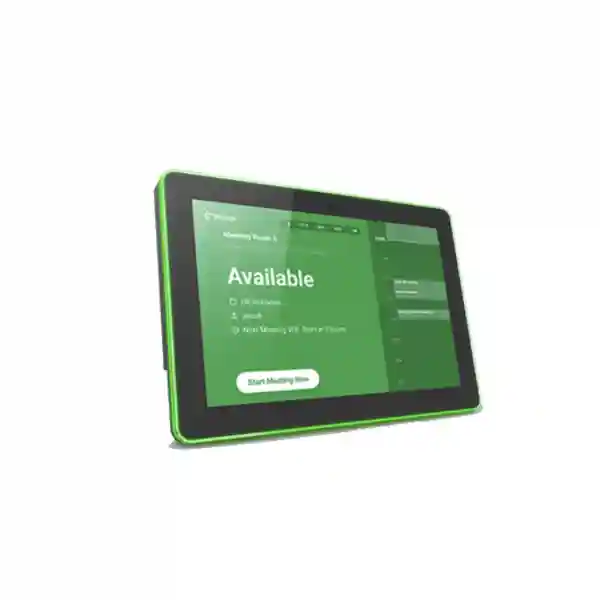
Yeastar DS7315 Room Display
The Yeastar DS7315 Room Display is a 15.6-inch interactive meeting-room scheduler designed to work with the Yeastar Workplace Meeting Room Booking System. Mounted outside a meeting space, it gives staff a clear view of current room status, upcoming schedules and booking actions while four-edge LED indicators make availability easier to recognize from a distance. For organizations in Tanzania planning smarter conference rooms, the DS7315 brings room discovery, on-the-spot reservation, check-in, meeting extension and meeting completion into one dedicated touch interface.
Choose the DS7315 when a larger 15.6-inch Full HD room display, visible edge lighting, Yeastar Workplace integration and built-in camera are important to the meeting-room workflow. Confirm subscription features, mounting, network and access-control requirements before ordering.
LCD IPS touch screen with 1920 × 1080 resolution and a 16:9 aspect ratio.
Four-edge LED indicators support configurable status colors for at-a-glance availability.
Gigabit Ethernet, 2.4/5 GHz Wi-Fi and Bluetooth 4.2 support practical deployment choices.
Power over Ethernet can simplify wall installations where a PoE network is already available.
What the Yeastar DS7315 does
The DS7315 is a dedicated digital room-signage endpoint for Yeastar Workplace. Its purpose is not simply to show a room name. It brings the booking workflow to the doorway, where employees actually need to make a decision. Staff can see whether the room is free, review schedule information, start an ad-hoc meeting, check in, check out, extend a session or end a meeting from the touch display. When configured with the Yeastar platform, the visual status on the screen and edge LEDs helps reduce the common friction created when a calendar says one thing while the physical room appears to be doing another.
The larger 15.6-inch screen is especially useful in executive offices, boardroom corridors, shared meeting zones and environments where visibility matters. Yeastar lists a 1920 × 1080 pixel display with a 344.3 × 193.2 mm active area. The four-edge LED design offers a highly visible status cue, while administrators can apply company branding and choose room-status colors. The built-in camera supports identity-oriented workflows in supported Yeastar Workplace configurations, including facial recognition, and QR-based identity authentication is part of the broader platform workflow.
Organizations should treat the DS7315 as one component of a complete room-booking design. The Yeastar Workplace account, meeting-room resources, network connectivity, power method, mounting position and any desired access-control integration should be planned together. If access control is required, Yeastar documents DS7315 integration with compatible DIDO relay-based access-control hardware through a relay module, with applicable Yeastar Workplace plan and firmware requirements. This is why a requirements review is more useful than purchasing the panel in isolation.
Yeastar DS7315 technical specifications
| Display | 15.6-inch LCD IPS touch screen |
|---|---|
| Resolution | 1920 × 1080 pixels |
| Aspect ratio | 16:9 |
| LED indicators | Four-edge LED indicators, 16 colors available |
| Camera | Built-in camera listed by Yeastar as 500W pixels |
| Wi-Fi | IEEE 802.11 b/g/n 2.4 GHz and IEEE 802.11 a/n/ac 5 GHz |
| Ethernet | 100M/1000M Ethernet |
| Bluetooth | Bluetooth 4.2 |
| System | Android 10.0 |
| Interfaces | DI/DO serial interface and USB 2.0 |
| Power | Power over Ethernet (PoE) or DC power |
| Dimensions | 397.4 × 256.4 × 28.5 mm |
| Weight | 3 kg |
| Environment | Indoor use, 0°C to +40°C operating temperature |
Specifications above are based on Yeastar product documentation. Power accessories, mounting components, licenses and deployment scope should be confirmed for the exact quotation because package contents and commercial bundles can vary by market and purchase channel.
Meeting-room workflow and integration
A well-planned DS7315 deployment starts with the meeting-room resource in Yeastar Workplace and then aligns the display with the room, calendar workflow and user policy. Organizations can define whether people are allowed to book directly from the room display, whether identity verification is required, and how room status is presented. This is valuable when the company wants a consistent booking experience across several rooms rather than relying on handwritten signs, unlocked shared calendars or verbal coordination.
For environments that already use Microsoft 365, Microsoft Exchange, Microsoft Teams or Google Workspace, Yeastar Workplace offers integration options at platform level. The practical benefit is that room scheduling can fit into the systems employees already use instead of creating a completely separate planning process. Exact supported functions depend on the selected Yeastar Workplace plan and current platform capabilities, so subscription requirements should be checked before procurement. Facial recognition and access-control features are associated with higher-tier capabilities and compatible hardware rather than being assumed in every deployment.
The DS7315 can also work alongside Yeastar People Counting Sensor deployments so occupancy information can contribute to room-use workflows. For organizations focused on utilization, the combination of room booking, check-in policies, sensors and analytics can make it easier to distinguish rooms that are reserved from rooms that are actually used. This supports more informed decisions about meeting-space capacity without turning the display itself into an analytics appliance.
Plan the surrounding meeting-room infrastructure
The room display is only one layer of a productive collaboration space. Customers planning a DS7315 project can also review FourTeck Tanzania’s integrated IT and collaboration solutions, the business technology shop, and deployment and support services. These pages help connect room scheduling with the displays, network switching, PoE, Wi-Fi, conferencing equipment, access control and structured cabling that may be required around it.
For multi-country organizations, FourTeck’s regional network can also support broader planning through FourTeck Uganda and FourTeck Africa. These links are useful when procurement teams want to keep architecture, naming, room standards and operational expectations consistent across several offices while still confirming local commercial scope separately.
Yeastar DS7315 Room Display Tanzania
For organizations evaluating the Yeastar DS7315 Room Display in Tanzania, the strongest use case is a workplace with several shared meeting rooms where employees need a faster way to understand availability at the door. The 15.6-inch Full HD display gives more visual space than compact room panels, making it suitable for boardrooms, executive meeting areas, training spaces and busy shared-office corridors. The four-edge LED indicators also provide a useful visual cue before a user reaches the room. Instead of opening a calendar, asking reception or walking into an occupied meeting, staff can approach the room and see current status directly on the display.
A Tanzania deployment should be planned around the customer’s actual network and power environment. If the meeting-room entrance already has structured Ethernet cabling connected to a suitable PoE switch, a PoE deployment can reduce the need for a separate local power adapter and keep installation neater. Where cabling is not available, the DS7315 supports Wi-Fi, but the wireless network should still be assessed for stable coverage and appropriate security. Businesses should also consider whether the display needs to be placed on a solid wall or glass partition and whether the mounting method fits the building finish. Network segmentation, IP addressing and device-management practices are worth documenting when many panels are being deployed.
For procurement teams in Tanzania, a useful quotation should define the number of rooms, required panels, mounting conditions, power method, network availability, Yeastar Workplace subscription level, desired calendar integration and any access-control requirement. It should also clarify whether related room technology—such as conferencing cameras, microphones, displays or switching—forms part of the same project. This prevents the DS7315 from being purchased as an isolated screen when the wider objective is better meeting-space management. FourTeck can use these inputs to structure a quotation around the exact environment rather than assuming that every office needs the same configuration.
Yeastar DS7315 Room Display Dar es Salaam
Businesses in Dar es Salaam often operate from multi-floor offices, commercial buildings, shared business centers, hotels, financial offices and regional headquarters where meeting rooms are used by many departments. In this kind of environment, the Yeastar DS7315 can serve as a visible scheduling point outside boardrooms and conference spaces. The 15.6-inch touch display is large enough to present room information clearly, while edge LEDs help people identify availability from a corridor. This matters when several rooms sit close together and staff need to select a free room quickly without repeatedly checking a central calendar.
The best Dar es Salaam deployment begins with a floor-by-floor room inventory. Record each room’s name, capacity, primary users, existing calendar resource, network port availability and power access. If the office uses PoE switching, confirm the available PoE budget and cable route to each display position. If Wi-Fi is preferred, verify signal quality at the exact wall location, not only inside the meeting room, because corridor walls, glass and door frames can change coverage. For polished corporate interiors, mounting, cable concealment and alignment with room signage should be planned before drilling or adhesive work begins.
Organizations should also decide how tightly the room workflow needs to be controlled. Some offices may allow ad-hoc booking from the display for convenience. Others may require user authentication, check-in rules or controlled access to executive rooms. Yeastar Workplace provides policy options, while DS7315 supports the hardware interfaces needed for compatible access-control integration. Procurement teams in Dar es Salaam should therefore state whether the project is simply for room visibility or for a wider smart-workplace workflow. That distinction affects subscription planning, integration effort and supporting hardware. A clear requirement document helps avoid purchasing panels first and discovering later that network, calendar or access policies need additional work.
Yeastar DS7315 Room Display Mwanza
The Yeastar DS7315 Room Display can be useful for Mwanza organizations that want to modernize meeting-room coordination without depending on manual room registers or informal messaging. Offices serving banking, healthcare administration, education, logistics, professional services and regional operations may have a smaller number of rooms than a large headquarters, but scheduling conflicts can still consume time. A dedicated room panel makes the physical space and the digital reservation process easier to connect: employees can see status at the door, view scheduled use and perform permitted booking actions from the touchscreen.
For a Mwanza site, infrastructure planning should focus on reliability and maintainability. A PoE-connected DS7315 can be attractive because one Ethernet run can provide network and power, reducing the number of wall power points around a finished meeting-room entrance. The switch, uplink and UPS strategy should be reviewed if the organization expects the booking display to remain available during short power interruptions. If Wi-Fi is used instead, confirm that the selected SSID provides dependable coverage and that the device can reach the Yeastar Workplace service consistently. IT teams should document device names, room associations and network settings so future troubleshooting is straightforward.
Buyers should also think beyond the first panel. If one room is the pilot, use it to establish a repeatable standard for mounting height, room naming, LED color policy, booking permissions, calendar synchronization and user guidance. Then the same approach can be extended to additional rooms without redesigning the workflow each time. When requesting a DS7315 quotation for Mwanza, include the present number of meeting rooms and expected future expansion, even if only one or two displays are required initially. This helps determine whether the project should be treated as a simple hardware purchase or as the first stage of a broader Yeastar Workplace rollout.
Yeastar DS7315 Room Display Arusha
Arusha has a wide variety of business and institutional environments where meeting spaces are shared by internal teams, visitors and project groups. Hotels, conference-oriented organizations, NGOs, tourism businesses, educational institutions and professional offices can all face the same practical problem: a room may be reserved in a calendar, but people standing outside the room still need a clear answer about whether it is available. The Yeastar DS7315 addresses that doorway decision with a large interactive display and visible LED status indicators linked to Yeastar Workplace.
An Arusha deployment should begin by deciding which rooms actually need a panel. High-demand boardrooms, training rooms and rooms used by multiple departments typically deliver more value than rarely used private spaces. The organization should then confirm the calendar environment and Yeastar Workplace integration path. Where Microsoft 365, Exchange, Teams or Google Workspace is part of the scheduling process, integration support should be mapped before user rollout. The goal is to keep the familiar calendar behavior while adding a physical room interface, not to create two unrelated reservation systems.
Installation planning also matters in hospitality and client-facing environments where aesthetics are important. The DS7315 measures roughly 397.4 mm by 256.4 mm with a depth of 28.5 mm, so its wall position should be coordinated with door frames, glass panels, power and network paths. If PoE is used, confirm switch capacity and cable termination. If identity authentication or access-control integration is planned, define the required Yeastar Workplace plan and compatible door-control interface before ordering. For Arusha buyers, a good quotation should therefore combine the display quantity with network, mounting, platform and access requirements, giving facilities, IT and procurement teams one consistent implementation plan.
Yeastar DS7315 Room Display Dodoma
Organizations in Dodoma that manage formal meeting schedules, departmental conference rooms or shared administrative spaces can use the Yeastar DS7315 to make room availability more visible and easier to act on. Government-related offices, institutions, associations, corporate branches and service organizations often depend on scheduled rooms for briefings, committee sessions, interviews and project meetings. When several groups share the same spaces, the cost of a double booking is not just inconvenience; it can disrupt planned agendas and create unnecessary coordination work. A door-mounted room display helps move the scheduling information closer to the physical room.
The DS7315 is particularly relevant where a larger display is preferred. Its Full HD 15.6-inch touch screen allows room information and booking controls to be presented clearly, while the edge LEDs offer a simple visual cue. For Dodoma sites, IT teams should assess whether Ethernet cabling can reach each meeting-room entrance and whether PoE switches have enough capacity. Facilities teams should verify mounting surfaces and cable routes. Administrators should determine whether users can reserve rooms at the display, whether check-in is mandatory and whether unattended reservations should be handled by the broader Yeastar Workplace policy.
Procurement can reduce implementation risk by collecting these technical and operational answers before requesting pricing. State the number of rooms, building or floor layout, current calendar platform, networking method, mounting preference, expected subscription level and any need for identity or access control. If the rooms also require video conferencing, audio systems or large displays, include those requirements so the doorway scheduler is planned as part of the complete collaboration environment. A consistent room standard is easier to support over time, especially when administrators need to add new rooms, update policies or expand the system to another Dodoma office.
Yeastar DS7315 Room Display UAE
For UAE offices, the Yeastar DS7315 Room Display is suited to modern commercial environments where meeting spaces are heavily shared and visual presentation matters. Corporate headquarters, free-zone offices, technology companies, hospitality operators and regional branches frequently have glass-fronted rooms and high meeting turnover. A 15.6-inch Full HD room panel offers a larger visual surface than compact schedulers, and four-edge LEDs can help users see availability from down a corridor. The device can support a standardized smart-office appearance while connecting the physical room entrance to Yeastar Workplace scheduling.
UAE procurement teams should define whether the DS7315 is part of a new fit-out or a retrofit. In a new office, structured cabling and PoE can be planned to each room entrance before finishes are completed. In an existing office, the project may need to work around glass partitions, finished walls and established network pathways. Yeastar supports wall mounting and documents its room-display installation process, while customers should still confirm the suitable mounting method for each surface. Because the DS7315 is intended for indoor use and a 0°C to +40°C operating environment, normal conditioned indoor office spaces are the appropriate deployment context.
For regional companies with UAE and East African branches, the larger opportunity is standardization. Room names, booking policies, check-in behavior, status colors and user instructions can follow the same corporate template even when procurement is handled locally. If access-control integration is required, include the door system, relay requirements, Workplace plan and firmware readiness in the design. If the company uses Microsoft or Google productivity platforms, confirm the intended integration model. A complete quotation should separate hardware, subscriptions, installation and optional integration so the business can compare scope accurately rather than judging only the panel price.
Yeastar DS7315 Room Display Uganda
The Yeastar DS7315 Room Display can support Ugandan businesses that are moving from informal meeting-room coordination toward a more visible, centrally managed booking process. Banks, telecom organizations, NGOs, corporate offices, schools, healthcare groups and branch networks often rely on shared conference rooms for both internal teams and visitors. A display mounted at the room entrance gives employees immediate context: whether the room is available, what the upcoming schedule looks like and which on-screen actions are permitted by the organization’s Yeastar Workplace configuration.
When planning a Uganda deployment, start with network readiness. The DS7315 supports 100M/1000M Ethernet and dual-band Wi-Fi, allowing a project to use wired or wireless connectivity according to the site. PoE can simplify installation when a suitable switch and Ethernet run are available, but the PoE budget and cable condition should be checked rather than assumed. In offices with several meeting rooms, standardizing network ports, VLANs, device names and mounting positions can make ongoing support much easier. A UPS-backed network can also help maintain the supporting infrastructure through brief power events where the customer considers that operationally important.
Uganda buyers should request pricing based on the complete workflow, not just the number of screens. Confirm the Yeastar Workplace plan, calendar environment, room count, preferred booking permissions, branding needs and whether facial recognition or access control is part of the requirement. The DS7315 supports advanced workflows, but those workflows can depend on software plan and compatible integration components. For multi-branch organizations, it is also worth creating a room-display standard that can be repeated in Kampala and regional sites. That reduces the number of one-off decisions and makes training, troubleshooting and future expansion more consistent.
Yeastar DS7315 Room Display Kampala
In Kampala, where many organizations operate from multi-tenant towers, campuses and growing office complexes, meeting-room utilization can become difficult to manage as headcount increases. The Yeastar DS7315 gives the room entrance a dedicated scheduling interface rather than leaving availability hidden inside individual calendars. Employees can view status and, depending on policy, book or manage meetings directly from the display. The larger 15.6-inch screen and edge lighting are useful in corridors with several conference rooms because users can identify the right space more quickly.
A Kampala project should coordinate IT and facilities from the beginning. IT needs to confirm Yeastar Workplace, calendar integration, network method and device-management policy. Facilities needs to confirm mounting surface, cable routing, display height and access to power or PoE. Security teams may need to participate if the DS7315 will be connected to room access control. Yeastar documents DIDO relay-based integration for DS7315 through a relay module, but the existing door hardware and power-control design still need to be evaluated for compatibility before installation.
For procurement, the important comparison is total deployment scope. Two quotations can include the same DS7315 hardware but differ significantly in licenses, mounts, PoE injectors, cabling, configuration, calendar integration, user setup and handover. Ask suppliers to state what is included and what remains the customer’s responsibility. Organizations with several Kampala offices should also decide whether every room requires the same functionality. A boardroom may justify identity controls and access integration, while a small internal huddle room may only need status and basic booking. Matching the feature level to each room can create a more practical rollout than applying the most complex configuration everywhere.
Yeastar DS7315 Room Display Arua
For organizations in Arua, the value of the Yeastar DS7315 is less about adding another screen and more about creating a repeatable process for shared meeting spaces. Branch offices, NGOs, education providers, healthcare administrators and regional operations may have only a few formal meeting rooms, yet those rooms can be highly important for interviews, visiting teams, project sessions and remote collaboration. A visible room scheduler helps employees understand current use without interrupting people inside or relying on a central administrator to coordinate every booking.
Because regional sites may have different infrastructure from a head office, the DS7315 deployment should be adapted to the actual Arua location. Check whether the room entrance has a suitable Ethernet route and whether the network switch can provide PoE. If not, Wi-Fi and DC power can be considered, subject to stable coverage and the exact power arrangement quoted. Confirm that the display can reliably reach the Yeastar Workplace service and that the office’s internet and security policies permit the required connectivity. Documenting these conditions is especially useful if remote IT staff will support the system.
A practical approach is to create a small deployment checklist: room name, resource account, display serial details, switch port or Wi-Fi configuration, mounting position, booking policy, user authentication setting and support contact. This gives the local site a clear handover record and makes future troubleshooting faster. When requesting the Yeastar DS7315 for Arua, state whether the site is standalone or part of a wider Uganda deployment. If it is part of a larger network, FourTeck can help align the proposal with the same general standards used at other offices while keeping local cabling, power and mounting requirements specific to the branch.
Yeastar DS7315 Room Display Mbarara
Mbarara organizations looking for a professional meeting-room scheduling experience can use the Yeastar DS7315 to make reservations visible at the point of use. The display is particularly appropriate where teams share boardrooms or training spaces throughout the day and where visitors may also need clear room information. The combination of a 15.6-inch Full HD touch screen and edge LEDs makes the device easier to notice than a small tablet used without dedicated room-display hardware, while Yeastar Workplace provides the management layer behind the booking experience.
The technical design should consider the whole path from the display to the cloud platform. Wired Ethernet is often preferable where structured cabling is available because it gives the device a predictable network connection, and PoE can simplify powering the panel. Wireless deployment is also supported, but signal strength and stability should be checked at the entrance wall. For multiple displays, use a consistent naming convention that maps the device to the room resource and physical location. This becomes valuable later when administrators are reviewing a device list or troubleshooting a specific meeting space.
Mbarara procurement teams should also ask how the room will be used. Is the goal only to show availability? Should users be able to create ad-hoc meetings? Is check-in required? Do meetings need to be extended or ended from the screen? Is there a company logo or room-status color standard? Will access control be added later? These questions determine the configuration effort and whether advanced Yeastar Workplace features are necessary. By answering them before ordering, the organization can avoid overbuying or under-specifying the solution. A staged rollout can begin with the busiest room, confirm the user workflow, then extend the same standard to additional rooms as adoption grows.
Yeastar DS7315 Room Display Gulu
The Yeastar DS7315 Room Display is a practical option for Gulu offices and institutions that need clearer coordination of shared meeting facilities. When staff move between departments, project teams or visiting groups, knowing whether a room is actually available can prevent delays. A dedicated display at the entrance gives the room a visible digital identity and can show real-time booking information through Yeastar Workplace. The large touch interface also supports direct interaction, reducing reliance on a receptionist or administrator for every routine room change.
For a Gulu deployment, reliability should be considered from the perspective of the complete system. The panel itself supports Ethernet, Wi-Fi, PoE and DC power, but stable operation also depends on the local network, internet path and Yeastar Workplace configuration. If the office has UPS protection for switches and internet equipment, decide whether the meeting-room displays should be connected to the same protected infrastructure. If there are only one or two rooms, the network design may be simple; if the site is a campus or multi-building environment, cabling and switch placement can require more planning.
Organizations should also define who owns administration after installation. Someone needs responsibility for room-resource naming, booking permissions, policy changes, user support and device updates. Yeastar provides remote management capabilities through the Workplace platform, which can be useful for dispersed organizations, but operational ownership still needs to be clear. When requesting a DS7315 quotation in Gulu, provide the number of rooms, floor layout, current calendar environment, existing PoE switching, mounting surface and any future expansion plan. That information helps create a proposal that fits the site instead of treating the display as a generic consumer tablet purchase.
Yeastar DS7315 Room Display Kenya
Kenyan organizations evaluating the Yeastar DS7315 often need a meeting-room system that fits into fast-moving corporate workplaces rather than a standalone signage screen. The DS7315 is designed around Yeastar Workplace, so it can present room availability, schedules and user actions at the entrance of the physical meeting space. For offices in Nairobi and other business centers with several rooms, the edge LED indicators can make free or occupied rooms easier to identify at a glance, while the 15.6-inch Full HD display provides a larger interactive surface for room information and booking controls.
A Kenya rollout can benefit from standardization across multiple sites. Define a common convention for room names, company branding, status colors, user permissions and check-in rules. Then document the network standard: wired Ethernet with PoE where available, approved Wi-Fi where cabling is not practical, and consistent VLAN or security policy where required. These design choices make a multi-office deployment easier to manage because technicians can understand the expected configuration before arriving at a new branch. The same principle applies to mounting height and user instructions so the experience remains familiar to employees who work across locations.
Procurement should distinguish between hardware cost and the broader service needed to make the display useful. Yeastar Workplace subscriptions, calendar integrations, installation, cabling, PoE, configuration and optional access-control work may be separate parts of the solution. Facial recognition and access-control functions should only be included when the applicable platform requirements are confirmed. Companies planning a Kenya purchase should therefore ask for a scope-based quotation showing the number of rooms, exact deployment tasks, subscription assumptions and support responsibility. This makes proposals easier to compare and gives IT teams a clearer path from product delivery to an operational room-booking system.
Yeastar DS7315 Room Display Kuwait
In Kuwait, the Yeastar DS7315 can serve businesses that want a polished meeting-room scheduling interface in corporate offices, project headquarters, hospitality environments and shared administrative spaces. Its 15.6-inch touchscreen gives users a larger visual area for room information, while the LED edge indicators help communicate status from a distance. The device is intended for indoor deployment and is best treated as part of a managed workplace system rather than as simple digital signage. Yeastar Workplace provides the scheduling and management functions that give the display its operational value.
Fit-out planning is especially important when meeting rooms use glass walls, stone finishes or premium interior materials. Determine the display position, mounting method and cable path early so the final installation looks intentional. PoE is useful where Ethernet cabling can be brought to the room entrance because it can carry power and network connectivity over the same cable. If the office design requires wireless networking, test coverage at the installation point and ensure that the corporate WLAN policy supports the display. The device should be placed where users can interact comfortably without obstructing doors or circulation paths.
Kuwait buyers should define whether the room-display project connects with broader smart-office goals. Identity verification, access control, people counting, analytics and calendar integration can all influence the design, but they should be selected according to actual needs and supported Yeastar plans. For companies with operations across the Gulf and Africa, it may also be useful to document one corporate meeting-room standard and adapt only the infrastructure details at each location. A clear quotation should list hardware quantity, required platform subscriptions, installation assumptions, optional integration work and any customer-provided components so budget decisions are based on the complete scope.
Yeastar DS7315 Room Display Ghana
Ghanaian businesses and institutions can use the Yeastar DS7315 to make shared meeting rooms easier to find, understand and manage. In offices where staff frequently move between conference rooms, the difference between a booked room and an occupied room can create confusion. A dedicated Yeastar Workplace display gives users a visible scheduling point at the entrance. The Full HD 15.6-inch interface is well suited to boardrooms and prominent collaboration spaces, while four-edge LEDs provide a quick visual status cue that does not require users to stand directly in front of the screen.
For deployment in Ghana, IT teams should map the display to the existing collaboration ecosystem. If room resources already exist in Microsoft or Google calendars, determine the correct Yeastar Workplace integration approach before rollout. Decide how users will check in, whether ad-hoc bookings are allowed and what happens when a reservation is not used. These policies affect user behavior more than the hardware specification alone. A short pilot with one or two high-traffic rooms can help the organization test the workflow and refine instructions before a larger rollout.
The physical installation should confirm Ethernet, PoE availability, Wi-Fi coverage, mounting surface and cable concealment. For multi-floor offices, plan switch ports and device names in advance so each panel is easy to identify in management tools. If access control is part of the requirement, involve the security-system team early because Yeastar’s supported integration uses compatible relay-based interfaces and depends on applicable platform requirements. Procurement teams in Ghana should request a detailed bill of scope that separates display hardware, platform licensing, cabling, mounting, configuration and optional integrations. This gives decision makers a more accurate view of the project than a hardware-only price.
Yeastar DS7315 Room Display Nigeria
For Nigerian enterprises with busy offices, shared conference rooms and multiple departments, the Yeastar DS7315 can provide a more visible way to manage room availability. The display works with Yeastar Workplace so users can see scheduling information at the physical room and, when allowed by policy, carry out booking actions from the touchscreen. The 15.6-inch panel is useful in larger corporate environments where small room schedulers may be difficult to read from the corridor. Edge lighting adds another layer of visibility by signalling room status without requiring a user to inspect the calendar in detail.
Nigeria deployments should consider scale from the beginning. A single-floor office may need only a few displays, while a headquarters can require dozens. At larger scale, seemingly minor choices—device naming, switch-port labeling, PoE budgeting, VLAN design and room-resource conventions—become operationally important. Standardize them before installation. If the organization has multiple sites, define which settings are global and which are site-specific. For example, branding and status-color conventions can be common while network addressing, mounting and cabling vary by building.
Power and network resilience should be aligned with the customer’s own business-continuity priorities. PoE can simplify installation, but it still depends on the switch and upstream power. Where critical, organizations can decide whether the relevant switching and connectivity should be supported by UPS infrastructure. Wi-Fi is available when cabling is impractical, but coverage should be validated at each display position. Nigerian procurement teams should also verify Yeastar Workplace subscription requirements for advanced functions such as facial recognition and access-control workflows rather than assuming every feature is included by default. A properly scoped quotation should show the hardware, licensing, integration and installation components separately for transparent comparison.
Yeastar DS7315 Room Display Seychelles
The Yeastar DS7315 Room Display can fit well in Seychelles offices, hospitality properties, management centers and organizations where meeting spaces are used by both staff and visitors. In a hospitality or guest-facing environment, the presentation of the room entrance matters alongside functionality. A dedicated 15.6-inch touch panel provides a cleaner, more consistent experience than temporary paper signs or unmanaged tablets, while configurable branding and status colors can help the room display match the organization’s visual identity.
Seychelles deployments may involve compact sites where only a few rooms require scheduling, so the project should be sized around actual demand. High-traffic boardrooms and training rooms are good candidates, while small private meeting rooms may not need the same level of control. Check Ethernet and PoE availability during the site assessment because a wired connection can provide a simple, stable deployment where cabling exists. Wi-Fi remains an option, but the exact installation position should be tested for signal quality. Facilities teams should also consider wall or glass mounting, cable concealment and user reach.
For hospitality and service organizations, decide how much meeting detail should be shown on the public-facing screen. Yeastar Workplace provides flexibility around the meeting information displayed, and businesses can choose a policy that balances usefulness with privacy. If rooms require restricted entry, access-control integration should be treated as a separate technical workstream and checked against compatible hardware and subscription requirements. When requesting a DS7315 quotation for Seychelles, include room count, calendar platform, building layout, networking method, branding preference and any access requirement. This creates a solution that fits the property rather than applying a generic office template to a specialized environment.
How to choose and size a DS7315 deployment
Start with the rooms rather than the device count. List every shared meeting space, its capacity, daily booking frequency, calendar resource, current scheduling problems and whether the entrance can support a display. Prioritize rooms where schedule confusion has a measurable impact. Then decide whether the 15.6-inch form factor is appropriate for all rooms or only prominent spaces. Because the DS7315 is larger than compact room schedulers, it can deliver excellent visibility but should be positioned thoughtfully in narrow corridors or glass-heavy interiors.
Next define the software workflow. Confirm the Yeastar Workplace plan, calendar integration, booking permissions, check-in behavior, branding, identity requirements and analytics objectives. If facial recognition or access control is required, validate the applicable Yeastar plan and integration prerequisites. If the organization only needs visible room status and basic booking, avoid adding unnecessary complexity. Good room-booking design is based on simple user behavior, not the maximum number of enabled features.
Finally define infrastructure: wired or wireless network, PoE or DC power, switch capacity, mounting surface, cable route, internet access and device-management responsibility. Build a repeatable installation standard with room names, display heights, network labels and handover documentation. This makes expansion much easier when another floor or branch adopts the same system.
Quotation checklist for Yeastar DS7315
State the exact quantity now and the expected expansion over the next phase.
Identify Microsoft 365, Exchange, Teams, Google Workspace or other scheduling context.
Confirm Ethernet, PoE availability, Wi-Fi coverage and any UPS expectation.
Describe wall, glass partition, cable route and required finish quality.
Define the functions needed so licensing can be matched to the project.
State whether facial recognition, QR identity or access-control integration is required.
Frequently asked questions
What is the Yeastar DS7315 used for?
It is an interactive meeting-room display for Yeastar Workplace. It shows room availability and schedules and can support on-screen actions such as ad-hoc booking, check-in, check-out, meeting extension and ending a meeting according to configured policies.
How large is the DS7315 display?
Yeastar specifies a 15.6-inch LCD IPS touchscreen with 1920 × 1080 resolution and a 16:9 aspect ratio.
Does the Yeastar DS7315 support PoE?
Yes. Yeastar supports Power over Ethernet for the DS7315, and its installation documentation describes use with a PoE switch or PoE injector. DC powering is also supported. Confirm the exact supplied power accessories in the quotation.
Can the DS7315 connect over Wi-Fi?
Yes. Yeastar lists 2.4 GHz IEEE 802.11 b/g/n and 5 GHz IEEE 802.11 a/n/ac support, in addition to 100M/1000M Ethernet.
Does DS7315 support facial recognition?
Yeastar documents facial recognition support for DS7315 within Yeastar Workplace. The feature is associated with applicable platform plan requirements, so confirm current licensing and configuration prerequisites before purchase.
Can the DS7315 integrate with meeting-room access control?
Yes, in supported configurations. Yeastar documents DS7315 connection to DIDO relay-based access-control devices through a relay module. The Yeastar Workplace plan, firmware level and existing access-control hardware must meet the relevant requirements.
Can I use DS7315 with Microsoft or Google calendars?
Yeastar Workplace provides integration options for Microsoft 365, Microsoft Exchange, Microsoft Teams and Google Workspace depending on platform plan and current feature support. Confirm the customer’s calendar environment during solution design.
What information should I provide for a quote?
Provide room count, office location, current calendar platform, network and PoE availability, mounting surface, desired booking workflow, Yeastar Workplace plan requirements, access-control needs and whether installation or configuration is required.
Decision recap
The Yeastar DS7315 is best suited to organizations that want a large, dedicated meeting-room scheduler rather than an improvised tablet display. Its strongest advantages are the 15.6-inch Full HD touch interface, highly visible edge LEDs, Yeastar Workplace integration, built-in camera, Ethernet and Wi-Fi connectivity, and support for PoE and advanced identity or access workflows. The right buying decision depends on the room count, calendar platform, desired user policy and site infrastructure. If those elements are confirmed before ordering, the DS7315 can become a clean front end to a much more organized meeting-space process.
Talk to FourTeck about your Yeastar DS7315 project
Share your room count, office location, calendar platform, network details and required booking workflow. FourTeck can structure the discussion around the display hardware, Yeastar Workplace requirements, mounting, PoE, integration and the related collaboration infrastructure needed for a practical deployment. Product availability, commercial terms and final scope should be confirmed through the quotation process.




Reviews
There are no reviews yet.