
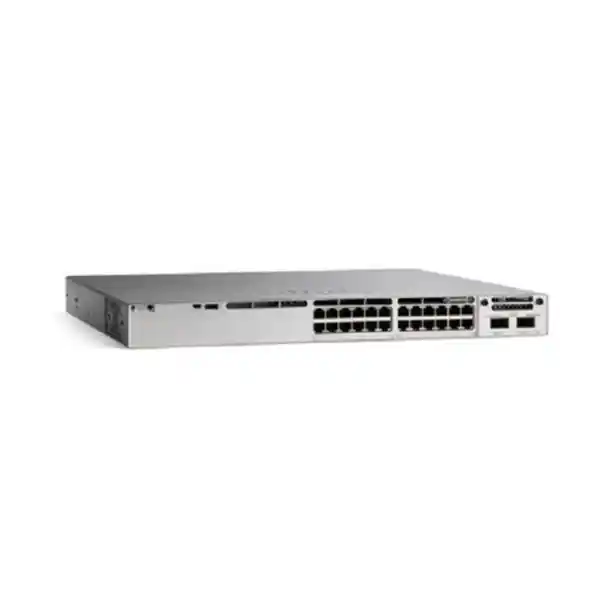
4 × 25G SFP28 Uplinks
StackWise-320
420 W Default PoE Budget
Cisco Catalyst C9300LM-24U-4Y Network Switch for Tanzania Enterprise Access Networks
The Cisco Catalyst C9300LM-24U-4Y is designed for organisations that need a compact enterprise access switch without giving up high-speed uplinks, UPOE device power or resilient stacking. It combines 24 copper 10/100/1000 Mbps UPOE access ports with four fixed 25 Gigabit Ethernet SFP28 uplink interfaces in a shallow-depth chassis. That combination can suit modern office floors, branch sites, education environments, healthcare facilities, hospitality networks, financial operations, public-sector deployments and other managed LANs where powered endpoints and fibre aggregation are both important.
For a Tanzanian buyer, the most important purchasing question is not simply whether the switch has 24 ports. The complete design should account for the number and type of powered devices, the uplink media and optics, the expected traffic load, rack depth, software licensing, stacking requirements, power redundancy and the existing Cisco environment. With its default 600 W AC power supply, the C9300LM-24U-4Y provides a 420 W PoE budget. Supported power-supply combinations can increase the available budget, but the correct power design should be calculated from the actual access-point, phone, camera and other endpoint requirements rather than assumed from the maximum per-port capability.
This page is intended to help technical teams, procurement staff and system integrators evaluate whether the C9300LM-24U-4Y is the right fit, identify the accessories that may be required and prepare a complete quotation request. Share the required port count, powered-device list, uplink design, quantity, licence preference and destination in Tanzania so the bill of materials can be checked before ordering.
Quick Product Fit
Best suited to
Managed enterprise access networks that need 24 copper edge ports, UPOE for powered devices, fibre uplinks faster than a traditional 1G or 10G-only access design, and optional physical stacking.
Check before buying
Confirm the -E or -A licence variant, software subscription term, optics, stack kit, total PoE load, redundant power requirement, rack depth and compatibility with the existing network architecture.
Consider another model when
You require more than 24 access ports in one chassis, copper multigigabit downlinks above 1G for high-performance wireless, substantially greater default PoE capacity, or a modular uplink architecture.
Verified Technical Specifications
| Model family | Cisco Catalyst 9300LM Series |
|---|---|
| Access ports | 24 × 10/100/1000 Mbps copper UPOE ports |
| Fixed uplinks | 4 × 25 Gigabit Ethernet SFP28 uplink ports |
| Default power supply | 600 W AC, C9300LM-specific PWR-C6 family |
| Default available PoE power | 420 W with a single default 600 W AC power supply |
| Stacking | StackWise-320; optional stack kit; up to eight supported fixed-uplink Catalyst 9300L/9300LM switches subject to Cisco stacking rules and compatible licence level |
| Switching capacity | 248 Gbps standalone; 568 Gbps value listed with stacking |
| Forwarding rate | 184.51 Mpps standalone; 422.59 Mpps value listed with stacking |
| Approximate dimensions with default PSU | 1.73 × 17.50 × 13.17 in (approximately 4.3 × 44.4 × 33.4 cm) |
| Weight with default PSU | 11.5 lb (5.21 kg) |
| Software / licence order variants | C9300LM-24U-4Y-E with Network Essentials or C9300LM-24U-4Y-A with Network Advantage; subscription selection should be confirmed for the intended feature set |
Specifications describe the hardware family and current Cisco documentation for this model. A quotation should still confirm the exact order code, software entitlement, subscription term, optics, power supply combination and accessories because these choices affect the final configuration and usable feature set.
Why 24 UPOE Access Ports Matter
A modern access switch often has to do more than connect laptops and printers. It may provide network connectivity and power to wireless access points, IP phones, security cameras, access-control endpoints, building systems and other Ethernet-powered devices. The C9300LM-24U-4Y uses Cisco UPOE on its 24 one-gigabit copper access ports. Cisco describes this model as supporting 60 W PoE capability at the access port level, but the switch-wide budget is the controlling factor for a real deployment. With the default 600 W AC power supply, the available PoE budget is 420 W, so a design that assumes every port can continuously draw the maximum possible power would be incorrect.
PoE sizing should start with the endpoint list. Record each device model, its required PoE class or maximum draw, the number of units and whether all devices may be active at full load simultaneously. A voice-heavy office may have many phones that draw modest power. A Wi-Fi deployment may have fewer devices but significantly higher per-device demand. A camera network can vary widely depending on infrared illumination, heaters, pan-tilt-zoom motors and auxiliary functions. A mixed building network may combine all of these loads on the same switch. Adding a reasonable design margin helps accommodate startup conditions, future devices and model substitutions.
Cisco supports additional C9300LM power-supply configurations that can increase the available PoE budget. That does not mean every project needs a larger or second power supply. For a 24-port switch with a moderate endpoint mix, the default configuration may be sufficient. For a wireless refresh, camera deployment or high-power edge design, the power plan can become as important as the port count. A redundant power requirement is a separate decision: redundancy is about continuity if a supply fails, while a higher aggregate power budget is about how much endpoint power the switch can provide. In some designs one decision influences the other, so both should be reviewed together.
For procurement, provide the powered-device schedule rather than only asking for a “24-port PoE switch.” That allows the quote to include the right power-supply combination and reduces the risk of receiving a switch that has the correct number of ports but insufficient power for the intended endpoints.
Four Fixed 25G SFP28 Uplinks for High-Speed Aggregation
The C9300LM-24U-4Y includes four fixed 25 Gigabit Ethernet SFP28 uplink ports. This is a major architectural difference from access switches that provide only 1G or a small number of 10G uplinks. Higher-speed fibre uplinks can be useful where multiple access switches converge toward a distribution or core layer, where wireless traffic has increased, where local services generate sustained east-west traffic, or where a site is being designed with additional bandwidth headroom for future growth.
The uplink speed alone does not complete the design. Fibre type, distance, optic compatibility, connector type, patching, peer interface capability and redundancy method must all be checked. An SFP28 cage should not be treated as proof that any third-party optic or any fibre plant will work. The transceiver must be supported for the intended switch software and link design, while the opposite endpoint must use a compatible speed and optical standard. Existing buildings may already have multimode or single-mode fibre, and the appropriate optic depends on that installed medium and the required distance.
For a new Tanzania site, document the equipment-room layout and expected fibre paths before choosing optics. For an upgrade, record the current switch models, transceiver part numbers, patch-panel type, fibre core count and active link speeds. This makes it easier to determine whether the project is a straightforward switch replacement or whether the uplink design also needs new optics, patch leads or fibre work.
High-speed uplinks are most valuable when the rest of the architecture can use them. If the upstream device is limited to lower speeds, or if the access layer serves a light branch workload, a different Catalyst model may be more economical. Conversely, where a switch is feeding dense Wi-Fi, converged services or multiple VLANs into a higher-capacity distribution layer, the four 25G uplink interfaces can provide useful design flexibility and resilience options.
StackWise-320: Scale and Operational Simplicity
Cisco lists the C9300LM family with StackWise-320 support. The platform can use an optional C9300L-STACK-KIT2 and dedicated stacking cables to form a physical stack with supported Catalyst 9300L and 9300LM fixed-uplink models under Cisco’s stacking rules. Cisco documents support for up to eight switches in a StackWise-320 stack. A stack can provide a single logical management and control plane across multiple physical switches, which can simplify operations in wiring closets and access-layer deployments.
Stacking is not automatically the best answer for every network. It is most useful where several access switches need coordinated management, where uplink resiliency is designed across stack members, or where operational teams value one logical switching system instead of several independently managed units. A small branch with one switch may not need stack accessories at all. A two-switch access closet may benefit from stacking if the distribution design, change process and failure model are planned around it. Larger closets can use stacking to create a more scalable access block, but cabling, software consistency, maintenance procedures and power should be planned from the beginning.
Compatibility matters. Cisco documentation indicates that C9300LM fixed-uplink models participate in StackWise-320 and stack with supported C9300L and C9300LM models at the same relevant licence level. They should not be treated as interchangeable with every Catalyst 9300 chassis. Modular-uplink C9300 and C9300X families use different stacking rules and hardware. When expanding an installed stack, provide the exact model numbers, current software release, licence level and existing stack accessories so compatibility can be checked before new hardware is ordered.
The stack kit is optional, so it should be included only where the design calls for stacking. This is an important bill-of-materials item: purchasing multiple stack-capable switches does not by itself mean the stack adapters and cables are included. The intended physical layout also determines cable length. Record the rack position of each switch and whether they will be adjacent in one rack or distributed differently before choosing stacking accessories.
Performance for a 24-Port Enterprise Access Layer
Cisco specifies 248 Gbps switching capacity and 184.51 million packets per second forwarding rate for the standalone C9300LM-24U-4Y. The data sheet also lists 568 Gbps switching capacity and 422.59 Mpps values with stacking. These numbers help position the platform as an enterprise access switch rather than a basic unmanaged or lightly managed edge device, but they should not be read as an application-level throughput guarantee. Real network performance depends on traffic patterns, packet sizes, features enabled, uplink design, policy configuration, endpoint behaviour and the rest of the infrastructure.
The fixed 25G uplinks provide an important complement to the 24 one-gigabit access ports. If all access ports are heavily used, uplink architecture determines whether the access layer can move that traffic efficiently toward the distribution or core network. Designs can use multiple uplinks for capacity or redundancy subject to the chosen topology and configuration. Where traffic is mostly local to the same switch, the internal switching system handles that forwarding without consuming upstream bandwidth. Where traffic is destined for shared services, internet gateways, data centres or other VLANs, upstream design becomes more significant.
Cisco’s data sheet groups Catalyst 9300L and 9300LM fixed-uplink models with a scale of up to 32,000 MAC addresses, 32,000 IPv4 route entries across direct and indirect routes, and 16,000 IPv6 routing entries for the platform group. Whether a particular routing, segmentation or policy feature is available or appropriate depends on software licensing and configuration. Buyers should therefore separate the hardware scale discussion from the software entitlement discussion. A feature that exists in the platform family may require a specific licence level or subscription.
For most access-layer projects, the practical sizing questions remain straightforward: how many endpoints connect now, how much growth is expected, which devices require power, what uplink speeds are needed, what features must be enabled, and how much operational resilience is required. Those answers are more useful for model selection than choosing a switch solely from a headline performance number.
Network Essentials, Network Advantage and Software Selection
The base model name C9300LM-24U-4Y describes the hardware family, but Cisco’s orderable variants include C9300LM-24U-4Y-E with Network Essentials and C9300LM-24U-4Y-A with Network Advantage. This distinction is important because the purchase should match the intended network functions, management approach and lifecycle plan. A product request that includes only the base hardware name is not enough to determine the correct software entitlement.
Cisco’s current ordering guidance pairs the -E hardware option with the Network Essentials network stack and the -A option with Network Advantage. Cisco also offers term-based software subscriptions with different levels and durations. The exact combination should be selected from the current Cisco ordering rules at quotation time. Some advanced routing, automation, assurance, policy or management capabilities can depend on software entitlement, so technical teams should document required features rather than choosing a licence level only by price.
A useful licence requirement list can include whether the switch will operate primarily as Layer 2 access, whether local Layer 3 routing is needed, whether the environment uses Cisco Catalyst Center, whether automation or advanced policy features are planned, and whether the customer already maintains a Cisco Smart Account. Cisco notes that Smart Accounts are required in the ordering and Smart Software Licensing process for Catalyst 9300 family purchases. If the organisation already has an established Cisco account structure, the procurement team should provide the relevant information through the proper secure commercial process rather than creating duplicate ownership records.
Software should also be considered during expansion. When adding a switch to an existing environment, record the software release train, feature use, licence level and management platform. This makes it easier to plan compatibility and change windows. New hardware should not be introduced into a production stack or access block without verifying software and feature alignment.
Because Cisco licensing can evolve, this page does not present a fixed bundle, subscription price or entitlement promise. The final quote should identify the exact hardware order code, selected software level and subscription term so procurement and engineering teams are reviewing the same configuration.
Compact-Depth Chassis for Space-Conscious Racks
One of the defining characteristics of the Catalyst 9300LM range is the shallow-depth chassis. Cisco lists the C9300LM-24U-4Y at approximately 1.73 × 17.50 × 13.17 inches with the default power supply, or about 4.3 × 44.4 × 33.4 centimetres. The listed weight with the default power supply is 11.5 pounds, approximately 5.21 kilograms. This can be useful in wiring closets, branch racks and compact equipment rooms where conventional deep enterprise switches create installation challenges.
Shallow depth does not remove the need for rack planning. The installation still requires appropriate front and rear clearance, cable bend radius, airflow, power connection space and room for stacking cables if stacking is used. Fibre patching is especially important with high-speed uplinks, because tightly bent patch leads or overcrowded cable managers can create reliability and maintenance problems. A rack that physically fits the chassis may still be unsuitable if doors, vertical PDUs or cable organisers interfere with connectors or airflow.
For new sites in Tanzania, include the rack dimensions, rack-unit availability, UPS placement, PDU type, ventilation and expected ambient conditions in the design review. For existing sites, photos and measurements of the actual cabinet can help identify constraints before delivery. If the switch is being installed in a wall-mounted cabinet, confirm the usable internal depth rather than relying on the nominal cabinet depth advertised by the enclosure manufacturer.
The compact form factor can make the C9300LM-24U-4Y attractive where enterprise features are required but rack depth is limited. It should still be treated as active infrastructure that needs a clean power and thermal environment, not as a small-office desktop device.
Common Deployment Scenarios in Tanzania
Office and branch access
Connect staff workstations, IP phones, printers, access points and building devices while using fibre uplinks toward a distribution switch or server-room network.
Wi-Fi access layer
Provide UPOE power to enterprise wireless access points when the endpoint speed requirement remains within the switch’s 1G copper access-port capability and the total PoE budget is properly sized.
Voice and collaboration
Support managed IP phone deployments with VLAN, QoS and access policy features appropriate to the selected licence and network design.
Security and facilities networks
Power compatible cameras and other Ethernet edge devices while segmenting operational traffic according to the organisation’s network policy and security architecture.
The switch may also fit education, healthcare, hospitality, finance and public-sector projects that need managed access switching with resilient uplinks. The correct design depends on the actual endpoint mix. For example, a classroom block may have access points, phones and staff computers but relatively few cameras. A clinic may combine clinical workstations, phones, wireless, surveillance and building systems. A hotel can have a large number of wireless and IP service endpoints distributed across several wiring closets. These environments can all use enterprise access switching, but their PoE, segmentation, redundancy and maintenance needs are different.
For multi-site projects, consistency can be as important as the specification of one switch. Standardising access-switch models, optic types, software releases, stack accessories and spare strategy can make deployment and support easier. However, not every site must use the same chassis. A 24-port shallow-depth unit may be ideal for one branch while a higher-density or multigigabit model is more appropriate at another location. Site classes should be based on port counts, endpoint power, uplink requirements and expected growth.
FourTeck Tanzania content for this product does not assume local stock, a guaranteed delivery time or an onsite service entitlement. Those commercial and service details should be confirmed against the exact project, quantity, destination and requested scope when a quotation is prepared.
Power Continuity, UPS and Electrical Planning
Network uptime depends on more than the switch power supply. If the switch powers phones, wireless access points, cameras or other critical endpoints, an electrical outage can affect many services at the same time. The UPS should therefore be sized for the switch, its PoE load and any other equipment sharing the protected circuit, such as routers, firewalls, fibre equipment and local servers. A UPS sized only from the switch’s nominal chassis consumption can be undersized when the switch is delivering substantial PoE power.
Start by estimating the steady-state and peak load for the complete rack. Then decide the required runtime: enough for brief interruptions, enough for an orderly shutdown, or enough to bridge to a generator or alternate power source. Battery ageing, ambient temperature and future expansion should be considered. If power continuity is operationally critical, the design may also include a second supported switch power supply connected to a separate protected power path, subject to the site’s electrical architecture and the selected C9300LM power configuration.
Cisco’s C9300LM switches use the PWR-C6 power-supply family rather than the PWR-C1 units used by other Catalyst 9300 variants. This matters when preparing spares or reusing components from an installed estate. A power supply that belongs to another Catalyst 9300 subfamily should not be assumed compatible. The exact supported module and airflow arrangement must be checked for the C9300LM chassis.
For quotation preparation, specify whether the requirement is a single default supply, a higher PoE budget, power redundancy, or both. Also share the site’s available mains standard, rack PDU arrangement and UPS capacity. This prevents a technically capable switch from being delivered into a rack that cannot support the intended powered endpoints or continuity objective.
What to Include in the Bill of Materials
A complete enterprise switch purchase is rarely just the switch chassis. The final bill of materials should be built from the deployment design so that installation is not delayed by missing optics, stacking parts or power accessories. The base hardware order code should identify whether the required licence level is Network Essentials or Network Advantage. The software subscription and term should be selected according to the current Cisco ordering model and required features.
Exact -E or -A hardware order code, applicable software subscription, Smart Account planning and software release requirements.
Supported SFP28/SFP-family optics as required by the link design, fibre patch leads and compatible peer interfaces.
C9300LM-compatible StackWise-320 kit and correct cable length when physical stacking is part of the architecture.
Default or upgraded supported power supply, optional second supply, rack power distribution and UPS capacity based on actual PoE load.
Rack position, patch panels, cable managers, copper patch leads, fibre management and any site-specific installation materials.
Required vendor support, lifecycle expectations, spare strategy and operational ownership should be defined before final commercial approval.
If the switch is replacing an older model, provide the existing switch part number, current licence level, installed optics, stacking configuration, power supplies and software version. That information can reveal whether accessories are reusable, whether uplinks need changes and whether a staged migration is required. If the switch is part of a new build, provide the port schedule and network diagram instead.
A clear bill of materials reduces commercial ambiguity. It also gives the engineering team a stronger basis for acceptance testing because the expected power, uplinks, stack configuration and licences are documented before delivery.
When the C9300LM-24U-4Y Is a Strong Choice
Choose this model when the site needs approximately 24 managed copper access ports, UPOE for a meaningful portion of the endpoint population, compact rack depth, fast fibre uplinks and the option to build a resilient StackWise-320 access block. It is especially attractive where rack depth is constrained but the organisation still wants a Catalyst 9300 enterprise switching platform rather than a lower-tier access switch.
It can also be a good fit where the distribution layer already supports high-speed SFP28 connectivity, allowing the access design to use 25G uplinks without moving to a physically deeper chassis. In a multi-switch closet, optional stacking can reduce the operational overhead of managing every switch as a completely independent unit. The 24-port density can be useful when the organisation prefers smaller failure domains or needs to divide access switching between different cabinets or floors.
When to evaluate alternatives
A different model may be better when the site needs 48 access ports in one chassis, when many endpoints require multigigabit copper speeds above 1G, when the default 420 W PoE budget is far below the expected load, or when the uplink architecture calls for modular interfaces rather than fixed SFP28 ports. High-performance wireless deployments should pay particular attention to access-port speed. The C9300LM-24U-4Y provides 1G copper downlinks; organisations deploying access points that need 2.5G, 5G or 10G wired connections should compare the appropriate multigigabit Catalyst models.
The goal is not to select the most powerful switch available. It is to select the smallest configuration that meets the technical requirement with sensible growth margin, operational fit and a complete accessory set. This keeps the network easier to support and makes the commercial comparison more meaningful.
Tanzania Deployment Planning Checklist
A strong switch quotation begins with a site requirement that both engineering and procurement can understand. For a Tanzania deployment, describe the location and project stage without assuming that a particular product is in local stock. A branch refresh, new office fit-out, campus expansion and data-room redesign each create different procurement and installation dependencies.
- Count current and planned endpoints. Separate user devices, phones, access points, cameras and other infrastructure so growth and PoE demand are visible.
- Build the PoE schedule. Record endpoint models and maximum expected draw, then compare the total against the 420 W default budget and the supported upgrade options.
- Document uplinks. State the required speed, fibre type, distance, peer switch model, redundancy method and whether optics already exist.
- Decide on stacking. If multiple access switches will operate as a StackWise-320 stack, include the stack kit, cable lengths and compatibility review.
- Confirm software requirements. Identify features that drive Network Essentials versus Network Advantage and define any management or automation platform dependencies.
- Check the rack. Confirm usable depth, free rack units, cable management, airflow, PDU outlets and the physical route for copper and fibre patching.
- Size protected power. Include the endpoint PoE load when calculating UPS capacity and runtime.
- Plan migration and testing. Define VLANs, trunks, addressing, routing, access policy, management reachability and a cutover sequence where an existing switch is being replaced.
If the project spans several Tanzanian sites, repeat these checks for each site class. A headquarters access closet may need a stack and dual uplinks, while a small branch may need only one switch and one protected uplink. Standardise where it reduces support complexity, but do not force every site into the same bill of materials if the operational requirements differ.
Commercial details such as price, availability, delivery schedule, warranty path and service scope should be confirmed for the exact configuration and destination. They are intentionally not stated as fixed claims on this page because they can change with model variant, quantity, supplier position, software term and project timing.
Installation and Migration Considerations
Before installation, verify that the delivered order code, power supplies, optics, stack components and software entitlement match the approved bill of materials. Record serial and asset information according to the organisation’s process, then stage the switch in a controlled environment where possible. Staging can include software alignment, base management configuration, VLAN and trunk preparation, access-port templates, authentication or policy settings, monitoring configuration and backup of the intended configuration.
For a replacement project, export and review the existing switch configuration rather than copying it blindly. Old configurations may contain obsolete VLANs, unused trunks, incorrect descriptions, legacy security settings or features that do not map directly to the new platform. Use the migration as an opportunity to confirm which ports and services are still required. Label existing copper and fibre patching before the cutover so the new switch can be connected methodically and rolled back if necessary.
PoE endpoints can add a specific migration risk. Rebooting phones, cameras and access points at the same time can create a temporary surge in power and network control traffic. A planned cutover should account for device startup time, controller or call-system dependencies and the time needed for wireless or security endpoints to return to service. Where the site has critical powered devices, validate the available PoE budget after all endpoints are online.
Uplinks should be tested for the expected speed, optical levels where relevant, VLAN carriage, aggregation state and redundancy behaviour. If the switch is part of a stack, validate member roles, stack health and failover behaviour according to the approved design. Monitoring should be enabled before the change is considered complete so interface errors, power events, environmental warnings and uplink instability are visible to the operations team.
A documented handover should include the final port map, software version, licence information, stack details, optic models, power-supply arrangement, management address, configuration backup location and support ownership. This information is valuable months later when another switch is added, an optic fails or the network is audited.
Buyer FAQs
How many access ports does the C9300LM-24U-4Y provide?
It provides 24 copper 10/100/1000 Mbps UPOE access ports. The model also includes four fixed 25 Gigabit Ethernet SFP28 uplink ports. The access ports are one-gigabit ports, so projects that require 2.5G, 5G or 10G copper downlinks should evaluate a multigigabit Catalyst model instead.
What is the default PoE budget?
With the default 600 W AC power supply, Cisco specifies 420 W of available PoE power. Supported power-supply combinations can increase the budget. The correct configuration depends on the total endpoint load and whether the project also needs power-supply redundancy.
Does every UPOE port provide 60 W at the same time?
No. The platform supports UPOE capability at the port level, but simultaneous power across the switch is limited by the available PoE budget. With the default power supply, the total budget is 420 W. A high-power endpoint deployment must therefore be sized from actual device requirements and may require a different supported power configuration.
Can the switch be stacked?
Yes. Cisco documents StackWise-320 support for C9300LM models, using the appropriate optional stack kit and dedicated stack cables. Up to eight supported fixed-uplink Catalyst 9300L/9300LM switches can be configured in a StackWise-320 stack subject to model, licence and software compatibility rules.
Are the 25G uplinks included as fibre transceivers?
The switch provides four fixed SFP28 uplink interfaces, but the required transceiver and fibre components should be selected for the actual link. Optic choice depends on distance, fibre type, peer interface, supported speed and compatibility. Do not assume that an optic is included or that an existing transceiver is compatible without checking the bill of materials.
What is the difference between C9300LM-24U-4Y-E and C9300LM-24U-4Y-A?
The -E variant is associated with Network Essentials, while the -A variant is associated with Network Advantage. The hardware access-port and uplink layout is the same family configuration, but the software entitlement differs. Required features and subscription should be reviewed before the order code is selected.
Is this a good switch for Wi-Fi access points?
It can be a strong choice when the access points fit within 1G wired access and the overall PoE budget. If the wireless design requires 2.5G or higher copper links to each access point, compare multigigabit Catalyst models. Also calculate the aggregate PoE requirement and uplink bandwidth for the expected wireless load.
Can it power IP phones and security cameras?
Yes, when the endpoints use supported Ethernet power and the total load fits the switch’s available PoE budget. A mixed voice, camera and wireless deployment should be calculated device by device because camera and access-point power demands can differ significantly from ordinary IP phones.
How deep is the chassis?
Cisco lists the model at approximately 13.17 inches, or 33.4 cm, deep with the default power supply. This shallow-depth design can help in constrained racks, but installers should still allow space for power connections, stacking cables, fibre bend radius, airflow and cable management.
What performance does Cisco specify?
Cisco lists 248 Gbps standalone switching capacity and 184.51 Mpps standalone forwarding rate for the C9300LM-24U-4Y. The data sheet lists higher combined values with stacking. Actual application performance depends on configuration, traffic profile, features and the broader network design.
Does the switch include redundant power?
The switch ships with one power supply by default and has provision for a second supported module. If redundancy or additional PoE capacity is required, specify it in the quotation. The C9300LM family uses Cisco PWR-C6 power supplies, so power modules from other Catalyst 9300 subfamilies should not be assumed compatible.
What should a Tanzania quote request include?
Provide the quantity, destination, number and type of endpoints, total PoE demand, required uplink speeds, fibre type and distance, stacking requirement, licence preference, current Cisco equipment, rack constraints, redundancy requirement and any support or deployment scope. This helps the commercial and technical review produce a complete configuration rather than a chassis-only quote.
Request a Cisco C9300LM-24U-4Y Configuration Review for Tanzania
For an accurate quotation, share the required quantity, site destination, current network, endpoint count, PoE schedule, uplink design, fibre type, stacking plan, rack constraints and required software features. The review should confirm the exact -E or -A order code, software subscription, compatible optics, stacking accessories and power configuration before procurement.
Price, stock, delivery time, warranty path and deployment scope should be confirmed for the specific project. This avoids assuming commercial details that can vary by quantity, supplier status, software term and destination.




Reviews
There are no reviews yet.