
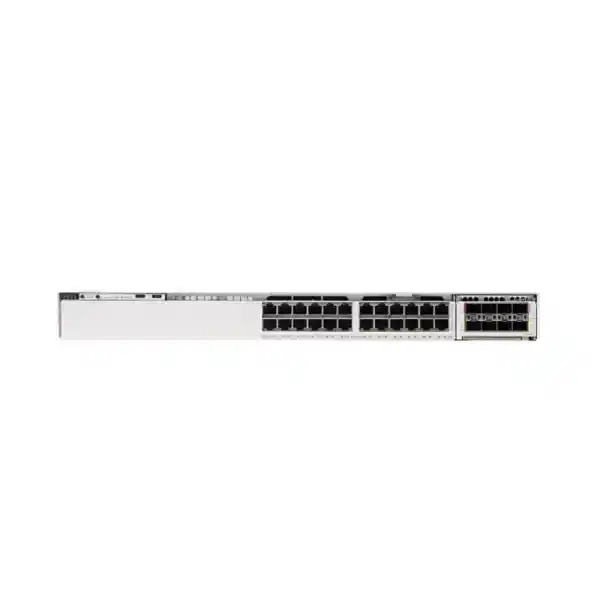
Cisco C9350-24T Smart Switch for Enterprise Access
The Cisco C9350-24T is built for organizations that want a modern, high-performance access-layer switch with 24 copper Gigabit Ethernet downlinks, no PoE, resilient stacking, and modular high-speed uplink choices. It fits networks where desktops, servers, printers, appliances, industrial controllers, or other wired endpoints use their own power source and the switching requirement is centered on reliable data connectivity, segmentation, routing, visibility, and operational control.
For a Tanzania deployment, the main buying decision is not simply “24 ports.” Confirm whether a data-only design is intentional, choose the correct uplink module and optics, select the required Cisco subscription tier, and decide how much power and stack redundancy the site needs. FourTeck Tanzania can use these design inputs to prepare a configuration-oriented quote without assuming PoE, optics, licenses, or accessories that your project may not need.
Cisco C9350-24T at a glance
What the C9350-24T is designed to solve
Enterprise access networks often need more than a basic collection of Ethernet ports. The switch at the edge has to support segmentation, policy, routing, monitoring, uplink growth, software lifecycle management, and resilience without making every small change a hardware replacement project. The C9350-24T addresses that requirement with a 24-port 1G copper access configuration, Cisco IOS XE software, an enterprise switching feature set, high-capacity stacking, and a field-replaceable uplink architecture.
This specific model is best understood as a data-only access switch. It is not the version to choose when IP phones, wireless access points, surveillance cameras, door controllers, or other endpoints must receive power through the Ethernet cable. In those environments, the C9350-24P or C9350-24U may be a better starting point, depending on the required power level. The C9350-24T is more appropriate when attached devices are locally powered, when PoE is intentionally separated from data switching, or when the switch is serving equipment that does not benefit from PoE.
That distinction matters commercially as well as technically. Buying a non-PoE switch for a PoE-dependent design creates immediate rework, while buying PoE capacity for a rack of independently powered endpoints may add cost and power-system complexity that the project does not need. A correct C9350-24T design therefore starts with an endpoint inventory: what connects to each port, how each device is powered, what VLAN or policy it belongs to, and what uplink capacity is required between the access layer and the rest of the network.
24-port Gigabit Ethernet access for structured networks
The C9350-24T provides 24 copper downlink ports supporting 10 Mbps, 100 Mbps, and 1 Gbps Ethernet. That speed mix allows the switch to accommodate modern Gigabit devices while still supporting older Ethernet endpoints that negotiate at lower rates. In a typical office or campus design, these ports can serve desktop computers, printers, building-management interfaces, security appliances, test equipment, console servers, legacy controllers, or other wired devices that use standard copper Ethernet.
Twenty-four ports can also be a practical fit for smaller wiring closets or branches where a 48-port switch would leave substantial unused access capacity. The correct choice should be based on both the current endpoint count and a realistic growth margin. A design that uses 23 or 24 ports on day one leaves little room for moves, additions, temporary devices, or troubleshooting. In contrast, a deployment with roughly 12 to 18 planned endpoints may preserve useful spare capacity while keeping the physical footprint to a single rack unit.
Copper cabling quality still matters. The switch cannot compensate for damaged patch leads, poor terminations, excessive channel length, or an unsuitable structured-cabling category. Before migration, document the patch panel, cable routes, endpoint NIC capabilities, and any ports currently forced to specific speed or duplex settings. A clean cabling audit reduces the risk that an access-switch upgrade is blamed for physical-layer problems that already existed in the site.
High-speed uplinks without locking the chassis to one interface choice
One of the most important design features of the C9350-24T is its modular uplink architecture. Cisco supports the C9350-NM-2C and C9350-NM-8Y network modules on this model. The C9350-NM-2C provides two QSFP28 slots supporting 40G or 100G Ethernet. The C9350-NM-8Y provides eight SFP56-based slots that can support 1G, 10G, or 25G, with supported operation also allowing four 50G interfaces. This gives the access switch room to connect into different distribution or core designs without changing the complete chassis.
For buyers, “modular uplink” also means that the base-switch selection is only one part of the bill of materials. The required network module, optical transceivers or direct-attach cables, fiber type, connector format, and far-end interface must all be validated. A 100G-capable module does not automatically mean every project should deploy a 100G uplink. The right speed depends on traffic load, oversubscription targets, application patterns, redundancy design, and the capability of the upstream switch.
Cisco describes the C9350-24T as supporting up to 200G of modular uplink bandwidth. In practical design terms, that provides significant headroom compared with the aggregate traffic of many 24-port 1G access deployments. The uplink plan should still account for failure scenarios. If two uplinks are used for redundancy, confirm whether the network design expects link aggregation, routed links, multi-chassis resiliency upstream, or a stack-based topology. Optics should be selected only after the distance, fiber plant, wavelength requirements, and upstream port type are known.
StackWise-1.6T for scale and operational simplicity
The Cisco C9350 Series supports StackWise-1.6T, with up to 1.6 Tbps of aggregate stacking bandwidth and support for as many as eight switches in a stack. A stack can present multiple physical switches as a unified system, simplifying some operational tasks while adding resilience and port-density growth. For access-layer environments with several racks or closets, this can be useful when the design benefits from common management, distributed forwarding, and a shared control-plane model.
Stacking is not a substitute for a complete high-availability design. Projects should confirm stack cable lengths, physical placement, member compatibility, software alignment, power redundancy, uplink distribution, maintenance procedures, and failure domains. Cisco specifies that C9350 models can stack together at StackWise-1.6T speeds when they use the same license level. That license-alignment requirement should be part of procurement planning rather than discovered during installation.
A single C9350-24T may be entirely appropriate for a small branch or isolated equipment room. A multi-member stack becomes more attractive when the site needs more than 24 access ports, wants uplinks distributed across different members, or requires maintenance flexibility. The topology should be designed around the actual service requirement. Adding more switches to a stack creates capacity, but it also increases the importance of good software-change planning, documented cabling, consistent configurations, and reliable power.
Performance capacity for enterprise access
Cisco specifies a 448G bandwidth figure and a 333.312 MPPS forwarding rate for the C9350-24T before stacking. With stacking included in the published capacity table, Cisco lists 2048G switching capacity and 1523.712 MPPS. These figures show that the platform is engineered as an enterprise access switch rather than a low-end unmanaged edge device. They should be interpreted within the broader architecture, because real application performance depends on traffic patterns, uplink design, configuration, protocol behavior, and the rest of the network path.
The C9350 family is based on Cisco Silicon One A100/L technology, and the C9350-24T uses a single A100/L ASIC for hardware-based forwarding. Cisco also lists 16 GB of DRAM and 18 GB of flash at the platform level, with optional SSD capacity for applicable use cases. The hardware resources support enterprise features such as large Layer 2 and Layer 3 tables, ACL processing, telemetry, and application-hosting capabilities within the limits of the software and license configuration.
Performance planning should focus on the intended role. For a conventional 1G access closet, the important questions are usually whether uplinks are adequately sized, whether inter-VLAN traffic is routed in the right place, whether policy and telemetry features are configured appropriately, and whether traffic bursts can be handled without avoidable congestion. A high specification number is useful, but a balanced topology and correctly selected uplinks are what turn that capacity into a good user experience.
Layer 2, Layer 3, segmentation, and traffic visibility
The C9350 platform is intended for enterprise switching where the access layer may need to do more than basic MAC-address learning. Cisco publishes support for thousands of active VLANs, switched virtual interfaces, large MAC and IP route tables, multicast entries, ACL resources, NetFlow entries, and jumbo frames up to 9216 bytes. The exact configuration and usable scale depend on software, feature combinations, and the selected SDM profile, so a design should be validated against the features that will actually be enabled.
For segmentation, VLANs can separate users, servers, management interfaces, building systems, guest devices, and other trust zones. Access control lists can then be used as one layer of policy enforcement where appropriate. In networks with routed access, Layer 3 interfaces and routing protocols may move traffic decisions closer to the edge. In traditional designs, the C9350-24T may operate primarily at Layer 2 while distribution switches perform inter-VLAN routing. Both approaches can be valid; the choice should reflect the organization’s operational model and failure-domain strategy.
Visibility is equally important. Traffic accounting and telemetry can help operations teams understand which applications or network segments are consuming capacity, where errors are occurring, and how traffic patterns change over time. These capabilities are most useful when there is a defined monitoring workflow. Collecting data without retention, dashboards, alert thresholds, or operational ownership adds complexity without improving incident response.
Security features belong in a broader access-control design
Cisco positions the C9350 Series as enterprise access switching with built-in security capabilities. The platform supports security ACL resources and other policy functions that can contribute to a defense-in-depth design. However, a secure network is not created by the switch model alone. Secure deployment also depends on management-plane protection, role-based administration, authentication design, secure software maintenance, logging, segmentation, endpoint posture, backup practices, and a well-defined change-control process.
Before installation, decide how administrators will access the device, which management network will be used, how credentials and keys are protected, how configuration backups are stored, and where logs and telemetry are sent. Default or shared credentials should not become part of the long-term operating model. Management traffic should be separated from ordinary user access where practical, and remote administration should use protected methods consistent with the organization’s security policy.
Access-layer security should also be aligned with endpoint behavior. A printer VLAN may need very different access than a user workstation VLAN. A server-room port may be statically assigned and closely controlled, while a campus user port may need identity-based policy and dynamic authorization. The C9350-24T provides an enterprise platform on which those controls can be implemented, but the policy design and integration choices remain project-specific.
Flexible management: device, cloud, or controller-led operations
The C9350 Series runs Cisco IOS XE and supports different operational models. Cisco documents cloud management through the Meraki dashboard, including options where the cloud is the configuration source and options where the device remains the configuration source while the dashboard provides centralized capabilities. Cisco also supports on-premises management with Catalyst Center. Traditional console, SSH, and CLI workflows remain relevant depending on the chosen operating mode.
This flexibility is valuable for organizations transitioning between management approaches. A network team with mature IOS XE automation and change control may prefer device-centric configuration. Another organization may prioritize centralized cloud workflows and inventory visibility. A larger campus may rely on Catalyst Center for broader enterprise operations. The right choice is not simply the newest interface; it is the model that matches the team’s skills, security requirements, connectivity assumptions, automation strategy, and governance processes.
Management choice also influences procurement because Cisco’s current C9350 ordering model uses the Cisco Networking Subscription. Confirm the selected license tier and term before ordering, along with the management platform the organization intends to use. License requirements can affect feature access, support, and operational workflows, so the subscription should be treated as a design input rather than an administrative detail added at the end.
Cisco Networking Subscription and license planning
Cisco’s ordering guidance for the C9350 Series uses a unified Cisco Networking Subscription model. For a 24-port access switch, Cisco lists medium access-tier licensing options, with Essentials and Advantage choices and multiple subscription terms. The correct license should be selected according to the features and management capabilities required by the project. Avoid assuming that a base hardware purchase automatically includes every software capability an organization may want to use.
License planning should be done across the whole stack or site. Cisco notes that C9350 members stack at StackWise-1.6T speeds with the same license level, so mixed procurement can complicate deployment. If a project is replacing older Catalyst access switches in phases, create a migration table showing each target closet, switch count, chosen license level, subscription term, software release plan, uplink type, and intended management mode. This reduces the chance of discovering mismatched entitlements during cutover.
The product page does not assume a particular subscription term because that is a commercial choice that should be validated when the quote is prepared. The same applies to Cisco support services. Buyers should request a bill of materials that clearly separates the chassis, network module, optics or cables, stacking accessories, power-supply options, licensing, and any support components so the delivered system matches the intended design.
Power architecture and redundancy planning
Cisco lists the PWR-C2-500WAC as the default power supply for the C9350-24T. Because this is a non-PoE model, the power system is supporting the switch itself rather than supplying an Ethernet power budget to attached endpoints. The C9350 platform supports field-replaceable, hot-swappable power supplies and can be configured with additional units for redundancy, subject to the supported power-supply combinations and deployment design.
Redundant switch power is most useful when the upstream electrical path is also resilient. Two power supplies connected to the same failing UPS or the same single circuit may not provide the independence a critical site expects. For important closets, consider how the switch PSUs connect to UPS systems, power distribution units, generator-backed circuits, and facility power. The goal is to understand the complete power path rather than count the number of PSU modules inside the chassis.
For Tanzania installations, power continuity and environmental conditions should be part of the site survey. Use appropriately sized UPS protection where the business requires continuity, and confirm that the rack has suitable grounding, ventilation, and electrical capacity. Do not place the switch in an enclosed cabinet that cannot remove heat effectively. Where the site has frequent power events, the operational plan should also include controlled recovery, configuration backup, and monitoring so repeated interruptions do not become hidden reliability problems.
Rack, weight, and environmental considerations
The C9350-24T chassis is approximately 4.4 cm high, 44.5 cm wide, and 38.3 cm deep before the additional depth of the installed power supply is considered. Cisco lists a weight of about 6.26 kg with the default power supply. It is therefore a standard 1RU enterprise switch, but rack-depth planning should use the installed dimensions, cable bend radius, rear power connectors, stack cables, and front patching requirements rather than the chassis depth alone.
Cisco specifies operating temperature ranges that vary with altitude, along with non-condensing relative-humidity limits. Environmental specifications are not a reason to run a communications room close to its maximum limit. Stable cooling, clean airflow, dust control, and unobstructed intake and exhaust paths provide better operational margin. In a populated rack, review the heat load from neighboring servers, UPS equipment, PoE switches, and other network devices rather than treating each unit in isolation.
Installation planning should also verify mounting hardware and cabinet compatibility. Standard rack environments are straightforward, while non-standard racks may require different brackets or accessories. Leave space for service access and label the switch, power feeds, uplinks, stack links, and patch-panel destinations. Good physical documentation speeds troubleshooting and reduces the risk of disconnecting the wrong circuit or uplink during maintenance.
Where the C9350-24T fits well
Office access
A good match for desks, printers, local servers, and business systems that already have separate power and need managed 1G access with enterprise segmentation and uplink resilience.
Branch networks
Useful where 24 access ports provide enough capacity and the branch requires enterprise policy, monitoring, modular uplinks, and a familiar Cisco operating model.
Server and appliance access
Suitable for 1G-connected appliances, management interfaces, and other locally powered equipment where PoE is unnecessary but Layer 2/3 control and high-speed uplinks matter.
Campus closets
Can serve as part of a larger access architecture when 24-port density, stackability, consistent operations, and modular aggregation links match the campus design.
When this model is not the right choice
Do not choose the C9350-24T when the access switch must directly power endpoints over Ethernet. A project with IP phones, Wi-Fi access points, cameras, access-control devices, or sensors may require the PoE+ C9350-24P or the higher-power C9350-24U, subject to endpoint power requirements and total power-budget planning. Likewise, if the site needs more than 24 copper access ports per switch, a 48-port model may reduce chassis count and rack usage.
The C9350-24T is also not a Multigigabit access model. Endpoints requiring 2.5G, 5G, or 10G over copper should be mapped to an appropriate C9350 Multigigabit SKU rather than forced into a 1G access design. This is particularly relevant when planning high-performance wireless access points or other devices whose wired interface is intentionally faster than 1 Gigabit Ethernet.
Finally, do not select the platform solely because the performance figures are high. If a deployment is small, unmanaged, and has no requirement for enterprise features, a simpler product family may be more economical. Conversely, if the site requires large-scale 25G or 100G downlinks rather than 1G copper access, a different role or platform should be evaluated. Good procurement starts with the network requirement, not the model name.
C9350-24T versus nearby C9350 options
| Model | Access ports | PoE profile | Best fit |
|---|---|---|---|
| C9350-24T | 24 × 10/100/1000 | No PoE | 24-port data-only enterprise access |
| C9350-24P | 24 × 10/100/1000 | PoE+, up to 30W per port | 1G access with powered endpoints |
| C9350-24U | 24 × 10/100/1000 | UPOE+, up to 60W per port | Higher-power 1G endpoints |
| C9350-48T | 48 × 10/100/1000 | No PoE | Higher-density data-only access |
This comparison is intended to help with model selection, not to replace a power and port audit. PoE models require total power-budget planning in addition to per-port capability. Multigigabit C9350 variants should be evaluated when endpoint interfaces exceed 1G over copper.
Tanzania deployment planning: practical checks before purchase
A successful deployment in Tanzania begins with the same disciplined design process used in any enterprise network, but local site conditions make power, cooling, cabling, and support logistics especially important to document. Confirm the rack location, UPS strategy, ambient conditions, available electrical circuits, grounding, and the condition of the copper and fiber cabling. If the switch is being installed in a branch, warehouse, industrial site, education facility, hotel, or other distributed location, include the physical environment in the bill-of-materials review.
Do not assume that an uplink optic used at one site will be correct at another. The transceiver choice depends on distance, fiber type, connector, wavelength, required speed, and the upstream switch. For single-mode or multimode fiber, verify the actual installed plant and patching. For direct-attach connections inside a rack or row, validate supported cable types and lengths. If a project will use stacking, confirm the physical distance between stack members before selecting stack cables.
Software and subscription planning should be completed before the hardware arrives. Define the intended management mode, administrator access process, monitoring platform, backup method, logging destination, and software-upgrade policy. If the organization has an existing Cisco estate, document software standards and feature dependencies so the new C9350-24T integrates into operations rather than becoming an isolated exception.
For commercial preparation, request a quote based on the complete configuration: C9350-24T chassis, required uplink module, optics or cables, stack accessories if applicable, desired power redundancy, Cisco Networking Subscription level and term, rack accessories, and any implementation services that are explicitly in scope. Price, stock, delivery time, and warranty should be confirmed for the actual quote instead of assumed from generic online listings.
Migration checklist for replacing an existing access switch
Record endpoint, VLAN, speed, duplex, description, special policy, and whether the connected device requires PoE.
Confirm current fiber or copper uplinks, upstream interfaces, redundancy method, optic type, and target bandwidth.
Align the new switch with the organization’s supported Cisco IOS XE release strategy and required subscription level.
Keep the old configuration, cable map, and recovery steps available until validation is complete.
After cutover, validate DHCP, DNS, routing, authentication, management, monitoring, and key applications rather than checking link lights alone.
Record serial and asset details, rack position, power feed, uplink ports, software version, license, and final port assignments.
Buying checklist for the C9350-24T
Use this checklist to prevent common ordering gaps. A complete switch solution is rarely just the chassis line item.
- Access requirement: Confirm that 24 copper 10/100/1000 Mbps ports are sufficient with realistic spare capacity.
- PoE decision: Confirm that connected endpoints do not need switch-delivered PoE.
- Uplink module: Select a supported C9350 uplink module that matches upstream speed and interface requirements.
- Optics and cabling: Validate transceivers, DACs, fiber type, connectors, distance, and compatibility at both ends.
- Stacking: If stacking is required, confirm member count, stack cables, physical arrangement, and license alignment.
- Power redundancy: Decide whether additional supported power supplies and independent power paths are required.
- License: Choose the Cisco Networking Subscription tier and term that match the needed features and management model.
- Management: Decide whether operations will use device-centric IOS XE, Meraki Dashboard capabilities, Catalyst Center, or a defined combination.
- Rack readiness: Confirm rack depth, mounting, airflow, grounding, cable management, and service access.
- Implementation: Define configuration, migration, testing, documentation, and support responsibilities before the cutover window.
Frequently asked questions
Does the Cisco C9350-24T provide PoE?
No. The C9350-24T is a data-only model. It provides 24 copper 10/100/1000 Mbps downlink ports but does not deliver PoE to connected devices. If your design includes IP phones, wireless access points, cameras, or other PoE-powered endpoints, evaluate a PoE-capable C9350 model and calculate the required total power budget.
How many access ports does the C9350-24T have?
It has 24 copper downlink ports supporting 10 Mbps, 100 Mbps, and 1 Gbps Ethernet. The model is aimed at enterprise access deployments where 24 data-only RJ-45 ports are appropriate for the endpoint count and growth plan.
Can the C9350-24T be stacked?
Yes. The C9350 Series supports StackWise-1.6T, with up to 1.6 Tbps aggregate stacking bandwidth and as many as eight members. Stack design should include the required stack cables, compatible members, aligned licensing, software planning, and resilient uplink and power arrangements.
What uplink options are available?
Cisco supports modular uplink options on the C9350-24T, including the C9350-NM-2C and C9350-NM-8Y. These provide options spanning 1G, 10G, 25G, 40G, 50G, and 100G depending on the module and supported operating mode. The network module and optics or cables should be selected for the actual upstream design.
What is the published switching performance?
Cisco lists a 448G bandwidth specification and 333.312 MPPS forwarding rate for the C9350-24T before stacking. Cisco’s table lists 2048G switching capacity and 1523.712 MPPS with stacking. Actual network performance still depends on configuration, protocols, uplink design, and end-to-end traffic conditions.
Which power supply is standard?
Cisco lists the PWR-C2-500WAC as the default power supply for the C9350-24T. The C9350 platform supports field-replaceable power supplies and can be designed with additional power redundancy where required. The electrical design should consider the complete power path, including UPS and facility circuits.
Can it be managed from the Meraki Dashboard?
Cisco documents Meraki Dashboard management options for the C9350 Series, including cloud-led and device-configuration operating approaches. The exact workflow should be selected according to the organization’s management strategy, licensing, software support, and security requirements.
Does it work with Cisco Catalyst Center?
Cisco lists Catalyst Center as an on-premises management option for the C9350 Series. Compatibility and feature support should be confirmed against the software versions and controller release used in the target environment.
What license should I order?
Cisco uses the Cisco Networking Subscription for the C9350 Series, with Essentials and Advantage options and different subscription terms. For a 24-port switch, Cisco lists medium access-tier licenses. The correct tier depends on the features and management model required by your organization, and stack members should use the same license level for the documented StackWise design.
Is the C9350-24T suitable for Wi-Fi access points?
Only when the access points receive power separately and a 1G copper connection is sufficient. Many modern enterprise access points use PoE and may also benefit from Multigigabit Ethernet. In those cases, a PoE-capable or Multigigabit C9350 model may be more appropriate.
What should be checked before ordering for a Tanzania site?
Confirm access-port count, endpoint power requirements, uplink module and optics, subscription tier and term, rack depth, stack requirements, UPS and power redundancy, environmental conditions, and migration scope. Stock, price, delivery, warranty, and implementation services should be confirmed in the actual quotation rather than assumed.
Is C9350-24T the same as a basic 24-port Gigabit switch?
No. Although it provides 24 Gigabit Ethernet copper downlinks, the platform is designed as an enterprise access switch with IOS XE, high-performance stacking, modular uplinks, Layer 2/3 scale, policy resources, telemetry, flexible management options, and enterprise lifecycle considerations. It should be selected and operated as part of a broader network architecture.
Request a Cisco C9350-24T configuration and quote
For the most useful quotation, provide the number of switches, endpoint count, whether any endpoint needs PoE, preferred uplink speed, upstream switch model if known, fiber or cable type, stacking requirement, desired power redundancy, management preference, and any existing Cisco licensing standard. This makes it possible to review the chassis together with the network module, optics, stacking accessories, power, and subscription requirements.
FourTeck Tanzania can prepare the product configuration for review based on the verified project requirement. Commercial details such as current price, stock, delivery schedule, warranty terms, and service scope should be confirmed in the formal quotation for your exact order.




Reviews
There are no reviews yet.