
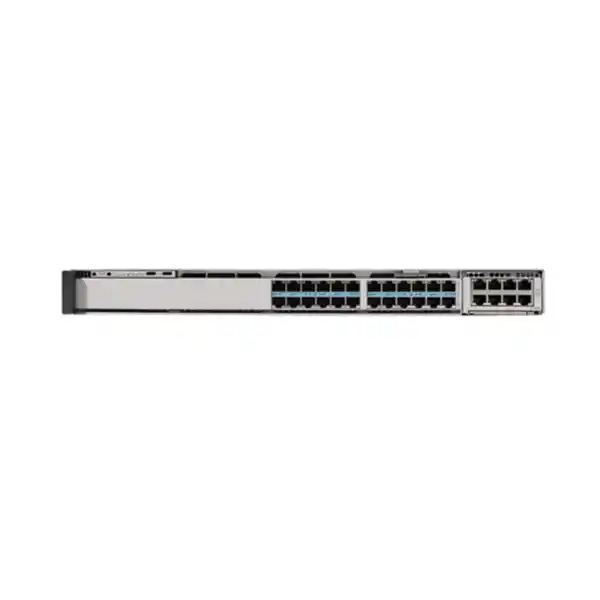
Cisco C9350-48HX Smart Switch
The Cisco C9350-48HX is built for access networks where ordinary 1 Gigabit switching no longer provides enough bandwidth or endpoint power. It combines 48 copper Multigigabit downlink ports, each capable of operating from 10 Mbps through 10 Gbps, with Cisco UPOE+ support of up to 90W per compatible powered port. That combination is especially relevant when a network must support high-performance Wi-Fi 6, Wi-Fi 6E or Wi-Fi 7 access points, advanced IP surveillance, smart-building systems, collaboration devices, edge compute appliances and other equipment that can place both high data and high power demands on the wiring closet.
For Tanzanian organisations planning a campus refresh, new headquarters, large branch, education facility, healthcare site, hospitality property, industrial office or smart-building deployment, the practical value is consolidation: one enterprise access platform can serve conventional wired endpoints, high-speed wireless infrastructure and power-intensive devices while retaining a path to faster uplinks, stacking and centralized operations. Before ordering, the project should still be sized carefully for actual endpoint power draw, power-supply configuration, uplink module choice, optics or cables, software licensing, rack depth and redundancy requirements.
Quick fit: who should consider the C9350-48HX?
Core specifications at a glance
| Model | Cisco C9350-48HX |
|---|---|
| Access ports | 48 × RJ-45 Multigigabit downlinks |
| Supported downlink rates | 10M / 100M / 1G / 2.5G / 5G / 10G |
| Power over Ethernet | Cisco UPOE+, up to 90W per supported port; maximum platform PoE budget depends on power-supply configuration |
| Maximum stated PoE budget | Up to 4320W with an appropriate supported PSU configuration |
| Stacking | StackWise-1.6T, up to eight C9350 switches in a compatible stack |
| Uplinks | Modular; supported options include 100G/40G, 50G/25G/10G/1G and multigigabit copper modules depending on design |
| Maximum aggregate uplink bandwidth | Up to 400G with supported modules |
| Switching capacity | 1760 Gbps standalone; 3360 Gbps with stacking |
| Forwarding rate | 1309.44 Mpps standalone; 2499.84 Mpps with stacking |
| Memory | 16 GB DRAM and 18 GB flash for the C9350 platform |
| Default PSU in Cisco ordering guide | PWR-C2-1600WAC-I |
Why 48 ports of 10G Multigigabit matter
Many access switches still assume that the majority of connected devices will remain at 1 Gigabit Ethernet. That is sufficient for ordinary phones, printers and many desktop clients, but it can become a bottleneck when newer wireless access points, workstations, media systems or specialist endpoints aggregate significantly more traffic. The C9350-48HX removes that constraint across all 48 access ports: each downlink can negotiate across 10M, 100M, 1G, 2.5G, 5G and 10G rates. This lets a network team mix legacy and high-speed devices in the same access layer without dedicating a small subset of premium ports to the fastest endpoints.
The design benefit is not simply “more speed.” It is better placement flexibility. A Wi-Fi access point that requires 5G today and may move to 10G in a future generation does not force an immediate switch replacement. A video production workstation, imaging endpoint or local server can be given additional access bandwidth where the cabling and endpoint support it. At the same time, older devices can continue to connect at lower negotiated speeds. For buyers, this can reduce the number of switch models needed in a wiring-closet standard and make capacity planning easier across a multi-floor or multi-building rollout.
The key design check is the full path, not only the switch port. Cabling category, cable length, patching quality, endpoint network interfaces, uplink capacity and upstream switching must all be appropriate for the intended rate. A 10G-capable access port does not guarantee that every existing copper run will operate at 10G. For a Tanzania deployment that reuses older structured cabling, a cabling survey and test plan are sensible before assuming every port can run at the highest multigigabit speed.
UPOE+ for Wi-Fi, cameras and high-power endpoints
The C9350-48HX supports Cisco UPOE+ with up to 90W per compatible port, aligned with IEEE 802.3bt Type 4 power delivery. That level is important because modern access-layer designs increasingly power devices that need much more than the 15.4W or 30W common in earlier PoE generations. High-radio-count wireless access points, pan-tilt-zoom cameras, digital signage, collaboration equipment, building controllers and edge devices can all benefit from higher per-port power availability when their specifications call for it.
Cisco lists a maximum PoE budget of 4320W for this model, but project teams should not treat that number as the amount automatically available from a single default power supply. Available PoE depends on the actual installed PSU configuration and input conditions. Cisco supports multiple field-replaceable power supplies in the C9350 chassis, and additional power supplies can be used to expand power availability or to build redundancy. For procurement, the useful exercise is to create a port-by-port power budget: list every powered endpoint, its expected and maximum draw, anticipated future endpoints, and the redundancy target. That produces a far more reliable bill of materials than multiplying a headline wattage by the number of ports.
Power planning should also include the building side of the installation. High-density PoE can place substantial load on rack power, UPS capacity and thermal management. Where the switch is intended to power dozens of high-wattage endpoints, verify the electrical circuit, UPS design, rack ventilation, ambient temperature and power-feed redundancy. This is especially important for critical sites where a network switch and its powered endpoints are expected to remain available during utility disturbances.
Designed for Wi-Fi 6, Wi-Fi 6E and Wi-Fi 7 access layers
Cisco positions the C9350-48HX for dense wireless access deployments, including Wi-Fi 6, Wi-Fi 6E and Wi-Fi 7. That fit comes from the combination of multigigabit copper and high-power PoE. Modern wireless access points can have radio capacity greater than a single 1G Ethernet uplink, and some require higher power budgets to operate all radios and features. A 2.5G, 5G or 10G wired connection can therefore help prevent the access switch from becoming the limiting component between the wireless edge and the rest of the LAN.
For a campus or office refresh, this means the wired design can be aligned with the wireless generation rather than treated as a separate decision. The access-point count per floor, expected client density, RF design, roaming requirements and application profile determine how many switch ports are needed. The uplink module should then be sized so aggregate traffic from those APs can move toward the distribution or core layer without creating an obvious oversubscription point. In higher-density environments, a 100G-capable uplink module can provide substantially more headroom than a traditional 10G access uplink.
The switch does not replace proper wireless planning. Access-point model, channel plan, mounting location, spectrum use, client capabilities and controller or cloud design remain separate considerations. The C9350-48HX is the wired foundation that supplies bandwidth and power; the overall wireless experience still depends on a complete end-to-end design.
High-speed modular uplinks
The C9350-48HX uses a modular uplink architecture instead of locking the buyer into one fixed uplink arrangement. Cisco documents supported modules that can provide two or four 100G/40G interfaces, multi-rate SFP56 options, and other configurations, with aggregate uplink bandwidth reaching up to 400G on this model. This flexibility matters when the same access-switch platform is used in buildings with different aggregation designs. One closet may need a pair of 40G links, another may require 100G uplinks, and a third may benefit from several 25G connections.
For procurement, the network module is a deliberate design choice rather than an afterthought. The switch can be ordered with the uplink approach appropriate to the core or distribution layer, fiber plant and redundancy plan. Optics, transceivers, DACs or fiber patching must also be selected for the chosen module and distance. A project using redundant uplinks should account for both logical topology and physical path diversity instead of simply installing two links through the same conduit or upstream chassis.
The most important buying question is not “what is the fastest module?” but “what uplink capacity and media fit the real traffic pattern and architecture?” A 400G aggregate option provides substantial headroom, but it is not automatically necessary for every access closet. Matching module choice to traffic forecasts, upstream port availability and lifecycle plans helps control cost while retaining a clear upgrade path.
StackWise-1.6T: scale without managing every switch as an island
Cisco StackWise-1.6T allows compatible C9350 switches to operate as a unified stack using dedicated rear-panel stack connectivity. Cisco supports up to eight members in a C9350 data stack and states up to 1.6 Tbps of stacking bandwidth. For network operations, stacking can reduce the number of separately managed access devices and create a single logical system with distributed forwarding. It is particularly useful in larger wiring closets where one 48-port switch is insufficient but administrators still want a consistent control and operational model.
The model can participate in stacks with other C9350 models at StackWise-1.6T speeds when the supported license-level requirements are met. That gives designers some freedom to mix access-port profiles within the broader C9350 family. Cisco also states that these switches use the StackWise-1.6T and StackPower cables specified for the C9350 platform and are not compatible with stacking or StackPower cables from previous-generation Catalyst 9300 switches. This distinction is important during upgrades because existing cables from an older stack should not be assumed reusable.
A stacking plan should define member count, physical cable topology, software version alignment, license compatibility, failure domains and maintenance procedures. For critical networks, consider what happens when one member, one stack cable, one power feed or an upstream link fails. Stacking improves operational simplicity, but resilience comes from the full architecture rather than from the stack feature alone.
StackPower+ and power resiliency
The C9350 family supports Cisco StackPower+, which lets power supplies across supported stacked switches contribute to a shared power pool. Cisco describes this as a 55V power-sharing architecture and supports up to four switches in a StackPower+ ring. In a high-PoE deployment, that can be valuable because power capacity and redundancy can be planned across a group of switches rather than treated as completely isolated per-device resources.
A practical example is a closet with several access switches powering wireless access points and cameras. Instead of sizing every chassis independently for the worst possible combination, a StackPower+ design may allow installed power supplies to be pooled so capacity can be redistributed according to demand. Additional PSU capacity can also be introduced to improve redundancy. The exact arrangement should still be checked against Cisco design guidance and the expected maximum endpoint load, because power sharing does not remove the need for sufficient total capacity.
For Tanzanian sites where power continuity is a major design concern, StackPower+ should be considered together with UPS runtime, generator strategy, separate electrical feeds and monitoring. A shared switch power pool helps at the equipment layer, while site resilience depends on how long the upstream electrical infrastructure can sustain the network and its powered devices.
Performance for demanding access networks
Cisco lists the C9350-48HX with 1760 Gbps of switching capacity and a 1309.44 Mpps forwarding rate in standalone operation. With stacking included, the listed capacities rise to 3360 Gbps and 2499.84 Mpps. The model uses dual Cisco Silicon One A100/L ASICs, while the broader C9350 platform provides the scale needed for enterprise Layer 2 and Layer 3 access roles. These figures are relevant because a switch with 48 high-speed copper ports needs an internal architecture that can handle simultaneous traffic without turning its port count into a paper specification.
The platform specification includes 16 GB of DRAM, 18 GB of flash, support for up to 64,000 MAC addresses and substantial IPv4/IPv6 routing scale. It also supports 9216-byte jumbo frames and Flexible NetFlow capacity. Not every access network will approach these limits, but the scale provides headroom for large campuses, segmented networks, routing at the access layer and environments with many endpoint identities.
Buyers should still map feature requirements to the chosen software license and release. Hardware capacity and software entitlement are different questions. If the design depends on a specific routing protocol, segmentation feature, automation function, encryption capability or management integration, confirm it against the current Cisco licensing matrix and target IOS XE release before procurement.
Layer 2, Layer 3 and segmentation capabilities
The C9350 platform is not limited to basic Ethernet aggregation. Cisco IOS XE provides enterprise Layer 2 switching and IP routing functions, IPv6 routing, multicast support, Quality of Service and policy enforcement. The platform also supports Software-Defined Access and, on suitable software releases and licenses, technologies such as BGP EVPN. This means the switch can participate in modern campus architectures rather than only acting as an unmanaged endpoint concentrator.
For a conventional campus, the switch may terminate user VLANs, provide gateway services where the architecture calls for routed access, apply access-control policy, classify traffic and export flow telemetry. For a more advanced design, segmentation can be integrated with Cisco TrustSec and fabric-based approaches. The right configuration depends on whether the organisation wants centralized policy, traditional VLAN/routing operations, cloud management, on-premises management or a hybrid operating model.
Avoid buying solely from a feature checklist. The design should identify the exact operational model, required licenses, supported software release, identity system, authentication method, upstream architecture and failure behavior. This turns a long list of capabilities into an implementable campus design rather than an unnecessarily complex configuration.
Security and traffic visibility
Cisco equips the C9350 platform with enterprise security functions that can be applied at the wired edge. Hardware access-control lists help enforce policy at line rate, while Cisco TrustSec can support segmentation. The platform also supports MACsec encryption and high-speed IPsec capabilities under the appropriate design and software conditions. Secure Boot, image signing and Cisco trust-anchor technologies are intended to protect platform integrity from startup through normal operation.
Visibility is equally important. Flexible NetFlow can capture traffic-flow information, NBAR can assist with application recognition, and SPAN or ERSPAN can mirror traffic for analysis. IP Device Tracking helps maintain awareness of connected endpoints. These functions give operations and security teams better information about what is attached to the access layer and how traffic is behaving, which is particularly useful in mixed user, IoT and operational-technology environments.
Security capabilities should be deployed as part of a broader policy. Port authentication, identity services, segmentation, management-plane protection, logging, software maintenance and incident-response processes all contribute to the result. A switch can enforce policy at the edge, but it cannot compensate for poor credential management, weak endpoint security or an unmonitored network.
Flexible management: Cisco IOS XE, Catalyst Center and Meraki dashboard
Cisco IOS XE is the operating system for the C9350 Series. It supports traditional command-line operations as well as model-driven programmability through NETCONF, RESTCONF and YANG, on-box Python scripting and streaming telemetry. For teams that already operate Cisco enterprise switching, this provides a familiar basis for configuration standards, automation, change control and troubleshooting.
Cisco also supports different management approaches. Catalyst Center can provide on-premises centralized management and automation, while the Meraki dashboard can be used for supported cloud management or monitoring workflows. Cisco describes options where configuration is sourced from the cloud and options where device configuration remains local while the cloud dashboard provides centralized visibility and command access. This flexibility can help organisations choose a model that matches internal skills, governance and connectivity requirements.
The management choice should be made before rollout because it affects operating procedures, licensing, onboarding and support processes. A team running dozens of sites may prioritize templates, inventory and remote monitoring; a tightly controlled data environment may prioritize local administration; another organisation may use a hybrid pattern. The C9350 platform supports these different operational styles, but the project should define one as the standard rather than leaving each switch to be administered differently.
Programmability, telemetry and application hosting
Modern network operations increasingly depend on automation and telemetry rather than manual command entry alone. The C9350 platform provides model-driven interfaces and streaming telemetry so configuration and operational data can be integrated with orchestration, monitoring and compliance workflows. For larger Tanzanian enterprises or service teams managing many switches, this can reduce repetitive configuration work and make it easier to audit whether the access layer remains aligned with standard templates.
Cisco also provides on-box application-hosting capabilities using the platform’s x86 resources, with allocated CPU and memory as well as application-facing interfaces and optional local SSD storage. Cisco identifies services such as ThousandEyes and Cisco Spaces among possible hosted workloads. This creates opportunities for localized visibility or services at the network edge without deploying a separate appliance for every function.
Application hosting should be planned conservatively. Confirm the exact application, software release, storage requirement, licensing, resource allocation and operational support model. The switch remains a critical network device, so hosted applications should not be treated as unrestricted general-purpose server workloads. The value is targeted edge functionality closely associated with network operations.
Power supplies, cooling and physical deployment
Cisco’s ordering guide lists PWR-C2-1600WAC-I as the default power supply for the C9350-48HX. The chassis supports multiple field-replaceable power supplies, allowing designs that prioritize greater PoE capacity, redundancy or both. The 1600W supply reaches its higher rated output with the specified higher-voltage input range, so the electrical design must be checked rather than assuming identical power availability under every input condition. This is especially relevant when the goal is to approach the switch’s maximum PoE delivery.
Cooling is handled by three field-replaceable fan modules with N+1 redundancy. Cisco specifies front-to-back airflow for the platform. The C9350-48HX weighs approximately 8.5 kg with the default power supply, and the chassis family is a 1RU access-switch format. Rack planners should verify the full installed depth with the selected PSU, leave enough rear clearance for power and stacking connections, preserve airflow, and avoid placing the switch in an enclosure where heat from high PoE load cannot be removed effectively.
Cisco specifies an operating range that varies with altitude, including up to 45°C at lower elevation limits and a reduced maximum at higher elevations. A project should compare the actual equipment-room conditions with the published hardware specifications. Where ambient temperatures are high or cooling is unreliable, the solution should include environmental monitoring and appropriate HVAC rather than relying on the switch to tolerate sustained operation outside specification.
Licensing and software planning
The C9350 family uses Cisco’s unified switching licensing approach. Cisco’s ordering guidance describes Essentials and Advantage license levels within the Cisco Networking Subscription model, with management flexibility across supported Cisco platforms. The appropriate license depends on the features and management model required by the project, so licensing should be part of architecture design and commercial planning rather than added after the hardware list is complete.
Cisco identifies IOS XE 17.18.1 as the introductory software release for the C9350-48HX and, in its current recommended-release guidance as of September 2026, lists IOS XE 17.18.4 for the C9350 models that include this SKU. Software guidance changes over time, so deployment teams should validate the recommended release again at implementation, review relevant release notes and confirm compatibility with the chosen management system, identity platform, optics, modules and feature set.
A disciplined rollout normally includes a standard software version, configuration baseline, rollback plan, maintenance policy and lab validation for critical features. This is particularly important when migrating from an older Catalyst generation because stack cables, power-sharing cables, licensing and some operational behaviors may differ even when the command-line experience feels familiar.
Where the C9350-48HX fits in a campus architecture
The most natural role for the C9350-48HX is the enterprise access layer: the point where user devices, wireless access points, cameras, building systems and other endpoints connect into the campus. Its 48 high-speed copper ports make it appropriate for dense closets, while modular high-speed uplinks connect those closets to aggregation or core switching. Stacking can create larger logical access blocks when more than 48 ports are required at one location.
In a headquarters design, each floor or zone may use one or more C9350 switches to connect edge devices, with redundant fiber uplinks toward a pair of distribution or core switches. In a university or hospital environment, the same switch can serve wireless APs, fixed workstations, cameras, phones and specialized systems, provided segmentation and QoS are designed appropriately. In a smart building, higher-power PoE can reduce the need for local power adapters for compatible endpoints while centralizing backup power at the communications room.
The model may be unnecessary for locations where all endpoints are low-bandwidth 1G devices and PoE demand is modest. In that case, a lower-speed C9350 model can be more economical. The C9350-48HX earns its place where a meaningful share of endpoints benefits from multigigabit speed, 90W-class power capability or the additional lifecycle headroom that these features provide.
C9350-48HX vs nearby C9350 choices
| Model type | Access profile | Best fit |
|---|---|---|
| C9350-48HX | 48 ports up to 10G mGig with up to 90W UPOE+ | Maximum copper access speed plus high endpoint power across the full 48-port bank |
| C9350-48TX | 48 ports up to 10G mGig, data-only | High-speed endpoints that do not need PoE from the switch |
| C9350-48U | 48 × 1G with UPOE | 1G access environments that need stronger PoE than standard PoE+ |
| C9350-48P | 48 × 1G with PoE+ | Conventional enterprise access where 1G and 30W-class PoE meet endpoint needs |
This comparison helps avoid overbuying or underbuying. If high-power PoE is not required, the 48TX removes that capability while preserving the 10G multigigabit access profile. If endpoint bandwidth will remain at 1G, the 48U or 48P may be a better fit depending on power needs. The 48HX is the premium choice when both multigigabit speed and high-power PoE are important across a large port count.
Tanzania deployment considerations
For a deployment in Tanzania, begin with the site rather than the switch specification. Confirm rack space, room temperature, ventilation, grounding, electrical feeds, UPS capacity and generator coverage. A high-density PoE switch can keep many endpoints running from centralized backup power, but that also means the network rack may carry a much larger electrical load than an older access design. Power-distribution units and protective devices should be sized for the actual PSU and redundancy arrangement.
Next, validate copper and fiber infrastructure. Existing copper runs should be certified for the speeds the project expects to use, especially if 5G or 10G Ethernet is required over installed cabling. Fiber types, connector standards, distances and spare strands should be checked before selecting uplink optics or DACs. Where buildings are separated, the physical-path design should consider lightning exposure, grounding and the benefits of optical isolation between structures.
Operationally, define who will manage the switch, where configuration backups will be stored, how software updates will be scheduled, and what remote support path is available when a site loses connectivity. For organisations with branches outside major cities, holding appropriate spares for power supplies, fans, stack cables, optics or a complete switch may be more valuable than relying on emergency logistics. Stock, delivery times and local service coverage should be confirmed for the specific quotation rather than assumed.
Finally, treat licensing, support and hardware as one solution. The switching platform is highly capable, but features such as centralized management, advanced policy or specific software functions may depend on the selected subscription and release. A complete quotation should therefore identify the switch, PSU arrangement, uplink module, optics or cables, stack components, software license, support level and any required accessories.
Sizing the switch for a real project
A useful sizing process starts with endpoints. Count wired users, access points, cameras, phones, building systems, printers, conference devices and any other network-connected equipment. For each device type, record the required port speed, whether PoE is needed, and the expected maximum power draw. Add sensible growth capacity rather than filling all 48 ports on day one. High-density wireless deployments often benefit from keeping spare ports in each closet so an additional AP can be installed without immediate switch expansion.
Then calculate traffic. A port that negotiates at 10G does not necessarily consume 10G continuously, so uplink sizing should use realistic workload assumptions plus burst and growth headroom. Identify east-west traffic that remains local, north-south traffic toward servers or internet services, and any especially heavy applications such as video, imaging, backup or large data transfers. This helps determine whether 25G, 40G, 50G or 100G uplinks are warranted.
Power sizing follows the same logic. Use endpoint maximums, diversity assumptions and resilience goals to select the number and type of power supplies. If the organisation expects all ports to support near-maximum UPOE+ draw simultaneously, the PSU design will be very different from an office where only a subset of ports power 20–30W devices. Include the UPS and generator implications of the chosen PoE load.
Finally, determine availability needs. Decide whether switches will be stacked, whether uplinks will be redundant, whether power will be shared with StackPower+, and which failures must be survived without service interruption. The result should be a documented bill of materials and topology rather than only a switch quantity.
Migration from older access switches
Replacing an older access layer with C9350-48HX switches is an opportunity to clean up more than hardware. Before migration, document VLANs, trunks, routing, authentication, QoS, spanning-tree behavior, monitoring, port descriptions and special device requirements. Old configurations often contain years of unused interfaces, temporary exceptions and historical commands that should not automatically be copied into a new platform.
Physical migration should also account for differences in chassis depth, power connectors, fan direction, uplink modules and stack hardware. Cisco explicitly notes that C9350 StackWise-1.6T and StackPower cables differ from previous-generation Catalyst 9300 stack cables, so a refresh bill of materials should include the correct new accessories. Existing transceivers should be validated for support rather than assumed compatible because the connector looks the same.
A staged migration reduces risk. Build the new stack or switch, load the approved IOS XE release, apply the validated configuration, test uplinks and management, then migrate endpoint groups in controlled batches. For PoE devices, confirm that expected power negotiation occurs. For multigigabit endpoints, verify actual negotiated speed and error counters after cutover. Maintain a rollback path until service is stable.
Where the new design also changes management architecture or segmentation, separate those changes into controlled steps where practical. Hardware replacement, IP addressing, identity policy and cloud-management onboarding do not always need to happen in the same maintenance window.
Operational checklist after installation
Confirm the approved IOS XE release, boot variables, image integrity and upgrade policy. Record the running version in inventory.
Check PSU status, redundancy mode, PoE consumption and available power after all intended endpoints are connected.
Verify member roles, stack links, software consistency and failover behavior before production sign-off.
Confirm both physical and logical uplink redundancy, expected routing or port-channel state, and path diversity.
Sample critical APs, cameras and workstations to confirm intended speed, duplex and PoE class.
Add the switch to logging, telemetry, alerting, configuration-backup and capacity-monitoring systems.
Post-install validation is where many avoidable problems are caught. A switch can pass basic connectivity tests while still having an undersized power budget, a down stack link, unexpected 1G negotiation on a multigigabit endpoint, or a redundant uplink that never actually forwards during failover. Treat commissioning as a documented technical acceptance step rather than simply confirming that link lights are green.
Buying considerations before requesting a quote
The switch chassis is only one line in a complete C9350-48HX solution. Confirm the required uplink network module and whether uplinks will use fiber optics, DACs or another supported media choice. If stacking is planned, include the correct StackWise-1.6T cables and, where power sharing is required, the appropriate StackPower+ cables. Do not reuse older Catalyst 9300 stack accessories unless Cisco documentation explicitly supports them for the C9350 platform.
Define the PSU configuration from the desired PoE load and redundancy target. The Cisco ordering guide identifies a 1600W unit as the default PSU for the C9350-48HX, but additional supplies may be needed for more PoE capacity or resilience. Each PSU also needs the appropriate power cable for the installation. Check rack power and UPS sizing alongside the switch bill of materials, especially for installations expected to power many 60W–90W endpoints.
Select the software license and support level based on actual required features and management. If the network depends on advanced routing, segmentation, centralized assurance, cloud management or specific integrations, confirm those entitlements in the current Cisco licensing information. Where service continuity is important, determine the desired hardware replacement and technical support arrangements before purchase.
For a Tanzania quotation, request a configuration-specific proposal rather than only a chassis price. Ask for the switch, licensing, power supplies, network module, optics or cables, stacking accessories and support to be itemized. Availability, lead time, taxes, duties, delivery arrangements and warranty handling should be confirmed for the quoted supply; they should not be inferred from manufacturer data.
Frequently asked questions
Does the C9350-48HX provide 10G on all 48 access ports?
Yes. Cisco specifies 48 Multigigabit copper downlinks supporting 10M, 100M, 1G, 2.5G, 5G and 10G. Actual negotiated speed depends on the connected endpoint, cable plant and configuration.
Can every port deliver 90W UPOE+?
The port hardware supports up to 90W UPOE+ per compatible port, and Cisco lists a maximum PoE budget of 4320W for the model. Reaching a given aggregate power level depends on the installed power-supply configuration and input conditions, so the project should be power-budgeted rather than assuming maximum power is automatically available.
Is the C9350-48HX suitable for Wi-Fi 7?
Yes. Cisco positions the C9350-24/48HX models for Wi-Fi 7 and other high-performance wireless deployments because they combine multigigabit wired access with high-power UPOE+. The specific access-point model and its required data rate and power budget should still be validated.
How many C9350 switches can be stacked?
Cisco supports up to eight C9350 members in a StackWise-1.6T data stack, subject to supported model and license conditions. The platform uses dedicated C9350 StackWise-1.6T cabling.
Can I reuse Catalyst 9300 stack cables?
Cisco states that C9350 switches use their specified StackWise-1.6T and StackPower cables and are not compatible with stacking or StackPower cables from previous-generation Catalyst 9300 switches. Plan new cabling as part of the migration bill of materials.
What uplink speeds are available?
The switch supports modular uplinks. Depending on the selected network module, designs can use 100G/40G interfaces or multi-rate 50G/25G/10G/1G options, with the C9350-48HX supporting configurations up to 400G aggregate uplink bandwidth.
What is the default power supply?
Cisco’s current ordering guide lists PWR-C2-1600WAC-I as the default PSU for the C9350-48HX. Additional supported power supplies can be selected where required for capacity or redundancy.
Can the switch be managed from the cloud?
Cisco supports Meraki dashboard management options for the C9350 series as well as on-premises management through Catalyst Center and conventional IOS XE administration. Exact workflows and entitlements should be validated for the selected license and release.
What should I provide when requesting a quote?
Provide the number of switches, estimated powered-device count and wattage, desired uplink speeds and media, stacking requirement, redundancy target, preferred management approach and any feature-specific licensing needs. This allows the quotation to include the right PSU, uplink, optics, stack cables and software rather than pricing only the base chassis.
Request a Cisco C9350-48HX solution quote
The Cisco C9350-48HX is a strong access-layer choice when a project needs 48 high-speed multigigabit copper ports, up to 90W UPOE+ capability per supported port, high-capacity modular uplinks and enterprise stacking. The most effective quotation is configuration-specific: it should match endpoint power, uplink bandwidth, stack design, software features, support requirements and the electrical environment of the site.
Request a project quote with your port count, PoE load, uplink requirements and redundancy goals so the switch, licensing, power supplies, network module, optics or cables and stacking accessories can be sized as one solution for your Tanzania deployment.




Reviews
There are no reviews yet.