
CISCO CATALYST 1200 • TANZANIA
Gigabit access and PoE+ power for a growing business LAN
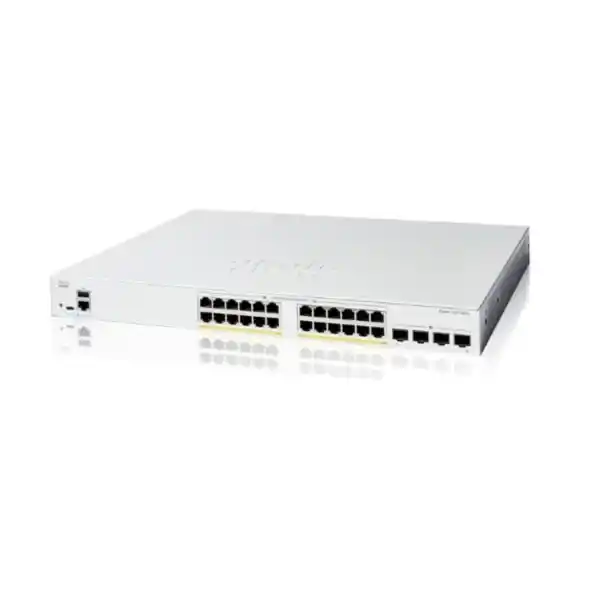
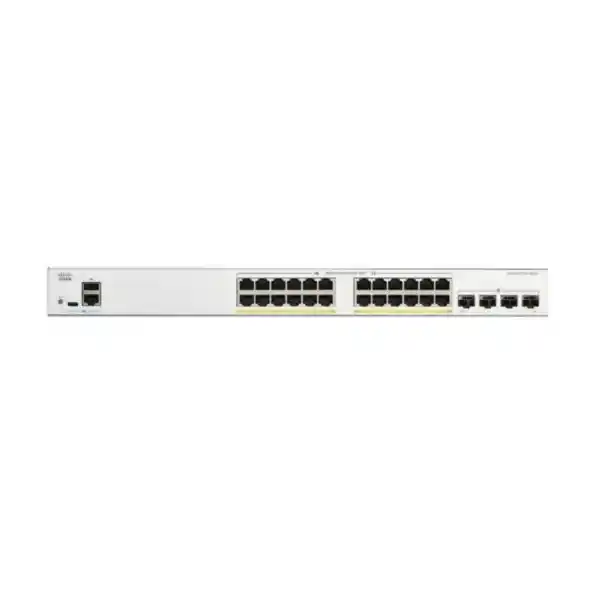
The Cisco Catalyst C1200-24FP-4G Network Switch suits organizations that need wired connectivity and centralized power for compatible IP phones, wireless access points and cameras. It combines 24 Gigabit copper ports with four 1G SFP uplinks, giving buyers a practical access-layer option when endpoint power matters more than a move to faster uplink speeds.
Request a model-specific quotation from FourTeck Tanzania with your endpoint list, power requirements and uplink details. Confirm the supplied unit’s PoE rating before approving a design close to the total power limit.
The specification that determines product fit
| Item | C1200-24FP-4G specification |
|---|---|
| Access connections | 24 × 10/100/1000 Mbps RJ-45 ports |
| Power delivery | IEEE 802.3af PoE and 802.3at PoE+; up to 30W per port within the shared budget |
| Total PoE allocation | 375W in Cisco’s current series datasheet |
| Uplinks | 4 × Gigabit SFP slots; 1G uplinks |
| Switching performance | 56 Gbps switching capacity; 41.67 Mpps forwarding rate for 64-byte packets |
| Physical format | Rack-mountable; 445 × 345 × 44 mm; approximately 4.6 kg |
| Cooling and input power | One fan; internal 100–240V AC, 50–60 Hz supply |
| Core network functions | VLANs, QoS, access control lists, spanning tree and IPv4/IPv6 static routing |
Choose it around the connected devices
Start with the equipment the business needs to connect. A switch purchase becomes much easier to assess when the requirement separates desk connections, powered endpoints, uplinks and growth. A team may have fewer employees than switch ports but still fill a cabinet with phones, ceiling access points, cameras, printers and meeting-room equipment. Conversely, a large headcount does not automatically justify this power budget if most users connect through a small number of access points.
This model is worth considering when Gigabit Ethernet meets the access requirement and several devices need standards-based PoE. Centralizing their power can simplify the physical installation and make it easier to include those devices in a planned backup-power arrangement. The result still depends on the complete design: cabling, endpoint compatibility, upstream capacity, configuration and the power available at the rack.
Ask the network owner to describe normal activity and the busiest realistic period. Video meetings, backup jobs, camera recording and large file transfers create different traffic patterns. That description helps determine whether the proposed switch belongs at a department edge, a small office rack or a branch access layer, and whether another platform would better meet future requirements.
Count ports before choosing a cabinet layout
Create a port schedule with one row for each physical connection. Include devices that are easy to overlook, such as attendance terminals, building controllers, presentation systems and spare patch-panel outlets. Record whether a desk phone provides a pass-through connection for a computer; that arrangement depends on the phone and must be checked instead of assumed. Allow space for the cabling arrangement that will actually be installed.
The four SFP slots are additional to the 24 copper access ports. They allow an appropriate optical uplink arrangement without automatically consuming a copper desk connection. Their usefulness depends on the equipment at the far end and the selected modules. Count each physical uplink in the network drawing and identify which connections carry production traffic, which support redundancy and which are reserved.
Leave an explicit growth allowance rather than filling every port on installation day. A spare connection helps with fault isolation and temporary work as well as expansion. If the planned endpoint count already uses all available copper ports, compare a larger access design before ordering. Repeatedly adding small switches later can complicate power management, documentation and troubleshooting across the site.
PoE budgeting: separate the port limit from the shared total
PoE planning has two separate questions: can a particular port supply the endpoint’s required standard and power, and can the switch supply the combined requirement of all endpoints? Passing the first check does not answer the second. A device inventory should therefore include both the required PoE standard and a defensible maximum demand for every powered device.
Do not interpret a full-PoE model name as a promise that every access port can deliver its maximum output simultaneously. Twenty-four allocations of 30W would require 720W, which exceeds this switch’s published budget. This arithmetic is a planning comparison, not a measurement of typical device consumption. A mixed population can fit comfortably, but the answer must come from the actual inventory.
Use equipment documentation to distinguish device consumption from power reserved at the switch. Cable losses and the way an endpoint requests power can affect the allocation you need to accommodate. Include peak modes, accessories and startup behavior where applicable. A camera with additional functions or an access point with optional features may need a different allowance from the simplest version of the same device family.
Keep useful headroom and validate the completed installation under realistic conditions. If a design fits only because every device is assumed to run at its lowest observed demand, revise that design before purchase.
A worked mixed-device power example
Consider a hypothetical office inventory with eight phones allocated 7W each, six wireless access points allocated 22W each and six cameras allocated 12W each. These figures are illustrative switch-side planning allowances. They are not compatibility statements or power specifications for any particular phone, access point or camera.
| Illustrative endpoint group | Ports | Allowance per endpoint | Subtotal |
|---|---|---|---|
| IP phones | 8 | 7W | 56W |
| Wireless access points | 6 | 22W | 132W |
| Network cameras | 6 | 12W | 72W |
| Combined planning allocation | 20 | — | 260W |
The example leaves four copper ports unused and an allocation of 260W before any additional reserve. Against a conservative 370W planning ceiling, it leaves 110W; against the datasheet figure of 375W, it leaves 115W. Neither remainder should be treated as automatically usable expansion power until the supplied unit’s rating and the real endpoint allocations have been checked.
The same exercise can reveal a different problem: a free port does not guarantee enough remaining power for the next device. Conversely, ample power does not create additional physical connections. Keep the port schedule and the power schedule together when approving changes. Replace the sample numbers with the documentation and operating modes for your equipment, then verify the switch’s reported allocation after deployment.
Understand the four Gigabit SFP uplinks
The 4G version provides Gigabit SFP uplinks. Buyers comparing similar names should pay particular attention to the ending of the product code: the 4X variant uses 10 Gigabit SFP+ uplinks. Select the uplink speed from the traffic requirement and the far-end equipment, not from the number of slots on the front panel.
Four physical uplinks do not automatically become one faster connection for every application. A single traffic flow can remain limited by an individual member link even when a design uses link aggregation. If several users access a central server or camera streams converge on a recorder elsewhere, evaluate the combined demand at that boundary. Internal switching capacity and upstream throughput answer different questions.
For fiber, identify the installed fiber type, route length, connector arrangement and optical requirements at both ends. Select modules that Cisco supports for the switch and that match the far-end interface. Confirm whether modules and patch leads are included in the quotation. An SFP slot describes an expansion interface; it does not establish that an optical transceiver is supplied with the chassis.
Write the uplink plan into the bill of materials. This avoids receiving the correct switch with unsuitable optics, mismatched patch leads or no suitable connection to the existing distribution equipment.
Plan VLANs around business access requirements
VLAN support allows an organized access network to separate groups of devices. A useful starting point is to identify staff systems, guest connectivity, voice, surveillance and device management. The right arrangement follows the organization’s access policy and operational responsibilities. Creating several VLAN numbers without deciding which systems may communicate leaves the most important design question unanswered.
For each group, document the address range, default gateway, DHCP source and permitted destinations. Then map those requirements to the switch port schedule and upstream links. A desk connection and an access-point connection may need different tagging arrangements. Confirm the native or untagged network and the allowed tagged networks on both ends of every relevant link.
Treat segmentation and enforcement as separate tasks. A VLAN separates the local broadcast domain; the network still needs appropriate controls wherever traffic crosses between groups. Decide whether that policy belongs on a firewall, a routing platform or a supported switch function. Test intended access and intended restrictions with representative devices before connecting the full population.
Keep the design understandable to the people who maintain it. A short, accurate matrix of groups and permitted services is often more useful during a fault than a long list of undocumented interface settings.
Use static routing where the design calls for it
The platform supports IPv4 and IPv6 static routing. That can be useful in a straightforward topology where a network administrator deliberately defines the paths between networks. It should be evaluated against the actual routing requirement rather than treated as a substitute for every enterprise routing feature. Confirm scale and software behavior for the intended deployment before making it the gateway for production systems.
A route also needs a complete return path. If a workstation can send a packet toward a server but the server’s gateway has no route back, connectivity can fail despite apparently correct local switching. Include the firewall, internet router and any upstream core in the routing review. Write down which device owns each gateway and where access controls are applied.
For many small installations, keeping security boundaries on the firewall is easier for the operating team to manage. In other designs, selected local routing may be appropriate. Choose the arrangement based on policy visibility, troubleshooting skills and future changes. When replacing an existing switch, confirm whether it previously performed only Layer 2 access or also held gateway addresses; that distinction materially changes the migration plan.
Connect IP phones with an end-to-end voice plan
A phone deployment needs more than link lights and available power. The endpoint must reach its call platform, obtain appropriate addressing and use the intended voice network. Confirm each phone’s PoE requirement and any pass-through connection to a computer. If the phone supports automatic network discovery, verify its behavior with the selected settings before applying a template across many ports.
Cisco documents voice VLAN capabilities and LLDP-MED network-policy handling for the series. These functions can assist a planned voice deployment, but the selected mode and endpoint behavior still need to agree. Define which system supplies addressing and any provisioning information. Test registration, internal calls and the external calling path through the relevant voice service.
QoS planning should follow the full call path. Identify where traffic is classified, which markings are trusted and how upstream devices handle congestion. A priority policy on the access switch cannot repair an overloaded external connection by itself. During acceptance testing, place calls while representative data traffic is active and check for audible problems, delay and instability.
Record the final phone-port settings in the handover documentation. This makes future desk moves easier and reduces the chance that a replacement phone or temporary computer connection inherits an unsuitable configuration.
Match wireless access points to both power and speed
Wireless access points differ in their wired interface speed, required power and operating modes. Confirm the exact access-point model and the features expected in use. An endpoint may establish a link while operating with restrictions if its power requirement is not met. Use the access-point documentation to confirm what is supported before including it in the proposed equipment list.
The copper ports here provide Gigabit access. An access point that is designed to use a faster wired link will need a different switching choice to realize that faster connection. Decide whether a Gigabit link fits the actual wireless design, including client density and the traffic expected at busy periods. A larger radio specification alone does not determine the required switch.
For multiple wireless networks, agree how the access point carries staff, guest and management traffic. Verify the VLAN arrangement with the wireless platform and upstream gateway. A guest network needs an enforceable access policy along its complete path, not merely a name that includes the word guest.
If your requirement begins with access-point selection, review FourTeck Tanzania’s Cisco wireless access point guidance alongside the wired switching plan. Assess the two together before fixing the final equipment quantities.
Size surveillance around recording traffic and peak demand
For a camera network, list the exact camera models and all functions expected to operate. Check the power requirement with the intended accessories and operating modes enabled. A simple daytime observation can miss demand from functions used at other times. Use the equipment documentation and a suitable allowance rather than treating every camera as an identical small load.
Map the path from each camera to its recorder or recording service. If the recorder is on the same switch, the traffic pattern differs from a design in which all streams cross an upstream link. Account for simultaneous viewing and playback as well as normal recording. Confirm expected bitrates with the surveillance design; the number of camera ports alone does not establish the bandwidth requirement.
Use the organization’s security policy to define who can reach camera interfaces and recording systems. Consider a dedicated surveillance network with access restricted at the appropriate boundary. Keep maintenance access available to authorized staff and document how updates are performed. If a camera fails to appear, check power, cabling, addressing and the recording configuration separately so that a network issue is not confused with an application issue.
Management that the operating team can maintain
Cisco provides local browser-based management and CLI options, with Cisco Business Dashboard support for broader visibility. Choose a management approach that fits the people responsible for the network. A single small installation may prioritize a clear local interface and an accessible configuration backup; a distributed operation may need a more consistent monitoring and maintenance arrangement.
Assign a deliberate management address and record how authorized administrators reach it. Restrict that reachability according to the organization’s policy and use supported encrypted access methods. Decide who is allowed to change settings, who receives fault reports and where the approved configuration is stored. These decisions should be complete before the switch becomes a dependency for everyday work.
Do not assume that the shared Catalyst branding means an existing configuration can be pasted unchanged from another platform. Compare syntax, feature behavior and software requirements during planning. Where automation or centralized tools are required, verify the exact integration against current documentation and the intended software release.
Make handover practical: provide a network drawing, the port schedule, the management method and an agreed recovery procedure. Store credentials through the organization’s approved process rather than putting them in an openly shared equipment list.
Apply access controls with a clear recovery path
The series supports access control lists and authentication-related functions, but effective protection depends on the policy and its implementation. Define the traffic that must remain available before adding restrictions. Consider normal users, administrators, printers, voice services, application dependencies and monitoring tools. An incomplete policy can block an essential service while still allowing an unintended route elsewhere.
Test restrictions using representative devices from each network group. Include both allowed and disallowed connections in the acceptance plan. Keep a known administrative recovery method available while changing management access. Make changes in a controlled window and preserve the working configuration so a mistaken rule does not turn a short task into an extended interruption.
If the organization plans to use endpoint authentication, confirm the identity service, client support and handling of devices that cannot participate. Phones, printers and embedded equipment may need different onboarding decisions. Establish how the help desk identifies an authentication problem and how a replacement device is admitted.
Keep unused connections under an intentional policy and protect physical access to the cabinet. Document exceptions with a reason and an owner. A switch feature list is useful during selection, but a maintainable access policy is what gives those controls operational value.
Prepare the rack, airflow and backup power
Check the cabinet before placing the order. Measure the usable equipment depth, allow room for power and network leads and verify that the mounting arrangement suits the installation. Include patch panels and cable management in the layout so technicians can identify and service connections without putting strain on the ports. Confirm the mounting accessories and power cord supplied in the quotation.
This model uses active cooling. Choose a location where fan noise and ventilation are acceptable, and keep airflow paths clear. Assess the temperature at the equipment intake under realistic cabinet conditions rather than relying only on the temperature of the room outside. If the cabinet is tightly enclosed or placed in a demanding location, review suitability with the installation designer before committing.
For backup power, size the UPS around total AC load and required runtime. The PoE budget describes power available to endpoints; it is not the complete input requirement of the switch and connected installation. Include any router, firewall, recorder and other equipment that must remain available. Powering access points while their upstream router has no backup may fail to preserve the service users actually need.
Have the responsible installer verify the local electrical arrangement, protective measures and power continuity requirements. Request a complete power plan instead of selecting a UPS from a headline wattage alone.
Build a complete bill of materials
A useful quotation identifies the exact switch and the components required to connect it. Include each uplink transceiver, the appropriate fiber patch leads, copper patch cords, rack accessories and any planned backup-power equipment. Specify quantities and compatibility requirements. When reusing existing components, record their exact identifiers and condition so the proposal does not quietly depend on an unverified spare.
Separate hardware from implementation tasks. Cabling preparation, configuration, migration, testing and documentation need clear owners whether they are handled internally or quoted as services. Ask the supplier to identify which items are included and which need separate agreement. Do not assume installation, ongoing management or a particular response time from the presence of a product listing.
For Tanzania procurement, request a current written quotation covering the exact configuration, applicable commercial terms and the intended destination. Confirm stock position, lead time, delivery arrangements and warranty terms for that offer. This page does not establish those transaction-specific details. If procurement requires additional product or import documentation, identify the requirement before committing to a purchase.
The strongest comparison is between complete, equivalent proposals. A lower chassis price can be misleading if another proposal already includes optics, accessories or a defined implementation scope.
Migrate with a small pilot before the full change
An access-switch replacement can affect many services at once. Begin with an inventory of existing connections, addresses and dependencies. Preserve the current configuration and label cables before moving them. Identify devices that are difficult to reach physically or need assistance from a separate administrator, such as ceiling access points, cameras and specialist business terminals.
Prepare the proposed configuration and test a small, representative set of endpoints. Include one device from every important group and verify its complete service, not just its physical connection. A working link does not establish that a phone can register, a printer can be found or a camera is recording. Resolve differences in tagging, addressing and power behavior before scaling out.
Schedule the production change with a defined rollback decision. Keep the previous equipment and recovery information available until the agreed acceptance checks are complete. Move connections in a controlled order and update the port schedule as each group is tested. If the installation depends on an upstream administrator, confirm that person is available during the window.
After changes are approved, preserve the startup configuration and an external backup through the documented management process. A deployment is not complete until the operating team can recover its working settings.
Acceptance checks that demonstrate the intended service
Agree the acceptance checks before installation so the customer and implementer share the same definition of success. Focus on outcomes the business can observe and the measurements that explain them. Test the planned endpoint population under realistic demand, including services that may activate outside normal working hours.
- Physical connections: confirm the port schedule, negotiated link speeds and stable links; investigate unexpected errors or repeated disconnections.
- Endpoint power: confirm the supplied unit’s rating, allocated power and behavior when the planned devices start together.
- Network separation: test addressing, gateways, permitted services and restricted access for each intended VLAN.
- Applications: verify phone calls, wireless access, camera recording, printing and the relevant business systems.
- Operations: confirm authorized management access, monitoring, saved configuration and a usable external backup.
- Power recovery: where backup power is part of the project, test the agreed recovery process and observe which services return.
Keep the results with the final equipment record. Investigate any exception rather than accepting a vague statement that the network seems fast. A documented baseline also helps later: if a new endpoint causes a problem, the team can compare current port usage and power allocation with a known working state.
Compare nearby models by the constraint you need to solve
| Requirement | Comparison to make | Decision to verify |
|---|---|---|
| Less aggregate PoE demand | C1200-24P-4G | Same 24 copper ports and four 1G SFP uplinks, with a 195W PoE budget. |
| Faster uplinks | C1200-24FP-4X | 24 Gigabit PoE+ access ports, four 10G SFP+ uplinks and a 375W datasheet budget. |
| More copper connections | A 48-port access design | Recalculate total endpoint power and uplink traffic as well as port count. |
| Broader enterprise requirements | A suitable enterprise access platform | Specify the required routing, resilience, management and software capabilities before comparing. |
A different model is useful when it addresses a real constraint. If the current design needs more upstream throughput, extra PoE capacity on its own will not solve that problem. If most connected equipment uses local adapters, paying for a larger shared power allocation may deliver little value. Compare the bottleneck, the operating requirements and the complete installed cost.
For organizations assessing a broader access-network project, FourTeck Tanzania’s Catalyst 9200 series overview provides a separate starting point. Treat that as a different platform assessment, with its own model and software checks. Similar port counts do not establish equivalent features, configuration behavior or resilience.
Troubleshoot by separating power, link and service
When a powered endpoint does not start, check the reported power state and the remaining allocation before changing unrelated network settings. Confirm the endpoint standard, cable condition and the configured port behavior. Test with a known suitable cable and, where practical, a known working endpoint. This narrows the cause without assuming the switch or device is defective.
When the endpoint has power but no network service, check the link state, negotiated speed, VLAN membership and addressing. A device can be powered through Ethernet while still having an incorrect network configuration. For an optical uplink, inspect module compatibility, fiber type and the configuration at both ends before treating the problem as an application fault.
When service is intermittent or slow, compare interface errors, utilization and event timing with the affected application’s behavior. Problems shared by several devices may point toward a common uplink or power dependency. A single affected device suggests a different investigation. Make one controlled change at a time and record what changed.
Avoid repeated blind resets as a routine response. They can interrupt other equipment and obscure evidence. Preserve relevant observations, work from the known configuration and escalate with the endpoint list, topology and symptoms when specialist help is needed.
Questions buyers ask before ordering
Can all 24 ports supply 30W at the same time?
No. The per-port capability is subject to the shared total. A simultaneous 30W allocation on all 24 ports would need 720W. Size the mix from actual endpoint requirements and leave headroom. Confirm the rating of the supplied unit when finalizing the design.
Is this a 10 Gigabit uplink switch?
This 4G model has four 1G SFP uplinks. If the network requires 10G uplinks, compare the appropriate 4X model and verify its supported modules, far-end interfaces and complete specification before selecting it.
Why do Cisco documents show both 370W and 375W?
The current series datasheet and comparison page list 375W, while the administration guide lists 370W. The documents differ. Ask for confirmation tied to the exact supplied unit; do not base a tightly loaded design on an unresolved difference.
Will it work with any IP camera, phone or access point?
Compatibility must be checked for the exact endpoint. Confirm the PoE standard, required power, Ethernet speed and any network settings. Devices using proprietary passive power or requiring a higher power standard need separate assessment. A matching connector alone is insufficient.
Are fiber modules included?
Do not assume they are. Request an itemized quotation identifying the supplied transceivers and patch leads. Check module support, the installed fiber and the far-end connection together before purchase.
Does the switch provide internet access by itself?
The switch connects the local network. Internet service still depends on the appropriate upstream gateway, service connection and security arrangement. Include those dependencies in the network and backup-power plans so the intended service works end to end.
What should I provide for a quotation?
Send the exact model, quantity, endpoint inventory, expected power allocation, uplink details and rack information. Include the intended destination and any required implementation tasks. Ask for current pricing, supply terms and the scope of warranty and support in writing.
Request a Cisco switch quotation for Tanzania
Ask FourTeck Tanzania for the Cisco Catalyst C1200-24FP-4G with a bill of materials matched to your actual network. Include how many phones, access points, cameras and wired users need connections; the required endpoint power; the uplink destination and fiber details; and any cabling or migration work that needs to be considered.
Before approving the order, confirm the exact supplied hardware, its total PoE rating, compatible optics, included accessories and current commercial terms. A clear requirement makes the quotation easier to compare and gives the installation team a practical basis for configuration, testing and handover.
Next step: share your endpoint and uplink schedule with FourTeck Tanzania for a model-specific quotation.




Reviews
There are no reviews yet.