
FOURTECK TANZANIA • BUSINESS NETWORKING
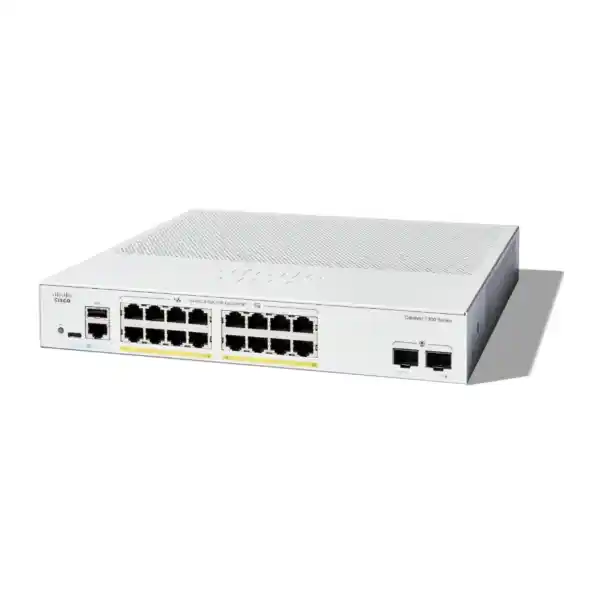
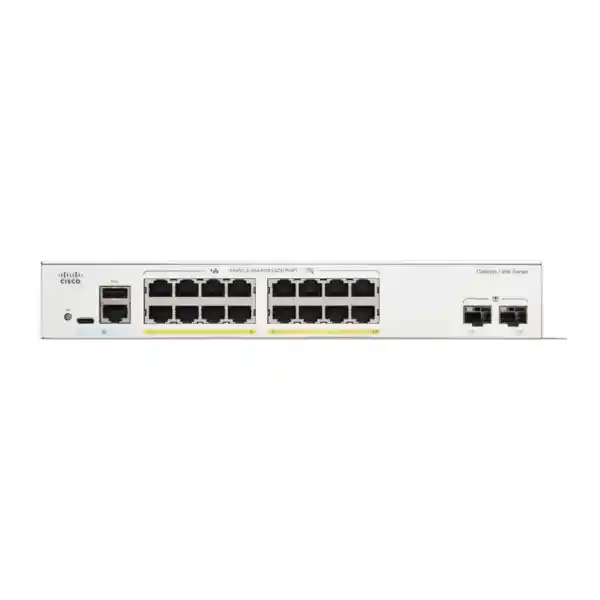
Cisco Catalyst C1300-16P-2G Network Switch
Connect a small business device mix with managed Gigabit Ethernet and shared PoE power. The C1300-16P-2G combines sixteen copper access ports with two Gigabit SFP uplinks, making it an option for a carefully sized office or branch network.
Request a quote from FourTeck Tanzania with your endpoint list, required uplink and installation scope so the proposed configuration can be checked before purchase.
A practical access switch for a defined device mix
Choose this model when your office needs a manageable wired network with centrally powered endpoints and a modest number of connections. It suits a planned mixture of computers, printers, compatible IP phones, wireless access points and cameras, provided the powered equipment fits the available electrical budget. Start with an endpoint list and a simple drawing of how the switch will connect to your router, firewall and any other switches.
The buying decision depends on three separate questions: how many physical connections you need, how much power the endpoints require, and how much traffic must travel upstream. Spare Ethernet sockets do not automatically mean spare power or spare uplink capacity. Considering these questions together helps avoid purchasing equipment that works during a small trial but becomes constrained after the remaining devices are connected.
For a Tanzania business preparing a new office or replacing a basic switch, the useful starting point is the actual network requirement. Describe the equipment and applications to FourTeck Tanzania when requesting a quote. Include any planned additions so the proposed switch, optics, cabling and power arrangements can be checked as one purchase.
Verified hardware at a glance
The following specifications identify the exact requested model. They should be used when comparing quotations because similar Catalyst product names can refer to different power budgets or uplink types.
| Copper access ports | 16 × 10/100/1000 Mbps RJ-45 |
|---|---|
| Fibre uplink slots | 2 × Gigabit SFP |
| PoE capability | IEEE 802.3af PoE / 802.3at PoE+; up to 30W per supported port |
| Total PoE budget | 120W shared across the powered ports |
| Switching capacity | 36 Gbps |
| Forwarding rate | 26.78 million packets per second, using 64-byte packets |
| Chassis | Rack-mountable; fanless |
| Dimensions, W × D × H | 268 × 297 × 43.94 mm |
| Weight | 2.38 kg |
Read the PoE budget before counting powered devices
PoE carries power and network data over the same compatible copper connection. That can simplify endpoint placement by reducing dependence on a separate local power adapter. However, the power required by each endpoint must still be supplied by the switch, and the total allocation has to remain within the shared limit. The number of PoE-capable sockets is therefore only one part of the design.
Use the endpoint manufacturer’s power requirements and the switch’s allocation behaviour when preparing a budget. A typical consumption figure measured during quiet operation may be lower than the amount needed during startup or when optional functions are active. Access point radios, camera illumination and attached phone accessories can change requirements. Record the exact model and power mode rather than estimating from a broad description such as camera or telephone.
As a purely illustrative calculation, six devices allocated 10W each and two devices allocated 20W each would require 100W in total. That leaves 20W against this model’s stated budget before any additional design reserve. These numbers are planning assumptions, not consumption claims for a particular endpoint. Replace them with verified figures and account for allocation, cable losses and operating conditions before approving the device list.
Build an endpoint schedule that supports an accurate quote
Create one row per device with its location, network connection, required PoE standard, maximum power requirement and expected installation date. Include existing equipment that will be moved onto the new switch. A short schedule is easier to validate than a request for a switch for an entire office, because it exposes both immediate demand and planned changes.
Separate non-powered connections from powered connections. A desktop computer or network printer may use an Ethernet port while drawing electricity from its own supply. A PoE phone uses both a network connection and part of the electrical budget. This distinction lets you see whether the project is constrained by socket count, power capacity, or both.
Reserve connections for equipment that is easy to overlook: a network recorder, meeting-room controller, reception workstation or an additional access point. Record which connections must remain available for troubleshooting. If the network is already close to the chosen port count on day one, compare a larger switch before committing to a layout that requires immediate expansion.
Plan the two SFP uplinks as complete links
The SFP slots provide a way to connect the access switch to suitable upstream equipment using compatible modules. A usable fibre connection requires more than matching the connector shape. Both ends need an appropriate speed, optical standard, wavelength arrangement, fibre type and supported module. The cable route and the equipment at the far end should be known before the optics are ordered.
For an existing fibre installation, provide the fibre type, approximate route length, termination details and upstream switch model with the quote request. For a new link, agree where the fibre will terminate and who is responsible for testing it. Do not assume that a transceiver or patch lead is included simply because the switch has an SFP slot.
This model’s uplinks are Gigabit SFP interfaces. If the design requires 10 Gigabit aggregation, choose a platform with suitable uplink hardware from the start. Changing a plug-in optic does not change the supported speed of the switch interface. Also check whether an upstream copper connection will consume one of the access ports in the proposed layout.
Separate local switching capacity from upstream bandwidth
The switch’s aggregate forwarding specification describes its internal switching capability under the manufacturer’s stated conditions. It does not describe the speed of your internet connection or guarantee the throughput of a file transfer. A real application also depends on its server, endpoint, cabling, protocol, storage and the route between the devices.
Draw the busiest traffic paths. Cameras sending recordings to a recorder on the same switch create a different upstream demand from cameras sending every stream through an uplink to another location. Likewise, a local file server may keep some traffic inside the access layer, while cloud applications depend on the router, firewall and internet service.
Consider simultaneous demand rather than adding only the advertised speeds of endpoint ports. Backup jobs, software downloads and video streams may overlap with normal working hours. If those activities share a constrained upstream link, rescheduling a task may help, but a sustained capacity requirement should influence the hardware choice. Ask for a design review when the access network will support large transfers or several busy wireless cells.
Organise staff, guest and device networks deliberately
VLAN support lets the network administrator organise connections into separate logical networks. The Catalyst administration tools include VLAN membership and voice VLAN configuration. A useful office plan might distinguish staff workstations, guest wireless users, telephones, cameras and switch administration, while keeping the design small enough for the team to operate confidently.
Choose those groups according to business access requirements. For example, decide whether guest devices should reach internal printers, whether camera users need access to every camera, and which administrators may manage the switch. Document the intended communication before configuration begins. That written policy gives the installer a clearer target than simply requesting several VLANs.
Segmentation needs coordination across the network. Access point settings, firewall interfaces, address allocation and upstream connections must agree with the switch configuration. A VLAN label by itself does not define all of the permitted traffic between networks. During acceptance, test both an allowed connection and a connection that should be blocked so the result matches the business requirement.
Choose where traffic between VLANs will be routed
The Catalyst 1300 platform includes Layer 3 functions, allowing suitable designs to route traffic between networks. Whether to use those functions here is an architectural decision. Many small offices prefer to keep routing and security policy on an existing firewall, while using the access switch to connect endpoints and carry the required VLANs.
Before enabling local routing, identify which device should inspect and control each traffic flow. Moving a path away from the firewall can change where an existing rule is enforced. Review return routes and the addressing plan as well as the forward path, because a connection can fail when the reply follows an unexpected route.
For a replacement project, ask the engineer to document the current default gateways and explain any proposed change. Avoid treating a Layer 3 feature label as proof that the switch replaces the complete role of a router or security appliance. Internet access, remote access and business security requirements still need their own design and validation.
Check IP phones as both network and power endpoints
A phone deployment needs reliable powering, network access and access to its call-control services. Verify the exact phone model, supported PoE standard and any accessory load. A basic desk phone and a phone with additional modules may have different requirements even when they belong to the same family.
Agree how phones will receive their network settings and how voice traffic will be identified. The voice VLAN functions can support an organised deployment, but the result depends on compatible endpoint behaviour and the chosen configuration. Test a representative phone before migrating every desk, especially when retaining existing provisioning or authentication arrangements.
Include real call tests in the handover: internal calling, an external call where the existing service permits it, and a call while ordinary office traffic is active. Switch selection alone does not establish compatibility with a PBX, SIP provider or telephone service. Supply those system details separately if they form part of the requested integration.
Match wireless access points to their wired requirements
An access point’s wireless generation does not by itself establish whether this switch is the right match. Check the AP’s Ethernet interface speed, required power standard and behaviour at a reduced power allocation. Some deployments may accept a lower operating mode; others depend on all radios and features being available.
List the intended AP model and quantity before choosing the power budget. Also describe the expected users and applications, since a meeting space with frequent video calls presents a different traffic pattern from a lightly used reception area. Wireless coverage design and wired switch sizing should inform each other.
If an AP requires a faster wired connection than this switch provides, compare suitable switching alternatives rather than assuming the wireless system will achieve its full intended performance. For wider planning, see Cisco wireless access point guidance for Tanzania. Confirm exact endpoint compatibility and the final equipment list before ordering.
Size camera networks around recording paths and peak power
Camera planning should include the recorder location, stream settings, viewing requirements and maximum endpoint power demand. A camera that records locally to a network recorder can create a different traffic path from one that sends continuous video to another building or an external service. Identify the path before estimating the upstream load.
Check the camera’s electrical requirements with all intended functions enabled. A specification for quiet daytime operation may not cover illumination, heating, movement or attached accessories. Do not assume that every IP camera uses the same PoE mode, and do not connect equipment solely because it has a familiar Ethernet connector.
Plan who may view recordings and who may administer the cameras. Keep those access requirements distinct from the physical connection schedule. At handover, verify recording and playback during representative activity and confirm that the network does not expose management interfaces to users who should only view video. Storage capacity and retention remain separate recorder or server considerations.
Use a management approach the team can maintain
The platform provides browser-based administration. That can make a small deployment easier to inspect, but somebody still needs responsibility for configuration, credentials and change records. Decide who owns the device after installation and how a replacement administrator would obtain approved access.
Record the switch name, management address, physical location and port descriptions in the network documentation. Use descriptions that identify a room or device role, rather than relying entirely on memory or a cable colour. When someone reports a fault months later, that information can shorten the investigation considerably.
Agree which management tasks form part of any installation request. Initial setup, integration with monitoring, configuration backup and later changes are different activities. A product quote should state which of those activities are included. If your organisation already uses a central management platform, have its exact compatibility and operating requirements checked before assuming that the switch will join the existing workflow.
Protect administrative access from the start
The administration guide documents controls for management access, including secure web access and restrictions on which sources may reach management services. Select an approach that fits the organisation’s administrator access policy and verify it while an approved recovery path remains available.
Use individual accountability where the chosen operating process allows it, protect stored credentials and remove obsolete access when responsibility changes. Avoid placing routine administration on an unrestricted user network. Keep any remote support arrangement explicit so the business knows how an engineer would connect and how that access can be withdrawn.
Treat a security configuration as something to validate, not a collection of enabled options. Test from an approved administrator connection and from an ordinary user connection. Keep a record of the expected result, and review it after substantial network changes. The switch is one control point within a wider design that also includes endpoints, servers, wireless equipment and the perimeter firewall.
Prepare the rack, power supply and cable route
The fanless chassis removes switch-fan noise as a placement concern, while its rack-mountable format offers flexibility for a compact equipment area. Placement still needs to follow the manufacturer’s installation guidance. An enclosed cabinet crowded with other equipment should be reviewed for usable space, airflow and access to connections.
Measure the cabinet and allow room for power leads, patch leads and fibre handling rather than considering the chassis depth alone. Keep labels readable and avoid arrangements that require several cables to be removed just to access one connection. Check the mounting method and included accessories in the final quotation.
Ask the installer to assess the available power connection and the proposed backup power arrangement. Include the router, firewall and any essential upstream equipment in that discussion. Keeping the access switch powered will not preserve a business application if another required component has lost power. Runtime should be based on the intended total load and tested arrangement, rather than inferred from a UPS product name.
Make structured cabling part of the acceptance criteria
A new switch cannot correct every problem in existing cabling. Review damaged connectors, poorly identified outlets and uncertain cable routes before migration. Identify which outlets are expected to support the powered endpoints and arrange appropriate testing for the intended installation.
Keep patch leads and permanent cabling within their specified use conditions. Cable quality, terminations and routing can affect network reliability and power delivery. Where an endpoint behaves intermittently, the cable path belongs in the investigation alongside switch settings and endpoint power requirements.
Request a simple outlet-to-port record for the finished installation. It should connect the room label, patch-panel position, switch port and endpoint role. That record becomes especially useful when a desk changes purpose or an additional wireless device is installed. Retain the relevant test results with the network handover so a later engineer can distinguish an original installation issue from a new fault.
Plan a replacement without assuming configuration portability
If this switch will replace an older unit, first capture the existing port roles, VLANs, uplink arrangement, management settings and device power requirements. Check whether the old unit performs routing or other functions that are easy to miss during a visual inspection. Photographing cables can help, but it does not replace a configuration record.
Do not assume that configuration files or commands from another Catalyst family can be applied unchanged. Prepare and review the target configuration against the software and documentation for the actual device. A switch replacement is also a good time to remove unexplained settings only after their purpose has been checked.
Choose a change window that allows time for testing and recovery. Label the cables, keep the previous working arrangement available where practical and define what would trigger a rollback. Migrate a small representative group first if the business permits it, then test the remaining functions before declaring the work complete.
Use an acceptance plan that reflects daily work
Begin with physical checks: the correct model has arrived, the intended ports are connected and the device is installed in its agreed location. Confirm that the administration record matches the installed equipment. Resolve missing accessories or incorrect optics before scheduling dependent changes.
Then test the services people actually use. A workstation should reach the required applications; a printer should receive a normal print job; a phone should complete an appropriate call test; an AP should support the agreed staff and guest access; a camera should record and play back through the intended system. A link light is useful evidence, but it is not a complete service test.
Finally, review the operating state with the intended endpoint mix connected. Check power allocations, connection speeds and relevant traffic observations, and record any limitations. Verify that the approved configuration is retained according to the deployment procedure and keep a backup. A clear acceptance record makes the difference between receiving a box and receiving a working part of the business network.
Know what to collect when troubleshooting
The switch’s status and statistics tools can help an administrator inspect interfaces and traffic. Use those observations alongside the user’s report. A helpful fault record includes the affected device, its port, when the problem began, whether other devices are affected and any recent change.
For a powered device that does not start, begin by verifying the endpoint model, cable path and electrical requirements. For an endpoint that starts but cannot reach an application, investigate network membership, addressing and the path to the service. Those are different symptoms and may require different checks.
Change one variable at a time where practical and record the result. Swapping a lead, moving an endpoint or changing a setting without keeping notes can make an intermittent problem harder to understand. Preserve useful observations before restarting equipment. If outside assistance is requested, send the relevant configuration and diagnostic information through an agreed secure process, with sensitive information handled appropriately.
Compare alternatives by the constraint you actually have
Start the comparison with the requirement that this model cannot comfortably meet. More electrical capacity, faster uplinks and more access ports are different reasons to choose another model. A larger number in one specification does not automatically solve a limitation elsewhere.
The C1300-16FP-2G is a relevant comparison when the same general port layout needs a higher stated PoE budget; Cisco lists 240W for that model. The C1300-16P-4X is relevant when the design needs 10 Gigabit SFP+ uplinks. Verify each complete specification rather than transferring this model’s dimensions or other characteristics to the alternative.
If hardware stacking is a requirement, this 2G model should not be selected on the basis of general family-level stacking descriptions. Cisco’s supported-model list must govern the choice. For a broader enterprise access discussion, review the Catalyst 9200 series overview and request an assessment against your own management and resilience requirements.
What to ask FourTeck Tanzania to include in the quotation
Request the exact model, quantity and intended use, together with your endpoint schedule. Ask for the proposed optics and cables to be itemised where they are required. Separate the hardware requirement from installation, configuration and migration work so the quotation can be checked against the project scope.
Ask for current price, stock position, delivery arrangements and the applicable warranty or support terms in writing. Those commercial details depend on the actual offer and should be confirmed before an order. If the project has a fixed completion date, provide it early so any supply or implementation dependencies can be discussed.
Include the upstream device model, any existing fibre details and your preferred management arrangement. State which services must remain available during a change and who will approve the final acceptance tests. This information helps the proposed purchase address the complete connection requirement and makes it easier to compare competing quotations on equal terms.
Buyer questions answered
Can all sixteen ports power devices at the same time?
The deciding factor is the total allocation, alongside each endpoint’s compatibility. Do not multiply the maximum per-port rating by the number of ports and treat the result as available power. Prepare a device schedule and have the combined requirement checked. If the schedule is close to the total budget, review growth and peak demand before choosing the model.
Will it work with my existing IP phones?
Provide the exact phone models, accessories and provisioning arrangement for compatibility checking. The switch connection is only part of a phone deployment: addressing, network membership, call control and any authentication also matter. Test one representative phone and the intended calling functions before moving the entire office. Similar appearance or a shared brand name is not sufficient evidence of compatibility.
Is this the right switch for a new Wi-Fi installation?
It may be suitable when the proposed access points fit the Ethernet speed and power capabilities of the design. Submit the AP models and quantities with your requirement. Include the expected wireless users and any guest network needs. If the wireless design calls for faster Ethernet or a different power standard, compare another switch before ordering.
Are SFP modules and fibre cables supplied with it?
Confirm the contents of the actual quotation. An interface slot does not establish that a suitable transceiver, fibre patch lead or installation service is included. Ask for the required components to be itemised and matched to the far-end equipment. Existing fibre should be identified and assessed before the link accessories are selected.
Can I connect a non-PoE computer or printer?
An ordinary Ethernet device can use a suitable data connection without becoming a powered endpoint. Identify its network speed and cabling requirements as part of the connection schedule. Devices that use separate mains supplies still consume switch ports, so include them when counting the total physical connections. Keep the power budget and the port count as separate checks.
Does this switch make the internet faster?
It provides the local access connections within the network. Internet performance also depends on the service, router, firewall, application and current demand. If users are reporting slow cloud applications, establish where the delay occurs before replacing equipment. Improving the access layer may help a local constraint, but it cannot establish a faster internet service on its own.
Can it replace my firewall?
Do not make that assumption. Decide separately where internet connectivity, security policy, remote access and traffic inspection will operate. Have the engineer review the routing arrangement and the paths between internal networks. The purchase should complement the agreed security architecture, with the responsibilities of each device documented and tested during the installation.
Is the switch suitable for outdoor cameras?
Camera location and switch installation location are separate questions. Assess the camera, cable route, environmental exposure and any required protection as a complete installation. This product should be placed only in conditions permitted by its installation documentation. Provide the site details before ordering; a camera connection requirement does not establish that the switch itself is suitable for outdoor mounting.
What should I check before replacing an unmanaged switch?
Count the connected devices, identify powered endpoints and record the upstream connection. Establish which services are sensitive to an interruption, and decide whether the new network needs segmentation or restricted management access. Document the intended port roles before moving cables. A short plan helps turn the replacement into an orderly change with clear acceptance tests.
Do I need a larger switch for future expansion?
Compare the known additions with your spare ports, remaining electrical capacity and expected upstream demand. A small increase in staff may involve several devices per work area rather than one new connection. If planned growth already consumes the available margin, price a larger or differently equipped model now and compare the cost of later expansion.
What information helps diagnose an intermittent connection?
Record the affected port and endpoint, the time of the fault, whether it loses power or only network access, and which other devices are affected. Include recent cabling or configuration changes. These details help separate an endpoint issue from a shared network problem. Avoid resetting several devices at once before useful observations have been collected.
What are the price and delivery time in Tanzania?
Request a current quotation from FourTeck Tanzania for the exact model and required accessories. Ask for the quoted commercial terms, stock position and delivery arrangement to be confirmed for your order. If configuration or migration is required, include that scope too. A hardware-only figure should not be treated as the full cost of a completed installation.
Request a quote for your planned network
Send FourTeck Tanzania the model name, required quantity and device schedule, together with any fibre link or migration requirements. Ask for a confirmed equipment list, current commercial terms and a clear implementation scope. This gives your team a concrete basis for approving a switch that fits the network you intend to operate.




Reviews
There are no reviews yet.