
CISCO CATALYST 1300 · BUSINESS ACCESS SWITCHING
Gigabit connections for your devices. Faster uplinks for your network.
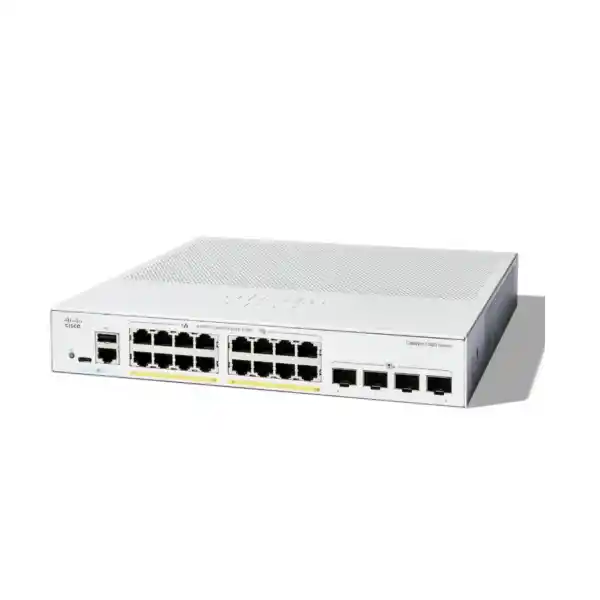
The Cisco Catalyst C1300-16P-4X Network Switch suits a business that needs managed wired access, power for compatible endpoints, and a faster connection back to its main network. For a Tanzania office, branch, classroom or small commercial site, the buying decision starts with three checks: how many devices need a cable, how much power they require together, and how the access switch will connect upstream.
Request a configuration and quote from FourTeck Tanzania with your endpoint list and uplink requirements. Confirm the exact equipment, accessories and commercial terms before ordering.
Is this the right switch for your site?
Choose this model when a compact group of wired devices needs more control than basic plug-and-play switching provides. A useful starting point is a small office with staff computers, several IP phones and a limited number of wireless access points. The physical device count may fit comfortably, but the power requirement deserves a separate calculation. Planning those two resources independently helps avoid buying a switch that has spare sockets yet cannot power the next endpoint.
It can also make sense as an access switch serving one part of a larger building. The upstream connection can carry combined traffic from the local devices towards a core switch, server environment or security gateway. That role should be assessed against the actual traffic path: a fast uplink is most useful when the receiving equipment and the applications beyond it can take advantage of the connection.
- A practical fit: a managed business edge with modest combined endpoint power demand and a defined upstream connection.
- Check another model: a design needing multigigabit copper access, higher power per endpoint, a substantially larger power pool or many additional wired connections.
- Define the wider network: internet access, wireless coverage, routing policy and application hosting still need their own equipment and configuration.
Treat future expansion as part of the initial decision. List devices planned for the next fit-out phase as well as those being installed today. A spare cable outlet, a spare switch port and spare electrical capacity are different things. Recording each one gives the purchasing team a more useful view of whether this switch is the right size.
Verified hardware at a glance
| Item | Model specification | Buying implication |
|---|---|---|
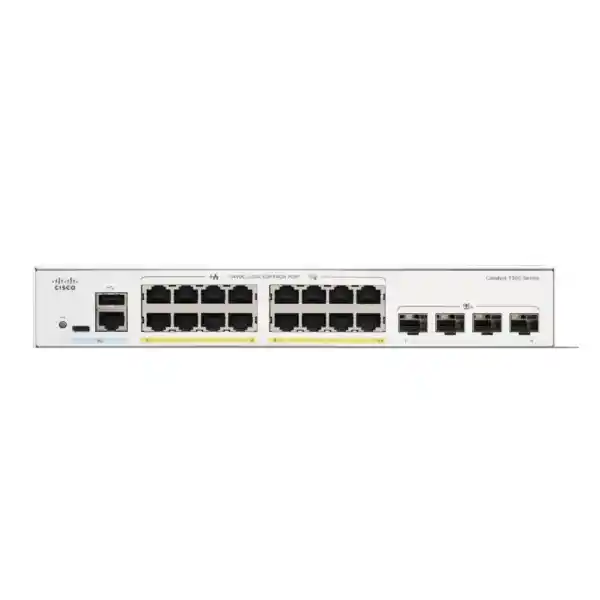
| Copper access | 16 × 10/100/1000 Ethernet PoE+ ports | Match wired device count and negotiated access speed. |
| Uplink interfaces | 4 × 10 Gigabit SFP+ | Select compatible modules or cables for the planned link. |
| Endpoint power | IEEE 802.3af PoE and 802.3at PoE+; up to 30W per port | Check each endpoint’s standard and required operating mode. |
| Shared PoE allowance | 120W total | The available power is shared across the powered devices. |
| Switching capacity | 112 Gbps | A switching fabric figure, rather than an internet speed promise. |
| Forwarding rate | 83.32 million packets per second, 64-byte packets | A specified packet forwarding metric under stated conditions. |
| Cooling and mounting | Fanless; rack-mountable | Plan ventilation, mounting and cable access. |
| Power input | Internal universal supply, 100–240V AC, 50–60Hz | Confirm the supplied power lead and suitable site power. |
Use this table to identify the exact variant before comparing quotations. Similar product names can describe a different uplink arrangement or power configuration. Ask the supplier to write the full model on the quotation and equipment schedule, and make accessory choices against that model. Do not assume that a photograph of another member of the series represents the requested hardware or the contents of the supplied package.
Power planning: count watts as well as ports
The most important sizing distinction is between the power an individual port can provide and the power the switch can allocate in total. Connecting a device successfully does not prove there is enough capacity for all other devices to operate in their intended mode. Build a simple power schedule before selecting the switch, using the endpoint manufacturer’s specified requirement and allowing for how the switch reserves or negotiates power.
A worked planning example
Consider an illustrative design with six endpoints budgeted at 10W each and two endpoints budgeted at 18W each. The calculation is 6 × 10W + 2 × 18W = 96W, leaving a nominal 24W against this model’s shared allowance. These are assumed design figures, not measured consumption or a compatibility guarantee. Actual admission depends on device classification, negotiated allocation, switch settings, cable conditions and startup behaviour. Confirm those details before treating the remaining allowance as usable expansion capacity.
Now compare a proposal for sixteen devices each requiring a 30W allocation. That represents 480W at the power source, well beyond this unit’s available pool. Reducing normal traffic does not solve that electrical sizing problem. A device might draw less at one moment while still needing a higher allocation for normal operation or a demanding feature. Size for the required endpoint behaviour, rather than a convenient idle reading.
What to record for every powered device
Record the exact endpoint model, quantity, supported PoE standard, maximum required allocation, essential features and priority during a constrained-power event. A camera may need more power when illumination activates; an access point may have different requirements depending on enabled radios or accessories. Verify those conditions in the endpoint documentation. A phone with added modules can also differ from the basic handset, so include the complete installed configuration.
Leave an intentional margin for changes and identify what happens when demand reaches the configured limit. If the project already uses almost all available power, a larger budget may be a more practical purchase than a tightly constrained design. Agree which devices are essential and test their recovery after a full power cycle. Those tests reveal problems that may remain hidden while an established network is running normally.
Choose the uplink around the complete connection
An uplink is a path between two pieces of equipment, so both ends must be specified together. Start with the distance and installed cabling, then establish the interface available on the upstream device. Identify whether the project uses fibre or a compatible direct-attach connection, and check the exact supported parts for the installed software and hardware. Connector shape alone is not sufficient evidence that a module will work.
Fibre selection
For a fibre link, record fibre type, approximate route length, connector arrangement, patch panel details and the matching optical requirements at both ends. Check the optical budget and any existing splices or intermediate panels. A building may already have fibre in place without having the right fibre plant for the proposed optics. Confirm the route and test results before ordering modules, especially when reuse of existing infrastructure is part of the cost estimate.
Short links within a cabinet
For nearby equipment, a supported direct-attach cable may simplify the connection. Confirm length, compatibility at each end, cable bend requirements and the physical route through the cabinet. Avoid selecting a cable so short that it strains the sockets or prevents servicing. Include its exact part number in the equipment schedule so the delivered accessory matches the design reviewed by the technical team.
Keep an interface allocation drawing if several high-speed connections are required. Identify which interfaces are used for upstream links, local equipment or a supported stacking arrangement. An interface assigned to one purpose is unavailable for another at that time. This prevents a quotation from promising more simultaneous connections than the planned configuration can provide.
A faster network interface also does not change a contracted internet service or the speed of every endpoint. Think about where traffic goes: local file transfers, access to shared applications and movement towards the main network can have different bottlenecks. Review the receiving switch, server connection, storage performance and security gateway along the path before estimating the benefit.
Separate devices according to their role
Catalyst 1300 VLAN and voice VLAN configuration options allow an administrator to organise traffic into logical groups. That is useful when staff devices, phones, visitor wireless traffic and building systems share physical switching infrastructure. The configuration needs to be consistent across the endpoint connection, uplink and upstream network. A VLAN name in a plan is only useful when membership, tagging and gateway behaviour have been implemented correctly.
Begin by describing who needs to communicate with which service. Staff computers may need business applications and printers, while visitor devices may only need internet access. Cameras may need a recorder and authorised management stations. These are example requirements to discuss with the network owner, rather than a prescribed security policy. Turn the agreed requirements into an addressing plan and an explicit traffic policy before configuring interfaces.
Decide where communication between groups will be controlled. If traffic is routed by a firewall, ensure the path actually crosses that firewall. If an approved routing design uses another device, document how filtering and visibility will be maintained. Logical separation alone does not define every allowed conversation, and an accidental trunk or gateway change can undermine an otherwise sensible plan.
Produce a port map showing endpoint type, VLAN membership and any special settings. Use clear labels that correspond to patch panel positions and physical outlets. For shared phone-and-computer locations, verify the endpoint’s own switching and tagging behaviour before assuming that a single outlet can carry both roles. Test a representative desk during commissioning, then use that confirmed pattern for the remaining desks.
Support voice and business traffic with an intentional QoS policy
The series provides Quality of Service controls using mechanisms including CoS and DSCP classification and queue mapping. These tools let an administrator decide how different traffic should be treated at a busy interface. Their value depends on the design across the full path. A priority marking received from an endpoint should be trusted only when the endpoint and the surrounding policy justify that trust.
For a business using IP phones, first confirm the phone models, power requirements, addressing method and voice platform requirements. Then review voice VLAN behaviour and the traffic policy with the person responsible for the calling system. The switch supplies network connectivity; successful registration, calls and external telephone services depend on the rest of that system as well.
Test voice quality under representative load. A quiet network can conceal the contention that appears during file transfers, backups or a busy working period. Include internal and external calls in the acceptance plan, and review the upstream path when problems occur. Prioritisation cannot create additional bandwidth where capacity is insufficient, nor can a local setting repair every issue in an internet or service-provider connection.
Keep the initial policy understandable. Record which traffic is prioritised, where classification occurs and which devices can set trusted markings. Avoid applying a broad priority treatment to every packet from a general-purpose device merely because one application is sensitive to delay. A clear, reviewed policy is easier to test and maintain than a collection of settings without an agreed purpose.
Wireless access points: check speed, power and coverage separately
When connecting a wireless access point, assess three independent questions: can the switch provide its required power, does the wired interface support the desired performance, and does the wireless design cover the occupied area? A successful cable connection answers only part of that assessment. Check the exact AP model and intended features, including any restrictions that apply when it receives a lower power level.
This model’s copper access connections are Gigabit Ethernet. If a proposed access point calls for a faster multigigabit wired connection to meet the design objective, choose the switching platform accordingly. The advertised wireless generation or aggregate radio capacity should not be treated as the throughput that every client will receive. Client capabilities, radio conditions, placement, channel use and the upstream network all influence the result.
Work from an access point placement plan rather than distributing APs wherever cable outlets happen to be available. Record each AP location and the associated cable test result, then add its power allocation to the switch schedule. If several wireless networks use different logical groups, confirm tagging between the AP and the upstream policy boundary. Include a visitor-device test that checks both internet access and the intended restrictions.
For a broader discussion of wireless model selection, see the Cisco wireless access point guidance for Tanzania. Use that planning information alongside the exact AP documentation and site requirements. Confirm the complete combination before approving a switch-and-wireless bill of materials.
Cameras and other powered endpoints
A small camera deployment can use the same purchasing discipline as an office network: list the exact devices, the power each needs and the traffic path to the recording system. Count the recorder’s network connection as well as the cameras where it shares the switch. Check camera operating modes and accessories, since a requirement based only on daytime behaviour may overlook conditions that change later.
Estimate traffic using the planned resolution, frame rate, compression and recording pattern. The useful question is how much traffic crosses each link during normal operation and during review or export. Keep those calculations tied to the actual recording design. A switch’s aggregate capacity does not establish how many days of footage can be stored, and storage capacity does not establish whether the live network path is correctly sized.
Treat remote viewing and device administration as separate access requirements. Define who can view footage, who can alter device settings and how remote connections are authorised. Keep management access controlled through the wider network design. Connecting a camera to a managed switch does not, by itself, establish secure remote access or a compliant retention policy.
The same exact-model approach applies to door controllers, intercoms and other Ethernet devices. Do not connect equipment merely because its connector looks familiar. Confirm standards-based power compatibility and the manufacturer’s installation requirements. Devices requiring a different power method, a higher power level or a specialist interface need an appropriate design rather than an assumed match.
Management and access control
Administrators can use the switch’s web-based interface and command-line management options. Select the method that the operating team can support consistently, then document management addressing and authorised access paths. Restrict access to approved administrators and management locations. A small network still benefits from defined ownership, particularly when several contractors or departments may request changes.
The platform documents 802.1X port authentication and access control lists. These capabilities need configuration and, where applicable, external authentication infrastructure. Before introducing authentication, identify the endpoint types that can participate and those that need a separately reviewed exception. Test success, failure and recovery paths with a small group before expanding the policy to every occupied port.
Use access rules to implement specific requirements that the network owner can explain and validate. Keep a record of permitted services, source groups and destinations. A rule that appears reasonable in isolation can still block an operational dependency, so include application owners in testing. Review changes with an understanding of where filtering occurs and whether another device also applies a policy.
Create an administrator handover record with device identity, management location, responsible team and the route for requesting changes. Store credentials and sensitive configuration in an appropriate protected system rather than a general purchasing document. When staff responsibilities change, review access promptly. These operating practices complement the technical features and make future troubleshooting more orderly.
Cabinet, cabling and power continuity
The fanless design is useful where equipment sits near an occupied area, but installation still needs appropriate ventilation. Choose a location where heat can escape, the equipment can be inspected and cables can be serviced without pulling on the connectors. Check the manufacturer’s installation instructions for the final mounting arrangement and any required clearances. Keep the equipment away from avoidable moisture, contamination and mechanical damage.
Measure the cabinet with patch leads, power connections and cable management included. A device that fits by its enclosure dimensions alone may leave too little room for bends, optical patch cords or access to adjacent equipment. Confirm mounting accessories and package contents in the quotation. Plan labels at both ends of every permanent connection so a technician can identify an outlet without tracing a live cable by trial and error.
Assess power continuity for the whole service. A UPS supporting the switch alone will not keep an internet application available if the router, gateway or upstream equipment loses power. Include powered endpoints in the load calculation, and choose runtime against the site’s operational requirement. Use the UPS manufacturer’s sizing method and appropriate measured or specified input demand rather than the endpoint power allowance alone.
For a Tanzania deployment, provide the actual site conditions instead of assuming that every office has the same environment or power arrangements. Confirm the available supply, suitable power connection, cabinet location, earthing arrangements and the responsibilities of the installer. If the equipment is needed for a time-sensitive opening or relocation, obtain written confirmation of the supply schedule and installation scope before coordinating dependent work.
Commissioning and acceptance
Define acceptance criteria before the old network is disconnected. The best checklist reflects the applications and devices that people need to use on the first working day. Record a baseline from the existing environment where possible, including addressing, uplink configuration and service dependencies. Keep a clear rollback plan if the new design fails an essential test.
- Confirm identity and assembly: match the received model and accessories to the approved equipment schedule, then inspect installation and labels.
- Establish administration: verify authorised management access, device identification and the intended management path.
- Test representative endpoints: confirm addressing, required applications and the intended separation between user groups.
- Exercise power behaviour: test the planned endpoint population, recovery after a restart and the operation of essential devices.
- Check uplinks and services: confirm the expected link status and test the traffic paths that matter to the business.
- Complete handover: record results, unresolved exceptions, the accepted configuration and the team responsible for ongoing changes.
Use a controlled test for each important restriction as well as each required connection. For example, a visitor device should reach its approved destination while remaining unable to reach systems that policy excludes. A successful internet test does not demonstrate that separation is correct. Similarly, a powered phone that displays a startup screen has not yet proved that calling works.
Agree what constitutes a pass and who signs off each service. Keep screenshots, logs or test records where they help explain the result. Resolve exceptions openly instead of marking the whole installation complete because most ports are active. A concise acceptance record provides a useful reference when a later change affects behaviour.
Maintenance that protects the working configuration
Cisco’s administration tools distinguish running and startup configurations and provide file backup operations. Save approved settings appropriately and retain a protected backup after acceptance. Name backups so their device, date and purpose are clear. Before restoring a file, verify the target device and the effect of the restore operation; applying an unsuitable configuration can interrupt management or user services.
Plan firmware maintenance around the exact device and current official release guidance. Review prerequisites, relevant fixes and the impact on connected services before scheduling an update. Back up the accepted configuration and define a recovery approach appropriate to the software change. Avoid assuming that a maintenance procedure used on another Catalyst family applies unchanged here.
Set a practical review routine for the network. Check whether the endpoint inventory still matches reality, whether spare capacity has been consumed and whether new applications have changed the traffic pattern. Investigate recurring faults with evidence such as port status, counters and the circumstances of the event. Compare observations over time rather than relying on a single snapshot from a quiet period.
Keep physical and logical records together. A new camera, relocated desk or replaced access point may change the power schedule or the required port settings. Update documentation when the change is made, and retain the reason for any exception. That discipline helps the next administrator distinguish an intentional design choice from a configuration error.
Compare the requirement before changing the model
| Requirement | Decision to review |
|---|---|
| More endpoint power | Compare a switch with sufficient total budget and the required per-port power standard. |
| More wired connections | Check a higher port count while retaining room for planned additions. |
| Faster access point cabling | Assess multigigabit copper access against the exact AP and performance objective. |
| Several switches managed as a stack | Validate the supported family, firmware, links and interface allocation. |
| An enterprise campus migration | Review the existing feature dependencies and migration path separately. |
Cisco lists this model among the supported C1300 Family 1 stacking models, with up to eight switches supported in a stack. Models must follow the documented family compatibility rules; cross-family stacking is not supported. Treat stacking as a separate topology decision, including supported interconnects and the ports consumed. It does not pool endpoint power between independent chassis or make every possible failure invisible to connected devices.
If the purchase replaces an existing switch, compare the current configuration before approving a substitute. Identify the actual use of access control, routing, management integrations, uplinks and any resilience design. A similar number of ports does not demonstrate that all operational requirements are covered. Prepare a short requirement matrix and test the important dependencies during the change plan.
For an existing 2960-X environment, the Catalyst 2960-X replacement planning guide addresses that separate migration question. Use the present product page to evaluate a specific small-business access requirement, and review an enterprise replacement against its own technical and operational needs.
Prepare a complete quote request
Send FourTeck Tanzania a concise description of the site and the job the switch must perform. Include whether this is a new installation, an expansion or a replacement, and identify any equipment that must remain in use. This context makes it easier to distinguish the base switch from the accessories and services needed to complete the connection.
- Quantity and exact requested model, together with any required regional ordering details.
- Endpoint inventory covering powered and non-powered devices, maximum power needs and planned additions.
- Upstream equipment, available interfaces, cable or fibre type and link distances.
- Logical requirements including user groups, management access and essential applications.
- Physical installation details, cabinet arrangements and power continuity requirements.
- Requested accessories, delivery destination, required timing and any installation or configuration scope.
Ask for the quote to state what is included and what is priced separately. Relevant items may include compatible uplink modules or cables, mounting provisions, patch leads and agreed configuration work. Do not assume that accessories shown in a diagram or product photograph are supplied with the base unit. A written equipment schedule reduces avoidable differences between the approved design and the delivered package.
Confirm current price, availability, lead time, warranty terms and the applicable support arrangement directly for the offer. If the project has a fixed opening date, distinguish confirmed supply commitments from planning estimates. Review all requested quantities and accessories before accepting the quotation so the installation team has the parts needed for the agreed topology.
Frequently asked buying questions
Can all sixteen connected devices receive the maximum per-port power?
No. The shared budget must cover the combined allocation. Work out the complete endpoint schedule and leave an intentional margin. The number of powered interfaces tells you where compatible devices can connect; it does not mean the maximum power rating can be multiplied across every interface simultaneously.
Are the copper access ports 10 Gigabit?
No. They provide Gigabit access. The high-speed uplink interfaces use SFP+. Match the access speed to the actual endpoint requirement, especially when choosing wireless equipment or planning local transfers to a server. A faster uplink does not alter the access interface specification.
Does the switch include fibre transceivers?
Confirm the quoted package rather than assuming that modules are included. Specify both ends of each link and ask for compatible part numbers. Existing fibre, connector type, distance and the upstream equipment should all be part of the accessory check before ordering.
Can it power any access point or camera?
Compatibility depends on the endpoint’s power standard, required allocation and operating mode, together with the remaining switch budget. Check the exact model and accessories. Higher-power devices or equipment using a different power method need another suitable arrangement, even when the network connector appears to match.
Will installing it improve internet speed?
The benefit depends on the bottleneck. Replacing an overloaded local link can help local network performance, but internet access also depends on the service, router or firewall and remote applications. Review the full path and measure the current constraint before predicting a change in user experience.
Is configuration needed?
Configuration is needed to implement the intended management, segmentation, traffic treatment and access policies. Define those requirements before installation and include verification in the handover. The amount of work depends on the existing network and the services the business needs to preserve.
What should a Tanzania buyer confirm before purchase?
Confirm the exact model, equipment schedule, compatible uplink accessories, current commercial terms and supply arrangements. Provide your site conditions and required scope so the quote can be checked against the real deployment. Treat any installation, warranty or delivery commitment as something to confirm for the specific offer.
Request a switch configuration and quote
Share your endpoint list, combined power requirement and uplink plan with FourTeck Tanzania. Request the Cisco Catalyst C1300-16P-4X with the compatible accessories needed for your intended connections, and ask for written confirmation of the package and current commercial terms. A complete requirement gives your purchasing and installation teams a clear basis for approving the equipment.




Reviews
There are no reviews yet.