
FOURTECK TANZANIA · BUSINESS NETWORKING
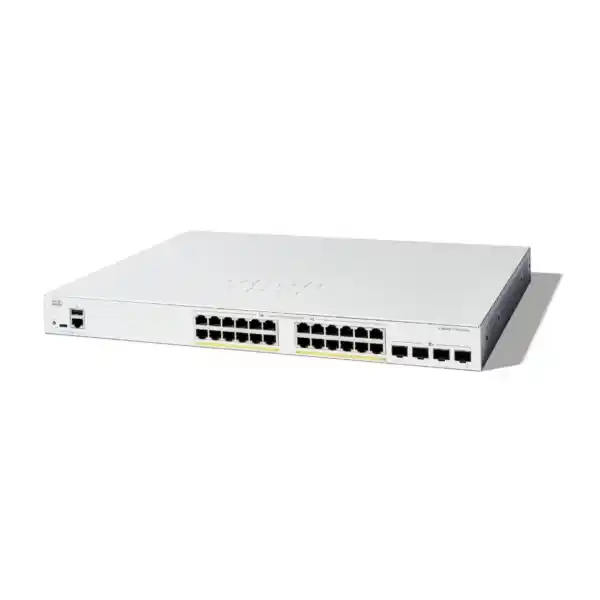
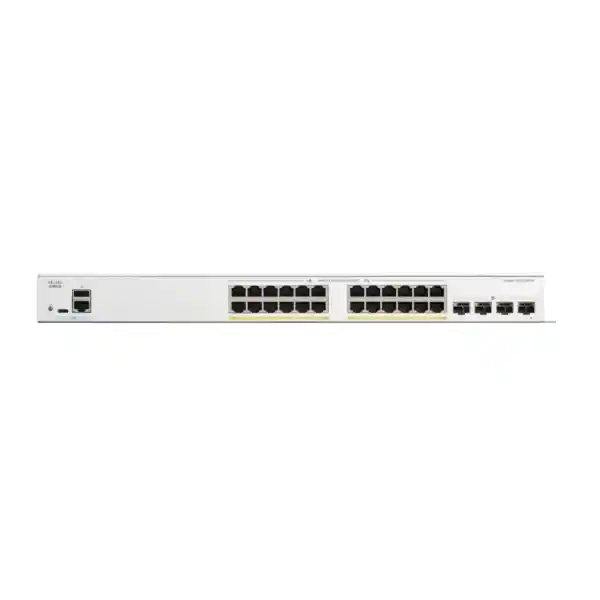
Cisco Catalyst C1300-24FP-4X Network Switch
Connect and power compatible business endpoints while planning a faster path to your upstream network. Select the complete configuration around your devices, power needs and uplink route.
Power phones, cameras and access points from one managed access switch
The Cisco Catalyst C1300-24FP-4X Network Switch is a practical choice for a Tanzania business that needs wired Gigabit connections, PoE+ endpoint power and faster links back to the main network. It provides 24 copper access ports and four 10 Gigabit SFP+ uplinks. Its strongest fit is an office, branch or equipment cabinet where compatible phones, cameras and wireless access points share a managed switching platform.
Start with the devices you need to connect and power. Count every workstation, printer, phone, camera and access point, then compare the combined power requirement with the switch budget. Request a FourTeck Tanzania quotation with your endpoint list, uplink distance and existing network details so that the switch, optics and accessories can be checked together.
This model is worth considering when an unmanaged switch no longer gives your team enough control over traffic separation, access policies or troubleshooting. Selection should still follow the application: a demanding wireless access point may need a faster copper port or more power than this particular switch provides.
The exact hardware at a glance
| Access connections | 24 × 10/100/1000 Mbps copper Ethernet ports |
|---|---|
| Endpoint power | PoE+ on the 24 access ports; up to 30W per port, within the shared budget |
| Uplink connections | 4 × 10 Gigabit SFP+ ports |
| Switching capacity | 128 Gbps |
| Forwarding rate | 95.23 million packets per second, measured with 64-byte packets |
| Installation format | Rack-mountable; chassis approximately 444.3 × 350 × 43.94 mm |
| Cooling | Fan-cooled; this exact model is not fanless |
| Power-budget planning | Use 370W conservatively; Cisco also lists 375W in its PoE allocation table. Confirm the applicable figure for the supplied unit. |
The access-port speed and uplink speed serve different purposes. A desktop connected to a copper access port has a maximum negotiated link speed of 1 Gbps. The faster SFP+ connections carry aggregated traffic towards a compatible upstream switch or other supported equipment. They do not convert each desktop connection into a 10 Gigabit connection.
The stated switching and forwarding figures describe the switching platform under the manufacturer’s stated conditions. They are not internet speed guarantees. Internet service, firewall throughput, server storage, client hardware and application behaviour still influence the experience that users see.
Who should shortlist this model?
Shortlist this switch when your access network needs a mixture of powered and unpowered Ethernet devices, along with an uplink that has room for several users or applications at once. A useful purchasing brief describes both the current installation and its next realistic expansion. Spare ports alone are not enough if the planned new devices consume the remaining PoE allowance.
For a small IT team, a documented configuration matters as much as the port count. Name ports by room or device role, record the management address and keep a current connection schedule. These simple practices make a managed switch easier to operate when someone moves a desk, replaces a phone or adds a camera.
Reconsider the fit if your plan depends on 2.5 Gigabit or 5 Gigabit copper access, endpoints needing power beyond PoE+, or an enterprise feature that has not been checked on the Catalyst 1300 platform. A requirement-led comparison prevents the purchase from being driven by a familiar Cisco name alone.
Office access
A possible fit for staff computers, compatible desk phones, printers and a modest wireless estate, subject to port and power calculations.
Branch cabinet
A possible fit where local endpoints need managed access and a faster connection to upstream equipment, with a documented remote support plan.
Camera and Wi-Fi network
A possible fit when every endpoint meets the port-speed and PoE limits, with separate consideration for recording, wireless coverage and security policies.
PoE+ budgeting: check the whole installation
| Illustrative load | Planning arithmetic |
|---|---|
| 12 devices allocated 15W each | 12 × 15W = 180W |
| 6 devices allocated 25W each | 6 × 25W = 150W |
| Combined illustrative allocation | 330W across 18 powered ports |
| Unallocated allowance against 370W | 40W; six empty ports do not imply six additional high-power devices |
PoE carries data and electrical power over a compatible Ethernet connection. For buyers, the important questions are whether each endpoint accepts the supported PoE standard, whether an individual port can supply its requirement and whether the sum of all allocations fits the switch. All three checks are necessary.
Cisco’s current material gives two total-budget figures for this model: 370W in the ordering description and 375W in the PoE table. Treat 370W as a conservative planning ceiling until the supplied hardware documentation and quotation resolve that difference. Do not build a project whose success depends on the additional five watts.
Twenty-four ports capable of up to 30W each do not mean that the switch supplies 720W simultaneously. The shared power budget is lower than that calculation. Likewise, a device’s typical consumption is not always the correct procurement value: its stated maximum requirement, negotiated allocation and startup behaviour deserve review.
Make a power schedule with one row per endpoint type. Include quantity, device model, required standard, planned maximum allocation and expansion allowance. If a replacement camera or access point is still undecided, leave its requirement open for verification instead of entering a convenient low estimate.
These figures are an example, not a validated device design or a promise of endpoint compatibility. Substitute the allocation required by the actual equipment. Check the resulting configuration before ordering and test it under a representative load during commissioning.
For a second example, 24 devices allocated 20W each would require 480W, which exceeds either published total for this model. Reducing the number of occupied ports, selecting lower-demand endpoints where suitable, or choosing a different power platform would need evaluation. A larger port count alone would not solve that mismatch.
Plan the four SFP+ connections before ordering
Begin uplink selection with the two pieces of equipment at either end. Record the supported interface type, desired speed, cable route and distance. If fiber is already installed, identify its type and connector arrangement. A generic request for a “10G module” leaves too many compatibility decisions unresolved.
For a cabinet close to another switch, a supported direct-attach connection may be worth evaluating. For a longer run, compatible optical transceivers and an appropriate fiber path may be needed. The approved accessory list and the requirements of both devices should determine the selection; physical fit in a slot is not a sufficient test.
Reserve uplink ports according to the intended topology. A design that uses interfaces for stacking has fewer interfaces available for independent network connections. Mark those roles on the bill of materials and connection drawing before deciding how many links will remain for upstream traffic.
Do not assume that transceivers, direct-attach cables or fiber patch leads are included with the switch. Ask for the quotation to identify each required component and its quantity. Separating these items also makes it easier to compare an offer that reuses existing optics with an offer that replaces them.
The acceptance test should include the actual uplink path rather than a temporary cable on the bench. Confirm link speed, stable operation and traffic flow across the intended VLANs. Record the selected module identifiers so that a later replacement does not depend on guesswork.
Separate business traffic with a clear VLAN plan
The Catalyst 1300 supports VLAN management for separating broadcast domains. A useful starting design distinguishes staff devices, voice, guest access, cameras and management where those roles exist. Each segment should have a reason, a defined owner and a clear path to the services it needs.
For example, a proposed camera segment might need access to a recorder and time service, while a guest segment might need internet access without permission to reach staff systems. These are design intentions to enforce and test. Creating VLAN names by itself does not establish the full security policy.
Write down which ports carry one endpoint network and which carry several tagged networks. Check that the upstream device uses matching VLAN identifiers and tagging expectations. A small mismatch can leave a phone working while its connected computer fails, or let an access point start without delivering the intended wireless networks.
Decide where traffic between segments will be routed and filtered. That may be an upstream firewall or another appropriate Layer 3 device, depending on the architecture. The purchase should include a clear routing responsibility rather than an assumption that any managed switch automatically replaces the existing gateway.
Keep the design proportional to the business. A short, consistent set of segments that the administrator understands is easier to maintain than a long list created without operational ownership. Document any exceptions, particularly shared printers, management stations and systems that need access across more than one segment.
Build voice quality into the whole path
Compatible IP phones can benefit from PoE power and a planned voice VLAN. The Catalyst 1300 administration documentation includes LLDP-MED network policies and traffic prioritisation controls. Successful deployment still depends on what the phone supports and how the surrounding network is configured.
Before moving phones, record the call platform, addressing method, provisioning requirements and any computer connected through a phone’s secondary port. Test a representative combination rather than assuming that every handset in an existing estate behaves the same way.
Agree where voice markings are accepted and how they are handled by the firewall and upstream links. Prioritising traffic on one switch cannot repair an overloaded external connection or an incorrectly configured call service. The acceptance check should follow a call from the handset through the relevant network path.
Useful tests include a normal call, an internal transfer and a call while ordinary data traffic is active. If a phone powers up but fails to register, check its VLAN, address assignment and service reachability before treating the problem as a defective switch port. Capture the working settings for future replacements.
Check wireless access points individually
Wireless access points differ in both power and wired uplink requirements. This model’s copper ports are Gigabit Ethernet. An access point selected for multigigabit operation cannot receive a 2.5G or 5G copper connection from those ports, even though the switch has 10G uplinks.
List the exact access-point models and their intended operating modes. Check whether PoE+ supplies all functions needed for the deployment or whether the access point requires a different power source. A device may establish a link while operating with restrictions, so a green port light is not the complete compatibility test.
A practical wireless brief also includes the number of users, applications and coverage areas. Those details belong in the access-point design, while this switch selection addresses the wired connection and shared power capacity. Purchasing a faster uplink alone does not determine coverage or roaming quality.
Where the project includes several wireless networks, confirm how each SSID maps to a VLAN and how the upstream policy treats it. Test a staff client and a guest client separately. This catches missing tagged networks and policy errors that a single successful wireless connection might hide.
For a wider wireless project, review FourTeck Tanzania’s Cisco wireless access point guidance alongside the endpoint power and port-speed schedule. Use the exact access-point specification to confirm this switch’s role in the proposed design.
Camera networks need power and traffic calculations
For a surveillance project, count cameras by model and required power. Include any demand associated with night operation, accessories or other supported functions in the device specification. Do not use a daytime reading from one camera as the purchasing allowance for every camera in the installation.
Bandwidth planning should follow the recording design. Identify where the recorder is connected, how many streams cross the uplink and whether users will view video from another part of the network. A design can have enough PoE capacity yet still place recording traffic on an unsuitable upstream path.
Define who is allowed to reach the cameras and recorder. Separate routine viewing from administration where the architecture supports it, and record any remote-access dependency. The switch is one component of that policy; the recorder, firewall, user accounts and camera configuration also need attention.
During handover, confirm recording and playback with the intended camera settings. Check that all planned devices remain powered together. If a fault appears only when more cameras are connected, review the aggregate allocation and cabling rather than replacing endpoints one by one without a shared-load assessment.
Management and security should have an owner
A managed switch needs an agreed administrator, a documented access method and a record of configuration changes. Decide who may alter ports, VLANs and credentials before the switch becomes part of production. Shared responsibility without a named owner can make even a simple fault take longer to resolve.
The Catalyst 1300 documentation covers authentication and access controls, including RADIUS-based functions and 802.1X. Use these capabilities only within a design that accounts for the endpoint types and supporting services. A printer, phone and employee laptop may need different treatment during an authentication rollout.
Write a short access policy in business terms first: who needs to manage the switch, from which network, and through which approved method. Translate that policy into the supported configuration and test it. Keep a controlled recovery route so that an incorrect policy does not leave the team unable to manage the equipment.
Pilot security changes with representative endpoints. Check successful access, rejected access and the behaviour when a required authentication service is unavailable. Agree the desired outcome for each case. This is particularly useful when adding access control to an existing network that previously allowed every connected device.
Maintain a configuration backup after the final checks and after later approved changes. Store operational secrets through the organisation’s normal controlled process. A purchase handover should identify where the backup is held and who can recover it, without exposing credentials in a general inventory or printed port schedule.
Redundancy, loops and stacking require a topology
The C1300-24FP-4X is among the Catalyst 1300 models listed for hardware stacking. Cisco groups compatible stack members into families; cross-family stacking is not supported. Check every proposed member and the required interconnect arrangement before treating an existing Cisco switch as a possible stack partner.
A stack design should show which connections are used between members, which are used upstream and which endpoints depend on each physical switch. Consider what happens when a member is disconnected or powered off. A shared management view does not remove the need to understand the physical failure paths.
For ordinary Ethernet redundancy, agree the spanning-tree design and any link aggregation with the upstream administrator. Multiple cables between devices should be intentional. An unplanned second connection can introduce a loop or a blocked path that does not behave as the installer expected.
Define the purpose of each additional link: greater aggregate capacity, a second physical route or another documented requirement. Then select a supported configuration for both ends. Do not assume that adding two links makes every individual application transfer twice as fast.
Resilience testing belongs in the commissioning plan. With approval from the network owner and an appropriate maintenance window, verify the intended response to a selected link failure. Record what remained available and how recovery was observed. Treat the results as evidence for that configuration, rather than a blanket promise of uninterrupted service.
Place the switch in a suitable equipment space
Choose the cabinet after checking usable depth, mounting arrangements, cable bend space and access to the power connection. The chassis measurement alone is not the full space requirement. Patch leads, transceivers and the rear power lead need room without being forced against a cabinet door.
This exact model uses a fan, so placement should account for ventilation and sound. Avoid selecting it on the assumption that every compact business switch is silent. An equipment cupboard also needs an operating environment appropriate to the hardware, rather than simply a convenient shelf near the network cables.
Record what will share the cabinet: patch panels, recorder, firewall, router, power distribution and backup equipment. That inventory helps the installer assess space and power together. Leave a practical way to trace and replace cables without disconnecting unrelated business services.
For Tanzania purchasing, confirm the required power cord and the site’s available connection as part of the order. Have the installation team assess grounding, surge protection and backup arrangements for the actual location. Those are site requirements to verify, not capabilities established by the product name.
If backup runtime matters, calculate it for the complete supported load, including powered endpoints and other necessary network equipment. The PoE allowance is not the same as the switch’s total wall-power demand. A backup calculation based only on the chassis at idle can substantially misrepresent the intended installation.
Choose a cabling plan that can be maintained
Use an endpoint schedule that ties a room or device location to a patch-panel position and switch port. This gives the team a common reference when troubleshooting remotely. It also helps distinguish a cabling fault from a configuration change after desks or equipment have been moved.
For reused copper cabling, request appropriate testing against the intended Ethernet and PoE application. A cable that previously supported a lightly used computer may need closer inspection before it becomes the sole data and power path to a critical endpoint. Include patch leads and connectors in that review.
For fiber uplinks, preserve the route information and test records alongside the selected transceiver details. Record both ends of each circuit. A label such as “uplink 1” is less useful during a fault than a label identifying the destination device and interface.
Keep spare-port planning realistic. A free port can support an extra device only if the VLAN configuration, cable route and power budget also permit it. Reserve a small, deliberate expansion plan instead of counting every unused socket as immediately deployable capacity.
A worked office planning exercise
Consider an illustrative office with twelve desk phones, six compatible wireless or camera endpoints, four printers or computers connected directly and two ports reserved for later use. This accounts for all 24 copper connections. It is an inventory example, not a recommended layout for every business.
Using the earlier sample allocations, the twelve phones at 15W and six other devices at 25W produce a 330W planning total. The four directly connected unpowered devices add access-port demand without adding PoE allocation. The remaining allowance should be considered before deciding what may use the two reserved ports.
Next, describe where the traffic goes. If cameras record to an upstream server, their streams contribute to uplink demand. If an access point carries several SSIDs, the connection must carry the required tagged networks. If a phone passes through a computer connection, its port configuration needs to accommodate that arrangement.
The resulting quotation brief is more useful than a request for a “24-port Cisco PoE switch.” It names endpoint quantities, states assumed allocations, identifies the uplink destination and describes expansion. Any undecided device remains a question to resolve before the configuration is accepted.
Finally, decide how the office will be supported after handover. Name the person who approves port changes, define the backup location and identify a maintenance window for firmware work. These operational choices help preserve the intended behaviour as the network changes.
Prepare a complete Tanzania quotation request
For a FourTeck Tanzania quotation, provide the exact model name, quantity and intended role of each switch. Include whether the order is a new installation, an additional cabinet or a replacement. Each situation creates different questions about migration, accessories and compatibility.
Supply a device schedule with model numbers and power requirements where known. Add the number of unpowered connections, the spare-port target and any planned high-demand devices. If the endpoint specification is incomplete, ask for those uncertainties to be identified in the proposal.
Describe the uplink at both ends, including distance and existing cable information. State whether optics will be reused or supplied new. If stacking is intended, include every member model and the proposed topology. This helps avoid comparing quotations that contain different amounts of required equipment.
Ask the quotation to distinguish switch hardware, necessary accessories and any separately offered services or support. Confirm the supplied condition and exact order identifier. Request current pricing, availability, delivery terms and applicable warranty or support terms in writing for the actual offer.
If payment or budgeting requires a TZS figure, obtain it from the current quotation rather than converting an unrelated overseas price. The final commercial document should state its validity and any relevant inclusions. This page does not establish a local price or delivery commitment.
- Switch quantity, installation role and intended expansion.
- Endpoint models, quantities and maximum PoE requirements.
- Uplink destination, distance, fiber or copper path and accessory requirements.
- VLAN, voice, security and management requirements.
- Cabinet space, site power, backup expectations and installation constraints.
- Required handover documents and acceptance checks.
Commissioning and acceptance checklist
Agree acceptance criteria before the installation. That allows the buyer and installer to judge whether the delivered configuration meets the brief. A useful checklist refers to business functions and measurable observations, rather than ending with a photograph of illuminated port LEDs.
Start with identity and connections: verify the supplied model, record its inventory details and reconcile installed connections with the port schedule. Check uplink operation using the intended cables and accessories. Document any change from the approved design so that the handover matches the working network.
Continue with endpoint behaviour. Confirm that the intended powered devices operate together and that ordinary data clients reach their required services. Test voice registration and calls, camera recording, staff wireless access and guest separation where those functions are in scope.
Finish with management and recovery. Verify authorised administrative access, save the working configuration and establish a backup. Record firmware details and any unresolved limitations. Agree who receives fault reports and which parts of the network are covered by the relevant service arrangement.
Keep the result specific. If remote access, resilience or a specialised application was not included in testing, identify it as outside the completed acceptance scope. A clear handover is more useful than a general statement that the network is fully tested.
Observe the network before adding more devices
The Catalyst 1300 management interface includes status and statistics for troubleshooting, including port utilisation and PoE information. Establish a simple baseline after installation so that future changes can be compared with known working behaviour.
Record the powered-device allocation, active uplinks and representative busy periods. An occasional complaint is easier to investigate when the team knows whether traffic or power demand has changed since commissioning. Use observations from the actual installation instead of assumptions based on the number of connected users.
When expanding, revisit the original endpoint and uplink schedules. A new wireless generation, a higher-resolution camera or an additional recorder can change demand without greatly changing the port count. Update the documentation at the same time as the configuration.
If several branches will use the same design, keep a consistent naming convention and a reviewed configuration template, while preserving each site’s unique addressing and topology. Standardisation should make differences visible rather than hide them inside a copied configuration.
Frequently asked buyer questions
Is this a 24-port 10 Gigabit copper switch?
No. The 24 copper access connections support 10/100/1000 Mbps. The four SFP+ uplink connections provide the 10 Gigabit interface option. Buyers needing faster copper access for workstations or access points should evaluate a model designed for that requirement.
Can every access port power an endpoint?
The access ports support PoE+, but simultaneous operation depends on the shared total budget and each endpoint’s allocation. Count all planned devices and verify their individual requirements. Full port occupancy is not evidence that a particular mix of powered devices will fit.
Should the project use 370W or 375W?
Cisco’s published ordering description states 370W, while its PoE allocation table states 375W. Plan conservatively against 370W and ask for the applicable supplied-unit figure to be confirmed. Leave allowance for growth rather than designing to the disputed boundary.
Will my existing access points work?
Check the exact models, supported Ethernet speed, power standard and intended operating mode. Also check VLAN requirements. A matching Ethernet connector does not confirm that an access point receives enough power or can deliver all the functions planned for the project.
Does the purchase include SFP+ modules?
Do not assume accessory inclusion. Ask the quotation to name the required modules or direct-attach cables and confirm compatibility at both ends. The cable route and intended distance are part of that selection.
Can it be stacked with any Cisco switch?
No. Stacking compatibility depends on the documented Catalyst 1300 family rules and the proposed member models. Verify the group, software requirements and interconnect design. A common manufacturer name does not establish stack interoperability.
Is the unit silent?
This model has fan cooling. Choose an appropriate equipment location and assess its suitability for nearby occupied areas. Do not apply fanless claims from a different model in the series to this unit.
Is it an automatic replacement for an existing enterprise switch?
Compare the existing functions, operating requirements and topology first. Port counts and uplink speed are only part of the decision. Review management, routing, security, stacking and application dependencies before approving a replacement.
What determines the final Tanzania price?
The current supplier quotation should identify the switch quantity, accessory selection and any separately offered work or support. Request current commercial terms for the actual configuration. No stock status, local price or dispatch date is established by this product description.
What should I send with an enquiry?
Send your endpoint list, power requirements, uplink destination and distance, current switch model and preferred expansion allowance. Include any configuration or handover requirements. These details make it possible to assess a complete proposal rather than a chassis-only price.
For an existing 2960-X estate, the Catalyst 2960-X replacement planning guide provides a separate migration discussion. Assess the required platform features before selecting an access switch for a replacement project.
Request a configuration-led quotation
Ask FourTeck Tanzania for a quotation for the Cisco Catalyst C1300-24FP-4X with your endpoint inventory and uplink plan. Identify any uncertainty about power allocation, optics or existing equipment so that it can be addressed before the order is finalised.
A useful final proposal states what will be supplied, how the switch will connect to the wider network and which acceptance checks will demonstrate the intended result. Confirm current commercial terms and the exact accessory list against that proposal.




Reviews
There are no reviews yet.