
FOURTECK TANZANIA · BUSINESS NETWORKING
Cisco Catalyst C1300-24P-4G Network Switch
Managed Gigabit access switching for a planned mix of powered business endpoints. Match device power, port requirements and upstream bandwidth before you buy.
Choose a switch around your devices and uplink needs
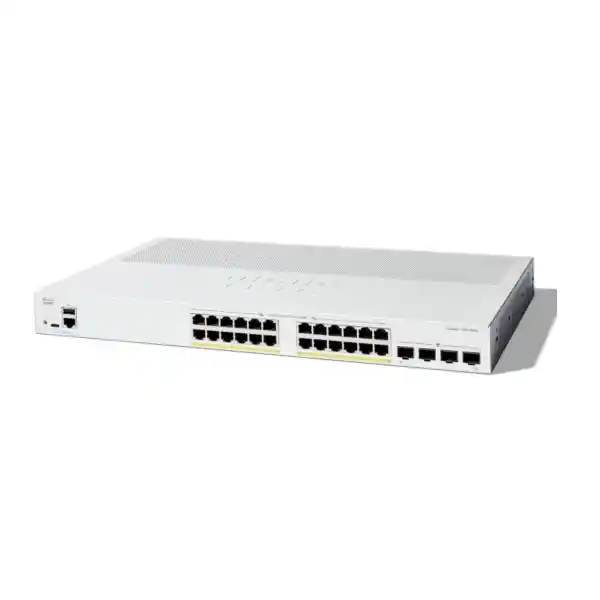
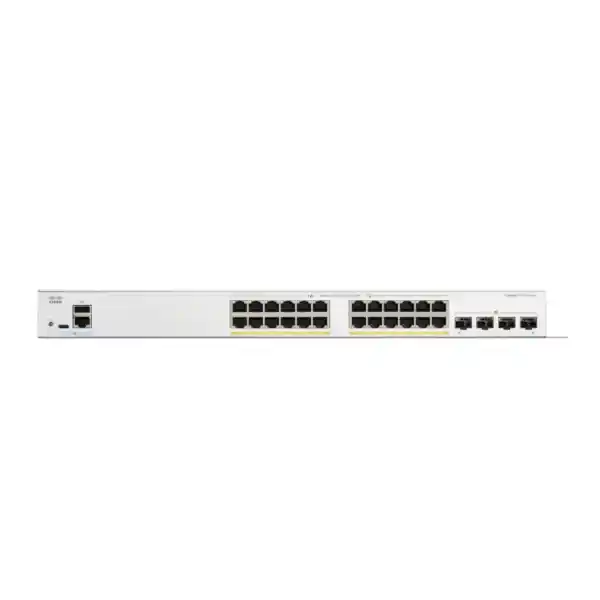
For a Tanzania office or branch that needs wired connectivity and power for compatible phones, cameras and wireless access points, the Cisco Catalyst C1300-24P-4G Network Switch provides 24 copper Gigabit Ethernet ports with PoE+ and four dedicated Gigabit SFP uplinks. Its 195W shared PoE budget makes endpoint power planning a central part of selection. Start with the number of connections, the power requirement of each powered device and the bandwidth needed back to the rest of the network.
This managed access switch is a practical candidate when your endpoints use Gigabit Ethernet and your design can work with 1G uplinks. VLANs, quality of service and administrative controls allow a structured network configuration rather than treating every connected device identically. The right fit depends on how those functions will be configured and maintained, as well as the physical port count.
Request a quotation from FourTeck Tanzania with your endpoint list, proposed uplink and installation requirements. Include any existing switch configuration or network diagram in a sanitized form. Pricing, availability, supplied accessories, applicable warranty terms and any requested configuration work should be confirmed in the quotation before ordering.
Verified hardware at a glance
Use the specification summary below to identify this exact model. The copper access ports and SFP uplinks serve different physical connection roles, and the PoE figure is a switch-wide allocation rather than a per-port allowance. Matching the complete model designation is important when comparing quotations within the Catalyst 1300 family.
PoE planning: count watts as well as ports
A PoE-capable connection must satisfy both the endpoint’s power requirement and the switch’s total available power. This model supports IEEE 802.3af PoE and IEEE 802.3at PoE+, with up to 30W at an individual supported port, subject to the shared budget. A device that needs more power than PoE+ can supply requires a different power arrangement or a suitable alternative switch.
Prepare a worksheet with the exact endpoint model, quantity, required PoE standard and maximum documented power requirement. Include accessories that change consumption, such as camera illuminators or additional endpoint modules. Use the power figure appropriate to switch-side planning rather than assuming that a typical consumption figure represents the maximum reservation. The device’s own technical documentation should explain its supported operating modes and power requirements.
As an illustrative budget calculation, twelve devices requiring an allocation of 10W each would account for 120W. Four additional devices requiring 15W each would add 60W, giving a combined planning allowance of 180W. The remaining 15W would be limited expansion room. These are hypothetical allocations, not measured performance or a guarantee that a particular set of devices will be admitted by the switch.
A second example shows why the number of PoE ports can be misleading: eight allocations of 25W total 200W, which exceeds the available budget even though many ports would remain physically unused. Check the switch’s actual allocation behavior, classification and configuration during commissioning. Keep a reserve for endpoint replacement and changing operating modes, and agree which services matter most if your design approaches its power ceiling.
Build a useful port and growth plan
An endpoint inventory should distinguish physical cables from people and from powered devices. A workstation can occupy one connection without drawing PoE, while a camera occupies a connection and consumes power. An access point may serve many wireless clients through one wired port, so wireless user count cannot be translated directly into switch port count. List the physical connections first, then add their traffic and power requirements.
Reserve space for shared equipment that is easily overlooked during an office refresh: printers, meeting-room systems, reception terminals, building systems and temporary engineering access. Decide where those devices belong in the network and who owns them. A spare port has more operational value when its intended VLAN and activation process are documented, especially when non-IT staff may request new connections.
Growth should be expressed as a small set of realistic changes. Consider an additional access point, more cameras, a new department or a second business application server. Each change may consume a different combination of power, ports and uplink bandwidth. A network can run out of one resource while having ample capacity in the others, so a single percentage labelled spare capacity is often too vague.
Record the planned port assignment alongside the patch-panel reference and endpoint name. Clear labels shorten fault isolation and reduce accidental disconnection during moves. For procurement, this worksheet also helps show whether one switch is sufficient or whether separate access areas would be easier to cable, power and maintain. Physical layout should influence the purchase alongside the equipment specification.
Understand the four Gigabit SFP uplinks
The four SFP slots on this version provide 1G uplink connectivity. They should not be confused with the 10G SFP+ uplinks on selected models carrying a 4X suffix. An optical module does not upgrade the underlying slot speed. If the project requires a 10G upstream connection, choose a switch whose hardware explicitly supports that interface rather than budgeting for a transceiver as the solution.
Optical link selection starts with the route between the two devices. Identify the installed fibre type, connector arrangement, route length and equipment at the far end. Then verify a supported transceiver pair, optical standard and power budget. Physical insertion into an SFP slot alone is insufficient evidence of compatibility. The bill of materials should identify the approved modules and patch leads explicitly.
Check what your busiest traffic actually crosses. File transfers to a server elsewhere, camera streams to a remote recorder and traffic from several wireless access points can share an upstream path. A collection of lightly used desktop connections creates a different demand profile from sustained backups or video traffic. Use a representative busy period to assess the design rather than assuming every access port is continuously saturated.
Where fibre is part of the project, include installation records and labelling in the handover requirements. A support engineer should be able to identify both ends, the fibre pair, module type and destination port without tracing cables through the building. Treat optics as planned components of the link; inclusion in a hardware quotation must be confirmed rather than assumed.
VLANs that reflect real business boundaries
VLAN support allows the network to group traffic into separate broadcast domains. The Catalyst 1300 administration documentation covers access ports, trunks and voice VLAN configuration. For a business deployment, start by describing the groups that should exist and the communication they require. The configuration should follow that design rather than accumulating unrelated VLAN numbers as new equipment arrives.
A straightforward proposed layout might separate staff devices, voice endpoints, surveillance equipment, guest wireless traffic and switch administration. Those are design examples, not compulsory categories or preconfigured networks supplied with the product. A smaller site may need fewer groups, while a more complex organization may need additional boundaries. Keep the structure understandable to the team that will support it.
Specify which VLANs each uplink needs to carry and how the connected router, firewall or access point will interpret tagged and untagged traffic. A mismatch can leave a device powered and linked but unable to reach its intended services. During installation, verify each device category against a short acceptance checklist rather than treating a successful link light as a complete network test.
Segmentation also requires a decision about permitted communication. Guests may need internet access without access to administration systems; cameras may need a recorder and time service without unrestricted contact with staff computers. Document those requirements in plain language before translating them into routing and access rules. VLAN separation is a building block, and the security outcome depends on the complete forwarding and policy design.
Decide where routing and security policy belong
The platform documentation includes IPv4 routing interfaces and static routes. This can be relevant when your network design calls for local routing between subnets. Whether that is the best arrangement depends on where policy must be enforced and which device the operations team expects to manage as the gateway. Confirm the required feature behavior against the selected firmware before implementation.
For many branch designs, it is useful to keep the policy discussion separate from the forwarding discussion. Routing establishes a path between networks; the security design determines which communication should be allowed. If sensitive traffic must pass through a firewall for inspection, avoid creating an alternate local path that unintentionally bypasses that requirement. Review both directions of a connection when evaluating the topology.
Write down the default gateway for each subnet, the next hop toward external services and the return route back to users. Include addressing for network administration and any infrastructure dependencies. This creates a reference for troubleshooting missing routes, unexpected policy blocks or a configuration change made on the wrong device. It also makes the project easier to review before equipment is installed.
This switch should be selected for its verified access-network role. Requirements for internet security inspection, remote-access VPNs or other edge services need their own appropriately specified equipment and configuration. If the project includes those functions, ask for a complete network design and a separate description of each component’s responsibilities so the switch quotation does not hide assumptions about the rest of the infrastructure.
IP phones: plan voice quality from desk to service
Voice VLAN and QoS functions can help organize and prioritize compatible telephone traffic. QoS gives selected traffic preferential treatment under defined conditions; it does not create extra bandwidth or repair an overloaded internet connection. The switch’s role should be considered alongside the phone, PBX, router and upstream service so that the intended treatment is consistent across the call path.
For a phone deployment, record the phone models, quantities and power requirements. Where a computer connects through a phone’s Ethernet pass-through, verify that phone’s supported speed and VLAN behavior. Do not assume that all models behave identically. Include reception phones, meeting rooms and common areas, since their usage and connection arrangements may differ from ordinary desks.
Test calls during a realistic busy period with other business applications in use. Confirm that phones register, calls establish correctly, audio works in both directions and any required calling functions behave as expected. If remote calling depends on a WAN path, evaluate that path too. A successful internal call alone does not establish the quality of an external service.
Document the intended marking and trust arrangement so that later changes do not undermine the initial setup. Identify which team owns phone provisioning and which team owns network policy. Where those responsibilities are split, a shared acceptance record is valuable: it gives both teams evidence of what was tested and a common starting point if call quality changes after deployment.
Wireless access points: check the wired side first
A PoE switch can simplify the connection of compatible wireless access points, but each AP still needs a suitable power source and wired interface. Check the AP’s exact model and desired operating mode. Some access points need higher power or multigigabit Ethernet for their intended feature set, so a Gigabit PoE+ port should not be assumed to meet every current wireless requirement.
Build the wireless equipment list from the coverage and capacity design rather than from switch availability. Note the number of AP cable runs, their expected client load and which wireless networks map to which VLANs. Where a device carries staff and guest services on one cable, agree the tagging arrangement with the wireless administrator before configuration begins.
Consider where wireless traffic travels after reaching the switch. If several busy APs send traffic through a shared upstream link, that path may influence user experience even when radio coverage is good. Application location, internet service and simultaneous demand all matter. Evaluate the whole route for meeting-room video, cloud applications and other heavily used services instead of equating signal strength with application performance.
Acceptance testing should include a representative client on each required wireless network. Verify address assignment, intended access and the boundaries between guest and internal resources. The access switch does not perform the AP’s radio planning or replace its management platform. Include any required wireless licenses, management services and installation work as separate quotation items when applicable to the chosen AP system.
Camera networks: account for power and recording traffic
A surveillance project combines two distinct workloads: delivering power to compatible cameras and forwarding video to its destination. Start with the exact camera models, their maximum power needs and the location of the recorder or video-management system. Cameras with heaters, infrared illumination or motorized functions can have requirements that differ from simple fixed indoor units.
Map the recording path before choosing the uplink. If the recorder is elsewhere, the relevant camera streams may cross a shared connection continuously. Resolution, frame rate, codec and recording settings affect the traffic profile, and simultaneous live viewing can add further demand. Obtain expected stream information from the camera design rather than estimating solely from the number of devices.
A dedicated camera network can make administration and policy clearer, but it still needs controlled access to required infrastructure and authorized operators. Agree how recordings will be viewed, which systems may administer cameras and where any remote access will terminate. Avoid unrestricted temporary access rules that remain in place after installation because nobody owns their removal.
Commissioning should include the operating conditions that are relevant to the camera system. Where practical, verify the power and recording behavior associated with additional camera functions, then confirm playback and time alignment. These are proposed project checks, not a promise of compatibility with every camera. The switch, camera and recorder requirements must be assessed together for the actual deployment.
Manage access and administration deliberately
The Catalyst 1300 security documentation includes 802.1X authentication and management-access controls. These functions require a planned configuration and, where applicable, supporting authentication infrastructure. Select controls that fit the endpoint population and support process. An unmanaged collection of exceptions can become harder to maintain than a smaller set of consistently applied policies.
Keep switch administration reachable only through approved paths and assign credentials according to the organization’s access process. Identify primary and backup administrators and record how emergency access will be handled. During a staff or supplier transition, ownership of the management configuration should remain clear. These operational decisions are part of a sustainable installation, even when the hardware requirement is modest.
If port authentication is required, test a representative device set before applying it broadly. Computers, phones, cameras and building systems can have different capabilities and onboarding needs. Define what should happen when authentication infrastructure is unavailable and how a support engineer can distinguish an identity issue from a cabling or addressing fault.
Reduce accidental exposure through practical housekeeping: label infrastructure ports, document unused connections and review changes to access rules. A switch purchase alone does not establish a secure environment. Request the configuration and handover scope needed for your policies, and include a clear test of permitted and denied access so the intended behavior can be reviewed by the organization responsible for the network.
Link aggregation, resilience and model limits
Link aggregation with LACP is documented for the platform and can combine compatible links into a logical group. Both ends need a matching design and supported configuration. Distribution across members depends on traffic characteristics and the configured method; one conversation should not be assumed to use the sum of every member link’s speed.
This exact 4G model does not provide the hardware stacking available on selected other Catalyst 1300 variants. Connecting two switches with Ethernet cables does not create a single hardware stack. If centralized stack behavior or a particular failover architecture is a project requirement, make that a selection criterion before placing an order.
Separate the failures you want to tolerate. A design that survives one cable failure may still depend on one upstream device or one power source. Identify those dependencies and decide which are acceptable for the business. Avoid adding redundant cables without a defined loop-prevention and forwarding design; additional physical paths need appropriate configuration and testing.
Write a small failure-test plan that reflects the proposed topology. For each planned test, record what will be disconnected, the expected effect, the observation method and the restoration step. Perform disruptive tests within an agreed maintenance window. The objective is evidence of the required business behavior, with no implication that a single access switch can guarantee uninterrupted service under every failure.
Installation and power continuity for Tanzania projects
Choose the installation location around cable access, ventilation, physical security and the ability to service the equipment. A rack-mountable switch still needs suitable mounting arrangements and enough room for patching. Confirm the supplied accessories and power lead in the quotation, and have the installer check the cabinet layout before the equipment arrives.
For power continuity, build a load inventory covering the switch and the other devices required to keep the service useful. Phones may still depend on a PBX or upstream router; camera viewing may depend on the recorder; internet access may depend on provider equipment. Protecting one component alone may leave the overall service unavailable during an outage.
Select any UPS against the complete expected electrical load and required runtime, using its manufacturer’s sizing information. PoE budget is not identical to the switch’s total AC input power, so use the appropriate input and load assumptions. Confirm electrical protection and installation arrangements with a qualified installer rather than treating the network equipment list as an electrical design.
For a Tanzania procurement, agree the delivery destination, site-readiness responsibilities and any requested installation scope directly in the commercial proposal. Confirm current pricing and applicable terms for the exact order. Request written confirmation of delivery lead time, order-specific warranty terms and any approval documentation required by your organization before committing the purchase. A written scope helps purchasing and IT compare offers on the same basis.
Commissioning and handover that make the purchase useful
Before changing a live network, record the current topology and dependencies. Identify critical applications, existing addressing, connected equipment and an acceptable change window. If the project replaces another switch, translate the intended behavior into the new configuration rather than assuming that a previous configuration file can be applied unchanged.
Build a representative test set: a staff workstation, a powered endpoint, a phone if used, and a client on each important network segment. Test the services that matter to users, including name resolution and access to required applications. Check that boundaries work as intended, as well as checking successful connections. A complete test includes destinations that should be unreachable.
The administration guide provides configuration backup and restore functions. Include saved configuration, firmware identification and recovery instructions in the handover. Confirm that the intended settings persist through a planned restart where your acceptance procedure permits it. Keep a protected copy of the final configuration in the organization’s approved system rather than leaving the only usable copy with the installer.
Finish with an equipment and responsibility record. Capture the installed device identity, port map, uplink details, configuration owner and support escalation process. Define what counts as completion and who signs off the result. This makes the quotation easier to assess because equipment delivery, configuration, testing and documentation become visible deliverables rather than assumptions attached to the word installation.
Monitor the resources that affect users
SNMP management is documented for the Catalyst 1300 platform, including SNMPv3. Where a monitoring system is available, arrange approved access and choose useful observations. The goal is to notice meaningful changes in connectivity and resource usage, with alerts assigned to someone who can investigate them.
Establish a baseline after the network is working correctly. Record typical busy-period uplink use, expected powered endpoints and the physical connections that should remain active. A baseline helps explain whether a later issue follows a new device, a changed application workload or a cabling problem. Monitoring without context often produces numbers that are difficult to act on.
Review capacity before adding devices. Revisit the power worksheet, port plan and upstream traffic assumptions together, especially when adding access points or cameras. A replacement endpoint may use the same cable while needing a different power standard or more bandwidth. Treat an equipment refresh as a small design review rather than assuming that a matching connector establishes suitability.
Assign ownership for software maintenance and configuration changes. Before an update, review the relevant release documentation, keep a recoverable configuration and plan the maintenance window. Afterward, verify key services against the same acceptance record used at installation. The ongoing value of a managed switch depends on how consistently the team uses its management and maintenance processes.
When to compare another switch
Choose this model when its copper port count, shared power allowance and Gigabit uplink arrangement meet the measured requirement with sensible room for change. If one of those resources is already tight, compare an alternative before purchasing. An apparent saving on the switch can be lost if the project immediately needs extra hardware or a redesign.
For a higher powered-device load, compare the verified total PoE allocation and the standard available at each port. A higher total budget does not automatically provide the higher per-port standard required by an individual device. Conversely, a high per-port rating does not establish that every port can supply that amount simultaneously. Review both figures for every candidate.
For higher upstream demand, compare models with native 10G uplinks and confirm optics compatibility at both ends. For access points needing multigigabit connectivity, assess the speed of the access ports themselves. For hardware stacking, check the exact supported models and stack compatibility rules rather than relying on a family name.
If you need only a few unpowered connections, a different port count or power arrangement may be more appropriate. Compare the complete installed cost, including transceivers, patching, power protection and any configuration work. The most useful recommendation is the switch that fits the device inventory and operating plan, with any assumptions stated clearly enough for the buyer to review.
Frequently asked questions
How much power is available for connected devices?
The switch has a shared 195W PoE budget. Calculate the planned allocation across all powered endpoints and check each device’s required standard. Physical availability of a port does not establish that enough power remains for an additional device.
Can all 24 ports deliver 30W simultaneously?
No. Twenty-four allocations of 30W would total 720W, well above the shared allowance. Determine the actual supported endpoint mix from documented device requirements and the switch’s power allocation settings; do not multiply the port count by the maximum individual rating.
Does this switch have 10G fibre uplinks?
No. This version provides four Gigabit SFP uplinks. If your design calls for 10G, request an appropriate alternative with the required native interfaces and compatible transceivers.
Can I use it for phones, access points and cameras together?
Potentially, provided each device is compatible with the available Ethernet interface and PoE standard, and the combined power and traffic requirements fit. Supply exact endpoint models for a proper compatibility and capacity review.
Does it replace a router, firewall or wireless controller?
Plan those functions separately according to the required network architecture. A managed access switch can contribute switching and documented routing functions, but the complete project still needs appropriately specified internet, security and wireless management components where those roles are required.
Are optics and installation included?
Confirm the quotation. Identify any required transceivers, fibre leads, mounting accessories, configuration, testing and handover work as separate inclusions so that different offers can be compared fairly.
What should I provide when requesting a Tanzania quote?
Provide quantity, delivery destination, endpoint models, PoE requirements, uplink details, existing equipment and any configuration or installation scope. Ask for current commercial terms and a clear list of inclusions before ordering.
Request a quotation for your planned network
Send FourTeck Tanzania the required quantity of the Cisco Catalyst C1300-24P-4G, your powered-device worksheet and your upstream connection requirements. For a replacement project, include a sanitized port map and the expected change window. This gives the quotation a concrete technical scope and helps identify missing components before purchase.
Ask for confirmation of the exact supplied model, current price, availability, accessories, optics where needed, applicable warranty and any requested implementation work. Agree who will configure, test and document the network. A quotation built around these details is easier to approve and more likely to match the installation your organization actually needs.




Reviews
There are no reviews yet.