
FOURTECK TANZANIA · 10 GIGABIT SWITCHING
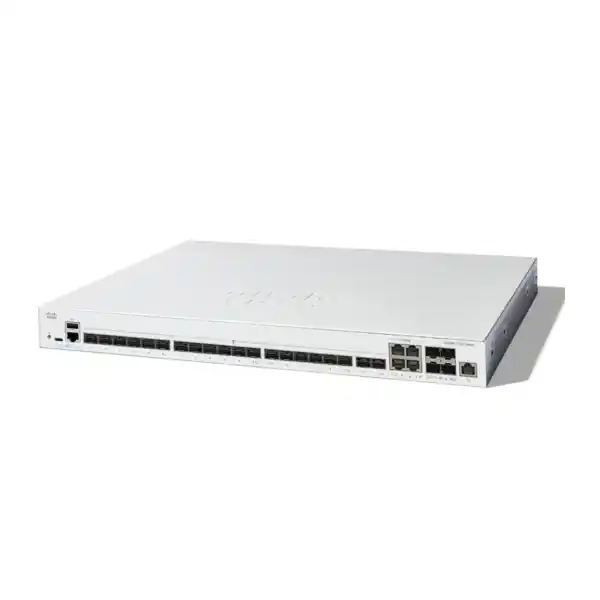
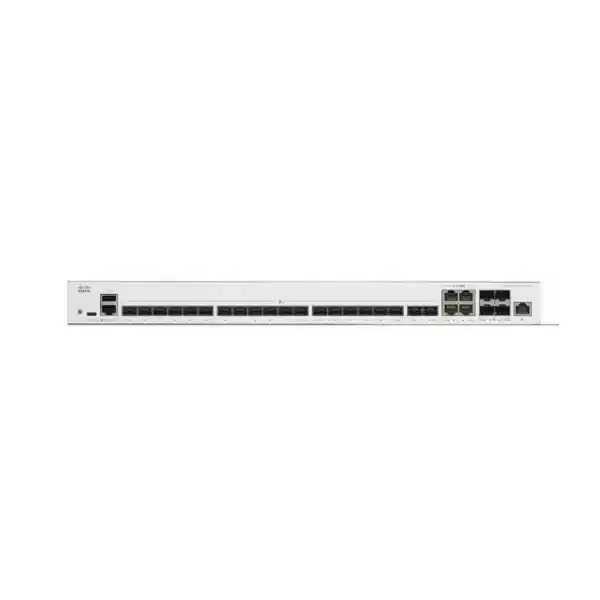
Cisco Catalyst C1300-24XS Network Switch
Bring your fiber aggregation and server connections into a planned, managed network. Select the interfaces, accessories and operating design around the applications your business needs to support.
Fiber-focused port mix
Separate management interface
Request a requirement-based quotation: share your endpoint models, connection media, link distances and required quantity with FourTeck Tanzania.
Technical snapshot
| Model | Cisco Catalyst C1300-24XS |
|---|---|
| Dedicated optical interfaces | 20 × 10G SFP+ |
| Shared interfaces | 4 × 10G copper/SFP+ combo; one medium per shared port |
| Management interface | 1 × Gigabit Ethernet out-of-band |
| Switching capacity | 480 Gbps |
| Forwarding rate | 357.14 Mpps, measured with 64-byte packets |
| Packet buffer | 8 MB aggregate |
| Dimensions (W × D × H) | 444.3 × 286 × 43.94 mm |
| Unit weight | 4.15 kg |
| AC input | 100–240 V, 50–60 Hz; internal power supply |
| Cooling | One fan |
Choose a switch around your traffic, media and growth
For a business connecting several access switches, servers or storage systems, the important question is where traffic collects. A network can have plenty of spare desktop ports and still become constrained at the links leading into its server room. The Cisco Catalyst C1300-24XS is worth evaluating when your design needs a concentration of 10 Gigabit Ethernet connections, especially where fiber is already part of the installation. Start with the applications and the links they use, then decide whether the proposed switch addresses the actual constraint.
For a Tanzania quotation, send FourTeck the number of connections, the equipment at each end, the cable type and the required distance. Include the role of the switch in your network: aggregation, server connectivity or a combination of both. That information helps turn a switch request into an itemized equipment requirement. Ask for the proposed accessories and commercial terms alongside the hardware so that you can assess the complete purchase before approving it.
Understand the shared ports before assigning connections
The four combo interfaces provide a choice of copper or SFP+ media for each shared port. They do not create eight independent connections. Plan the port map by logical interface, rather than counting every socket on the front panel. This matters if you intend to mix fiber uplinks with copper server connections: selecting the copper side of a combo pair leaves its associated SFP+ side unavailable for a separate link.
Write down the chosen medium next to every shared interface. Reserve the dedicated optical connections for the links that need them and allocate the shared interfaces according to the endpoints you actually own. If a later project changes a connection from copper to fiber, revisit that allocation before ordering more modules. A simple port schedule should show the local port, remote device, remote port, media, link purpose and any planned spare capacity. This is easier to review than a drawing that shows sockets without explaining their relationships.
Where this model fits best
Consider this switch for a business network where several faster links need to meet in one controlled location. Examples to assess include an office aggregation layer, an equipment room linking different floors, or a small server environment with compatible network interfaces. These are design scenarios, rather than a promise that every installation will achieve the same result. Suitability depends on the connected equipment, traffic pattern and operating requirements.
A useful first step is to separate local application traffic from internet traffic. If users mainly access remote cloud services through a modest internet circuit, changing an internal switch may have little effect on their experience. If the constraint appears during local backups, movement of large files or simultaneous access to internal servers, investigate the relevant LAN paths. Record measurements during the busy period and identify the narrowest link. That evidence gives you a practical reason for selecting an aggregation switch and a baseline against which to assess the eventual upgrade.
Build the optical link specification from both ends
An SFP+ slot is only one part of an optical connection. Before choosing modules, establish the switch and interface at the other end, the installed fiber type, the route length and the patching arrangement. Ask for exact module part numbers and confirmation of compatibility with both endpoints. A generic description such as “10G fiber module” leaves too many important details unresolved for a dependable purchase.
For an existing installation, collect labels from the current transceivers and the fiber patch panels. For a new link, obtain the cable design from the installer and include any intermediate panels in the review. Specify the connectors and patch leads as part of the bill of materials. Keep a record of the intended pairing so that replacement parts can be requested accurately later. The acceptance plan should include confirmation of the negotiated speed, stable link operation and a traffic test suitable for the application, rather than treating an illuminated port LED as the entire commissioning result.
Select DAC or copper only where it matches the installation
For short equipment-to-equipment connections, assess a supported direct-attach copper cable against the physical layout and the interfaces at both ends. Measure the actual cable route through the rack, including service loops and cable management. The distance between the front panels is rarely the whole route. Confirm cable support for the exact devices and software before placing the order; a cable that fits physically is not sufficient evidence of compatibility.
For a built-in copper connection, Cisco specifies Category 6a or better cabling for 10G ports. Include the full installed path in the cabling review, with patch cords and any patch panels. Label both ends and keep the test record with the installation documents. If the existing cabling history is uncertain, arrange assessment before committing the design to that medium. Choosing a supported connection method at the start avoids having a working switch waiting on a last-minute accessory change during the cutover.
Plan capacity around simultaneous workloads
Use a traffic matrix to describe who talks to whom during the busiest operating period. Include scheduled jobs as well as interactive users: a backup window may overlap with reporting, replication or large file transfers. The purpose is to estimate the load on each shared path. Adding up the maximum speed printed on every network interface does not describe the traffic your business will actually generate.
For example, consider several servers sending backups to one destination. Even when every switch link is appropriate, the destination may become the limiting resource. Assess the receiving interface, storage performance and backup software at the same time as the switch. For access-switch aggregation, record the busiest uplinks and likely future additions. Leave a documented allowance for growth instead of assigning every interface on day one. Treat the published switching figures as hardware specifications; use application tests to determine whether the finished installation meets your operational target.
Use VLANs to express a clear network structure
VLAN configuration lets you organize Layer 2 networks around their intended roles. A practical plan might distinguish staff devices, guests, application servers and management systems. Start by documenting which groups need to communicate, which systems supply addressing and where the gateway for each group will live. The VLAN identifier alone does not explain these relationships to the person who will support the network later.
For every uplink, record the VLANs it needs to carry and how untagged traffic should be handled at both ends. Keep names consistent in the switch configuration, drawings and support notes. Avoid extending a network segment into an area simply because a spare connection exists. Review the business reason first. When the design includes several administrators or a managed service provider, agree who owns changes to the VLAN schedule. This reduces the chance that an otherwise straightforward addition disrupts unrelated users through an overlooked tagging mismatch.
Decide where inter-VLAN routing should happen
The platform supports IPv4 interface configuration and static routing, allowing appropriate traffic to move between routed networks. Decide whether the switch or another device should provide each gateway before implementation. That choice determines the traffic path and the place where access policies must be enforced. Introducing routing without reviewing the existing gateways can create a confusing design even when the physical links are correct.
Prepare a table of subnets, gateways, permitted destinations and the device responsible for each decision. Include return routes as well as the forward path. Where inspection by a firewall is required, ensure the proposed arrangement continues to send the relevant traffic through that firewall. Keep the design within the verified feature set and software capabilities of this particular model. If your requirements depend on a specific dynamic routing protocol or another enterprise feature, ask for an explicit compatibility assessment before selecting hardware or approving a replacement.
Separate access policy from simple connectivity
A successful connection test answers whether two devices can communicate. An access-policy test answers whether they should be able to communicate under the intended conditions. The switch provides access control list configuration, but the organization still needs a clear policy for using it. Define permitted application paths and administrative access before translating those decisions into rules.
Keep a readable explanation with each policy group: its owner, purpose and the systems it is intended to protect. Test both allowed and denied traffic during commissioning, and identify how changes will be reviewed. Where applications use several supporting services, include those dependencies in the test plan so that a restrictive rule does not produce intermittent failures. Assign ongoing responsibility for policy maintenance. A rule set that was correct at installation can become inappropriate when applications move, address ranges change or an old service is retired. Switch access controls should form part of the broader security design.
Make management access deliberate
Use the separate Gigabit out-of-band management interface as part of a planned administration design. Cisco documents a separate IP stack for this interface, so its addressing and reachability deserve their own review. Connecting a management cable is only the physical step. Decide which administrative network can reach it, how engineers authenticate and how access will be recovered if the normal production path is unavailable.
Keep management addresses and device names in your support records. Confirm that the proposed management route works from the actual tools and locations used by the support team. A recovery method should be tested during the maintenance window, while someone can still reach the equipment locally. Define who holds emergency credentials and how changes are recorded. If the same upstream equipment or power source supports both production and management, account for that shared dependency when assessing the usefulness of the recovery arrangement.
Choose administration methods your team can maintain
The Catalyst 1300 platform offers a web interface and command-line management. Match the operating method to the people responsible for the network, while keeping an authoritative record of the resulting configuration. A familiar-looking command is not proof that an existing configuration can be copied unchanged from another Cisco family. Validate the relevant syntax and behavior against this platform before using it in production.
Agree how routine work will be performed: adding a VLAN, labeling a port, reviewing interface status, backing up settings and restoring a device. Provide support staff with a concise operational guide covering those tasks. Keep administrative credentials out of general installation documents and quotation emails. If more than one team will manage the switch, establish a single change record rather than allowing competing configuration copies to develop. The best management approach is one that the organization can apply consistently after the original installer has completed the project.
Evaluate stacking as an operational design choice
Front-panel stacking can consolidate management of compatible switches. This model belongs to Cisco’s C1300 Family 2; do not assume that any switch carrying the Catalyst 1300 name can join the same stack. Check the proposed member models, software and approved interconnects together. Stacking also consumes interfaces that are assigned to stack duties, so reserve those connections before calculating the remaining ports available for servers or uplinks.
A stack should have a drawing that identifies each member, its role and its interconnections. Ask how the design behaves if a link or a unit fails, and include the relevant recovery test in the acceptance plan. Cisco describes active and standby control roles and ring or chain arrangements; these do not justify a blanket promise of uninterrupted operation. Decide whether unified management or independent switches better suits your maintenance practices. Document the chosen approach, its dependencies and the procedure for replacing a member before the equipment enters service.
Plan link aggregation with realistic expectations
Link aggregation is available for suitable connections, including LACP configuration. Before grouping links, verify the corresponding capability and configuration at the remote device. Record which physical interfaces belong to the group, what each link carries and how failure will be detected. Parallel cables should follow an intentional design; simply connecting additional cables is not a configuration method.
Set performance expectations around the application and the distribution of traffic across the group. Do not present several combined interfaces as a guarantee that one file transfer will achieve their summed line rate. Test representative workloads and confirm behavior when one member link is disconnected during an approved test. If the group spans equipment in a more complex arrangement, review support for that topology specifically. Leave clear labels on member cables and note the group identity in the port schedule so that a future technician can distinguish a deliberate bundle from an accidental loop.
Prioritize traffic only after identifying contention
Quality of service configuration can help manage competing traffic classes. Begin with the applications that have a clear business requirement, rather than assigning elevated priority broadly. Identify where congestion occurs and whether existing endpoints, access switches and upstream equipment apply consistent markings. A policy on one device cannot by itself establish predictable treatment across an entire end-to-end application path.
Write down the intended outcome in observable terms: for example, acceptable responsiveness during a planned backup workload. Review whether bulk jobs can also be scheduled differently or whether a constrained connection needs more capacity. Use measurements before and after configuration changes to assess the result. Keep the classification rules understandable to the support team and revisit them when applications change. Prioritization helps distribute available resources under contention; it should be evaluated alongside capacity planning and application behavior when determining whether a proposed network design will meet business needs.
Prepare a rack and power plan for the actual site
The switch is rack-mountable, uses an internal universal AC power supply and has fan cooling. Check the equipment space, cable approach and ventilation before installation. Review the manufacturer dimensions against the cabinet, including room for connectors and cable bends. A cabinet that accommodates the chassis may still be awkward to service if patching or a door obstructs access.
For a Tanzania deployment, establish the power and environmental conditions at the specific premises. Ask the facilities team about the intended socket, power distribution, protective arrangements and any backup supply. Include the switch and related equipment in the continuity plan, because keeping one device powered does not preserve a service whose other components have stopped. Define who will inspect the cabinet and respond to temperature or power concerns. Where uptime matters, assess the full chain of dependencies and test the planned recovery process under controlled conditions rather than assuming resilience from the switch alone.
Treat server and storage performance as a complete path
When assessing this model for server connectivity, collect the network adapter models, intended link speeds and operating system details. Include any virtualization or storage network design in the review. The switch is one component in the path between an application and its data. A successful hardware selection requires the other components to support the intended workload as well.
Choose an acceptance workload that resembles normal operations. For a file server, this might involve multiple clients and the file sizes that staff actually use. For backups, examine the elapsed time across a representative job and confirm that restoration procedures remain workable. Record baseline results before the upgrade where possible. If specialized storage requirements or vendor support conditions apply, obtain the relevant design approval rather than treating general Ethernet connectivity as sufficient. This keeps the purchase tied to a measurable application requirement and avoids attributing every future performance issue to switching.
Coordinate Wi-Fi and camera networks at the access layer
An aggregation switch may carry traffic from access points, phones or cameras through their existing access switches. In that situation, review both layers. Faster aggregation links do not by themselves resolve a limitation on the endpoint connection, an overloaded recorder or a weak wireless design. Document where each type of device connects and which equipment supplies its power.
For networks with many cameras, include the recording and viewing paths when estimating traffic. For wireless networks, include guest separation and the route to the internet gateway. The proposed system should state the required power capability of endpoint access equipment separately from the aggregation requirement. If the immediate project is mainly about powering end devices or adding many copper desktop connections, reconsider the hardware mix before ordering. A clear division between aggregation and access duties makes it easier to compare proposals and prevents an attractive headline speed from overshadowing the actual installation requirement.
Keep migration scope small enough to verify
Begin a replacement project with an inventory of the working installation. Capture interface assignments, addressing, VLANs, uplink media, management access and application dependencies. Mark any unexplained connections for investigation before the change window. The most useful migration document describes the service carried by a cable, so that the engineer can assess the consequences of moving it.
Prepare the new configuration and review it against that inventory. Where practical, validate the proposed settings and accessories before disconnecting production equipment. Decide the order in which services will move and identify the person who will confirm application operation. Keep a rollback decision point with enough time remaining to restore the old arrangement. Record the expected duration of each check internally instead of promising an unsupported universal installation time. A controlled cutover gives the team a way to distinguish a physical connection problem from an addressing, tagging or application issue.
Use a commissioning checklist with business outcomes
A commissioning plan should cover the physical installation, configuration and the services that depend on it. Confirm the port map, media selection, negotiated links and management reachability. Check the intended VLAN and routing paths, then test the applications that motivated the purchase. Record the result and any remaining limitation while the installation team is still available.
Include negative and recovery tests where appropriate: a restricted network should remain restricted, and an approved resilience arrangement should behave as documented when a component is removed from service. Conduct disruptive tests only in a controlled window with an agreed restoration procedure. Assign acceptance to named roles, such as the network administrator and application owner. The handover should state what was tested and under which conditions. This creates a stronger basis for support than an informal statement that the network appeared to work immediately after installation.
Keep backups and recovery instructions usable
Plan configuration backups as part of normal operation, with a clear owner and a protected destination. Retain the final commissioned configuration and an updated copy after approved changes. Record the software version and the steps needed to restore service on replacement hardware. Avoid placing sensitive configuration exports in a broadly shared project folder without reviewing their contents and access controls.
A useful recovery note also identifies cable assignments, management access, required modules and the most important validation checks. Keep it available to the people who may respond outside normal working hours. Decide how replacement equipment will be prepared and how the current configuration will be located. Test the restoration approach in an appropriate environment when continuity requirements justify it. Recovery planning is most useful when it reflects the actual support arrangement, rather than depending on one individual remembering how the original installation was assembled.
Budget for the complete connection set
Request an itemized bill of materials that separates the switch from optics, DAC cables, patch leads and any other required accessories. Identify which components are new, which are being reused and who is responsible for confirming reused items. Compare quotations using the same connection schedule. Two prices for the same chassis can represent substantially different project scopes.
For local procurement, ask for the quoted currency, applicable taxes, delivery terms, payment conditions and validity period. Obtain current confirmation of availability and any support or warranty terms for the actual offer. Keep hardware supply, installation and ongoing support clear in the quotation so that the person approving the purchase can see what each line covers. This page does not establish a selling price or stock position. The useful next step is a requirement-based quotation that identifies the exact equipment and accessories proposed for your site.
Compare alternatives by port mix and operating needs
Use the required connection schedule as the starting point when comparing this model with another switch. Ask how many connections need fiber, how many need built-in copper and how many must remain available after uplinks or stack links are assigned. Include the expected growth period and the operational features your team relies on. A shared port must be counted once when assessing whether a proposal accommodates the planned connections.
Also compare management practices, required routing functions, support arrangements and the ability to integrate with the current network. If the design requires a capability outside the verified feature set, choose a platform that explicitly supports it. Avoid selecting purely on nominal port count or a family name. The right alternative is the one that meets the complete requirement with an understandable deployment and support plan. For organizations replacing older access switches, FourTeck’s Tanzania migration guidance can provide a separate starting point for reviewing that different network role.
Information to send with a quotation request
Provide the switch quantity, intended role, endpoint models, existing switch models and required connection media. Add link distances, installed fiber details and a proposed port schedule where available. Include any stacking requirement, management constraints and the applications that matter most. If you are uncertain about a component, identify it as a question rather than substituting an assumed specification.
For a replacement, add the current configuration inventory and an outline of the change window, sharing sensitive information only through an appropriate agreed channel. For a new installation, include the cabinet and power details that affect installation. Explain whether the request covers hardware alone or also needs a separately defined implementation scope. These details allow the proposed bill of materials to be checked against a real deployment. You can then review the equipment, accessories and commercial conditions together before authorizing an order.
Related Tanzania planning guidance
If your project also involves an older user-access network, review the Cisco Catalyst 2960-X replacement guidance for Tanzania. Use it to organize the access-switch inventory separately from the aggregation requirements discussed here.
Buyer questions
How many data connections are available?
There are 24 usable data ports. Four are combo interfaces, meaning each offers a copper or SFP+ media choice for one logical connection. The separate management interface serves a different purpose. Count the actual planned connections and any ports assigned to stacking before deciding how much capacity remains.
Are optical modules and DAC cables included?
Do not assume that a chassis quotation includes the modules and cables needed for every link. Ask for an itemized list with exact accessory part numbers, quantities and endpoint compatibility. State which existing components you intend to reuse so they can be assessed as part of the proposed installation.
Will this improve our internet speed?
Evaluate the source of the present limitation first. An internal switching upgrade cannot establish a higher service rate from your internet provider. Measure the affected application path and distinguish local server traffic from internet traffic. The result should guide whether this switch addresses the problem you are trying to solve.
Can we connect existing fiber links?
Assess each installed link individually. Provide the remote device and interface, existing transceiver labels, fiber type, distance and patching details. Compatibility must be confirmed for the entire connection. Plan a link and application test before accepting reused components into the finished network.
Can it join any Catalyst switch stack?
Stack compatibility depends on the specified product family and software. Ask for confirmation of every proposed member and interconnect. Keep a record of the ports reserved for stack duties and the recovery behavior to be tested. Sharing a manufacturer or product name alone is insufficient evidence that two switches can stack together.
Can it replace an existing access switch directly?
Review the role of the existing equipment before deciding. Record endpoint connections, power requirements, VLANs, uplinks and management dependencies. A switch chosen for fiber aggregation may not match the needs of a copper endpoint installation. Prepare a complete replacement comparison rather than relying on nominal port count.
How should we assess application performance?
Agree representative workloads and acceptance criteria before the change. Compare results with a baseline where possible, and examine servers, adapters, storage and software alongside the network path. Test during conditions that reflect actual use, including simultaneous jobs when they are part of the business requirement.
How do we obtain Tanzania pricing and delivery information?
Send FourTeck the quantity and connection schedule, together with your site requirements and intended project scope. Request a current quotation that identifies the supplied components, applicable charges, availability and delivery conditions. Confirm these terms for the actual order before committing the project budget.
Request your C1300-24XS quotation
Send FourTeck Tanzania your required quantity, port schedule and accessory requirements. Ask for a proposal that identifies the switch, compatible connection components and any separately scoped implementation work. Review current pricing, availability, delivery conditions and support terms in the quotation before placing your order.




Reviews
There are no reviews yet.