
FOURTECK TANZANIA • BUSINESS NETWORKING
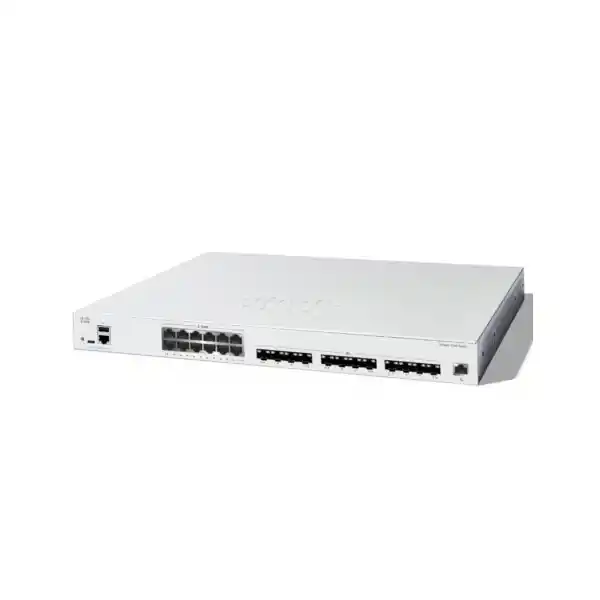
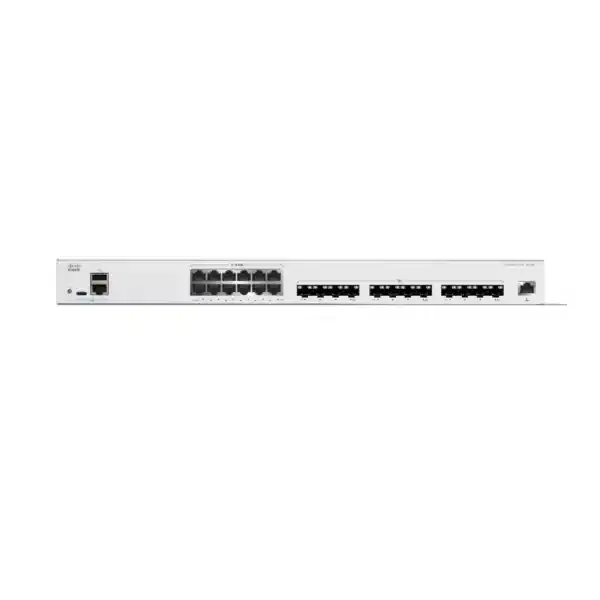
Cisco Catalyst C1300-24XTS Network Switch
Connect a mixed copper and fibre business network with a managed switch that brings 10 Gigabit Ethernet into the server room. This model provides 12 copper and 12 SFP+ data ports, plus a separate management connection. It is a candidate for organisations that need to bring servers, storage and downstream switches together without committing every connection to one cable type.
Request a Tanzania quotation from FourTeck with your endpoint list, cable distances and intended network role. Confirm the switch, connection accessories and configuration scope together so the proposed system matches the equipment you actually need to connect.
Choose it for the connections your business needs
Start with the equipment at each end of the proposed links. A business may have servers with copper network adapters, a storage appliance beside them and fibre running to another communications cabinet. In that situation, a balanced port mix can simplify the bill of materials. The buying decision is less about the largest number on a brochure and more about whether each required connection has a suitable interface and a clear purpose.
Treat this as a managed infrastructure choice. Someone must define the addressing, switching behaviour, security boundaries and maintenance process. If your current network is difficult to document, use the upgrade to create a simple connection diagram before ordering. Mark the business systems that depend on each cable and the person responsible for approving interruptions. That preparation gives procurement and technical teams a shared definition of a successful purchase.
Consider another design if your priority is powering a large endpoint estate, using faster-than-10G data links or meeting a specific enterprise routing architecture. Begin with those requirements rather than assuming that every product carrying the Catalyst name offers the same features.
A quick fit check
Mixed server-room connections
Consider this model when the planned network includes both copper-connected equipment and fibre-connected infrastructure. Write down the required connection type for each endpoint before choosing accessories.
Aggregation for access switches
Evaluate it where several access switches need a shared upstream connection point. Count uplinks, spare connections and any inter-switch links separately from server connections.
Check power at the access layer
If phones, cameras or wireless access points need electrical power through Ethernet, include suitable PoE equipment elsewhere in the design. This switch does not provide that endpoint power.
Verified hardware at a glance
| Model | Cisco Catalyst C1300-24XTS |
|---|---|
| Data interfaces | 12 × 10 Gigabit copper; 12 × 10 Gigabit SFP+ |
| Management interface | 1 × Gigabit Ethernet out-of-band management |
| Switching capacity | 480 Gbps |
| Forwarding rate | 357.12 million packets per second; 64-byte packets |
| Packet buffer | 8 MB |
| Power over Ethernet | No PoE output |
| Mounting | Rack-mountable |
| Chassis size | 444.3 × 273 × 43.94 mm (W × D × H) |
| Unit weight | 4.2 kg |
| Input power | Internal universal supply; 100–240 V AC, 50–60 Hz |
| Cooling | One fan |
Capacity figures describe the switching platform; they are not a promise of file-transfer speed, internet bandwidth or application response time. The result seen by a user also depends on the endpoint, storage, upstream path and traffic pattern. Confirm the exact ordered configuration and current software documentation before deployment.
Plan the copper links before reusing existing cabling
A copper connection is often attractive when the endpoint already has a suitable RJ-45 network interface. However, a socket that looks familiar does not establish the supported speed of the device behind it. Record the adapter model, driver, intended link speed and patching path. Ask for the complete installed channel to be assessed, including patch panels and patch leads, rather than relying on the label printed on one visible cable.
Measure the route the cable will follow. A short straight-line distance between two racks can become a longer installed path after overhead trays, vertical cable managers and service loops are included. Existing cabling that worked for an earlier network should be checked against the proposed application. Ask the installer for appropriate test evidence and label both ends with identifiers that match the connection schedule.
Plan copper capacity around operational needs as well as day-one demand. Keep an agreed allowance for a replacement server, a maintenance laptop or a future appliance. Avoid reserving ports informally in several different spreadsheets. A single approved port schedule makes later changes easier to understand and helps prevent an essential spare from becoming an undocumented permanent connection.
Build the SFP+ connection schedule as part of the order
An SFP+ slot needs a compatible connection solution. For an optical link, the proposed module, fibre type, connector and equipment at the far end must work together. For nearby equipment, a supported direct-attach cable may be worth evaluating. Obtain confirmation for the exact accessory part number and switch software combination. A generic description such as “10G fibre module” does not provide enough information to approve a purchase.
Make a small schedule for every planned link: origin, destination, installed distance, cable route, existing fibre details and the required connection at both ends. Include whether the far end is a server adapter, another switch or an appliance. Where an existing fibre circuit will be reused, ask for its current test records or arrange an assessment. Confirm the patch leads needed inside each cabinet as well as the main fibre run.
Agree what happens when a link accessory fails. A practical spares plan might prioritise the accessories used by business-critical systems or those with limited interchangeability. Specify whether spares must match an approved part exactly. Store them with their identification intact, and keep the connection schedule current when a module or cable is replaced.
Use switching capacity in the context of real workloads
Identify the traffic that is actually causing difficulty. A backup window that overruns, a slow shared-file service and a congested link between cabinets are different problems. Record the source, destination and busiest period for each workload. That helps establish whether a switching upgrade addresses the constraint or whether storage, application processing or another part of the path needs attention first.
Ask the technical team to distinguish local traffic from traffic that crosses an upstream connection. Several fast server links can still converge on a narrower path to another device. Draw the expected traffic flow for the most demanding normal operating period, then repeat the exercise for backup and recovery work. The same design may behave differently when many users return after an outage.
Use a representative acceptance test with agreed endpoints and a recorded method. Capture the state of the network before and after the change so the comparison is useful. An isolated speed test can be a diagnostic aid, but the business acceptance criterion should reflect the service being improved. For example, agree an acceptable backup completion window or a repeatable file-service test rather than a general promise that everything will feel faster.
Keep storage and virtualisation requirements explicit
A server-room deployment may be a suitable use case, but storage networking needs its own review. List the storage platform, host adapters, host operating systems and any vendor design requirements. Ask the storage supplier to confirm the proposed topology. Do not assume a switch is appropriate for every storage architecture simply because the front-panel speed matches the network adapters.
Map ordinary user traffic, host management, backup traffic and storage traffic separately. Decide which flows must remain available during a host or switch maintenance event. If the design includes multiple paths, document how the hosts and storage system will use those paths and how the behaviour will be tested. A second cable is useful only when the surrounding configuration gives it an intended role.
Keep changes small enough to diagnose. When replacing switching and modifying a storage service at the same time, define separate checkpoints so a problem can be isolated. Retain baseline settings and recovery instructions for the connected systems. The quotation should identify any specialist storage validation required rather than leaving that work implicit in a general network installation line.
Separate departments and services with a deliberate VLAN plan
The platform provides VLAN configuration, including access and trunk interface modes. VLANs let the network team organise separate broadcast domains. Before applying a configuration, describe the business groups and services that belong together. A useful plan records each segment’s purpose, addressing, gateway and permitted uplinks. It should also show where users obtain essential services and how administrators reach managed equipment.
Keep tagging expectations consistent between connected devices. A trunk carrying several networks needs agreement at both ends, while an ordinary endpoint connection may need a simpler access configuration. Have a reviewer compare the proposed port settings with the connection schedule. This reduces the chance that a correctly working physical link is mistaken for a hardware problem when its logical network membership is wrong.
Treat separation and access permission as related design tasks. Decide which departments may reach shared applications, which devices need administrative access and which connections should be blocked. Record exceptions with an owner and a reason. That record makes later changes easier to assess, especially when an application supplier asks for additional connectivity during troubleshooting.
Decide where routing and security inspection should happen
Layer 3 capability allows the switch to participate in an internal routed design. That can be useful when the intended architecture places selected network gateways in the switching layer. The first decision is where those gateways belong and which device should inspect traffic between sensitive systems. Agree this with the security and application teams before moving an existing gateway.
Prepare a traffic matrix rather than relying on broad statements such as “all departments need access to the server.” Identify the application, direction and required service for each approved relationship. Where a firewall is responsible for inspection or policy enforcement, make sure the proposed routes preserve that path. Have the implementation reviewed for both normal operation and any fallback route.
Check required routing protocols against documentation for the exact family and software release. C1300 and C1300X are different families; feature descriptions for one should not be transferred to the other. If the wider design depends on a particular protocol, scale or integration, make it an acceptance condition in the technical specification. Obtain an explicit answer before procurement commits to the hardware.
Protect management access and administrative accounts
Cisco’s security guide documents HTTPS and SSH management, access profiles and authentication controls. Configure management according to the organisation’s security policy and restrict access to approved administrative sources. Assign responsibility for accounts and credentials before the equipment enters production. An unowned shared administrator login makes both routine maintenance and incident investigation harder.
Use the separate management connection as part of an intentional access design. Decide where it connects, who can reach it and how an authorised engineer will recover access if a production network change fails. Keep recovery instructions available to the people who may need them. A dedicated socket alone does not create an independent recovery path; the connected network must be planned accordingly.
Introduce network access controls with a staged test. Where authentication infrastructure is involved, verify expected behaviour for ordinary endpoints and exceptional devices. Include what happens when the authentication service is unavailable. Keep a controlled recovery method and obtain sign-off from the service owners before enforcing a policy that could interrupt business equipment.
Apply access rules with a clear owner
The access-control functionality supports rule-based filtering. Start with a written list of approved traffic relationships and translate it into a configuration that can be reviewed. Give each significant rule a purpose and an owner in the supporting documentation. Avoid allowing temporary troubleshooting exceptions to become permanent simply because no one remembers why they were added.
Check the effect of a rule from the user’s perspective. Test the intended connection, test a connection that should be denied and verify that essential supporting services still work. A rule that protects an application but prevents a legitimate maintenance operation can create an avoidable support problem. Include the application’s operational owner in the acceptance process where appropriate.
Set a review point for exceptions and unused access. When a server is retired, a department moves or a supplier’s support requirement changes, review the related rules as well as the physical ports. Keeping the policy current is an ongoing responsibility. The switch provides controls, while the organisation provides the decisions about who should be able to communicate.
Plan link aggregation and loop prevention together
The port-management guide includes link aggregation configuration. Aggregated links require compatible settings on the connected equipment and an understanding of the traffic distribution method. Ask the designer to document the intended benefit: additional aggregate capacity, resilience or both. Do not treat several physical cables as proof that one individual transfer will gain all of their combined bandwidth.
Redundant physical paths also need a loop-prevention design. The platform includes spanning-tree controls, but the chosen topology and configuration still require review. Identify the expected forwarding paths and the response to a disconnected cable. Keep the diagram close to the configuration record so a future engineer can tell whether an unexpected blocked path is protective behaviour or a fault.
Test cable changes in a controlled maintenance window. Confirm the effect of removing and restoring the planned redundant connections, and check the connected services throughout the exercise. Record what users actually experience. The resulting evidence is more useful than assuming every duplicated connection will provide seamless recovery under every kind of failure.
Check stack compatibility before buying additional switches
Supported stacking is limited to compatible members within the same Cisco-defined family. This model belongs to the C1300 10 Gigabit stacking family; the published maximum is eight members. Confirm the exact proposed member list, supported connection method and firmware requirements before ordering a multi-switch system. The same brand name does not establish stack compatibility.
Count connections allocated to the stack before deciding how many remain for equipment. Agree whether the deployment will begin with one unit or whether several will be commissioned together. Record member identification and physical positions so the configuration can be matched to the rack. If a unit is replaced later, those records should explain how the replacement is to be introduced.
Evaluate the stack as an operational system. Define a maintenance process, a configuration backup routine and a recovery plan for the failures that matter to your business. Request a demonstration of the agreed recovery behaviour during acceptance. Avoid building a service commitment around an assumed interruption time that has not been tested with the chosen design and software.
Prioritise important traffic without hiding capacity problems
Quality of Service controls can classify and prioritise traffic. Cisco documents queue scheduling, DSCP mapping and bandwidth-related settings. Begin by identifying the applications that have a justified priority requirement. Agree how traffic will be identified and which connected devices are trusted to mark it. A policy should be understandable enough that another administrator can explain its intended effect.
Assess prioritisation under representative load. An apparently successful test on an idle network does not show how the policy behaves during congestion. Include both the priority service and ordinary business work in the test. Check that background tasks still have an acceptable completion time and that troubleshooting staff can identify when prioritisation is actively affecting traffic.
Keep the bandwidth plan visible alongside the policy. If an upstream service is consistently overloaded, review the cause and the capacity requirement rather than relying only on queue settings. Define who can request a policy change and how its effect will be measured. This keeps performance decisions connected to business needs instead of accumulating undocumented special treatment.
Place the switch where power and cooling can support it
Review the cabinet before approving the final installation plan. Allow room for cable bend radius, accessible patching and ventilation as well as the chassis itself. Identify the rack position, power connection and cable-management approach in advance. A technically suitable switch can still be difficult to maintain if it is installed where connectors are obstructed or labels cannot be read.
Assess the room’s operating conditions over a normal working week, including periods when other equipment is busy or the building is lightly staffed. Ask the installer to check the applicable environmental requirements and airflow instructions. Consider dust control and access for routine inspection. This is indoor business infrastructure planning; any harsher location needs a separate suitability assessment.
Include the switch and connected dependencies in power-continuity planning. Establish which services should remain available during a power interruption and evaluate the complete set of devices required to deliver them. Ask for the proposed UPS load and runtime assumptions to be documented. Backup power for a single device is useful only to the extent that the rest of the necessary service path can continue operating.
Common deployment scenarios to discuss
A growing office may need a central connection point for server equipment and the switches serving different work areas. In this scenario, start by identifying which links carry shared application traffic and which systems depend on them. Keep endpoint power at the appropriate access equipment, and review upstream capacity before treating the central switch as the answer to every performance complaint.
A campus-style organisation may have fibre between communications cabinets and copper connections inside the main equipment room. Here, the connection schedule and existing fibre condition are central to selection. Identify each destination, the installed route and the far-end equipment. Decide how future buildings or departments would be added without using all available expansion capacity immediately.
A backup or shared-file project may bring together several systems with different connection types. Establish the actual workload and test method first. Check the server and storage dependencies, then evaluate the switching design against that evidence. These are planning examples, not a claim that a particular organisation, application or storage vendor has certified this exact proposed deployment.
Compare alternatives by requirement
Compare a copper-focused design when almost every required endpoint uses a copper connection. Compare a fibre-focused design when most links leave the cabinet or terminate in optical interfaces. The balanced arrangement of this model is useful only when it matches the connection inventory. Buying a different mix and then compensating with many accessories can complicate both cost and support.
Consider a PoE access switch where the primary job is connecting and powering endpoint devices. Consider a different switching tier where the architecture requires capabilities beyond this platform’s documented scope. If future plans include faster data links, specialised routing or a particular management system, record those as explicit requirements rather than assuming a later software change will provide them.
Evaluate the complete proposed system rather than the bare switch price. Include link accessories, cabling work, configuration, validation, support options and any operational training. Compare exclusions as carefully as included items. A clear requirements table helps procurement understand why two superficially similar quotations may represent materially different results.
Prepare a controlled migration
Start by recording the existing connections, network segments, gateways and operational dependencies. Take appropriate backups and establish a rollback plan before disconnecting equipment. Identify who can approve the change and who will test the important business services. Schedule the work around the organisation’s operating needs, including backup windows and any external supplier involvement.
Build the proposed configuration from a reviewed plan. Validate manageable portions before the production cutover, especially when changing routing, segmentation or authentication. Do not assume an old switch configuration can be transferred unchanged. Keep a record of differences between the current and proposed design so an unexpected outcome can be traced to a specific change.
During cutover, check agreed milestones and record observations. If a critical acceptance condition fails, follow the documented decision process for troubleshooting or rollback. After a successful migration, update the diagram and port schedule immediately. Keep the previous configuration and relevant test evidence for the agreed retention period so the next maintenance task begins with reliable information.
Define acceptance tests that reflect business services
Create an acceptance plan before installation day. Identify the essential connections and the people qualified to verify each service. Separate physical-link checks from application tests so a successful cable connection is not mistaken for complete service readiness. Record the expected result, test owner and evidence to be retained for every important condition.
Include management access, permitted communication between network segments and the recovery procedures relevant to the design. Where redundancy is included, test the agreed failure cases in a controlled way. Where performance improvement is a purchase objective, use the same test method and endpoints for the baseline and final measurement. Note anything that prevents a fair comparison.
Complete the handover with the approved configuration, topology diagram, labelled connection schedule and maintenance responsibilities. Agree how outstanding issues will be tracked and who signs off completion. The goal is an operable business network with a clear owner, not simply a powered-on device with active link lights.
Request an itemised Tanzania quotation
Give FourTeck the required quantity, intended site environment and a short description of the business problem. Include the endpoint inventory, cable distances and any existing equipment that must remain in use. State whether the request is for hardware alone or whether configuration, migration, testing or other services need to be discussed. Service availability and scope should be confirmed in the response.
Ask for accessories to be listed separately with exact identifiers and quantities. Confirm what is included in the hardware package and what must be ordered additionally. Request explicit commercial details for the proposed supply, including applicable warranty and support terms, payment conditions, taxes, delivery arrangements and quotation validity. Do not make a purchase decision using an assumed stock position or an unconfirmed delivery date.
Where a formal tender or internal specification applies, provide it early. Identify mandatory technical requirements and the evidence expected for acceptance. A useful quotation should answer those requirements or state the gaps clearly. This gives the technical reviewer a sound basis for approval and helps procurement compare proposals on a consistent scope.
Frequently asked buying questions
Is this a 24-port Gigabit access switch?
It is a 10 Gigabit model with an equal split between copper and SFP+ data connections. Match that arrangement to your equipment list. A conventional desktop-access requirement may call for a different port mix.
Will it power IP phones or wireless access points?
No. Plan separate suitable PoE access equipment or another approved power method for endpoints that need it. Check data connectivity and electrical power as two separate requirements.
Can I use the SFP+ connections immediately?
Specify compatible transceivers and fibre, or a supported cable assembly, for the intended links. Confirm the accessories included in the quotation and check the far-end device. An available slot does not mean every required connection accessory is supplied.
Can it improve backup performance?
It may form part of an appropriate backup-network design, subject to review. First measure the existing constraint and check the source systems, storage and traffic path. Agree a representative test rather than assuming the switch alone determines completion time.
Can I keep my current VLAN arrangement?
Review the existing segment and port configuration against the proposed design. Preserve the intended business connectivity and security policy, then test it. Configuration syntax and behaviour should be verified rather than copied without review.
Does it replace a firewall?
Plan the switching and firewall roles separately. Decide where traffic is routed and where inspection is required. Have the proposed paths reviewed so internal forwarding does not bypass the intended security controls.
What should I provide when requesting a quote?
Provide quantity, endpoint models, link distances, existing cable information, the intended network role and any installation constraints. Include the required service scope and procurement conditions so the response can address the complete project.
What price and delivery time should I budget for?
Request a current written Tanzania quotation. Confirm the complete bill of materials, applicable commercial terms and delivery arrangements in that response. This page does not establish a price, local stock position or delivery commitment.
Coordinate the wider network
If the project also includes wireless coverage, use FourTeck’s Cisco wireless access point planning guidance to frame the related questions. Keep the access point’s data-link and power requirements visible in the same project specification. The switching and wireless choices should support the same approved service design.
Before approving an order, ask the team to explain how each proposed component contributes to the required result. Confirm who owns the switching configuration, the connected services and the acceptance decision. That shared understanding is particularly useful when several suppliers are involved or the project will be delivered in stages.
Request your Cisco switching quotation
Send FourTeck Tanzania your connection list and project requirements for the Cisco Catalyst C1300-24XTS. Ask for an itemised proposal covering the switch, verified connection accessories and the agreed technical scope. Confirm commercial terms and delivery arrangements before ordering.
Next step: prepare your endpoint inventory, link distances and required quantity for a quotation.




Reviews
There are no reviews yet.