
CISCO COMPACT ACCESS SWITCHING · TANZANIA
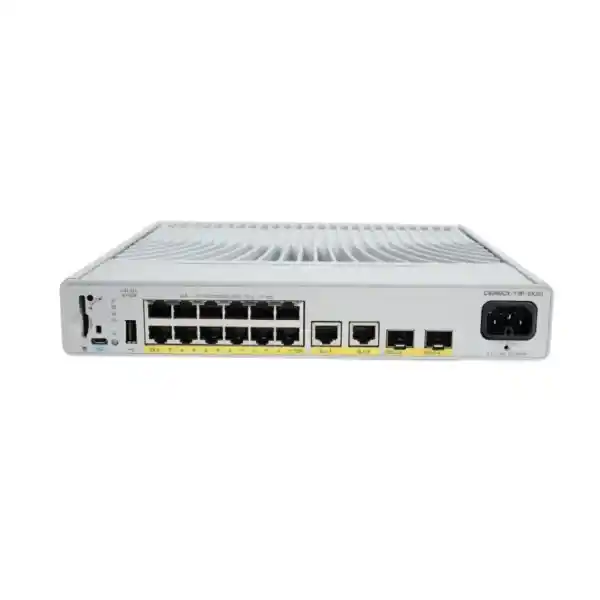
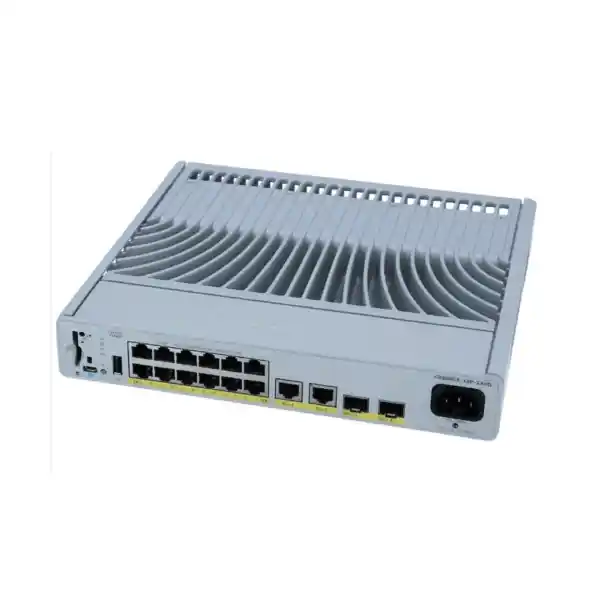
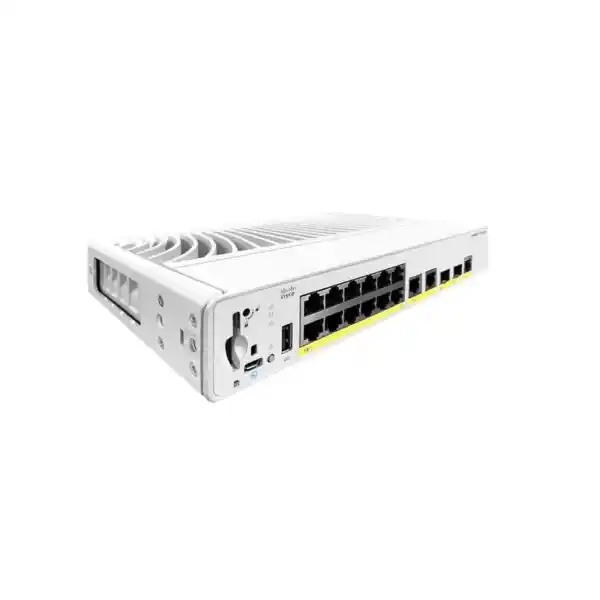
Cisco Catalyst C9200CX-12P-2X2G Network Switch
Bring managed wired connectivity and endpoint power closer to the people and devices that need them. This compact Catalyst switch is a practical candidate for a small office zone, meeting area or branch where space and fan noise matter. It suits buyers who want an enterprise access design without choosing a larger switch solely to serve a modest group of endpoints.
For a Tanzania quotation, start with your endpoint list, power requirements and upstream connection. Ask FourTeck Tanzania to quote the exact licence variant and a complete bill of materials, including compatible uplink components and mounting accessories where required. Confirm the commercial offer before placing an order.
Start with the requirement, then choose the switch
Choose this model when the installation calls for a small, managed access point in the wired network, with a mix of powered and unpowered Ethernet devices. The most useful question is whether its access capacity, shared power allowance and uplink arrangement fit the actual room or branch. A model name alone cannot establish that fit, especially where wireless access points and cameras have different operating modes.
Prepare a schedule with one line for every device. Record its network speed, required power standard, maximum requested power, intended VLAN and business role. Include ordinary computers and printers as well as powered devices. Then add the devices expected during the planned ownership period. This turns an informal request for a switch into a design that procurement and technical staff can evaluate together.
Identify the owner of each dependency before purchase. Someone must provide upstream switch capacity, addressing, authentication services where used, physical cabling and an approved power outlet. Where these tasks belong to different teams, record the handover points. A correctly selected access switch can still arrive before its supporting infrastructure is ready, delaying a project without any fault in the hardware.
The ideal outcome is a quotation tied to a clear deployment brief. State how many active connections are needed at launch, what growth is expected and how much downtime the location can tolerate. Those answers help determine whether this compact unit is appropriate or whether a larger platform, a different power class or a different resilience design should be considered.
Verified hardware at a glance
| Model | Cisco Catalyst C9200CX-12P-2X2G |
|---|---|
| Access interfaces | 12 × 10/100/1000 Ethernet PoE+ ports |
| Fixed uplinks | 2 × 1G copper and 2 × 10G SFP+ |
| Maximum shared PoE budget | 240W |
| Internal power supply | 315W AC, fixed |
| Cooling | Fanless |
| Published switching / forwarding figures | 68 Gbps / 50.59 Mpps |
| Chassis size, H × W × D | 4.4 × 26.9 × 24.4 cm |
| Published weight | 2.99 kg |
| Hardware stacking | Not supported |
Published chassis performance figures describe the switching platform; they are not a promise of internet throughput or application response time. End-to-end results depend on the selected links, traffic mix, upstream network and connected systems.
Size endpoint power before filling every port
PoE planning needs two separate checks: whether each endpoint uses a supported power standard and whether the combined allocation fits the switch. The number of powered ports does not mean that every port can simultaneously consume its individual maximum. Treat the shared budget as an engineering limit and preserve headroom for the way your devices actually request and use power.
As an illustrative calculation, six devices budgeted at 15W each and four budgeted at 25W each require 190W in total. That leaves 50W below this model’s published allowance. This example is a planning exercise, not a compatibility statement for particular phones, cameras or access points. Use the manufacturer’s stated switch-side requirements and the allocation observed during validation for the final design.
Another useful boundary check is twelve allocations of 30W, which total 360W and exceed the available budget. A design that needs that combination should be changed before ordering. Possible approaches include selecting a platform with a larger power allowance, distributing endpoints between switches or revisiting the endpoint mix. Do not rely on hoped-for average consumption to justify an allocation that the system cannot provide.
Check startup as well as steady operation. During commissioning, power the intended endpoint set together and inspect allocation, device status and any reduced-function indications. An endpoint may require more power for optional radios, heaters, accessories or other features. Document the tested configuration so that a later replacement device does not silently change the assumptions used for the original purchase.
Plan the upstream connection as a complete link
An uplink is a connection between two ends, not simply an available socket on the new switch. Identify the upstream device, its available interface type, intended speed and configuration owner. Then document the route between the equipment. An existing copper run, an inter-room fiber link and a short in-cabinet connection can each lead to a different component list.
For an optical connection, specify fiber type, distance, connectors and the supported transceiver at both ends. For a direct-attach option, verify cable support and permitted length for both platforms. The presence of an SFP+ interface does not establish that an arbitrary module is suitable. Check compatibility for the exact switch, software release and peer device before the quotation is finalized.
Map which business traffic will cross the link. Local printing, phone calls, camera recording, wireless backhaul and cloud applications can place very different demands on it. Estimate the busiest reasonable operating period instead of adding only average utilization. If the upstream path remains constrained, replacing the local switch alone may produce less benefit than the buyer expects.
Where more than one uplink is planned, ask the engineer to define its role. Additional cables may serve a tested aggregation or redundancy design, but connecting them without a topology plan can create problems. Record the approved forwarding behavior, the peer relationships and the test that demonstrates recovery. Avoid assuming that two connected links automatically double application speed or eliminate outages.
Select the exact licence variant
The requested base model does not specify a final software tier. Cisco lists C9200CX-12P-2X2G-E for Network Essentials and C9200CX-12P-2X2G-A for Network Advantage. Its current ordering guidance describes an included perpetual Network Stack licence associated with the suffix and a mandatory matching software term licence at purchase. The quote should identify the selected subscription type and term explicitly.
Give the supplier a requirement list rather than asking for the highest tier by default. Separate basic access needs from routing, policy, automation and management requirements. Ask for confirmation against the exact platform and intended release wherever a feature is important to the design. Product-family marketing is useful context, but it is not a substitute for a supported configuration for your order.
Keep hardware, perpetual entitlement, subscription and support line items understandable to both IT and procurement. Record which account will receive entitlements and who is responsible for maintaining licence information. If an organization uses a central purchasing team, agree how the branch hardware and software records will be associated with the correct organization before equipment is deployed.
At handover, retain the final order configuration and the entitlement records with the network documentation. Ask what continues, changes or requires renewal when a quoted term ends, based on that exact offer. Avoid treating every line item as having the same duration. Clear records make future expansions and support requests easier to scope without reconstructing the original purchase from email fragments.
Use the fanless design with suitable installation conditions
A fanless chassis removes fan noise from the installation, which can be valuable near occupied desks and collaboration spaces. It still releases heat and needs appropriate ventilation. Cisco’s installation guidance recommends at least 7.6 cm of clearance around the unit and a clean, dry, ventilated environment. The chosen location must also meet the applicable environmental limits for the switch and installed optics.
Measure the proposed location with cable bends, connectors and servicing space included. The chassis dimensions alone do not show the space required after installation. Check that a technician can reach the power connection, read indicators and remove a patch lead without disturbing unrelated equipment. An accessible position can save significant time when a simple connection problem needs attention.
Use the correct mounting arrangement for the actual surface or cabinet. Cisco documents several compact-switch mounting methods, with appropriate accessories and orientation instructions. Ask the installer to identify the intended method and include any required kit in the order. Do not assume that a bracket suitable for another Catalyst chassis will fit this unit or preserve the required clearance.
For Tanzania projects, assess the actual indoor site conditions rather than relying on a broad statement about the local climate. A cupboard, reception cabinet and equipment room can have different temperatures and dust exposure within the same building. If the location is exposed to weather, industrial contamination or unsuitable temperatures, review an appropriately rated alternative instead of assuming a compact enterprise switch is ruggedized.
A practical fit for offices, branches and shared spaces
In a small office zone, begin with the number of desks and the placement of shared devices. A compact switch can be considered where running every local connection back to a larger cabinet is impractical. Compare the cost and maintenance implications of this arrangement with centralized cabling. The right answer depends on the building and support model, not just the number of spare ports today.
In a branch, list the services that must operate during business hours and identify where each depends on another device. Phones may need call-control reachability, wireless clients need the wider network, and payment or business systems may depend on an internet path. This exercise helps the buyer see which requirements belong to the access switch and which require separate network or power decisions.
In meeting and training areas, check temporary connection demand as well as permanent devices. A room that is quiet most days can become busy during scheduled events. Record how visiting equipment will be connected and controlled, and whether staff can identify the correct ports without opening an equipment enclosure. Plan physical access and network policy together.
For hospitality, education or healthcare administration, use the operational needs of the particular space to assess fit. Separate staff, guest and specialist equipment requirements in the brief, and verify any endpoint compatibility that matters. These are deployment examples to guide selection; they do not establish suitability for a regulated system or imply that FourTeck has assessed a particular facility.
Match wireless, voice and camera requirements individually
A wireless access point should be assessed as a specific model with a specific operating mode. Check its Ethernet speed, power class and maximum draw with the features you intend to enable. A connection that supplies power and establishes a link may still limit the access point’s intended capability. In particular, a requirement for multigigabit access or a higher power class should trigger a different switch comparison.
For a wider wireless project, review Cisco wireless access point planning in Tanzania alongside the wired design. Place the access point schedule, switch-port map and power calculation in the same project pack. This makes it easier to identify where an apparently small wireless change creates a new requirement in the wired network.
For IP phones, check the handset’s power requirement, voice-network arrangement and any attached accessories. If a computer will share the phone’s network connection, record that design and test both users of the connection. Include call setup, established calls and recovery after an approved restart in acceptance testing. A successful dial tone by itself does not demonstrate the complete user experience.
For cameras, include the recording destination and the traffic path in the design. Check sustained recording and the operating modes that affect power demand. Do not assume that every device described as a PoE camera has the same needs. Validate the exact endpoint and its intended features, then retain the result so that a later replacement can be checked against a known baseline.
Define segmentation and access control before commissioning
Cisco documents VLANs, voice VLANs and VLAN trunks for this compact platform. These tools can support a design that separates different kinds of traffic, but the separation policy must be specified and configured. Write down which devices belong together, which networks they need to reach and where traffic between networks will be controlled. A port label is useful documentation, but it does not enforce a policy.
Plan addressing and supporting services at the same time. Identify DHCP ownership, gateway placement, DNS requirements and any management-network restrictions. Use a simple matrix to describe permitted communication between staff systems, voice equipment, cameras and guest services. Ask the engineer to translate that matrix into the appropriate configuration across the complete network, including upstream security controls where required.
Cisco also documents IEEE 802.1X port-based authentication for this model. If your organization uses it, include the authentication infrastructure and endpoint behavior in the deployment plan. Test an approved user, an unrecognized endpoint and a service outage under the organization’s agreed policy. Feature availability does not mean that credentials, certificates or an authentication server are included with the switch.
Keep administrative access deliberately scoped. Assign responsibility for configuration changes, protect management credentials through the organization’s normal process and retain a recoverable configuration backup. These are operational recommendations for the deployment, not a promise that a new switch automatically secures a site. Review the actual configuration and feature dependencies with the engineer responsible for the production network.
Treat availability as a design decision
This compact model does not support hardware stacking. If a project specification calls for a StackWise group, select a suitable stacking-capable platform instead of treating this unit as interchangeable with the larger Catalyst models. For a compact access location, the engineer should describe how the standalone device fits the upstream architecture and how it will be recovered or replaced.
List the failures that matter to the business. A disconnected uplink, loss of local power, an upstream device outage and failure of the access switch are different events. Each can require a different response. Ask which event the proposed design addresses and how the response will be verified. A second link does not resolve every failure in the equipment that it connects.
If power continuity is required, size the supporting UPS for the intended equipment and runtime. Include connected powered endpoints in the overall load assessment, along with any upstream equipment that must remain operational. A local switch staying powered may provide little business benefit if the router, recorder or other essential service loses power at the same time.
Agree the recovery process before the first incident. Decide whether a spare is justified, where backups will be retained and who can restore the configuration. Record the approved software and the replacement procedure. For a location without resident IT staff, include clear equipment identification and escalation instructions so that local personnel can help diagnose a problem without making unplanned configuration changes.
Inspect cabling and the physical handover
Use the project survey to establish which installed cables can be reused. Check labels, termination quality, route condition and test records rather than assuming that an existing outlet will perform correctly because it once worked with another device. Where faults are intermittent, a new switch may make troubleshooting more visible without addressing the underlying cabling problem.
Plan patching so that access connections and uplinks are easy to identify. Label both ends and maintain a port schedule that includes the room, outlet and endpoint role. Leave sufficient slack for servicing without creating an untidy bundle that strains connectors or blocks ventilation. Good cable organization is a practical maintenance measure, especially where several teams share an equipment cabinet.
Include power-cord suitability, outlet position and any approved power protection in the site survey. Ask for the power cord required for the installation to be identified in the quotation. Do not assume that a particular regional cord, mounting accessory or optical module is included simply because the switch chassis is listed on a purchase order.
At physical handover, compare the delivered equipment with the approved bill of materials and record serial numbers. Check that the intended mounting components and uplink parts are present before scheduling a cutover. Photograph labels and the finished installation for internal records where appropriate. These details make it easier for a remote support team to understand what was actually installed.
Build a migration plan around the existing network
Start a replacement project by documenting the current port roles and dependencies. Record access and trunk relationships, addressing, management settings, endpoint power needs and the upstream connection. Identify settings that exist for historical reasons and ask whether they are still required. Copying an old configuration without review can carry old mistakes into a new installation.
If the broader project involves an older Catalyst estate, use Catalyst replacement planning for Tanzania as a separate planning reference. This compact product should be evaluated for its own role and capacity. A smaller chassis is not automatically an equivalent replacement for a high-density access switch serving a whole floor.
Prepare and review the new configuration before the maintenance window where possible. Confirm the intended software release, the selected feature set and the upstream changes. Set measurable acceptance criteria, such as endpoint registration, access to business applications and correct isolation between networks. Make sure the person authorizing the cutover understands both the expected interruption and the recovery decision.
Keep a rollback plan that names the conditions for using it. Retain the previous configuration and record the original physical connections before moving cables. Where an application owner must validate a result, schedule that person for the maintenance window. The migration is complete when the agreed services have been tested and documented, rather than when all front-panel indicators show activity.
Test the experience users rely on
Begin acceptance with an inventory check: every intended device should appear on the expected connection and receive the appropriate network settings. Then test the workflows people actually use. Opening a business application, making a call, joining wireless service and viewing a recording are more meaningful than demonstrating that one test computer can reach a single address.
Check operation with the planned endpoint population connected. Review negotiated link behavior, endpoint power allocation and any reported errors. Compare observations with the approved design, and investigate deviations before handover. Record the test conditions, including the connected device mix, because results from an almost empty switch may not represent normal use.
Test recovery only within an approved maintenance procedure. For example, the project team may verify what happens after a permitted uplink interruption or a controlled restart. Document the expected result and the observed result separately. Do not introduce an outage into an operating business simply to demonstrate a feature that was not part of the agreed acceptance plan.
Finish with a practical handover pack. Include the final port schedule, configuration backup location, management details held securely, licence records, support contacts from the accepted offer and outstanding actions. Identify who owns routine checks and future changes. A clear handover reduces dependence on the individual engineer who completed the installation and gives the buyer a usable record of the delivered system.
Compare complete quotations for Tanzania procurement
Ask for the final hardware suffix, software term, uplink components, mounting arrangement and power cord to appear clearly in the commercial offer. Separate optional items from the items required to make the proposed design operate. A lower headline hardware price can be difficult to compare with another quote if one includes essential software or link components and the other does not.
Request current price and currency for the exact configuration. Have the supplier state tax treatment, delivery arrangements and any other applicable charges in the quotation. Do not infer Tanzania pricing from an overseas retailer or assume that a web description establishes local stock. Quantity and required delivery location should form part of the enquiry so that the commercial response can be specific.
Confirm warranty and support terms in writing for the offered equipment. Ask who provides each service, what is included and what information is needed for a claim or technical case. Distinguish product coverage from installation work and ongoing network administration. These are separate purchasing decisions even when they appear in a single project proposal.
Compare offers against the same deployment brief. If one supplier proposes a different platform, ask which requirement caused the change and how the alternative meets it. This approach gives procurement a defensible comparison based on capacity, functionality and included scope. It also helps prevent a late discovery that the preferred price assumed a different licence tier, endpoint mix or installation method.
When to review another platform
Review a different model if the access-port count does not leave a sensible path for planned growth. Choose that headroom deliberately rather than ordering a much larger device without a reason. Consider whether growth will occur in the same room, elsewhere in the building or at another branch, because those situations can lead to different physical network designs.
Revisit the selection when the endpoints need capabilities beyond ordinary Gigabit PoE+ access. Examples include higher access speeds, a higher per-device power class or more total endpoint power than the proposed configuration can provide. Have the engineer compare the actual requirement with an appropriate platform and verify the relevant model documentation before a substitution is approved.
A specification for hardware stacking, a different power-supply resilience arrangement or an exposed operating environment also deserves a separate comparison. These requirements affect architecture and suitability, not just convenience. Do not assume that every capability advertised somewhere in the Catalyst 9200 family applies to every compact model within that family.
Conversely, a site with only a few simple connections may not need the operational scope of this platform. Consider the organization’s management standards, staff familiarity and expected use over the ownership period. The appropriate purchase balances the technical requirement with the ability to configure, maintain and support the result. Ask for that fit to be explained in the proposed solution.
Buyer questions
Can all twelve ports supply their individual maximum at once?
The combined requested allocation must remain within the shared power allowance. Do not multiply the port count by a per-port maximum and assume the result is available. List the endpoint requirements and check the total before ordering. If the intended population exceeds the budget, change the platform or distribute the devices through an engineered design.
Are optical transceivers included with the switch?
This description does not establish that any transceiver is included. Ask for each uplink component to appear in the bill of materials and confirm compatibility at both ends. Fiber type, reach and connector details should be specified together. That prevents an order for a working chassis from arriving without the parts required to connect it upstream.
Will a faster uplink make every endpoint faster?
An uplink can improve available aggregate capacity where it addresses a real bottleneck. It does not change the access speed of a connected endpoint, the internet service capacity or the response of a remote application. Identify the constrained part of the existing path before deciding which upgrade is likely to improve the experience.
Does the base model name determine the software tier?
No. Ask the quote to identify the final suffix and selected software entitlement. Describe the required features and management approach so that the tier can be checked against them. Keep the accepted configuration with the purchase records, including subscription terms and account ownership, instead of relying on the abbreviated model name in an informal request.
Can this replace an existing stacked access switch?
A replacement must be evaluated against the original architecture, not just the occupied-port count. This unit is standalone and should not be assumed to reproduce a stacked design. Review the upstream topology, failure response, management approach and capacity requirements before choosing it for a migration. Select another platform if stacking is a firm requirement.
Is the fanless chassis suitable for a closed cupboard?
Suitability depends on the cupboard’s ventilation, temperature, clearance and accessibility. A fanless unit still needs to dissipate heat. Ask the installer to check the proposed position against Cisco’s installation guidance, including the effect of other equipment. If suitable conditions cannot be maintained, choose a better location or reconsider the equipment design.
Can the switch power any wireless access point?
Compatibility must be checked for the exact access point, operating mode and required power class. Also check whether its intended performance calls for a faster wired access connection. An access point powering on is only one part of validation. Test the features intended for use and include the full population in the deployment power calculation.
What should a Tanzania quote request include?
Provide the quantity, delivery location, endpoint schedule, upstream device details, cabling information, mounting preference and required software features. State whether implementation or support should be priced as separate scope. Ask for current commercial terms and an itemized configuration. This gives the supplier enough information to respond with an offer that can be reviewed consistently.
Does buying the switch include network installation?
Installation is a separate scope unless the accepted offer states otherwise. Define survey work, configuration, mounting, cabling, cutover, acceptance testing and documentation explicitly when requesting a project quotation. Also agree who supplies upstream changes and application validation. Clear responsibilities reduce the chance of equipment arriving while essential deployment tasks remain unassigned.
How should future endpoint changes be handled?
Check a replacement or additional device against the original port, power and network-policy assumptions before connecting it. Update the endpoint schedule and confirm remaining capacity. A new camera or wireless model may have different requirements from the device it replaces. Keeping that record current helps preserve the design as the business changes.
Request a configured quotation from FourTeck Tanzania
Send the required quantity, endpoint power schedule and upstream connection details with your enquiry. Include the proposed installation location, mounting method and any required network features. Ask for the final licence suffix, software term, compatible link components and required accessories to be listed clearly, with installation and support scope identified where requested.
Confirm current pricing, stock position, delivery terms and applicable coverage in the written offer. Use the agreed bill of materials and deployment brief as the purchasing reference, then retain the final configuration and acceptance records for the team that will operate the network.
Next step: request a Cisco Catalyst compact-switch quote matched to your site requirements.




Reviews
There are no reviews yet.