
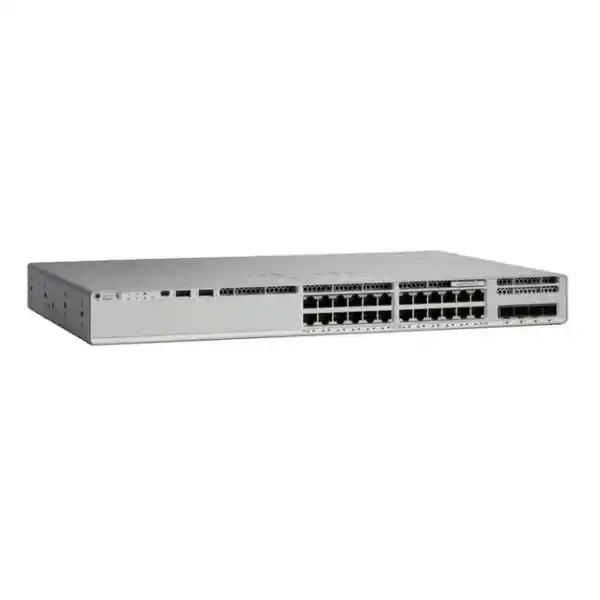
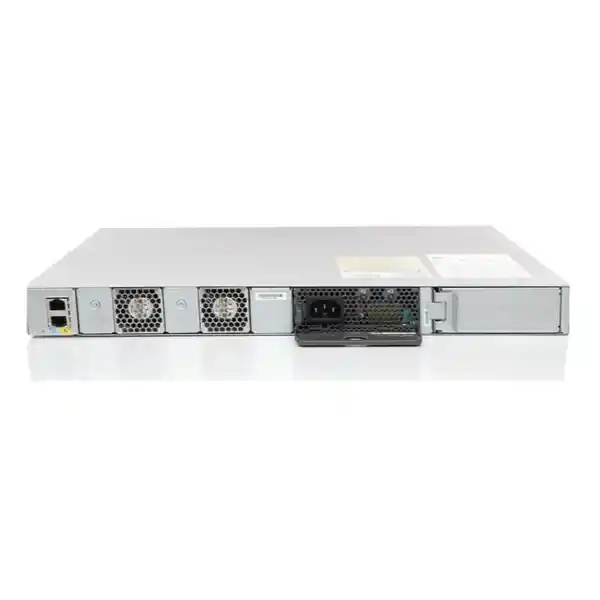
Cisco Catalyst C9200L-24PXG-2Y Network Switch
The Cisco Catalyst C9200L-24PXG-2Y is a stackable enterprise access switch for organisations that need a practical mix of standard Gigabit Ethernet, multigigabit copper, PoE+ and high-speed fibre uplinks in one 1U platform. It provides 24 PoE+ access ports, including eight multigigabit ports that can operate up to 10 Gbps and sixteen 1 Gigabit ports, plus two fixed SFP28 uplinks that support 1, 10 or 25 Gbps operation. This combination is particularly useful when a network must support newer wireless access points, IP phones, cameras and other powered endpoints without forcing every user-facing port to be 10 Gigabit.
For Tanzania-based businesses, institutions and project teams, the main buying question is not simply whether the switch has enough ports. The important checks are whether eight multigigabit ports are sufficient for high-bandwidth devices, whether the planned powered-device load fits the PoE budget, whether 25G uplinks match the distribution or core design, and whether Network Essentials or Network Advantage is the correct licensing tier. The C9200L-24PXG-2Y is strongest when those requirements are known in advance and the switch is being used as a resilient access-layer platform rather than as a generic unmanaged replacement.
Fast feature summary
8 multigigabit plus 16 Gigabit Ethernet copper ports.
Useful for high-throughput APs, workstations and edge devices.
Fixed SFP28 uplinks for high-speed aggregation.
Optional stacking with up to 80 Gbps stack bandwidth.
Standalone platform capacity for this exact model.
Specified standalone forwarding rate.
Why this model exists
Many access networks have reached an awkward middle stage. Most connected devices still require only 1 Gigabit Ethernet, yet newer Wi-Fi access points and selected high-performance endpoints can exceed the practical limits of a single 1G access link. Replacing every port with 10G capability may add cost and power consumption that the deployment does not need. The C9200L-24PXG-2Y addresses this by mixing sixteen 1G PoE+ ports with eight multigigabit PoE+ ports. Network designers can reserve the faster copper interfaces for devices that actually benefit from 2.5G, 5G or 10G operation while retaining conventional Gigabit access for phones, printers, cameras, desktops and other standard endpoints.
The second design decision is the uplink. Instead of four fixed 10G SFP+ uplinks found on some other C9200L variants, this model provides two fixed SFP28 uplinks capable of 1, 10 or 25 Gbps. That makes it attractive where a compact access switch needs fewer but faster uplinks into a distribution layer, a pair of aggregation switches, or a resilient fibre topology. A 25G uplink can provide more headroom for a switch serving multigigabit access points and other high-throughput endpoints, but the optics, cabling and upstream interface must all be compatible with the selected link speed.
This is still an access-layer product, not a universal core switch. It is designed around enterprise campus, branch and similar edge requirements, with Cisco IOS XE software, Layer 2 and Layer 3 functions, security controls, automation interfaces, telemetry, and optional stacking. Buyers should therefore evaluate it in the context of the complete network design: endpoint speeds, PoE demand, uplink topology, redundancy, licensing, optics, configuration standards and operational skills.
Access-port design: 16 × 1G plus 8 × multigigabit
The twenty-four RJ-45 access ports are divided into two practical groups. Sixteen ports are intended for conventional Gigabit Ethernet access. The remaining eight are multigigabit interfaces that can operate at intermediate Ethernet rates such as 2.5 Gbps and 5 Gbps as well as 1 Gbps and 10 Gbps. The value of multigigabit Ethernet is that it can increase throughput on suitable copper cabling without requiring an immediate move to fibre at every endpoint. This is especially relevant for modern wireless access points whose aggregate radio capacity may exceed 1 Gbps, and for a smaller number of high-performance wired devices.
The design does not mean every connected device automatically runs faster. The endpoint network interface, cable category and quality, negotiated Ethernet speed, configuration and traffic pattern all matter. For 10GBASE-T operation, cable plant quality becomes more important, and Cisco specifically calls for Category 6A or better for 10G operation in its architecture guidance for this model family. Existing cabling should therefore be audited before a project assumes that every multigigabit port will sustain 10 Gbps.
A sensible deployment plan maps the eight fastest ports to the devices that genuinely need them. Examples include high-capacity Wi-Fi access points, selected engineering or media workstations, local servers, edge appliances or other bandwidth-intensive devices. Standard phones, cameras and ordinary desktops can remain on the sixteen 1G ports. This preserves the value of the multigigabit interfaces and makes capacity planning easier as the network grows.
PoE+ planning: power is a design calculation, not just a checkbox
All access ports on the C9200L-24PXG-2Y support PoE+, which allows the switch to deliver both network connectivity and electrical power to compatible devices over Ethernet cabling. In a real project, however, “24 PoE+ ports” does not mean that every port can draw the maximum PoE+ power simultaneously under every power-supply configuration. The available PoE budget is determined by the installed power supplies and the system’s own power needs.
Cisco lists the PWR-C5-600WAC as the AC power supply for this C9200L model. With one 600W AC power supply, the documented available PoE power is 370W. With two supported 600W AC power supplies, the platform can provide up to 740W of available PoE power. That distinction is important. A deployment with a few phones and access points may fit comfortably within 370W, while a dense installation of higher-power devices may require the second power supply both for additional PoE capacity and for power redundancy.
Before ordering, create a port-by-port power worksheet. Record the expected maximum power draw of each access point, camera, phone or other powered device, then add growth headroom. Do not base the design only on average consumption. The switch must support the worst credible powered-device load while also meeting the organisation’s redundancy policy. If an uninterrupted network is important, the upstream power design matters too: an additional switch power supply does not replace a properly sized UPS, protected power circuit or broader continuity plan.
The result should be a clear decision on whether one or two power supplies are required at installation, what UPS capacity is appropriate, and how much PoE reserve remains for future devices. This is particularly useful in office fit-outs, campus wireless upgrades, hotel and hospitality deployments, schools, clinics, retail branches and surveillance-heavy environments where the number and power class of edge devices can change over time.
25G uplinks and SFP28 design considerations
The model’s two fixed uplink ports are SFP28 interfaces that support 1, 10 or 25 Gbps operation. For many buyers, these uplinks are the main reason to choose the “2Y” version over a 24-port C9200L variant with four 10G uplinks. Two 25G-capable ports can provide substantial northbound bandwidth while keeping the front-panel design simple. They can be used for high-speed fibre connections, redundant uplinks to separate upstream switches, or other supported topologies defined by the network architecture.
The uplink speed must be planned end to end. A 25G port requires a compatible upstream interface and an approved optical or direct-attach media choice for the required distance and fibre type. A design that needs four physically separate 10G uplinks may be better served by the C9200L-24PXG-4X, whereas a design that benefits from one or two higher-speed uplinks can make stronger use of the C9200L-24PXG-2Y. Port count and link speed should be evaluated together rather than treating “25G” as automatically better.
For redundancy, consider where each uplink terminates and how failure domains are separated. The physical topology, spanning-tree or routed-access design, port-channel strategy, upstream switch capabilities and licence level all affect the final architecture. Fibre transceivers and cables should be selected only after confirming Cisco compatibility for the exact IOS XE release and the intended link speed and distance.
StackWise-80 for growth and operational simplicity
C9200L fixed-uplink models support Cisco StackWise-80 when the appropriate stacking hardware is used. The platform can support an 80 Gbps stacking bandwidth and, according to Cisco’s current data sheet, up to eight C9200L members in a supported stack with the same licence level. Stacking can simplify management by presenting multiple physical switches as a coordinated system, while also providing a practical path to expand access-port capacity without managing each switch entirely as an isolated device.
Stacking is not mandatory. A single C9200L-24PXG-2Y can operate as a standalone switch, and smaller sites may prefer the simplicity of a single unit or a pair of independently managed switches. Where a stack is planned, the design should include the correct stack kit, cable lengths, physical rack layout, software compatibility and failure procedures. All members should also be checked for compatible licensing and supported software before being combined.
Stacking should be chosen for an operational reason: simplified management, additional port density, easier expansion or resiliency. It should not be added merely because the feature exists. The organisation’s maintenance model, spare strategy, change-control process and recovery procedures determine whether a stack is the best fit for the site.
Performance and scale
Cisco specifies 292 Gbps of switching capacity and a 229.16 Mpps forwarding rate for the C9200L-24PXG-2Y in standalone operation. With stacking included in the platform figures, Cisco lists 372 Gbps switch capacity and a 277 Mpps forwarding rate. These values help confirm that the model is sized as an enterprise access switch with enough internal capacity to service its mixed 1G and multigigabit access interfaces and high-speed uplinks.
For scale, the C9200L family supports up to 16,000 MAC addresses, 4,094 VLAN IDs and 512 switched virtual interfaces. Cisco lists up to 11,000 total IPv4 routes for C9200L platforms, including direct and indirect entries, along with 1,500 IPv6 routing entries and 1,000 multicast routing entries. Multigigabit C9200L models use a 12 MB packet buffer and support jumbo frames up to 9,198 bytes. These numbers are not a promise that every feature can be pushed to every maximum at the same time; they are platform scale references for planning.
In most branch and campus access designs, user experience is influenced as much by uplink architecture, wireless design, WAN capacity, QoS, endpoint behaviour and configuration quality as by raw switch capacity. The most useful interpretation of the hardware specifications is therefore “does this platform have enough headroom for the intended role?” rather than simply comparing the largest number on competing data sheets.
Cisco IOS XE, automation and network visibility
The Catalyst 9200 family runs Cisco IOS XE, giving network teams a familiar enterprise operating environment with support for standard switching, routing, security, management and automation workflows. For organisations moving from small-business switching to a more structured enterprise access layer, this can be a major operational change. Configuration standards, user access control, logging, backups, monitoring and software lifecycle management should be defined before deployment rather than added later.
Cisco documents automation support in the Catalyst 9200 licensing framework, including model-driven approaches such as NETCONF, RESTCONF and YANG as well as Plug and Play capabilities. Telemetry and visibility functions include model-driven telemetry, SPAN and RSPAN, with flow visibility capabilities depending on platform and software features. These tools are useful for teams that want repeatable configuration, centralised monitoring and better operational insight, but they also require compatible management systems and appropriately skilled administrators.
The switch can also participate in broader Cisco campus architectures. However, buyers should avoid assuming that every advanced architecture feature is identical across all Catalyst 9200 models or licence tiers. The C9200L has specific scale and feature boundaries, including more limited virtual-network scale than modular C9200 variants. If an organisation is planning advanced segmentation, SD-Access or a more complex routed campus, the design should be checked against current Cisco documentation before purchase.
A practical procurement process should therefore identify not only the switch hardware but also the intended management platform, software release policy, support model and configuration method. This reduces the risk of buying capable hardware without a matching operational plan.
Network Essentials or Network Advantage?
Cisco sells this hardware in licence-specific orderable variants. The C9200L-24PXG-2Y-E is associated with Network Essentials, while the C9200L-24PXG-2Y-A is associated with Network Advantage. The base model name alone does not tell you which licence tier a quotation includes, so the exact orderable part number should be checked before purchase.
Network Essentials covers the foundational capabilities required by many access-layer deployments, including core Layer 2 functions, static routing and selected routed-access features, first-hop security, quality of service, 802.1X, MACsec-128, automation interfaces and telemetry functions listed by Cisco for the tier. Network Advantage adds more advanced routing and segmentation capabilities. Examples listed by Cisco include broader dynamic-routing support and advanced network segmentation features such as VRF, VXLAN, LISP and SGT-related functions, subject to platform and software support.
The correct choice depends on the intended architecture, not on a general preference for “more features.” A straightforward branch or access-layer design may be fully served by Network Essentials. A network that requires advanced routing, segmentation or architecture-specific functions may justify Network Advantage. Because Cisco licensing evolves over time and new orders can include subscription requirements in addition to the perpetual network licence, the full licence bundle, term and support entitlement should be verified on the current quote.
When comparing offers in Tanzania, insist that the quotation identifies the complete Cisco orderable SKU, licence tier and included subscriptions rather than listing only “C9200L-24PXG-2Y.” That makes comparisons more accurate and helps prevent an apparent price difference from hiding a difference in licence entitlement.
Security and access control capabilities
Access switches sit directly between users, devices and the rest of the organisation’s network, so security controls at this layer matter. The Catalyst 9200 family includes enterprise access security capabilities such as 802.1X, first-hop security functions, control-plane protection and MACsec support. On the C9200 family, Cisco lists AES-128 MACsec capabilities. These functions can help protect links and enforce access policy when they are configured as part of a complete identity and segmentation design.
Hardware support alone does not create a secure network. 802.1X requires an authentication design, suitable identity infrastructure, endpoint supplicants or fallback methods, and well-tested policies. MACsec requires compatible peers and careful key-management or policy integration. DHCP snooping, Dynamic ARP Inspection, port security and related controls also need deliberate configuration. The implementation should account for devices that do not behave like ordinary user computers, including phones, printers, cameras, building systems and specialised equipment.
For procurement, the useful question is whether the C9200L-24PXG-2Y supports the organisation’s intended security architecture at the selected licence level and software version. For deployment, the focus should shift to configuration standards, test plans, logging and operational ownership. A staged rollout is generally safer than enabling multiple enforcement features on every access port at once.
Physical installation, rack planning and environment
The C9200L-24PXG-2Y is a 1U rack-mount access switch. Cisco lists chassis dimensions of approximately 1.73 × 17.5 × 13.8 inches, or 4.4 × 44.5 × 35.0 centimetres. With the power-supply and fan area included, the depth is approximately 15.4 inches, or 39.1 centimetres. Cisco lists the model weight at about 12 pounds, or 5.44 kilograms. These measurements should be checked against the actual rack, rear clearance, patching layout and cable-management system rather than relying only on nominal rack depth.
The switch uses two fixed fans and has two power-supply slots. The fans on C9200L fixed-uplink models are not field-replaceable in the same way as the fan modules on modular C9200 models. That difference matters when defining hardware maintenance and spare strategy. The power supplies are field replaceable, and the second slot can be used for power redundancy and, on this PoE model, to increase the available PoE budget when the supported configuration is installed.
Cisco specifies a normal operating range of -5°C to 45°C up to 1,500 metres altitude, with a lower maximum temperature at higher altitude, and a noncondensing relative-humidity range of 5% to 90%. The minimum ambient temperature for cold start is 0°C. The published environmental ranges should be treated as equipment limits, not as a target operating condition. A well-designed communications room still needs appropriate ventilation, clean airflow, controlled dust, safe electrical distribution and enough space to service the equipment.
During site preparation, confirm rack-unit availability, front and rear access, patch-panel layout, uplink fibre routing, earthing, power outlet type, UPS capacity and heat load. This avoids a common problem in which the network design is correct on paper but the switch room cannot comfortably accommodate the finished installation.
Where the C9200L-24PXG-2Y fits well
Wi-Fi access layer
Eight multigigabit PoE+ ports make the switch a practical fit where a site needs to connect a limited number of higher-throughput wireless access points while keeping other edge devices on standard Gigabit Ethernet.
Branch or office access
The mix of PoE+, Layer 3 capability, enterprise management and high-speed uplinks suits branches and offices that have outgrown simple standalone switching and need a more controlled access architecture.
IP telephony and cameras
PoE+ on all access ports allows a single switch to serve phones, cameras and other compatible powered devices, provided the total power budget is calculated correctly.
High-speed edge aggregation
Two 25G-capable uplinks can be useful when the access layer needs greater upstream bandwidth than four 10G uplinks would provide in the chosen topology.
The model is less compelling if every access port needs 10G, if more than eight multigigabit copper ports are required, if the design needs four separate fixed 10G uplinks, or if the network requires the higher stacking bandwidth and modular uplink flexibility of a C9200 rather than a C9200L. In those cases, another Catalyst 9200 family member may align better with the project.
Choosing between the C9200L-24PXG-2Y and nearby alternatives
The closest comparison within the C9200L family is often the C9200L-24PXG-4X. Both provide twenty-four PoE+ access ports with eight multigigabit interfaces and sixteen 1G interfaces. The principal difference is the uplink design: the 2Y model has two 1/10/25G SFP28 uplinks, while the 4X model has four 1/10G fixed uplinks. Choose based on the upstream topology, not simply on aggregate headline bandwidth. Two faster ports may be ideal for a dual-homed 25G design, while four ports may be preferable where physical link count or a specific four-link architecture is more important.
A standard C9200L-24P-4X may be sufficient where every user-facing link can remain at 1G and multigigabit access is unnecessary. Moving to the PXG model should solve a real bandwidth requirement, such as higher-speed wireless. Conversely, a modular C9200-24PXG provides greater uplink flexibility and StackWise-160 rather than StackWise-80. That can justify the different platform when the network needs modular uplinks, stronger stack bandwidth or a broader architecture role.
The best selection process starts with a port map and uplink diagram. Count how many endpoints need 1G, how many need 2.5/5/10G, how many need PoE, how much power they draw, how many uplinks are required, what speed each uplink must support and whether stacking is planned. Once those requirements are written down, the correct model usually becomes much clearer.
Tanzania deployment checklist before ordering
For a project in Tanzania, procurement should confirm the complete technical configuration before comparing price. The exact Cisco licence suffix matters, as do the number and type of power supplies, the stacking kit if required, and the optics or cables for the two SFP28 uplinks. A switch quotation that omits these details may look complete while still leaving essential components outside the bill of materials.
- Confirm whether the required orderable variant is Network Essentials (-E) or Network Advantage (-A).
- Confirm how many multigigabit ports are required today and during the expected life of the installation.
- Calculate the PoE demand of every planned powered device and decide whether one or two supported power supplies are required.
- Verify the SFP/SFP+/SFP28 media, fibre type, distance and upstream port compatibility for 1G, 10G or 25G uplinks.
- If stacking is planned, include the correct StackWise-80 hardware and confirm licence/software compatibility between members.
- Check rack space, depth, ventilation, cable management, UPS sizing and service access in the communications room.
- Define the target IOS XE release, management method, configuration template, monitoring approach and backup process.
- Confirm support entitlement and any subscription terms included in the quote rather than assuming they are bundled identically across suppliers.
This checklist is useful for government, education, hospitality, healthcare, retail, financial services, logistics and general enterprise projects because it separates the hardware requirement from the complete deployment requirement. The switch is one component of a working access network; optics, cabling, power, licensing, software and operational readiness are equally important to a successful installation.
Detailed specification reference
| Model | Cisco Catalyst C9200L-24PXG-2Y |
|---|---|
| Access ports | 24 PoE+ copper ports: 8 multigigabit ports up to 10G and 16 ports up to 1G |
| Uplinks | 2 × fixed 1/10/25G SFP28 |
| Stacking | StackWise-80, up to 80 Gbps stack bandwidth; supported C9200L stack members must follow Cisco compatibility requirements |
| Switching capacity | 292 Gbps standalone; 372 Gbps with stacking figure |
| Forwarding rate | 229.16 Mpps standalone; 277 Mpps with stacking figure |
| Power supply | PWR-C5-600WAC supported for this AC C9200L model; 2 power-supply slots |
| Available PoE power | 370W with one supported 600W AC supply; up to 740W with two supported 600W AC supplies |
| MAC addresses | Up to 16,000 for C9200L platforms |
| VLAN IDs | 4,094 |
| Jumbo frames | Up to 9,198 bytes |
| Memory | 2 GB DRAM and 4 GB flash for C9200L platforms |
| Dimensions | Approx. 1.73 × 17.5 × 13.8 in (4.4 × 44.5 × 35.0 cm) chassis |
| Weight | Approx. 12 lb (5.44 kg) |
| Operating environment | Normal range documented from -5°C to 45°C up to 1,500 m; 5% to 90% noncondensing relative humidity |
| Licence variants | C9200L-24PXG-2Y-E (Network Essentials) and C9200L-24PXG-2Y-A (Network Advantage) |
Specifications should be checked against the current Cisco ordering guide, data sheet, software documentation and the exact quoted configuration before final purchase because licensing, supported software and accessory compatibility can change over a product’s lifecycle.
Common configuration and procurement mistakes
Buying the base model without confirming the licence suffix. The -E and -A orderable variants represent different network licence tiers. If a project needs a feature associated with Network Advantage, a quotation for the Essentials variant can create a gap even though the hardware model looks identical at first glance.
Assuming “full PoE+” means unlimited simultaneous PoE power. The per-port capability and total chassis power budget are different concepts. The total powered-device load must remain within the available budget for the installed power-supply configuration.
Ordering 25G optics before confirming the upstream design. The SFP28 uplink can support 25G, but the remote switch, optic type, fibre, distance and software compatibility must all match. A port speed alone does not define a working link.
Expecting all 24 access ports to be multigigabit. Only eight are multigigabit on this model. The other sixteen are standard Gigabit Ethernet ports. Port mapping should therefore be planned before patching.
Ignoring rack depth and rear service clearance. The bare chassis dimension is not the complete installation envelope. Allow room for the power supplies, cable bend radius, airflow, stack cables and safe servicing.
Planning the hardware but not the operations. A managed enterprise switch requires configuration ownership, authentication, backups, monitoring, software maintenance and support procedures. Those responsibilities should be assigned before the switch becomes a critical production dependency.
Frequently asked questions
How many 10G copper ports does the C9200L-24PXG-2Y have?
It has eight multigigabit RJ-45 access ports that can operate up to 10 Gbps when the connected device, cable plant and configuration support that speed. The remaining sixteen access ports are up to 1 Gigabit Ethernet.
Does it provide PoE+ on all 24 access ports?
Yes, Cisco describes this model as providing PoE+ across its access ports. The important limitation is the total available PoE budget, which depends on the installed power supplies and must be sized against the connected devices.
What uplink speed is supported?
The two fixed SFP28 uplink ports support 1, 10 or 25 Gbps operation. The exact transceiver or cable must be compatible with the switch, the selected speed, the transmission distance and the upstream device.
Can the switch be stacked?
Yes. C9200L models support StackWise-80 using the appropriate stack hardware, with up to 80 Gbps of stack bandwidth. Cisco documents support for up to eight C9200L members in a supported stack, subject to licence and compatibility requirements.
What is the difference between C9200L-24PXG-2Y-E and C9200L-24PXG-2Y-A?
The hardware configuration is based on the same model, but the -E orderable variant is associated with Network Essentials and the -A variant with Network Advantage. The correct licence depends on the routing, segmentation and advanced feature requirements of the network.
How much PoE power is available?
Cisco lists 370W of available PoE power with one supported 600W AC power supply and up to 740W with two supported 600W AC power supplies. The final design should include headroom above the calculated endpoint demand.
Is this model suitable for Wi-Fi 6 or Wi-Fi 6E access points?
It can be a strong access-layer choice for higher-throughput wireless because eight ports support multigigabit Ethernet and PoE+. The exact fit depends on each access point’s Ethernet speed, power requirement and the wireless design. Buyers should confirm those requirements against the specific access-point model.
What should be included in a complete quote?
A complete quote should identify the full Cisco orderable SKU and licence tier, required power-supply configuration, any stacking hardware, uplink optics or cables, support or subscription entitlements, and any other accessories needed for the intended installation. Do not assume those items are included merely because the base switch model is listed.
Request a configuration and quote review
Before ordering the Cisco Catalyst C9200L-24PXG-2Y, prepare your endpoint count, number of multigigabit devices, PoE power requirements, required uplink speeds, fibre distances, stacking plan and preferred licence tier. A configuration review should confirm the complete bill of materials so the switch, optics, power supplies, licences and stack accessories match the intended deployment.
For Tanzania projects, request a quote that clearly identifies the exact Cisco part number and included entitlements. Pricing, stock, delivery time, warranty terms and local service scope should be confirmed in the specific quotation rather than assumed from general product information.




Reviews
There are no reviews yet.