
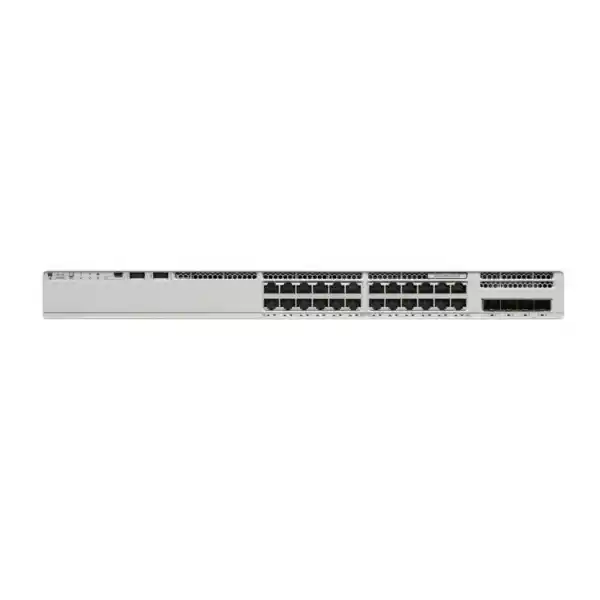
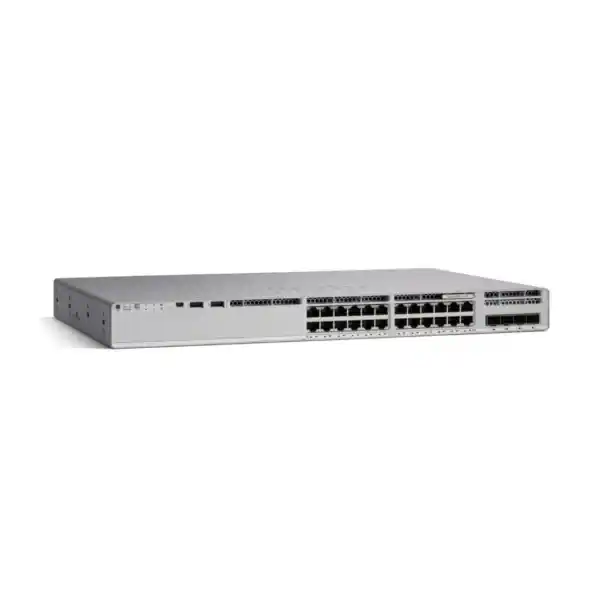
Cisco Catalyst C9200L-24T-4X Network Switch
A 24-port managed Gigabit Ethernet data switch with four fixed 1/10G SFP+ uplinks, Cisco IOS XE and StackWise-80 support for branch, office and campus-edge networks that need enterprise control without PoE on the access ports.
4 x 1/10G SFP+ uplinks
128 Gbps switching
StackWise-80
Data only — no PoE
A practical 24-port access switch with 10G uplink headroom
The Cisco Catalyst C9200L-24T-4X is built for organisations that need a dependable managed access switch for wired users, servers, printers, security appliances and other Ethernet devices, while keeping faster uplink capacity available for the rest of the network. Its access side provides 24 data ports operating at 10/100/1000 speeds, and its uplink side provides four fixed SFP+ interfaces that can operate at 1G or 10G. This combination makes the model especially relevant where a 24-port edge switch must aggregate into a faster distribution or core layer without relying on a separate modular uplink card.
The “T” in this model identifies it as a data-only switch rather than a PoE access switch. That distinction matters during procurement. The C9200L-24T-4X will not power IP phones, wireless access points, cameras or other powered devices through the Ethernet cable. If the planned endpoints need Power over Ethernet, a PoE-capable Catalyst 9200L model is the more suitable direction. If endpoints are self-powered, however, the data-only design can be a sensible way to avoid paying for PoE capability that the site does not require.
For buyers in Tanzania, the most important planning questions are therefore straightforward: do you need 24 copper access ports, do you need four high-speed optical or DAC-capable uplinks, and do your edge devices require PoE? If the first two answers are yes and the third is no, this model is a strong fit for branch offices, business floors, schools, service locations and distributed enterprise networks. Before ordering, confirm the software license level, transceivers, fibre type, patching, stacking accessories and power-supply design so the delivered configuration matches the intended deployment rather than just the chassis model.
Key specifications at a glance
These figures describe the hardware platform and should be read together with the selected software entitlement. Cisco offers orderable variants associated with Network Essentials or Network Advantage. Because the base name C9200L-24T-4X does not by itself identify which license level is included in a particular quotation, licensing should be confirmed before purchase rather than assumed from the chassis name.
Why the four 10G uplinks matter
A common limitation in lower-cost access switches is the uplink bottleneck. Twenty-four users may each connect at Gigabit Ethernet, but a switch with only 1G uplinks can become constrained when many users simultaneously access central servers, cloud gateways, backup systems or shared storage. The C9200L-24T-4X addresses that design concern with four fixed 1/10G SFP+ uplink ports. Those ports can be used for high-speed connections to distribution switches, core switches or other suitable infrastructure, subject to the optics, cabling and topology selected by the network team.
The practical advantage is not that every deployment must run all four uplinks at 10G. Rather, the chassis gives architects room to design for resilience and growth. A branch may use one 10G uplink initially and add a second path later. A campus floor may use redundant uplinks to separate physical paths. A server-room edge can reserve interfaces for links to two upstream switches. Where EtherChannel or cross-stack designs are appropriate, multiple physical links can be combined or distributed according to the network architecture and software configuration.
Because the uplinks are fixed, buyers should treat the “4X” choice as a deliberate hardware decision. The C9200L family also includes models with fixed 1G uplinks. If the network is expected to remain entirely at 1G upstream, the extra 10G capability may not be necessary. Conversely, if a site is migrating to faster distribution, increasing internet bandwidth, centralising applications, expanding virtualisation or moving more workloads across the LAN, 10G uplinks can reduce the need for an early switch replacement. The transceiver choice still matters: SFP+ interfaces require compatible optical modules or supported direct-attach solutions, and the fibre type and distance should be validated for each link.
Performance for a business access layer
Cisco specifies 128 Gbps of switching capacity and a forwarding rate of 95.23 million packets per second for the C9200L-24T-4X. Those values help place the switch correctly in a design: it is an enterprise access-layer platform intended to connect endpoint traffic efficiently while providing higher-speed links toward the rest of the network. With stacking, Cisco lists a switch capacity of 208 Gbps and a forwarding rate of 155 Mpps for this model. Performance values are platform specifications, not a guarantee that every application will experience a particular end-to-end throughput, because real results also depend on packet sizes, uplink design, congestion, security policy, routing, cabling and upstream systems.
The broader C9200L platform supports up to 16,000 MAC addresses, 11,000 total IPv4 routes when direct and indirect entries are counted, 1,500 IPv6 routing entries, 512 switched virtual interfaces, 4094 VLAN IDs and jumbo frames up to 9198 bytes. These scale figures are useful when the switch is being considered for more than a very small flat network. They provide headroom for segmentation, routed access, service VLANs, management networks, user groups and other structured enterprise designs, while still positioning the platform below larger Catalyst families intended for denser or more demanding core and distribution roles.
For procurement, the best way to use these numbers is to compare them with the actual network design rather than buy only on headline capacity. Count active endpoints, estimate uplink utilisation, identify latency-sensitive applications, review expected east-west traffic, and check whether local servers or backup systems will create bursts. If the access layer is primarily office traffic with 24 Gigabit endpoints and 10G upstream connectivity, the C9200L-24T-4X provides a balanced profile. If the design needs multigigabit access ports, 25G or 40G uplinks, or much larger route and policy scales, a different Catalyst model may be more appropriate.
StackWise-80 for resilient growth
The C9200L fixed-uplink family supports Cisco StackWise-80. Cisco documents up to eight compatible C9200L switches in a stack, with 80 Gbps stacking bandwidth. A stack is managed as a single logical system rather than as a set of completely independent switches, which can simplify administration and make it easier to expand an access layer while keeping a consistent operational model. For growing offices, this can be valuable when one 24-port switch is sufficient today but additional ports may be required later.
Stacking must be planned correctly. Cisco specifies the C9200L-STACK-KIT for the fixed C9200L models, and the standard kit includes adapters plus a stacking cable. Cable length options exist, so rack layout should be considered before accessories are ordered. Cisco also states that C9200L fixed models cannot be mixed in the same stack with modular C9200 models or unrelated Catalyst switch families. In addition, stack members must use the same license level. This is why a quotation should identify whether the selected switch is the Network Essentials or Network Advantage orderable variant before multiple units are purchased for one stack.
A stack can also support higher-availability network designs. Cisco documents cross-stack EtherChannel and single-system behaviour for spanning-tree operation across stacked units. These features can help reduce the effect of a single physical link or member failure when the surrounding network is designed for redundancy. Stacking is not a substitute for a complete resilience plan, however. Power paths, uplinks, transceivers, upstream switch redundancy, configuration backup, spare strategy and maintenance procedures all remain important. For a Tanzania branch or campus deployment, confirm whether stacking is required from day one or simply planned for future growth; this determines whether the stack kit and cables need to be included in the initial order.
Cisco IOS XE, automation and operational visibility
Catalyst 9200 Series switches run Cisco IOS XE, giving network teams a modern enterprise operating platform rather than a basic unmanaged or web-only switching interface. Cisco documents automated device provisioning, open APIs through NETCONF and RESTCONF with YANG data models, and model-driven telemetry. These capabilities can be useful for organisations that want repeatable switch deployment, central monitoring or integration with network automation tools. They are also valuable to teams that are standardising configuration templates across multiple branches or offices.
Automation does not mean every deployment needs a complex controller. A single switch can still be operated using conventional network-management practices. The value of IOS XE is that it leaves room to mature operational processes over time. A business can begin with a small managed environment and later adopt structured templates, API-based configuration, telemetry collectors or Cisco management platforms as its network grows. This can be especially useful where IT teams support several geographically separated sites and want consistent VLAN, security, QoS and uplink policies across them.
Cisco also documents cloud monitoring for Catalyst and integration options within its broader management ecosystem. The exact management capabilities available to a buyer depend on the chosen software package, subscription and deployment model, so they should be verified against the license included in the quotation. The base hardware name alone does not establish every software entitlement. During procurement, ask which Network license level is supplied, whether a Cisco DNA subscription is part of the order, what term applies, and whether the proposed management features require additional licensing or infrastructure. That avoids a common mistake: selecting hardware that is technically capable of a feature while overlooking the commercial entitlement needed to use it in the intended way.
Security capabilities for the access edge
The access layer sits where users and devices enter the network, so switch security is part of the overall security architecture rather than an optional afterthought. Cisco positions the Catalyst 9200 Series with hardware and software trust features, including image signing, Secure Boot and a Trust Anchor foundation. Cisco also documents AES-128 MACsec support on Catalyst 9200 models. MACsec can protect Ethernet links when it is supported and correctly configured on both ends, helping reduce the risk of traffic exposure on eligible network segments.
The platform also supports policy-oriented capabilities that can be used as part of broader segmentation and identity designs. Cisco describes the Catalyst 9200 Series as an entry-level platform for Software-Defined Access, with policy automation and integration into the wider Cisco architecture. In practical terms, that means the switch can participate in more structured enterprise security designs where users, devices and services are separated according to business policy instead of relying only on physical network boundaries.
The exact security feature set available to a particular deployment must still be matched to its software license and software release. Buyers should not assume that every feature named for the product family is enabled under every license level. Before purchase, list the security functions the organisation actually intends to use: secure management, 802.1X access control, segmentation, MACsec, access-control policies, telemetry, authentication integration and central policy management. Then validate those requirements against the proposed C9200L-24T-4X license. This requirement-led approach is more reliable than choosing an “Essentials” or “Advantage” label first and only later discovering whether it covers the intended design.
Power, cooling and rack planning
Cisco lists the PWR-C5-125WAC as the default primary power supply for the C9200L-24T-4X. The hardware design provides two power-supply slots, allowing a deployment to be planned with an additional compatible supply where power redundancy is required. Because this is a non-PoE model, the power subsystem is serving the switch itself rather than delivering an Ethernet power budget to endpoints. That makes it important to distinguish between switch power redundancy and PoE capacity: adding a second supply does not turn the C9200L-24T-4X into a PoE switch.
The fixed C9200L models use two fixed fans and support fan redundancy, but the fans are not field-replaceable modules in the way they are on some modular Catalyst 9200 models. Rack design should therefore allow proper airflow and service access around the chassis. Cisco lists the C9200L-24T-4X chassis at approximately 4.4 cm high, 44.5 cm wide and 28.8 cm deep, with a weight of about 4.35 kg. As a 1RU-class enterprise switch, it fits conventional network-rack layouts, but cable management, transceiver clearance and power cords should still be considered before installation.
Cisco’s environmental specification for the 9200L platform includes normal operation from -5°C to +45°C at elevations up to 1500 metres, with a lower maximum temperature at higher altitude, plus documented short-term exceptional conditions. These figures are product limits, not a recommendation to run a communications room at the edge of its thermal envelope. In Tanzania, sites should plan adequate ventilation or cooling, dust control, stable power and appropriate surge protection according to local building and electrical practice. Where utility interruptions are a concern, network uptime planning may also include a UPS or generator-backed circuit. The appropriate capacity should be calculated for the full rack load rather than estimated from the switch alone.
Where the C9200L-24T-4X fits well
Branch offices
A branch with up to 24 wired access connections can use the switch as its main access layer while retaining 10G uplinks toward a router, firewall, server segment or upstream switching layer. Stacking also provides a path to add more access ports later.
Campus floors
Where endpoints are self-powered and the distribution layer uses fibre or high-speed SFP+ links, the model can serve as a managed floor switch with VLAN segmentation, uplink redundancy and enterprise monitoring.
Server-room edge
The 24 copper ports can connect appliances or systems that use 1G Ethernet, while the four SFP+ uplinks provide faster paths to aggregation. It should not be mistaken for a high-density data-centre switch, but it can be useful at the enterprise edge.
Schools and institutions
Administrative PCs, labs, printers and other self-powered devices can be segmented and managed centrally. If wireless access points or phones are expected to draw power from the switch, choose a PoE model instead.
The model is less suitable when the primary requirement is powering edge devices, connecting multigigabit Wi-Fi access points directly, or providing modular uplink choices beyond the fixed four SFP+ ports. It is also not the default choice for a small unmanaged network where enterprise software, segmentation, stacking and operational tooling would not be used. In those scenarios, a simpler or differently configured switch may offer better value.
Good switch selection starts with the endpoints. Build a port schedule that identifies every device, its speed, its power requirement, its VLAN and the expected uplink path. Then add spare capacity for growth and maintenance. If that exercise results in roughly 24 self-powered Gigabit devices and a need for resilient or high-speed upstream connectivity, the C9200L-24T-4X aligns closely with the requirement. If the port schedule includes many phones, cameras or access points that need PoE, move to a PoE-capable model before finalising the bill of materials.
Choosing between data-only and PoE models
The most important model-selection issue for many buyers is whether a data-only switch is appropriate. The C9200L-24T-4X supplies Ethernet connectivity but not electrical power over those access ports. Desktop computers, printers, servers, storage appliances and many other devices have their own power supplies, so they may work perfectly well on a data-only switch. IP phones, surveillance cameras and wireless access points often depend on PoE, which means a data-only switch would require separate injectors or power supplies if those devices are connected.
If only one or two powered devices exist, an organisation might technically use external injectors, but that can add cabling complexity and extra points of failure. If PoE is a routine requirement across the site, choosing a PoE-capable C9200L model is usually cleaner. Cisco’s C9200L-24P-4X, for example, is the corresponding 24-port family member with PoE+ access ports and four 10G uplinks. The trade-off is that PoE models use different power-supply requirements and should be sized according to the expected power draw of connected devices.
For a buyer comparing quotations, do not accept a product description that simply says “24-port Cisco 9200L” without the full model suffix. C9200L-24T-4X, C9200L-24P-4X, C9200L-24T-4G and other variants look similar in family naming but differ materially in PoE capability and uplink speed. The “T” versus “P” and “4G” versus “4X” distinctions affect the design. A correct quotation should identify the exact orderable part number and software license variant, not just the family. That precision prevents receiving a switch that has the right port count but the wrong power or uplink capability.
Licensing: confirm Essentials or Advantage before ordering
Cisco lists two orderable versions of the 24-port data model with four 10G uplinks: C9200L-24T-4X-E for Network Essentials and C9200L-24T-4X-A for Network Advantage. The physical platform description is closely related, but the software entitlement is not the same. Cisco also lists Cisco DNA subscription products for 24-port Catalyst 9200 switches. This means the phrase “C9200L-24T-4X” is useful as the hardware model name, but it is not enough to define a complete commercial configuration.
The right license depends on the network features and management model required by the organisation. A branch that needs straightforward enterprise Layer 2/Layer 3 access functions may have different requirements from a campus using advanced policy, assurance or software-defined capabilities. Because Cisco licensing can evolve across software releases and subscription structures, the safest procurement approach is to map the required features to the current Cisco licensing guide at the time of purchase and then ensure the quotation carries the correct “-E” or “-A” orderable code.
Ask the supplier to state the exact hardware part number, network license level, any DNA term, support service, optics, stack kit and secondary power supply as separate line items where applicable. This makes quotations easier to compare and reduces ambiguity. It also prevents a common mismatch in which two suppliers appear to offer the same switch at different prices but are actually quoting different license tiers, subscription terms or accessories. For this product page, no specific license tier is assumed because the base model provided does not identify one. Buyers should select the required variant as part of the final configuration and quotation process.
Optics, fibre and uplink planning
The four uplink interfaces are SFP+ slots, so the switch does not by itself define the physical medium or distance of each uplink. That is determined by the transceiver and cabling selected for the link. A buyer may need short-range multimode fibre, longer-distance single-mode fibre, or a supported direct-attach connection inside a rack or row. The correct choice depends on distance, fibre plant, connector type, upstream switch compatibility and the speed required.
Before ordering optics, document the link from end to end. Identify the C9200L-24T-4X uplink port, the remote switch model and port, the required speed, cable distance, fibre type already installed, connector presentation and whether there are patch panels between the devices. For existing buildings, the fibre category should be verified rather than inferred from jacket colour or an old label. A 10G design can fail to meet expectations if the installed optical path does not support the intended transceiver and distance.
Redundancy planning should also be physical, not only logical. Two uplinks routed through the same conduit, patch panel or upstream chassis can still share a common failure point. Where business continuity matters, consider diverse paths and separate upstream devices where the wider architecture supports that design. The switch provides four uplink ports, but resilience comes from how those ports are used.
FourTeck Tanzania should be given the intended distances and fibre details when a quotation is requested so compatible transceivers and accessories can be specified. Do not assume that SFP+ modules are included with the base switch unless the quote explicitly says so. Likewise, a stack kit, secondary PSU and fibre patch leads should be treated as distinct design items. A complete bill of materials is more useful than a chassis-only price when the goal is a deployable network rather than a box on a shelf.
Deployment checklist for Tanzania organisations
Count wired devices, identify which ones need PoE, note port speed requirements and reserve capacity for growth. If powered devices dominate the list, reconsider the data-only model.
Choose the number of active uplinks, target speed, remote devices and resilience model. Record fibre type, distance and transceiver requirements before the optics are ordered.
Map required routing, segmentation, automation and management functions to the current Network Essentials or Network Advantage entitlement and any applicable subscription.
If multiple C9200L switches will operate as a stack, include the correct StackWise-80 kit and suitable cable length. Keep stack members on the same supported license level.
Determine whether a second power supply is required and ensure the rack has suitable protected power. Size UPS or backup power from the complete rack load and required runtime.
Define management addressing, VLANs, trunks, routing, time services, AAA, logging, monitoring, configuration backups and software-version policy before installation day.
Local deployment quality depends on more than switch selection. Communications rooms should have reliable power, controlled temperature, sensible dust management, rack grounding and documented cabling. Remote sites should also have an operational plan for outages and a clear method for support staff to reach the device securely. Where the switch will support critical business services, consider spare optics, configuration backups and escalation procedures as part of the deployment rather than after a failure.
A pre-installation survey can reduce surprises. Check rack space, power outlets, patch-panel positions, available fibre strands, cable labels, upstream ports and internet or WAN equipment. Confirm that the planned management network can reach the switch and that the organisation has a defined method for storing credentials and configuration backups. The C9200L-24T-4X is designed as an enterprise access switch, and it delivers the most value when deployed within an equally disciplined operational environment.
High availability and maintainability considerations
Availability should be designed around likely failure domains. The C9200L-24T-4X supports stacking, redundant fan operation and a second power-supply position, and Cisco documents fast failover behaviour within Catalyst 9200 stacks. Those capabilities provide useful building blocks, but the final level of resilience depends on the complete topology. A switch with two power supplies still has a common chassis; a stack with two uplinks still depends on how those uplinks are connected upstream.
For a business-critical floor or branch, consider separate power sources where practical, redundant upstream devices, cross-stack links and documented recovery procedures. Configuration backups should be current and accessible to authorised administrators. Software upgrades should be planned through a maintenance process that considers the relevant Cisco release guidance, interoperability and rollback method. The platform supports cold patching with reboot for certain fixes, so maintenance planning should allow for situations where a restart is required.
Cisco publishes a mean time between failures figure of 525,990 hours for the C9200L-24T-4X. MTBF is a statistical reliability metric for planning and comparison; it should not be interpreted as a promise that an individual unit will operate for that many hours without failure. Operational resilience should therefore be based on architecture and support processes rather than the expectation that hardware cannot fail.
When assessing support requirements, decide how quickly the organisation needs replacement hardware, remote troubleshooting and vendor escalation. Those commercial support terms are separate from the switch’s technical specification and should be confirmed in the quotation. No warranty length, replacement time or local service-level commitment is assumed on this page because those details can depend on the exact service package and supplier agreement.
How to compare this switch with nearby Catalyst 9200L choices
| Model direction | Best reason to choose it | Key trade-off |
|---|---|---|
| C9200L-24T-4X | 24 data ports with four 10G-class SFP+ uplinks | No PoE on access ports |
| 24-port PoE+ 4X model | Power phones, access points or cameras while retaining four 10G uplinks | Different power requirements and PoE budget considerations |
| 24-port data 4G model | Data-only access where 1G uplinks are sufficient | Less uplink headroom for growth or aggregation |
| 48-port data 4X model | Higher copper-port density with four 10G uplinks | More ports than some branch or floor designs need |
The comparison should begin with functional requirements rather than price. If the deployment requires PoE, eliminate the data-only models immediately. If the deployment does not need PoE, compare the required uplink speed and port density. A 4G variant may be sufficient for a lightly loaded branch, while a 4X variant offers 10G uplink capability for faster aggregation. Likewise, a 48-port switch can improve rack density where many copper ports are needed, but it can be unnecessary if the site has fewer than 24 active connections and prefers smaller failure domains.
Also compare lifecycle costs. Count optics, stack kits, secondary power supplies, support, licenses, rack space and power protection, not only the chassis. A lower initial chassis price can become less attractive if it requires an early replacement when uplink demand grows. Conversely, buying 10G uplinks and advanced software features that will never be used can add unnecessary cost. The C9200L-24T-4X is most compelling when its exact strengths—24 Gigabit data ports, fixed 10G uplinks, IOS XE management and StackWise-80—match the network plan.
Frequently asked questions
Does the C9200L-24T-4X provide PoE?
No. It is a 24-port data-only model. Devices that need power over Ethernet require a PoE-capable switch, an appropriate external power supply or an injector. For networks with many phones, cameras or wireless access points, a PoE model is usually the cleaner design.
How many uplink ports does it have?
It has four fixed SFP+ uplink ports. Cisco lists them as 1/10G fixed uplinks, giving the switch the ability to connect upstream at 1G or 10G with suitable supported transceivers and cabling.
Can the switch be stacked?
Yes. C9200L fixed models support StackWise-80. Cisco documents up to eight C9200L members in a stack, using the proper C9200L stack kit, with members on the same supported license level. C9200L switches are not mixed in a stack with modular C9200 models.
What is the switching capacity?
Cisco specifies 128 Gbps switching capacity and 95.23 Mpps forwarding for the C9200L-24T-4X. Cisco also lists higher aggregate values when the model is used in a StackWise-80 configuration.
Are SFP+ transceivers included?
Do not assume they are included with the base chassis. The required optics depend on link speed, fibre type, distance and the upstream device. The quotation should explicitly list the required modules and patch leads.
What is the difference between C9200L-24T-4X-E and C9200L-24T-4X-A?
Cisco identifies the “-E” orderable variant with Network Essentials and the “-A” variant with Network Advantage. The appropriate choice depends on the features and management capabilities the organisation requires. Confirm the current licensing details for the quoted software release and subscription.
Is this suitable for a small business?
It can be, particularly where the business wants enterprise IOS XE management, segmentation, 10G uplinks, stacking and room to standardise across multiple sites. For a very simple network with minimal management requirements, a smaller business-class switch may be easier and more economical.
What should I provide when requesting a quote in Tanzania?
Provide the number and type of endpoints, whether PoE is required, preferred license level if known, uplink speed, fibre distance and type, whether stacking is needed, whether a redundant power supply is required, and any support requirements. This lets the quotation include the correct accessories instead of only the switch chassis.
Buying guidance: what should be on the quotation?
For an accurate quote, the line item should identify the exact Cisco orderable part number rather than only “C9200L-24T-4X”. That means confirming whether the intended unit is the Network Essentials or Network Advantage variant. The quote should also clarify the software subscription or entitlement, because the operational feature set and commercial package are part of the final solution.
Next, check the physical accessories. If the uplinks will be used, specify compatible 1G or 10G transceivers or direct-attach cables as required. If two or more C9200L units will operate as a stack, include the C9200L stack kit and the correct stacking cable length. If power redundancy is required, include the supported secondary power supply. If the switch is being installed into an existing rack, confirm the rack mounting components, patch cords and cable-management arrangement.
Support should be explicit too. Ask what Cisco support or supplier service is included, how software access is handled, and what replacement process applies if hardware fails. Avoid assuming a specific warranty period or local response time unless it is stated in the formal offer. Availability and delivery dates can change as stock and import conditions change, so they should be confirmed at quote time rather than treated as permanent product attributes.
Finally, compare quotations on a like-for-like basis. One proposal may include optics, stacking hardware, a second PSU and a higher software tier while another includes only the chassis. A clear bill of materials makes the difference visible. For a production network, the objective is not merely to buy a switch; it is to buy a complete, supported configuration that can be installed and operated without discovering missing components on deployment day.
Configuration and migration planning
Replacing an older access switch is an opportunity to clean up the network rather than copy every legacy setting without review. Before migration, export the existing configuration and create a port-by-port map showing endpoint, VLAN, voice or data role, trunk status, allowed VLANs, speed or duplex exceptions and any security policy. Remove unused configuration deliberately, and keep a rollback plan in case a critical dependency is discovered during the cutover.
Management should be planned before user ports are moved. Assign the switch to the intended management VLAN or routed management network, configure time synchronisation, logging, authentication, secure administrative access and monitoring. Where central AAA is used, keep a tested fallback procedure so an authentication outage does not lock administrators out. Store configuration backups in a controlled location and document the software image and license state of the deployed device.
Uplink migration deserves special attention when moving from 1G to 10G. Confirm that both ends support the selected speed and optics, then verify link light, interface counters and error rates before user traffic is moved. If redundant links are used, test failover intentionally. A design can look correct on paper but still contain a spanning-tree, port-channel or VLAN mismatch that only becomes visible when a path fails.
After cutover, monitor utilisation, errors, CPU, memory, temperature, link flaps and log messages. Establishing a healthy baseline makes later troubleshooting easier. Cisco IOS XE telemetry and standard monitoring methods can support this process, depending on the organisation’s tools and licensing. A disciplined migration turns the C9200L-24T-4X from a simple hardware replacement into a more manageable and observable access-layer platform.
Who should choose this model?
Choose the C9200L-24T-4X when the access requirement is centred on wired, self-powered Gigabit devices and the network needs stronger uplink capacity, enterprise management and a path to stacking. It is particularly well suited to organisations that already use Cisco Catalyst switching or that want to standardise branch and campus access on IOS XE. Its four SFP+ uplinks make it more future-oriented than a comparable 1G-uplink model without forcing the buyer into a 48-port chassis.
Do not choose it solely because “Catalyst 9200” is familiar. If the network needs PoE, multigigabit access, a greater port density or more advanced uplink options, another model may fit better. Likewise, if the site only needs a handful of unmanaged ports, this platform may be more sophisticated than necessary. The right switch is the one that matches the port schedule, resilience plan, software requirements and growth assumptions.
For Tanzania customers, a useful next step is to request a configuration-based quotation rather than a chassis-only price. Share the endpoint count, PoE requirement, uplink design, fibre distances, stacking plan, desired software features and power-resilience requirement. That information enables a more accurate bill of materials and reduces the risk of missing optics, stack accessories or license components. If you are replacing an existing switch, include the current model and a simple description of the present uplinks so the proposed migration can be checked for compatibility.
Request a correctly configured Cisco Catalyst 9200L quote
For a useful quotation, provide the number of wired endpoints, whether any devices need PoE, required uplink speed, fibre distance and type, whether stacking is planned, the desired software feature level, and whether a secondary power supply is needed. FourTeck Tanzania can then prepare the bill of materials around the intended deployment rather than quote the chassis in isolation.
No price, stock level, delivery time, warranty period or local service response is stated here because those items must be confirmed for the actual quotation. Ask for the exact Cisco orderable part number and included license tier so you can compare like-for-like offers.




Reviews
There are no reviews yet.