
StackWise-480
Modular uplinks
Data-only access switch
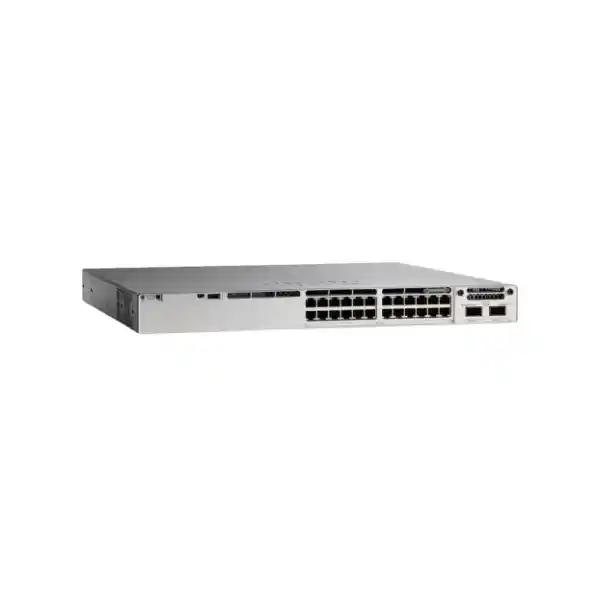
Cisco Catalyst C9300-24T for secure, stackable enterprise access switching
The Cisco Catalyst C9300-24T is designed for organizations that need a high-availability 24-port Gigabit Ethernet access switch without PoE on the access ports. It is a strong fit for offices, campuses, server and infrastructure rooms, branch aggregation points, education environments, hospitality back offices, and other networks where endpoints already have independent power or where the switch primarily connects desktops, servers, appliances, printers, controllers, security devices, and other data-only equipment.
For Tanzanian buyers, the most important purchasing decision is not only the hardware model. The exact orderable SKU also determines the software and management offer. Current Cisco ordering information distinguishes C9300-24T-E, C9300-24T-A, and C9300-24T-M variants. Before requesting a quote, identify the routing, segmentation, automation, management, and subscription requirements for the intended deployment so the switch, software tier, uplink module, optics, stacking accessories, and support coverage are aligned from the start.
Organizations that want resilient Layer 2/Layer 3 enterprise access switching with 24 copper Gigabit ports, flexible high-speed uplinks, physical stacking, and Cisco Catalyst software capabilities—without paying for PoE hardware they do not need.
Fast specification summary
| Hardware family | Cisco Catalyst 9300 Series, C9300-24T |
|---|---|
| Access ports | 24 × 10/100/1000 Mbps Ethernet copper data ports |
| PoE on access ports | No — this is the data-only C9300-24T model |
| Uplink design | Modular; compatible C9300 network modules provide 1G, 10G, 25G, 40G, or multigigabit uplink choices depending on module |
| Stacking | StackWise-480; Cisco documents support for up to eight members in a compatible C9300 stack |
| Power stacking | StackPower supported |
| Default AC power supply | 350 W AC for C9300-24T |
| Switching capacity | 208 Gbps standalone; 688 Gbps with stacking, per Cisco data sheet |
| Forwarding rate | 154.76 Mpps standalone; 511.90 Mpps with stacking, per Cisco data sheet |
| Form factor | 1RU-class chassis; check rack depth against the final power-supply configuration |
Specification note: the C9300-24T hardware family can be ordered with different software offers. Quote requests should identify the required license/management option rather than assuming every C9300-24T includes the same feature entitlement.
Why choose the C9300-24T?
Many enterprise access switches are purchased with PoE because phones, access points, cameras, and IoT endpoints need power from the switch. The C9300-24T serves a different requirement: it concentrates the investment on enterprise switching, resiliency, uplink flexibility, software capability, and operational consistency where PoE is unnecessary. That can make it a practical choice for user networks dominated by desktops, workstations, printers, server interfaces, storage management ports, out-of-band devices, or powered appliances.
The platform belongs to Cisco’s Catalyst 9300 family, which is positioned as a stackable enterprise access switching platform. Its value is not simply the number of copper ports. The modular uplink bay allows the uplink design to be selected separately from the access-port count. This can help a network team standardize on one 24-port access chassis while choosing an uplink module that matches the distribution layer, fiber plant, bandwidth plan, and optics already in use.
Physical stacking is another major reason to select this platform. StackWise-480 lets compatible switches operate as a stack with a common operational model, while StackPower supports power sharing among supported members. For buyers planning multiple access switches in the same rack, these capabilities can simplify management and improve design options compared with a collection of isolated standalone switches. Final stack topology, cable lengths, power supplies, software compatibility, and member-model rules should be confirmed before ordering.
Understanding the data-only design
Use it when endpoints do not need switch power
The twenty-four RJ-45 access interfaces provide Ethernet data connectivity but are not PoE ports. They are appropriate for independently powered equipment or for network segments where power delivery is handled elsewhere.
Do not substitute it for a PoE model
If the planned endpoints include IP phones, wireless access points, surveillance cameras, door controllers, or other powered devices, evaluate a PoE-capable Catalyst 9300 variant instead of assuming injectors will be acceptable operationally.
Plan for the complete bill of materials
The chassis is only one part of the deployment. Depending on the design, the bill of materials may also include a network module, optics, stacking cables, power-stack cables, a second power supply, subscriptions, support, and rack accessories.
Flexible modular uplinks for different distribution designs
A defining feature of the C9300-24T is its modular uplink architecture. Rather than locking the switch to one fixed uplink configuration, Cisco supports a range of C9300 network modules. Current documentation lists C9300-NM-4G with four 1 Gigabit SFP slots, C9300-NM-8X with eight 10 Gigabit SFP+ slots, C9300-NM-2Y with two 25 Gigabit SFP28 slots, C9300-NM-2Q with two 40 Gigabit QSFP+ slots, and C9300-NM-4M with four multigigabit copper interfaces. This gives architects several ways to connect the access layer to distribution switches, core devices, routers, or other infrastructure.
The right module depends on more than headline speed. Review the number of uplinks, redundancy model, fiber type, transceiver compatibility, connector type, cable distance, port-channel design, distribution-switch interfaces, and future capacity. A campus using existing 10G SFP+ optics may prioritize a different module from a new deployment built around 25G uplinks. Likewise, a network with limited fiber strands may value higher per-link bandwidth, while a design that emphasizes path diversity may prefer more physical uplink ports.
Do not order optics solely from the generic module description. Cisco transceiver support varies by module, software release, speed, media type, and optic. Validate the intended transceiver or direct-attach cable against current Cisco compatibility information and the equipment at the far end. This is especially important when upgrading an existing site, because a physically compatible module does not automatically make every legacy optic or third-party transceiver part of a supported design.
StackWise-480 and resilient access-layer design
Cisco documents StackWise-480 for the standard C9300 models, with up to eight members in a supported stack. In practical terms, stacking can allow a group of access switches to be operated with a shared control and management model rather than configuring each unit as a completely independent device. For a branch, campus floor, or equipment room with several switches, this can reduce operational complexity and provide design flexibility for cross-stack links and resiliency.
Stacking is not a reason to ignore physical failure domains. A good deployment still considers how switches are powered, which rack PDUs they use, how uplinks are distributed, what happens if a stack member fails, and how cabling is arranged for serviceability. If a stack is business-critical, plan cable routing and stack topology so a maintenance action does not unintentionally break the stack ring. Confirm compatible stack members, software levels, and licensing because Cisco applies member and license rules to mixed stacks.
StackPower can complement the data stack by allowing supported Catalyst 9300 switches to participate in a power stack. This capability can be useful for resilience and power-resource planning, but the benefit depends on the selected power supplies and topology. For the data-only C9300-24T, the default 350 W AC supply is part of the base hardware specification; a second supply and any power-stacking components should be sized deliberately rather than treated as automatic inclusions.
Performance for enterprise access networks
Cisco lists 208 Gbps switching capacity and 154.76 million packets per second forwarding rate for the C9300-24T in standalone operation. With stacking, Cisco lists 688 Gbps switching capacity and 511.90 Mpps forwarding rate. These figures provide useful platform context, but sizing should still be based on the actual traffic profile, uplink architecture, oversubscription targets, routing features, ACLs, telemetry, encryption requirements, and application behavior.
For many office access networks, the principal design question is not whether all twenty-four 1G user ports can transmit simultaneously at line rate. The practical questions are how much traffic moves northbound, whether local east-west traffic is significant, how many links are bundled into the distribution layer, and which services are enabled on the switch. A 10G uplink can be sufficient for some branches, while a dense user environment, virtualization edge, lab, or high-throughput application may justify a different uplink choice.
The modular design gives the network team room to match the uplink to those traffic assumptions. It also makes the purchase easier to align with phased growth: the access-port requirement can remain twenty-four 1G copper ports while the uplink strategy reflects current and future bandwidth needs. Any upgrade path should still be checked for module compatibility and software requirements before equipment is ordered.
Software tiers: choose the exact C9300-24T SKU
The generic hardware name C9300-24T does not by itself communicate the full software offer. Cisco’s current ordering guide lists three orderable forms: C9300-24T-E for Network Essentials with an Essentials software subscription, C9300-24T-A for Network Advantage with an Advantage software subscription, and C9300-24T-M for a Meraki-managed software option. The exact subscription term and software entitlement are purchasing decisions and should be specified in the quote.
Network Essentials covers foundational switching and routing functions, while Network Advantage adds advanced routing, segmentation, resiliency, automation, and security capabilities. Cisco’s current feature matrix should be consulted for the exact feature required by the network design. Do not select a tier simply because “Advantage” sounds preferable; identify concrete requirements such as advanced routing protocols, VRF/VXLAN/LISP segmentation, Cisco TrustSec, advanced automation, or specific high-availability functions and map them to the current license matrix.
The Meraki-managed option is materially different operationally because it uses Meraki Dashboard management and requires an applicable Meraki software license. Organizations standardizing on Cisco IOS XE and Catalyst Center should not assume the -M ordering choice is interchangeable with -E or -A. Conversely, organizations with an established Meraki operating model may value centralized cloud management. Confirm the management platform, feature requirements, and subscription policy before deciding.
| Variant | Current Cisco positioning | Buying question |
|---|---|---|
| C9300-24T-E | Network Essentials / Essentials software option | Are foundational switching, routing, visibility, and security features sufficient? |
| C9300-24T-A | Network Advantage / Advantage software option | Does the design require advanced routing, segmentation, resiliency, automation, or security features? |
| C9300-24T-M | Meraki-managed software option | Is Meraki Dashboard the intended management model and is the required Meraki license included in the procurement plan? |
Security, segmentation, and policy considerations
Enterprise access switching sits at a critical point in the security architecture because users and devices enter the network at the edge. Catalyst 9300 software supports capabilities such as 802.1X access control, first-hop security, MACsec options, telemetry, and Cisco TrustSec-related functions depending on software tier and design. The meaningful question for a buyer is not whether a feature name appears in a family data sheet, but whether the selected license and software release support the exact policy required.
For example, a basic office deployment may primarily need VLAN separation, ACLs, 802.1X, QoS, and standard Layer 2 protections. A larger campus may require VRFs, scalable group-based policy, VXLAN/LISP, advanced routing, or deeper integration with Cisco Catalyst Center and identity services. Those requirements affect the license selection and may also affect the surrounding architecture, including authentication servers, certificates, IP addressing, routing design, and operational workflows.
When evaluating encrypted links, confirm whether MACsec is required, which key length and interfaces are involved, and whether both ends support the desired mode. Security features should be validated as a complete design, not treated as a checkbox. The switch can be a capable enforcement point, but secure outcomes also depend on configuration, identity policy, patching, monitoring, administrative access controls, backups, and change management.
Automation, telemetry, and operational visibility
Modern campus operations increasingly depend on consistent configuration and useful telemetry rather than manual command-line work on every switch. Cisco’s Catalyst 9300 platform supports model-driven and programmable management functions, but the depth of automation varies by software tier. Network teams that plan to use NETCONF, RESTCONF, gRPC, YANG models, zero-touch provisioning, on-box scripting, or advanced controller-driven workflows should map those requirements to the current license feature matrix.
Operational visibility deserves equal attention. SPAN and RSPAN, model-driven telemetry, and flow-related capabilities can support troubleshooting, capacity planning, monitoring, and incident response. Before enabling extensive telemetry, decide where the data will be collected, how long it will be retained, how collectors are secured, and whether the monitoring platform can handle the expected volume. Visibility is most useful when it is part of an operational process rather than enabled without a clear consumer.
For Tanzanian organizations with distributed branches or limited on-site networking staff, standardized deployment templates and remote observability can reduce the need for reactive travel. The C9300-24T can fit that operating model, but the final management platform—traditional CLI/WebUI, Catalyst Center, Meraki Dashboard for a compatible -M offer, or a third-party system—should be chosen deliberately and tested against the required features.
Power, rack, and physical planning
The C9300-24T uses a 350 W AC default power supply according to Cisco’s current platform documentation. Its chassis is approximately 1.73 inches high and 17.5 inches wide; depth varies depending on the power-supply configuration. Cisco’s dimensional tables show a deeper overall profile when certain supplies are installed, so rack selection should account for the final configured depth, cable bend radius, power leads, airflow, and service clearance rather than only the bare chassis depth.
A 1RU switch still needs thoughtful rack placement. Leave enough rear access for the power supplies and fan modules, separate copper patching from power where practical, label uplinks and stack cables, and avoid cable bundles that obstruct airflow. In sites where equipment rooms experience high ambient temperatures, dust, unstable utility power, or limited cooling, environmental controls can be as important as switch specifications. Use the manufacturer’s installation limits when validating the room.
Power continuity should be planned around the business requirement. A UPS can help bridge short outages and provide cleaner shutdown or failover behavior, but UPS sizing must include the complete rack load and desired runtime. If redundant power supplies are fitted, connect them to appropriately independent power paths where the site electrical design supports it. StackPower can add design options across stack members, but it does not remove the need to understand the upstream electrical failure domains.
For Tanzania deployments, validate the actual site power quality, grounding, surge protection, UPS condition, generator transfer behavior, and cooling before commissioning critical network equipment. These are site-engineering checks rather than product features, and they can materially affect reliability in branch, warehouse, education, and industrial environments.
Common deployment scenarios
Office user access
Connect desktops, workstations, printers, meeting-room systems, and other independently powered endpoints. Use VLANs, access control, QoS, and redundant uplinks according to the organization’s network policy.
Server and infrastructure connectivity
Use the 1G copper ports for management interfaces, appliances, controllers, backup devices, or low-to-moderate bandwidth server links where data-only connectivity is appropriate.
Campus access stack
Build a compatible StackWise-480 access stack for a building or floor, then select a modular uplink option that matches the distribution layer and fiber design.
Branch standardization
Standardize remote sites on a common enterprise switch platform where local endpoints do not require PoE, while retaining consistent policy, management, monitoring, and software practices.
Lab and technical environments
Provide reliable Gigabit copper access for test equipment, engineering workstations, management ports, and appliances, with flexible uplinks to higher-speed aggregation infrastructure.
Networks separating data and powered devices
Use C9300-24T for data-only endpoints and place phones, access points, cameras, or other powered devices on a dedicated PoE-capable switch where operational separation is desirable.
When the C9300-24T is not the right choice
The C9300-24T should not be selected simply because twenty-four ports are required. If a significant share of endpoints need power from the switch, a PoE+, UPOE, or UPOE+ model may produce a cleaner design than combining a data-only switch with many external injectors. If the access layer requires multigigabit downlinks above 1 Gbps for Wi-Fi access points, high-performance workstations, or specialized devices, consider a multigigabit Catalyst model rather than relying on the uplink module to solve a downlink requirement.
Likewise, if forty-eight copper ports are needed in one rack unit, compare the C9300-48T. If a lower-cost branch design with fixed uplinks is sufficient, a different Catalyst family or a fixed-uplink C9300L may be more appropriate. If the organization has fully standardized on another cloud-management platform, confirm the operational impact of introducing Cisco IOS XE or choose the appropriate managed variant.
The correct switch is the one that fits the complete access-layer design: port count, power requirements, downlink speed, uplink speed, stacking, routing, segmentation, security, management, support, lifecycle expectations, and budget. Comparing only port count or switching capacity can lead to a technically functional but operationally poor choice.
Planning a C9300-24T deployment in Tanzania
A reliable deployment begins with a site survey and a clear bill of materials. Confirm the number and type of endpoints, copper cable categories and test results, rack space, patch-panel layout, fiber path to the distribution layer, available fiber pairs, optic type, expected distances, redundant paths, power sources, UPS capacity, grounding, cooling, and management connectivity. These checks are especially important when replacing an older switch because existing cabling and optics may impose constraints that are not visible in a product specification table.
Next, define the logical requirements. Document VLANs, IP subnets, routing boundaries, gateway redundancy, access control, authentication, QoS, multicast, segmentation, telemetry, logging, time synchronization, DNS, configuration backup, software upgrade policy, and administrator access. The software license can then be selected against concrete features instead of guesswork. This also helps avoid ordering Network Advantage for a site that only needs foundational functions—or discovering too late that an Essentials configuration does not cover a required advanced feature.
For branch sites, also account for WAN dependency. Centralized authentication, monitoring, or controller workflows may behave differently during internet or WAN outages. Decide what the switch must continue doing when remote services are temporarily unreachable. Where cloud-managed operation is being considered, validate the intended license, onboarding process, outbound connectivity requirements, and local operational fallback procedures.
Finally, plan commissioning and acceptance. Record the hardware and software versions, verify stack health, test redundant uplinks, confirm spanning-tree or routing behavior, validate authentication, check monitoring, save a baseline configuration, test backup/restore procedures, and document port labels. For business-critical networks, include a rollback plan and a maintenance window appropriate to the site.
What to include in your quote request
A precise quote request reduces back-and-forth and lowers the risk of receiving a switch that is technically correct but incomplete for deployment. Start with the required model and quantity, then state whether the expected orderable variant is C9300-24T-E, C9300-24T-A, or C9300-24T-M. If you are unsure, describe the required features and management model instead of guessing the suffix.
- Number of C9300-24T switches and whether they will operate standalone or in a stack.
- Required software/management model and subscription term, if known.
- Required uplink speed and media: 1G SFP, 10G SFP+, 25G SFP28, 40G QSFP+, or multigigabit copper where applicable.
- Optic type, fiber type, connector, and approximate link distance for each uplink.
- Whether stacking cables, StackPower components, or a secondary power supply are required.
- Desired Cisco support coverage and any organizational support standard.
- Rack and power constraints that may affect the configured depth or power arrangement.
- Any advanced routing, segmentation, security, automation, or telemetry feature that must be supported.
If the deployment is replacing existing equipment, include the current switch models, uplink optics, routing role, and any stack topology. That context makes it easier to identify compatibility questions before hardware arrives on site.
Migration from an existing access switch
Migrating to a C9300-24T is more than copying an old configuration. Start by reviewing the existing switch for obsolete commands, unused VLANs, inactive ports, legacy spanning-tree assumptions, old authentication settings, unsupported optics, and policies that should not be carried forward. A clean migration is an opportunity to remove technical debt while preserving the services users actually need.
Map every physical port before the change. Record endpoint identity, VLAN, speed/duplex behavior, trunk settings, port-channel membership, security settings, and whether the cable is known-good. For uplinks, record the optic part number, fiber type, patching path, and remote interface. This information helps separate migration problems from pre-existing cabling or endpoint issues.
Build and review the intended configuration before the maintenance window. Where possible, stage the switch, load the approved software, apply the baseline configuration, register licensing, configure management, and test authentication and monitoring in advance. During the cutover, migrate in a controlled sequence and verify services before moving to the next group of ports.
After the change, monitor error counters, interface utilization, CPU and memory trends, routing neighbors, stack status, logs, environmental readings, and authentication results. Retain the migration record so future support teams can see what changed and which assumptions were validated.
Lifecycle and support planning
Enterprise switching is normally a multi-year investment, so procurement should include a lifecycle plan. Confirm the exact hardware PID, software tier, subscription term, support entitlement, and organization’s preferred software train. Maintain an asset record that links serial numbers, Smart Account information, support contracts, stack membership, site location, and configuration backups. This makes renewals, replacement, and incident handling easier later.
Software maintenance should be governed rather than ad hoc. Review Cisco release guidance, security advisories, feature requirements, hardware support, and maintenance windows before upgrading. In stacked environments, check stack-member compatibility and the expected upgrade behavior. Test critical features in a representative environment when the operational risk justifies it.
Support should match the business impact of failure. A small noncritical office may accept a different response model from a hospital administration network, financial branch, university core building, or industrial facility. Define the acceptable outage, spare strategy, remote-hands availability, and escalation process, then select support coverage and local spares accordingly. Do not assume that a warranty alone provides the same service level as a paid support offer.
Frequently asked questions
Does the Cisco C9300-24T provide PoE?
No. The C9300-24T is the data-only 24-port copper model. If connected devices need power from the switch, evaluate an appropriate PoE-capable Catalyst 9300 variant.
How many access ports does it have?
It provides twenty-four 10/100/1000 Mbps Ethernet copper access ports. Uplinks are provided through a separate modular uplink architecture rather than consuming those access ports.
Can the C9300-24T use 10G uplinks?
Yes, with a compatible uplink network module such as the C9300-NM-8X for SFP+ interfaces. The final optics and link design must also be compatible with the module, software, fiber, distance, and far-end equipment.
Does it support 25G or 40G uplinks?
Cisco lists C9300 network modules that provide two 25G SFP28 ports or two 40G QSFP+ ports. Select the module and transceivers only after confirming the complete compatibility and bandwidth design.
What is the difference between C9300-24T-E and C9300-24T-A?
The hardware port configuration is the same data-only 24-port family, but the software offers differ. Cisco positions -E with Network Essentials and an Essentials software option, while -A uses Network Advantage and an Advantage software option. Match the license to the required routing, segmentation, security, automation, and resiliency features.
What is C9300-24T-M?
It is the Meraki-managed ordering option for this hardware family. It uses Meraki Dashboard management and requires an appropriate Meraki software license. Confirm the feature set and management model before choosing it instead of the Catalyst IOS XE licensing path.
Can multiple C9300 switches be stacked?
Yes. Cisco documents StackWise-480 for standard C9300 models and supports stacks of up to eight compatible members. Member-model and license rules apply, so the planned combination should be checked before purchase.
What power supply comes with the C9300-24T?
Cisco lists a 350 W AC default power supply for the C9300-24T. A second supply may be part of a resilience design, but the exact bill of materials should be confirmed at quotation time.
Is the uplink module included?
Treat the uplink module as a configuration item that must be confirmed on the quote. The C9300 platform supports several modular uplink choices, and the correct module depends on the required speed, port count, media, and optics.
What information is needed for a Tanzania deployment quote?
Provide quantity, required software tier or features, uplink speed, fiber type and distance, stacking requirement, redundancy requirement, power constraints, support expectations, and the main deployment scenario. This is enough to start defining a more accurate bill of materials without inventing assumptions.
Compatibility checks before you order
Before approving the purchase, verify the C9300-24T against the equipment it must connect to. Confirm uplink module compatibility, transceiver part numbers, optical wavelength, fiber type, connector type, supported distance, link speed, and the capabilities of the far-end switch. If the design uses port channels, confirm the intended member links and redundancy behavior. For stacks, check member models, license levels, stack cables, power-stack requirements, and the Cisco IOS XE release planned across the stack.
Also validate feature dependencies. A requirement such as advanced routing, network segmentation, programmable automation, high-availability functions, or stronger MACsec capability may influence the license tier. If a third-party monitoring, NAC, authentication, or automation platform is part of the environment, confirm its supported integration method and software version. These checks are usually less expensive to complete before shipment than after equipment reaches the site, and they help turn a product purchase into a deployment-ready configuration.
Request a Cisco Catalyst C9300-24T quote for Tanzania
For an accurate quote, specify whether you need Network Essentials, Network Advantage, or Meraki-managed operation; the desired uplink speed and media; whether the switches will be stacked; and any redundant power or support requirements. If those details are not yet decided, provide the number of users, endpoint types, uplink environment, routing and segmentation needs, and management preference so the configuration can be reviewed before ordering.
Ask for a complete bill of materials—not only the switch chassis—so licensing, uplinks, optics, stacking accessories, power, and support can be checked together.




Reviews
There are no reviews yet.