
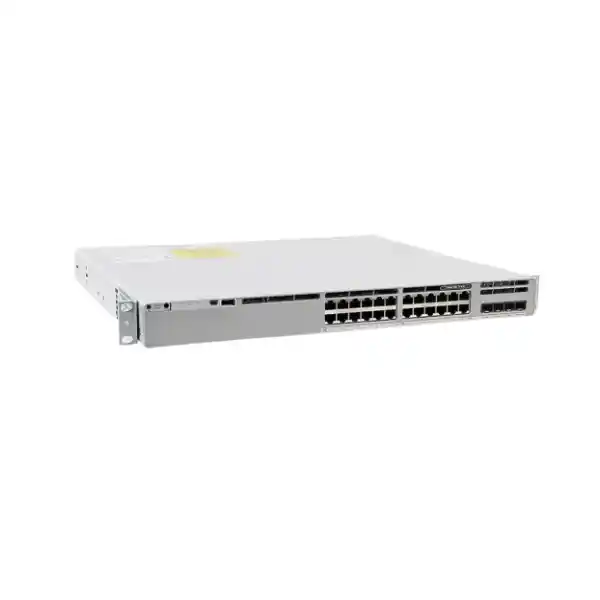
Cisco Catalyst C9300L-24T-4G Network Switch
The Cisco Catalyst C9300L-24T-4G is a 24-port, data-only enterprise access switch for organisations that need dependable Gigabit Ethernet connectivity, fixed 1G fiber uplinks and a stackable Cisco IOS XE platform without paying for PoE capability they do not intend to use. It is a practical fit for user access, branch networks, office floors, server-room edge connectivity and other managed LAN deployments where endpoints have their own power source and where four 1G SFP uplinks provide the required upstream design.
Who should consider the C9300L-24T-4G?
This switch is aimed at managed enterprise networks that need more than a basic unmanaged or smart switch. The C9300L family sits within Cisco’s Catalyst 9300 switching platform and runs Cisco IOS XE, giving administrators a familiar enterprise operating environment for VLANs, access control, routing, quality of service, telemetry and policy-driven network operations according to the installed licensing and software release. The 24T designation is especially important because it identifies a data-only copper access model. That makes it suitable when desktops, printers, servers, appliances and other Ethernet endpoints already have independent power, or when PoE devices are served by separate switches or injectors.
A Tanzania organisation might use the switch on a corporate office floor, in a branch rack, in an education or healthcare administration network, in a hospitality back-office environment, in a professional services office, or as part of a larger campus access layer. The right choice depends less on the label “24-port switch” and more on the complete traffic design. If a site has twenty user devices and a few spare ports, four 1G uplinks can be a sensible match. If the same site must aggregate many high-throughput wireless access points, surveillance streams, storage traffic or workstation clusters, a model with 10G uplinks may be more appropriate even if 24 access ports are still sufficient.
The strongest reason to choose this model is therefore fit: 24 copper Gigabit access ports, no PoE, fixed 1G optical uplinks and StackWise-320 capability. Buyers should avoid choosing it merely because the model is part of the Catalyst 9300 family. Cisco offers nearby variants with PoE, 48 access ports, 10G uplinks and different capabilities. A correct bill of materials should reflect endpoint power needs, uplink bandwidth, redundancy objectives, routing features, optics and the planned software tier.
Verified hardware at a glance
| Item | C9300L-24T-4G | Why it matters |
|---|---|---|
| Access ports | 24 × 10/100/1000 Mbps Ethernet data ports | Fits standard Gigabit wired endpoints; no multigigabit access ports. |
| Uplinks | 4 × fixed 1G SFP | Use compatible 1G optics for fiber uplinks; this is not the 4X 10G-uplink model. |
| PoE | Not provided | Phones, access points and cameras needing PoE require another power approach. |
| Default power supply | 350W AC | A second supported power supply can be considered for power redundancy. |
| Stacking | StackWise-320 support | Optional stack kits and dedicated stack cables are required for a physical stack. |
| Switching capacity | 56 Gbps; 376 Gbps with stacking | Shows platform forwarding capacity for this exact hardware class. |
| Forwarding rate | 41.66 Mpps; 279.76 Mpps with stacking | Cisco specifies wire-speed nonblocking performance for the family. |
| Memory | 8 GB DRAM, 16 GB flash | Relevant for the IOS XE operating environment and platform functions. |
| Form factor | 1.73 × 17.5 × 16.1 in with default power supply; approx. 14.93 lb / 6.78 kg | Check rack depth, rails and airflow before installation. |
Specifications should be checked again against the exact orderable part number, software release and accessory list before purchase. The base hardware name C9300L-24T-4G does not by itself state whether the intended order is the Network Essentials or Network Advantage license variant.
24 Gigabit Ethernet access ports: what the “24T” choice means
The 24 copper ports operate at 10/100/1000 Mbps, making the switch well suited to conventional Gigabit Ethernet edge devices. In a typical office, those ports can connect desktop computers, printers, thin clients, room systems, servers with 1G interfaces, network appliances and other powered endpoints. They can also connect devices that happen to support PoE as long as those devices obtain power elsewhere, but the switch itself does not energize the Ethernet cable. This distinction should be recorded in the procurement specification so that installation teams do not arrive with devices that expect PoE from the access switch.
Port count planning should include spare capacity. A site with twenty-four known wired endpoints may appear to match a 24-port model perfectly, but operating at one hundred percent port occupancy leaves no room for growth, temporary devices, migration overlap or troubleshooting. The right capacity plan should count currently active devices, known additions, equipment likely to move from Wi-Fi to wired Ethernet, and infrastructure devices that may be added later. If growth is likely to push the rack beyond twenty-four copper connections, a 48-port model or a stack of switches may be operationally simpler than filling every port from day one.
The switch also supports enterprise segmentation and policy features according to the selected license. This means the physical 24-port layout can support multiple logical networks rather than acting as one flat LAN. Staff, servers, management devices, guests, building systems or other groups can be separated through VLAN and routing design. The exact feature set depends on the license level and software configuration, so procurement should not treat “managed” as a single capability. The network architect should define which Layer 2, Layer 3, security and automation functions are required and then confirm that the chosen Cisco license tier supports them.
Four fixed 1G SFP uplinks: capacity and design considerations
The C9300L-24T-4G provides four fixed 1G SFP uplink interfaces. They are useful for connecting the access switch to distribution switches, core switches or other network segments over suitable fiber links, subject to compatible Cisco-supported optics and the installed fiber type. Because these are fixed 1G uplinks, the uplink speed should be evaluated carefully before purchase. Four interfaces give topology flexibility, but they do not turn into 10G ports. If the access layer is expected to carry sustained traffic from many high-throughput clients, dense wireless networks, large backup jobs or storage-intensive applications, the C9300L-24T-4X family with 10G/1G SFP+ uplinks may be a more future-ready choice.
The practical uplink requirement depends on traffic concentration rather than the number of access ports alone. Twenty-four user ports rarely transmit at full line rate simultaneously, so a 1G uplink design can remain appropriate for many offices and branches. However, cloud collaboration, software distribution, centralized storage, large file transfers and internet breakout can produce bursts that expose uplink bottlenecks. Administrators should review current interface utilization, application demand and growth instead of assuming that an older 1G uplink design will remain adequate throughout the next switch lifecycle.
Optics must also be part of the bill of materials. The phrase “SFP uplink” does not specify fiber distance, connector type or transceiver. Existing multimode or single-mode fiber, patch panels and upstream switch interfaces determine which optic is suitable. Before ordering, document the remote switch model, the desired link speed, fiber type, approximate distance and any installed transceiver part numbers. This prevents a common deployment delay in which the switch arrives correctly but the optical modules or patch leads do not match the site.
Important: this model does not provide PoE
The C9300L-24T-4G is a data-only model. Cisco lists no available PoE power for this switch. That makes it different from the C9300L-24P-4G, which is designed with PoE+ access ports and a higher-capacity default power supply. If the intended endpoints include IP phones, wireless access points, IP cameras, door controllers or other devices that normally expect power from the Ethernet switch, the 24T model should be selected only when a separate power method is deliberately part of the design.
For new offices and refresh projects, it is worth checking future device plans as well as the current inventory. A site with no PoE requirement today may add wireless access points, surveillance cameras or IP telephony later. If that roadmap is likely, a PoE-capable model can reduce the need for mid-life switch replacement or external power injectors. Conversely, if the environment is intentionally data-only—such as a rack serving powered desktops, servers or appliances—the 24T model avoids buying PoE capacity that will remain unused.
StackWise-320: scale the access layer as one stack
Cisco lists the C9300L fixed-uplink family with StackWise-320 support. StackWise lets multiple compatible switches operate as a stack using dedicated rear stacking connections and stack accessories. Cisco documentation states that up to eight fixed-uplink switches can be configured in a StackWise-320 arrangement. For a growing access layer, stacking can simplify management and provide a structured way to expand port count without treating each switch as an isolated island.
Stacking is not automatic simply because the switch supports it. The required C9300L stack kit and correct stack cables must be included where a physical stack is planned. Cisco lists stack kits containing adapters and a stack cable, with cable-length options for rack layout. The bill of materials should therefore specify whether each switch will be standalone or stacked, how many switches will share the stack, how they will be positioned in the rack, and which stack cable lengths are required. Leaving stacking accessories until installation day can turn a correct switch purchase into an incomplete deployment.
The performance figures also help put stacking in context. Cisco lists 56 Gbps switching capacity and 41.66 Mpps forwarding rate for the standalone C9300L-24T-4G, increasing to 376 Gbps and 279.76 Mpps when the stacking bandwidth is included in the platform calculation. These figures are not a substitute for application sizing, but they demonstrate that the stack backplane is a dedicated high-bandwidth element rather than a simple collection of switches linked through ordinary access ports.
A stack design should still include failure planning. Review which uplinks terminate on which members, how critical devices are distributed, and whether dual upstream paths are required. Stacking can simplify operation, but it does not remove the need to design power, uplink and maintenance resilience. The objective is to avoid making the entire access layer dependent on a single cable, a single upstream device or a single power feed.
Power supply and hardware resilience
The C9300L-24T-4G ships with a 350W AC power supply as the default hardware configuration. Cisco’s Catalyst 9300 documentation states that the family supports dual redundant power supplies and that switches normally ship with one power supply by default, with a second supported supply available separately. For a business-critical switch, that second power supply can be considered when the rack has two independent power feeds or when the organisation wants to reduce exposure to a single PSU failure.
Power redundancy should be designed end to end. Installing two power supplies but plugging both into the same failed PDU or the same unprotected electrical circuit does not create full power-path resilience. A more complete design considers UPS capacity, separate PDUs where available, surge protection, rack grounding and the expected runtime during outages. In Tanzania environments where utility quality or generator transfer may vary by site, the switch should be treated as part of the complete rack power plan rather than as an isolated appliance.
Cisco also documents three field-replaceable fans with N+1 redundancy for the Catalyst 9300 Series. That is useful for serviceability, but airflow should never be ignored. Keep rack intake and exhaust paths clear, avoid blocking vents with dense cabling, and ensure ambient conditions remain within the supported range. Cisco’s current environmental specifications vary permitted temperature by altitude, with normal operating limits becoming lower at higher elevations. Site conditions should be checked against the current data sheet for the exact deployment altitude rather than assuming a universal temperature limit.
Physical dimensions matter as well. With the default power supply, Cisco lists the C9300L-24T-4G at approximately 1.73 inches high, 17.5 inches wide and 16.1 inches deep, with a weight of about 14.93 pounds or 6.78 kg. Adding a second or different power supply can increase overall depth. Rack selection should therefore account for the installed power-supply configuration, cable bend radius, rear clearance and stack connectors, not just the chassis faceplate.
Performance and scale for enterprise access
Cisco’s current Catalyst 9300 data sheet groups the C9300L and C9300LM fixed-uplink platforms within an enterprise performance profile that includes 32,000 MAC addresses, 32,000 IPv4 routes in the stated platform scale, 16,000 IPv6 routing entries, 8,000 multicast routing entries, 5,120 QoS scale entries, 5,120 ACL scale entries and support for 4,094 VLAN IDs. The family is also listed with 8 GB of DRAM and 16 GB of flash. These figures are platform-scale references rather than promises that every feature can be used to its maximum simultaneously. Actual design limits can depend on software release, license, feature combinations and template choices.
For most office and branch deployments, the practical value is that the switch is built for structured enterprise networks rather than simple port multiplication. It can participate in routed-access designs, apply access controls, prioritize traffic and provide visibility according to its software entitlements. A buyer comparing it with lower-tier switches should therefore consider operational requirements such as standardized configuration, troubleshooting tools, security policy, automation and long-term software lifecycle, not only raw port count.
Performance planning should still begin with real traffic. A switch serving normal office clients may operate comfortably with 1G uplinks because user traffic is bursty and internet bandwidth may be well below aggregate access capacity. A switch connecting engineering workstations, local servers or heavy backup clients can behave very differently. Collect interface utilization from the existing network where possible, identify peak periods, and model expected growth. The fact that a platform can forward at wire speed does not eliminate congestion where many access ports converge onto a smaller uplink bundle.
Cisco IOS XE and licensing choices
The Catalyst 9300 family runs Cisco IOS XE. For the C9300L-24T-4G, Cisco lists orderable variants associated with Network Essentials and Network Advantage. The base product name supplied here does not specify which of those license levels is intended, so a quotation should not silently assume one. The -E orderable variant corresponds to Network Essentials, while the -A variant corresponds to Network Advantage in Cisco’s current ordering information.
Network Essentials covers fundamental switching capabilities and selected routed-access, visibility and security functions. Cisco positions Network Advantage as the higher tier, adding advanced routing, segmentation, automation, resiliency and security capabilities. Current Cisco documentation lists examples such as BGP and broader routing functions, VRF, VXLAN, LISP and Cisco TrustSec-related segmentation, additional programmability interfaces, advanced high-availability functions and MACsec-256 under Network Advantage. Feature availability can change with licensing models and software releases, so the design should verify the exact required functions against Cisco’s current feature matrix before the order is placed.
This matters commercially because two switches with identical physical ports can serve different network requirements depending on the software tier. A simple access layer using VLANs, standard authentication, QoS and basic routing may have different licensing needs from a campus fabric, a network using advanced dynamic routing, or an environment with more demanding segmentation and automation requirements. Procurement teams should therefore ask the network engineer for a short feature list rather than selecting the license purely on price.
Subscription and support choices should also be documented separately from the hardware model. Cisco’s current Catalyst ordering model includes term-based software subscription options, and Cisco Smart Licensing is used for software entitlement management. The exact commercial package, support coverage and term should be confirmed at quotation time. FourTeck Tanzania should not present a license term, warranty period or support entitlement as included unless it is explicitly part of the quoted configuration.
Security and segmentation planning
An access switch sits close to users and devices, so security design should be part of deployment rather than an afterthought. Cisco’s Catalyst platform supports capabilities such as 802.1X access control, first-hop security features, control-plane protection, access control lists, MACsec and telemetry according to license and software release. The value of those features depends on configuration. Simply buying an enterprise switch does not automatically create secure access.
A well-planned office network should decide how users, servers, printers, building systems and management interfaces are separated. VLANs can create logical boundaries, but the routing and firewall policy between those VLANs determines what traffic is allowed. Where identity-based access is required, 802.1X can be integrated with the wider authentication architecture. Where link encryption is needed, confirm the supported MACsec capability for the chosen license and interface design. If Cisco TrustSec, scalable group tags or fabric-based segmentation are part of the roadmap, verify the Network Advantage requirements and the surrounding Cisco architecture.
Administrative access deserves the same attention. Define management VLANs, restrict SSH and web management sources, use centralized authentication where appropriate, synchronize time, send logs to a retained logging platform, and maintain configuration backups. If the switch is deployed in a branch, document how administrators reach it when the primary WAN path is unavailable. A console strategy, secure out-of-band access or an agreed local recovery process can make a major difference during an outage.
Security baselines should be release-aware. Features, defaults and recommended configuration can change as Cisco IOS XE evolves. Production networks should follow supported releases and an approved change process instead of remaining indefinitely on the factory image. Before upgrades, review Cisco release notes, compatibility and any advisories relevant to the installed configuration. This operational discipline is as important as the hardware selection itself.
Where the C9300L-24T-4G fits in a Tanzania network
In a Tanzania business network, the C9300L-24T-4G can serve as a managed access switch where a compact number of powered Ethernet devices must connect to a larger LAN. A branch office might use the 24 copper ports for staff workstations, printers and local appliances, then use one or more SFP uplinks toward a distribution switch or router. A head-office floor could use a stack of C9300L switches when centralized policy and additional port capacity are required. A server or equipment room can use the data-only access ports for appliances that do not need PoE.
Local deployment planning should include power continuity, cooling, rack security, cabling quality and the topology beyond the switch. The switch itself does not determine internet reliability, WAN resilience or application performance. If a branch relies on one ISP circuit, one firewall or one upstream distribution switch, those components may remain single points of failure even when the access switch has redundant power. A useful network review maps the complete path from endpoint to application.
The same principle applies to fiber. Confirm whether the building uses multimode or single-mode cable, where the remote fiber terminates, and what interface exists on the upstream device. If a site expansion may require longer distances or new buildings, the optical plan should be made before selecting transceivers. Never assume that an SFP used in a previous switch is automatically supported in a new Cisco platform; validate the exact optic and software support.
For multi-site organisations, standardization can be valuable. Using a repeatable switch family, license policy, VLAN template, logging method, naming convention and software baseline simplifies support across branches. The C9300L-24T-4G can be one standard building block where 24 non-PoE ports and 1G fiber uplinks match the branch profile, while PoE or 10G-uplink variants can be reserved for sites with different requirements.
C9300L-24T-4G vs nearby Catalyst 9300L options
| Model family | Access ports | Fixed uplinks | Choose it when |
|---|---|---|---|
| C9300L-24T-4G | 24 data | 4 × 1G SFP | You need 24 non-PoE Gigabit ports and 1G fiber uplinks. |
| C9300L-24T-4X | 24 data | 4 × 10G/1G SFP+ | You want the same 24-port data role with faster uplinks. |
| C9300L-24P-4G | 24 PoE+ | 4 × 1G SFP | Phones, APs or cameras must receive PoE from the switch. |
| C9300L-48T-4G | 48 data | 4 × 1G SFP | The environment needs more copper ports without PoE. |
These comparisons are hardware-level distinctions. The exact license suffix, subscription, support, stack kit, secondary power supply and optics must still be selected for the final bill of materials. If the project is likely to move toward Wi-Fi with multigigabit wired backhaul, heavy east-west traffic or faster aggregation, consider whether a different Catalyst model is more appropriate rather than treating every 24-port switch as interchangeable.
When to choose the 4G model—and when not to
Good fit
- Up to 24 wired Gigabit endpoints with sensible spare-port planning.
- Endpoints do not require power from the Ethernet switch.
- 1G fiber uplinks are sufficient for current and forecast traffic.
- Enterprise IOS XE operations and StackWise-320 are desired.
- The network team wants Catalyst 9300-class policy, visibility and lifecycle features.
Consider another model
- IP phones, Wi-Fi access points or cameras need PoE/PoE+ from the switch.
- The uplink design requires 10G or faster interfaces.
- More than 24 copper access ports are needed in the near term.
- Multigigabit access is needed for newer high-throughput endpoints.
- A simpler low-feature branch switch is sufficient and the Catalyst 9300 capabilities would be unused.
This decision framing is often more useful than a feature list because it exposes the trade-offs that can create unexpected project cost. A cheaper data-only switch can become expensive if external PoE injectors are later added everywhere. A 1G-uplink model can become a bottleneck if the site then deploys high-capacity Wi-Fi. On the other hand, buying PoE and 10G uplinks without a realistic requirement can add cost without improving the application experience. Match the model to the three-to-five-year network plan rather than only today’s port count.
Migration from an existing access switch
A replacement project should begin with discovery, not with copying the old configuration line for line. Capture the existing switch model, active port count, VLANs, trunk links, port channels, spanning-tree role, routing functions, authentication, DHCP-related features, QoS, monitoring, logging, SNMP or telemetry, NTP, administrative access and any local scripts or automation. Record the installed uplink optics and fiber path as well. This information reveals whether the C9300L-24T-4G is a true functional fit or only appears similar by port count.
If the old switch is part of a stack, plan whether the migration will replace the whole stack or only selected members. Mixing platforms in a stack is not a general assumption; compatibility must be checked for the exact Cisco models and software. In many refreshes, treating the target stack as a new logical unit creates a cleaner change plan. Build and validate the new configuration, back up the existing environment, pre-stage software and licensing where possible, label patch leads, and document a rollback method before the maintenance window.
The cutover should prioritize critical links. Bring up management access, upstream trunks or routed links, time synchronization and monitoring before moving all user ports. Then migrate endpoints in controlled groups and confirm DHCP, DNS, authentication and application access. If voice, cameras or access points are part of the existing environment, remember again that the 24T model will not provide PoE. A migration that ignores power can pass every configuration check and still leave devices offline.
After migration, review error counters, uplink utilization, spanning-tree state, routing neighbors, authentication failures and logs. Keep the old configuration and switch inventory as part of the project record. A good refresh improves documentation and operational consistency rather than simply replacing one chassis with another.
Procurement checklist for Tanzania buyers
Use the checklist below before requesting a final quotation. It is designed to prevent small accessory or licensing omissions from delaying installation.
- Confirm the exact role. State whether the switch is for a branch, office floor, campus access layer, server room or another environment.
- Count copper endpoints. Include current devices, planned growth and spare-port capacity.
- Confirm PoE requirements. The C9300L-24T-4G does not power devices over Ethernet.
- Validate uplink bandwidth. Decide whether four 1G SFP uplinks are enough or whether 10G SFP+ is justified.
- Document fiber and optics. Record multimode or single-mode fiber, distance, connector path and upstream interface.
- Choose the license level. Confirm whether Network Essentials or Network Advantage is required by the feature set.
- Define software/subscription needs. Include the appropriate current Cisco software term where required by the order.
- Decide on stacking. Add the correct C9300L stack kit and cable lengths if StackWise-320 will be used.
- Decide on power redundancy. Consider a supported second power supply and independent power paths for critical sites.
- Check rack depth and airflow. Account for power supplies, cable clearance and ventilation.
- Plan support and lifecycle. Specify the desired support service and ownership of future software maintenance.
- Record implementation scope. Clarify whether the requirement is hardware supply only or includes configuration, migration and testing.
A practical bill of materials is more than the switch chassis
The model name identifies the central device, but a production-ready order can require several additional items. Uplink transceivers are selected according to fiber type, distance and the remote interface. Stack accessories are required if the switches will operate in a StackWise-320 configuration. A second power supply may be desired for redundancy. Rack hardware, patch leads, cable management and UPS capacity may also need to be included depending on the site.
Licensing and support should appear as explicit line items so that the buyer can see what is perpetual, what is term-based and what service coverage is included. The exact orderable switch variant should show whether Network Essentials or Network Advantage is being supplied. If the quotation contains a subscription, record its tier and term. If support is included, identify the actual support product rather than describing it generically as “warranty” or “support.” This avoids misunderstandings at renewal time.
For stacked deployments, record the quantity of stack kits and cable lengths. For resilient uplinks, document how many SFPs are needed per switch and where each fiber terminates. If link aggregation is planned, make sure the upstream switch has compatible ports and that the design does not consume uplinks needed for another function. A structured bill of materials also makes future expansion easier because the network team can see which parts were standard and which were site-specific.
FourTeck Tanzania can use this information to frame the quotation around the intended deployment rather than treating the request as a bare chassis purchase. That is particularly useful when the buyer already knows the Cisco model but still needs help confirming optics, stacking, licensing or implementation scope.
Operations after installation
A Catalyst switch provides more value when it is operated consistently. After installation, maintain an approved software release, configuration backups, administrator access records and a monitoring baseline. Track interface errors, uplink utilization, environmental alerts, stack health and power-supply state. Configure time synchronization so that logs can be correlated with firewalls, servers and authentication platforms. Send important events to a retained logging system instead of relying only on local device memory.
Configuration standards should cover interface descriptions, unused-port handling, VLAN naming, trunk policy, spanning tree, authentication, management-plane access and logging. Descriptive interface labels reduce troubleshooting time because technicians can immediately see which room, device or uplink is expected on each port. Unused ports should follow the organisation’s security baseline rather than remaining open by default. Configuration changes should be recorded so that emergency support does not depend on one administrator’s memory.
Capacity reviews should be periodic. A network that was correctly sized at installation can change as more cloud applications, users and devices are added. Watch uplink peaks and port occupancy. If the switch approaches full copper-port use, decide whether to add another stack member or move to a larger design before there is no maintenance flexibility. If 1G uplinks become consistently saturated, the appropriate response may be to redesign the uplink layer or move to a 10G-capable variant rather than simply adding more access ports.
Lifecycle planning should include software maintenance and eventual replacement. Enterprise switching is not a one-time purchase that should be forgotten in the rack. Keep hardware inventory, serial information, licenses and support records in a central asset system. Review Cisco lifecycle notices and security advisories relevant to the installed platform. This turns the switch from an unmanaged dependency into a controlled infrastructure asset.
Common deployment scenarios
Corporate office floor
Use the 24 copper ports for powered desktops, printers and room devices, with fiber uplinks to the building distribution layer. Confirm future PoE needs before standardizing on a data-only model.
Branch rack
A good fit where the branch has fewer than 24 wired devices, centralized configuration requirements and suitable 1G uplink capacity. Add redundant power and dual uplinks only when the wider branch architecture can use them.
Stacked access layer
Combine compatible C9300L units with the correct StackWise-320 accessories where a larger port pool and unified stack operation fit the campus or building design.
Equipment or server room
Connect appliances and other 1G devices that have independent power. Check whether four 1G uplinks are sufficient for east-west and upstream traffic before using the switch near bandwidth-intensive workloads.
Questions to answer before approving the model
First, will any endpoint require PoE now or within the planned lifecycle? If yes, compare a PoE-capable model. Second, are four 1G uplinks enough for the traffic profile? If not, compare the 4X 10G-uplink variant or another current Catalyst platform. Third, is 24 access ports enough after allowing for growth and spare capacity? Fourth, does the network require advanced routing, segmentation, automation or security features that point toward Network Advantage rather than Network Essentials?
Next, decide whether the switch will be standalone or stacked. A stack requires accessories and a rack layout that supports the selected cables. Determine whether power redundancy is necessary and whether the site has two useful power paths. Confirm the rack has sufficient depth and ventilation. Then validate optics against the exact fiber run and upstream switch. These physical checks are simple, but they account for many avoidable installation delays.
Finally, document ownership. Who will configure the switch, manage Cisco licensing, approve software upgrades, monitor logs and renew any subscriptions or support? If the answer is unclear before purchase, it will usually be harder after deployment. A well-scoped quotation should therefore include both the technical bill of materials and the operational responsibilities that keep the switch supportable over time.
If you can answer those questions confidently, the C9300L-24T-4G can be evaluated on its actual role instead of on brand or port count alone. This is the most reliable way to avoid buying too little capacity, unnecessary features or an incomplete accessory set.
Frequently asked questions
Does the Cisco C9300L-24T-4G support PoE?
No. Cisco identifies the C9300L-24T-4G as a 24-port data-only model and lists no available PoE power. If the switch must power IP phones, access points, cameras or similar devices, compare a PoE-capable Catalyst 9300L variant such as the 24P family.
Are the uplinks 1G or 10G?
This exact 4G model has four fixed 1G SFP uplinks. The C9300L-24T-4X is the nearby 24-port data model with four fixed 10G/1G SFP+ uplinks. Choose based on the required upstream bandwidth and existing optics.
Can C9300L-24T-4G switches be stacked?
Yes. Cisco documents StackWise-320 support for C9300L fixed-uplink models, with up to eight switches in the supported stack architecture. The appropriate C9300L stack kit and stack cables are separate accessories and should be included in the bill of materials.
What is the switching capacity?
Cisco lists 56 Gbps switching capacity and 41.66 Mpps forwarding rate for the C9300L-24T-4G, with 376 Gbps switching capacity and 279.76 Mpps forwarding rate in the stacking performance figures.
What power supply does it use?
The default power supply is a 350W AC unit. Cisco Catalyst 9300 documentation supports dual redundant power supplies, so a supported second supply can be considered where the deployment requires power redundancy.
Which license should I choose?
Cisco lists Network Essentials (-E) and Network Advantage (-A) orderable variants for this hardware. The right tier depends on required routing, segmentation, automation, resiliency and security features. Confirm the exact feature matrix and subscription package at quotation time.
Is this a good replacement for any older 24-port Cisco switch?
Not automatically. A replacement must match PoE requirements, uplink type and speed, stacking, licensing, routing, optics and software behavior. Port count alone is not enough to establish equivalence.
What information should I send for a Tanzania quotation?
Provide the exact model requested, quantity, endpoint count, any PoE devices, required uplink speed, fiber type, stack requirement, preferred license tier if known, desired support scope and whether configuration or migration assistance is required.
Confirm the exact C9300L-24T-4G configuration for your site
Send FourTeck Tanzania your required quantity, current switch model, number of wired endpoints, uplink details, fiber type, stacking requirement and the Cisco features you need. The quotation can then distinguish the core switch from optics, stack accessories, redundant power, licensing, support and implementation services instead of assuming one universal configuration.
Request a Cisco switch quotation
Price, stock, delivery time, warranty and support coverage should be confirmed in the formal quotation for the exact orderable part number and project scope.




Reviews
There are no reviews yet.