
Cisco Catalyst 9300L • Enterprise Access Switching
Cisco Catalyst C9300L-24T-4X Network Switch for Tanzania Projects
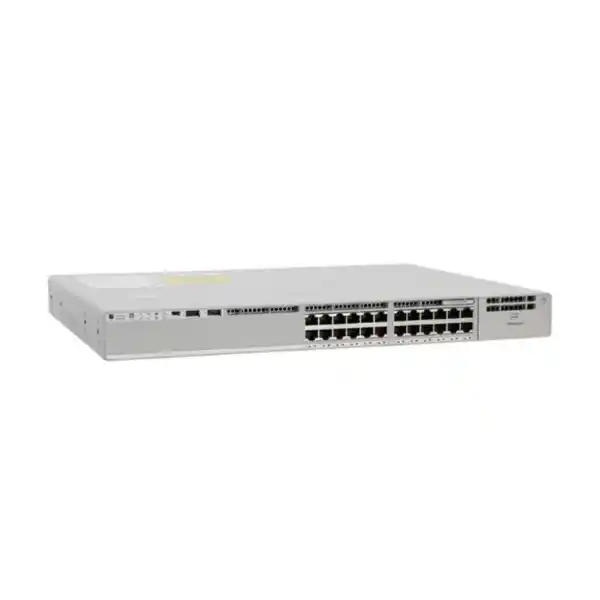
The Cisco Catalyst C9300L-24T-4X is designed for organisations that need a managed, stackable 24-port Gigabit Ethernet access switch with fixed high-speed fibre uplinks, but do not need PoE from the access ports. It combines 24 data-only 10/100/1000 Mbps copper ports with four fixed 10G/1G SFP+ uplink ports, a 350W AC power supply and support for Cisco StackWise-320. For an office, campus, institution, branch, server room or structured LAN refresh, that combination can provide a clear upgrade path from older access switching while retaining familiar copper connectivity at the edge and adding more capable uplink options.
4 × 10G/1G SFP+ Uplinks
StackWise-320
Data Only • No PoE
Quick Product Information
| Model | Cisco Catalyst C9300L-24T-4X |
|---|---|
| Access ports | 24 × 10/100/1000 Mbps copper Ethernet, data only |
| Fixed uplinks | 4 × 10G/1G SFP+ |
| PoE | No. This is a data-only “T” model. |
| Stacking | Supports StackWise-320; stacking hardware is a separate planning item |
| Switching capacity | 128 Gbps standalone; Cisco lists 448 Gbps switching capacity with stacking |
| Forwarding rate | 95.23 Mpps standalone; 333.33 Mpps with stacking |
| Default power supply | 350W AC |
| Form factor | 1RU class; maximum listed chassis dimensions 4.4 × 44.5 × 48.8 cm |
| Weight | Approximately 6.78 kg with fans and default power supply installed |
The base model name does not, by itself, identify the exact software licensing bundle. Cisco lists separate ordering variants for Network Essentials, Network Advantage and Meraki-managed licensing. A quotation should therefore identify the complete part number and software entitlement rather than treating “C9300L-24T-4X” as a complete commercial configuration.
Who This Switch Is For
This model is most relevant where the access layer primarily serves devices that already have their own power source. Typical examples include desktop computers, workstations, printers with local power, servers with 1G interfaces, industrial or administrative endpoints, network appliances, laboratory equipment and other wired devices that do not need the switch to deliver electrical power over Ethernet. The four 10G/1G SFP+ uplinks make it possible to connect the access switch to a distribution or core layer at speeds above the 1G access-port rate, subject to correct optics, fibre type, distance and upstream compatibility.
A data-only switch can also be a deliberate design choice when an organisation separates powered-device access from general user access. For example, one switch may serve conventional wired users while a different PoE model serves wireless access points, IP phones, surveillance cameras or access-control equipment. That separation can simplify power budgeting and can be useful where a cabinet already contains dedicated PoE infrastructure. However, it is not automatically the right design: if powered endpoints are expected on these 24 ports, choosing the C9300L-24T-4X can create additional injector or power-adapter requirements that would have been avoided with a PoE-capable model.
For Tanzanian projects, the most important first decision is therefore not simply whether 24 ports are enough. Buyers should confirm the type of devices on every access port, future user growth, uplink speed, fibre availability, management approach, routing requirements, licensing level, stack design, rack conditions and power-resilience target. These inputs determine whether this exact model is a good fit or whether another Catalyst 9300L variant should be specified.
Why the 24 Data Ports Matter
The 24 front-panel copper access ports support standard 10/100/1000 Mbps Ethernet operation. In a modern structured LAN, this is a useful density for a communications room, departmental floor, small branch, server-room edge segment or other location where twenty-four wired drops are sufficient after allowing for spare capacity. The model is not a multigigabit access switch, so endpoints that require 2.5G, 5G or 10G over copper should be evaluated against a different Catalyst 9300 family option.
Port count should be calculated from the patch-panel and endpoint plan rather than from the number of current users alone. A new office may have spare desk outlets, printers, time-attendance terminals, conference-room devices, building systems and future expansion that are easy to miss in a simple user count. A 24-port switch should not be purchased with all ports already committed unless the design intentionally allows expansion through an additional switch or stack member.
Because the access ports are data-only, power planning stays separate from endpoint connectivity. That can be an advantage when every attached device is locally powered, but it becomes a constraint when a network is expected to power voice, wireless or security endpoints. Before ordering, mark every planned port as data-only or powered-device access. If several powered endpoints are present, compare the cost and operational simplicity of a PoE Catalyst variant against the use of external injectors, adapters or a second PoE switch.
Four Fixed 10G/1G SFP+ Uplinks
The “4X” in the model name identifies four fixed SFP+ uplink interfaces that Cisco specifies for 10G or 1G operation. This is one of the most important reasons to select the C9300L-24T-4X instead of a 4G variant. An organisation can use higher-speed fibre links toward a distribution switch, core switch, aggregation layer or another suitable upstream device without consuming the 24 copper access ports. The physical uplink sockets are fixed rather than provided through a replaceable uplink module, so the required uplink architecture should be confirmed before purchase.
The switch does not make the optical design decision automatically. Buyers still need to specify the transceiver type, link speed, fibre medium, connector type, distance and remote-end compatibility. A 10G link over short-reach multimode fibre has different optics and cabling requirements from a longer single-mode connection. Existing SFP or SFP+ modules should not be assumed compatible merely because they fit the same physical cage. The exact transceiver support matrix, software release and upstream platform should be reviewed for the proposed bill of materials.
If the design uses link aggregation, diverse uplink paths or redundant upstream switches, those choices should be documented before optics are purchased. The same applies when a site plans to begin at 1G and migrate uplinks to 10G later. A clear migration plan avoids ordering transceivers that must be replaced immediately when the backbone is upgraded.
StackWise-320 for a Unified Access Stack
Cisco documents StackWise-320 support for the Catalyst 9300L fixed-uplink family. Up to eight compatible switches can participate in a StackWise data stack, giving network teams a way to build greater port density while operating the stack through a common control and management plane. For a growing site, that can be more convenient than treating every access switch as an isolated device, and it can support a more resilient access design when the stack topology and uplinks are planned correctly.
Stacking should not be treated as a feature that is automatically ready out of the box. The C9300L requires the appropriate stack kit and cables, and Cisco distinguishes C9300L stacking from the StackWise implementations used on modular-uplink Catalyst 9300 models. C9300L units stack with other C9300L units rather than being mixed freely with other Catalyst families. A bill of materials should identify the number of switches, stack kits, cable lengths, rack positions and intended ring topology before the order is placed.
There is also an important power distinction: Cisco states that Catalyst 9300L switches do not support StackPower. Data stacking and power sharing are therefore separate considerations. If power redundancy is required, plan redundant power supplies and upstream electrical resilience appropriately instead of assuming the data stack will provide pooled switch power.
For multi-switch deployments, software and licensing alignment also matters. Stack members should be planned with compatible software and a consistent licensing level. A pre-deployment review should therefore cover hardware compatibility, software target release, licence selection, stack member numbering, uplink strategy and rollback or replacement procedures.
Performance and Scale for Enterprise Access
Cisco lists a 128 Gbps switching capacity and 95.23 Mpps forwarding rate for the C9300L-24T-4X in standalone operation. In the same platform table, Cisco lists 448 Gbps switching capacity and 333.33 Mpps forwarding rate with stacking. These figures help position the model as an enterprise access switch rather than a simple unmanaged edge device, but they should not be interpreted as a guarantee of application performance. Real network performance depends on topology, packet sizes, oversubscription, uplink design, configuration, software features and traffic patterns.
For the fixed-uplink Catalyst 9300L platform, Cisco publishes scale figures that include up to 32,000 MAC addresses, up to 32,000 IPv4 routes across direct and indirect entries, 16,000 IPv6 routing entries, 8,000 multicast routes, 5,120 QoS scale entries and 5,120 ACL scale entries. These platform limits are useful when an organisation is replacing older access switches or planning a larger routed-access design, but actual usable scale can depend on feature templates, software release and configuration. The network design should be validated against the features that will actually be enabled.
For a typical office or branch access layer, the practical questions are usually simpler: how many devices will be active, how much traffic leaves the switch, whether 1G endpoint links are sufficient, whether uplinks need 10G, whether east-west traffic is significant, and how much growth is expected. Answering those questions produces a more useful sizing decision than selecting a platform only from headline throughput numbers.
Cisco IOS XE, Licensing and Feature Selection
The Catalyst 9300L family runs Cisco IOS XE, but the feature set available to the buyer depends on the exact licensing combination. Cisco offers the C9300L-24T-4X with different commercial suffixes, including Network Essentials and Network Advantage variants, and Cisco also lists a Meraki-managed ordering option for this hardware family. The base model shown on this page is therefore best understood as the hardware platform; the full order code determines how the switch is licensed and managed.
Cisco documents core switching capabilities under Network Essentials, including Layer 2 functions, selected routed-access capabilities, QoS, 802.1X, telemetry and visibility features. Network Advantage adds a broader set of routing, segmentation, automation, resiliency and security capabilities. Examples Cisco lists under the Advantage tier include protocols and functions such as BGP, full EIGRP, HSRP, IS-IS, VRF, VXLAN, LISP, Cisco TrustSec, NETCONF, RESTCONF, gRPC, YANG and MACsec-256. The requirement should therefore be mapped to actual features rather than choosing a licensing tier solely by name.
Cisco’s current licensing documentation also distinguishes the perpetual network licence from Cisco Catalyst and Cisco DNA subscription licensing. The correct combination, term and management approach should be confirmed for the exact order. If the organisation already operates Cisco Smart Accounts, Catalyst Center, identity services, automation tooling or a Meraki environment, that existing operational model should be included in the procurement discussion so the new switch does not arrive with an entitlement or management method that conflicts with the installed estate.
A Tanzania buyer requesting a quotation should ideally state whether the target is Network Essentials, Network Advantage or Meraki management; whether advanced routing or segmentation is required; whether there is an existing Cisco Smart Account; and whether the switch will join an installed Catalyst standard. If these answers are not yet known, the technical requirement should be reviewed before a final ordering suffix is chosen.
Security, Segmentation and Operational Control
Enterprise access switching is not only about providing Ethernet ports. The access layer is where users, endpoints and local services enter the wired network, so authentication, segmentation, policy and visibility can be important design requirements. Cisco includes capabilities such as 802.1X and first-hop security functions in its switch feature packaging, while more advanced segmentation and security capabilities depend on the selected software level. This gives organisations the option to use the switch as part of a broader identity-aware and policy-based network design rather than as a basic connectivity device.
The correct feature set depends on the environment. A simple branch may need VLANs, access control, QoS and straightforward routed uplinks. A larger campus may require more complex segmentation, dynamic routing, automation or integration with broader Cisco network-management systems. The hardware can support a wide enterprise feature set, but the licence and configuration must match the intended architecture.
During migration, security settings should be rebuilt from design requirements rather than copied blindly from an older switch. Legacy VLANs, unused trunks, permissive access-control entries, outdated authentication assumptions and undocumented static configurations often accumulate over time. A switch refresh is a useful point to validate the endpoint inventory, VLAN purpose, trunk design, management access, logging, time synchronisation, AAA, port security, firmware policy and backup process.
Power Supply and Resilience Planning
Cisco specifies a 350W AC power supply as the default for the C9300L-24T-4X. The switch has two internal power-supply slots, so a second supported supply can be used for power redundancy where the design requires it. This is relevant for organisations that want to reduce the risk associated with a single switch PSU failure. The electrical design should still consider the upstream UPS, power distribution unit, circuit capacity and whether the two switch power supplies are connected to genuinely independent power paths.
Because this is a data-only model, the 350W supply is not providing a PoE budget to endpoints. This can simplify switch power consumption compared with powered-access models, but it does not eliminate the need to size the cabinet UPS correctly. The UPS may also support a router, firewall, optical equipment, patching accessories, servers, wireless controllers or other devices. Calculate the protected load at the cabinet level and consider the required runtime, battery condition, generator transfer behaviour and maintenance plan.
Cisco states that the 9300L does not support StackPower, so multiple stacked switches do not automatically share power through the stack. For a resilient stack, each member’s PSU design and upstream electrical feed should be planned independently. If redundant power supplies are required, include them explicitly in the bill of materials rather than assuming they are part of the base chassis package.
Rack, Cooling and Environmental Considerations
Cisco lists the C9300L-24T-4X at approximately 6.78 kg with fans and the default power supply installed. The maximum documented dimensions for the 9300L chassis family are approximately 4.4 cm high, 44.5 cm wide and 48.8 cm deep. That places the switch in a standard rack-mount enterprise format, but cabinet depth should still be checked alongside rear cabling, power connectors, stack cables, fibre bend radius and front or rear service clearance.
Cisco’s hardware documentation gives a normal operating temperature range of –5°C to 45°C, with altitude-related limits, and a non-condensing relative-humidity range of 5% to 90%. These are equipment limits rather than a reason to accept poor room conditions. A network cabinet should be kept clean, ventilated and protected from heat, dust, moisture and accidental obstruction of airflow. Sites with unstable room cooling should consider environmental monitoring and should avoid loading cabinets in a way that traps exhaust air.
In Tanzania, cabinet planning should reflect the conditions at the actual building rather than a generic office assumption. Confirm room ventilation, UPS protection, earthing, rack depth, cable management and maintenance access at each site. Where a project spans multiple branches, document a standard cabinet layout so replacement, troubleshooting and remote guidance are easier across locations.
Tanzania Deployment Planning
A successful switch purchase depends on the rest of the site. For a Tanzania office, campus, institution, healthcare environment, financial operation, hospitality property, public-sector facility, reseller project or systems-integration deployment, begin by documenting the existing network. Record the router or firewall, current switches, fibre routes, patch panels, VLANs, uplink speeds, server connections, wireless infrastructure, IP phones, cameras and any devices that depend on PoE. This shows whether the requested C9300L-24T-4X fits the actual topology.
Next, identify the physical path from this switch to the upstream network. If the uplink crosses floors or buildings, confirm whether existing fibre is multimode or single-mode, the connector type, the approximate distance and the equipment at the remote end. The 4 × SFP+ uplinks are flexible only when the optics and fibre are selected correctly. For new cabling, document the intended backbone standard so later branches or additional access switches can follow the same design.
Power continuity should be reviewed at the same time. A network switch can be technically correct yet still deliver poor availability if the cabinet has an undersized UPS, weak batteries, poor ventilation or a shared circuit that trips under unrelated loads. Define the required runtime and what must remain operational during an outage. If the wider site has backup generation, confirm how the communications cabinet behaves during transfer and recovery.
Finally, document commercial requirements separately from technical requirements. Quantity, destination, project phase, licensing preference, accessory list and any required spare units should be visible in the quotation request. Stock, lead time, warranty and delivery conditions should be confirmed for the exact offered part numbers rather than inferred from a general product page.
Choosing Between Similar Catalyst 9300L Models
| Model family choice | Use when | Key difference |
|---|---|---|
| C9300L-24T-4X | 24 powered-separately endpoints and 10G/1G fibre uplinks are required | Data-only access ports; four fixed 10G/1G SFP+ uplinks |
| C9300L-24P-4X | The access switch must power PoE+ endpoints | 24 PoE+ access ports; higher default PSU and a PoE budget |
| C9300L-24T-4G | 24 data ports are suitable and 1G fixed fibre uplinks are sufficient | Four fixed 1G SFP uplinks instead of 10G/1G SFP+ |
| 48-port 9300L variants | A wiring closet needs more access-port density | 48 access ports; PoE and uplink choices depend on exact model |
| 9300L multigigabit/UPOE variants | Selected endpoints need above-1G copper and higher-power PoE capabilities | Different access interfaces, power capability and PSU requirements |
The correct choice is usually determined by four questions: how many access ports are required, whether those endpoints need PoE, whether any endpoint needs multigigabit copper, and what speed is required toward the upstream network. Answer those questions first; then select the software and management variant that matches the organisation’s network design.
Migration from Older Access Switches
The C9300L-24T-4X is relevant to refresh projects where an older access switch no longer meets software, performance, support or uplink requirements. Cisco has identified C9300L variants as migration options from several Catalyst 3650 configurations, which makes the platform familiar in upgrade planning. A migration should still be treated as a design exercise rather than a one-for-one hardware swap.
Start by exporting the current configuration and building an inventory of active ports, VLANs, trunks, routed interfaces, spanning-tree settings, authentication, QoS policies, ACLs, monitoring, syslog, SNMP, time services and management access. Compare each requirement against the new software release and licensing tier. Remove obsolete configuration instead of carrying forward years of unused commands. Confirm whether the old switch uses proprietary or third-party optics that need replacement.
Plan the physical cutover around patching and labelling. When 24 copper connections are moved at once, poor cable identification can turn a short maintenance window into extended troubleshooting. Label patch-panel ports, switch ports and uplink fibres; record the intended destination; preconfigure the switch where practical; and keep a rollback plan for critical services. If a stack is being introduced, stage and validate the stack before connecting production endpoints.
After migration, verify more than simple link lights. Check VLAN membership, gateway reachability, authentication, DHCP, DNS, application access, voice or video quality where relevant, uplink redundancy, monitoring visibility, logging and expected spanning-tree state. Save the final configuration and update the network diagram so the refresh improves documentation as well as hardware.
Bill of Materials: What to Confirm Before Quotation
The switch chassis is only one part of a deployable solution. A complete request should describe everything required to place the switch into service. This is especially important for project procurement, where a missing optic, cable or licence can delay commissioning even when the main hardware arrives on schedule.
- Exact licensing suffix: confirm whether the requirement is Network Essentials, Network Advantage or a Meraki-managed variant and select the appropriate subscription or entitlement combination.
- Uplink optics: specify 1G or 10G, fibre type, distance, connector and the remote-end platform. Validate supported transceivers for the intended software and topology.
- Stacking accessories: if multiple 9300L units will form a stack, include the correct stack kits and cable lengths for the rack arrangement.
- Power redundancy: decide whether the default single 350W AC supply is sufficient or whether a second supported PSU is required for the design.
- Rack and power accessories: confirm rail or mounting needs, power cord requirements, PDU outlets, UPS capacity and cable management.
- Software and management: identify the target IOS XE release, Smart Account requirements, management platform and any organisational standards that must be met.
- Project quantities and spares: state the number of production units, any cold or configured spare requirement, deployment locations and whether all units must use the same standard build.
Common Business Scenarios
Corporate Office Access
A floor or department with desktops, printers and other locally powered devices can use the 24 copper ports while 10G fibre uplinks connect toward the distribution layer. Check spare port capacity and whether future Wi-Fi or voice growth will require PoE elsewhere.
Branch Standardisation
Organisations standardising branch switching can use a consistent 24-port data-only design where sites share similar endpoint and uplink requirements. Standard templates, optics and documentation can reduce operational variation across branches.
Campus Wiring Closet
A campus or institution can place the switch at the access layer with fibre uplinks toward distribution. StackWise-320 can be considered where several compatible 9300L switches are required in the same closet.
Legacy Switch Refresh
Older 1G access switching can be refreshed while retaining copper endpoint connectivity and introducing 10G uplink capability. Licensing, configuration conversion and optical compatibility should be reviewed before migration.
When the C9300L-24T-4X Is Not the Right Choice
This model should not be chosen simply because the port count and brand look familiar. It is specifically a data-only 24-port 1G copper switch with fixed 10G/1G SFP+ uplinks. If the access layer must power wireless access points, IP phones, cameras or other PoE devices, a PoE-capable model is usually more appropriate. If endpoints require multigigabit access speeds, the standard 1G copper ports are not sufficient. If more than 24 access ports are needed in one chassis, compare 48-port options.
The fixed uplinks are another design constraint. They are an advantage when four 10G/1G SFP+ interfaces match the intended architecture, but a deployment that requires a different uplink type or greater uplink flexibility may need a different Catalyst model. Likewise, an environment that expects power sharing between stack members should not assume that StackWise-320 also provides StackPower; Cisco explicitly excludes 9300L from StackPower support.
Finally, software requirements can change the commercial selection even when the hardware is correct. Advanced routing, segmentation, automation or security features may require the appropriate software tier. The exact ordering SKU should therefore be selected only after both the physical topology and the required feature set are understood.
Deployment Checklist
- Count endpoints. Map all present and expected wired devices and reserve sensible expansion capacity.
- Mark PoE requirements. Confirm that devices on these ports do not need switch-provided power, or select a PoE model instead.
- Design uplinks. Decide 1G or 10G, fibre type, distance, transceiver type, link aggregation and redundancy.
- Decide on stacking. If using StackWise-320, define member count, stack kit, cable lengths and rack positions.
- Select licensing. Map required routing, segmentation, automation, security and management features to the correct Cisco licence combination.
- Plan resilience. Decide whether a second PSU is required and confirm UPS, PDU and electrical-feed design.
- Check the rack. Validate cabinet depth, airflow, patching space, fibre bend radius and service clearance.
- Prepare configuration. Build VLAN, routing, security, management and monitoring settings before the cutover where practical.
- Test before acceptance. Verify endpoint access, uplinks, failover, management visibility, logging and intended policy behaviour.
- Document the finished installation. Update diagrams, port maps, serial records, licence ownership, software release and backup configuration.
Frequently Asked Questions
Does the C9300L-24T-4X provide PoE?
No. Cisco identifies this as a data-only “T” model. The 24 copper ports provide Ethernet connectivity but not PoE power. If the switch must power access points, phones, cameras or other PoE endpoints, compare a PoE-capable Catalyst 9300L model such as the corresponding “P” variant.
How many uplink ports does it have?
The switch has four fixed SFP+ uplink ports supporting 10G/1G operation. Buyers must still select compatible transceivers and fibre based on speed, link distance, fibre type and the equipment at the other end of the connection.
Can multiple C9300L switches be stacked?
Yes. Cisco documents StackWise-320 for the Catalyst 9300L family and supports stacks of up to eight compatible switches. The required stack kit and cables must be included in the design, and C9300L stacking should be planned with compatible 9300L members rather than assumed to mix with other Catalyst families.
Does StackWise-320 also share power?
No. Cisco states that the Catalyst 9300L does not support StackPower. Data stacking and power redundancy are separate design decisions. If redundant switch power is required, plan supported secondary power supplies and suitable upstream electrical resilience.
What is the difference between C9300L-24T-4X-E and C9300L-24T-4X-A?
Cisco lists the “-E” variant with Network Essentials and the “-A” variant with Network Advantage. The Advantage tier supports a broader set of advanced routing, segmentation, automation, resiliency and security capabilities. The right choice depends on the features required by the network design.
Is there a Meraki-managed version?
Cisco lists a C9300L-24T-4X-M ordering option for Meraki-managed deployment. Management and licensing should be confirmed before ordering because the base hardware name alone does not identify the intended software and operating model.
What power supply ships with this model?
Cisco specifies a 350W AC supply as the default for the C9300L-24T-4X. The platform provides a second internal power-supply slot, so redundancy can be considered with a supported additional PSU. Confirm the exact offered power components and cords on the quotation.
Can I use existing SFP or SFP+ modules?
Possibly, but compatibility should be checked rather than assumed. Confirm the transceiver model, required speed, fibre type, link distance, software support and the platform at the remote end. Physical fit alone is not enough to establish supported operation.
Is this switch suitable for a small business?
It can be, particularly when the business needs enterprise Cisco switching, 24 data-only access ports, 10G uplinks and future stacking. For a simple site with basic unmanaged requirements, it may provide more capability than necessary. The choice should reflect operational needs, support skills, licensing and growth plans.
What should a Tanzania quotation request include?
Include quantity, deployment location, port requirements, PoE needs, desired uplink speed, fibre details, optics, stack plan, licensing preference, secondary PSU requirement, management platform and any required accessories or spare units. This allows the final bill of materials and commercial terms to be checked against the actual project.
Important Buying Notes
The product name on this page describes the C9300L-24T-4X hardware model. The exact ordering SKU, software licence, subscription term, optics, stacking accessories, secondary PSU, power cords and other items should be confirmed on the quotation. No local stock level, fixed delivery time, warranty term or price should be assumed from a general product description.
The target listing SKU could not be verified from an indexed Tanzania product page, so a retailer-specific or manufacturer model number has not been substituted into the SKU field. Confirm the exact FourTeck Tanzania SKU, if one is assigned, during the approval or catalogue-management process.
Request a C9300L-24T-4X Configuration Review
For a Tanzania deployment, send the required quantity together with your endpoint count, PoE needs, fibre/uplink design, stacking plan, licence preference, rack and power requirements, and any existing Cisco equipment that the switch must integrate with. A configuration-first request helps identify the correct ordering suffix and accessories before the commercial proposal is finalised.
Request a quotation based on the complete bill of materials—not the switch chassis alone.




Reviews
There are no reviews yet.